
Information security is not a guarantee of the security of your company, information and computer systems. Unfortunately, it is impossible to give a reliable answer at the wave of a magic wand. But it is quite possible to implement it at the proper level, the concepts underlying it are not very simple.
Information security is a system that allows you to identify vulnerabilities of the organization, dangers, threats to it, and deal with them. Unfortunately, there are many examples when products that were considered “panaceas for all occasions” actually distracted from the development of the right methods of effective treatment. Their manufacturers did their part by declaring that their product will eliminate all security problems.
In this article, we will try to dispel myths about information security and show management strategies that need to be followed.
The Merriam-Webster online dictionary (link: http://www.m-w.com/) defines information as follows:
information obtained in the course of scientific research, education or study;
news, news, facts, data;
commands or symbols for representing data (in communication systems or in a computer);
knowledge (messages, experimental data, images) that change the concept obtained as a result of physical or mental experience.
Security is defined as follows: freedom from danger, safety; freedom from fear or anxiety.
If we combine these two concepts together, we get the definition of information security – measures taken to prevent unauthorized use, misuse, alteration of information, facts, data or hardware, or denial of access to them.
As is clear from the definition, information security is not a one hundred percent guarantee that you will build the strongest fortress in the world – and then someone will appear with an even more powerful battering ram. Information security is a preventive action that allows you to cloud information and equipment from threats and the exploitation of their vulnerabilities.
A Brief History of Security
The ways in which information and other resources are accessed are constantly changing, as are society and technology. Understanding this is essential to developing a sound approach to security. So let’s take a brief look at its history to avoid repeating past mistakes.
Physical Security
At the dawn of civilization, valuable information was stored in tangible form: carved on stone tablets, later written on paper. The same material objects were used to protect it: walls, moats, and fences.
Note
Important or secret information was avoided on hard drives, which is probably why so few of the alchemists’ writings have survived. They did not discuss their secrets with anyone except their chosen disciples, because knowledge is power. Perhaps this is what Sun Tzu meant when he said: “A secret that knows more than one is no longer a secret.”
Information was usually transmitted by messenger and accompanied by guards. And these measures justified themselves, since the only way to obtain information was to steal it.
Obtaining information during transmission
Unfortunately, the central archive had one drawback. When the message was captured, the enemy learned everything that was written in it. Even Julius Caesar received valuable information during the transmission.
This concept was developed during World War II. Germany used a code called “Enigma” to transmit messages sent to military units.
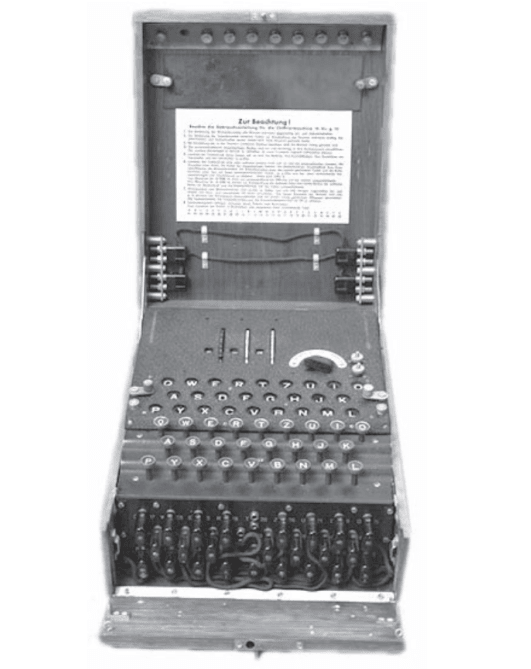
The Germans believed that the Enigma machine was virtually impossible to break. It would have been very difficult to break, if not for the operators’ accounts, which allowed the Allies to read some of the reports. In military affairs, code words were commonly used to designate geographical locations and combat units. The Japanese replaced these names with code words, making it very difficult to understand their messages.
Radiation protection
In addition to hardware systems, complex computers are very difficult to hack. Therefore, there was a constant search for other ways to intercept information transmitted in embedded form.
In 1950, it was found that access to messages is possible by viewing the electronic signals that arise during their transmission over telephone lines.
The operation of any electronic systems is accompanied by radiation, including teletypes and imprint units used to transmit encrypted messages, the encryption unit sends an embedded message over the telephone line, and with it an electrical signal from the source of one message is transmitted. Therefore, if there are three pieces of equipment, the original message can be restored.
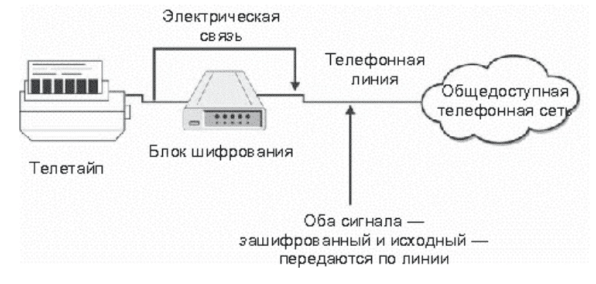
The problem of radiation detection led to the creation of the TEMPEST program in the United States of America. This program developed standards for the electrical radiation of computer systems used in secret organizations. The goal of the program was to reduce the level of radiation that could be used to collect information.
Note
The TEMPEST system plays an important role in some secret government programs. Commercial organizations also have every reason to be dissatisfied, but they are unlikely to be large enough to force them to fork out for the use of computer radiation capture systems in their work.
Starting a computer
When transmitting messages by telegraph, it was enough to provide protection for communication and radiation. Then computers appeared, and information resources of organizations were transferred to them in electronic format. After some time, working on computers became easier, and many users learned to communicate with them in an interactive dialogue mode. Now any user who logged into the system can access information. The need for computers arose.
In the early 1970s, David Bell and Leonard La Padula developed a security model for computer operations. This model was based on the government’s concept of information levels (unclassified, unclassified, secret, top secret) and security clearances. This concept is embodied in the 5200.28 Ti-usted Computing System Evaluation Criteria (TCSEC) standard, developed in 1983 by the U.S. Department of Defense. It was nicknamed the “Orange Book” because of the color of its cover. The “Orange Book” ranked computer systems according to the following pictogram.
D – Minimal Protection (Non-Rated)
C1 – Discretionary Protection
C2 – Controlled Access Protection
B1 – Labeled Protection
B2 – Structured Protection
B3 – Domain Protection
A1 – Testable Development
The Orange Book defined functional and assurance requirements for each section. A system had to meet these requirements to qualify for a certain level of certification.
Most security certifications were time-consuming and expensive to complete. As a result, very few systems were certified above the C2 level (in fact, only one system ever passed the A1 level certification, the Honeywell SCOMP). By the time systems were certified, they had become obsolete.
Other criteria attempted to separate functional requirements from assurance requirements. These developments were incorporated into the German Green Book in 1989, the Canadian Criteria in 1990, the Information Technology Security Evaluation Criteria (ITSEC) in 1991, and the Federal Criteria (known as the Sottop Criteria) in 1992. The ITSEC and Sottop Criteria advanced more than the others, leaving functional requirements largely undefined.
The modern concept of security is embodied in the “Common Criteria”. The main idea is concentrated in the so-called security profiles, which define the different security environments in which a computer system can be placed. Products are evaluated for compliance with these profiles and undergo certification. When purchasing a system, an organization has the opportunity to choose the profile that best meets its needs and select products certified according to this profile. The product certificate includes a level of trust, that is, the level of secrecy established by the assessments that correspond to the functional capabilities profile.
Computer systems technology is developing at a rapid pace compared to the certification program. New versions of operating systems and hardware appear and enter their markets only before older versions and PASS certification of systems.
One of the problems associated with the criteria for assessing the security of systems was a lack of understanding of the mechanisms of operation in the network. When computers are connected, new security problems are added to the old ones. Yes, we have communication facilities, but there are many more local networks than wide area networks. throughout the building. And, finally, there are many users who have access to the systems. The Orange Book did not solve the problems that arise when combining players into a Common Network. The current situation is such that the presence of a network calls into question the legal validity of the Orange Book certificate. In response to this, in 1987, the TNI (Trusted Network Interpretation), or the Red Book, appeared. The Red Book retains all the security requirements from the Orange Book and tries to solve the problem of network space and create a junk of network security. Unfortunately, the Red Book also has security-related functionality.
These days, the problems have become even more serious. Organizations began to use wireless networks, the appearance of the Red Book could not have been predicted. For wireless networks, the Red Book certificate is considered obsolete_mm.
So where has history taken us? It seems that none of the solutions solve the security problem. In real life, a reliable system is a combination of all security methods.
Reliable physical security is necessary to ensure the security of tangible assets, information carriers and systems. Communications security (COMSEC) is responsible for the security of information transmission. Radiation detection (EMSEC) is necessary if the enemy has equipment to read the electronic emissions of computer systems. Computer security (COMPUSEC) is necessary for access control in computer systems, and network security (NETSEC) is necessary for the creation of local networks. Together, all types of entanglement provide information security (INFOSEC).
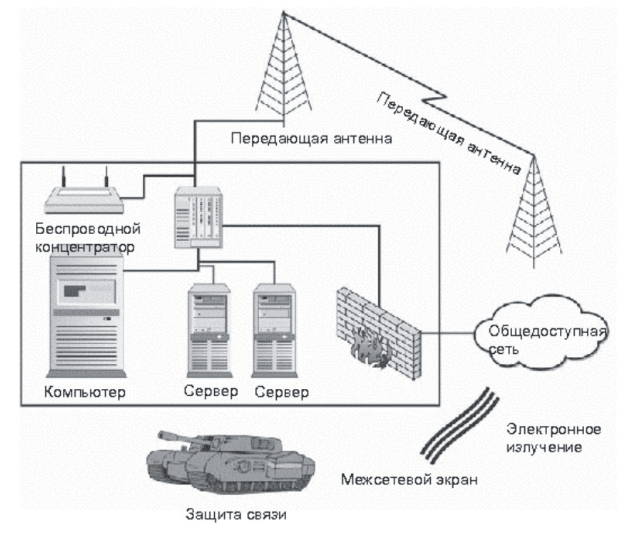
There is still no certification process for computer systems to confirm the security provided. For most of the proposed solutions, agile technologies have moved forward rapidly. The US Security Laboratory (Underwriters Laboratory) has proposed a new security concept, according to which it is possible to create a certification center that certifies the security of various products. If there is a possibility of penetrating a system whose users have worked with an uncertified product, then this should be regarded as a negligent attitude to the security of the administrators of this system.
Unfortunately, this concept creates two problems.
The pace of technological development calls into question the fact that the center will present the best certified products before they become obsolete.
Proving that something works reliably is extremely difficult, almost impossible. In essence, the certification body must disprove the fact that the system can be hacked. What if all existing certificates become obsolete tomorrow?
As WASH continues to seek new solutions, it remains to define safety as the best thing that can be done. Safety is achieved through daily practice and constant vigilance.
It is clear that one cannot rely on a single type of security to ensure information security. Nor does there exist a single product that implements all the indispensable communication methods for computers and networks. Unfortunately, many developers claim that their product is the only one that can handle this task. In fact, this is not so. A comprehensive search for information resources requires many different products. This issue will be discussed in the following sections.
Antivirus software
Antivirus software is an integral part of a reliable security program. If it is properly configured, the risk of infection with malicious software will be significantly reduced and not always – remember the Melissa virus).
But no antivirus program can protect an organization from an attacker using malware to infiltrate the system, or from a legitimate user trying to gain unauthorized access to the Centers
Access Control
Any software system in an organization restricts access to files by identifying the user who is logged in. If the system is configured properly, when the necessary permissions are configured for legitimate users, there are restrictions on using 4 sites that they do not have access to. A single access control system will not provide detection if an attacker gains access to files on behalf of the administrator through vulnerabilities. The attack will be considered a legitimate action of the administrator.
A firewall (freewall) is an access control device that prevents internal networks from external attacks. It is installed at the border between the external and internal networks. A properly configured firewall is the most important firewall device. However, it cannot prevent an attack through an authorized communication channel. For example, if a web server is allowed to be accessed from the outside and has a vulnerability in its software, the firewall will miss this attack because the server requires an open web connection to operate. The firewall will not solicit internal users because they are already inside the system. An attacker can masquerade as an internal user. Consider an organization that has wireless networks. If the internal wireless network is configured incorrectly, an attacker sitting in a parking lot could intercept data from that network, making it appear as if the user is inside the system. In this case, the firewall will not help.
Authentication of an individual can be accomplished using three things: what you know, what you have, or what you are. Historically, computer systems have used passwords (whatever you know) to authenticate an individual. But it turns out that passwords are not particularly reliable. The password can be guessed, or the user writes it down on a piece of paper – and everyone knows the password. Using other authentication methods solves this problem.
Smart cards are used to establish identity (you have them), and thus the risk of password leakage is reduced. However, if the smart card is stolen, and this is the only form of authentication, then the thief can disguise himself as a legitimate user of the computer system. Smart cards will not be able to prevent an attack using vulnerabilities, since they are designed to properly log the user into the system.
Another problem is the cost of smart cards, because each one costs from 80 to 100 dollars. An organization with a large number of employees will require serious expenses for paying for security standards.
Biometric systems are another authentication mechanism (this is what you are) that significantly reduces the likelihood of getting a password. There are many biometric scanners
To make sure of the following:
fingerprints;
retina/iris;
palm prints;
hand configuration;
Each method involves using a device to detect a person’s characteristics. These devices are usually sophisticated enough to prevent fraud. For example, fingerprinting involves multiple checks of temperature and pulse. There are many challenges with using biometrics, including the cost of deploying the readers and the reluctance of employees to use them.
Caution!
Before deploying a biometric system, make sure that your organization’s employees agree to use it. Not everyone wants to point their eye at a laser beam to scan their retina!
Like other strong identification methods, biometrics are only effective if the system is used correctly. If an attacker finds the trajectories of the biometric system’s rim, it will not be able to provide security.
Intrusion Detection
Intrusion Detection Systems (IDS) have repeatedly been seen as a comprehensive solution to the security problem. Better computers no longer need to be sought, now it is pointless to determine that someone is performing illegal actions on the system and stop it! Many IDSs have been sold as systems that can stop attacks before they can be carried out. In addition, new intrusion prevention systems (IPS) have been introduced. It should be noted that no intrusion detection system is intrusion-resistant, nor is it a substitute for a solid security program or security practices. With the negligence of these systems, it is impossible to detect legitimate users who are trying to gain unsanitary access to information.
Additional problems are created by intrusion detection systems with automatic support for detecting individual sites. Imagine that the IDS system is configured to block access from the alleged attack addresses. At this time, your customer was generating traffic that the system identified as a possible attack. Do not be surprised later that this customer does not want to do business with you anymore!
Policy Management
Policies and their management are important components of a solid security program. With their help, the organization receives information about systems that do not comply with established policies. However, this component does not take into account the presence of vulnerabilities in systems or misconfigurations of application software that could lead to successful penetration of the system. Policy management does not guarantee that users will not neglect their passwords and share them with attackers.
Encryption
Encryption is the most important mechanism for securing information in transit. With file fingerprinting, you can ensure the security of information during storage. Only one employee of the organization should have access to these files, and the firewall will not be able to distinguish between legitimate and illegitimate users if they provide the same keys for the algorithm. To ensure security during cleaning, it is necessary to control the imprinting devices and the system as a whole.
Mechanisms of physical Law_CITES
A physical search is the only way to comprehensively detect computer systems and information. It can be performed relatively seriously. To do this, dig a hole 20 meters deep, place important systems in it and fill it with concrete on top. Everything will be completely safe! Unfortunately, there will be problems with employees who need access to laptops for normal work.
Even with physical search mechanisms carefully placed in their places, you will have to give users access to the system – and that will be a young man! A physical firewall will not prevent a legitimate access attack or a network attack.
In this project, we will show that the certification of computer security systems does not meet the needs of the security industry. We will evaluate current operating systems according to the Orange Book criteria
Step by step
Determine which operating systems are used in your office. Choose one of them.
Copy the “Orange Book” (see here: link: http://en.wikipedia.org/wiki/TCSEC).
Start by reviewing the functional requirements in Section C of the Orange Book. They are under the headings “Security Policies” and “Identity.” Ignore the assurance and documentation requirements for now.
Determine whether this system meets the requirements of Section C. If so, proceed to Sections B and A.
After determining the functional level of the system, check the assurance and documentation requirements for that level. Are these requirements met?
Depending on the type, operating systems almost always have functionality at level C1. Level C2 is based on security requirements for object reuse, and most commercial operating systems meet the functionality requirements at this level. These systems do not have functionality levels corresponding to level B.
The lecture discusses different categories of attacks, their definitions and the conditions under which they occur. The mechanism of attack occurrence is briefly discussed.
Various problems often arise during the operation of bumper systems. Some of them occur due to someone’s mistake, and some are the result of malicious actions. In any case, damage is caused. Therefore, we will call such events attacks, regardless of the reasons for their occurrence.
There are four main categories of attacks:
access attacks;
modification attacks;
denial of service attacks;
denial of commitment attacks.
Let’s take a closer look at each category. There are many ways to carry out attacks: using specially designed tools, social engineering methods, and through vulnerabilities in computer systems. Social engineering does not use technical means to gain unauthorized access to a system.
Attacks aimed at capturing information stored electronically have one interesting feature: the information is not stolen, but copied. It remains with one owner, but at the same time it is also received by the attacker. Thus, the owner of the information is responsible, and it is very difficult to identify the moment when this happened.
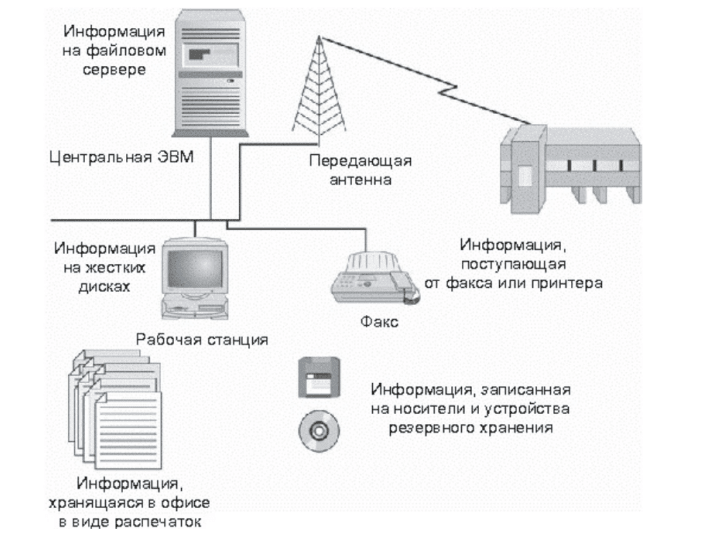
An access attack is an attempt to obtain information to which the attacker does not have access. An access attack is possible wherever there is information and the means to transmit it.
Snooping
Snooping is the act of looking through files or documents in search of information of interest to the attacker. If the documents are stored in the form of printouts, the attacker will open the desk and rummage through them. If the information is stored in a computer system, it will scan file by file until it finds the information it needs.
Eavesdropping
When someone is participating in a conversation that they are not a party to, this is called eavesdropping. In order to gain unsanitary access to the information, the attacker must expose themselves in close proximity to them. Very often, they use electronic devices.
The introduction of wireless networks has increased the likelihood of timely interception. Now the attacker does not need to expose themselves inside the system or physically connect the listening device to the network. Instead, during the communication session, he is in the parking lot or near the building.
Warning!
The advent of wireless networks has created numerous security issues, opening up unsecured access to internal networks for attackers. These issues will be discussed in detail below.
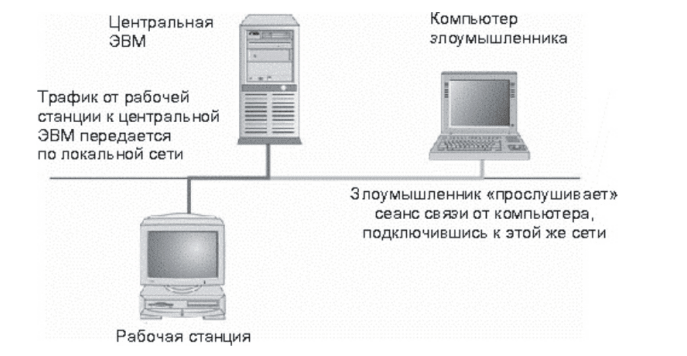
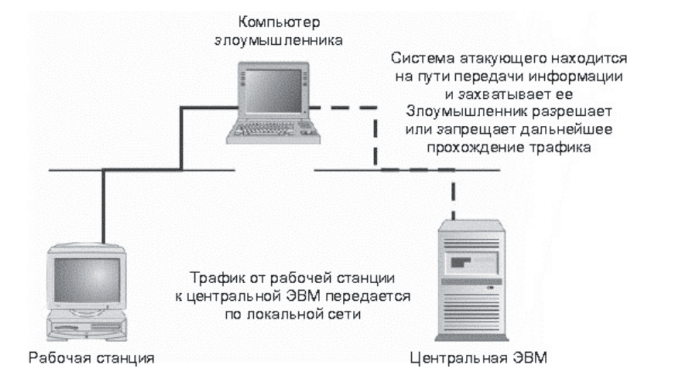
Interception
The attacker captures information as it is being transmitted to its destination. After analyzing the information, he makes a decision to allow or deny its further passage.
Access attacks take different forms depending on how the information is stored: as paper documents or electronically on a computer.
Documents
If the information an attacker needs is stored as paper documents, he will need access to those documents. They could be found in the following places:
in filing cabinets;
in tables or on desks;
In a file or printer;
So, the attacker needs to get into all these places. If he is an employee of the organization, he will be able to get into the manor along with the filing cabinet. He will find desks in unlocked offices. Fax machines and printers are usually located in public places, and people have a habit of leaving printed documents there. Even if all the offices are closed, you can rummage through the garbage bins. But archives will be a problem for hacking, especially if they belong to developers and are in a protected place.
Locks on doors can stop someone, but there will always be rooms left open until lunch. Locks on filing cabinets and desks are relatively simple, they can be easily opened with a master key, especially if you know how to do it.
Physical access is the key to obtaining data. It is worth noting that reliable security of the premises will protect data from unauthorized persons, but not from employees of the organization or internal users.
Electronic Information
Electronic information is stored:
on workstations;
on servers;
on laptops;
on floppy disks;
on CDs;
on backup tapes.
A crook can simply steal a storage medium (floppy disk, CD, backup tape, or laptop). Sometimes this is easier than accessing the files stored on the computers.
If the attacker has legal access to the system, he will analyze the files by simply opening them one by one. With the appropriate level of resolution control, access to the illegal user will be denied, and access attempts will be recorded in the logs.
Properly configured permissions will prevent accidental information leakage. However, a serious hack will try to bypass the Management system and gain access to the necessary information. There are many vulnerabilities that will help him in this.
The hacker does this by installing a network packet analyzer on the computer system. Typically, this is a computer that is configured to capture all network traffic (not just traffic addressed to the computer). To do this, the hacker must increase his authority in the system or connect to the network. The analyzer is set up to capture any information passing through the network, but especially user IDs and passwords.
As mentioned above, the advent of wireless technology allows hackers to intercept traffic without centralized access to the system. Wireless signals are read at a fairly large distance from their source:
on other floors of the building;
in the parking lot;
on the street next to the building.
Wiretapping is also carried out on global computer networks, such as leased lines and telephone connections. However, this type of interception requires appropriate equipment and specialized knowledge. The most suitable place to place a listening device is an Internet cafe with access to electrical wiring.
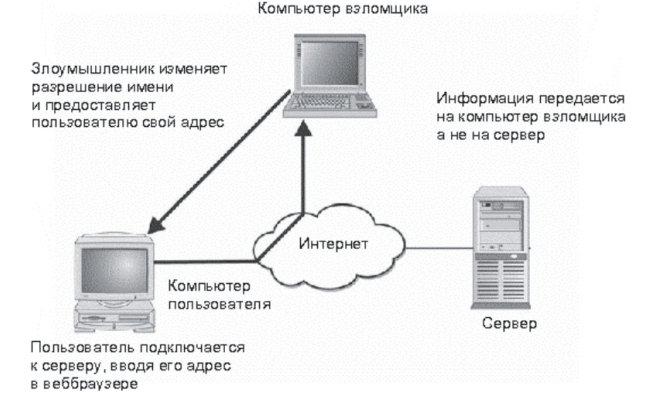
Note. Interception is more dangerous than interception, it means a targeted attack on a person or organization.
A modification attack is an attempt to change information without permission. This attack is possible wherever information is present or transmitted. It is aimed at violating the integrity of the information.
Substitution
One type of modification attack is to replace existing information, such as changing an employee’s salary. A substitution attack targets both confidential and public information.
Addition
Another type of attack is to add new data, such as historical information. A hacker performs an operation in the banking system that transfers funds from an investor’s account to his own account.
Deletion
Deletion refers to the movement of existing data, such as canceling a transaction record from a bank’s balance sheet, so that funds withdrawn from the account remain in the account.
Like access attacks, modification attacks are performed against information stored in paper documents or electronically on a computer.
Documents
It is difficult to change documents without anyone noticing: if there is a signature (for example, in a contract), you need to take care of its forgery, the stapled document must be carefully reassembled.
It is much easier to modify information stored electronically. Given that the hacker has access to the system, such an operation leaves behind minimal evidence. In the absence of sanitized access to the Central, the attacker must first gain access to the system or remove the Central’s permissions. Attacks of this kind exploit vulnerabilities in systems, such as “shaving” the server’s security, which ALLOWS the replacement of the home and the bare pages.
Modification of the database or transaction list must be done very carefully. Transactions are numbered sequentially, and the removal or addition of incorrect transaction numbers will be noticed. In these cases, it is necessary to work carefully throughout the system to prevent exposure.
It is more difficult to successfully carry out a modification attack when information is being transmitted. The best way is to first intercept the traffic of interest, and then modify the information before sending it to its destination.
Self-check questions:
Is it true that it is easier to intercept than to listen?
An attempt to insert an entry into a ledger is called atayu
Definition of Denial of Service (DoS) Attacks
Denial of Service (DoS) attacks are attacks against a legitimate user who is using a system, information, or computer capabilities. As a result, the attacker usually does not gain access to the computer system and cannot operate on the information. Such an attack cannot be called anything other than vandalism.
Denial of Access to Information
As a result of the information directed against it, the latter becomes unusable. The information is destroyed, distorted, or moved to an inaccessible location.
Denial of Access to Applications
Another type of DoS attack is directed at applications that process or display information, or at the computer system on which these programs run. If such an attack is successful, it becomes impossible to reconstruct the tasks performed by such an application.
Denial of Service
A common type of DoS attack is one that attempts to disable a computer system, rendering the system, its applications, and all stored information inaccessible.
Denial of Service
Denial of Service attacks have been around for many years. Examples include cutting a network cable, jamming radio transmissions, or flooding the network with messages that create excessive traffic. The target of the attack is the communications medium. The integrity of the computer system and information will not be compromised, but the lack of communication will affect access to these resources.
How Denial of Service Attacks Are Performed
They are typically directed against computer systems and networks, but sometimes paper documents are targeted.
Documents
Paper-based information is the target of digital DoS attacks. Documents must be stolen or destroyed to render them unusable. Physical DoS attacks are either intentional or accidental. An attacker can simply destroy documents, and if their credentials are not preserved, then consider the information lost. For the same purpose, he can organize arson of a building. Accidents also lead to the same results: after all, a fire can occur due to damaged wiring, and a document can be destroyed by deception.
Electronically Stored Information
There are many ways to carry out DoS attacks that can damage information stored electronically. It can be deleted, and to secure success, the attacker will delete all backup copies of the use of this information. He can make the file unusable by adding new capabilities to it, and then destroy the key. Access to the information will be lost if there is no backup use of the file.
A physical DoS attack is also the physical destruction of a computer (or its theft). An example of a short-term DoS attack is that it shuts down the computer, as a result of which users gain access to their programs.
There are DoS attacks that directly target the computer system. They are implemented using exploits that exploit vulnerabilities in operating systems or firewall protocols.
Hackers are also aware of ‘Shaved’ in applications. With their help, the attacker sends a certain set of commands to the application, which it is unable to process correctly, as a result of which the application crashes. Rebooting restores its functionality, but it becomes impossible to work with the application during the reboot.
The easiest way to disable a communication tool is to cut the network cable. A thin attack requires access to the wiring, but, as we will see, an excavator is 4 tools for DoS attacks aimed at communication facilities, directing excessive traffic to the site. This traffic literally overwhelms the communication infrastructure, depriving legitimate users of access to the network.
But not all of them are intentional, sometimes chance plays a greater role in the occurrence of such incidents. The excavator, which I mentioned above, can cut off the optics
The breakdown has already caused many phone and Internet users. Developers, while testing a new software device, sometimes completely involuntarily turned off the pain of the system.No matter how much he resists the temptation to press a beautiful button and stop or reboot the entire system.
This attack is aimed at the possibility of identifying information, in other words, it is an attempt to provide false information about a real event or transaction.
Masquerade
Masquerade is the act of performing actions under the guise of another user or system. This attack is carried out when communicating through personal devices, when conducting financial transactions, or when transferring information from one system to another.
DoS attacks usually target a single computer system or communication line, but sometimes they are directed against the entire Internet! In 2002, there was an attack on the Internet’s legal name servers. They were literally “avalanches” of requests for name resolution. There were so many requests that some computers crashed. But the attack was not completely successful, as many servers did not lose their functionality, and the Internet continued to function. If all the servers could be turned off, the Internet would become inaccessible for most rare names.
An event denial is a denial of the fact that a transaction took place. For example, a person makes a purchase at a store using a credit card. When he receives the bill, he tells the company that issued his credit card that he never made the purchase.
How disclaimer attacks work
Attacks are carried out on information stored in paper documents or in electronic form. The complexity of implementing the attack depends on the precautions in place in the organization.
Documents
The fraudster impersonates another person using someone else’s documents. This is easier to do if the document is typed rather than handwritten.
He denies the fact of reconciling the transaction. If there is a signature on the contract or receipt for receiving a credit card, he will claim that it is not his signature. Naturally, when planning such an attack, he will try to make the signature look implausible.
Disclaimer attacks are much more successful when information is submitted electronically. After all, an electronic document can be created and sent by anyone. In the “from” field of an email address, the name of the sender can be changed, the authenticity of which is not confirmed by an email invoice.
This is also true for information transmitted by computer systems. A system can assign itself any system and disguise itself as another system
Note
We have given a simplified example. A system can assign a GR address to another system if it is not located on the same network segment. On the Internet, such a replacement is very difficult to make, since it will not allow you to establish a connection.
In the electronic environment, it is much easier to deny the fact of any event, because digital documents and credit card receipts do not have a handwritten signature.
If a document does not have an electronic digital signature, it is impossible to prove its belonging to a specific person. But even if there is a signature, you can always say that it was stolen or that the password was revealed.
In the electronic environment, it is easier to refuse to execute a transaction with a credit card because there is no signature on it that matches the signature of its owner. Some evidence can be sought if the goods are delivered to the address of the credit card owner. And what if they were sent to the wrong place? How to prove that the owner of the credit card is the person who bought the goods?
This project will allow you to identify possible ways of attacking your information or computer system. Such an attack could use something you know: your home or your business.
Step by step:
Analyze the information that is relevant to your business and home. Determine the most important of them.
Determine where this information is stored
Identify the types of attacks that are most damaging to you. Consider the likelihood of access attacks, modification attacks, denial of service attacks, and fraud.
Think about how to detect such attacks.
Choose the type of attack that you consider to be the most damaging and develop a strategy to attack it.
For many businesses, the most sensitive information is personal files and earnings. Don’t forget about customers—their credit card numbers and social security numbers. Financial and medical organizations have sensitive information that is regulated in some way. When reviewing information and thinking about the possibility of an attack, make it your goal to ensure that it is not disclosed. It is quite possible that it is important for your business to consider the possibility of modification, denial of service attacks, and denial of service attacks.
Detecting attacks is a pointless thing. You can use electronic means to do this, but you should not neglect the security and personnel issues of your organization. Did an employee of the company notice that a stranger appeared in the OKMS? Did an employee notice a change in a file?
When developing a strategy, don’t limit yourself to goodies and networks. Think about how an attacker could use CSIC tools to obtain information or destroy it.
The topic is devoted to hacker attacks. The motivation of hackers, the history of hacking methods, various methods of carrying out attacks are considered. Types of malicious software are considered, as well as ways to detect different types of hacker attacks.
The story about security would be incomplete without a bit about hackers and how they work. The term hacker is used here in its modern meaning – a person who breaks into computers. It should be noted that being a hacker was not considered something anti-patent, rather, it was a characteristic of a person who knew how to professionally handle bumpers. Nowadays, hackers are those who break into or disable a computer system. Studies have shown that hackers most often become:
Male;
aged 16 to 35;
single;
educated;
technically literate.
Hackers have a clear understanding of how computers and networks work, and how protocols are used to perform system operations.
This lecture will introduce you to the motivations and methods of hackers. It should not be considered a guide for novice hackers, but rather how you can hack and make your systems work for you.
Motivation provides the key to understanding hackers’ actions, revealing the intentions behind a failed intrusion. Motivation explains why computers are so attractive to them.
Answering these questions will allow security professionals to better assess the potential threats to their systems.
Attention-seeking
The original motivation for hacking computer systems was to “do it.”
Once a system is hacked, hackers brag about their victories on Internet Relay Chat, a program for real-time communication over the Internet, which they have created specifically for such discussions. Hackers make a name for themselves by taking down a complex system or multiple systems at once, placing their signature on the web pages they break.
Hackers are attracted not just by hacking a specific system, but by the desire to be the first to do it or to hack many systems at once. In some cases, hackers will intentionally remove a vulnerability, using a junior hacker to disable the computer so that no one else can repeat the attack.
The desire to attract attention gives rise to untargeted attacks, that is, hacking is done for fun and is not related to a specific system. Targeted attacks, the purpose of which is to obtain specific information or access to a specific system, have different motivations. From a security perspective, this means that any computer connected to the Internet is a potential forum for attacks.
Note
A growing form of motivation is hacktivism, or hacking for the public good. Hacktivism is associated with political action and is often used as a pretext to justify crime. It is more dangerous because it appeals to honest and naive people.
Greed
Greed is one of the oldest motives for criminal activity. For a hacker, it is associated with the desire for any kind of profit – money, goods, services, information. Is such a motivation acceptable for HACKING? To answer this question, it is difficult to identify the robber, detain him and bring charges.
When a system intrusion is detected, most organizations will eliminate the vulnerability that was used in the attack, restore the system and continue working. Some will seek help from law enforcement if they can’t trace the hack due to lack of evidence or if the hacker is in a country with no computer security laws. Let’s say the hacker left evidence and was arrested. The case will then go to a jury, and the district attorney (or federal prosecutor) will have to prove that the person on the stand actually hacked the victim’s system and verified the theft. This is very difficult to do!
Even if he is found guilty, the punishment for the hacker can be very light. Consider the case of a hacker named Datastream Cowboy. Together with the hacker Kuji, he hacked into the Griffs Air Force Base’s Aeronautical Development Center in Rome and New York and stole over two hundred thousand dollars worth of software. The Datastream Cowboy hacker turned out to be a 16-year-old teenager from the UK – he was arrested and convicted in 1997 and sentenced to pay $1,915.
The important thing to understand from this example is that there must be a way to deal with criminals who are driven by the desire for profit. If the system is hacked, the risk of being caught and convicted is very low, and the profit from stealing credit card numbers, goods and information is very high. The hacker will look for valuable information that can be sold or used for his own benefit.
A hacker whose main motive is greed sets himself special tasks – his main target is sites with valuable content (software, money, information).
Note
The FBI has started work on the Infragard program. The goal of the program is to improve reporting on criminal activity and further develop REL between business and law enforcement. The program provides its participants with information for exchange and analysis, as well as a means to interact with law enforcement and work with incoming information.
Malicious intent
And the last motivation of a hacker can be malicious intent, vandalism. In this case, the hacker is not concerned with taking control of the system (unless it helps him achieve his goals). Instead, he tries to harm legitimate users by preventing them from working on the system, or legitimate site owners by modifying its web pages. Malicious attacks are usually targeted. The hacker actively seeks to threaten a specific site or organization. The main reason for such attacks is revenge for unfair treatment or a political statement, and the result is to cause damage to the system without gaining access to it.
In this section, we will not just talk about the history of hacking, but consider it from different perspectives. Past events and facts have been made public; There are many resources that describe these events and their participants. Therefore, we will not repeat ourselves, but learn about the evolution of hacking methods. You will see that many cases of successful hacking could have been avoided with the correct system configuration and the use of software methods.
Sharing
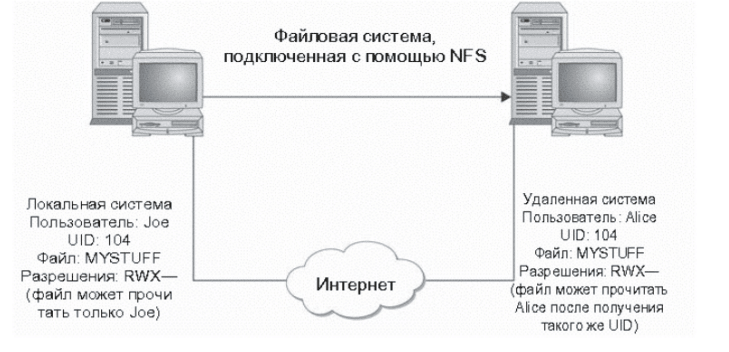
The original purpose of the Internet was to provide easy access to data and for academic institutions to work together. Thus, most systems were designed to use information. The Unix operating system used the 4-year-old Network File System (NFS), which allowed one computer to mount a drive on another computer over a local area network (LAN) or the Internet.
This mechanism was used by early hackers to gain access to information – they would mount a remote drive and read it. NFS used user identifiers (UIDs) as a proxy to access the data on the drive. If a user with ID 104 had permission to access a file on their home computer, another ALICE user with ID 104 on a remote computer could read the file. The danger increased when illegal systems allowed access to the root file system, including configuration and password files. In this case, the hacker could gain administrative privileges and connect to the root central system, which would allow him to change the configuration of the remote system.
The most interesting thing is that many operating systems (including Sun OS) ship with the root file system exported for read/write. So, any user on any computer can connect to the root system and make arbitrary changes to it. Then anyone who can do it can do it.
In most cases, public access to the centers is controlled by configuring rules on the organization’s external firewall. In those systems where this is not done, it is not too late to impose restrictions on public access using the firewall.
The vulnerability in file sharing is not only in the Unix operating system, but also in Windows NT, 95, 98. Some of these systems can be configured in such a way that they allow remote access to their file systems. If a user re-shares files, he can easily open his file system for public use.
Warning!
New file sharing systems, such as Gnutella, allow computers on an internal network to share files with other systems on the Internet. These systems have configurable throttling and can open ports that would normally be protected by a firewall (such as port 80). Such systems pose a more serious threat than NFS and Windows file sharing.
Note
Firewalls can control not only file usage, but also remote trusted access from outside the network. A firewall on the internal network alone, outside the firewall, cannot perform this switching. And this is a serious security concern.
Perhaps the most common way hackers break into a system is through weak passwords. Passwords are still used to authenticate users. Since they are the standard method of identification for most systems, there is no additional cost. In addition, users understand how to work with passwords. Unfortunately, many people do not know how to choose a strong password. Very often, passwords are either (four-character exchange) or stupid. A short password allows for a “face-to-face” attack, so a hacker will try suspicious passwords until he finds the right one. If the password consists of two characters (which is a bui), then there will be only 676 possible combinations. With an eight-character password (which includes only a few letters), the number of combinations increases to 208 million. Naturally, guessing a two-character password is much easier than guessing an eight-character password!
An easy-to-understand password is a tayuke – a weak password. For example, the password for the directory ‘toor’ (‘root’ spelled backwards) would allow a hacker to gain access to the system very quickly. Some password problems fall into the category of system misconfiguration. For example, at Digital Equipment Corporation’s VAX systems, the VMS account was named ‘Teld’ and had a default password. If the system administrator was unaware of this and did not change the password, anyone could gain access to the system using this account. Some weak passwords include wizard, NCC1701, gandalf, and Drwho.
A good example of how weak passwords can help break into systems is the Morris worm. In 1988, a Cornell University student named Robert Morris developed a program that spread across the Internet. This program exploited several vulnerabilities to gain access to computer systems and replicate itself. One of the vulnerabilities was weak passwords. In addition to the list of most common passwords, the program used the following passwords: blank password, self-added account name, username, username, and reserved account name. This worm caused a fairly large number of systems to be infected and was very effective in bringing down the Internet.
Question: Is there a secure alternative to passwords?
Answer: Smart cards (authentication tokens) and biometrics are alternatives to passwords. However, there are additional costs associated with deploying such systems. In addition, they may not always be usable. For example, an online retailer is unlikely to use them to authenticate its customers. So, passwords are likely to be with us for the foreseeable future.
Tip
There is no universal solution to the password problem. In most operating systems, the system administrator has the ability to configure password requirements, and this is very important. One of the best ways to get rid of weak passwords is to teach them a proper understanding of security issues.
Programming defects
Hackers have exploited programming flaws many times. One such flaw is a door-step left in a program that allows for later integration into the system. Early versions of Sendmail had such “measured moves.” The most common was the WIZ command, available in early versions of Sendmail, which ran on Unix. When you connected to Sendmail (via network access to port 25) and typed the WIZ command, you could start a root shell interpreter. This functionality was first included in Sendmail as a tool for debugging the program. Such capabilities, left in general-purpose programs, allow hackers to instantly penetrate systems using these programs. Hackers have discovered many such loopholes, most of which have been eliminated by programmers. Unfortunately, some “Dimensioned Systems” still exist because not all systems have been updated with software.
Not so long ago, the boom in website programming led to the creation of a new category of “careful” programming. This is related to online shopping. Some websites store purchase information, such as the item number, quantity, and even price, directly in the URL bar. This information is used by the website when you calculate the cost of your purchases and determine whether your credit card has been charged. Many sites do not validate the information when you order a list, but simply take it from the URL. If a hacker changes the URL before confirming, they can get a blank number in the list. There have been cases where a hacker has set a negative price and instead of spending money on a purchase, they have received credit from the site. It is not entirely wise to leave such information in the address bar, which can be changed by the user, and not validate the information entered on the server. Although this vulnerability prevents a hacker from logging in, both the website and the organization are at great risk.
Social engineering is the acquisition of uninterrupted access to information or a system without the use of technical means. Instead of using vulnerabilities or exploits, the hacker plays on human weaknesses. The hacker’s most powerful weapon in this case is a pleasant voice and acting skills. The hacker can call a company employee under the guise of technical support and find out his password “to solve a small problem in the employee’s computer system.” In most cases, this number goes through.
Sometimes a hacker, posing as a company employee, calls the technical support service. If he knows the name of the locksmith, he says that he forgot his password, and as a result either finds out the password or changes it to the desired one. Given that the technical support service is focused on providing immediate assistance, the likelihood that the hacker will get one account is very high.
The hacker will not be too lazy to make many calls to properly study his target. He will start by finding out the names of the managers on the company website. Using this information, he will try to get the names of other employees. These new names will be useful when talking to technical support for information about accounts and how to grant access. Another phone call will help find out what system is being used and how to remotely access the system. Using the names of real employees and managers, the hacker will come up with a whole story about an important meeting at the client’s website that he cannot access with his remote access account. The technical support employee will compare the facts: the person knows what is happening, knows the name of the manager and the company – and, without thinking, will grant him access.
Other forms of social engineering include studying junk organizations, virtual junkyards, using open sources of information (websites, reports filed with the US Securities and Exchange Commission, advertisements), outright robbery, and impersonation. Stealing a laptop or a toolkit will do a triple service to a hacker who wants to learn more about a company. The tools will help him play the role of a management team or an employee of the company.
Social engineering allows you to solve the most ingenious infiltrations, but it takes time and talent. It is usually used by hackers who have targeted a specific organization as their victim.
Tip
The best defense against social engineering attacks is to educate your employees. Explain to them how technical support can contact them and what questions to ask. Explain to the employees of this service how to identify the employee before giving them the password. Educate the employees of the organization about identifying people who should not be in the office and what to do in this situation.
Buffer overflow
Buffer overflow is one of the programming techniques used by hackers (see the next section). Buffer overflow is harder to detect than weak passwords or configuration choices. It requires very little experience to work with it. Unfortunately, hackers, looking for an opportunity to overflow the buffer, publish their results, including an exploit script or program that can be run by anyone with a computer.
Buffer overflow is especially dangerous because it allows hackers to execute almost any command on the target system. The large number of buffer overflow scenarios allows hackers to create new ways to penetrate an attacked system. Most recently, a buffer overflow exploit has been to add a line to the inetd.conf file (on an I_JIix system, this file manages the telnet and FTP services):
Creates a new service for port 1524 (the login block). This service allows an attacker to run a root shell shell.
It should be noted that a buffer overflow does not restrict access to a remote system. There are several types of buffer overflows that can be used to advance a user through a system. Local vulnerabilities are just as dangerous (if not more painful) as remote ones.
A buffer overflow is an attempt to fit too much data into a computer’s memory area. For example, if we create an eight-byte variable and put nine bytes into it, the ninth byte will be placed in memory immediately after the eighth. If we try to put even more data into that variable, the young end will fill all the memory used by the operating system. In the case of a buffer overflow, the part of memory we are interested in is called the stack and is the return address of the function that is executed in the next step.
The stack controls the switching between programs and the operating system that occurs when one part of the program (or function) checks its task. In a buffer overflow attack, the hacker places instructions into a local variable that is stored on the stack. This data takes up more space in the local variable than the space allocated for it, and overwrites the return address to the point of this new instruction. This new instruction loads a shell or other program to execute, changes the configuration key (inetd.conf), and resolves the hacker’s access issue by creating a new configuration.
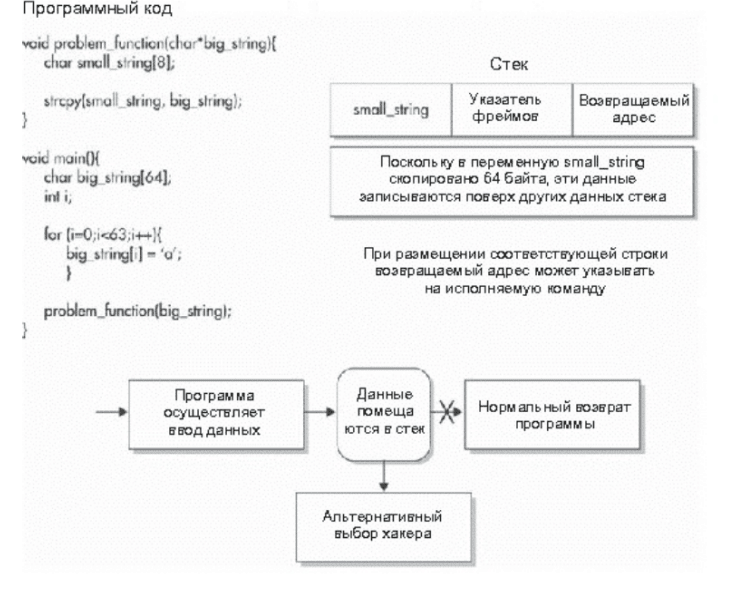
Buffer overflows are very common due to a program error where user data is aligned into the same variable without checking the amount of data before performing the operation. Many programs suffer from this. However, this problem is solved quite quickly once it is discovered and brought to the developer’s attention. But if it is so pointless to do so, then why do buffer overflows still exist? If the programmer checks the size of the user data before placing it in a pre-declared variable, buffer overflows can be avoided.
DoS attacks are malicious actions that are performed to prevent a legitimate user from accessing a system, network, program, or information. DoS attacks come in many forms, and they can be centralized (launched from a single system) or distributed (launched from multiple systems).
DoS attacks cannot be completely prevented, and they cannot be stopped unless the source of the attack can be identified. DoS attacks will not only occur in MberSpace. A pair of wire cutters is a simple tool for taking them and cutting the LAN cable. In this story, we will not dwell on Cosmic DoS attacks, but will pay special attention to attacks directed against computer systems or networks. that physical attacks are quite destructive and sometimes even more destructive than attacks in cyberspace.
There is another important point in the preparation of most attacks. Until hackers manage to penetrate the target system, DoS attacks are launched from fake addresses. GR-protoul has a problem in the addressing scheme: it does not check the sender address when creating a packet. Thus, the hacker gets the opportunity to change the sender address of the packet to hide its location. Most DoS attacks do not need to return traffic to the hacker’s home system to achieve the desired result
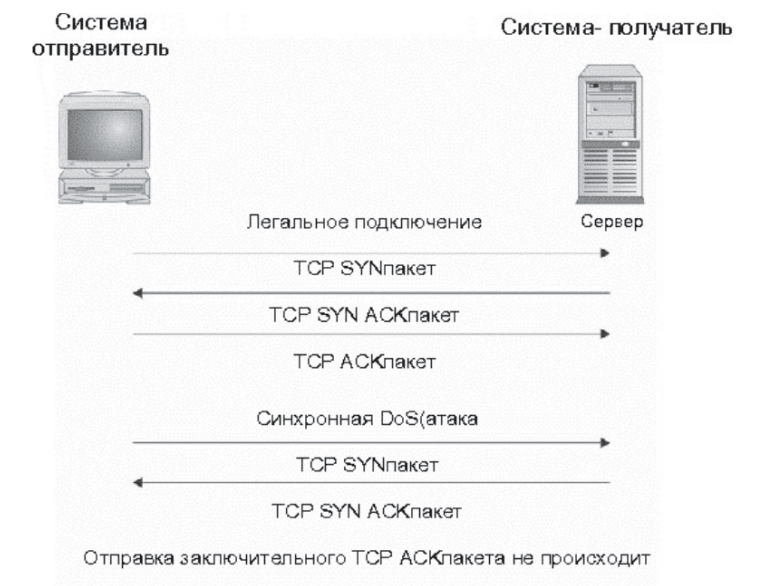
The first types of DoS attacks were centralized attacks (singlesource). A single system was used to carry out the attack. The most famous is the so-called SYN Hood attack. When receiving a SYN packet, the receiving system responds with an ASC packet, notifying it that the data has been received, and sends data to establish a connection with the sender. continues to send As a result, the connection queue buffer on the secondary system is full and the system stops responding to new connection requests.
Obviously, if the source of the synchronous attack has a legitimate GR address, then it can be relatively reliably identified and the attack stopped.
Several measures have been proposed to protect systems from synchronous attacks. The simplest way is to place a timer in all connections waiting in the queue. After some time, the connections should close. On the other hand, to prevent a well-prepared attack, the timer will have to be set to such a small value that it will make it almost impossible to work with the system. Some network devices can detect and block synchronous attacks, but these systems tend to perform poorly because there is a certain amount of latency between connections over a period of time. If an attack has multiple sources at once, it is very difficult to identify.
After the synchronous attack, other attacks were discovered, more serious but less sophisticated in the ‘Ping of Death’ attack, a ping packet (ICMP emi request) was sent to the target system. In the usual version, a ping packet contains no data. The ‘Ring of Death’ packet contained a large amount of data. When the consumer system reads this data, the protocol stack buffer overflows, causing a complete system crash. The developers of the stack did not foresee that the ping packet would be used in this way, and therefore no verification of the data placed in the small buffer was performed. The problem was quickly resolved after its discovery, and few systems are currently vulnerable to this attack.
The ‘ping of death’ is one of the types of , which targets vulnerabilities in systems or applications and causes them to stop. are destructive at the initial stage and quickly lose their power after the correction of system problems.
Unfortunately, new DoS attacks targeting applications and operating systems are discovered regularly. You can take a break from new attacks while hackers patch OIMbCI in the attack scenarios that have occurred.
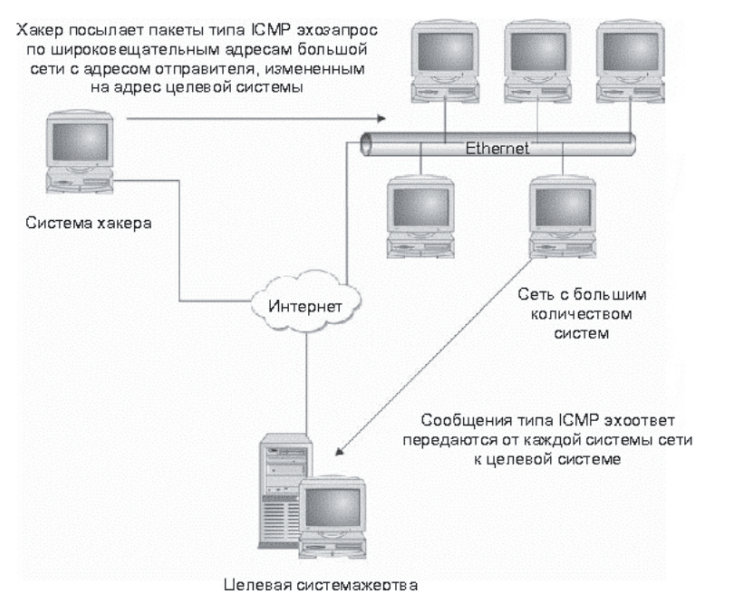
Distributed DoS attacks (DDoS) are DoS attacks that involve a large number of systems. Typically, one master system and one hacker are in control. These attacks do not have to be complex. For example, a hacker sends ping packets to the migration addresses of the largest network, while in a spong-spong address all responses are addressed to the victim system. This attack is called a smurf attack. If the intermediate network contains many computers, the number of response packets sent to the target system will be so large that it will cause the connection to fail due to the huge amount of data being transferred.
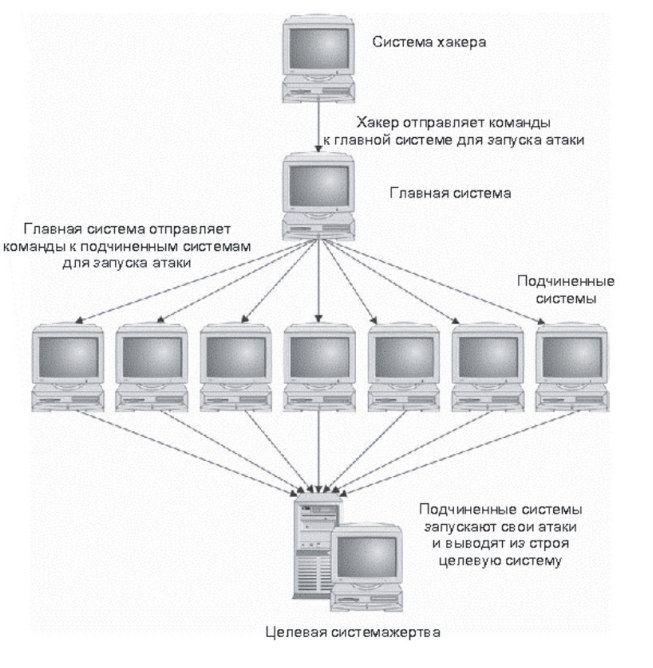
New attack tools such as Trinoo, Tribal Flood Network, Mstream, and Stacheldraht allow a hacker to coordinate the efforts of many systems in DDoS attacks directed against a single target. These tools have a three-tier structure. The hacker interacts with the host system or server process located on the victim system. The host system interacts with slave systems or client processes installed on other compromised systems.
Commands sent to the host system and from the host system to the slave devices can be printed or transmitted using UDP (User Data Protocol) or ICMP (Control Message Protocol), depending on the tool used. TCP, SYN, or ICMP traffic packets. Some tools randomly change the sender addresses of the attacked packets, making them difficult to detect.
The main result of DDoS attacks carried out using special tools is the coordination of a large number of systems in an attack directed against a single system. Regardless of how many systems are connected to the Internet and how many systems are used to throttle traffic, such attacks can cripple an organization if a sufficient number of subordinate systems are involved.
Many modern attacks are carried out by so-called “script kids.” These are users who search the Internet for exploit scripts and run them against any systems they can find. These simple attack methods require no special knowledge or instructions.
There are other methods that rely on a better understanding of computers, networks, and the systems being attacked. In this section, we will learn about methods such as sniffing switched networks and IP spoofing.
To do this, the sniffer puts the network interface card into promiscuous mode, i.e. the network adapter will intercept all packets traveling over the network, not just packets addressed to the adapter or system. network hubs .
In a switched environment, there is no broadcast mode; instead, packets are sent directly to the receiving system of the youth. Therefore, it is quite possible that a sniffer can work in a switched environment. And it has already HAPPENED. A sniffer specifically designed for a switched environment can be found at: http/ettercap.sourceforge.net/.
To listen to traffic in a switched environment, a hacker must fulfill one of the following conditions:
To “convince” the switch that the traffic you are interested in should be directed to the sniffer, make the switch send all traffic to all ports.
If one of the conditions is met, the sniffer will be able to read the traffic of interest and, thus, provide the hacker with the information he is looking for.
The switch routes traffic to ports based on the Media Access Control (MAC) address of the frame being transmitted over the Ethernet network. Each network interface card has a unique MAC address, and the switch “knows” which addresses are assigned to which port.
The following are methods that can be used to force a switch to route network traffic to a sniffer:
MAC address duplication;
Domain name spoofing.
(ARP spoofing). ARP is an address resolution protocol used to obtain the MAC address associated with a specific GR address. When transmitting traffic, the sending system sends to the receiver. The receiving system responds to this request by sending its MAC address, which the system will use.
If the sniffer captures traffic of interest to it, it will respond instead of the real receiving system and provide its own MAC address. As a result, the sending system will send the traffic to the sniffer.
To ensure the effectiveness of this process, it is necessary to redirect all traffic to the sniffer instead of the actual destination. If this is not done, there is a possibility that access to the network will be denied.
Note
It is believed that it is impossible to change MAC addresses. This is not at all the case. This can be done on a Unix system using the ifconfg command.
In order to perform AI spoofing, the sniffer must be on the same local subnet as both systems (sender and recipient) to be able to duplicate MAC addresses.
Domain name spoofing. There is a third way to force the Switch to send all traffic to the sniffer: you need to “trick” the sending system into using the real MAC address of the sniffer for data transmission. In this case, there is no.
In this attack, the sniffer intercepts them from the sending system and responds to them. Instead of sending a request, the sending system receives the sniffer’s GR address and sends all traffic to it. We see that in this case, the domain name impersonation attack turns into a hijacking attack.
To ensure the success of this attack, the sniffer must scan and respond to everything before the actual recipient does. Therefore, the sniffer must be on the traffic route from the sending system to the DNS server, and preferably on the same local subnet as the sender.
Instead of performing one of the methods listed above, the hacker can force the switch to act as a hub. Each switch uses a certain amount of memory to store a mapping table between the MAC address and the physical port of the switch. This memory has a limited capacity. If it is full, some switches may display an open state. This means that the switch will stop sending traffic to certain MAC addresses and will start forwarding all traffic to all ports. As a result, the switch will act as a network access device (hub), which will allow the sniffer to perform its functions. To initiate this attack method, the hacker must connect directly to the desired switch.
Let’s think about what is needed to perform the attacks listed above. In the case of AI spoofing, MAC address duplication, or MAC flooding, the attacker must connect directly to the attacked switch. Such a connection is also required to simulate the domain name.
Conclusion: The hacker must install the system on a local switch. He can first log in to the system through a known vulnerability and then install the software required for sniffing. Otherwise, the hacker is already inside the organization (he is its employee or contractor). In this case, it uses its legitimate access to the local network, which allows it to exchange data with the switch.
As mentioned above, packets sent over the network are not inspected. Therefore, an attacker can change the sending address so that it appears that the packet came from any address. The difficulty is that the returned packets (SYN ASC packets on a TCP connection) will not be able to return to the sending system. (GR spoofing) to establish a TCP connection is associated with serious difficulties. In addition, the TCP header contains a sequence number that is used to confirm the receipt of the packet. The initial sequence number (ISN) for each new connection is chosen pseudo-randomly.
In 1989, Steve Bellovin of AT&T Bell Labs published an article in the journal Computer and Communications Review entitled “Security Issues in the TSRLR Protocol Family”. This article indicates that in many implementations of the TSRLR protocols, the final sequence number is not chosen randomly, but instead simply increments. Therefore, if the last known ISN is known, the next number can be calculated in advance. This is what makes it possible to perform a GR spoofing attack.
The following figure shows how a spoofing attack is performed:
First, the hacker identifies his target. He must determine the increment value of the outgoing sequence number (ISN). This can be done by making a series of legitimate connections to the target system and noting the ISNs that are returned (in this case, the hacker risks “exposing” his real.
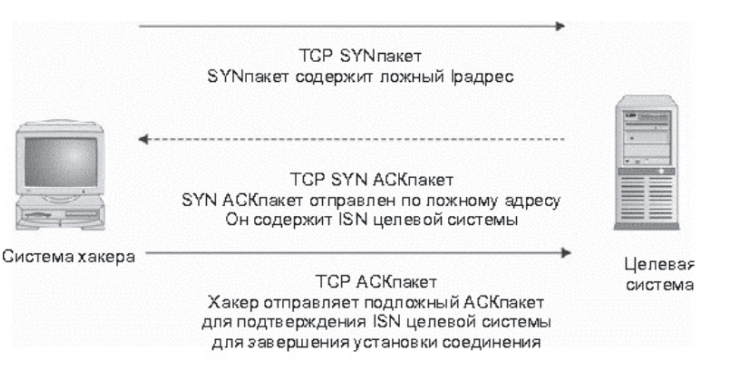
After determining the ISN increment value, the hacker sends a TCP with the modified GR sender address to the target system. The system will respond with a SYN AS packet, which will be sent to this fake address and therefore will not reach the hacker. The SYN ASC packet contains the initial sequence number of the target system. To complete the connection establishment process, this ISN must be confirmed by sending a final TCP ASC packet. The hacker calculates an approximate ISN (based on a predetermined increment) and sends an ASC packet containing the fake sender and the confirmation ISN.
If all this is done correctly, the hacker will have broken the legitimate connection with the target system. He will be able to send commands and information to the system, but will not receive any responses.
Malware continues to be a serious security problem for most organizations, as well as for homes.
Computer viruses are parasites on other computer programs. They are designed so that they cannot live on their own. When a program is executed, the virus is executed to perform its functions. These functions usually involve infecting other programs and spreading to other disks. Non-destructive viruses are malicious – they delete files or crash the system. Other viruses do not cause any harm, except to spread through computer systems.
Viruses began to appear at a time when computers used a disk-based operating system – DOS. (Not to be confused with a DoS attack!) These viruses spread through files available on bulletin boards or floppy disks. Later viruses were created that attached themselves to text editor files and were executed as part of a macro language in text editors.
Examples of computer viruses include the Michelangelo virus (now obsolete) and the Melissa macrovirus. A more detailed description of the various viruses can be found at: http://www.symantec.com/ and at: http•J/www.mcafee.com/.
The ancient Greeks hid warriors in shelters, preparing an attack. So the “Trojan Horse” hides its malicious suicide under the guise of a useful and interesting program. Trojan Yun is a full-fledged and independent program that is designed to perform malicious actions. Usually it is disguised as a new program or e-mail.
Most programs like Trojan Yun contain mechanisms for self-propagation to other victim computers. Take, for example, the ILOVEYOU program. It gets on the computer through an e-mail message with an attachment containing the Msual Basic program. This attached file looks like a regular text file. But if the user opens this file, Visual Basic yud will be executed. It will send itself by mail to all users, and their addresses will be found in the victim’s address book.
The damage from Trojan June is similar to the damage from computer viruses. A program like ILOVEYOU can cause a DoS attack by ISTOI_RNIA computer resources. In many organizations, the ILOVEYOU program completely stopped the operation of email services.
As the name suggests, a worm is a program that “crawls” from system to system without any help from the victim. The worm spreads and multiplies itself. All that is required of its creator is to run the worm.
The first known example is the famous Internet worm, created by Robert Morris in 1989, the Morris worm was programmed to exploit a variety of vulnerabilities, including weak passwords. With their help, it searched the Internet for systems that it penetrated and executed. Once in a system, the worm began to look for other victims. After a while, it disconnected the entire Internet (although the Internet was much smaller back then, and many sites disconnected themselves from the network to be obscured by the worm).
Recently, the CodeRed worm has gained popularity. It exploited vulnerabilities in Microsoft’s Internet Information Services (IIS) to spread across the World Wide Web. Because it used legitimate web connections to attack, even firewalls could not protect computers in the cloud from it. Once inside the system, CodeRed chose a random address for its next attack.
In September 2002, the Slapper worm appeared on the Internet, demonstrating the potential danger of worms. This worm did not act immediately, preparing a “latchhead” for a future attack. It should be noted that even at the time of its peak, the Slapper worm did not affect the number of systems that CodeRed did.
The Slapper worm exploited a vulnerability in the 0penSSL module of the Apache web server (0penSSL allows it to work with the HTTPS hypertext transfer protocol). Once inside the system, the worm selected a GR address to attack from a list of class A networks programmed into the worm’s code. Then Slapper examined the target system and checked to see if a web server was running on it. If so, it turned out that the web server was an Apache server running on an Intel platform (since it has its own specific ‘brackets’). In the young youth, the worm determined the presence of a vulnerability in the target system for attack.
The attack itself was carried out using HTTPS and port 443. This made it difficult to detect the attack, since the traffic was digitized. The only thing that gave away the worm’s activity was that when searching for vulnerabilities, it used the standard NTTR protocol and port 80 and revealed itself in a stupid way.
An exploit executed on the target system allowed the worm to access shell commands, which it used to invent and compile itself, and then execute the resulting program. It then found new victims and started the process over and over again. After infecting one system, the worm continued to search for other vulnerable systems.
The most dangerous feature of the Slapper worm in operation (and a key component of future worms) was its ability to spread over a network. Instead of a hierarchical communication model, it used a peer-to-peer model of nodes. Each compromised system communicated over UDP with three systems: one system infected it, and two infected it. Using this mechanism, the received non-mand was redirected to all available nodes. The original worm was designed to coordinate a DoS attack. Whoever intended to use it would have to “really” connect and combine these mechanisms into a network.
Hybrids
A great example is the Nimda worm, which used web server vulnerabilities to jump from one system to another, much like a worm. One, Ninrla, also spread through email attachments that were attractive enough to entice the user to open Ninrla. Once the attachment was opened, the worm spread further through email. It used the victim systems to attack web servers.
Hackers using indirect attack methods are not looking for specific information or organization: they can break any system. Their level of skill ranges from very low to very high, and the motive is, above all, the desire to attract attention by hacking some system. There is probably also a thirst for profit, but what they are trying to acquire in this way remains a mystery.
Attack targets
Hackers use untargeted attack methods to find a system they can find. They usually have no specific target. Sometimes a network or domain name is chosen to search, but this choice is usually random.
The hacker conducts preliminary research in various ways. Some begin the attack immediately, without any “reconnaissance” and precise targeting, if they expose a system connected to the network. After preliminary probing, the attack is usually carried out from compromised systems so that the hacker can “pick up their tracks.”
Hackers most often perform a covert scan of an address range, called a semi-GR scan. This can be used to identify the systems in the range and the services available on those systems. A covert scan performs a detailed ping request on that address range, that is, sending a ping request to each address and viewing the responses received.
When performing a covert scan, the hacker typically sends a TCP softkey and waits for a SYN ASK response. When a response is received, the hacker sends a TCP to reset the connection before closing it. In many cases, this allows the intrusion attempt to be hidden from the target system’s event logging service.
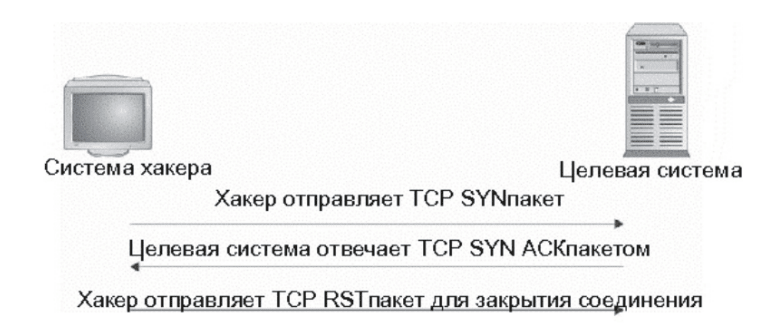
A variation of stealth scanning is a connection reset scan, in which the attacker sends a TCP-RST packet to the GR address. This packet usually does not cause any action on the receiving system, and the system does not respond to it. There are other scanning methods that give good results. Note that a connection reset scan detects systems that are connected to the network, but does not identify the services running on them, as a stealth scan does.
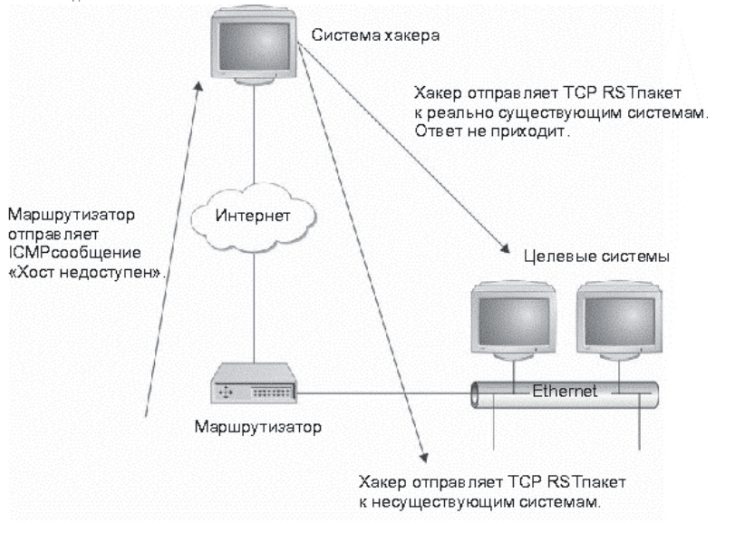
There are stealth scanning techniques that allow you to detect open ports. They are usually done by passing traffic to specific ports. If the port is closed, it will respond with an RST packet, otherwise it will not receive a response
Sometimes a hacker conducts a preliminary investigation in several stages. First, he chooses a domain name (usually randomly) and starts a DNS zone transfer directed to this domain. The zone transfer registers all known DNS systems and domains. Once he has this list, the hacker runs tools such as Queso or Nmap to determine the operating system of the potential target. And this data is used for real attacks.
Preliminary investigation is not limited to collecting Internet addresses. Wardialing is another method used by hackers to identify potential victims and to detect systems that have a modem and answer calls. Using a computer, the hacker calls thousands of phone numbers found on the modem line overnight. Modern software is able to distinguish a modem from a CNX. After detecting modems, the hacker will contact each of them, determining the operation of the program. Using the PC Anywhere program (which is very attractive to attackers), the hacker takes control of the responding computer.
The rapid spread of wireless networks in organizations and in users’ homes allows for hacker phasing. The new term “wardriving” means that the hacker drives around the city with a computer and a wireless network adapter, identifying wireless network points. A GPS (Global Positioning System) device is used to record the coordinates of such points. Sometimes such research is done in combination with “Xvarchalking”. The hacker navigates by chalk marks on sidewalks or building walls that indicate that there is an open wireless network in that location.
Once the wireless network is identified, the hacker will use the Internet explosion to attack other sites. This method of attack is excellent at masking the hacker, because the false trail leads to the organization’s wireless network. Even if the hacker’s presence is detected, it is very difficult to find out his real location.
In the event of a breach, a hacker using non-targeted attack methods has one or more (not very many) exploits at his disposal. Using preliminary reconnaissance, he will try to find systems that are vulnerable to these exploits. Many hackers, having found a system, tried to break it in one way. ” More advanced hacks use special scanning tools to find vulnerable systems and then create attack scripts that target all systems at once.