


Android users are reporting that they cannot get rid of ads that appear after every phone call. Researchers warn that a new ad fraud scheme may be behind the issue, with seemingly harmless apps such as alarm clocks, messaging apps, and calendars serving as the source.

“I get a pop-up ad every time I end a phone call,” one recent complaint on the Samsung community forums reads.
“I’ve tried every setting. I read somewhere that it might be one of the apps I downloaded. But it started happening as soon as I got the phone, before I had even installed any apps.”
Similar complaints asking, “What is this screen that suddenly appears after a call?” can be found across Reddit and other social media platforms. Many users assume their default phone app has started showing excessive ads or that their device has been compromised. In reality, the culprit is usually another app downloaded from the Google Play Store that secretly displays ads over other apps after every phone call.
DoubleVerify’s Fraud Lab describes the practice as a new ad fraud trend that allows malicious developers to profit from millions of ad impressions. According to the researchers, they have observed a significant and suspicious increase in apps with little or no real content that rely on this simple delivery mechanism.
“We call this ‘AfterCall’ advertising. It appears immediately after a phone call, outside the app’s normal context,” said Nir Danon, a cybersecurity researcher at DoubleVerify Engineering.
“Imagine visiting your mom, and she asks you to fix her phone. You check her recently used apps, look for anything suspicious, review her browsing history and downloads, but nothing stands out. Yet the ads keep appearing.”
The offending apps use a relatively simple fraud scheme. They often encourage users to install additional questionable cleaner or antivirus apps that claim to solve the problem but ultimately make the situation even worse.
Normally, Android apps cannot take over the entire screen to display whatever they want. To do that, attackers first need to trick users into granting a special permission. While this sounds difficult, it often isn’t.
SYSTEM_ALERT_WINDOW is a restricted Android permission that allows an app to display content over other applications. Unlike most permissions, it cannot be granted through a standard pop-up during installation. Instead, developers must send users to the system settings, where the permission has to be enabled manually.
“Malicious developers are still able to bypass this safeguard by manipulating the user onboarding process,” Danon said.
In one example, an alarm clock app claims it needs the permission so alarms can appear correctly even when the phone is locked. Another app, a calendar, gives users no real choice at all—it simply closes unless the permission is granted.
“Most non-technical users simply tap through these screens without understanding the consequences.”
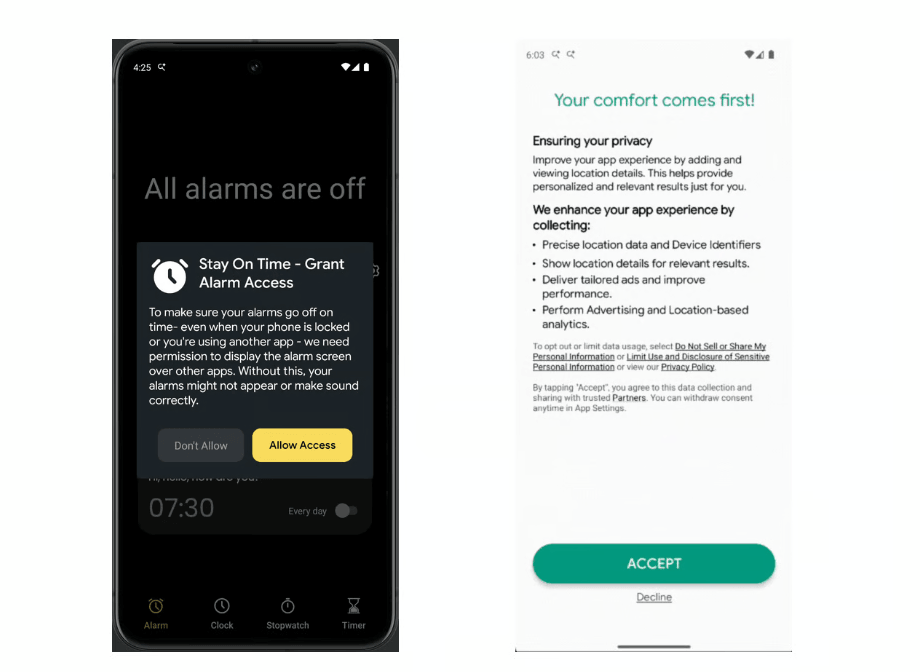
The report does not identify the specific apps involved, but it notes that some remain available on Google Play and have already surpassed 100,000 downloads. These apps have also been granted the USE_FULL_SCREEN_INTENT permission, which allows them to display full-screen notifications even when a device is locked.
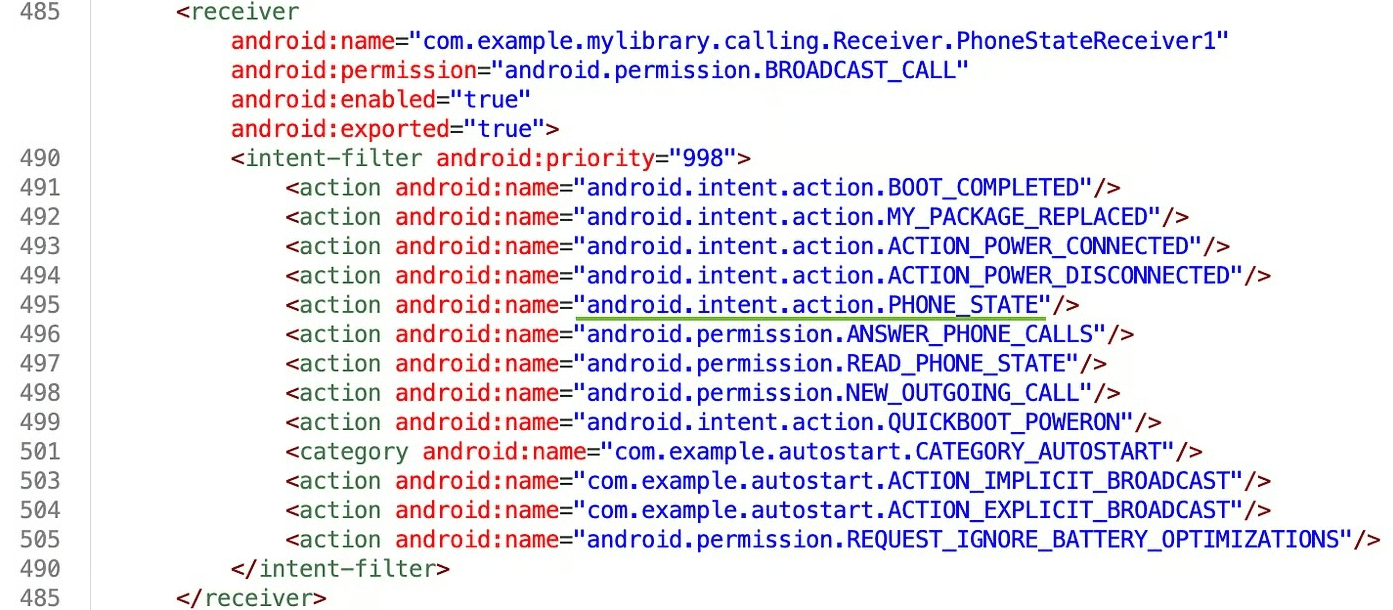
Once an app tricks a user into granting the required permission, it hooks into the Android system and begins listening for system events. Android apps communicate through a feature called Intents—small messages that describe events occurring within the system. Apps use Broadcast Receivers to monitor these Intents and respond when specific events occur.
AfterCall apps specifically monitor the ACTION_PHONE_STATE_CHANGED event. They wait for the phone state to change from off-hook (an active call) to idle (the call has ended). As soon as that transition occurs, the app immediately displays a full-screen advertisement.
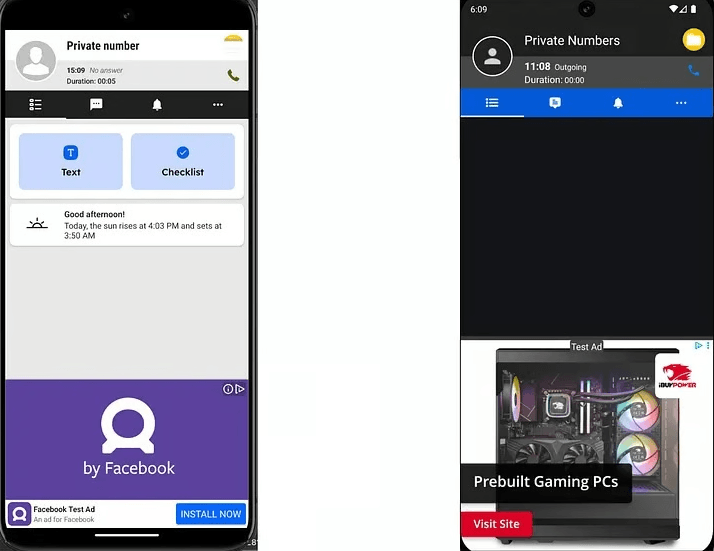
“They all follow the same design: call details, a superficial explanation of how the screen supposedly relates to the app, a ‘profile photo,’ and, underneath it all, an advertisement,” the researcher noted.
The scam does not stop there. To make detection more difficult, the malicious app removes itself from the list of recently used apps, making it harder for users to identify and uninstall it. Although app stores and security platforms actively scan for malicious software, some of these apps still manage to slip through pre-publication security checks.
One way to identify these apps is by checking which ones have permission to display over other apps. This is the permission abused by apps that show ads after phone calls.
For example, on Samsung devices, open Settings → Apps → Additional settings → Special access → Appear on top. There you will find a list of every app that has been granted this permission.
If you see an alarm clock, calendar, note-taking app, or another everyday utility that has no legitimate reason to display content over other apps, it should be treated as suspicious. Malicious apps often disguise themselves as ordinary tools, and their icons typically appear completely harmless.
Security researchers recommend revoking this permission from any suspicious app. If the app asks for the permission again after your next phone call, it should be uninstalled immediately.
Google also provides a general guide for removing unwanted ads, pop-ups, and malware on Android. The company recommends restarting the device in Safe Mode, which can make it easier to identify and uninstall the app responsible for the intrusive ads.
