
26.07.2024
2 min
1634



Learn about a unique and sneaky way to get free Wi-Fi access on a plane using a paid connection bypass program through a loyalty program account. Read the detailed guide with examples and code.

Disclaimer: All information presented in this material is for informational purposes only. The materials are not intended to infringe or protect illegal activity. All methods and tools mentioned are for educational and research purposes only.
The plane reached an altitude of about three kilometers, and the passenger pulled out his laptop, hoping to use the Internet or do some work. After connecting to the airplane’s Wi-Fi, an authorization window opened that required entering credit card data. While searching for the card found in the passport, he noticed that the system offered free access to the air miles program account, despite the fact that the payment had not yet been made. This probably indicated a vulnerability in the firewall.
Curious about the situation, the passenger logged into his JetStreamers Diamond Altitude account and saw the edit profile button. At first it seemed ordinary – with standard editing options and the ability to change the name and address. But closer analysis revealed that through this button you can access the Internet using a loyalty program account. This process, although it was quite slow and illogical, could still give a positive result.
To realize this idea, it was necessary to create several software prototypes. Initially, the possibility of using the Go programming language was considered, but the final choice fell on Python, which allowed the tool to be called PySkyWiFi.
The first prototype involves the possibility of using the name field in the air miles program account as a kind of tunnel for exchanging instant messages. The idea is that you can change your name once you’re signed in, and anyone who’s also signed in to that account will be able to see the new name. Thus, short messages can be sent each time the name is changed. For example, to change the name to “Hi, how are you”, to receive the answer “Good, how about you” due to the change of the interlocutor’s name.
This system, although it seems inconvenient, could be the first step in the further development of a method for bypassing the firewall of airplane Wi-Fi. Using this primitive method, it is possible to exchange messages with other people without having to pay for Internet access.
The experiments were carried out on two laptops, one of which was old, and after logging into the air miles account, it was possible to forward messages due to the name change. Although the process is not very convenient, it still proved possible to bypass certain network limitations.
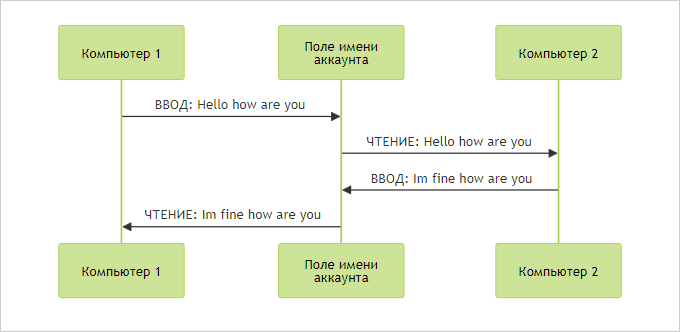
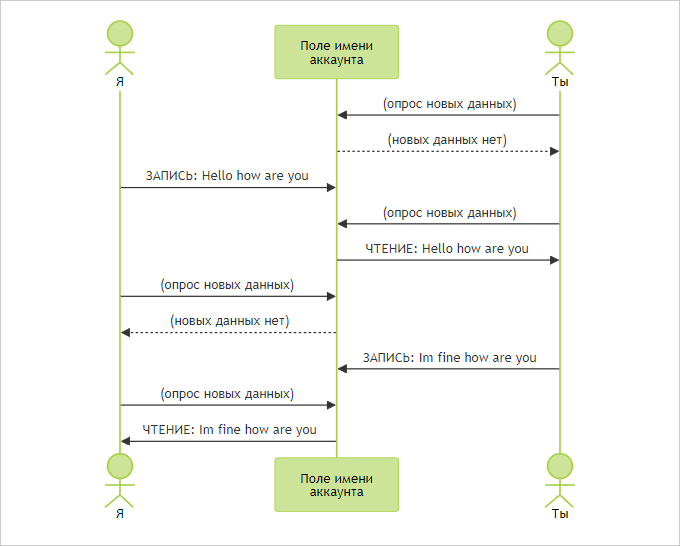
With this tool, you can exchange messages through the terminal with someone on the ground, bypassing the need to pay for Wi-Fi. Both parties will not have to worry about messages being sent through the SkyVenture Premium Gold Rewards loyalty program account.
Although you need to find an interlocutor to communicate with, the tool already shows good potential. It’s important to note that sending automated data through your account can cause problems, so you should be careful with such actions in the future. Successful experiments where the name in the air miles program account was changed many times without restrictions helped to make sure that PySkyWiFi works.
After that, all that was left was to complete the rest of the code using other services like GitHub Gist, which allowed sending data in a similar way. This made things easier and faster, making PySkyWiFi even more efficient for sharing data through loyalty program accounts like Star Power UltimateBlastOff.
A tunnel created through an air miles account can be used for more than just simple messaging. For the next prototype, a program was developed that runs on a computer located on the ground or in the cloud and automatically transmits information from the real world to the passenger of the plane through the account. This application can be configured to transmit data such as the latest stock quotes or football scores during the flight.
To implement this task, a daemon was created that constantly monitors the name field in the account. When it receives a new request, the daemon calls the appropriate API, extracts the required information (eg STOCKPRICE: APPL or SCORE: MANUNITED) and sends it back through the account. This process worked perfectly, allowing to combine the first prototype for instant messaging with the second prototype for tracking important data.
Below we explain how it works (source code).
PySkyWiFi consists of two components:
Sky Proxy is a proxy running on a laptop on an airplane
A ground daemon is a daemon running on a ground computer with an internet connection or in the cloud.
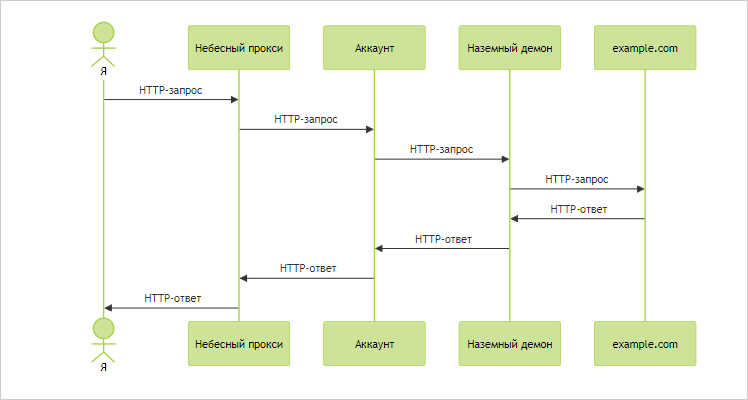
Here is a simplified diagram:
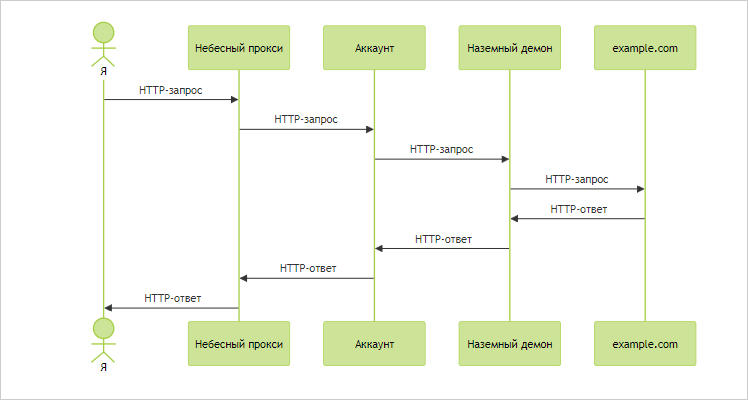
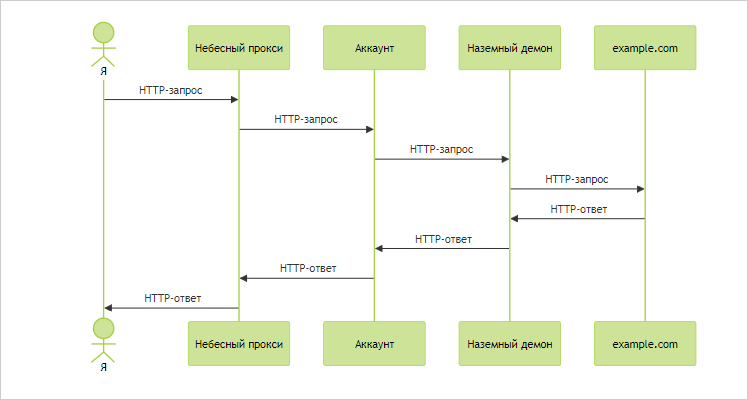
Preparing to use PySkyWiFi starts before you even leave home. First, you need to start a daemon on the ground computer or server. After that, when you are already on the plane and connected to Wi-Fi, start the sky proxy server on your laptop. Now the PySkyWiFi repeater is ready to go.
Tools like curl are used to send HTTP requests to the sky proxy. The request is sent through a local proxy (eg localhost:1234/) with an X-PySkyWiFi header specifying the URL of the website to request.
For example:
curl localhost:1234 -H "X-PySkyWiFi: example.com"
The ground daemon receives the X-PySkyWiFi header, processes it, and forwards the request to the target website. All other content of the request remains unchanged.
After that, you need to wait a few minutes until the HTTP response arrives. If everything is successful, you will receive a response from the website as if you sent the request over the normal Internet. The main advantage of this method is free access to the network. However, in the end, you will probably have to pay for Wi-Fi after your curiosity is satisfied, because it is not worth spending too much time on such experiments.
Here’s how everything is arranged inside:
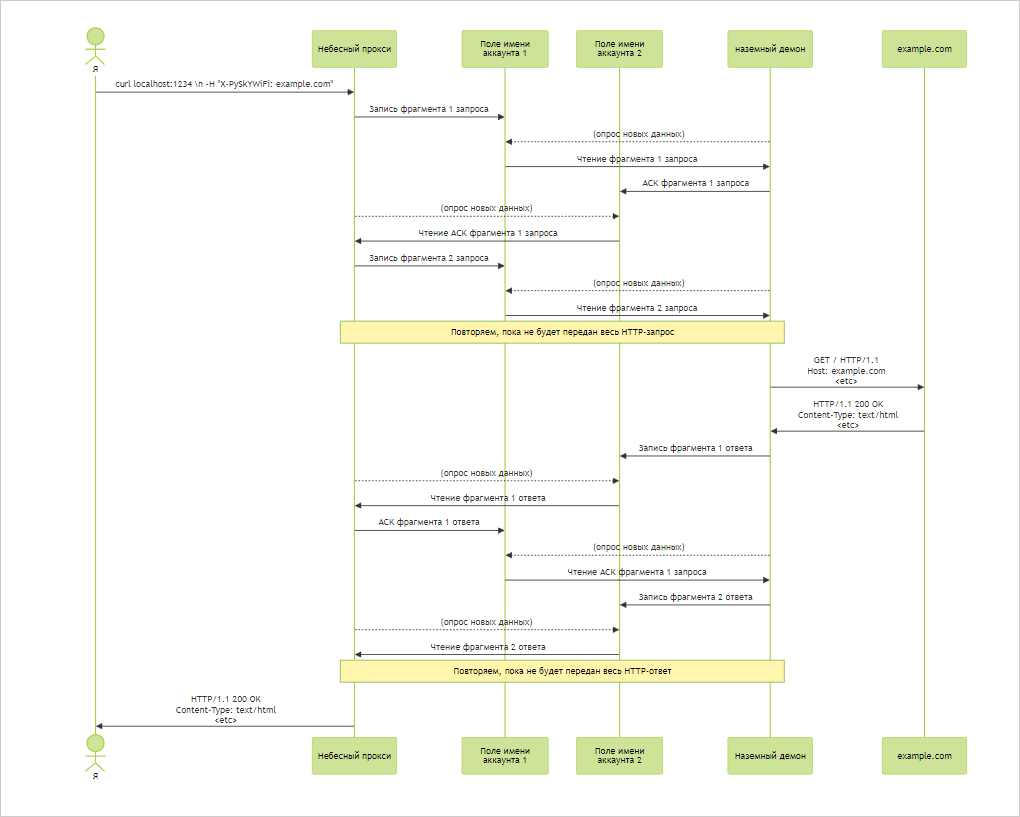
The sky proxy receives an HTTP request from a curl call. It breaks the request into chunks because the entire request is too large to pass through the air miles program account at once.
Sky proxy writes each fragment in turn in the account name field.
The ground demon polls the account. When it detects that the name field has changed and contains a new fragment, it reads that fragment and transmits an acknowledgment to the sender so that it knows that the next fragment can be transmitted. The receiver combines the fragments and reproduces the original HTTP request.
After the ground daemon receives and reproduces the complete HTTP request, it sends the request over the Internet.
The ground daemon receives an HTTP response.
The ground daemon sends an HTTP response to the sky proxy by performing the above process in reverse order. This time, the ground daemon splits the HTTP response into chunks and sends those chunks to the account name field in turn (actually, to simplify the protocol, it writes those response chunks to the second account name field).
Sky Proxy polls the second account. It reads each fragment and glues them back together to recreate the HTTP response.
The sky proxy returns an HTTP response to the outgoing curl call. That being said, curl works with a perfectly normal HTTP response, just a bit slower. He has no idea about all the nonsense that just happened.
Sky proxy and ground daemon are pretty simple: they send HTTP requests and parse HTTP responses. The magic is how they push these requests and responses through the air miles program account. Let’s look at it in more detail.
PySkyWiFi communication logic is built on two main layers: transport and network.
The task of the transport layer is to organize data exchange between clients. It is responsible for how long messages should be broken into smaller pieces for convenient transmission, and how clients notify each other when they are ready to receive subsequent pieces. This layer works similarly to the TCP protocol used on the Internet for reliable data transfer.
The network layer is responsible for the actual transfer of data between clients after the transport layer has determined what to transfer. It resembles the IP protocol, but in a simplified form. Thanks to this separation of layers, each layer performs its task independently: the transport layer works with data, and the network layer works with its transmission.
This architecture makes it easy to add support for new platforms or account types. For example, to work with other airline loyalty programs, only the network layer needs to be changed, while the transport layer remains the same.
The transport layer creates a connection between two clients using two channels: SEND (sending) and RECV (receiving). The client writes data to its SEND channel, and polls the RECV channel to receive data. Thus, two-way data exchange is implemented through constant polling and recording in the appropriate channels.
This system provides an efficient way to communicate information, regardless of where customers are – on the plane or on the ground.

From the perspective of the transport layer, a channel in the PySkyWiFi system is considered as a data medium where write and read operations can be performed. The transport layer does not go into the details of how these channels work – its main task is to distribute the data correctly.
A key feature is that a PSWF client can either send or receive data, but not at the same time. In send mode, the client will not receive data from another client, and in receive mode, it cannot send its own. This distinguishes PySkyWiFi from the TCP protocol, where transmission and reception can be done in parallel.
When sending HTTP requests through a narrow channel (for example, through the name field in a loyalty program account), the sky proxy sends the request and the ground daemon receives it. After that, the celestial proxy switches to receiving mode, and the terrestrial daemon executes the request and sends the response back. Thus, they constantly change roles to ensure two-way data exchange.
Because the channel is narrow, the amount of data that can be transferred at a time is small. Therefore, long messages (such as HTTP requests) are broken into smaller fragments, each of which is sent in turn over the SEND channel. This makes the process quite time-consuming, but ultimately effective in achieving a full data transfer cycle. To start a message, the sender transmits the first piece of message data inside the DATA segment.
The DATA segment has the following structure:
Letter D
Sequence number of the fragment (a six-digit number that uniquely identifies the fragment)
The piece of data itself.
For example, a data segment in the middle of a message might look like this: D000451adline”: “Mudslide in Wigan causes m
After the sender transmits the DATA segment, it pauses. It wants to transmit the next DATA segment, but it cannot overwrite the account name field until it knows that the receiver has accepted and processed the previous one.
The receiver tells the sender that it is safe to transmit a new DATA segment by acknowledging that each segment has been read. The receiver does this by writing an ACK segment to its own SEND channel:
The ACK segment has the following structure:
Letter A
The six-digit sequence number of the segment whose acquisition is confirmed. For example: A000451
In the PySkyWiFi system, the transport layer uses DATA and ACK segments to transmit and acknowledge data between two clients. The sender continuously polls its RECV channel, waiting for an ACK segment. When it receives such a segment with a certain sequence number, such as 000451, it indicates that the receiver has successfully received the data segment with that number and can now send the next segment with the number 000452.
The process continues until all message fragments have been sent, at which time an END segment consisting of the letter E is transmitted, signaling the end of the transmission. The clients then switch roles: the former sender becomes the receiver and starts polling its RECV channel for new data, and the former receiver starts sending its response, breaking it into pieces.
The important thing is that the transport layer doesn’t care about exactly how the network layer works—it just needs to have two channels, one for writing and one for reading. The network layer can use any available technology to transfer data, whether it’s local files, a Discord profile, or an AirMiles account. This gives PySkyWiFi flexibility in working with different airline loyalty programs, which allows the system to be universal.
Here’s how PSWF uses transport protocol segments to exchange long messages:
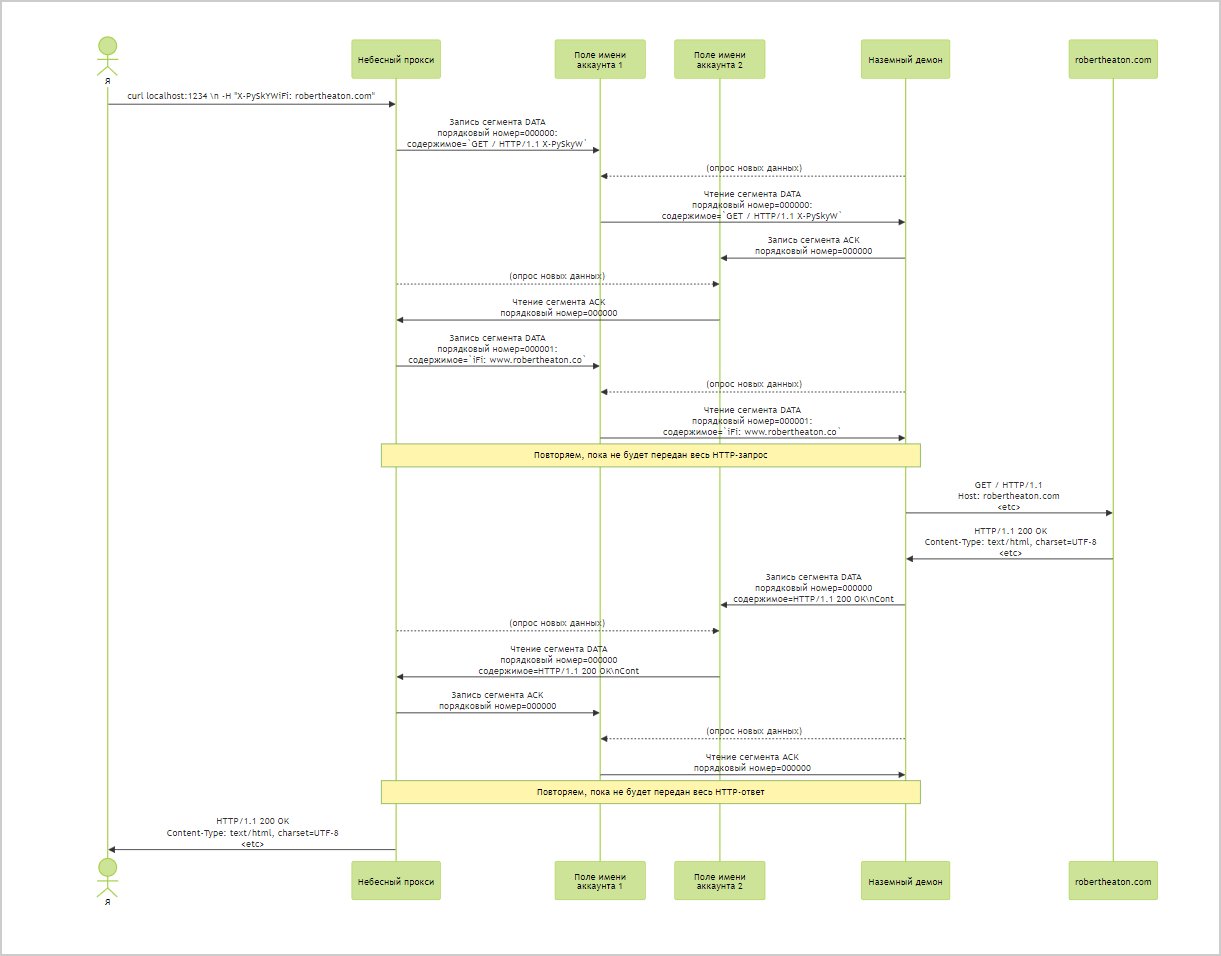
The transport layer decides what data clients should transmit to each other, but says nothing about how they should transmit it. This is done by the network layer.
The task of the network layer is to send data between clients. It doesn’t matter where the data came from or what it means; it simply receives some data from the transport layer and sends it to another client (usually via an account).
This means that the network layer is quite simple. And it also means that adding a new network layer for the new air miles program platform is also not difficult. We use the new platform to implement a few operations and a few properties (see below), and then the transport layer can automatically use the new platform without any additional effort.
The network layer consists of two operations:
send(msg: str) – Write msg to storage. When implemented based on the air miles program, it writes the msg value in the account name field.
recv() -> str – Read message from storage. When implemented based on the Air Miles program, it reads the value from the account name field.
In addition, the network layer implementation must define two properties:
sleep_for is the number of seconds the transport layer should wait between polling new segments from the RECV channel. In test implementations, sleep_for can be very low, but in an implementation, for example, based on an air miles program account, it should be many seconds to avoid overloading the remote server with too many requests.
segment_data_size is the number of characters that the transport layer must transmit in one segment. Must be equal to the maximum size of the account field used to transfer segments (often around 20 characters).
Optionally, the network layer implementation can also provide two more operations:
connect_send() – A hook called by the sender when the SEND channel is initialized. In the account-based implementation of the air miles program, this allows the customer to log into the platform with a username and password. This gives the client a cookie that it can use to authenticate future send and recv calls.
connect_recv() – A hook called by the receiver when the RECV channel is initialized.
If you implement all these methods, you will be able to use PySkyWiFi on planes of another airline. But, I repeat, it should not be done.
When writing a network layer that uses the new air miles system, you can use a couple of tricks that increase the speed and reliability of the implementation.
To overcome the limitations of the HTML account forms of airline miles programs, which allow only alphabetic characters to be entered, the PySkyWiFi network layer uses base26 encoding. This encoding converts a byte string into a set of letters from A to Z.
The conversion process involves converting the bytes into a large number, which is then represented in a base-26 number system. In this system, the letters A to Z act as “digits”. Thus, any data can be coded exclusively with letters, which allows it to be written into the name field, which only accepts alphabetic characters. This approach provides the ability to bypass the limitations of text input forms, and allows data to be transferred through the air miles account.
def b26_encode(input_string: str) -> int:
    # Преобразуем входную в строку в целое число base-256
    base256_int = 0
    for char in input_string:
        base256_int = base256_int * 256 + ord(char)

    # Преобразуем целое число base-256 в строку base26
    if base256_int == 0:
        return 'A'  # Особый случай пустых входных данных или входных данных, равных нулю

    base26_str = ""
    while base256_int > 0:
        base26_str = chr(base256_int % 26 + 65) + base26_str
        base256_int //= 26

    return base26_str

b26_encode("Hello world")
# => 'CZEZINADXFFTZEIDPKM'
The transport layer in the PySkyWiFi system does not participate in the data encoding process. The network layer receives the bytes, converts them to base26 encoded strings, and those strings, containing only the letters A to Z, are written to the account. When it needs to get data back, the network layer reads the string, decodes it back into bytes, and passes it to the transport layer. Thus, the transport layer works with bytes and does not need to know about the encoding methods used to transfer the data.
The disadvantage of using base26 is that the string becomes much longer, which reduces the throughput of the protocol, just as the binary form of a number is longer than the decimal form. To improve efficiency, base52 could be used, which includes both upper and lower case letters, allowing more data to be transferred in less space. This improvement may be implemented in a future version of the system.
Another way to increase the bandwidth of the PSWF is to increase the size of the segment that the network layer can handle. If we double the size of the segments, we also double the bandwidth of the protocol.
Fields in airline miles program accounts usually have a length limit. For example, a name of no longer than 20 characters may be allowed. However, you can maximize bandwidth:
Using the full length of the field
By breaking the segment into several fields
Let’s say we can manage five fields, each of which can store up to 20 characters. Instead of using a single field to transfer 20-character segments, we can break a 100-character segment into 5 blocks of 20 and update them all together in a single request. Then the recipient will also be able to count all 5 fields in one request and sew them together to reproduce a complete segment.
It would be more efficient to use CONNECT requests to set up a tunnel between the sky proxy and the target website in PySkyWiFi, as this would allow the system to work at the system proxy level. Most HTTP proxies are implemented based on CONNECT requests, which provides a direct TLS connection to a website. This would mean that the traffic transmitted through the air miles account would be encrypted, which would significantly increase the security and efficiency of data transmission.
However, implementing this mechanism would require more work than simply manually redirecting HTTP requests, as is currently done in PySkyWiFi. Using CONNECT requires more complex setup and connection control.
After experimenting with PySkyWiFi, a tunnel through the GitHub Gist was successfully used to load the blog homepage via curl. Although it took a long time, the result showed the potential of this approach, and it can be considered both the most productive and the least productive flight.