
19.01.2024
2 min
2719



Want to understand which version of DeepSeek-R1 performs better in real-world conditions? In this review, we compared four models with different levels of quantization: Q5_K_XL, Q4_K_XL, Q3_K_XL, and IQ2_M. We tested the generation speed, RAM/VRAM consumption, and response quality on the example of generating the Python snake game. Find out how the models behave on CPU and GPU+CPU, what really affects performance, and whether it is worth saving resources at the expense of quality. For a detailed technical analysis, see our article.

After building a home server to work with LLM DeepSeek-R1 (more about this in the article “Local DeepSeek-R1-0528. When snail speed is not a sentence, but a starting point”), there was a need to compare different quantization options to optimize the ratio of speed and quality. When running different models, I noticed that quantization often speeds up token generation.
Today, almost every popular model that comes out soon appears on huggingface in several quantized versions. It is not easy to immediately assess the balance between size, speed and quality. I decided to download several such models, compare their speed and at the same time subjectively assess the quality.
As part of the study, four options for quantized DeepSeek-R1 0528 from unsloth were selected.
UD-Q5_K_XL 481GB
UD-Q4_K_XL 384GB
UD-Q3_K_XL 296GB
UD-IQ2_M 229GB
EPYC 7K62
Supermicro H11SSL-i Version: 2.00
8 x hynix 64GB 2Rx4 PC4-3200AA-RB4-12. (Total 512GB)
NVIDIA RTX 3090
The server allows you to run LLM both using GPU+CPU and using only CPU.
For each model, testing will be conducted on CPU only and CPU+GPU. We will ask LLM to write a snake game. The prompt itself will be as simple and naive as possible.
'''text
Напиши гру змійка на Python.
- Ігрове поле має мати сітку
- гра повинна мати приємну кольорову гаму
- меню
- анімацію поїдання їжі
- Цікаву особливість
'''
We will set the temperature value to 0 according to the recommendations from the DeepSeek website. The llama.cpp test environment in the docker container is running on ubuntu 24. Examples of docker compose files.
services:
  cpu-llm:
    container_name: cpu-${MODEL_NAME}-${TEMP:-0.0}
    image: ${IMAGE_CPU:-ghcr.io/ggml-org/llama.cpp:server}
    user: "${UID:-1000}:${GID:-1000}"
    ports:
      - "${PORT:-29004}:${PORT:-29004}"
    volumes:
      - ./${MODEL_DIR}:/models:ro
    security_opt:
      - no-new-privileges:true
    read_only: true
    tmpfs:
      - /tmp
    command: [
      "-m", "/models/${MODEL_FILE}",
      "--cache-type-k", "${CACHE_TYPE_K:-q4_0}",
      "--threads", "${THREADS:--1}",
      "--ctx-size", "${CTX_SIZE:-16384}",
      "--prio", "${PRIO:-3}",
      "--temp", "${TEMP:-0.0}",
      "--min-p", "${MIN_P:-0.01}",
      "--top-p", "${TOP_P:-0.95}",
      "--port", "${PORT:-29004}",
      "--host", "${HOST:-0.0.0.0}"
    ]
    healthcheck:
      test: ["CMD-SHELL", "curl -f http://localhost:${PORT:-29004}/health || exit 1"]
      interval: 30s
      timeout: 10s
      retries: 5
      start_period: 2m
    restart: unless-stopped
services:
  gpu_cpu-llm:
    container_name: gpu_cpu-${MODEL_NAME}-${TEMP:-0.0}
    image: ${IMAGE_GPU:-ghcr.io/ggml-org/llama.cpp:server-cuda}
    user: "${UID:-1000}:${GID:-1000}"
    deploy:
      resources:
        reservations:
          devices:
            - driver: nvidia
              capabilities: [gpu]
    ports:
      - "${PORT:-29004}:${PORT:-29004}"
    volumes:
      - ./${MODEL_DIR}:/models:ro
    security_opt:
      - no-new-privileges:true
    read_only: true
    tmpfs:
      - /tmp
    command: [
      "-m", "/models/${MODEL_FILE}",
      "--cache-type-k", "${CACHE_TYPE_K:-q4_0}",
      "--threads", "${THREADS:--1}",
      "--ctx-size", "${CTX_SIZE:-16384}",
      "--n-gpu-layers", "${GPU_LAYERS:-998}",
      "-ot", ".ffn_.*_exps.=CPU",
      "--prio", "${PRIO:-3}",
      "--temp", "${TEMP:-0.0}",
      "--min-p", "${MIN_P:-0.01}",
      "--top-p", "${TOP_P:-0.95}",
      "--port", "${PORT:-29004}",
      "--host", "${HOST:-0.0.0.0}"
    ]
    healthcheck:
      test: ["CMD-SHELL", "curl -f http://localhost:${PORT:-29004}/health || exit 1"]
      interval: 30s
      timeout: 10s
      retries: 5
      start_period: 2m
    restart: unless-stopped
To begin with, I will give a comparison of consumed resources. As you can see, all models except the smallest require a server with more than 256 gigabytes of memory. And only with the UD-IQ2_M presented in the test is it possible to switch to more budget 32GB memory modules in the assembly instead of 64GB modules.
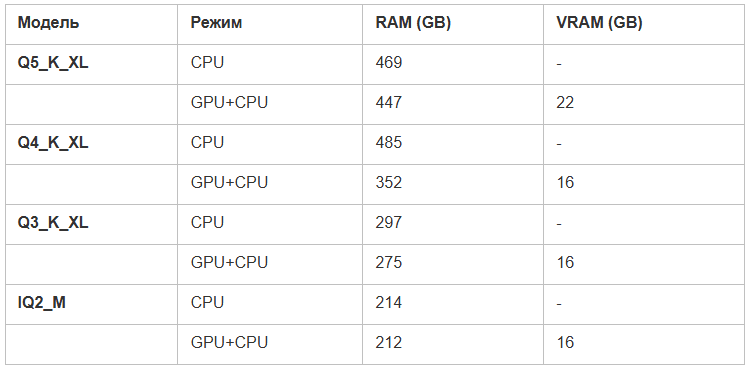
If anyone knows why q5-k-xl consumes less memory than q4-k-xl when running on CPU only, please share in the comments.
The games turned out to be different, and in general — quite good. Although none of them was an example of perfect code, this was enough to evaluate both the generation speed and the overall quality of the implementation.
Since the main goal was precisely to measure performance, and not to analyze the quality of the content in detail, for convenience I collected all the results into one GitHub repository. There you can view all 24 game options and form your own opinion.
According to my own observations, larger models generate better results: more interesting visuals, more thought-out mechanics. As much as possible within a small query. Those implementations that did not start or in which the snake did not react to food, I considered unsuccessful — and took this into account when building the graph.
Below are examples that seemed to be the most successful. I advise you to view the rest of the options in the repository — they will help you better assess the quality of generation.
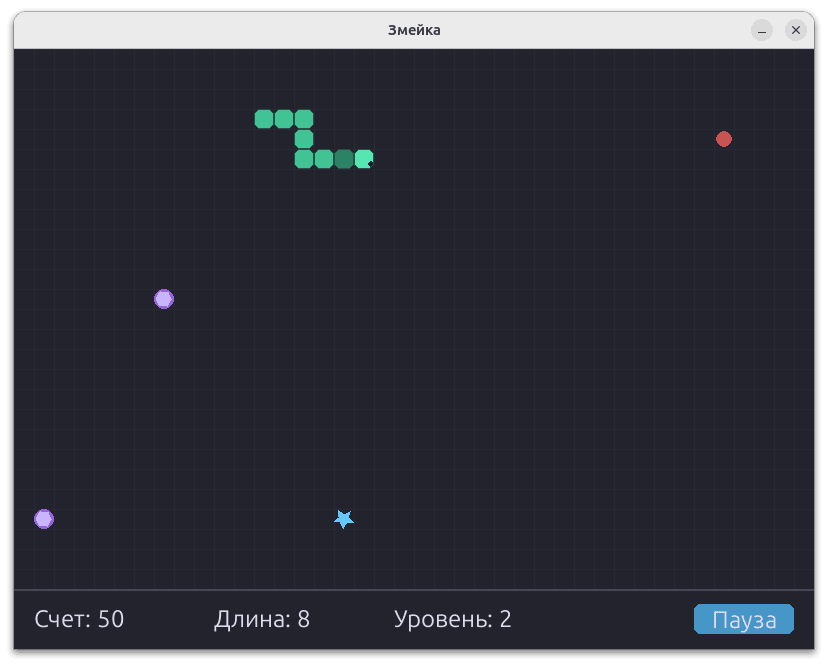
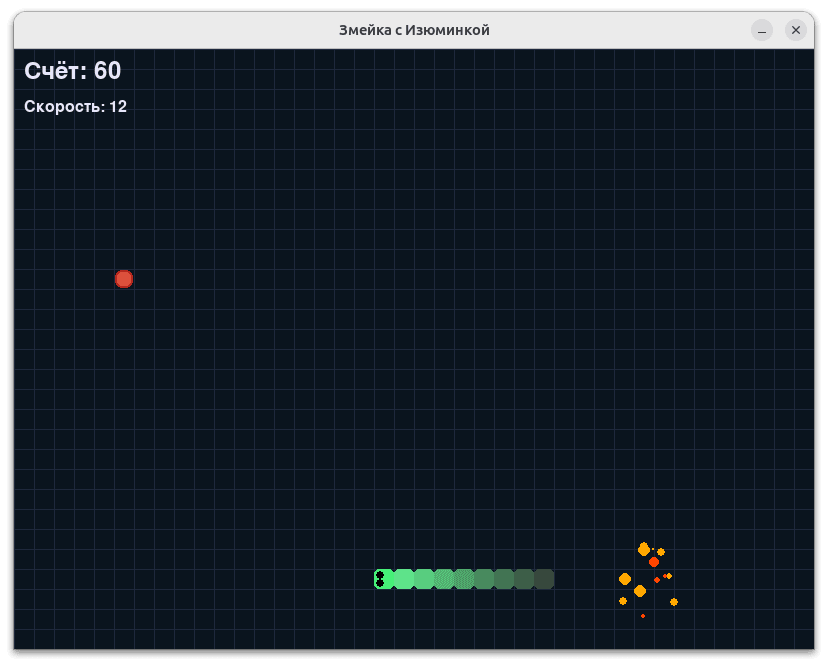
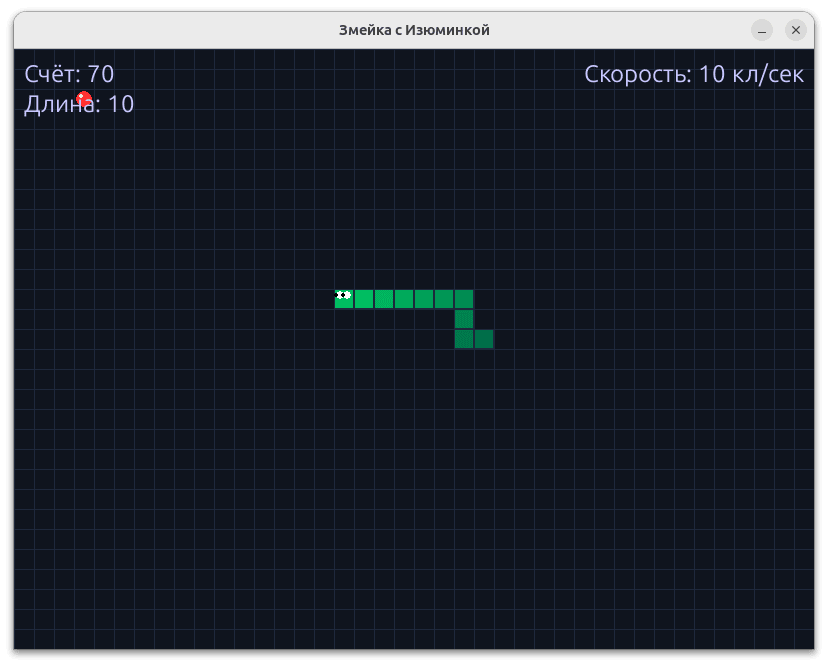
To assess the speed of work, separate measurements were not made for 1000, 2000 and 5000 tokens – instead, all the final generation values were collected and summary graphs were constructed. The diagrams clearly show the dependence: as the model size decreases, the token generation speed increases. This trend is maintained for both the CPU and the GPU+CPU configuration.
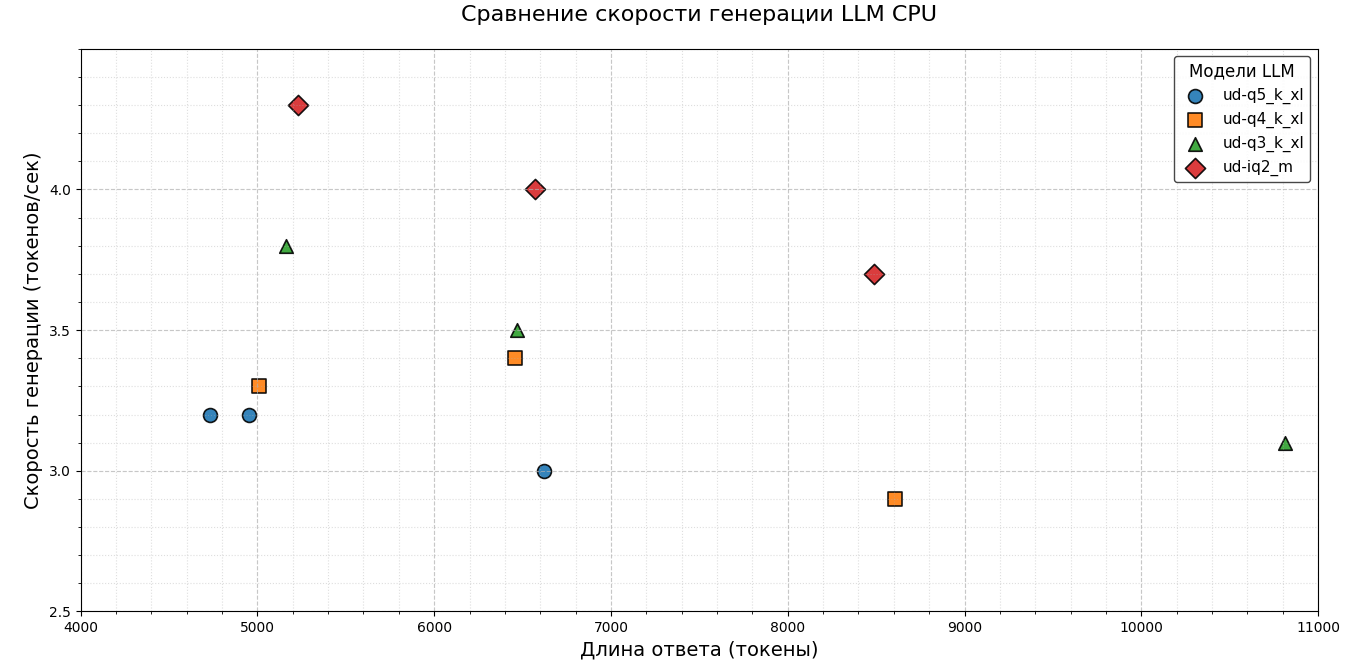
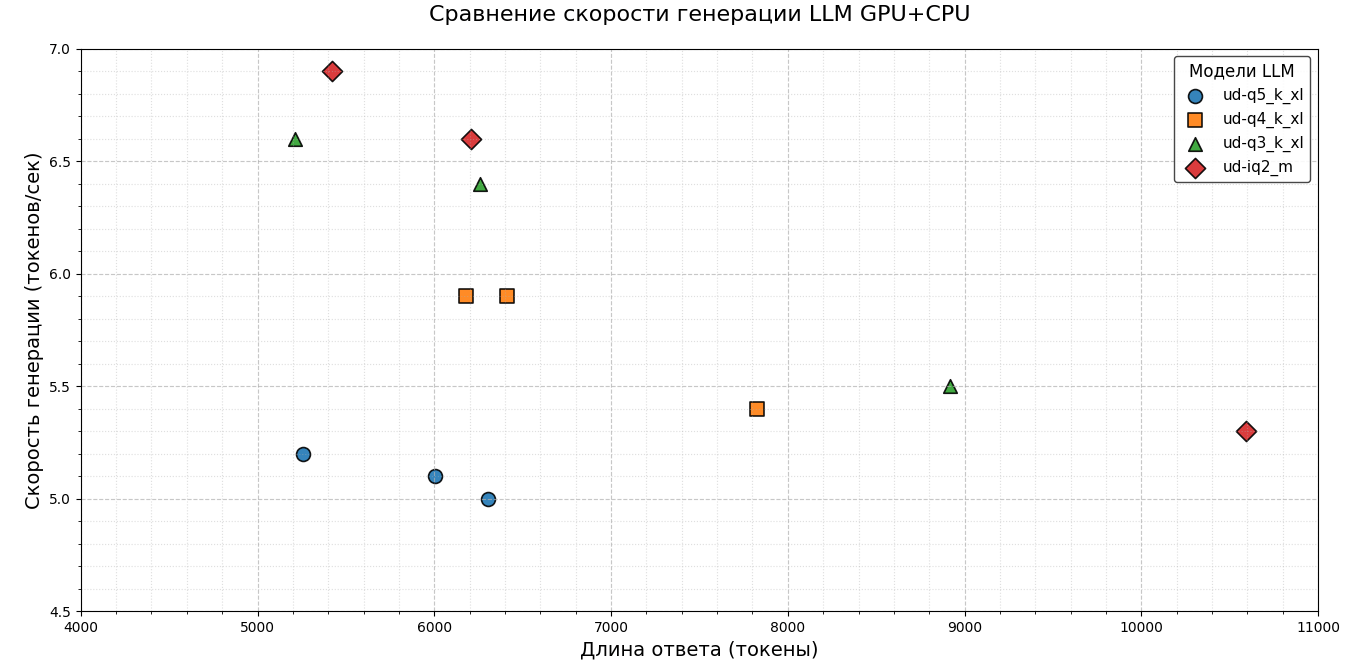
Initially, it was planned to compare only the speed of token generation, but it became noticeable that the response markers shift to the right in more compact versions of the models. This indicates an increase in the total response length in smaller models. Therefore, it was decided to evaluate not only the speed of generating a single token, but also the total time that the model spends on generating a response.
The results were summarized in convenient graphs, where runs that returned incorrect solutions were separately marked. The data turned out to be quite indicative: despite the increase in the speed of generating a single token, the overall time for forming an answer increases. This is due to the fact that the models produce longer answers containing more tokens. At the same time, there is a decrease in the overall quality of the answers.
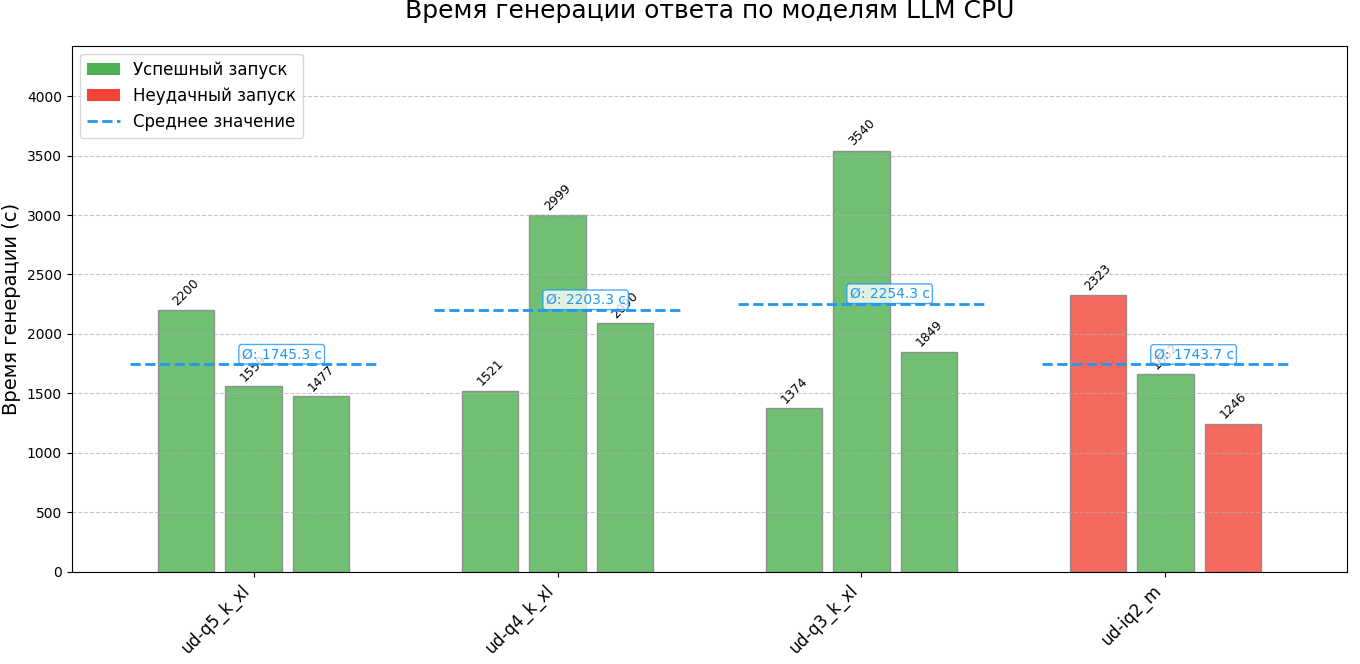
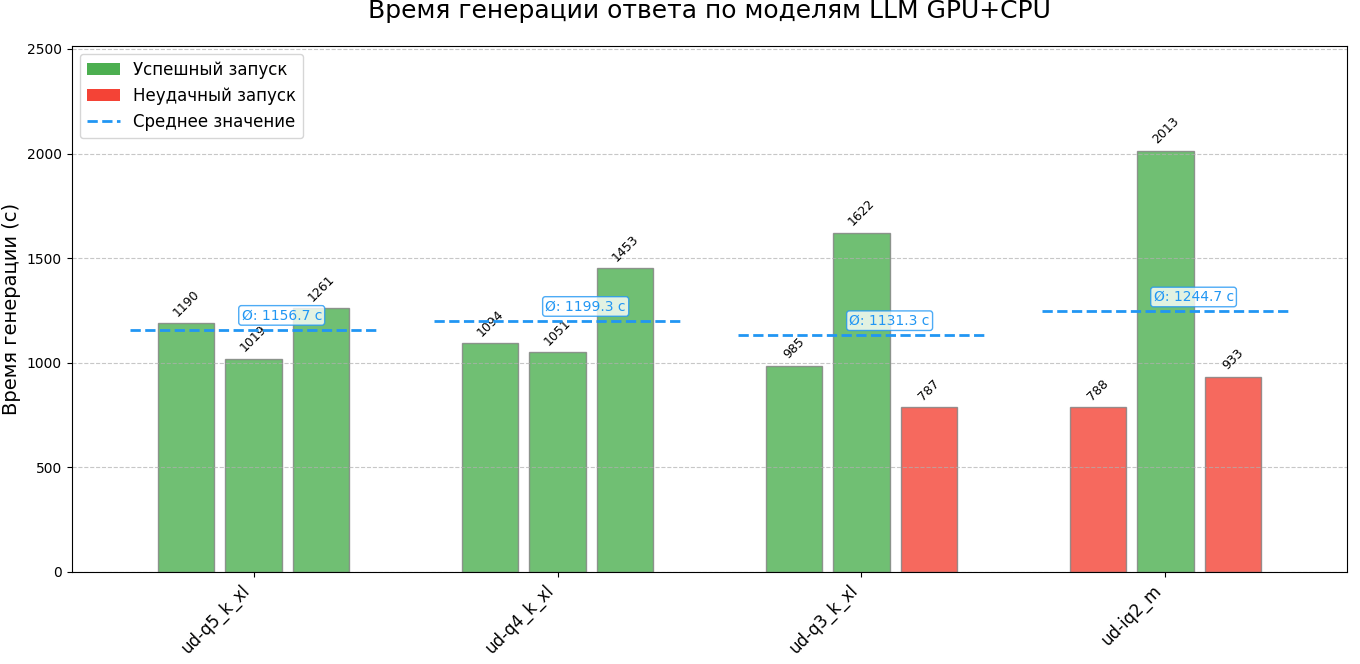
The repository contains two json files with numerical values of the results of each run. Two files are created for each run:
.md contains the entire answer including the reflection section
.py contains only the program code for ease of running
Switching to more compact versions of the model in the case of code generation using DeepSeek-R1 0528 turned out to be impractical. This not only reduces the quality of the generated content, but also leads to an increase in the overall response time due to its increasing length. If we additionally take into account the time spent on unsuccessful runs, the situation worsens even more.