
12.09.2025
14 min
886



The article describes in detail how to set up automated releases of Rust projects using modern tools. It explains what git-cliff is used for when creating a changelog, how release-plz helps manage versions and perform publishing on crates.io, and what role cargo-dist plays in building binaries for different operating systems. The integration of Dependabot and Mergify is separately considered, which allows you to update dependencies in a timely manner and avoid routine work. The material shows how the combination of these tools makes the process of releasing new versions fast, reliable, and convenient even for large projects.
Imagine a developer named nuhro. He wrote his first Rust program and it runs happily on his machine. He also sent the binary/exe to a few trusted friends and they all loved the program after they blindly executed it. Good vibes!
Then one day he decided to share this little program with the world (aka Reddit). To do that, he realized he needed to release the program. Otherwise, how would internet users (who might be using different OS/platforms) install/run the program, right?
And so, that was me in 2019 when I published my first Rust project and automated the release process using a borrowed GitHub Actions workflow from ripgrepo_O. Back to the present, if you want to release a Rust project, it’s likely that you’ll come across the following Rust release tools:
cargo-releaseвсе про випуск іржавого ящика.
cargo-smart-release: автоматично випускати складні робочі простори cargo з генерацією журналу змін.
cargo-unleashІнструменти автоматизації випуску для масивних монорепозиторіїв.
We could list other tools here, but in short, all we want to do is:
Переконайтеся, що проєкт готовий до випуску . Це може включати оновлену версію/журнал змін/залежності.
Позначте новий реліз.
Опублікуйте нову версію на різних платформах (crates.io, GitHub тощо)
Here we are going to mix the most powerful tools to create a witch’s brew – the best way to publish Rust containers. Some might call it a toxic brew that can poison someone with excessive automation. Some might call it a one-way ticket to automation hell. Some might…
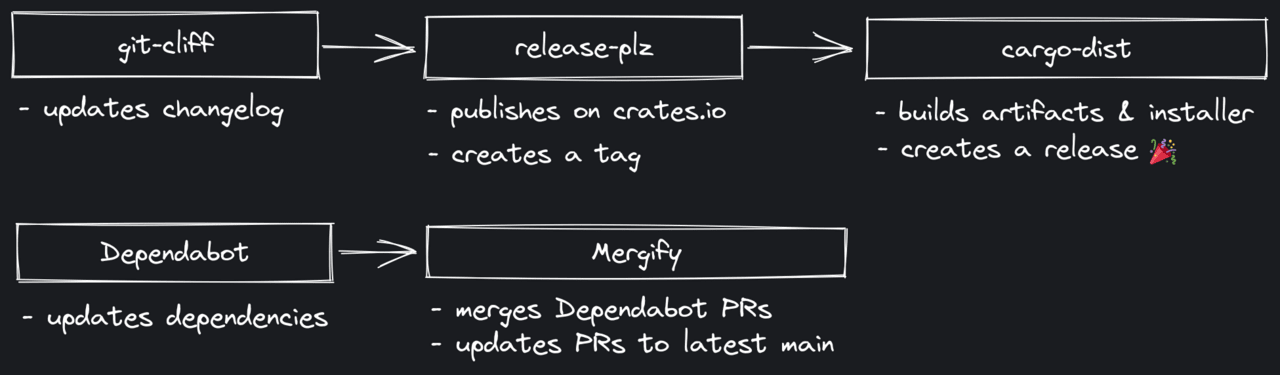
So here is a list of the tools we will be using:
git-cliff Генератор журналу змін з широкими можливостями налаштування. Автоматизує створення журналу змін.
release-plz Опублікувати контейнери Rust з CI з вимогою щодо випуску. Обробляє оновлення залежностей, керування версіями та випуск crates.io.
cargo-dist Упаковка для застосунків Rust, що підлягає транспортуванню. Створює релізи та упаковки GitHub для різних платформ.
Dependabot Автоматизовані оновлення залежностей, вбудовані в GitHub. Оновлює залежності дій Rust та GitHub.
Mergify Автоматизований інструмент CI/CD для оптимізації. Автоматично об’єднує
Dependabotзапити на зняття.
With minimal customization, we can make these tools seamlessly integrate with each other, and ultimately, all we have to do is simply click a button to launch a new release. In other words, the best thing about this release process is that almost everything is handled in an independent interface, i.e. GitHub Actions, so we don’t even have to lift a finger.
Now, let’s get to work!
git-cliff– one of my big projects, widely used in the Rust ecosystem to automate changelog creation.
git-cliff is a command-line tool (written in Rust) that provides a highly customizable way to generate changelogs from git history. It supports the use of custom regular expressions to modify changelogs, which are mostly based on regular commits. Thanks to a Jinja2/Django-inspired templating engine, a wide range of changelog formats can be implemented using a single configuration file. More information and examples can be found in the GitHub repository.
For our changelog format, we can simply use the default configuration, which outputs something like the following:
# Changelog

All notable changes to this project will be documented in this file.

## [unreleased]

### Documentation

- Add link to emacs package support git-cliff (#307)
For this configuration, we first need to install git-cliff:
cargo install git-cliff --locked
Then we can initialize it as follows:
git cliff --init
This will create cliff.toml in the current directory, and you can commit it to the root of your repository to release-plz get it.
If you want to create a more complex changelog, you can look at the examples or use the configuration that git-cliff follows:
$ git cliff

# Changelog

All notable changes to this project will be documented in this file.

## [unreleased]

### 📚 Documentation

- _(readme)_ Add link to emacs package support git-cliff ([#307](https://github.com/orhun/git-cliff/issues/307)) - ([fa471c7](https://github.com/orhun/git-cliff/commit/fa471c7178dce184ca6fe5bbb24b9c2db96d68ce))
Great, now we’re ready to set up the actual lever removal tool!
release-plz creates a fully automated release pipeline, allowing you to easily release changes more frequently without fear of bugs or other minor errors you might make when releasing from the terminal.
Unlike git-cliff, we don’t actually need to install release-plz as a command line tool. This is because release-plz is run from CI (GitHub Actions) and we don’t do anything locally for releases. However, we still need to configure some things about how we want to release our project.
To configure release-plz, create release-plz.toml with the following content in the root of your repository:
[workspace]
# path of the git-cliff configuration
changelog_config = "cliff.toml"

# enable changelog updates
changelog_update = true

# update dependencies with `cargo update`
dependencies_update = true

# create tags for the releases
git_tag_enable = true

# disable GitHub releases
git_release_enable = false

# labels for the release PR
pr_labels = ["release"]

# disallow updating repositories with uncommitted changes
allow_dirty = false

# disallow packaging with uncommitted changes
publish_allow_dirty = false

# disable running `cargo-semver-checks`
semver_check = false
Important options here are:
changelog_config: should point to the git-cliff configuration we created in the previous section.
dependencies_update: setting this to true means that you want to run cargo update before every release. Enabling this to update transitive dependencies doesn’t hurt, as we’ll already be updating core dependencies using Dependabot in the next steps.
git_tag_enable: set this to true to create a tag for new releases.
git_release_enable: make sure you set this to false since we don’t want release-plz to create a GitHub release for us, as that part will be handled by cargo-dist.
As for the next step, we need to create the actual release automation that is responsible for executing the release-plz of each commit pushed to the repository and creating a “release PR”.
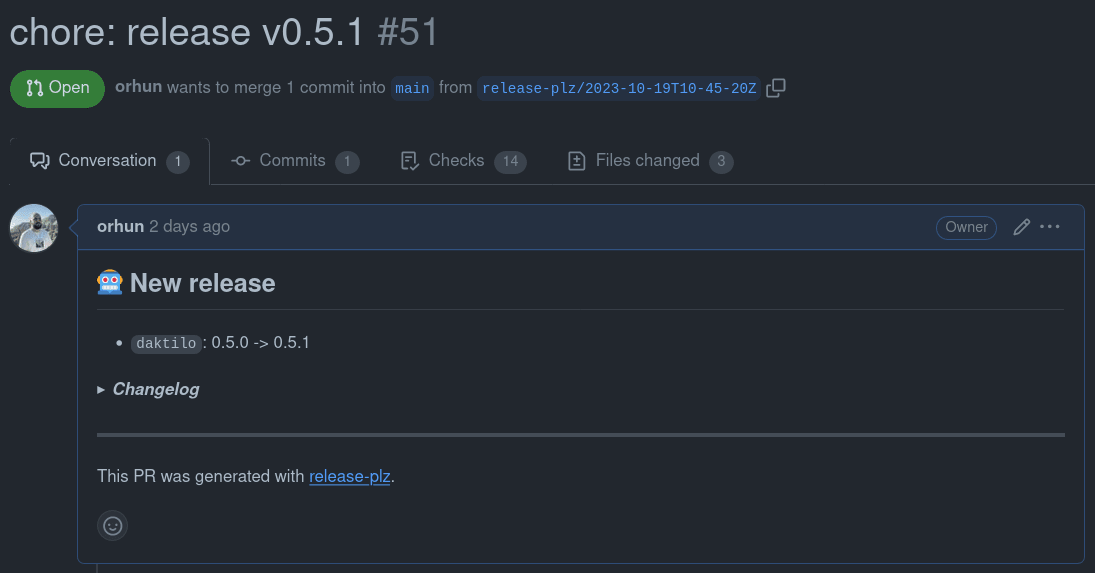
https://github.com/orhun/daktilo/pull/51
After merging the release PR, release-plz detects that there is a version change, Cargo.toml, and runs cargo publish to release the new version on crates.io.
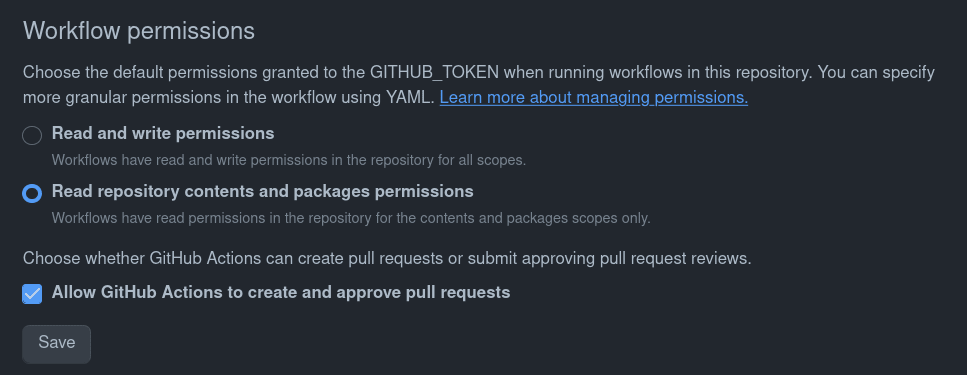
Oh, so we probably need to set up secrets for the publish token, etc., right? Yes! And a few permissions too. You can check out the release-plz documentation for more details, but here’s a quick rundown:
1. Change the “Workflow Permissions” to allow GitHub Actions to create and approve pull requests in Repository > Settings > Actions > General.
2. Create a new PAT (Personal Access Token) (fine-grained or classic) with the correct repository permissions and add it to the repository as a secret key named RELEASE_PLZ_TOKEN.
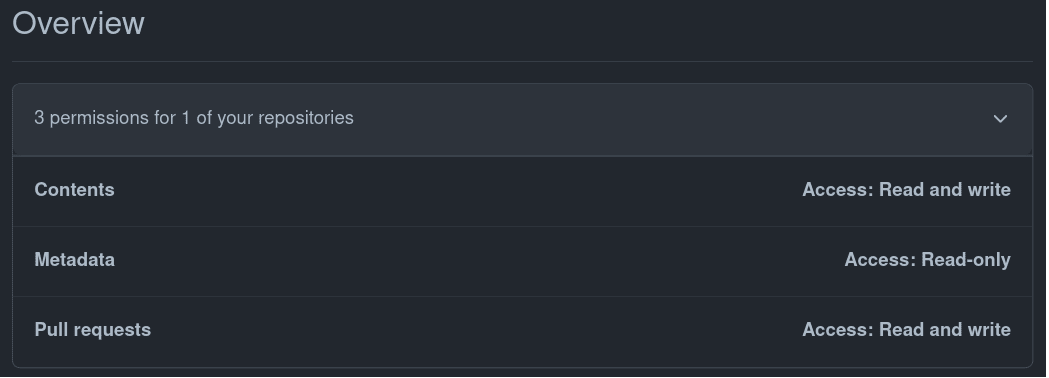
3. On crates.io, generate a new token with publish-new and publish-update access rights and add it to the repository as a secret named CARGO_REGISTRY_TOKEN.
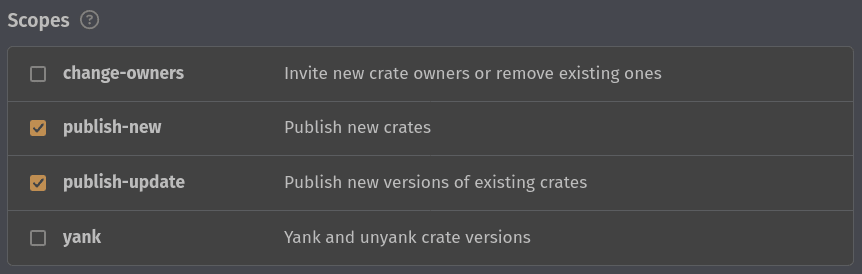
4. We can finally create our GitHub Actions workflow at .github/workflows/release-plz.yml.github/workflows/release-plz.yml
name: Continuous Deployment

on:
  push:
    branches:
      - main

jobs:
  release-plz:
    name: Release-plz
    runs-on: ubuntu-latest
    steps:
      - name: Checkout repository
        uses: actions/checkout@v4
        with:
          fetch-depth: 0
          token: ${{ secrets.RELEASE_PLZ_TOKEN }}

      - name: Install Rust toolchain
        uses: dtolnay/rust-toolchain@stable

      - name: Run release-plz
        uses: MarcoIeni/[email protected]
        env:
          GITHUB_TOKEN: ${{ secrets.RELEASE_PLZ_TOKEN }}
          CARGO_REGISTRY_TOKEN: ${{ secrets.CARGO_REGISTRY_TOKEN }}
To break this down:
We clone the entire git history with fetch-depth: 0, which is necessary to determine the next version and create a changelog.
We install a stable version of Rust (why not?!)
As a final step, we run release-plz, damn it!
Q: Wow, wow, wow, hey, hey, hey, what’s up with GITHUB_TOKEN: ${{ secrets.RELEASE_PLZ_TOKEN }}? Just use ${{ secrets.GITHUB_TOKEN }}bro, which is defined as the `default` for each repository.
Q: Good question! If you’re using GITHUB_TOKEN, that means you’re going to authenticate on behalf of GitHub Actions.
Q: So what’s wrong here?
A: Well, workflows that are launched on: push: tags won’t work if the tag was created by GitHub Actions. So we use a personal access token, which is a way of saying, “Dear GitHub Actions, I’m launching release-plz, and I’m the one creating the tag, so please run the subsequent workflows.” Also, this way we don’t have to specify the workflow’s permissions with the permissions: key. You can learn more about it here.
Now we’re just ready to work on our project as usual, and release-plz will create a PR for our changes, and we can merge it to create a new release when we’re ready!
Q: What if I want to run/test release-plz locally?
A: You can if you want! The update request is just the output of the release-plz update command, so you can run it locally and see what’s changed in terms of the changelog, etc. Also, if you want to create an update request from the command line, you can just run release-plz release-pr!
cargo-dist simplifies binary distribution by breaking the process into several steps, such as planning, building, publishing, and announcing. It’s simply a tool for creating this great release page along with binary artifacts and installers:
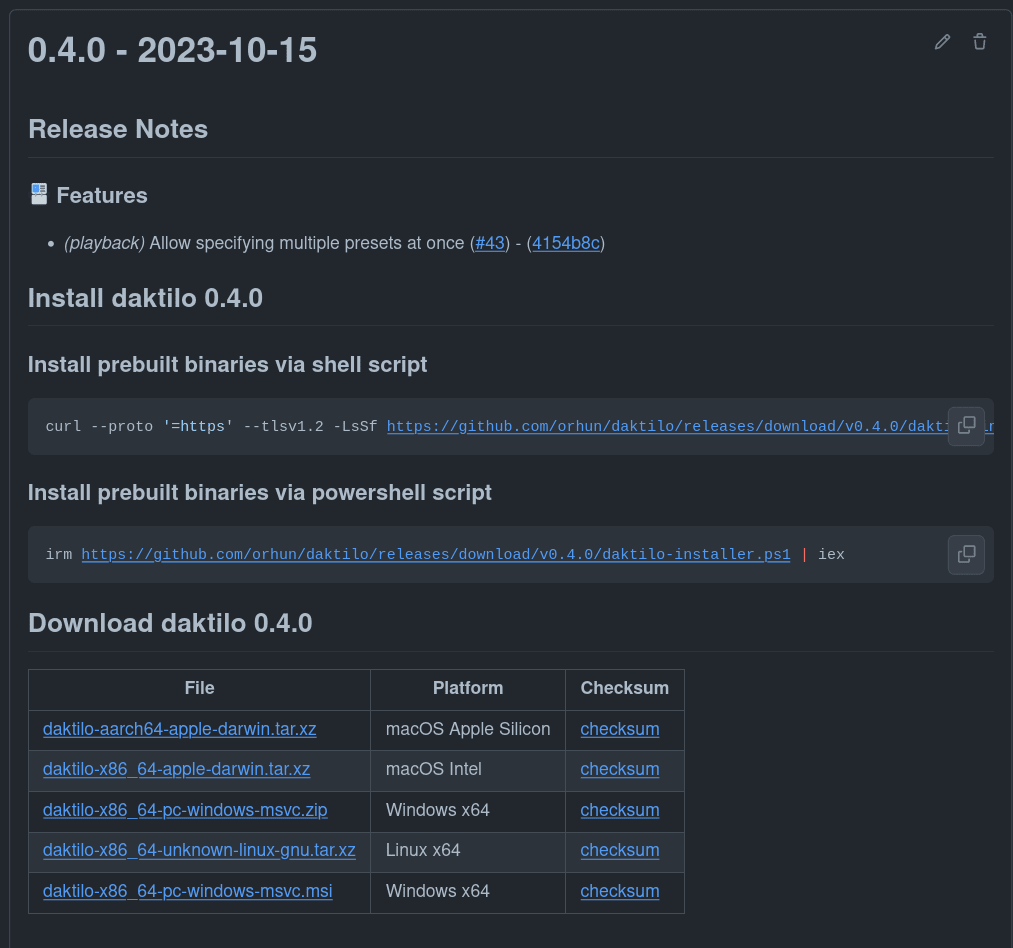
https://github.com/orhun/daktilo/releases/tag/v0.4.0
Similar to release-plz, cargo-dist is a tool that we will not be using locally, but will be running from CI. However, it needs to be installed to set up CI (for itself) for the first time.
So, let’s start by installing cargo-dist:
cargo install cargo-dist --locked
You can also use cargo-dist-installer to install cargo-dist (i.e. binary installer) if you want:
cargo_dist_version="0.3.1"

curl --proto '=https' --tlsv1.2 -LsSf https://github.com/axodotdev/cargo-dist/releases/download/v{version}/cargo-dist-installer.sh | sh
We will also have an installer as shown above after it cargo dist does its thing.
cargo dist init
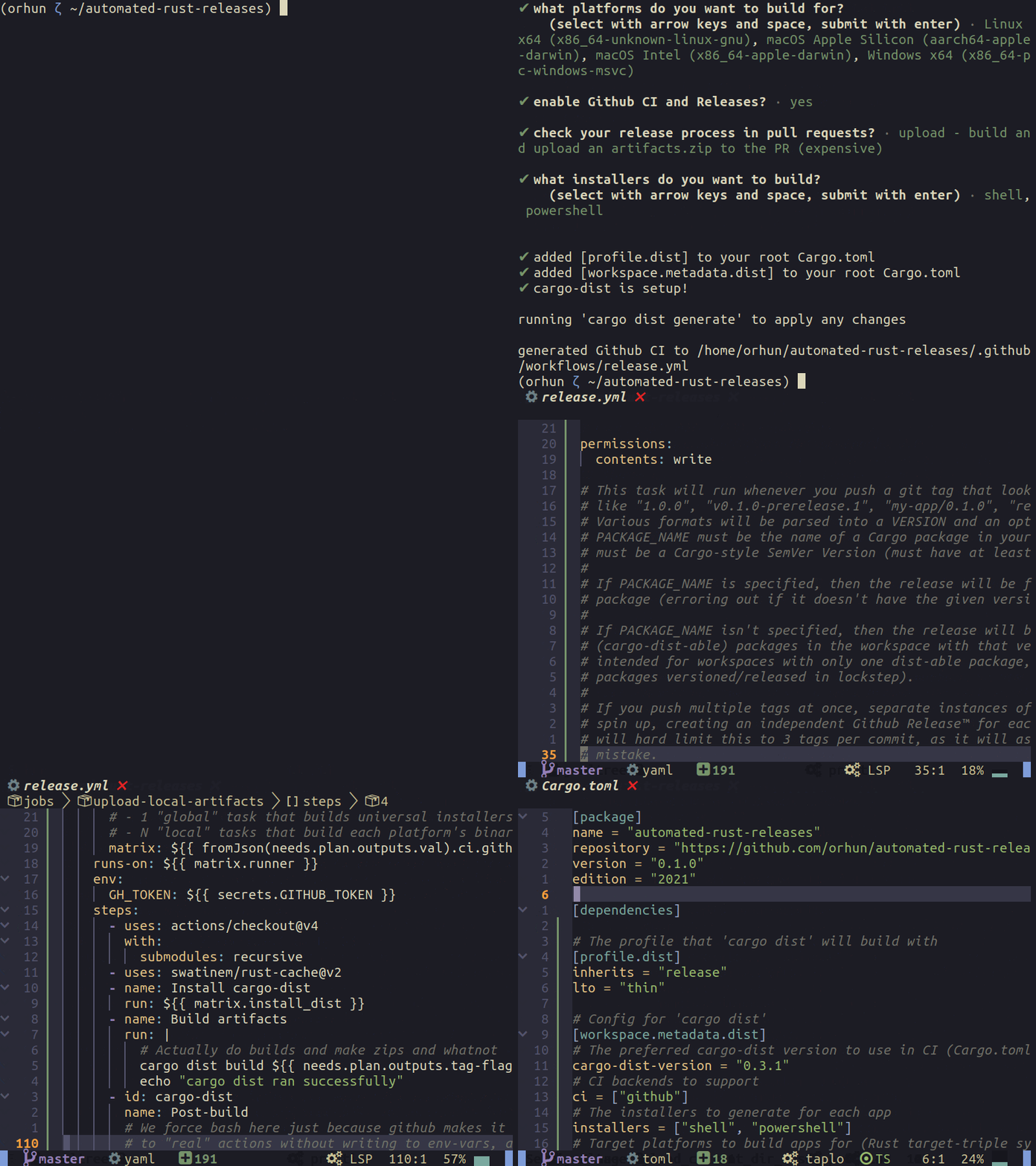
Wow, what happened?
The above command generates a .github/workflows/release.yml file to handle GitHub releases. It also adds the following section to your Cargo.toml project:
# The profile that 'cargo dist' will build with
[profile.dist]
inherits = "release"
lto = "thin"

# Config for 'cargo dist'
[workspace.metadata.dist]
# The preferred cargo-dist version to use in CI (Cargo.toml SemVer syntax)
cargo-dist-version = "0.3.1"

# CI backends to support
ci = ["github"]

# The installers to generate for each app
installers = ["shell", "powershell"]

# Target platforms to build apps for (Rust target-triple syntax)
targets = [
  "x86_64-unknown-linux-gnu",
  "aarch64-apple-darwin",
  "x86_64-apple-darwin",
  "x86_64-pc-windows-msvc",
]

# Publish jobs to run in CI
pr-run-mode = "upload"
You can update this configuration to easily configure cargo-dist and change release options.
Q: What about new releases/breaking changes to cargo-dist? Do I need to delete the configuration and start over?
A: You can just run cargo dist init again to regenerate the release configuration!
Q: Cool! Does cargo-dist check for updates to the workflow file? What if I want to make changes to the generated GitHub Actions workflow (e.g. install Linux dependencies)?
A: Just set the following values in the configuration to avoid the “out of date” warning:
[workspace.metadata.dist]

# Ignore out-of-date contents
allow-dirty = ["ci"]
Q: How can I test cargo-dist on-site?
Easy:
$ cargo dist plan

announcing v0.1.0
  automated-rust-releases 0.1.0
    automated-rust-releases-installer.sh
    automated-rust-releases-installer.ps1
    automated-rust-releases-aarch64-apple-darwin.tar.xz
      [bin] automated-rust-releases
      [misc] LICENSE-MIT
      [checksum] automated-rust-releases-aarch64-apple-darwin.tar.xz.sha256
    automated-rust-releases-x86_64-apple-darwin.tar.xz
      [bin] automated-rust-releases
      [misc] LICENSE-MIT
      [checksum] automated-rust-releases-x86_64-apple-darwin.tar.xz.sha256
    automated-rust-releases-x86_64-pc-windows-msvc.zip
      [bin] automated-rust-releases.exe
      [misc] LICENSE-MIT
      [checksum] automated-rust-releases-x86_64-pc-windows-msvc.zip.sha256
    automated-rust-releases-x86_64-unknown-linux-gnu.tar.xz
      [bin] automated-rust-releases
      [misc] LICENSE-MIT
      [checksum] automated-rust-releases-x86_64-unknown-linux-gnu.tar.xz.sha256
And run cargo dist build if you really want to build the artifacts. Also, if you set pr-run-mode to upload in the configuration, the artifacts will be built and uploaded as artifacts.zip in the associated commit on GitHub.
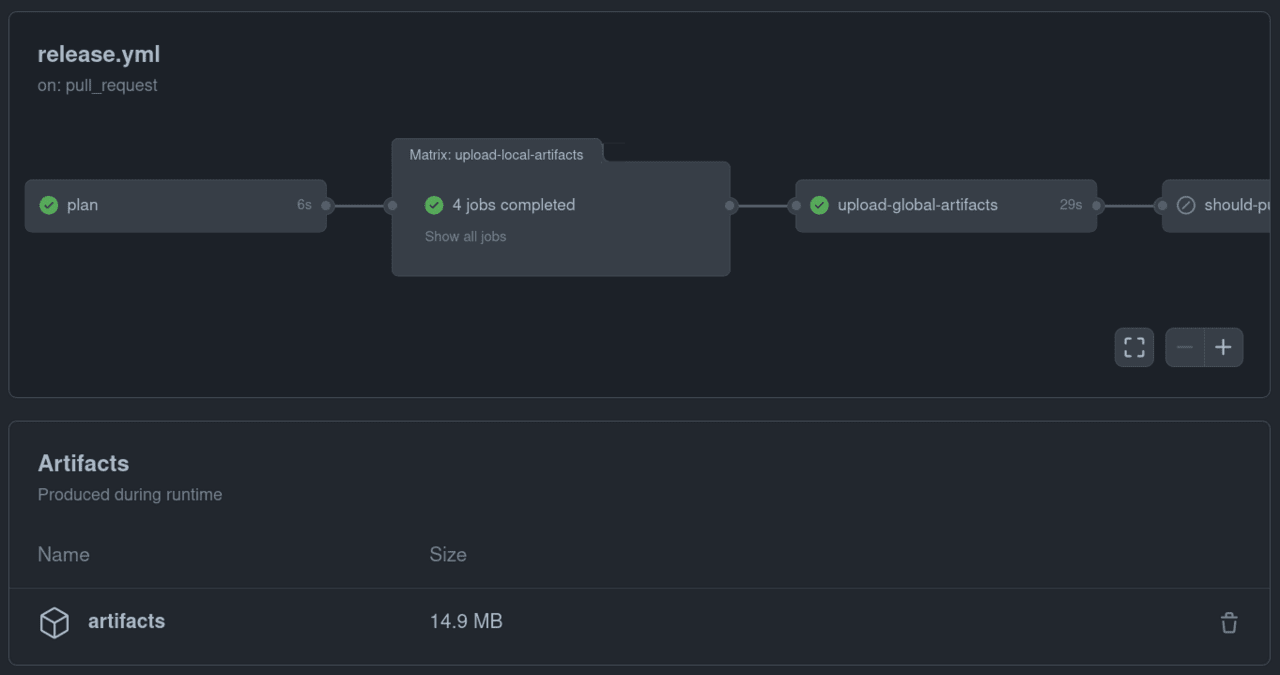
Now we’re ready to create artifacts and release them to GitHub! There are a few more steps left before we create a release and show everything off.
Dependabot— is a tool built into GitHub for automatically updating project dependencies by creating pull requests.
We can simply configure this by creating .github/dependabot.yml:
version: 2
updates:
  # Maintain dependencies for Cargo
  - package-ecosystem: cargo
    directory: "/"
    schedule:
      interval: daily
    open-pull-requests-limit: 10

  # Maintain dependencies for GitHub Actions
  - package-ecosystem: github-actions
    directory: "/"
    schedule:
      interval: daily
    open-pull-requests-limit: 10
Now Dependabot will start creating pull requests for Rust/GitHub Actions dependencies when they become obsolete:
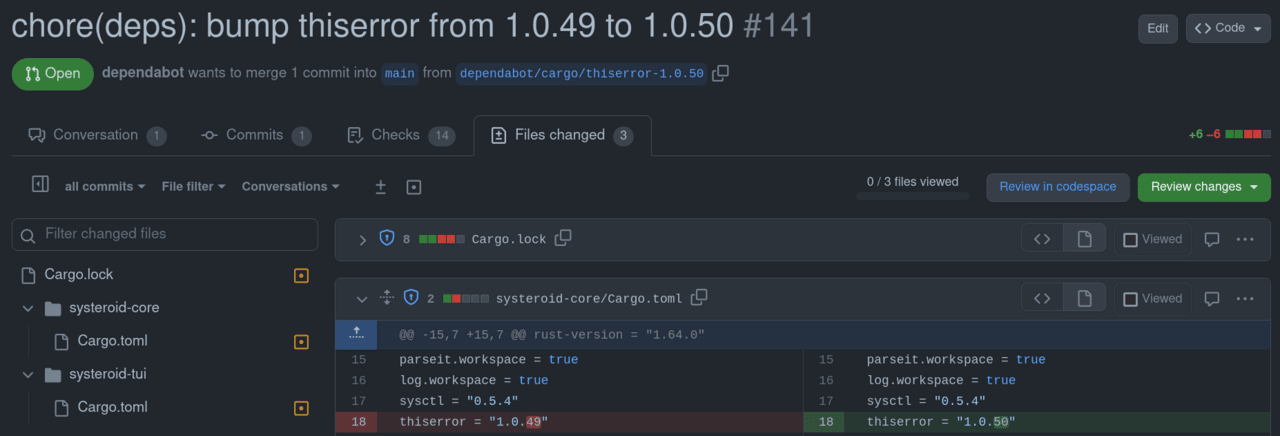
https://github.com/orhun/systeroid/pull/141
Mergify— it’s a CI/CD pipeline optimizer that manages your pull requests, automates your GitHub workflow, and optimizes your CI costs.
We will use Mergify to:
Automatically merge Dependabot pull requests.
Update to the latest main branch for pull requests.
Let’s create the configuration in .github/mergify.yml:
pull_request_rules:
  - name: Automatic merge for Dependabot pull requests
    conditions:
      - author=dependabot[bot]
    actions:
      merge:
        method: squash

  - name: Automatic update to the main branch for pull requests
    conditions:
      - -conflict # skip PRs with conflicts
      - -draft # skip GH draft PRs
      - -author=dependabot[bot] # skip dependabot PRs
    actions:
      update:
Finally, we need to create an account at https://mergify.com and add our GitHub repository to the dashboard:
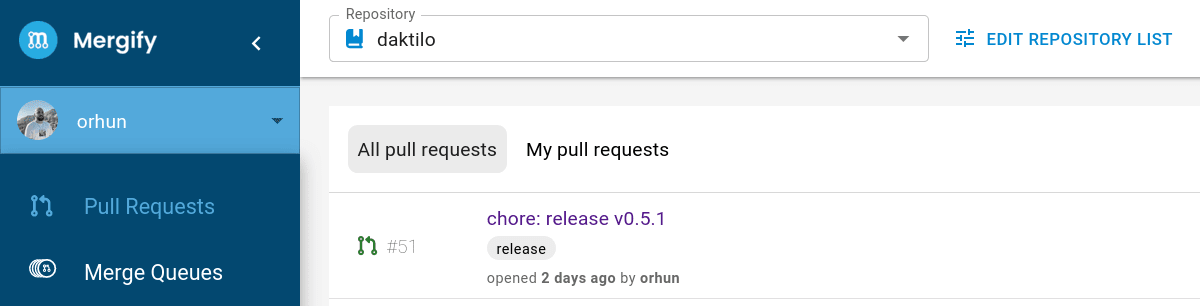
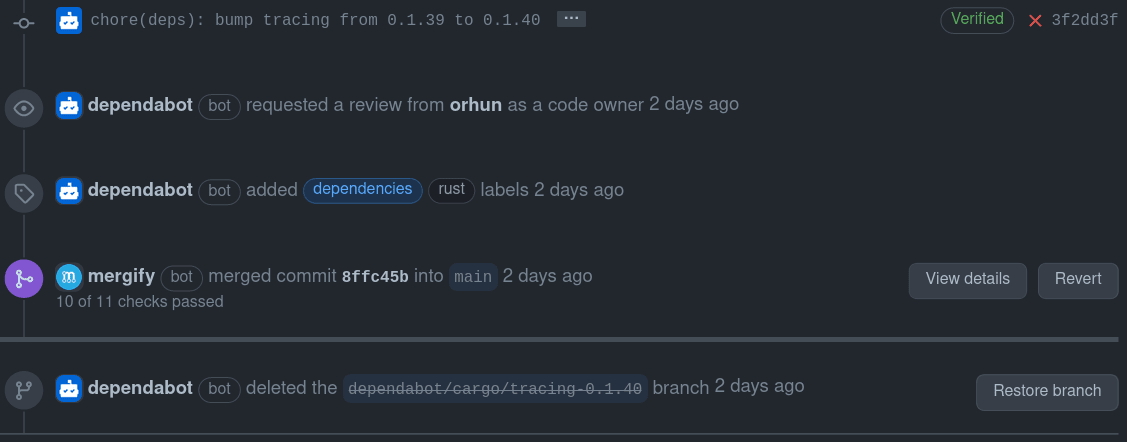
Now Mergify will start processing open pull requests:
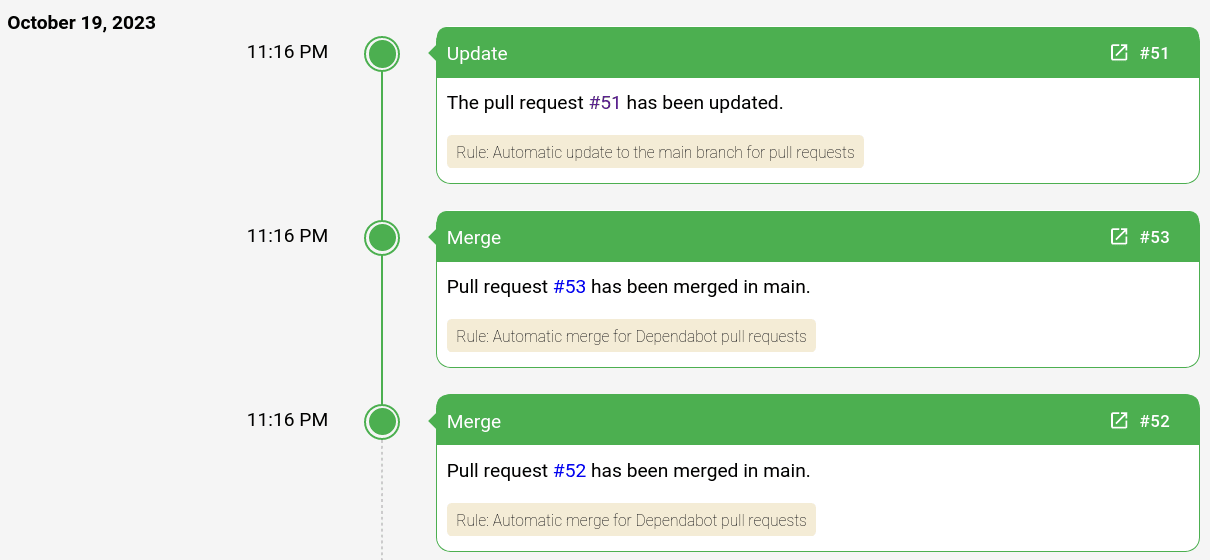
Dependabot withdrawal requests are now automatically merged!
All code/configuration is available here: https://github.com/orhun/automated-rust-releases
release-plz have already created a PR request for us:
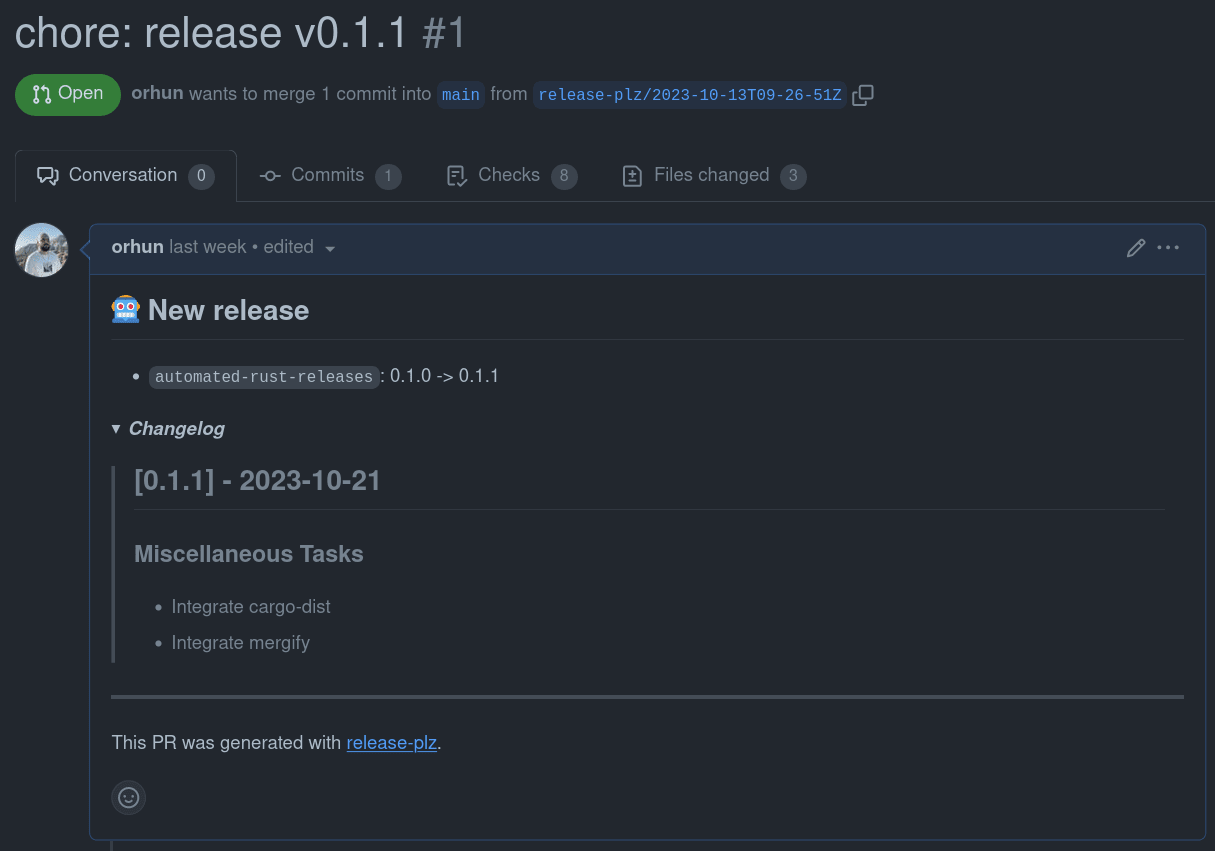
https://github.com/orhun/automated-rust-releases/pull/1
cargo-dist checks also pass. Let’s hit the merge button and create a release:
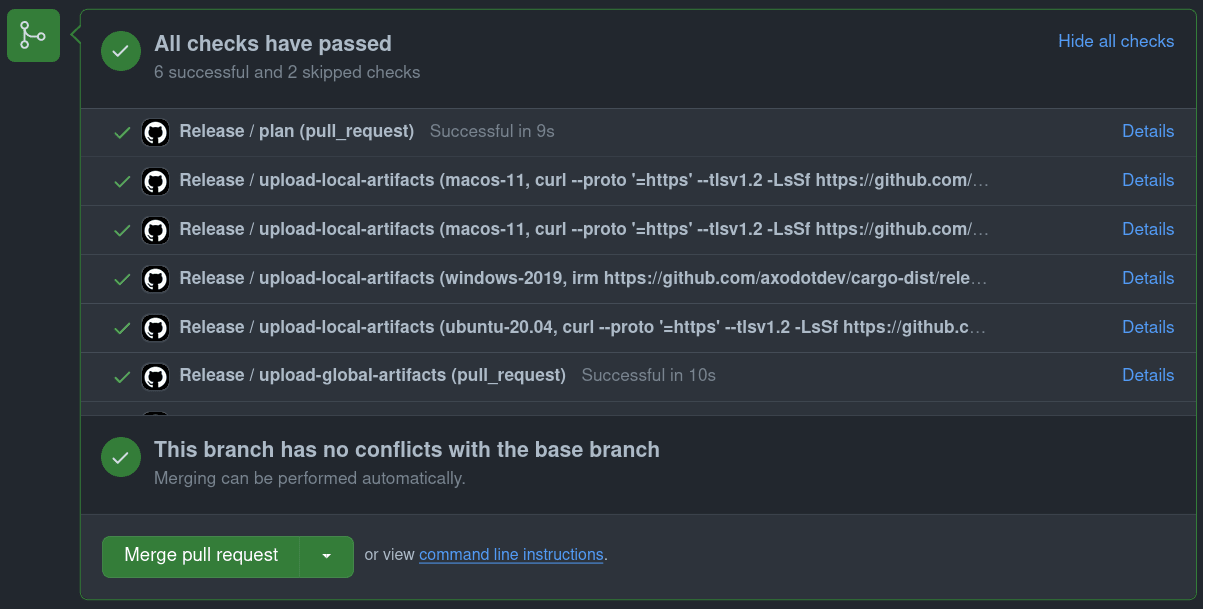
After the merge, release-plz gets the new version from Cargo.toml and sends it to crates.io:
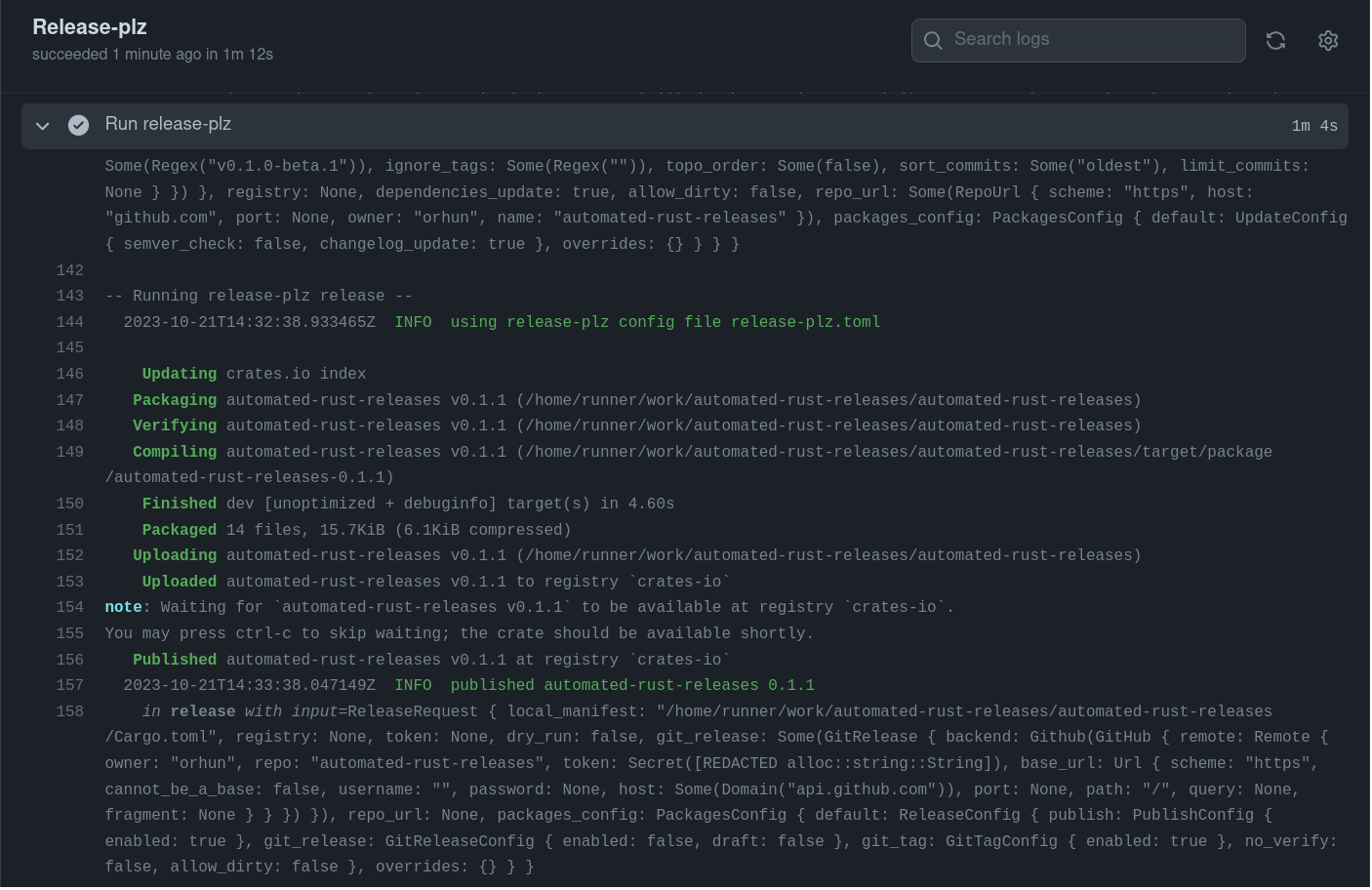
release-plz also creates a new tag that triggers cargo-dist:
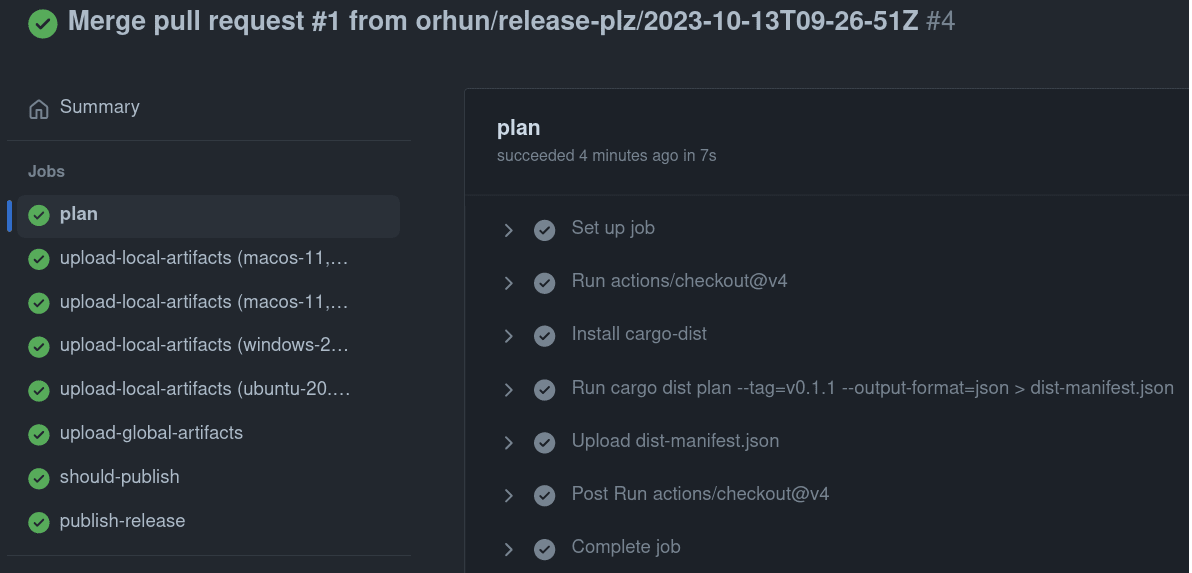
cargo-dist collects artifacts and uploads them to the GitHub release:
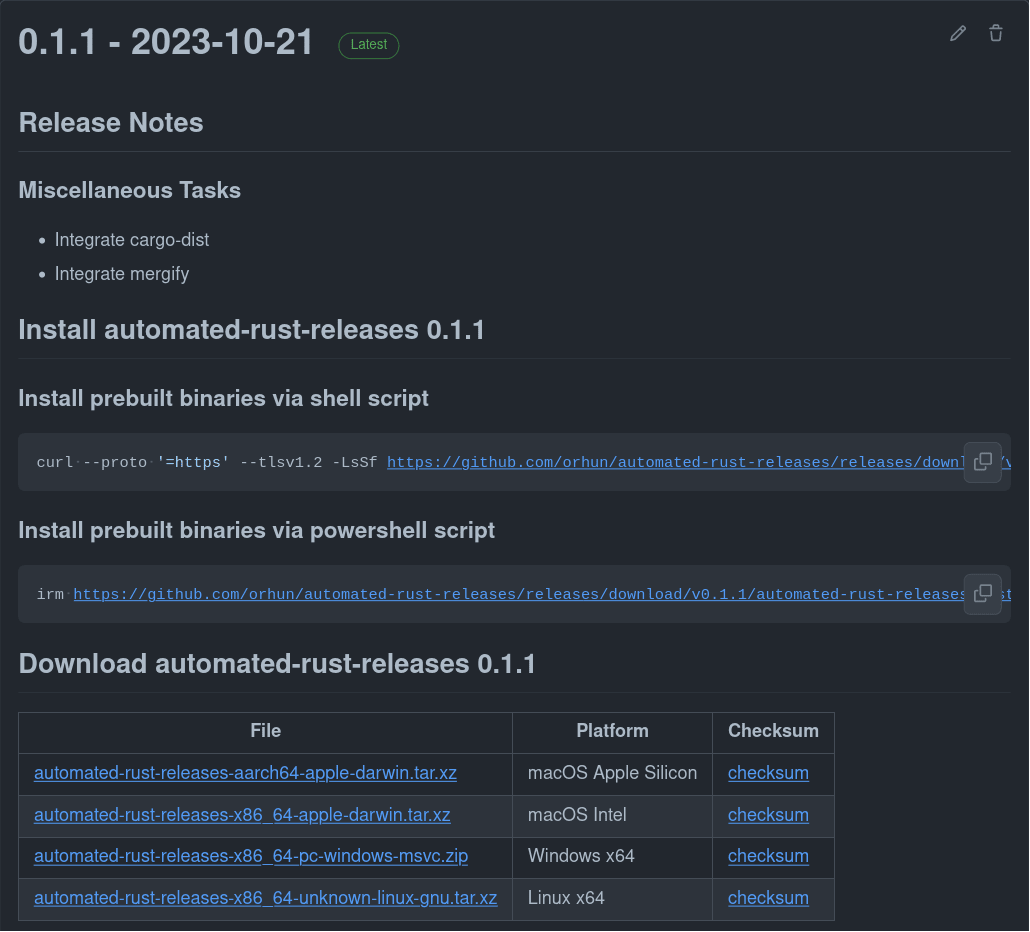
https://github.com/orhun/automated-rust-releases/releases/tag/v0.1.1
As you can see, cargo-dist also parses the changelog (generated by git-cliff) and adds it to the release. (Note that you actually need to create a CHANGELOG.md file in the root of your repository for this to work.)
Let’s try the installer in practice:
$ curl --proto '=https' --tlsv1.2 -LsSf https://github.com/orhun/automated-rust-releases/releases/download/v0.1.1/automated-rust-releases-installer.sh | sh

downloading automated-rust-releases 0.1.1 x86_64-unknown-linux-gnu
installing to /home/orhun/.cargo/bin
  automated-rust-releases
everything's installed!
And when we run it:
$ automated-rust-releases

Hello, world!
I used this release automation for my latest project, daktilo (a CLI program for turning your keyboard into a typewriter), and I’m pretty happy with it so far. The only improvements I’m looking forward to are the following:
git-cliff: better integration with GitHub (i.e. adding contributor names to changelogs * )
release-plz: setting the version in the release call report using the command *
cargo-dist: cross-compilation *
Let me know if you have any suggestions and ideas! Happy release!