


Learn how to set up Zero Trust in your infrastructure: secure web admin via mTLS and make devices trusted with TPM and Secure Enclave. A practical guide for engineers.
The concept of infrastructure protection, in which no party trusts the other by default, deserves special attention. Every action is verified, every request is controlled, and access is only allowed according to clearly defined rules. This approach is called Zero Trust, a model that puts security above convenience and eliminates “blind trust” even within the system.
What are the main ideas behind it?
Always check explicitly
No “trusted” zones
Designing with the mindset of “we’ve already been hacked”
Let’s go through the postulates in more detail and technically. As we go along, we will solve pressing problems – protecting web admins from data theft. As a result, we want to gain an understanding of how to make an MVP solution built on the principles of zerotrust.
Formally, for secure interaction in the infrastructure, mutual authentication and authorization between the parties is required. A typical corporate network includes server and user segments. One of the most common ways of data leakage is the presence of an attacker inside the VPN environment, who gains access to accounts or bypasses two-factor authentication for internal admin panels, and then steals information.
The main reason for such incidents is the assumption that everything inside the VPN is already sufficiently protected, and re-authentication is no longer required. However, this approach is considered outdated.
The modern security model involves mandatory and explicit verification of both sides of communication — both from the server and the client side. The most reliable mechanism for this is the use of mTLS (mutual TLS), in which the parties mutually verify each other’s cryptographic certificates before establishing a connection.
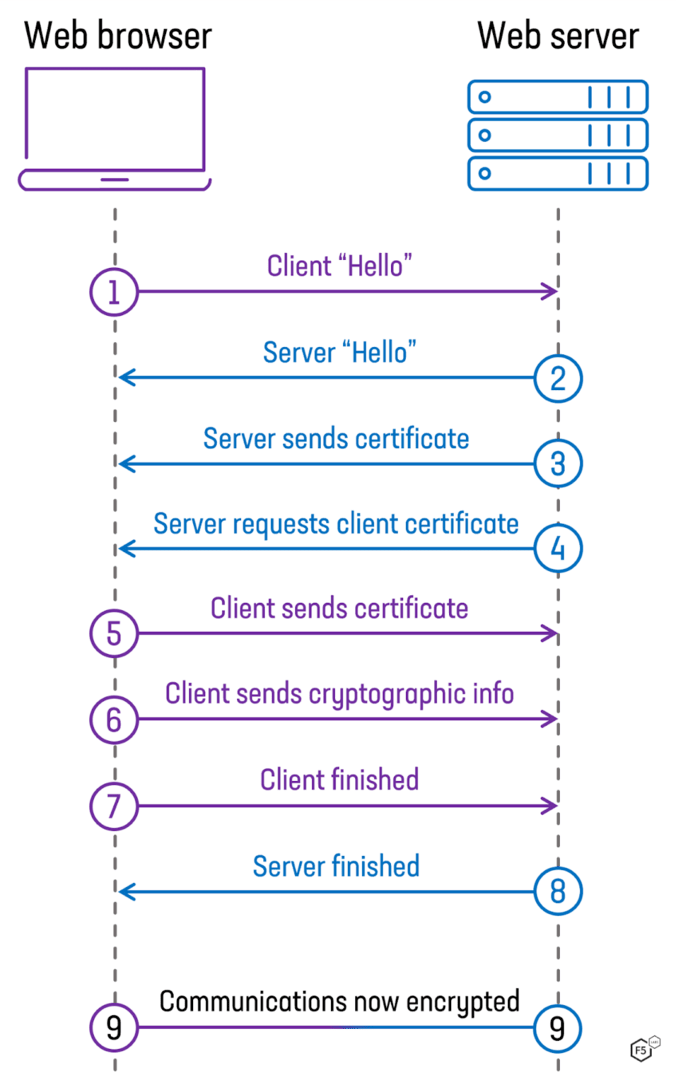
This is how mTLS works. The client and server exchange certificates, validate them, and establish a secure connection. The explicit verification problem is solved.
What if we not only want to know who came to us, but also find out how secure the device is? That is, to fully protect our admins, we need to do two things:
Authenticate device
Authenticate user
You can reliably authenticate a device by generating a certificate in a non-removable storage. For this, Secure Enclave in Apple devices and TPM for other devices are suitable. You can authenticate the user using standard methods – for example, ldap or OIDC are suitable. We will talk more about the issues of device and user verification in a separate article.
Designing a service should be done as if all your servers and clients were exposed to the Internet with all ports. At the same time, it is necessary to take into account that each company has its own level of maturity and its own pace of business development. Compromises will be required, for example, for exclusively inter-server interaction (access to the DBMS by the backend of a web application), urgent implementation of ZT will be redundant. However, designing new or transferring the architecture of old services to new rails will yield significant results from the point of view of IS in the long term.
Returning to the urgent problem of protecting admins – the simplest and most effective method will be a proxy. Or step by step:
Implement a proxy that performs device verification
Implement a user verification mechanism – e.g. OIDC
Move the existing admin to our secure proxy
After implementing these points, it will not matter to us in which zone of trust our admin will be – inside the VPN, inside a separate protected subnet inside the VPN, or on the Internet. We have removed the binding to trusted zones.
This point is somewhat less technically applied, but it is very important. When building the infrastructure, it is necessary to accustom ourselves to the thought that each element is already hacked – a client laptop, a server, or a network hardware. This way we will be able to clearly understand what risks will arise when hacking, for example, a client laptop, and what measures need to be taken to mitigate or prevent attacks.
Since the applied problem that we are solving is the protection of web admins, the main object of protection for us will be client laptops, since our proxy allows only devices known to us into the admin.
a) we install protection and monitoring tools on it – edr agent, properly configured logging.
b) we make sure that our Security Operation Center is able to recognize all modern types of attacks on endpoints. To do this, we constantly study new TTPs, conduct training and write new rules in SIEM.
So, what did we learn? To get the MVP of Zetotrust’s web admin protection solution, we need:
Implement a certificate delivery and validation infrastructure for end devices
Implement a proxy capable of establishing a secure mtls connection, prospectively checking the security level of the connecting device.
Establish protection and monitoring of end devices
At a high level it looks something like this:
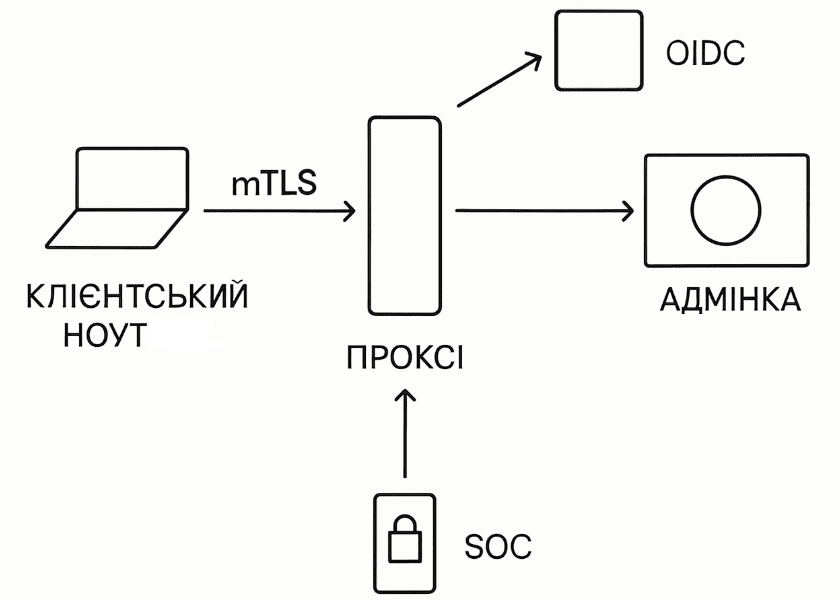
The scheme is deliberately simplified, in each new material it will be updated and complicated. The mTLS scheme and the certificate validation system will be described in detail, the inclusion of SOC not only in working with the laptop itself, but also in monitoring the admin itself, checking the security of end devices, that is, each new element will be reflected in the scheme as it is discussed in detail. The final scheme will be available later.
It is impossible to say exactly who invented ZT and how. We are more interested in the practical side of the issue. And there is a number of materials on it.
Google BeyondCorp. A series of articles, including the first internal, and then commercial product. The articles describe in detail the theory, the scheme of work and a number of key technical and management aspects. Must read.
Project Zero Trust. A book by two Zerotrust ideologists who have been traveling to different companies for ten years and telling how to implement it. There is very little technical information, but there are some insightful tips on “selling” a business idea.
Cloudflare ONE. A commercial solution from Cloudflare, the documentation describes the technical aspects in sufficient detail, from which you can understand the organizational aspects. It is an *AAS solution, personally, it is not reasonable for me to get attached to ready-made solutions of this scale. It is well suited for taking ideas for your own development.
In order for zt participants to verify each other, we need some kind of mechanism. Previously, we chose the good old mTLS for this. It allows you to reliably and safely verify both sides of the interaction.
Let’s turn to our practical task – protecting web admins. Browsers learned to check the validity and trust of a web resource certificate a long time ago, and the mechanism is well-established. With verification by the endpoint server, not everything is so simple. The first problem that comes to mind is where to put the certificate on the user’s machine so that it is not stolen? There are several options – just on the file system, in a protected password storage (for example, Keychain on macOS), or in an even more protected hardware storag TPM or Secure Enclave.
Our practical experience of pentests shows that everything that is on the user’s machine can be extracted. The certificate is simply extracted from the disk twice, the password from the Keychain is extracted by a fabricated pop-up asking to enter the password from it. The TPM remains. Its obvious advantage is that the certificate generated inside cannot be extracted – that is, when the machine is broken into and even if an attack is received on it, the root will still not be able to obtain the private key. It turns out that our choice is obvious – we put the certificates for mTLS in the TPM/SecEnclave.
And here the interesting things begin.
Let’s start with the platform that works most correctly – Windows. All the logic of working with TPM is sewn into several system DLLs of different levels of abstraction, for which humanity has developed a large number of wrappers.
Without going into technical details, the generation and storage of the certificate is performed by calling functions already written by good people from the go package (we write in go). All that is needed is to package the function call into a binary, add support for cli and silent mode, and then test its pouring and execution using domain policies.
Apple devices performed quite smoothly. Let’s start in order.
There are no developed Opensource libraries/software for working with Secure Enclave. Of the more or less live ones – software for writing ssh keys to tpm (not tested) and POC software for full-fledged work with SecureEncavle, writing and deleting arbitrary keys, their listing, etc. It would be taken as a basis and would work normally. Apple hasn’t rolled out an OS update yet, after which everything stopped working. A willful decision was made to write everything from scratch.
Due to the lack of open libraries, you have to use the native macOS API. Because of this, you are forced to write in Objective C. After a heroic express of learning a new language in combat conditions, you come to a new interesting task.
Binary signing. You can’t just take and distribute a program that works with a secure crypto provider. This will require a) a paid Apple Developer account b) sacred, nowhere described knowledge of what entitlements the software needs to request, and what checkboxes to check in XCode.
Compatibility. Apple’s own processors and SoCs are undoubtedly outstanding technical achievements. The problem is that with each new version of the chip, the specification and necessary elements change. In order for the binary to work correctly on all platforms at once, it was necessary to consult with the spirit of Steve Jobs.
After overcoming the above, it was possible to create software. Brief conclusions – Secure Enclave is still raw and requires a lot of attention and support, the platform holder – Apple – can change the rules of the game at any time, your software will stop working, your processes will break. You need to be ready and have a plan B for every negative development of events.
As soon as we start pouring certificates onto devices, we will face a problem – how to understand that the device requesting our certificate is corporate?
Since we use self-written binaries to request and execute the certificate, we need some mechanism so that a temporary employee Vasya does not come to the office with a personal laptop, install our binary, pull the handle and turn his personal laptop into a corporate one.
The first solution is to use the official attestation method recommended by manufacturers. Apple offers the ACME protocol – the official certificate management protocol in a corporate environment. The verdict is short – it is crude and does not work. For Windows, there is an official TPM Key Attestation process, which in our experience works. Here we come to the fact that half of our fleet will work normally (Windows), and half will not (macOS). We need another method.
The second method. Retrograde. We organize a secret room in which there is a server with a Certification Authority from which one patch cord sticks out. We bring all the company’s laptops to this room and distribute the certificate over the wire. The method, funny as it may seem, is effective, but not very convenient. Distributing certificates to the existing equipment fleet will be extremely laborious. However, the method is quite valid for setting up new equipment. For now, we leave it in this truncated form.
The third method. Independent Enroll with validation. Our software for communicating with our CA is distributed openly, it already comes complete with a corporate distribution. When a certificate is requested from a new device, it goes into a waiting list, in which an engineer manually analyzes whether the device is indeed corporate, after which he will approve the certificate. The method is good, but only for small volumes. We use it for exceptional cases. We also use it for initial distribution to the fleet of current devices that have been issued to users.
Together – in an ideal world, when vendor solutions work, we will be able to fully automate the attestation process using MDM. Right now we are forced to use auxiliary tools.
For mTLS validation, our proxy needs a CA from which it can receive confirmation whether “our” or “not our” computer came.
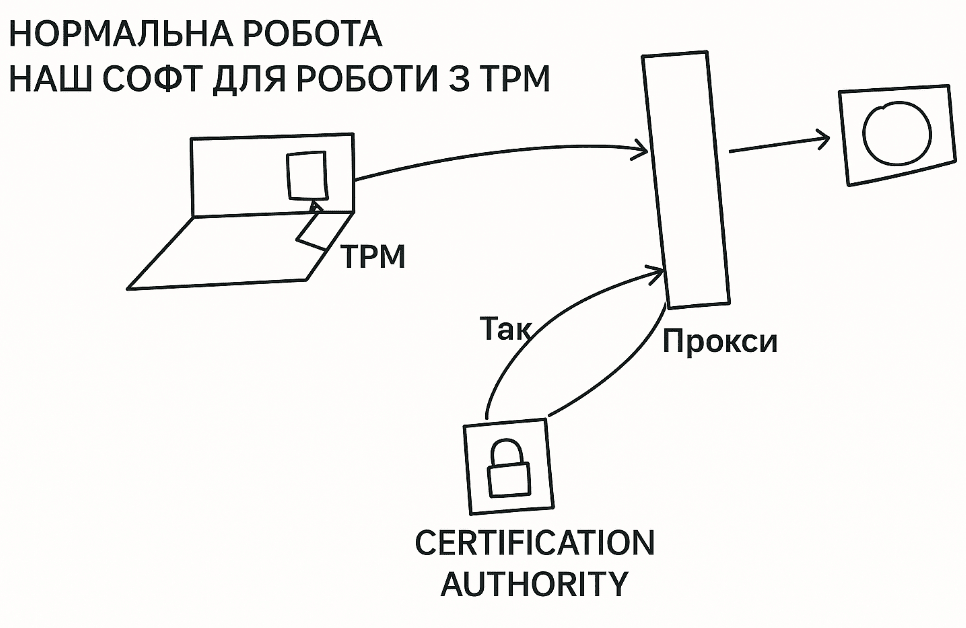
We also need a CA for initial device certification:
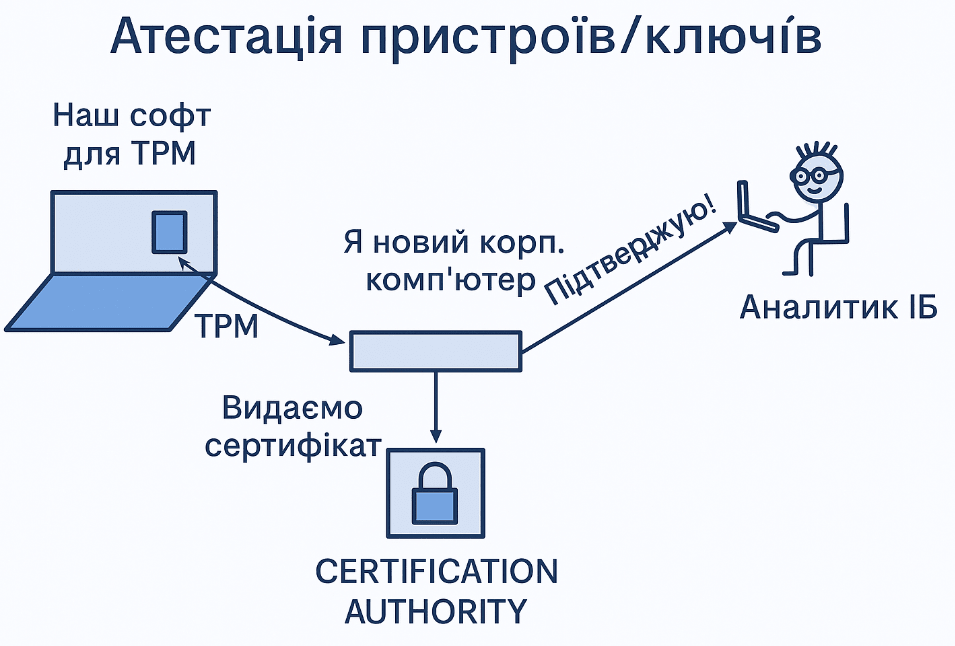
As you can see from the diagram, we need a small middleware to work with the CA and our software. On it, we can provide new computers, spin up authentication if necessary, collect statistics, and, importantly, collect logs of our software (in case of crashes, for example).
Since mTLS is a fairly well-established technology, browsers work well with it and have a sufficient set of tools with fine-tuning.
To ensure stable operation, it is desirable to have a farm for testing all necessary browsers for all necessary operating systems. At the time of writing, Chrome, Firefox, Safari browsers on MacOS and Windows worked correctly.
After successful installation of the certificate in tpm, when the user opens the admin panel behind our zt proxy, the browser offers to select a certificate for authentication (this is how mtls works). To improve the user experience, a small additional configuration is required to transparently “present” this certificate to the browser. This is done using standard documented methods and from experience it works correctly. This tweak will ensure zero user interaction when switching to zt, which will ensure us respect, honor, and positive feedback from our employees.
To connect user machines to the zt process, we will need:
Develop a mechanism (software) for delivering, managing and attesting certificates for all supported OS and devices.
Understand and elevate Certification Authority to ensure device authentication
Write middleware to interact with Certification Authority
A few more notes. For our MVP, we support laptops with Windows and macOS. We have conducted research on *nix, achieved functionality, but do not officially support it. We also do not consider mobile devices here, their support is beyond the scope of MVP.
