


In the second part of the Zero Trust Implementation Guide, we look at how to build a single proxy layer to protect admins, implement mTLS and OIDC authentication, and control access based on device state. We explain how the decision-making system (DMS) works, integrate osquery and EDR, and implement caching and real-time logic. The article will help DevOps, sysadmins, and security teams configure dynamic access, build an architecture with proxies, and detect compromised devices before they even open the admin. This is a fundamental step in building a reliable Zero Trust infrastructure.

Let’s recall the main idea of ZT regarding the protection of admins – the admin can only be accessed by providing a certificate that is stored in a secure storage on the device. This means that the attack surface is greatly reduced and consists of a) end devices; b) machine-to-machine interactions (when one service knocks on the API of another service).
It turns out that in order for an attacker to gain access to the admin data, the easiest way is to hack an employee’s laptop.
At the initial stage, we must adhere to at least:
Basic OS Configuration Requirements
Agent Installation and Performance
We write requirements for OS configuration. We fix in them the need for a lock screen, disk encryption, disabling unnecessary services, etc. We check the status of these requirements using an agent on the device. The simplest option is osquery. Osquery will allow us to constantly monitor the security status of our devices. It also easily integrates with SIEM for potential data enrichment.
In addition to osquery, we need some kind of agent that collects logs from the device, ideally an EDR agent. This will allow us to detect attacks on the device and respond to them promptly, including disabling access to admins for the compromised device.
On top of the basic minimum, you can add any of your own controls, the main thing is to ensure the delivery of statuses for these controls to a single place where we will see the general security status of our device fleet.
Let’s take a closer look at how device security and data access are related. So we’ve rolled out osquery, installed EDR, and are compiling logs into SIEM. All we need to do is write a service, call it the “Decision Making System” (DMS), in which the main logic will take place. It contains the requirements for admin access, which will be compared with the current device status.
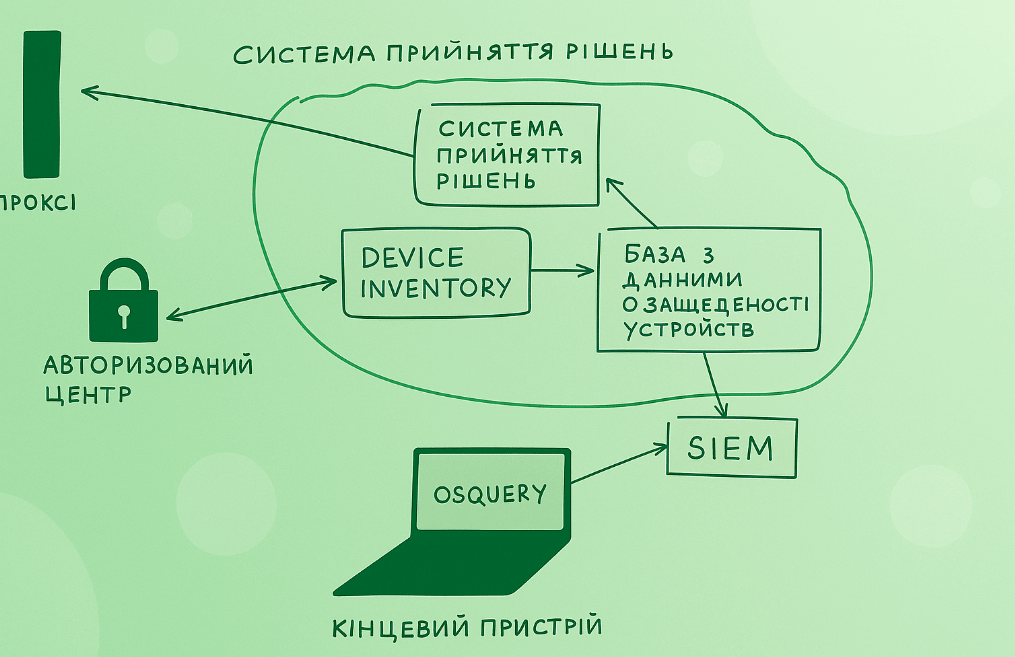
The scheme of work will look like this – each HTTP request from the end device comes to the proxy, the proxy in turn asks the SPR whether it is possible to run this device. At any time, the device status can change – for example, a new RCE has appeared in the browser, and updates have not yet been installed. At this moment, the SPR changes the device status to insecure, and the user is shown a stub instead of data in the admin panel, notifying that an update is necessary. After the update, the data via osquery will reach the SPR, and the device status will change to green again. For different admin panels, you can set different requirements – for non-critical ones, for example, even non-updated devices can be run, and for especially critical ones – add additional requirements.
As you can see from the diagram, the Device inventory and the Device security database are separated. This is done because most often the device inventory system does not scale well or slowly adapts to dynamic requirements for functionality. Therefore, for speed of development, you can deploy your own system, in which inventory data will be synchronized from a single Device inventory, and the status of requirements fulfillment – from osquery and other agents.
The task of inventory and agents is a complex and time-consuming process, which is reasonable to allocate to a separate project and transfer to individual people. Communications are also important in this task – you need to notify users as widely as possible about the implementation of new technologies and the need to comply with requirements. Special attention should be paid to agreements with managers, obtaining their approval and support. These measures will significantly reduce friction when switching to a new access scheme and will help increase the overall security of the device fleet.
Above, we discussed the minimum task of building a secure fleet of devices and integrating it into Zerotrust. As an optional step, I would like to share additional measures that will take the security of laptops and, in part, users, to a new level.
Dedicated people should constantly monitor new attack vectors and test them in practice. New delivery methods, reinforcement, approaches to social engineering – all this should be done regularly, and together with the Security Operations Center team, it is necessary to assess which vectors were noticed and which were not. Controls should be built for all missed vectors, and these controls should be validated.
Most often, Red Teaming finds vectors that are poorly or not detected at all by available protection tools. To solve this problem, it is necessary to either a) add specific monitoring rules, if possible; b) create your own software, or take open source.
Examples of tasks that are poorly detected by antiviruses but are regularly used in attacks:
Adding ssh key to authorized keys
Running binary from flash drive.
Most methods of mounting on macOS
There are ready-made solutions for the tasks above, or it is not so difficult to write your own little demons.
It is clear that the topic of device protection is much broader, but since the attack vector through laptop compromise is very important for us, the need for attention to this topic is difficult to overestimate.
The key link in zt is the proxy. It is with it that all clients interact, from which they receive a verdict – whether they will be allowed into the admin area or not.
What a proxy should be able to do first of all:
Establish mTLS connection with client
Correctly proxy requests from client to protected service and back
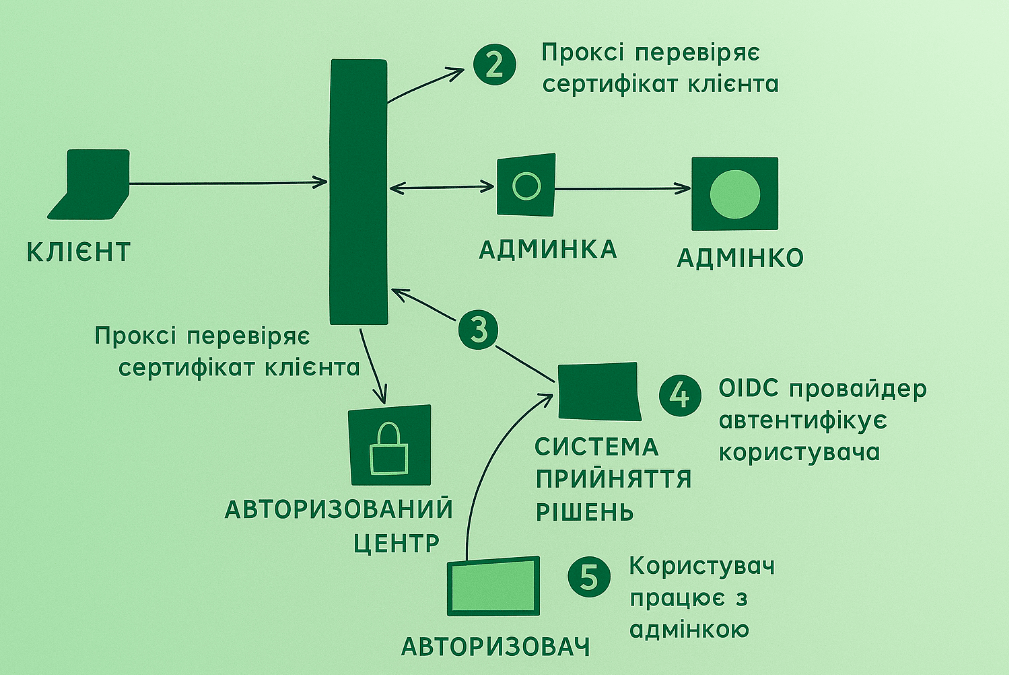
Work with other services – Certification Authority and its middleware, OIDС, decision-making system (which makes the decision to allow/not allow)
The scheme of work is as follows:
What a proxy should be able to do in the second place:
Work not only with HTTP protocol
Tear down connections in real time
Support granular access configuration per route for HTTP. For example, allow only certain users to access /admin.
Provide support for machine-2-machine interaction
Have a breaking glass mechanism
Let’s see if there are ready-made solutions for these tasks that we need to refine ourselves, and think about what we need to do during the MVP period.
The first criterion for choice is open sources. Ready -made Vendor solutions are not suitable – they have very specific requirements, raw products, the vendor always runs slower than you. When choosing an option, we focus on the stack, as we plan to support, write and rewrite the decision.
The second criterion is compliance with our requirements for functionality.
Among the more or less ready-made solutions, we can single out: ORY, Pomerium, Teleport. Everyone can evaluate what is closer to them. You just need to immediately accept that in the second year of operation everything will have to be changed and rewritten.
In general, a fairly simple task, some solutions are able to do it out of the box, some will have to be added.
Correct proxying of the connection
Since our proxy is in a split state, high stability requirements are imposed on it. Also, great attention should be paid to the process of migrating admins to our proxy. Let’s take an example:
The existing admin uses a self-written user authorization and authentication system. The user goes to the self-written system, logs in, it sets HTTP headers and cookies for him, after which the admin lets the user through. When migrating to a single OIDC, this creates a problem – the admin waits for certain headers from the user, otherwise it simply won’t let him through.
Therefore, we need to implement improvements on our single OIDC and on our proxy so that they throw up the headers that the admin is waiting for. Perhaps, improvements will also be needed from the admin side, but we need to minimize them. This is a very important point – the easier it is for a resource to migrate to zt, the faster and easier the migration of other resources will be, and later the entire company. Ideally, we should make the scheme more user-friendly than it was. Users will gain ease of access and operation, and we will gain a more secure and technically mature infrastructure.

Interaction with the CA is implemented within the framework of the mTLS connection task, there should be no difficulties with it.
With OIDC as well – after checking the device, we must edit the user to the page for entering his login and password/second factor, after which it is correctly processed and his session saved.
Interaction with the Decision-Making System. In the SPR, we will lay down the functionality of analyzing the degree of device security, setting requirements for them and managing these entities. We will dwell on it in more detail in the following materials, the main thing we will note for ourselves here – the SPR must have an API by which the proxy will poll it, and the proxy itself must support a caching mechanism so that the SPR does not have to be pulled for each user request. I note that within the framework of MVP we are only designing this part, the decision to “allow/not allow” itself will still be made at the level of certificate availability and trust.
Even in the MVP process, after connecting several admins, the list of functions we will need will grow and multiply. I will list and comment on some of them:
Support for non-HTTP protocols. It would be cool if we could administer our servers via ssh with zt functionality – device verification, single convenient authorization, etc.
Real-time connection termination In the event of an incident or the release of a new 0day in Chrome, we want to lower the trust level of devices and terminate their connection with admins.
Granular configuration of routes within the program will allow us to quickly and conveniently connect legacy admins and at the zt level control access to sensitive functionality inside them.
Machine-2-machine. This is an obvious and very important thing – almost any admin is visited not only by people, but also by other services, and they also need to be somehow verified and authorized. The topic greatly overlaps with the problem of inter-service authentication, integrating these two technologies into one is a complex and interesting task.
Breaking glass. In some cases, we still allow non-compliant clients to access our resources. And in some situations, our zt infrastructure may fail, and we need to allow users to continue working during the failure.
Proxy is a service that is constantly growing and changing. It is important to determine for ourselves what we want first of all, implement it, ensure reliability, and then continue development.

У вас скільки класного, усілякого добра, що потрібно ще одне життя ))