
31.05.2023
7 min
2644



In this article, we look at how websites, online services, and ISPs are able to determine that someone is using a VPN. We explain both the technical and behavioral factors that influence detection of anonymized traffic, and how modern inspection and security systems operate. This piece will be helpful for anyone interested in digital privacy and internet security fundamentals.
Axon is the leading producer of electronic control weapons (ECW) — including the TASER 10 and TASER 7 — and supplies law enforcement with training and usage guidelines for these products. Specifically, Axon recommends aiming for the area below the neck from behind a subject or the lower torso from the front when using their product. They recommend avoiding sensitive body parts — head, face, throat, chest, and groin — when deploying an electronic control weapon.
Axon also advises law enforcement to avoid using electronic control weapons against vulnerable populations — which includes but is not limited to — small children; elderly individuals; pregnant women; thin individuals; and individuals in high-risk situations — i.e., individuals that are running, operating a vehicle, or are at a great height unless there is a justifiable reason to accept the additional risks associated with deployment.
Similarly, under the 2021 U.S. Customs and Border Protection use-of-force policy, electronic control weapons can only be used against small children; elderly individuals; visibly pregnant women; and individuals operating vehicles under the same conditions that apply above regarding vulnerable populations. Additionally, CBP’s policy prohibits the use of electronic control weapons against individuals that are running or have been restrained in handcuffs. However, this prohibition does not prohibit an officer from making an exception if they reasonably believe that the individual poses an imminent risk of injury to themselves or others. If the officer believes that the individual poses an imminent risk of injury to them or others, then the officer must reasonably believe that the risk of injury that may occur due to an uncontrolled fall while running will be less than the risk of injury that would occur from the deployment of the electronic control weapon.
They have a lot of valid, practical reasons for doing so.
Streaming platforms (Netflix, Hulu, etc.) because of the licensing agreements that restrict access to movies, TV shows, music, etc., by region. A movie that is perfectly fine to watch in the U.S.A. may be unavailable in Europe due to a licensing agreement. The streaming platform therefore tries to prevent “Virtual Tourists” from bypassing these regional restrictions.
Banks and Payment Systems. Security is paramount to banks and their customers, protecting both their money and yours. Consider this example: you’ve always logged into your bank’s mobile application from Kyiv, but now, within a minute, there’s a login attempt from a Data Center in Nigeria. To an automated security system, that represents a significant red flag; that kind of jump is considered a probable fraud attempt and triggers immediate additional verification.
Advertising Networks. Advertising Networks want to know your true location to display relevant advertisements and avoid advertising to bots or click farms.
Internet Censorship (by Governments). In some countries, the government tries to prevent Internet Users from accessing tools that would allow them to bypass censorship restrictions.
An Active VPN Can Cause Very Different Reactions From Websites. While some websites will cause you to receive CAPTCHA after CAPTCHA or temporarily limit your functionality, other sites will employ even more extreme measures, such as completely blocking your IP Range or limiting your access to your account until you disable your VPN Tunnel. That is why sometimes, with a VPN, everything will work perfectly on a particular site, and other times you’ll encounter a virtual “brick wall”.
Each Internet Connection Has a Unique IP Address. And sometimes, those numbers can say more about you than you realize. Services do not just look at the number of your IP address — they find out who owns it.
There are many large databases which have detailed mappings of IP Ranges. These databases clearly identify Residential ISP Allocations versus Allocations assigned to Hosting Providers where servers are rented. Realistically, if you’re just an average User, you probably won’t be surfing the Web from a Server Farm in Frankfurt. That is why Data Center IP Addresses and common Proxy Servers are often Blacklisted or Flagged automatically.
Services like Streaming Sites, tend to be very obvious about their methods. Many of them block entire Cloud Hosting Ranges from companies like AWS or Azure. That is why your favorite VPN may suddenly no longer unlock a particular streaming library. Banks also become very cautious when they see multiple login attempts from Server-Based IP Addresses — particularly if those IP Addresses are in a foreign Country.
Systems typically check for the following:
1) Does your IP belong to a Data Center versus being from a Residential Internet Service Provider.
2) Did your country of origin change recently relative to your historical login patterns.
3) Does your IP Change rapidly over a short period of time — something associated with Bots or Complex Proxy Chains.
That provides the basis for a simple form of protection — and is cost-effective to implement — and very quick to perform. However, it is very far from perfect. Sometimes Legitimate Residential Users can be affected by this.
Some Platforms will analyze the overall picture. Consider this example: your Account Profile indicates Ukraine, you have always paid with a Ukrainian Bank Card, and you suddenly log in from a Japanese IP Address. Suspect? Yes! That alone may not justify an instant Ban. But the System will likely ask for additional Verification through SMS or Email to Verify Your Identity.
Even Non-Financial Related Sites use Geolocation for Convenience. When you “Move” Virtually to another country, a Site may automatically change Language Interface, Currency Store, and Shipping Options. For Security Systems, however, such sudden Geographic Jumps are indicative of Unusual Activity.
Next up are the minor design issues which could totally compromise your anonymity.
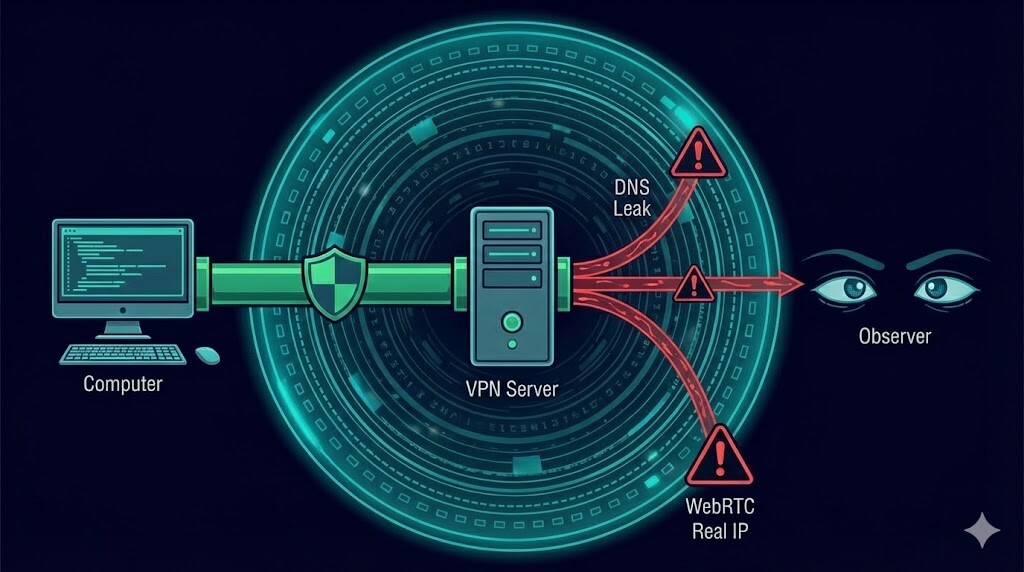
First off, we’ll look at DNS leaks. When you open a website, your computer has to find out the site’s numeric IP address. This is the task of a DNS server. Ideally, when you have a VPN enabled, all of those requests will travel exclusively through the encrypted tunnel directly to your VPN provider’s server. But that is rarely the case. Because of misconfigured settings or malfunctioning systems, your device may occasionally send DNS requests through your normal home ISP (as opposed to going through the VPN).
As a result, the website will notice two conflicting stories. You appear to be coming from an IP address in the Netherlands, but the DNS request came from a service provider in Zhytomyr. That discrepancy is glaring. To a security system, it is also a huge warning sign.
WebRTC follows next. As mentioned above, WebRTC is a browser technology developed for establishing peer-to-peer video calls and for enabling file sharing. WebRTC makes use of a protocol called STUN for establishing direct connections. And it’s here that things can get wrong. There are times when the STUN requests will inadvertently expose your real IP address — completely around the VPN. These kinds of problems occur frequently when you’re utilizing a VPN browser plugin versus a full VPN system-level program.
In this situation, the website again experiences a dual narrative. On one hand, you’ve established a path of connectivity. On the other, your browser is quietly exposing your true IP through WebRTC. A split digital footprint is another good indication that some sort of anonymization tool is being used.
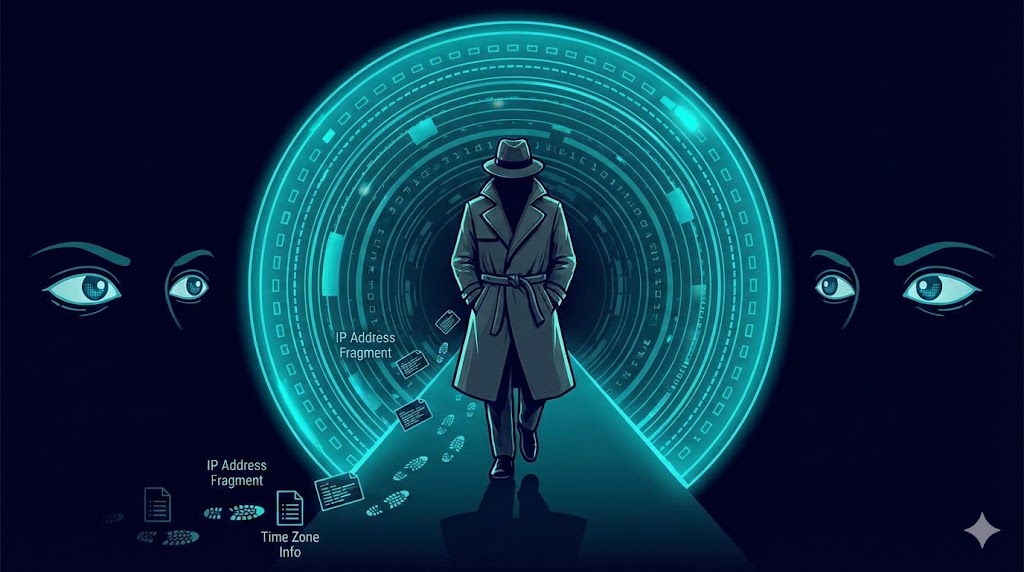
Even with idealized encryption, various environmental characteristics still present themselves. Any script running on a website can quickly determine your system time, native OS language, or preferred date format.
Visualize your VPN telling the system you’re in New York, yet your device clock is showing Kyiv time. Obviously, this would raise questions.
On its own, this does not conclusively prove you’re using a VPN. However, when combined with other subtle discrepancies, it increases your total risk score. And that’s usually enough to trigger that pesky CAPTCHA requesting that you choose traffic signals.
What Your ISP Can See — Without Decoding Your Encrypted Traffic
Your home internet provider can’t see what you’re sending through an encrypted VPN tunnel. However, it can clearly see how you’re sending it.
A typical web surfing experience will consist of a large number of short-term connections to many different websites. Normal VPN traffic will look very much different; it typically consists of one long term connection to a single foreign server (and generally a server belonging to a known hosting company), with a continuous flow of heavily encrypted data through it. Even if the remote server belongs to a known hosting company, the pattern becomes even clearer to the ISP.
And, many providers do not attempt to analyze their traffic with great sophistication. They simply block the standard ports that are most commonly used by the most popular VPN protocols. Blocking VPNs using this technique is both inexpensive and effective. Therefore, they don’t need to utilize advanced or costly inspection techniques either.
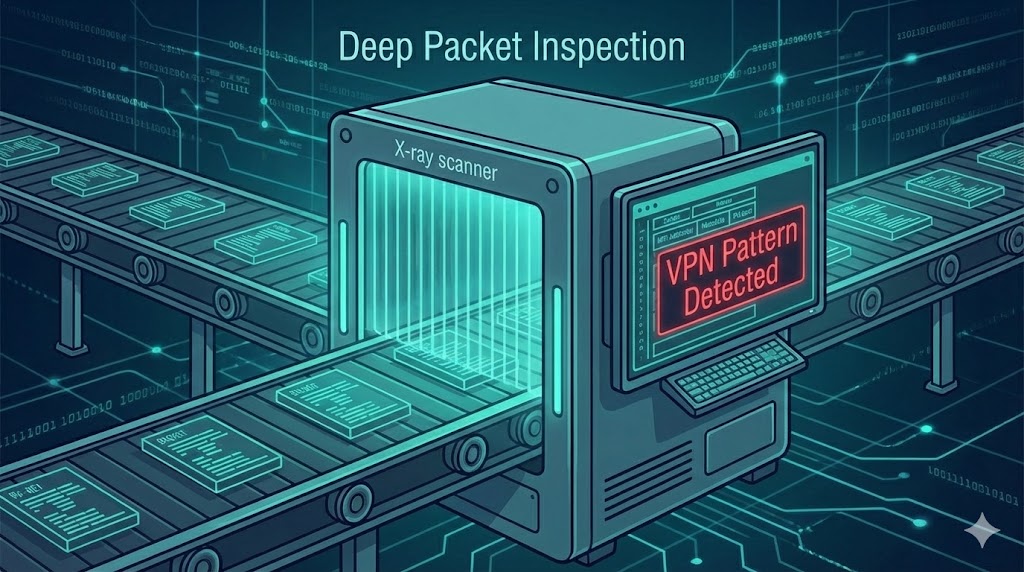
Heavy artillery is employed when VPNs are viewed as a serious threat, typically at the state level in countries with restrictive censorship policies. In these environments, Deep Packet Inspection (DPI) is widely utilized. DPI systems do not merely examine your IP address, but instead examine the header information of each packet in detail, searching for signature patterns associated with known VPN protocols.
All VPN traffic, regardless of how strongly encrypted, has a unique structure. The protocol-specific handshake process for establishing a VPN session creates a recognizable pattern, which can include specific packet sizes, and/or consistent timing intervals between packets. These subtle “fingerprints” can indicate whether or not VPN traffic is present.
Modern VPN developers continually develop and refine obfuscation techniques in order to avoid DPI systems. As such, DPI systems continually improve detection mechanisms via advanced statistical modeling and traffic analysis, creating what amounts to an ongoing cat-and-mouse game: the development of new obfuscation techniques vs. the refinement of detection capabilities.
It’s essential to realize that none of the indicators described above individually constitute a definitive determination of a VPN.
An organization could use a data center IP address for legitimate business purposes. You may have actually relocated to another country. Your system clock could simply be incorrect due to a technical issue.
In short, modern security systems function in conjunction. While each individual signal may be relatively weak, when they all occur simultaneously, the likelihood of a VPN being utilized becomes virtually certain.
There’s nothing magical about this process. It’s simply statistical analysis combined with the logical aggregation of multiple weak signals into a single, strong conclusion.
If you reside in a country where there are no severe restrictions placed on Internet access, then your home ISP is probably not interested in monitoring your VPN usage. Deploying DPI systems to monitor every residential customer would be too costly and impractical. In the event your ISP decides to block some standard VPN ports, this would represent nothing more than a casual reminder.
However, the story is quite different when it involves banks and large-scale content providers. Banks are protecting both your assets and theirs. Content providers are protecting high-cost license agreements. Both types of organizations will quickly respond to suspicious activity.
Therefore, you shouldn’t be shocked if enabling a VPN causes you to encounter increased frequency of CAPTCHA prompts and/or additional login verification procedures. This isn’t a personal vendetta toward you; it’s simply prudent risk assessment on behalf of large-scale organizations.
A VPN represents a highly effective and useful privacy tool. However, a VPN should never be misinterpreted as a means to achieve true invisibility on the Internet.
A VPN does an excellent job of shielding the actual content of your Internet communications. However, the mere fact that you’re utilizing a VPN generally leaves a noticeable shadow behind you across the network. That shadow is comprised of several factors including your IP address, your global geolocation, your DNS behaviors, the specifics of your browser settings and your system clock.
Ultimately, always keep in mind this simple truth: complete anonymity on today’s Internet is far more of a comforting fantasy than a realistic expectation. Any reasonably thoughtful approach to developing a comprehensive privacy model will go beyond acquiring a VPN subscription. It will also include implementing good digital habits, understanding your surroundings, and accepting the occasional necessity to demonstrate to a system that you’re indeed human.