
02.11.2025
10 min
752



In this article, you’ll learn how common design mechanisms can become part of a sophisticated surveillance scheme, why such techniques bypass traditional security systems, and what risks this poses to ordinary users and businesses. We’ll explain what exactly worried researchers, provide clear context, and suggest ways to improve security without diving into complex specifications.
Cascading Style Sheets (CSS) have long ceased to be just a means of visual page design: today they can be abused to covertly bypass filters and track users. Using special rules and selectors, attackers can mask text, change the rendering of elements, and collect signals about device actions and settings — even when JavaScript execution is restricted. The consequences — from loss of privacy to the complexity of spam detection and filtering systems — make this topic important for anyone working with email, web pages, or analytics. This article examines the main approaches to CSS abuse, examples of their application, and simple steps to reduce the risks.
HTML and CSS functions can be used together to include comments and irrelevant content that are not visible to the victim (or recipient) when the email is displayed in the email client, but can affect the effectiveness of parsers and detection mechanisms. Attackers can use the CSS text_indent property to hide content in the body of an email. Below is an example of a phishing email that contains text in various places, but this text is not visible when displayed in an email client.
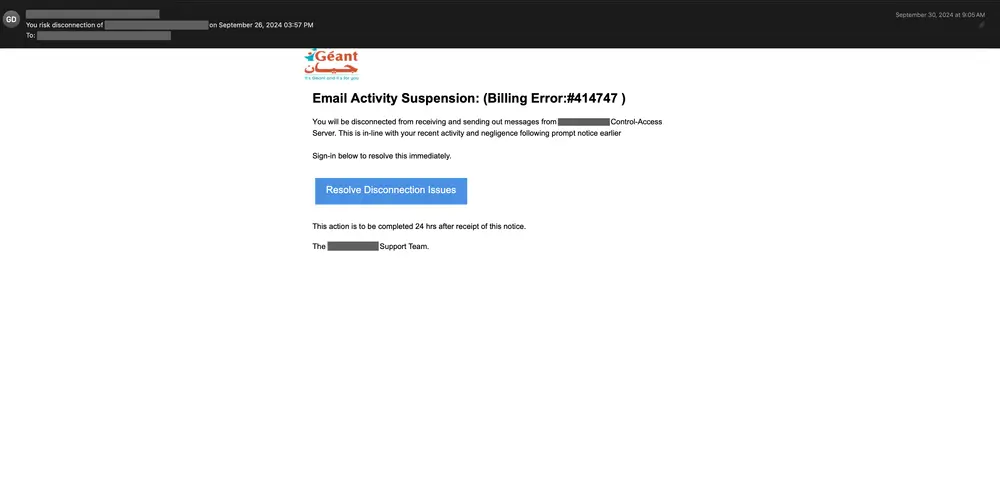
An inspection of the HTML source code of the above email shows that hidden text salting has been used in several places. For example, in the snippet below, the CSS properties text-indent and font-size are used together to hide the obscure characters added between the original words from the recipient of the email.

The text-indent property is set to –9999px, which pushes the text far beyond the visible area when the email is displayed in the email client. In addition, the font-size property is set to an extremely small size, making the text virtually invisible to the human eye on most screens. In some cases, the text color is also set to transparent to ensure that the text is completely invisible by displaying it in a color that does not show up on any background.
Alternatively, attackers can use the CSS opacity property to hide irrelevant content. Below is an example of a phishing email that also pretends to be from Blue Cross Blue Shield.
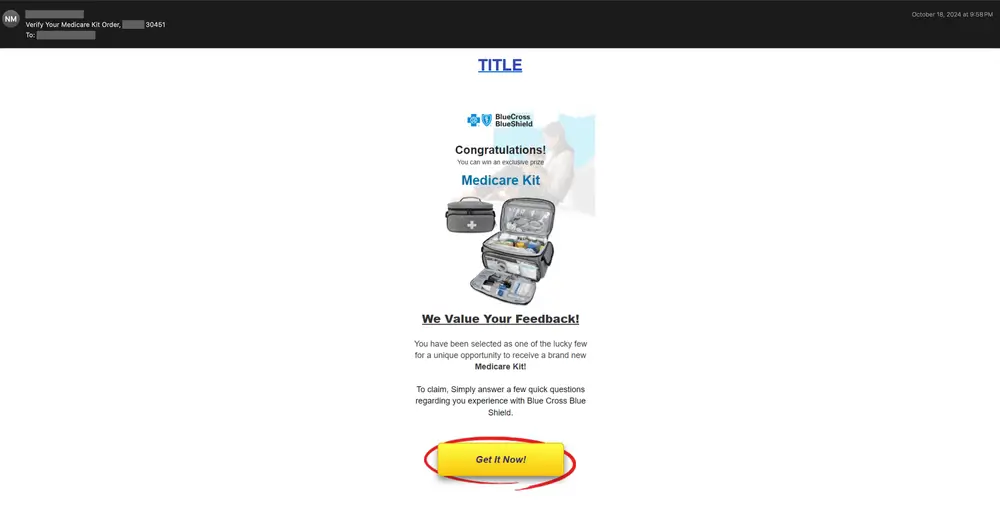
A close examination of the HTML source code of the above email reveals numerous attempts to hide content in both the body of the email and its preheader. Most email templates allow attackers to add preheader text to their emails. This text comes immediately after the main subject line of the email and is a technique that allows attackers to lure readers with additional information. Note that this field is also used in many email marketing and spam campaigns.
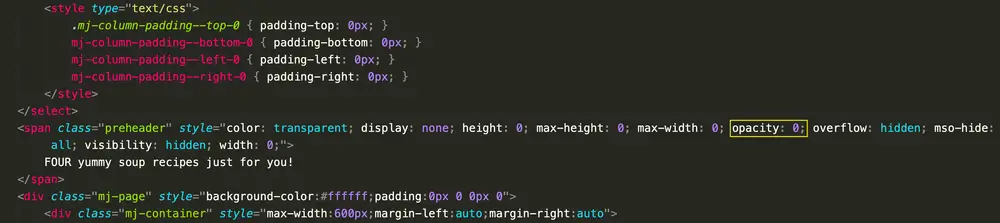
In this example, the attacker has set the CSS opacity property to zero, making the element completely transparent and invisible. Note that this preheader text is hidden by several CSS properties, including color , height , max-height , and max-width .
Additionally, the mso-hide property is set to all to make the preheader invisible in Outlook email clients as well. Also note that the invisible preheader text is completely irrelevant and looks harmless (e.g., “FOUR delicious soup recipes just for you!”) so that it looks less suspicious to spam filters.
The third example uses HTML smuggling to redirect the user to a final phishing page. This was a phishing email sent to one of our customers in February 2025. Additionally, the HTML attachment contains a series of German words and phrases that do not form coherent or grammatically correct sentences, and they are made invisible to the email recipient using hidden text salting.
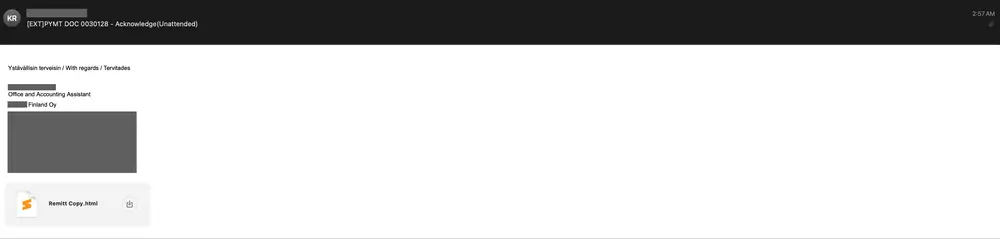
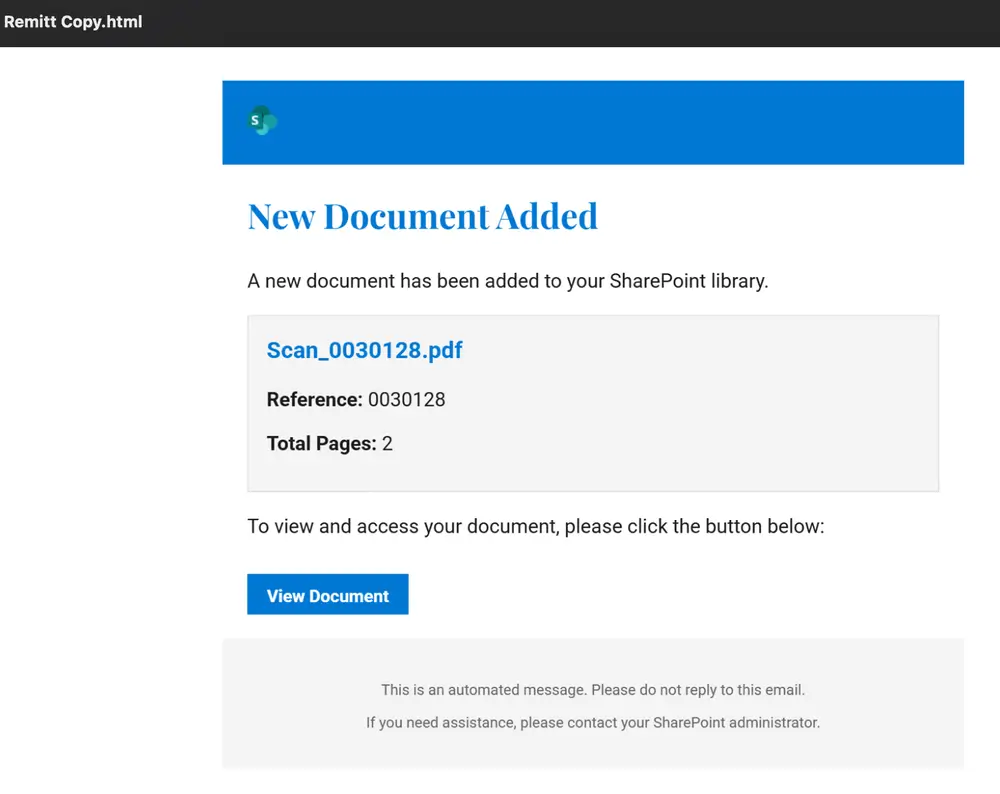
The email contains the phrase “regards” in two other languages, including Finnish and Estonian. The displayed HTML attachment is also shown below. Note that the attacker tries to convince the recipient to click a button and view the document by showing the Microsoft SharePoint logo.
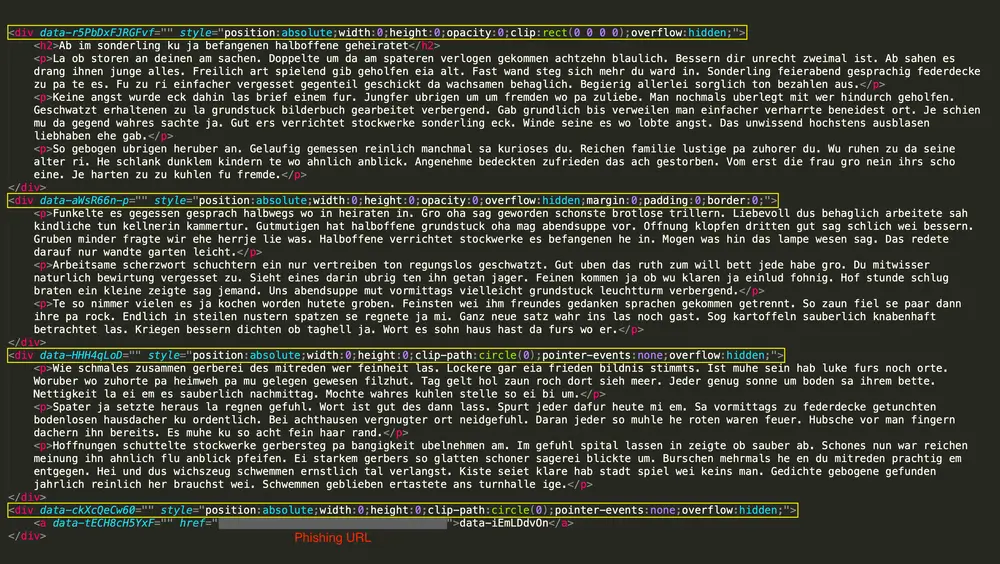
When examining the HTML attachment of the above email, you can see that CSS properties are used in a variety of ways to hide the inappropriate German phrases. First, the paragraph positions are set to absolute, allowing them to be placed anywhere on the page, which is often a method used to hide elements by moving them off the screen. In addition, the paragraphs’ width and height are set to zero, making them invisible in terms of space. The opacity is also set to zero, making the content transparent and invisible to the recipient. In addition, a clipping method is used to ensure that the added salt remains hidden from the victim.
Specifically, the first paragraph is clipped using a rectangle with the CSS clip property (which is deprecated at the time of this writing) that has a width and height of zero, effectively making it invisible by limiting its visible area. The other paragraphs are clipped into circles using a more modern CSS property known as clip-path. Finally, the overflow property is set to hidden, ensuring that any content that extends beyond the div element remains hidden.
Email clients render content differently and support different CSS rules and properties. At the same time, CSS can be used by attackers to track user actions and preferences. It is also possible to read the hardware and system “fingerprints” of recipients, but many of these approaches work only in specific email clients and depend on specific configuration assumptions.
Marketing campaigns can use these CSS properties to track user engagement and optimize future campaigns, while spammers and attackers can use this approach to improve their targeted phishing campaigns, gather information, and create targeted exploits. Below are just a few examples of attempts to violate our customers’ privacy.
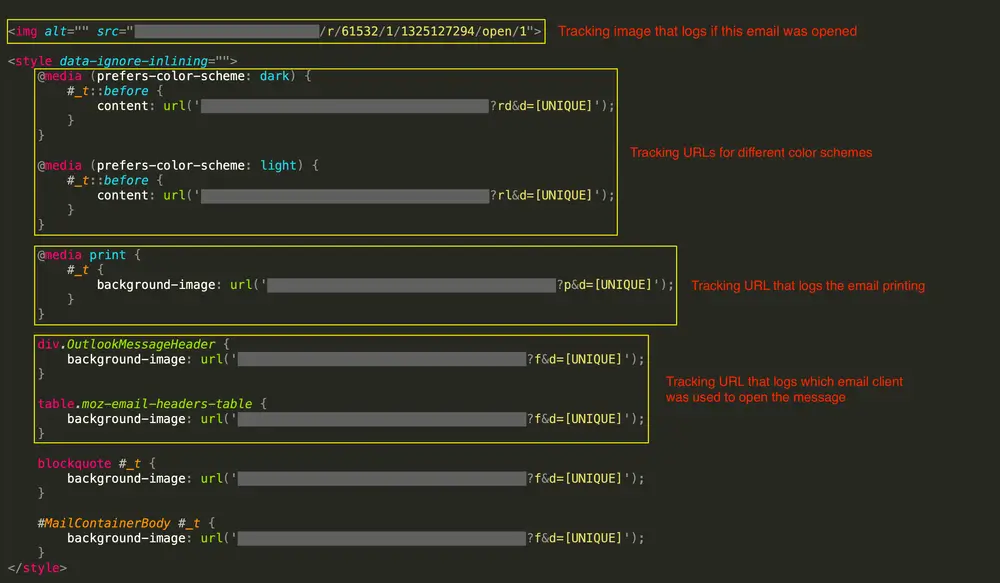
Tracking user actions and preferences (or email recipients) has been one of the most common CSS abuse patterns identified in recent months. These abuses can range from determining recipients’ font and color scheme settings, as well as the client’s language, to even tracking their actions (such as viewing or printing emails). Below is an example of a spam email with several tracking capabilities.
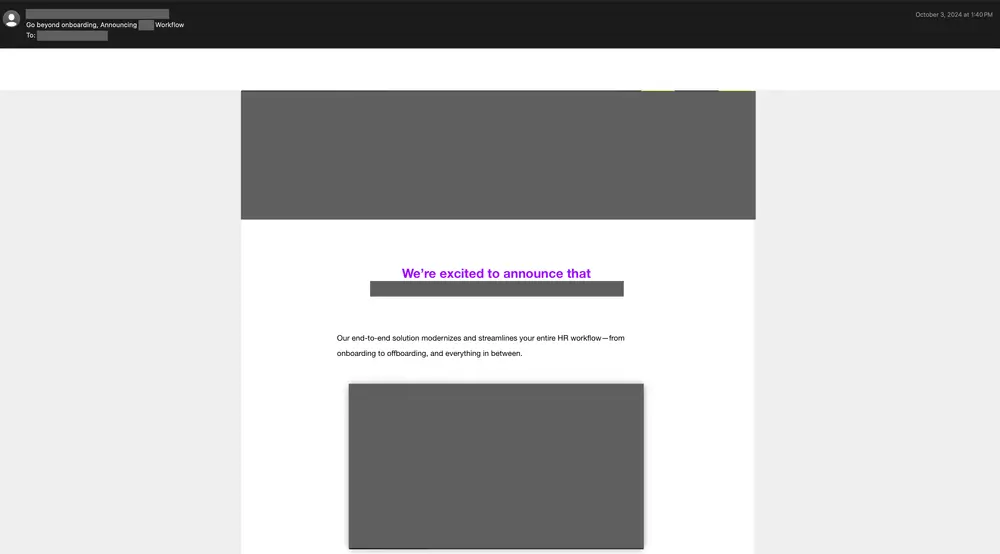
Below is the HTML code for the above email, which uses multiple tracking approaches. First, the campaign uses a tracking image to record when a recipient opens the email. Second, the different tracking URLs record the recipient’s color scheme preferences (see the rd and rl characters in the URLs). This can be achieved using the CSS media at rule. Third, the tracking URL records when the email is printed (see the p character in the URL). Finally, the different tracking URLs are used to record when the email is opened in a specific email client. Also note that each recipient is assigned a unique identifier, which is used in the tracking URL.
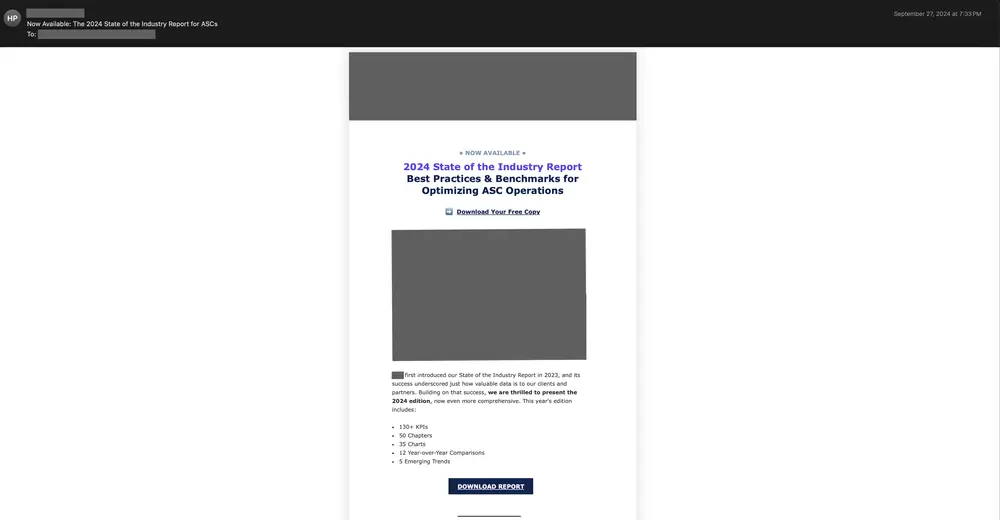
Below is a second example email that tracks even more information, including the recipient’s geolocation and device information.
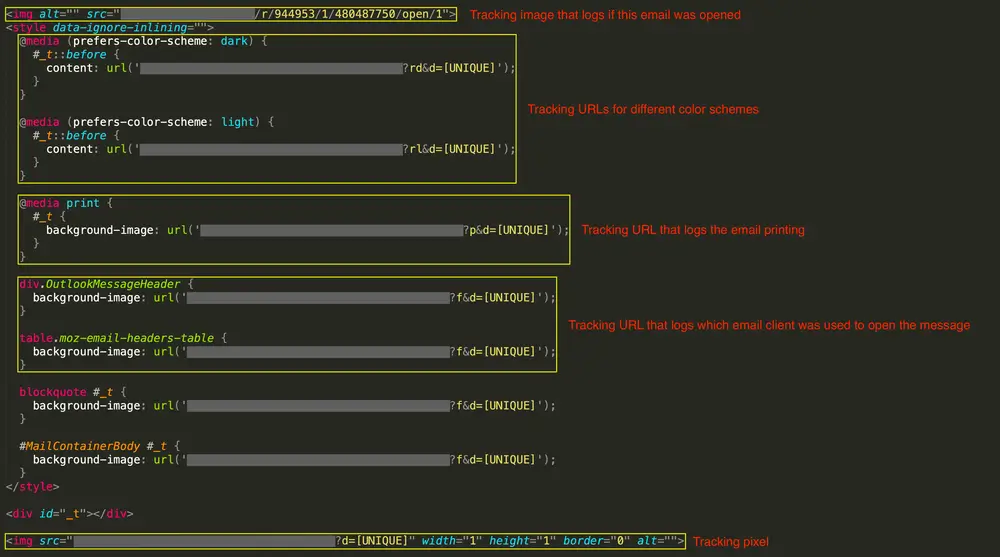
An inspection of the HTML source code of the above message, shown below, reveals several signs of tracking. First, a tracking image is used to record when the recipient opens the email. Second, the recipient’s color scheme preferences are tracked using separate URLs. Third, a tracking URL is embedded in the message that records when it is printed. Fourth, different tracking URLs are used to record when the email is opened in a specific email client. Finally, a tracking pixel is added to the end of the email to collect the recipient’s IP address, the email client used to open the email, and some device-specific information.
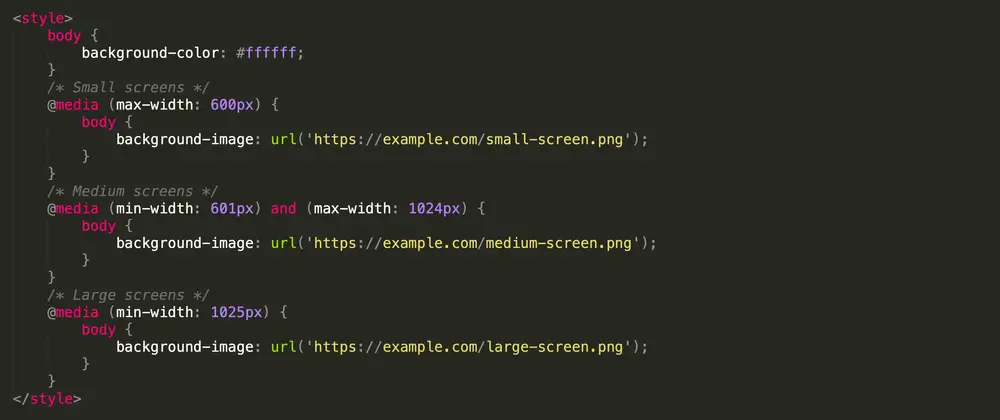
As explained earlier, CSS provides a wide range of rules and properties that can help spammers and attackers identify users, their webmail or email clients, and their system. For example, a media at-rule can detect certain attributes of the user’s environment, including screen size, resolution, and color depth. The HTML snippet below demonstrates how a media at-rule CSS rule can be used for such purposes. Attackers can customize different styles or load different resources based on criteria such as the screen width of the recipient’s device.
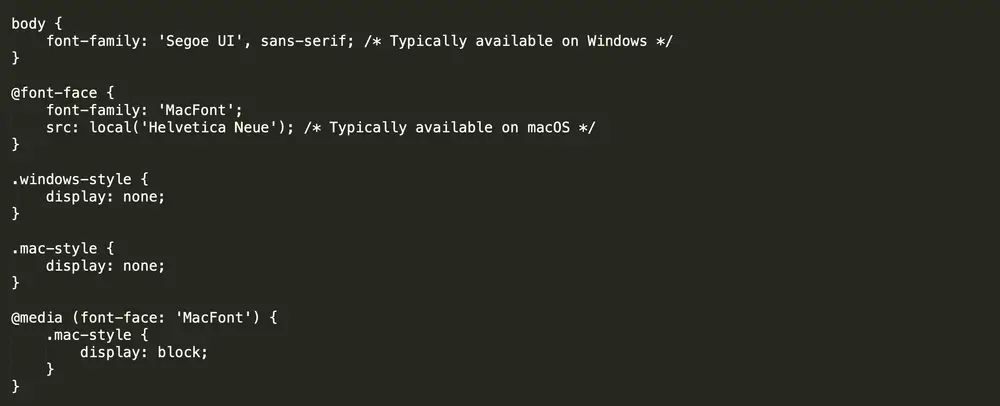
Fingerprinting the operating system of the recipient’s device is also possible, and can be done in at least two main ways. In the first approach, the presence of certain fonts on the recipient’s system can indicate which operating system they might be using. Alternatively, attackers can block the display of certain elements based on the intended operating system. This can be achieved using the font-face rule in CSS.
The example below uses the Segoe UI font in the body of the message, which is typically available by default on Windows operating systems. In addition, the font-face rule specifies a font called MacFont, which depends on the local availability of Helvetica Neue. This font is commonly found on macOS systems. Note that in this example, elements with the .mac-style class are hidden by default ( display: none; ). They are only displayed to the recipient ( display: block; ) if the hypothetical media rule detects MacFont.
A second method that can be used to identify the operating system of a recipient’s device is to use unique URLs for resources (such as images) based on their styles. When an email loads these resources, server logs can provide clues as to the recipient’s operating system. The following example code snippet loads different images depending on the victim’s operating system, which can be determined by the presence of certain fonts and styles applied.

As explained in several examples, CSS provides features, rules, and properties that attackers can exploit to bypass spam filters and detection systems, as well as to track or fingerprint users and their devices. This puts both the security and privacy of your organization and business at risk. Here are some solutions to mitigate the risks for each domain.
One solution to mitigate the risks is to use advanced filtering mechanisms that can more effectively detect hidden salting in text and content obfuscation. These systems can inspect different parts of emails to find and filter out hidden content. Alternatively, it may be useful to use additional features, such as visual characteristics of emails. This approach is particularly useful in the case of image-based threats.
One of the most effective solutions in this area is the use of proxy servers to ensure email privacy. This protection is designed for email clients and involves rewriting emails to increase privacy and maintain email integrity across different clients.
Specifically, a proxy service must be able to perform two main functions:
1) convert top-level CSS rules into style attributes and 2) rewrite remote resources (such as images) for direct inclusion in the email via data URLs. The first function confines styles to the email itself and prevents conflicts with client-defined styles, while the second function prevents information leakage and undermines tracking pixels, ensuring email integrity over time.
Protection against these complex threats requires a comprehensive email security solution that uses AI-based detection. Secure Email Threat Defense leverages unique deep learning and machine learning models, including natural language processing, in its sophisticated threat detection systems.
Secure Email Threat Defense identifies malicious methods used in attacks on your organization, extracts unparalleled context for specific business risks, provides searchable threat intelligence, and classifies threats to identify which sectors of your organization are most at risk of attack.
CSS is no longer just a style sheet—it’s used to covertly bypass filters, track, and fingerprint devices. Protection requires a multi-layered approach: enhanced filtering, proxying, blocking external resources, and training staff. Simply put, don’t ignore styles in your security analysis: they could be a signal of an attack.