

10.08.2026
3 min
385



Cybersecurity researchers discovered a malicious application called Setup Assistant in the Microsoft Store, which was used to infect computers with a previously unknown remote access trojan, Vinci RAT. Attackers lured users through fake websites impersonating popular applications and then redirected them to the official Microsoft Store. The malicious application was digitally signed by Microsoft and may have remained available in the store for at least five months.

The malicious campaign was discovered by cybersecurity specialists at eSentire during an incident investigation in early November 2026. According to the researchers’ technical report, the attack began when a user searched for Snipping Tool, Windows’ built-in screenshot utility.
Instead of reaching the official application page, the user was directed to a fake website, snipp.codes-team[.]com, where they were prompted to download a file named Snipping-Tool.exe. In reality, it was a Microsoft-signed installer that initiated the installation of a different application through the Microsoft Store.
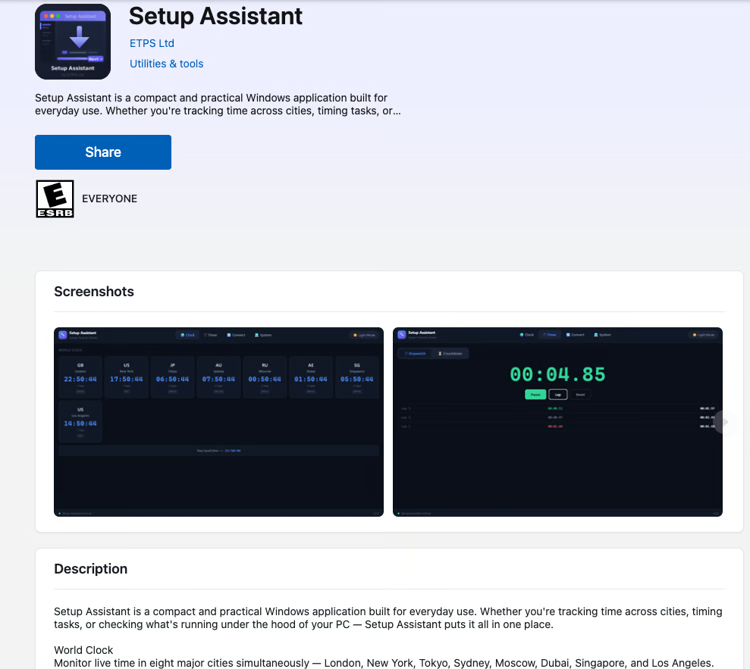
As a result, a program called Setup Assistant, published in the official store under the name ETPS Ltd, was installed on the computer. At first glance, it appeared to be an ordinary utility, but it actually functioned as a backdoor and malware downloader.
Researchers also discovered additional subdomains within the attackers’ infrastructure, suggesting that fake Microsoft Teams and Roblox pages may have been used as part of the campaign.
According to eSentire, the codes-team[.]com domain was registered on March 21, 2026, while the Setup Assistant package appeared in the Microsoft Store on June 1. This means the application may have been distributed through the official store for more than five months before the attack was discovered.
After installation, Setup Assistant executed hidden JavaScript code and established a connection to the command-and-control server setup-assistant[.]com. The application monitored the Downloads folder on the computer and could execute PowerShell and JavaScript commands received from the attackers.
During the investigated incident, this mechanism was used to execute malicious PowerShell code that created a scheduled Windows task to repeatedly run commands. Eventually, the Vinci RAT trojan was downloaded onto the computer, allowing attackers to remotely control the system.
To conceal its activity, the malware used code obfuscation and techniques to bypass the Antimalware Scan Interface (AMSI), which helps Windows security software detect malicious scripts.
Vinci RAT is written in PowerShell and consists of approximately 800 lines of code. Despite its relatively small size, it offers a wide range of capabilities for remotely controlling an infected computer.
Once launched, the trojan collects system information, including the computer name, username, Windows version, language, time zone, Active Directory domain membership, and installed security software.
In addition, Vinci RAT allows attackers to execute commands through cmd.exe, download and run EXE files, DLL libraries, and PowerShell scripts. Some components can execute directly in memory, making them more difficult to detect using traditional security tools.
The trojan also supports a reverse shell connection, allowing operators to interact with the infected system and launch additional malicious components.
After discovering the malicious application, eSentire researchers reported it through the official Microsoft Store complaint form. However, they received a response stating that the application did not violate the store’s policies.
The researchers disagreed with this conclusion, as their analysis of Setup Assistant confirmed the presence of hidden code, connections to command-and-control servers, and remote command execution capabilities.
This case demonstrates that even an application’s presence in the official Microsoft Store does not guarantee its safety. Attackers can exploit users’ trust in the store and digital signatures to convince them to install malicious software.
Researchers recommend that organizations control application installations from the Microsoft Store using Group Policy, AppLocker, WDAC, or Microsoft Intune, and verify unfamiliar applications before allowing their use.
For regular users, it is important to verify the authenticity of download websites and application developers. Even if a link eventually leads to the Microsoft Store, it does not necessarily mean that the application being offered is genuine or safe.
The main danger of this campaign is that the infection occurred through the official Microsoft Store, which users generally consider trustworthy. The scale of Vinci RAT’s distribution remains unknown, but the investigated incident demonstrates how attackers can exploit legitimate software distribution channels to gain access to Windows computers.