Many developers have noticed that when working with a terminal, output to stdout is noticeably faster than to stderr. In the first part of the article, we will consider why there is such a difference in how standard streams are arranged in UNIX systems and what role buffering plays. Using the example of Rust applications, the author demonstrates that using stderr can reduce FPS by almost half. Profiling using the samply tool confirms: stdout makes significantly fewer system calls due to line buffering, while stderr works without it. It is this difference that explains why TUI interfaces respond better when outputting via stdout.

I recently realized that stdout is much faster than stderr for Rust. Here are my findings after diving deep into this rabbit hole.
I’ve been using the terminal (i.e. command line) for most of my daily tasks for a while now. I’ve always been fascinated by how fast and convenient the command line can be, which is why I’m a big fan of using CLI (command line) or TUI (terminal user interface) programs over GUI (graphical user interface) programs whenever possible. In addition to my existing preferences, I’ve come to truly believe that the terminal is the future after seeing the recent developments in terminal interaction with tools like Zellij and GPU-based terminal emulators like Alacritty/Wezterm/Rio. When this immense potential is combined with a powerful systems programming language like Rust, the result is often a very smooth terminal experience and development that I believe every developer appreciates when it comes to efficiency, speed, and security.
This is probably why I got interested in building terminal UI applications in Rust in the first place. When I built my first Rust/TUI project, kmon, I was amazed at how something as simple as a terminal could be extended to create applications that made terminal usage even more familiar. A few years later, I became a co-developer of Ratatui, a Rust library for building TUIs, and I was lucky enough to be one of the core members of the team that revived the deprecated tui-rs library last year as Ratatui.
All of this being said, as a daily terminal user and command-line developer, I encounter new terminal-related problems every day. Sometimes I come across really interesting questions and problems. As you might expect, this blog post is the result of one of those questions.
Okay, now let’s take a step back and try to understand the question first. We need to understand some UNIX concepts before we get started.
The UNIX operating system brought many groundbreaking advances to the world of computers, and one of them was undoubtedly standard threads. According to UNIX, each process has three open threads at startup:
0. Standard input (stdin): for reading input data.
1. Standard output (stdout): for writing normal output.
2. Standard error output (stderr): for printing diagnostic or error messages.
Here is a simplified example to demonstrate these flows:
# read the value of foo from stdin
$ read -r foo
test

# print the value of foo to stdout
$ echo "value of foo is '$foo'"
value of foo is 'test'

# "echoo" command does not exist so an error message will be printed to stderr
$ echoo "$foo"
bash: echoo: command not found
These I/O (input/output) streams are usually connected to the user’s terminal via a tty (TeleTYpe), which can be described as an interface that provides access to the terminal.
As you may have heard many times, according to the UNIX philosophy, “everything is a file.” This means that I/O streams must also be a file, and this is actually true:
$ file /dev/stdin /dev/stdout /dev/stderr

/dev/stdin:  symbolic link to /proc/self/fd/0
/dev/stdout: symbolic link to /proc/self/fd/1
/dev/stderr: symbolic link to /proc/self/fd/2
If you understand, the file descriptor (unique identifier) of these abstract files is the same as in the initial list above (starting at 0).
So if these are files, we should be able to read them, right? Actually, no.
*types quickly*
$ cat /dev/stdout
Why is nothing happening?
This is because they are not real files, but just file descriptors associated with a TTY or PTY (i.e. emulated TTY, also known as PseudoTeletType).
$ ls -l /proc/self/fd/ lrwx------ - orhun 0 -> /dev/pts/20 lrwx------ - orhun 1 -> /dev/pts/20 lrwx------ - orhun 2 -> /dev/pts/20
As you can see, the standard streams are attached to PTYs (i.e. pseudo-terminals) in the /dev/pts section.
Wait, so /dev/stdout is a symbolic link to a file descriptor at /proc/self/fd/1, and that file descriptor is a symbolic link to /dev/pts/20!?
What is /dev/pts/20 anyway in this case?
$ file /dev/pts/20

/dev/pts/20: character special (136/20)
In Unix, special character files are files that provide access to I/O devices, such as the NULL file (/dev/null) and file descriptors. In our case, stdout is a file descriptor (1), so it is a special character file. (The name “special character” actually comes from the fact that each character is treated separately.)
Each special character file has a major device number that identifies the type of device, and a minor device number that identifies a specific device of that type. So what you see on the right (136/20) means:
$ rg '136' /proc/devices

136 pts
Major 136: PTS device (/dev/pts)
Minor 20: device 20 (/dev/pts/20)
Okay, cool, but why can’t I read from /dev/stdout?
Oh, yes. When you try to read data from stdout, it keeps executing because it’s waiting to read data from the file descriptor. So if you type it, you can read it back:
$ cat /dev/stdout

foo # input
foo
bar #input
bar
Now that we have a general understanding of I/O streams, we can move on to real-world examples and move forward to answering our question.
The following section uses the Rust programming language, but the general concepts are generally applicable to any programming language, even HolyC.
Terminal user interfaces use a terminal by drawing widgets/components such as text boxes, spinners, and stylized text on it, similar to traditional graphical user interfaces. The terminal is able to display such elements through its custom processing of ANSI control codes. These ANSI sequences are used to control the cursor position, color, and style of the terminal.
So, to create a terminal user interface, we need a low-level library to manage both the terminal and the I/O streams, as well as to render the interface components. This two-step process is usually split between different libraries for ease of use and to maintain the single responsibility principle.
For example, while ncurses (one of the oldest TUI libraries written in C) handles the low-level interface to the terminal, the CDK (curses development kit) provides a set of widgets for creating graphical-like programs in the terminal.
Similarly, in the Rust ecosystem, the following libraries are currently most used for this task:
crossterm: a pure Rust-level terminal management library that runs on various platforms.
ratatui: a lightweight library that provides a set of widgets and utilities — supports various backends, including crossterm.
So, let’s create a very simple TUI using these libraries:
#!/usr/bin/env rust-script

//! ```cargo
//! [dependencies]
//! crossterm = "0.27.0"
//! ratatui = "0.25.0"
//! ```

use std::io::{self, stdout};

use crossterm::{
    event::{self, Event, KeyCode, KeyEventKind},
    terminal::{disable_raw_mode, enable_raw_mode, EnterAlternateScreen, LeaveAlternateScreen},
    ExecutableCommand,
};
use ratatui::{prelude::*, widgets::*};

/// Handle key events.
fn handle_events() -> io::Result<bool> {
    if event::poll(std::time::Duration::from_millis(50))? {
        if let Event::Key(key) = event::read()? {
            // Quit when 'q' is pressed.
            if key.kind == KeyEventKind::Press && key.code == KeyCode::Char('q') {
                return Ok(true);
            }
        }
    }
    Ok(false)
}

/// Render the widgets.
fn ui(frame: &mut Frame) {
    frame.render_widget(
        Paragraph::new("__QQ\n(_)_\">")
            .alignment(Alignment::Center)
            .block(
                Block::default()
                    .title("blog.orhun.dev")
                    .borders(Borders::ALL),
            ),
        frame.size(),
    );
}

fn main() -> io::Result<()> {
    enable_raw_mode()?;
    stdout().execute(EnterAlternateScreen)?;
    let mut terminal = Terminal::new(CrosstermBackend::new(stdout()))?;

    let mut should_quit = false;
    while !should_quit {
        terminal.draw(ui)?;
        should_quit = handle_events()?;
    }

    disable_raw_mode()?;
    stdout().execute(LeaveAlternateScreen)?;
    Ok(())
}
You can run this using a rust script as follows:
$ cargo install rust-script
# [...]

$ chmod +x simple-tui.rs

$ ./simple-tui.rs
Depending on the size of your terminal, you will get a result similar to this:
┌blog.orhun.dev──────────────────────────┐
│                  __QQ                  │
│                 (_)_">                 │
│                                        │
└────────────────────────────────────────┘
This is cool! How is this possible?
Let’s break the code down into a few steps to understand what’s happening:
1. Initializing the Terminal
In the main function, we use crossterm to set our terminal to stdout and tell ratatui to use the crossterm backend.
use std::io::stdout;
use ratatui::{Terminal, backend::CrosstermBackend};

crossterm::terminal::enable_raw_mode()?;
stdout().execute(EnterAlternateScreen)?;
let mut terminal = Terminal::new(CrosstermBackend::new(stdout()))?;
RAW mode and alternate screen?
Enabling raw mode means that we will not use the standard terminal behavior (no input processing and special keys) and want to have full control over it. We also switch to an alternate screen (i.e. a new buffer) in the terminal because we don’t want to lose our actual terminal/command prompt and return to it after pressing the “q” key.
Speaking of input processing, here’s how we do it:
2. Handling key events
We simply poll the events from the crossterm function handle_events and exit when we press ‘q’:
use crossterm::event::{self, Event, KeyCode};

if crossterm::event::poll(std::time::Duration::from_millis(50))? {
    if let Event::Key(key) = event::read()? {
        if key.kind == KeyEventKind::Press && key.code == KeyCode::Char('q') {
            return Ok(true);
        }
    }
}
3. Widget Rendering
Finally, here’s where ratatui shines:
use ratatui::{prelude::*, widgets::*};

frame.render_widget(
    Paragraph::new("__QQ\n(_)_\">")
        .alignment(Alignment::Center)
        .block(
            Block::default()
                .title("blog.orhun.dev")
                .borders(Borders::ALL),
        ),
    frame.size(),
);
Here we create two widgets:
Paragraph: Contains text that is centered
Block: Wraps a paragraph with a heading
ratatui provides many other widgets and makes it surprisingly easy to create complex interfaces. Also, as you can see from the example, center-aligning a div is actually easy.
Returning to our original topic, if we look again at the main function, all of this happens on stdout:
use std::io::stdout;

let mut terminal = Terminal::new(CrosstermBackend::new(stdout()))?;
Of course, we can try changing all references to std::io::stdout to std::io::stderr and try running again.
-let mut terminal = Terminal::new(CrosstermBackend::new(std::io::stdout()))?;
+let mut terminal = Terminal::new(CrosstermBackend::new(std::io::stderr()))?;
…what happens then? Well, visually nothing changes, and we can’t tell the difference. The result is the same. Is that right?
We need a way to measure the performance of TUI rendering and see the difference between stdout and stderr usage. To do this, I developed an FPS (frames per second) counter program along with some monochrome colors for rendering (based on the colors_rgbratatui template).
#!/usr/bin/env rust-script

//! ```cargo
//! [dependencies]
//! anyhow = "1.0.76"
//! crossterm = "0.27.0"
//! palette = "0.7.3"
//! rand = "0.8.5"
//! ratatui = "0.25.0"
//! ```
//!

use anyhow::Result;
use std::{
    fmt,
    io::{stderr, stdout, Write},
    time::{Duration, Instant},
};

use crossterm::{
    event::{self, Event, KeyCode, KeyEventKind},
    terminal::{disable_raw_mode, enable_raw_mode, EnterAlternateScreen, LeaveAlternateScreen},
    ExecutableCommand,
};
use palette::{convert::FromColorUnclamped, Hsv, Srgb};
use ratatui::{prelude::*, widgets::*};

#[derive(Copy, Clone, Debug, Default)]
enum IoStream {
    #[default]
    Stdout,
    Stderr,
}

impl fmt::Display for IoStream {
    fn fmt(&self, f: &mut fmt::Formatter<'_>) -> fmt::Result {
        write!(f, "{}", format!("{:?}", self).to_lowercase())
    }
}

impl IoStream {
    fn as_stream(&self) -> Box<dyn Write> {
        match self {
            IoStream::Stdout => Box::new(stdout()),
            IoStream::Stderr => Box::new(stderr()),
        }
    }
}

#[derive(Debug)]
struct Fps {
    frame_count: usize,
    last_instant: Instant,
    fps: Option<f32>,
}

impl Default for Fps {
    fn default() -> Self {
        Self {
            frame_count: 0,
            last_instant: Instant::now(),
            fps: None,
        }
    }
}

impl Fps {
    fn tick(&mut self) {
        self.frame_count += 1;
        let elapsed = self.last_instant.elapsed();
        // update the fps every second, but only if we've rendered at least 2 frames (to avoid
        // noise in the fps calculation)
        if elapsed > Duration::from_secs(1) && self.frame_count > 2 {
            self.fps = Some(self.frame_count as f32 / elapsed.as_secs_f32());
            self.frame_count = 0;
            self.last_instant = Instant::now();
        }
    }
}

struct FpsWidget<'a> {
    fps: &'a Fps,
}

impl<'a> Widget for FpsWidget<'a> {
    fn render(self, area: Rect, buf: &mut Buffer) {
        if let Some(fps) = self.fps.fps {
            let text = format!("{:.1} fps", fps);
            Paragraph::new(text).render(area, buf);
        }
    }
}

struct RgbColorsWidget<'a> {
    /// the colors to render - should be double the height of the area
    colors: &'a Vec<Vec<Color>>,
    /// the number of elapsed frames that have passed - used to animate the colors
    frame_count: usize,
}

impl Widget for RgbColorsWidget<'_> {
    fn render(self, area: Rect, buf: &mut Buffer) {
        let colors = self.colors;
        for (xi, x) in (area.left()..area.right()).enumerate() {
            // animate the colors by shifting the x index by the frame number
            let xi = (xi + self.frame_count) % (area.width as usize);
            for (yi, y) in (area.top()..area.bottom()).enumerate() {
                let fg = colors[yi * 2][xi];
                let bg = colors[yi * 2 + 1][xi];
                buf.get_mut(x, y).set_char('▀').set_fg(fg).set_bg(bg);
            }
        }
    }
}

struct AppWidget<'a> {
    title: Paragraph<'a>,
    fps_widget: FpsWidget<'a>,
    rgb_colors_widget: RgbColorsWidget<'a>,
}

impl<'a> AppWidget<'a> {
    fn new(app: &'a App) -> Self {
        let title = Paragraph::new(vec![Line::styled(
            app.current_stream.to_string(),
            Style::new().bold(),
        )])
        .alignment(Alignment::Center);
        Self {
            title,
            fps_widget: FpsWidget { fps: &app.fps },
            rgb_colors_widget: RgbColorsWidget {
                colors: &app.colors,
                frame_count: app.frame_count,
            },
        }
    }
}

impl Widget for AppWidget<'_> {
    fn render(self, area: Rect, buf: &mut Buffer) {
        let main_layout = Layout::default()
            .direction(Direction::Vertical)
            .constraints([Constraint::Length(1), Constraint::Min(0)])
            .split(area);
        let title_layout = Layout::default()
            .direction(Direction::Horizontal)
            .constraints([Constraint::Min(0), Constraint::Length(8)])
            .split(main_layout[0]);

        self.title.render(title_layout[0], buf);
        self.fps_widget.render(title_layout[1], buf);
        self.rgb_colors_widget.render(main_layout[1], buf);
    }
}

#[derive(Debug, Default)]
struct App {
    should_quit: bool,
    switch_stream: bool,
    current_stream: IoStream,
    // a 2D vector of the colors to render
    // calculated when the size changes as this is expensive to calculate every frame
    colors: Vec<Vec<Color>>,
    last_size: Rect,
    fps: Fps,
    frame_count: usize,
}

impl App {
    pub fn run(io_stream: IoStream) -> Result<bool> {
        let mut terminal = init_terminal(io_stream.as_stream())?;
        let mut app = App {
            current_stream: io_stream,
            ..Default::default()
        };

        while !app.should_quit && !app.switch_stream {
            app.tick();
            terminal.draw(|frame| {
                let size = frame.size();
                app.setup_colors(size);
                frame.render_widget(AppWidget::new(&app), size);
            })?;
            app.handle_events()?;
        }
        restore_terminal(io_stream.as_stream())?;
        Ok(app.should_quit)
    }

    fn tick(&mut self) {
        self.frame_count += 1;
        self.fps.tick();
    }

    fn handle_events(&mut self) -> Result<()> {
        if event::poll(Duration::from_secs_f32(1.0 / 60.0))? {
            if let Event::Key(key) = event::read()? {
                if key.kind == KeyEventKind::Press && key.code == KeyCode::Char('q') {
                    self.should_quit = true;
                }
                if key.kind == KeyEventKind::Press && key.code == KeyCode::Char(' ') {
                    self.switch_stream = true;
                };
            }
        }
        Ok(())
    }

    fn setup_colors(&mut self, size: Rect) {
        // only update the colors if the size has changed since the last time we rendered
        if self.last_size.width == size.width && self.last_size.height == size.height {
            return;
        }
        self.last_size = size;
        let Rect { width, height, .. } = size;
        // double the height because each screen row has two rows of half block pixels
        let height = height * 2;
        self.colors.clear();
        use rand::Rng;
        let mut rng = rand::thread_rng();
        for y in 0..height {
            let mut row = Vec::new();
            // more randomness towards the bottom
            let randomness_factor = (height - y) as f32 / height as f32;
            for _ in 0..width {
                let base_value = randomness_factor * ((height - y) as f32 / height as f32);
                // adjust the range as needed
                let random_offset: f32 = rng.gen_range(-0.1..0.1);
                let value = base_value + random_offset;
                // clamp the value to ensure it stays within the valid range [0.0, 1.0]
                let value = value.max(0.0).min(1.0);
                // set hue to 0 for grayscale
                let color = Hsv::new(0.0, 0.0, value);
                let color = Srgb::<f32>::from_color_unclamped(color);
                let color: Srgb<u8> = color.into_format();
                let color = Color::Rgb(color.red, color.green, color.blue);
                row.push(color);
            }
            self.colors.push(row);
        }
    }
}

fn init_terminal<W>(mut stream: W) -> Result<Terminal<CrosstermBackend<W>>>
where
    W: Write,
{
    enable_raw_mode()?;
    stream.execute(EnterAlternateScreen)?;
    let mut terminal = Terminal::new(CrosstermBackend::new(stream))?;
    terminal.clear()?;
    terminal.hide_cursor()?;
    Ok(terminal)
}

fn restore_terminal<W>(mut stream: W) -> Result<()>
where
    W: Write,
{
    disable_raw_mode()?;
    stream.execute(LeaveAlternateScreen)?;
    Ok(())
}

fn main() -> Result<()> {
    let mut io_stream = IoStream::Stderr;
    loop {
        match io_stream {
            IoStream::Stdout => {
                io_stream = IoStream::Stderr;
            }
            IoStream::Stderr => {
                io_stream = IoStream::Stdout;
            }
        };
        if App::run(io_stream)? {
            break;
        }
    }
    Ok(())
}
Press the spacebar to switch between stdout and stderr:
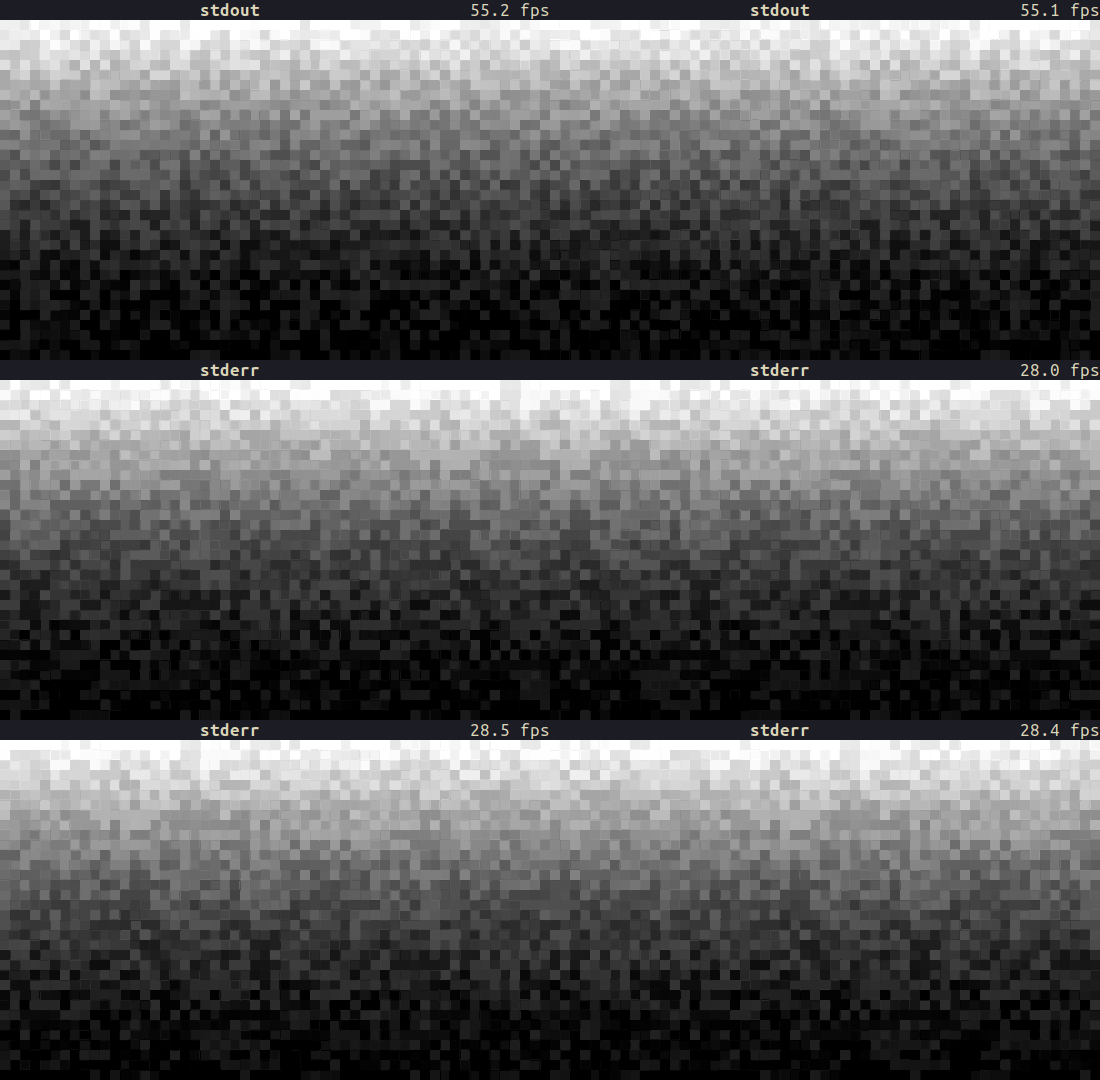
Have you noticed a drop in FPS? stdout is ~2x faster than stderr on a 550×360 terminal!
Before we dive into the Rust code, let’s take a look at the external runtime, observing the CPU and system calls to understand what’s going on. For this task, I’ll be using a profiling tool called samply.
It records the execution profile of a given command, and then opens profiler.firefox.com in the browser, where we can inspect a bunch of information, such as which functions were executed and for how long, flame graphs, and timelines. We can even see the source code for the calls and which lines were sampled how many times.
Let’s start by installing samply:
$ cargo install sampl
(I recently packaged it for Arch Linux, so it’s also available via pacman -S samplybtw)
And then we need to make some changes to the code we’re going to profile. For Rust projects, it’s recommended to build in release mode with debug information to get built-in stacks and view the source code. So we can add the following profile to our Cargo.toml:
[profile.profiling]
inherits = "release"
debug = true
I also made some changes to the previous stdout-vs-stderr.rs:
Removed parts like the FPS widget that are not relevant for profiling.
Added a STREAM environment variable to start the TUI with a specified I/O stream. Accepts either “stdout” or “stderr”
Added a DURATION environment variable to exit the TUI after a specified number of seconds.
#!/usr/bin/env rust-script

//! ```cargo
//! [dependencies]
//! anyhow = "1.0.76"
//! crossterm = "0.27.0"
//! palette = "0.7.3"
//! rand = "0.8.5"
//! ratatui = "0.25.0"
//! ```
//!

use anyhow::Result;
use std::{
    env,
    io::{stderr, stdout, Write},
    time::{Duration, Instant},
};

use crossterm::{
    event::{self, Event, KeyCode, KeyEventKind},
    terminal::{disable_raw_mode, enable_raw_mode, EnterAlternateScreen, LeaveAlternateScreen},
    ExecutableCommand,
};
use palette::{convert::FromColorUnclamped, Hsv, Srgb};
use ratatui::{prelude::*, widgets::*};

#[derive(Copy, Clone, Debug, Default)]
enum IoStream {
    #[default]
    Stdout,
    Stderr,
}

impl From<String> for IoStream {
    fn from(value: String) -> Self {
        match value.to_lowercase().as_str() {
            "stdout" => Self::Stdout,
            "stderr" => Self::Stderr,
            _ => Self::default(),
        }
    }
}

struct RgbColorsWidget<'a> {
    /// The colors to render - should be double the height of the area
    colors: &'a Vec<Vec<Color>>,
    /// the number of elapsed frames that have passed - used to animate the colors
    frame_count: usize,
}

impl Widget for RgbColorsWidget<'_> {
    fn render(self, area: Rect, buf: &mut Buffer) {
        let colors = self.colors;
        for (xi, x) in (area.left()..area.right()).enumerate() {
            // animate the colors by shifting the x index by the frame number
            let xi = (xi + self.frame_count) % (area.width as usize);
            for (yi, y) in (area.top()..area.bottom()).enumerate() {
                let fg = colors[yi * 2][xi];
                let bg = colors[yi * 2 + 1][xi];
                buf.get_mut(x, y).set_char('▀').set_fg(fg).set_bg(bg);
            }
        }
    }
}

struct AppWidget<'a> {
    rgb_colors_widget: RgbColorsWidget<'a>,
}

impl<'a> AppWidget<'a> {
    fn new(app: &'a App) -> Self {
        Self {
            rgb_colors_widget: RgbColorsWidget {
                colors: &app.colors,
                frame_count: app.frame_count,
            },
        }
    }
}

impl Widget for AppWidget<'_> {
    fn render(self, area: Rect, buf: &mut Buffer) {
        let main_layout = Layout::default()
            .direction(Direction::Vertical)
            .constraints([Constraint::Length(1), Constraint::Min(0)])
            .split(area);
        self.rgb_colors_widget.render(main_layout[1], buf);
    }
}

#[derive(Debug, Default)]
struct App {
    should_quit: bool,
    // a 2d vec of the colors to render, calculated when the size changes as this is expensive
    // to calculate every frame
    colors: Vec<Vec<Color>>,
    last_size: Rect,
    frame_count: usize,
}

impl App {
    pub fn run<W>(io_stream: IoStream, stream: W, exit_after: Duration) -> Result<()>
    where
        W: Write,
    {
        let mut terminal = init_terminal(stream)?;
        let mut app = Self::default();
        let start_time = Instant::now();
        while !app.should_quit {
            app.tick();
            terminal.draw(|frame| {
                let size = frame.size();
                app.setup_colors(size);
                frame.render_widget(AppWidget::new(&app), size);
            })?;
            app.handle_events()?;
            if start_time.elapsed() >= exit_after {
                break;
            }
        }
        match io_stream {
            IoStream::Stdout => restore_terminal(stdout())?,
            IoStream::Stderr => restore_terminal(stderr())?,
        }

        Ok(())
    }

    fn tick(&mut self) {
        self.frame_count += 1;
    }

    fn handle_events(&mut self) -> Result<()> {
        if event::poll(Duration::from_secs_f32(1.0 / 60.0))? {
            if let Event::Key(key) = event::read()? {
                if key.kind == KeyEventKind::Press && key.code == KeyCode::Char('q') {
                    self.should_quit = true;
                }
            }
        }
        Ok(())
    }

    fn setup_colors(&mut self, size: Rect) {
        // only update the colors if the size has changed since the last time we rendered
        if self.last_size.width == size.width && self.last_size.height == size.height {
            return;
        }
        self.last_size = size;
        let Rect { width, height, .. } = size;
        // double the height because each screen row has two rows of half block pixels
        let height = height * 2;
        self.colors.clear();

        use rand::Rng;
        let mut rng = rand::thread_rng();
        for y in 0..height {
            let mut row = Vec::new();
            let randomness_factor = (height - y) as f32 / height as f32; // More randomness towards the bottom
            for _ in 0..width {
                let base_value = randomness_factor * ((height - y) as f32 / height as f32);
                let random_offset: f32 = rng.gen_range(-0.1..0.1); // Adjust the range as needed
                let value = base_value + random_offset;
                // Clamp the value to ensure it stays within the valid range [0.0, 1.0]
                let value = value.max(0.0).min(1.0);
                let color = Hsv::new(0.0, 0.0, value); // Set hue to 0 for grayscale
                let color = Srgb::<f32>::from_color_unclamped(color);
                let color: Srgb<u8> = color.into_format();
                let color = Color::Rgb(color.red, color.green, color.blue);
                row.push(color);
            }
            self.colors.push(row);
        }
    }
}

fn init_terminal<W>(mut stream: W) -> Result<Terminal<CrosstermBackend<W>>>
where
    W: Write,
{
    enable_raw_mode()?;
    stream.execute(EnterAlternateScreen)?;
    let mut terminal = Terminal::new(CrosstermBackend::new(stream))?;
    terminal.clear()?;
    terminal.hide_cursor()?;
    Ok(terminal)
}

fn restore_terminal<W>(mut stream: W) -> Result<()>
where
    W: Write,
{
    disable_raw_mode()?;
    stream.execute(LeaveAlternateScreen)?;
    Ok(())
}

fn main() -> Result<()> {
    let stream = env::var("STREAM").map(IoStream::from).unwrap_or_default();
    let duration = env::var("DURATION")
        .ok()
        .and_then(|v| v.parse::<u64>().ok())
        .map(Duration::from_secs)
        .unwrap_or_else(|| Duration::from_secs(5));
    match stream {
        IoStream::Stdout => App::run(stream, stdout(), duration)?,
        IoStream::Stderr => App::run(stream, stderr(), duration)?,
    }
    Ok(())
}
Now we can compile the binary with the profiling profile:
$ cargo build --profile profiling
To record a profile, simply run the samply command:
$ export STREAM="stdout"
$ export DURATION=5

$ samply record target/profiling/stdout-vs-stderr-profiler
(Or you can use my run-profiler.sh script, which will do everything for you.)
After the TUI finishes, after 5 seconds, we will be greeted by the profiler.firefox.com page:
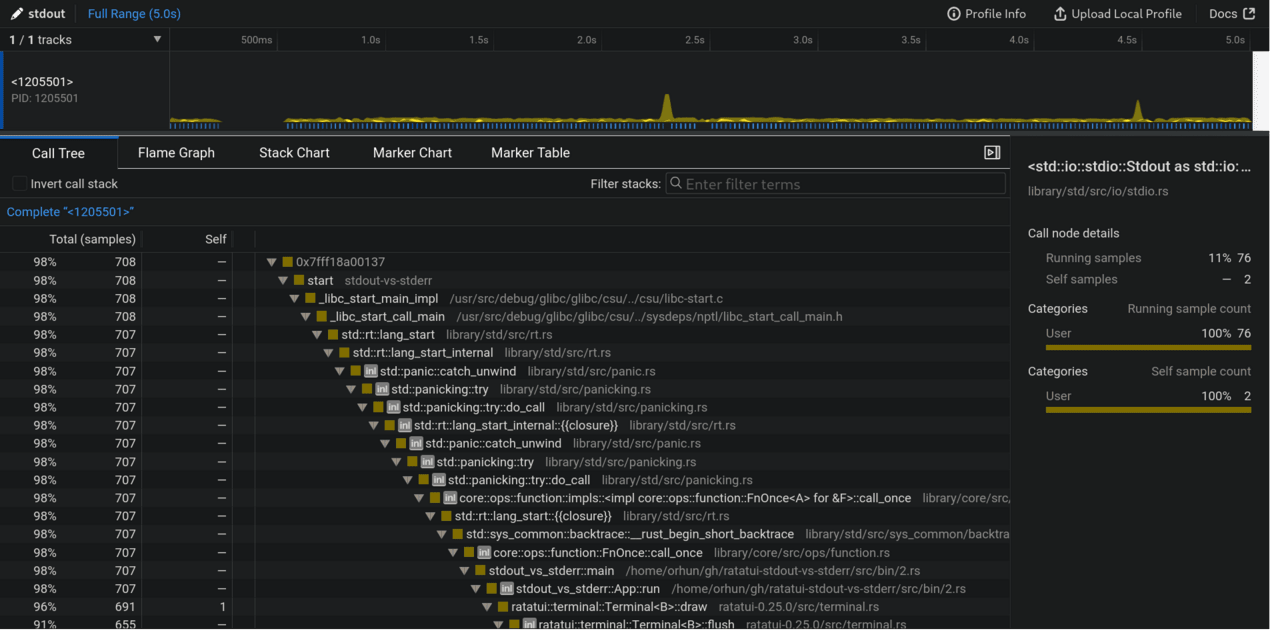
Once we do the same for stderr via STREAM=”stderr”, we can start comparing what went differently for the I/O streams.
These profiles are also available to view online if you want to experiment for yourself:
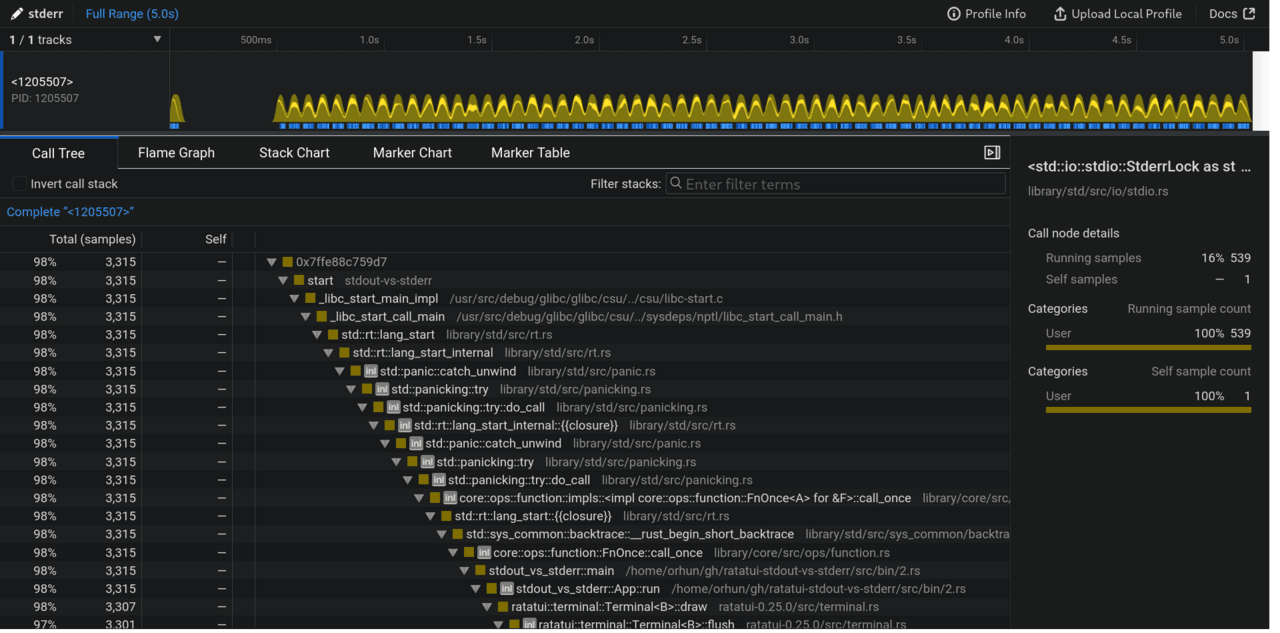
You can immediately see the difference on the processor page (the first one is stdout):

stdout has 708 samples compared to stderr which has 3315, which means that stdout made 4 times fewer calls than stderr in 5 seconds! We have definitely stumbled upon something important.
Next, we can figure out the characteristics of each call. It is safe to assume that for each rendering there will be some write calls to the terminal. We can zoom in on the processor image to see each render more clearly:

As you can see, stdout has displayed more frames in the same time frame as stderr. Also, stderr (during each render) has more of the lighter yellow spikes compared to stdout (sometimes). We’ll figure out what those spikes are soon.
We can zoom in even further and look at the calls that occurred for each render:
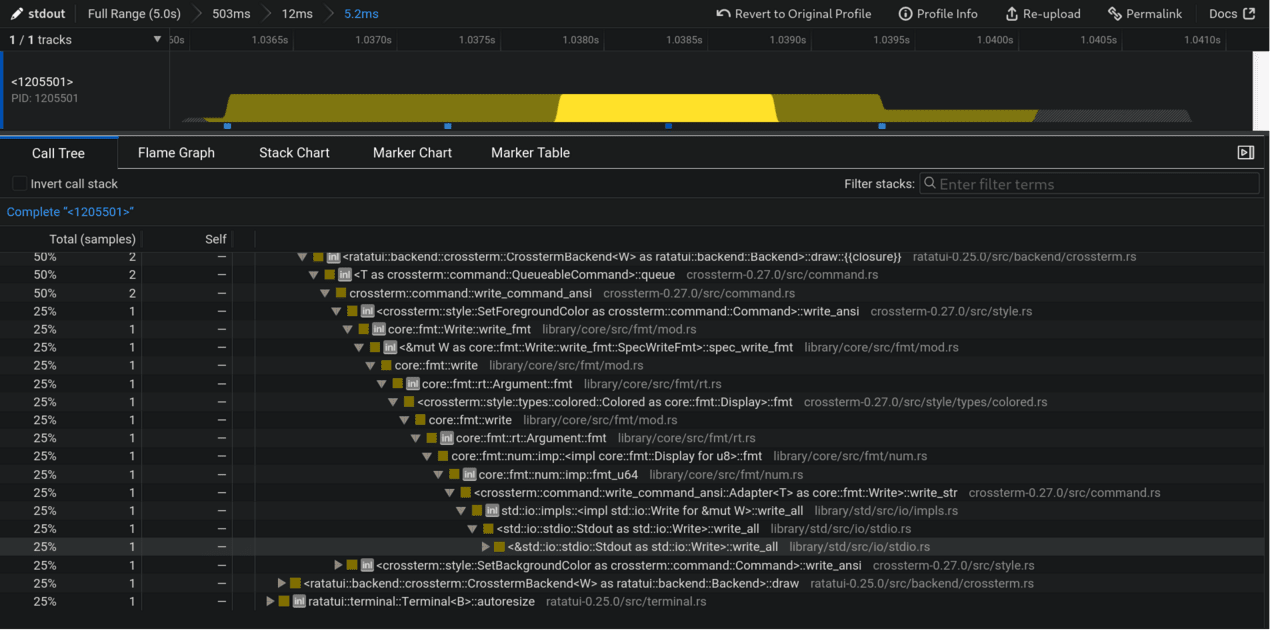
Full stack trace:
<std::io::stdio::Stdout as std::io::Write>::write_all [library/std/src/io/stdio.rs]
std::io::impls::<impl std::io::Write for &mut W>::write_all [library/std/src/io/impls.rs]
<crossterm::command::write_command_ansi::Adapter<T> as core::fmt::Write>::write_str [crossterm-0.27.0/src/command.rs]
core::fmt::num::imp::fmt_u64 [library/core/src/fmt/num.rs]
core::fmt::num::imp::<impl core::fmt::Display for u8>::fmt [library/core/src/fmt/num.rs]
core::fmt::rt::Argument::fmt [library/core/src/fmt/rt.rs]
core::fmt::write [library/core/src/fmt/mod.rs]
<crossterm::style::types::colored::Colored as core::fmt::Display>::fmt [crossterm-0.27.0/src/style/types/colored.rs]
core::fmt::rt::Argument::fmt [library/core/src/fmt/rt.rs]
core::fmt::write [library/core/src/fmt/mod.rs]
<&mut W as core::fmt::Write::write_fmt::SpecWriteFmt>::spec_write_fmt [library/core/src/fmt/mod.rs]
core::fmt::Write::write_fmt [library/core/src/fmt/mod.rs]
<crossterm::style::SetForegroundColor as crossterm::command::Command>::write_ansi [crossterm-0.27.0/src/style.rs]
crossterm::command::write_command_ansi [crossterm-0.27.0/src/command.rs]
<T as crossterm::command::QueueableCommand>::queue [crossterm-0.27.0/src/command.rs]
<ratatui::backend::crossterm::CrosstermBackend<W> as ratatui::backend::Backend>::draw::{{closure}} [ratatui-0.25.0/src/backend/crossterm.rs]
core::result::Result<T,E>::and_then [library/core/src/result.rs]
<ratatui::backend::crossterm::CrosstermBackend<W> as ratatui::backend::Backend>::draw [crossterm-0.27.0/src/macros.rs]
ratatui::terminal::Terminal<B>::flush [ratatui-0.25.0/src/terminal.rs]
ratatui::terminal::Terminal<B>::draw [ratatui-0.25.0/src/terminal.rs]
stdout_vs_stderr::App::run [/home/orhun/gh/ratatui-stdout-vs-stderr/src/bin/2.rs]
stdout_vs_stderr::main [/home/orhun/gh/ratatui-stdout-vs-stderr/src/bin/2.rs]
core::ops::function::FnOnce::call_once [library/core/src/ops/function.rs]
std::sys_common::backtrace::__rust_begin_short_backtrace [library/std/src/sys_common/backtrace.rs]
std::rt::lang_start::{{closure}} [library/std/src/rt.rs]
core::ops::function::impls::<impl core::ops::function::FnOnce<A> for &F>::call_once [library/core/src/ops/function.rs]
std::panicking::try::do_call [library/std/src/panicking.rs]
std::panicking::try [library/std/src/panicking.rs]
std::panic::catch_unwind [library/std/src/panic.rs]
std::rt::lang_start_internal::{{closure}} [library/std/src/rt.rs]
std::panicking::try::do_call [library/std/src/panicking.rs]
std::panicking::try [library/std/src/panicking.rs]
std::panic::catch_unwind [library/std/src/panic.rs]
std::rt::lang_start_internal [library/std/src/rt.rs]
std::rt::lang_start [library/std/src/rt.rs]
_libc_start_call_main [/usr/src/debug/glibc/glibc/csu/../sysdeps/nptl/libc_start_call_main.h]
_libc_start_main_impl [/usr/src/debug/glibc/glibc/csu/../csu/libc-start.c]
start [stdout-vs-stderr]
0x7fff18a00137
Full stack trace:
<std::io::stdio::Stdout as std::io::Write>::write_all [library/std/src/io/stdio.rs]
std::io::impls::<impl std::io::Write for &mut W>::write_all [library/std/src/io/impls.rs]
<crossterm::command::write_command_ansi::Adapter<T> as core::fmt::Write>::write_str [crossterm-0.27.0/src/command.rs]
core::fmt::num::imp::fmt_u64 [library/core/src/fmt/num.rs]
core::fmt::num::imp::<impl core::fmt::Display for u8>::fmt [library/core/src/fmt/num.rs]
core::fmt::rt::Argument::fmt [library/core/src/fmt/rt.rs]
core::fmt::write [library/core/src/fmt/mod.rs]
<crossterm::style::types::colored::Colored as core::fmt::Display>::fmt [crossterm-0.27.0/src/style/types/colored.rs]
core::fmt::rt::Argument::fmt [library/core/src/fmt/rt.rs]
core::fmt::write [library/core/src/fmt/mod.rs]
<&mut W as core::fmt::Write::write_fmt::SpecWriteFmt>::spec_write_fmt [library/core/src/fmt/mod.rs]
core::fmt::Write::write_fmt [library/core/src/fmt/mod.rs]
<crossterm::style::SetForegroundColor as crossterm::command::Command>::write_ansi [crossterm-0.27.0/src/style.rs]
crossterm::command::write_command_ansi [crossterm-0.27.0/src/command.rs]
<T as crossterm::command::QueueableCommand>::queue [crossterm-0.27.0/src/command.rs]
<ratatui::backend::crossterm::CrosstermBackend<W> as ratatui::backend::Backend>::draw::{{closure}} [ratatui-0.25.0/src/backend/crossterm.rs]
core::result::Result<T,E>::and_then [library/core/src/result.rs]
<ratatui::backend::crossterm::CrosstermBackend<W> as ratatui::backend::Backend>::draw [crossterm-0.27.0/src/macros.rs]
ratatui::terminal::Terminal<B>::flush [ratatui-0.25.0/src/terminal.rs]
ratatui::terminal::Terminal<B>::draw [ratatui-0.25.0/src/terminal.rs]
stdout_vs_stderr::App::run [/home/orhun/gh/ratatui-stdout-vs-stderr/src/bin/2.rs]
stdout_vs_stderr::main [/home/orhun/gh/ratatui-stdout-vs-stderr/src/bin/2.rs]
core::ops::function::FnOnce::call_once [library/core/src/ops/function.rs]
std::sys_common::backtrace::__rust_begin_short_backtrace [library/std/src/sys_common/backtrace.rs]
std::rt::lang_start::{{closure}} [library/std/src/rt.rs]
core::ops::function::impls::<impl core::ops::function::FnOnce<A> for &F>::call_once [library/core/src/ops/function.rs]
std::panicking::try::do_call [library/std/src/panicking.rs]
std::panicking::try [library/std/src/panicking.rs]
std::panic::catch_unwind [library/std/src/panic.rs]
std::rt::lang_start_internal::{{closure}} [library/std/src/rt.rs]
std::panicking::try::do_call [library/std/src/panicking.rs]
std::panicking::try [library/std/src/panicking.rs]
std::panic::catch_unwind [library/std/src/panic.rs]
std::rt::lang_start_internal [library/std/src/rt.rs]
std::rt::lang_start [library/std/src/rt.rs]
_libc_start_call_main [/usr/src/debug/glibc/glibc/csu/../sysdeps/nptl/libc_start_call_main.h]
_libc_start_main_impl [/usr/src/debug/glibc/glibc/csu/../csu/libc-start.c]
start [stdout-vs-stderr]
0x7fff18a00137
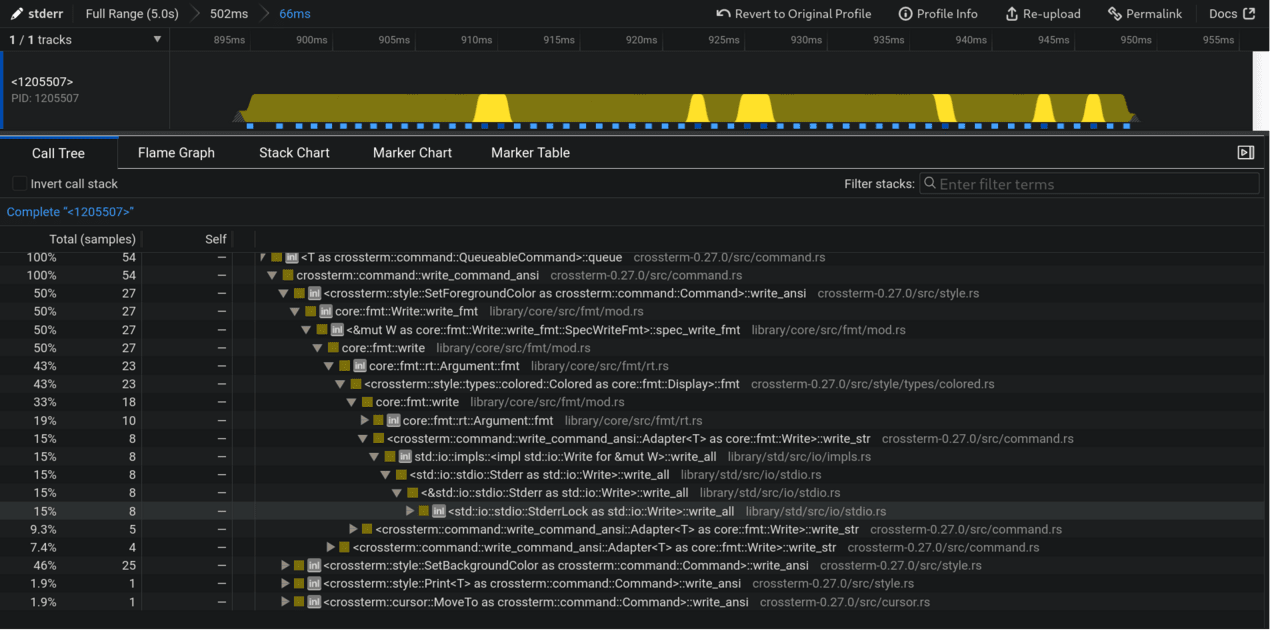
<std::io::stdio::StderrLock as std::io::Write>::write_all
Full stack trace:
<std::io::stdio::StderrLock as std::io::Write>::write_all [library/std/src/io/stdio.rs]
<&std::io::stdio::Stderr as std::io::Write>::write_all [library/std/src/io/stdio.rs]
<std::io::stdio::Stderr as std::io::Write>::write_all [library/std/src/io/stdio.rs]
std::io::impls::<impl std::io::Write for &mut W>::write_all [library/std/src/io/impls.rs]
<crossterm::command::write_command_ansi::Adapter<T> as core::fmt::Write>::write_str [crossterm-0.27.0/src/command.rs]
core::fmt::write [library/core/src/fmt/mod.rs]
<crossterm::style::types::colored::Colored as core::fmt::Display>::fmt [crossterm-0.27.0/src/style/types/colored.rs]
core::fmt::rt::Argument::fmt [library/core/src/fmt/rt.rs]
core::fmt::write [library/core/src/fmt/mod.rs]
<&mut W as core::fmt::Write::write_fmt::SpecWriteFmt>::spec_write_fmt [library/core/src/fmt/mod.rs]
core::fmt::Write::write_fmt [library/core/src/fmt/mod.rs]
<crossterm::style::SetForegroundColor as crossterm::command::Command>::write_ansi [crossterm-0.27.0/src/style.rs]
crossterm::command::write_command_ansi [crossterm-0.27.0/src/command.rs]
<T as crossterm::command::QueueableCommand>::queue [crossterm-0.27.0/src/command.rs]
<ratatui::backend::crossterm::CrosstermBackend<W> as ratatui::backend::Backend>::draw::{{closure}} [ratatui-0.25.0/src/backend/crossterm.rs]
core::result::Result<T,E>::and_then [library/core/src/result.rs]
<ratatui::backend::crossterm::CrosstermBackend<W> as ratatui::backend::Backend>::draw [crossterm-0.27.0/src/macros.rs]
ratatui::terminal::Terminal<B>::flush [ratatui-0.25.0/src/terminal.rs]
ratatui::terminal::Terminal<B>::draw [ratatui-0.25.0/src/terminal.rs]
stdout_vs_stderr::App::run [/home/orhun/gh/ratatui-stdout-vs-stderr/src/bin/2.rs]
stdout_vs_stderr::main [/home/orhun/gh/ratatui-stdout-vs-stderr/src/bin/2.rs]
core::ops::function::FnOnce::call_once [library/core/src/ops/function.rs]
std::sys_common::backtrace::__rust_begin_short_backtrace [library/std/src/sys_common/backtrace.rs]
std::rt::lang_start::{{closure}} [library/std/src/rt.rs]
core::ops::function::impls::<impl core::ops::function::FnOnce<A> for &F>::call_once [library/core/src/ops/function.rs]
std::panicking::try::do_call [library/std/src/panicking.rs]
std::panicking::try [library/std/src/panicking.rs]
std::panic::catch_unwind [library/std/src/panic.rs]
std::rt::lang_start_internal::{{closure}} [library/std/src/rt.rs]
std::panicking::try::do_call [library/std/src/panicking.rs]
std::panicking::try [library/std/src/panicking.rs]
std::panic::catch_unwind [library/std/src/panic.rs]
std::rt::lang_start_internal [library/std/src/rt.rs]
std::rt::lang_start [library/std/src/rt.rs]
_libc_start_call_main [/usr/src/debug/glibc/glibc/csu/../sysdeps/nptl/libc_start_call_main.h]
_libc_start_main_impl [/usr/src/debug/glibc/glibc/csu/../csu/libc-start.c]
start [stdout-vs-stderr]
0x7ffe88c759d7
Now it’s clear that these bursts were write_all caused by waits. That’s nice to know, but what does it even mean?
This means that:
stoutwrite_all is called once every 5.2ms and this happens every now and then.
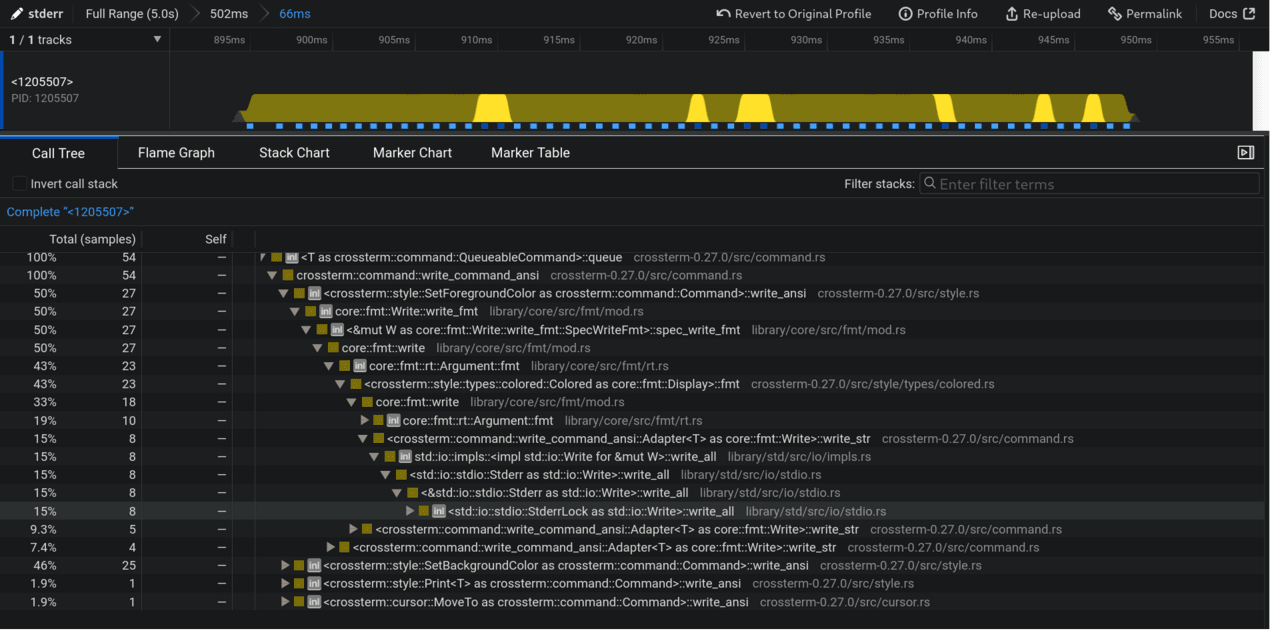
stderrwrite_all is called 5 times in 66ms and this happens multiple times for almost every render.
We can see this more clearly from the stack diagram (the first one is stdout):
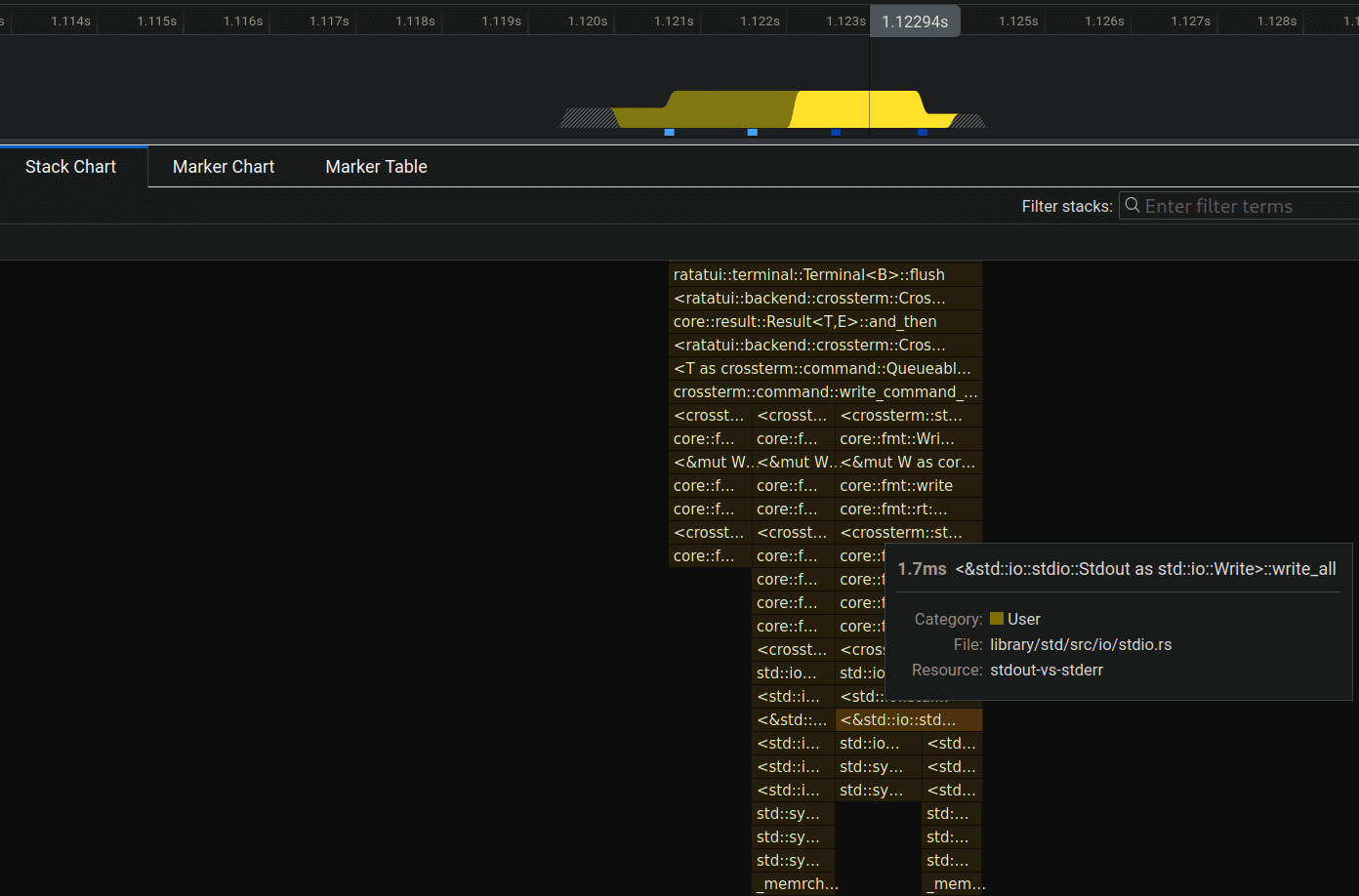
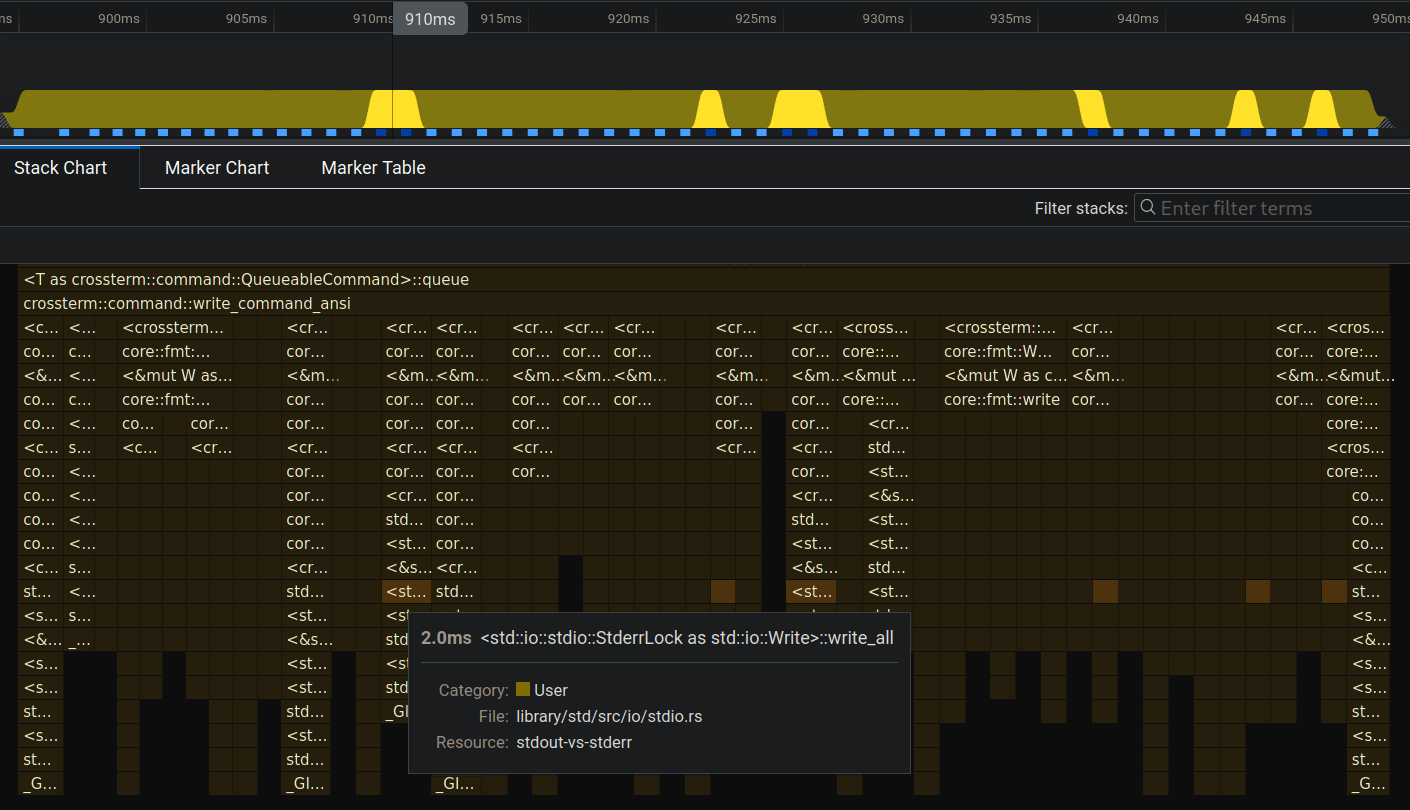
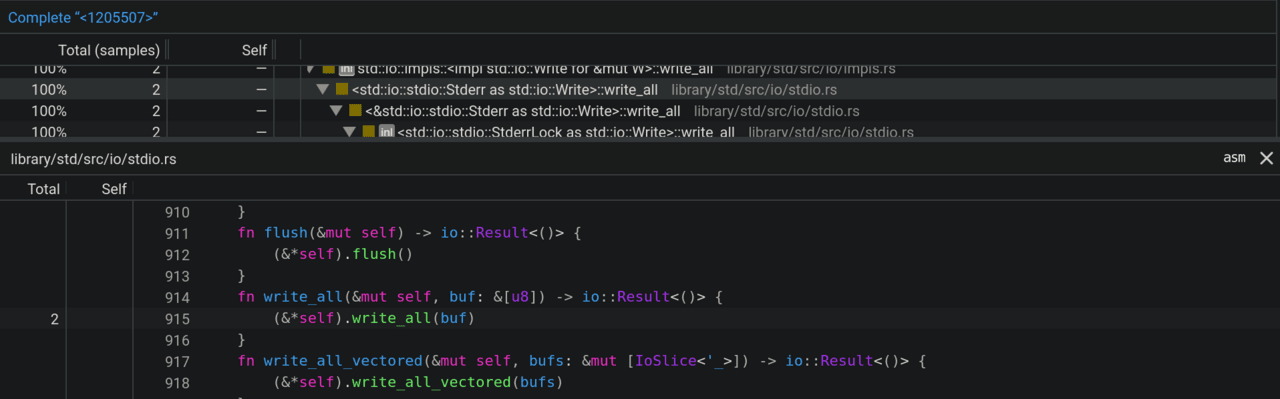
Ultimately, we can inspect the code of this call, but it’s not very useful because it’s abstract:
So what can we conclude from all this?
The conclusion is that stdout makes fewer write calls, thus being able to display more frames in the same amount of time. In other words, stderr blocks until the write function for each frame is displayed on the terminal, while stdout returns data faster.
There must be some buffering going on for stdout.