
19.06.2025
13 min
965



In the second part, we take a closer look at how different buffering methods affect stdout and stderr. The author experiments with LineWriter, BufWriter, and raw output, demonstrating the difference in execution speed. It turns out that when both streams use the same buffering technique, their performance becomes almost identical. Additionally, examples of using from_raw_fd to create unbuffered stdout are considered, as well as optimization possibilities in TUI applications. Comparison with other programming languages — Go, Python, C, C++, and Zig — shows that the approach to standard streams may differ, but the principles of buffering remain key. This in-depth study helps to understand when it is worth leaving stderr “raw” and when it is advisable to use buffering for better performance.

Let’s remember the changes we made that brought us to this point:
-let mut terminal = Terminal::new(CrosstermBackend::new(std::io::stdout()))?;
+let mut terminal = Terminal::new(CrosstermBackend::new(std::io::stderr()))?;
So something internal changes when we do this. ratatui This is a good place to look first:
The CrosstermBackend framework is a wrapper around the Write implementation that is used to send commands to the terminal. It provides methods for drawing content, manipulating the cursor, and clearing the terminal screen.
/// A Backend implementation that uses Crossterm to render to the terminal.
pub struct CrosstermBackend<W: Write> {
    writer: W,
}

impl<W> CrosstermBackend<W>
where
    W: Write,
{
    pub fn new(writer: W) -> CrosstermBackend<W> {
        CrosstermBackend { writer }
    }
}
Write is a Rust feature for objects that can be used to write streams of bytes. It has methods like write, flush, and most importantly write_all, which we encountered earlier. The code above means that CrosstermBackend can work with anything that implements Write, such as File, &mut [8], and other types, including Stdout. This abstraction helps us use the backend with different structures.
This is why the compiler doesn’t complain when we change the argument from Stdout to Stderr.
Okay, so ratatui uses stdout as its input and sends it to crossterm for writing. In this case, we need to go one level deeper to see what’s different about crossterm from stdout and stderr.
Not really. Take a look at this chart:
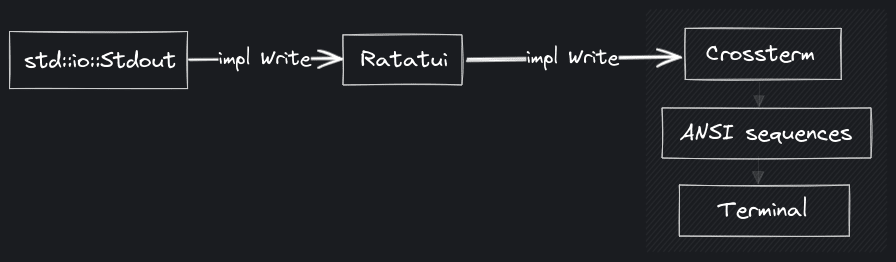
As you delve deeper into the subject, the capabilities of the passed type are limited by the implementation. In other words, if you take a Write parameter, you only have a set of functionality that you can work with (write, write_all, etc.). In this case, crossterm has no chance of telling stdout and stderr to behave differently, since it only knows about the “type”, which is write. That’s why we need to delve deeper, which is where we started, with the Stdout and Stderr structures.
Wait, you mean we need to check the source code of the Rust standard library to answer this question? Doesn’t that mean that stdout is not always faster than stderr, and that it depends on the implementation details?
That’s right. “Everything is a file,” remember? stdout and stderr are also files, no different. Rust must be doing some magic here. 🪄
To understand the magic, you can refer to the definition of Stdout:
pub struct Stdout {
    // FIXME: this should be LineWriter or BufWriter depending on the state of
    //        stdout (tty or not). Note that if this is not line buffered it
    //        should also flush-on-panic or some form of flush-on-abort.
    inner: &'static ReentrantMutex<RefCell<LineWriter<StdoutRaw>>>,
}
Now let’s look at Stderr:
pub struct Stderr {
    inner: &'static ReentrantMutex<RefCell<StderrRaw>>,
}
Take a look at the difference:
-ReentrantMutex<RefCell<LineWriter<StdoutRaw>>>
+ReentrantMutex<RefCell<StderrRaw>>
Hmm… So Stdout, additionally wrapped in another structure called LineWriter.
So, you see what this is all about?
LineWriter wraps a write block and buffers the output into it, flushing the data whenever a newline character ( 0x0a, ) is encountered.’\n’ We can use LineWriter to write one line at a time, which greatly reduces the number of actual writes to the file.
This is what we’ve been looking for all this time. Let’s try it!
use std::io::{self, LineWriter, Write};
use std::thread;
use std::time::Duration;

let stdout = io::stdout();
let mut writer = LineWriter::new(stdout);

writer.write_all(b"In Rust's domain where choices gleam,")?;
eprintln!("[waiting for newline]");
thread::sleep(Duration::from_secs(1));

// No bytes are written until a newline is encountered
// (or the internal buffer is filled).
writer.write_all(b"\n")?;
eprintln!("\n[writing the rest]");
thread::sleep(Duration::from_secs(1));

// Write the rest.
writer.write_all(
    b"Ratatui's path, a unique stream.
Terminal canvas, colors bright,
Untraveled road, a different light.
That choice, the difference, in code's delight.",
)?;

// The last line doesn't end in a newline,
// so we have to flush or drop the `LineWriter` to finish writing.
eprintln!("\n[flush or drop to finish writing]");
thread::sleep(Duration::from_secs(1));
writer.flush()?;
If we run this code:
[waiting for newline]
In Rust's domain where choices gleam,

[writing the rest]
Ratatui's path, a unique stream.
Terminal canvas, colors bright,
Untraveled road, a different light.

[flush or drop to finish writing]
That choice, the difference, in code's delight.
From this conclusion we can observe:
The first eprintln! message is printed, and the writer module waits for a newline character to write to stdout (even though we already called write_all earlier).
The second part of the poem is printed in its entirety up to the last line.
The last line is not printed until we clear the standard output.
While this may seem like a rather strange behavior at first glance, it actually has a huge performance advantage, and that’s why stdout is much faster than stderr! See you in another blog post.
Wait! Is that it? You’re right, we can do more with this information.
Let’s go back to the standard definition of the Stdout library:
pub struct Stdout {
    // FIXME: this should be LineWriter or BufWriter depending on the state of
    //        stdout (tty or not). Note that if this is not line buffered it
    //        should also flush-on-panic or some form of flush-on-abort.
    inner: &'static ReentrantMutex<RefCell<LineWriter<StdoutRaw>>>,
}
Yes, what about FIXME with the comment? And what is BufWriter?
Good questions, the documentation explains very well BufWriter :
BufWriter stores a buffer of data in memory and writes it to the underlying writer in large, infrequent bursts. BufWriter This can speed up programs that make small, repeated write calls to the same file or network socket. In other words, BufWriter writes data to its internal buffer instead of an actual stream, and then writes this collected data to the stream infrequently.
Isn’t this the same as LineWriter?
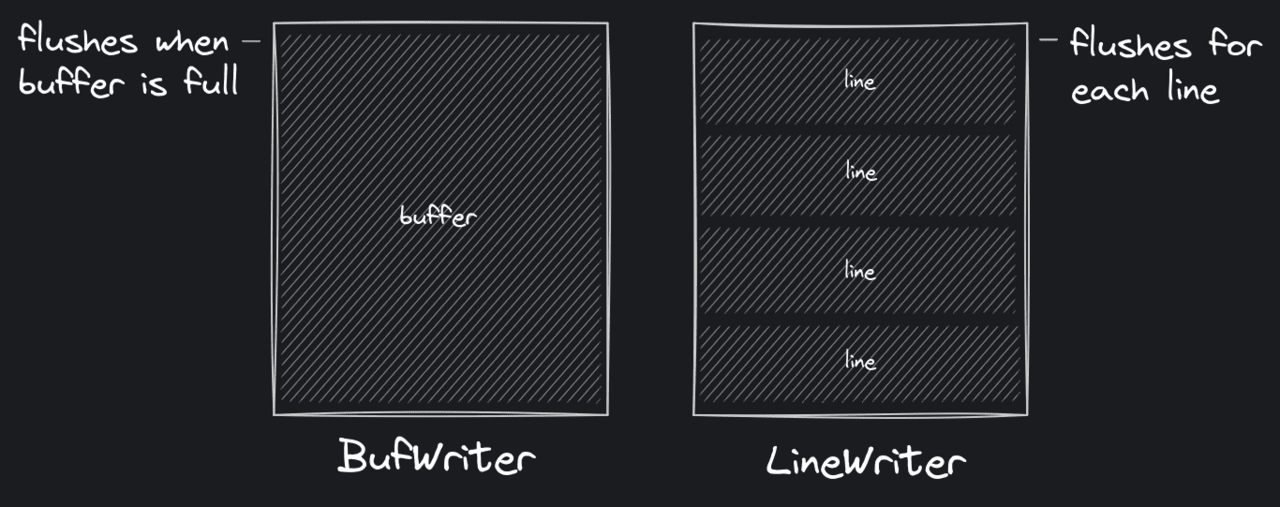
Isn’t that the same as LineWriter? Good point! They actually differ when it comes to flushing (i.e. when buffered data is written to the stream).
BufWriter: resets when the internal buffer is full.
LineWriter: same behavior as BufWriter, but also clears for each line (when 0x0a or ) is encountered.\n
They also both blush when the author goes out of sight.
To make it clearer:
Let’s change our previous LineWriter example to use BufWriter:
use std::io::{self, BufWriter, Write};
use std::thread;
use std::time::Duration;

let stdout = io::stdout();
let mut writer = BufWriter::new(stdout);

writer.write_all(b"In Rust's domain where choices gleam,")?;
eprintln!("[writing the first line]");
thread::sleep(Duration::from_secs(1));

// No bytes are written until a newline is encountered
// (or the internal buffer is filled).
writer.write_all(b"\n")?;
eprintln!("\n[writing the rest]");
thread::sleep(Duration::from_secs(1));

// Write the rest.
writer.write_all(
    b"Ratatui's path, a unique stream.
Terminal canvas, colors bright,
Untraveled road, a different light.
That choice, the difference, in code's delight.",
)?;

// The last line doesn't end in a newline,
// so we have to flush or drop the `LineWriter` to finish writing.
eprintln!("\n[flush or drop to finish writing]");
thread::sleep(Duration::from_secs(1));
writer.flush()?;
We will see that nothing is printed until we reset the BufWriter:
[writing the first line]

[writing the rest]

[flush or drop to finish writing]
In Rust's domain where choices gleam,
Ratatui's path, a unique stream.
Terminal canvas, colors bright,
Untraveled road, a different light.
That choice, the difference, in code's delight.
Regarding the comment on the stdout structure:
This should be a LineWriter or a BufWriter, depending on the state of stdout (tty or not). What this means is that stdout should automatically choose between line buffering (LineWriter) and block buffering (BufWriter) depending on whether it is connected to a TTY or not. So, stdout should no longer be buffered into lines when outputting to a non-terminal (like sending output to a file).
I don’t understand what the advantage of using BufWriter is in this case?
In the case of non-TTY, say writing to a file, this would mean that the output would be buffered into blocks, so we wouldn’t be making system calls for each line. In other words, we wouldn’t be constantly dumping data, which is a huge performance advantage. This can save us a lot of overhead when working with larger files.
And this is actually implemented in Rust, but the merge request is not merged: #115652
It would also be great to be able to enable block buffering for stdout in the future. There is a discussion about this here: #60673
What would be the benefit of this?
Take a look at this code for example:
for i in 1..1000000 {
    println!("{}", i);
}
Keep in mind that println!this writes to stdout, and it is line-buffered (i.e. uses LineWriter) by default. In other words, it clears the terminal for each line and executes a system call!
Now look at this:
let stdout = io::stdout();
let mut output = BufWriter::new(stdout);
for i in 1..1000000 {
    writeln!(output, "{}", i)?;
}
Here we wrap stdout in a BufWriter, making it block buffered✨
#!/usr/bin/env rust-script

use std::{
    io::{self, BufWriter, Result, Write},
    time::Instant,
};

fn main() -> Result<()> {
    let first = Instant::now();
    for i in 1..1000000 {
        println!("{}", i);
    }
    let first_elapsed = first.elapsed();

    let second = Instant::now();
    let stdout = io::stdout();
    let mut output = BufWriter::new(stdout);
    for i in 1..1000000 {
        writeln!(output, "{}", i)?;
    }
    let second_elapsed = second.elapsed();
    output.flush()?;

    println!("Line buffered: {:?}", first_elapsed);
    println!("Block buffered: {:?}", second_elapsed);

    Ok(())
}
When we run it:
$ chmod +x block-buffered-stdout.rs

$ ./block-buffered-stdout.rs

# [...]
Line buffered: 1.080789949s
Block buffered: 408.105636ms
Blocking buffered stout launches ~2x faster! Awesome! I wonder what would happen if we applied this to our TUI application.
We could try making the following change:
-let mut terminal = Terminal::new(CrosstermBackend::new(stdout()))?;
+let mut terminal = Terminal::new(CrosstermBackend::new(BufWriter::new(stdout())))?;
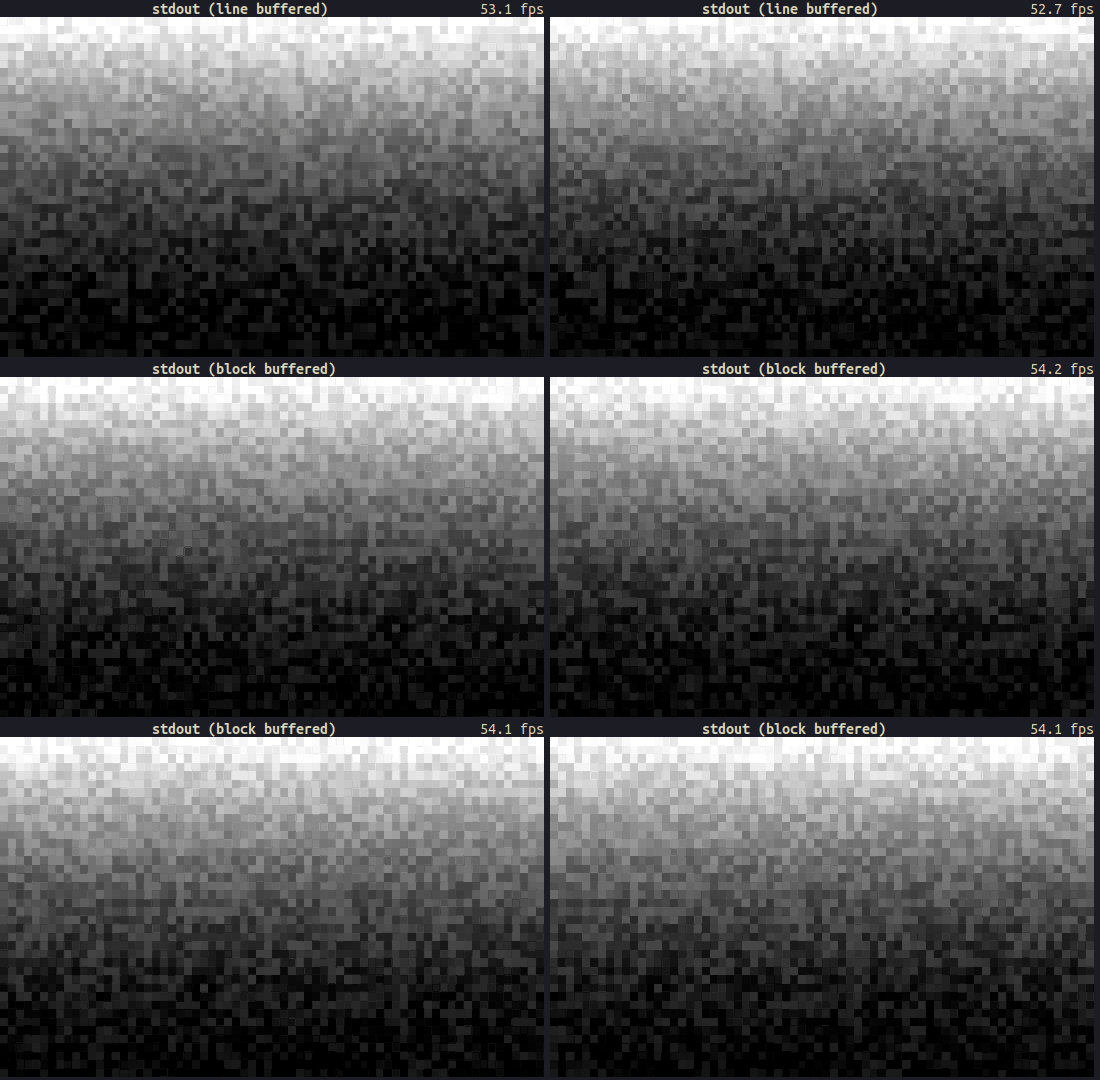
Hmm, no noticeable performance gain. What if we tried something more substantial, like using…block buffered stderr. By default stderr is not buffered, remember?
Yeah… Oh! I have a better idea. How about making stderr a line buffer? Stdout is also line buffered, so would we get the same performance?
Yeah, let’s try that!
// line buffered stdout (as default)
let mut terminal = Terminal::new(CrosstermBackend::new(stdout()))?;

// line buffered stderr
let mut terminal = Terminal::new(CrosstermBackend::new(LineWriter::new(stderr())))?;
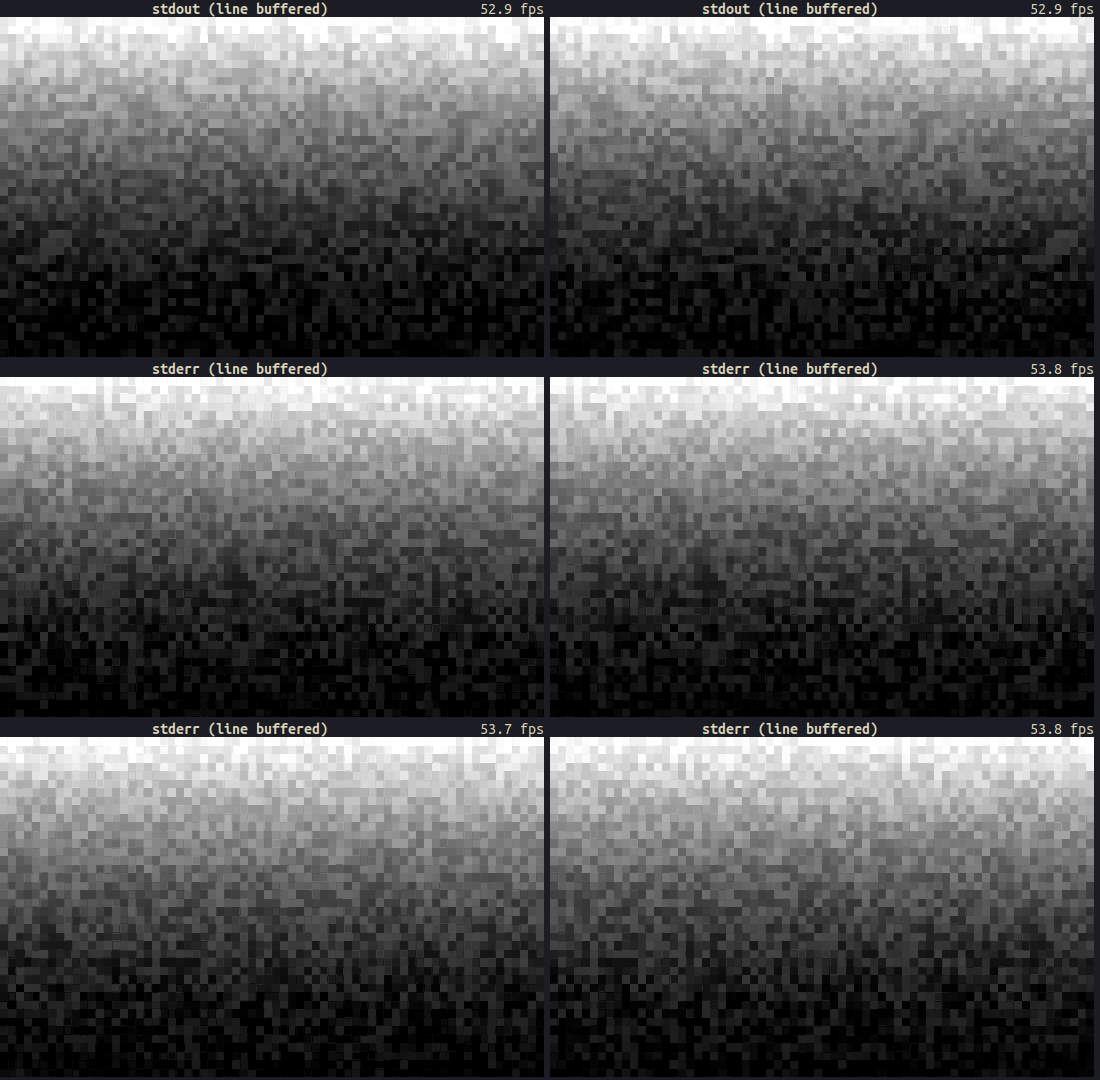
Damn, did we just make stderr performance identical to stdout by simply making it line-buffered?
Oh yeah, it looks like it!
Experimenting with raw records
How about doing the opposite of what we’ve been doing so far and trying to make stdout unbuffered? That would hurt performance, and we’d probably end up with a result similar to using stderr by default. Let’s prove our hypothesis!
If we look at our findings so far:
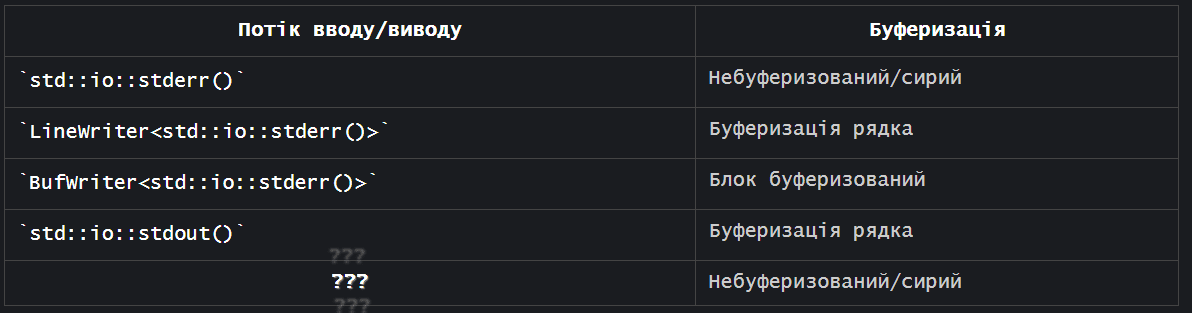
Since the stderr() function returns a raw stream by default (i.e., StderrRaw), it is easier to implement a buffering layer on top of it. However, the stdout() function already returns a buffered stream, so we need to get the raw stream somehow.
If you remember the meaning of Stdout:
/// A handle to the global standard output stream of the current process.
pub struct Stdout {
    inner: &'static ReentrantMutex<RefCell<LineWriter<StdoutRaw>>>,
}
We need StdoutRaw for an unbuffered stream, not for wrapping it inside a LineWriter. The type definition also confirms the unbuffered behavior:
/// A handle to a raw instance of the standard output stream of this process.
///
/// This handle is not synchronized or buffered in any fashion. Constructed via
/// the `std::io::stdio::stdout_raw` function.
struct StdoutRaw(stdio::Stdout);
Great. This comment brings us to the stdout_raw function:
/// Constructs a new raw handle to the standard output stream of this process.
///
/// The returned handle has no external synchronization or buffering layered on
/// top.
const fn stdout_raw() -> StdoutRaw {
    StdoutRaw(stdio::Stdout::new())
}
Easy, we can just create raw standard output by calling stdout_raw!
Not really, that’s a private action.
std::io::stdio::stdout_raw();
         ^^^^^  ---------- function `stdout_raw` is not publicly re-exported
         |
         private module
There is actually a tracking issue from 2019 regarding exposing raw stdout/stderr/stdin: #58326
There is currently no easy/obvious way to get unbuffered Stdout/err/in. These types exist in stdio, but they are not public for reasons not mentioned. For example, these types would be useful for CLI applications that write a lot of data at once without having to clean it up unnecessarily. And unfortunately, there is still no easy/obvious way to get unbuffered I/O streams 🙁
But!
In this release we have some hints about possible workarounds. One thing that comes up a few times in the release is that we can use this from_raw_fd on Linux as a workaround.
Let me guess, from_raw_fd takes a file descriptor, and we are just going to use the stdout file descriptor (which is “1”) to create an unbuffered stream.
That’s right!
use std::fs::File;

let mut raw_stdout = File::from_raw_fd(1);
writeln!(raw_stdout, "test");
But…
error[E0133]: call to unsafe function is unsafe and requires unsafe function or block
   |
55 |                 let raw_stdout = File::from_raw_fd(1);
   |                                  ^^^^^^^^^^^^^^^^^^^^ call to unsafe function
   |
   = note: consult the function's documentation for information on how to avoid undefined behavior
If we read the documentation for :from_raw_fd
Safety: fdThe passed file must be its own file descriptor; in particular, it must be open.
There are more details (which I will cover in another blog post), but the moral of the story is that we need to put our code in an unsafe block like this:
use std::fs::File;

// SAFETY: no other functions should call `from_raw_fd`, so there
// is only one owner for the file descriptor.
let raw_stdout = unsafe { File::from_raw_fd(1) };
writeln!(raw_stdout, "test");
If you run it, you’ll see “test” on standard output. Yay! \o/
However, as briefly mentioned in the previous section, there’s still a big problem with this code. Going back to the documentation for from_raw_fd:
This function is typically used to take ownership of the specified file descriptor. When used this way, the returned object will take responsibility for closing it when the object goes out of scope.
This means that the raw_stdout variable takes ownership of the file descriptor and closes standard output (stdout) when it goes out of scope. In other words, when the created File object is disposed, standard output is closed.
We can verify this behavior with this code:
use std::fs::File;
use std::io::{Result, Write};
use std::os::fd::FromRawFd;

fn print1() -> Result<()> {
    let mut raw_stdout = unsafe { File::from_raw_fd(1) };
    writeln!(raw_stdout, "test1")
}

fn print2() -> Result<()> {
    let mut raw_stdout = unsafe { File::from_raw_fd(1) };
    writeln!(raw_stdout, "test2")
}

fn main() -> Result<()> {
    print1()?;
    print2()?;
    Ok(())
}
You expect to see “test1” and “test2”, but stdout is closed after we leave the first function. When we try to open it again, it will panic due to the security rule (the file passed to fd must be its own file descriptor + it must be open).
$ ./raw-stdout-broken.rs

test1
Error: Os { code: 9, kind: Uncategorized, message: "Bad file descriptor" }
This is bad. What should we do?
In our case, we want the open file to persist throughout the entire program. Let’s also assume that this is a TUI program and we have some functions where passing raw_stdout is not possible.
Well, there is another quick and dirty way to solve the problem: lazily initialize stdout and make it globally available via lazy_static (or another crate, like once_cell):
use std::fs::File;
use std::io::{Result, Write};
use std::os::fd::FromRawFd;
use std::sync::Mutex;

lazy_static! {
    static ref RAW_STDOUT: Mutex<File> = unsafe { Mutex::new(File::from_raw_fd(1)) };
}

fn print1() -> Result<()> {
    writeln!(RAW_STDOUT.lock().unwrap(), "test1")
}

fn print2() -> Result<()> {
    writeln!(RAW_STDOUT.lock().unwrap(), "test2")
}

fn main() -> Result<()> {
    print1()?;
    print2()?;
    Ok(())
}
$ ./raw-stdout-1.rs

test1
test2
Okay, okay, that’s a bit much. I mean lazy, static, mutex, locking, etc… Don’t we have a better way to solve this? Also, it’s impossible to create any other instances of stdout with this code.
There is actually a better way. The FromRawFd documentation gives us a hint:
Consuming ownership is not strictly required. Use the From<OwnedFd>::from implementation for an API that strictly consumes ownership.
It looks like we can bypass closing stdout if we use OwnedFd.
Owned file descriptor. This closes the file descriptor on deletion. It’s guaranteed that no one else will close the file descriptor.
So we can create a ✨global unbuffered stdout that doesn’t use ownership of the underlying file descriptor✨ like this:
use lazy_static::lazy_static;
use std::fs::File;
use std::io::{Result, Write};
use std::os::fd::{FromRawFd, OwnedFd};

lazy_static! {
    static ref RAW_STDOUT_FD: OwnedFd = unsafe { OwnedFd::from_raw_fd(1) };
}

fn print1() -> Result<()> {
    let mut raw_stdout = File::from(RAW_STDOUT_FD.try_clone()?);
    writeln!(raw_stdout, "test1")
}

fn print2() -> Result<()> {
    let mut raw_stdout = File::from(RAW_STDOUT_FD.try_clone()?);
    writeln!(raw_stdout, "test2")
}

fn main() -> Result<()> {
    print1()?;
    print2()?;
    Ok(())
}
$ ./raw-stdout-2.rs

test1
test2
If we need a more elegant solution, we can use the as_raw_fd function on Stdout instead of just “1”:
static ref RAW_STDOUT_FD: OwnedFd = {
    let stdout = std::io::stdout();
    let raw_fd = stdout.as_raw_fd();
    unsafe { OwnedFd::from_raw_fd(raw_fd) }
};
Весь цей біль, чому?
So that we can do this:
let stdout = std::io::stdout();
let raw_fd = stdout.as_raw_fd();
let raw_stdout = unsafe { File::from_raw_fd(raw_fd) };

// initialize the terminal with raw/unbuffered stdout
let mut terminal = Terminal::new(CrosstermBackend::new(BufWriter::new(raw_stdout)))?;
Yes, I almost forgot that we’re dealing with TUI. I think the original question was, “Is raw stdout as slow as raw stderr?”
So, let’s get this straight:
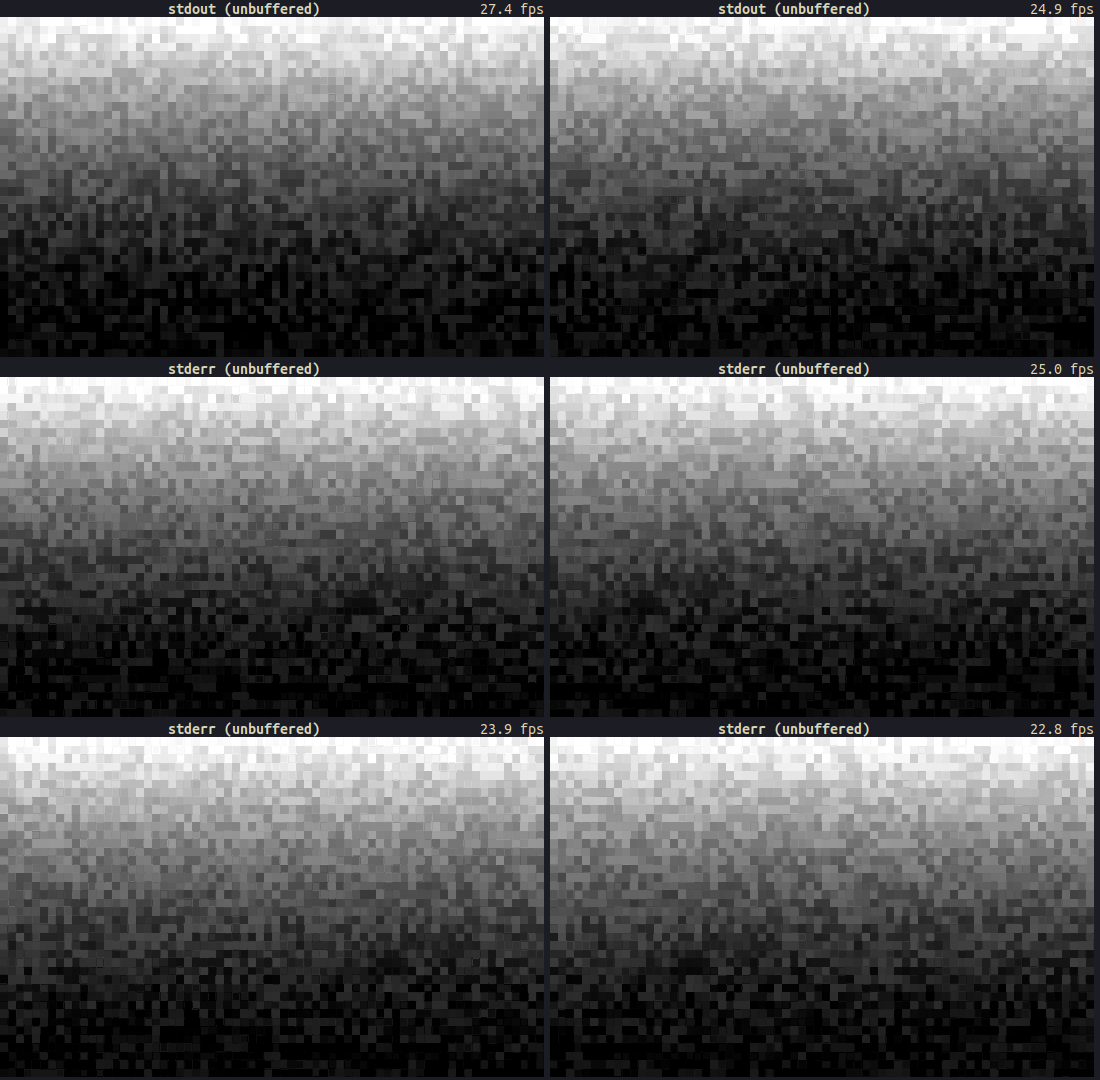
And that’s it, raw stdout has the same performance as raw stderr.
Everything we’ve done so far begs the question: Can we make stdout faster?
Well, now we know that the reason why stderr is slower than stdout is that it’s not buffered. So can we somehow achieve faster (more productive) I/O with stdout by doing something like “better buffering”?
Another way to improve FPS is to reduce the number of write calls. However, crossterm/ratatui already does some optimizations, such as not rendering cells that don’t change. The problem is that in the FPS counter example we’re using, the cells are constantly changing, so this optimization has no effect. Also, we’re setting both the background and foreground colors, so each render essentially takes multiple write calls.
In the screenshot below, I’ve modified the crossterm backend, ratatui, to highlight cells that don’t change between renders. It’s clear from the number of red cells that we can’t miss many write calls, as almost everything changes in the terminal:
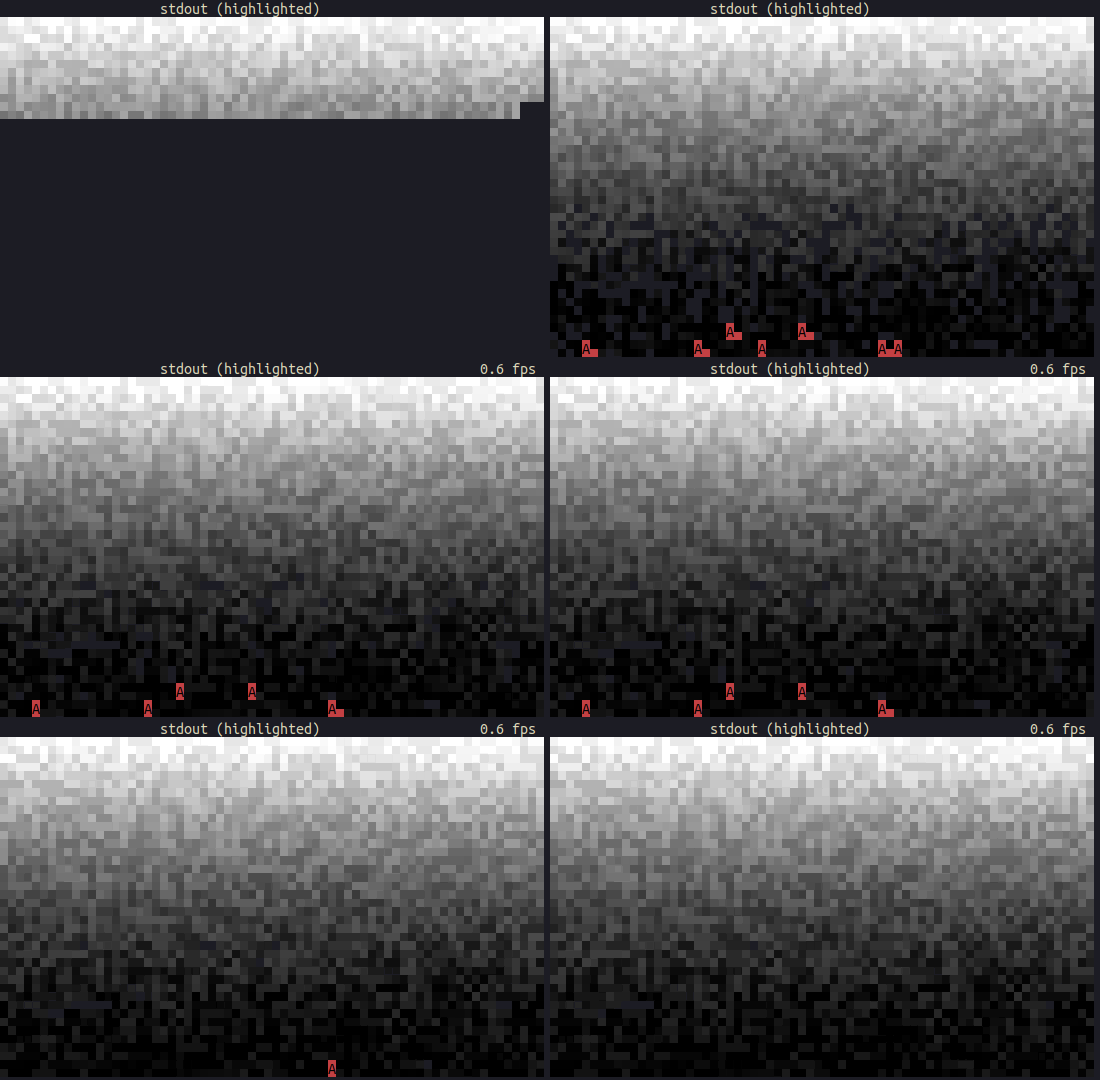
However, this is not the case for most TUI applications, and this optimization actually saves us from having to redraw most of the screen.
Another interesting point to note is the buffer size. With a smaller buffer size (100 bytes) and a delay between renderings, we can observe the following:
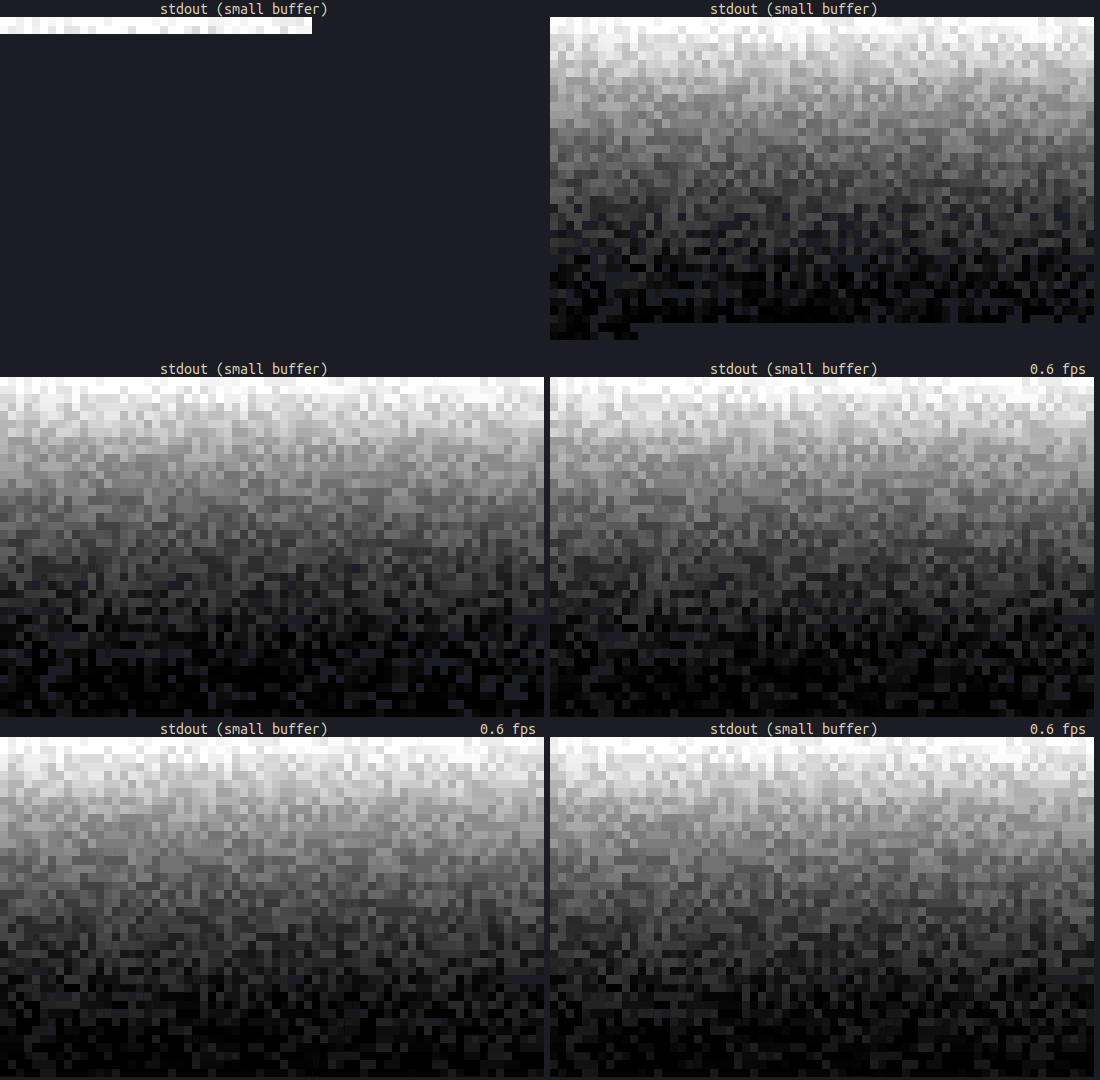
Whereas a larger buffer renders larger fragments:
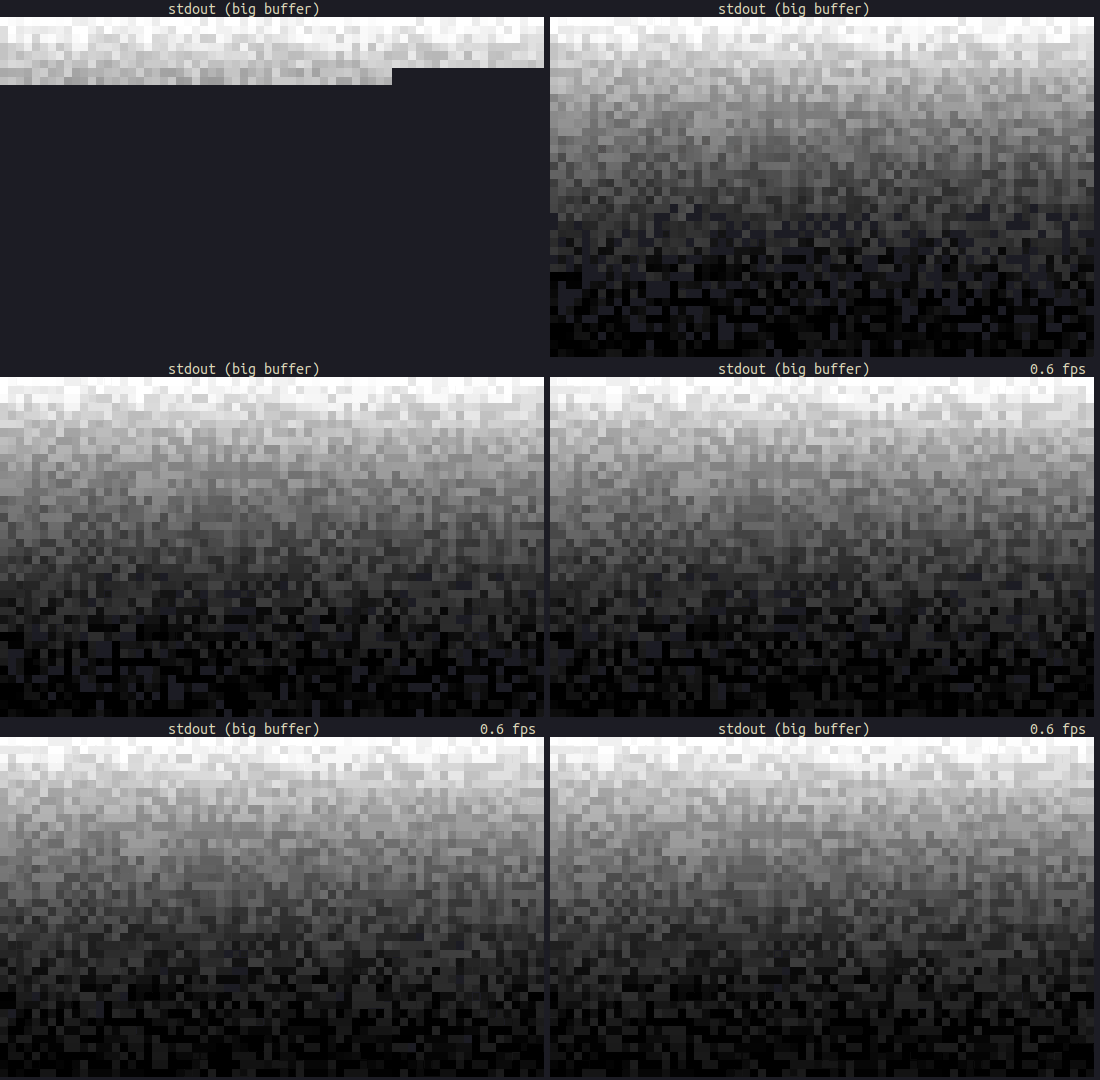
We won’t see much difference if we remove sleep mode, except if we use a very small/large buffer, then the FPS drops significantly. We can probably experiment with the buffer size to draw one line per render, but I haven’t been able to get better FPS in my attempts.
Another point worth mentioning is the recent developments in ratatui to improve the performance of cell rendering. This doesn’t have a huge impact on FPS, but it’s definitely an improvement due to using fewer resources.
We can continue to experiment with low-level functions of crossterm/ratatui for further optimization, but I think that would be a better topic for the second part of this post.
At the time of writing this, I haven’t been able to achieve “faster stdout”, so feel free to leave comments with your suggestions!
Here is a comparison of ratatui’s crossterm rendering for stdout and stderr using unbuffered / line-buffered / block-buffered writing:
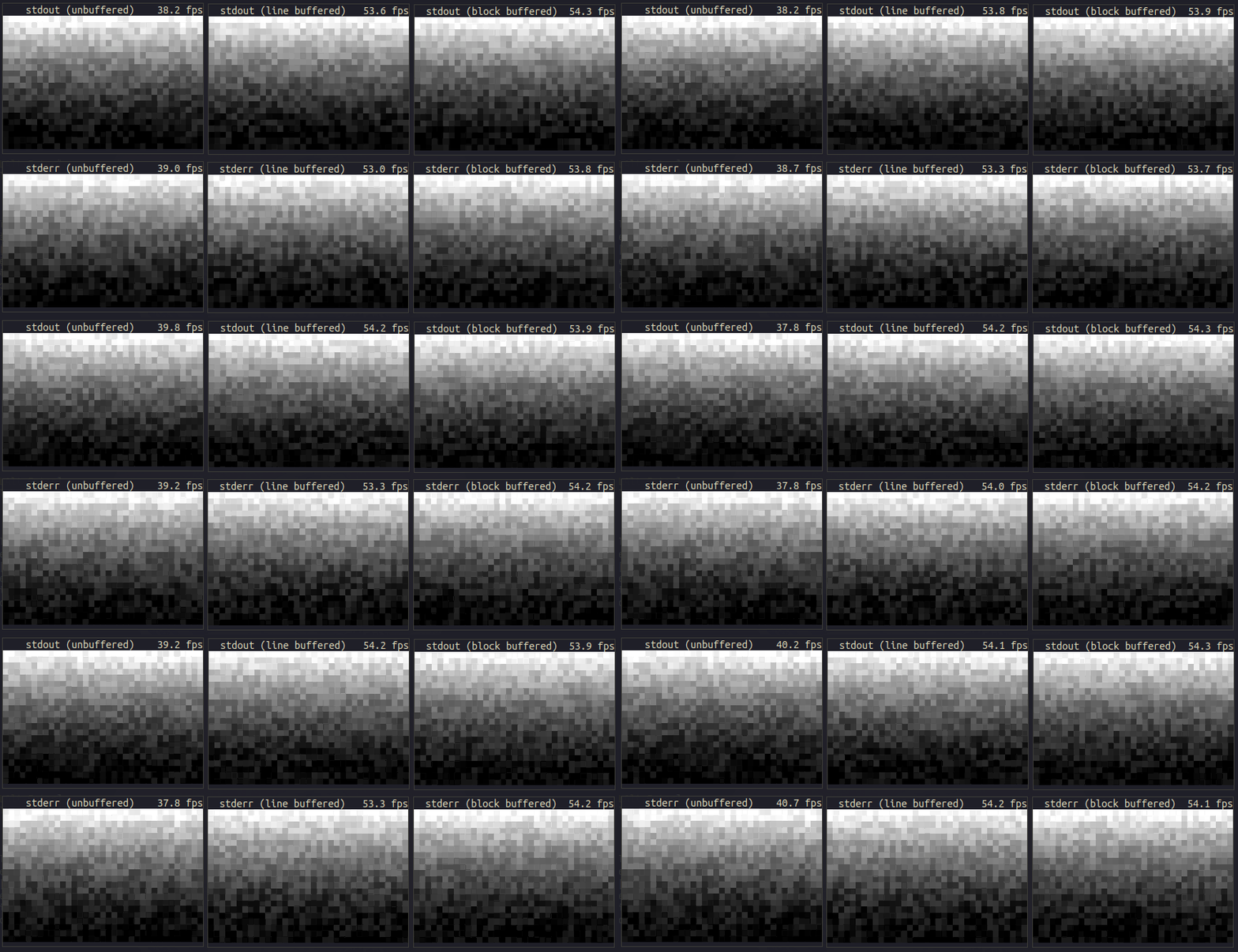
The conclusion from this is that I/O streams have similar performance when the same buffering technique is used. It can also be said that std::io::stdout() is faster than std::io::stderr() due to the use of line buffering versus its absence.