02.04.2023
7 min
1944



This article examines a real incident where a seemingly harmless SSH command led to a potential credential leak. It explains why command-line arguments can be dangerous, where exactly the system may expose entered passwords, and how third-party processes can see them without compromising the server itself.

If there’s a way to make things easier and faster, someone is going to sacrifice some level of security to achieve that speed. That’s particularly true when it comes to infrastructure teams, because they’re always trying to solve problems on the fly. But this can be good until the moment when passwords come into play. One example we experienced really demonstrated this point to us. And it might seem like a small detail, but the potential ramifications would have been significantly worse.
It’s just another ordinary day. I’m reviewing the running processes on the server (using ps aux) when suddenly I notice:
bash
sshpass -p 'Qwerty123' ssh [email protected]
This is a password, in plain view, from the command-line.
So, I go over to my coworker:
— “Hey, what’s the magic behind this?”
— “We’ve created a little script to let you connect to the remote host quickly, so you don’t need to type in your password each time.”
— “Are you aware that any user who can run a ‘ps’ command on the server will be able to see this password?”
— “Well, we’re inside the network.”
— “Until the first one runs ‘ps’, or it ends up in the logs.”
Within a few hours we were having an unscheduled audit.
Passing a password as parameters to a command is an anti-pattern that has been around for a long time.
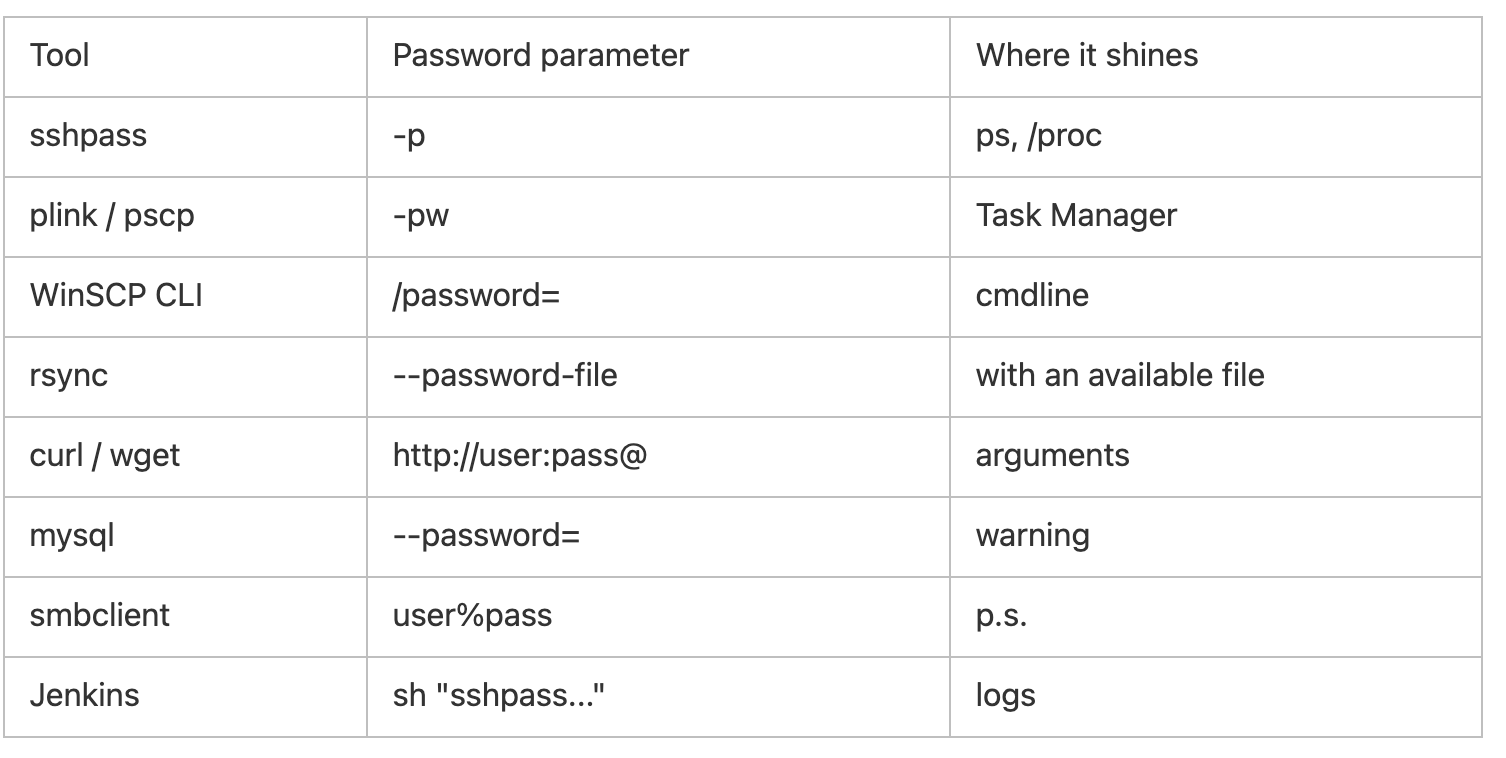
Arguments passed to commands are visible in ‘ps’, ‘/proc/[PID]/cmdline’, Windows Task Manager, etc.
When they’re logged in by CI/CD tools, monitoring and auditing tools will capture them too.
Many tools (such as sshpass, plink, WinSCP CLI, rsync, mysql, curl, mRemoteNG) provide options to pass a password in this manner — and this provides a temptation to perform a quicker “hack”.
And as a result, you can obtain the password without ever actually touching SSH.
powershell
$insecureProcs = Get-CimInstance Win32_Process | Where-Object {
    $_.CommandLine -match '\-p\s' -or $_.CommandLine -match '\-pw\s' -or $_.CommandLine -match '--password=' -or $_.CommandLine -match '/password='
} | Select-Object ProcessId, Name, CommandLine
$insecureProcs | Format-Table -AutoSize
bash
ps -eo pid,user,command --no-header | while read PID USER CMD; do
  if [[ "$CMD" =~ -p ]] || [[ "$CMD" =~ -pw ]] || [[ "$CMD" =~ --password= ]] || [[ "$CMD" =~ /password= ]]; then
    echo "PID=$PID USER=$USER CMD=$CMD"
  fi
done
How we leaked the password in production
It turns out we were running a daily backup job using cron with the following command:
bash
sshpass -p 'MySecret123' ssh [email protected]
There were additional users running jobs on the server at the time. The password showed up in the process monitor.
Also, Jenkins stored the same command in its pipeline logs which were readable by everyone involved in the project. I had to quickly switch keys, eliminate the offending tasks and add extra oversight.
Linux — Cron scanners, Ansible, Shell scripts.
Windows — PowerShell + Logging.
CI/CD — Linters & Scanners (Checkov, KICS, Semgrep).
IDE — Pre-commit hooks that disallow commands with passwords in arguments.
Example Checkov rule:
yaml
pattern: sshpass -p $PASS ...
message: 'Пароль передается в командной строке — это небезопасно.'
severity: ERROR
Use ssh-agent keys in scripts with no password.
Store your secrets in Vault, AWS Secrets Manager, Ansible Vault.
Hide account info in .pgpass, .my.cnf, .netrc (rights 600).
Restrict access: No one except root should see anyone else’s processes.
Remove/limit dangerous tools (sshpass etc.).
In cases where it is necessary to store secrets in files, encode.
One innocuous optimization could have led to a full-blown leak. We identified and fixed the issue, implemented regular checks, and our coworker converted to keys.
Advice: Run a review on your servers today. If there are any passwords being transmitted via command argument, remove those arguments instantly. These kinds of minor issues can be much costlier than a mere 5 minutes of configuration.
P.S. Have you had a similar experience? Share with us how you located and remediated similar vulnerabilities. Maybe we can create a collective resource of Best Practices.