This article discusses the most effective ways to store confidential files in the event of emergencies, global disruptions, or technological disasters. You’ll learn how to use hardware and software encryption, steganography techniques, backups, sharing secrets between trusted individuals, and the Dark Crystal platform for digital protection even without Internet access.
All of a person’s information can be divided by degree of importance, approximately like this:
system backups (importance 1/10);
current working files (3);
personal archive: photos, videos (6);
copies of paper documents (8);
secrets: keys, passwords, wallets (10/10).
Losing files is always unpleasant. So we make backup copies. But the degree of paranoidness of information protection efforts depends on the importance. There is a category of files that cannot be lost under any circumstances. These are our main secrets, that is, keys, passwords and wallets.
A popular option for storing cold crypto wallets are encrypted flash drives such as Digital Bitbox, Trezor, Ledger and KeepKey. They automatically encrypt files and are equipped with a nice display.
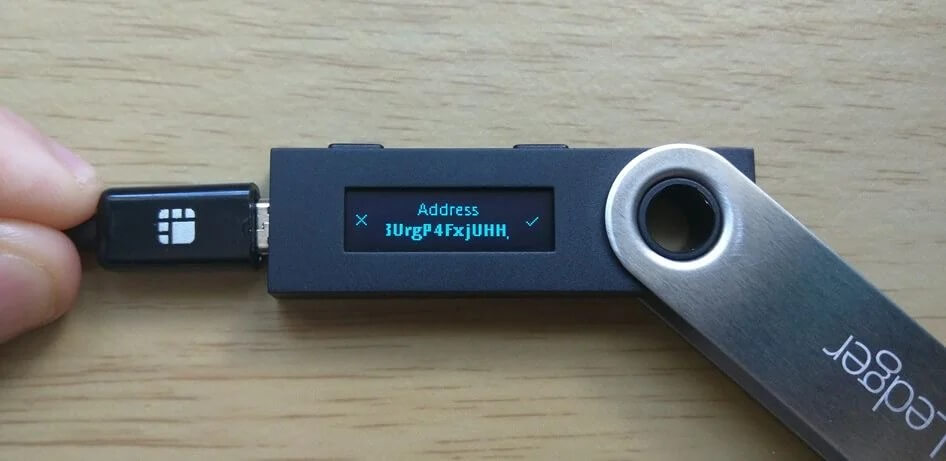
Such flash drives (ledgers, vaults) provide additional protection for the crypto wallet. Here we add at least one level of protection:
pin code for accessing the flash drive;
This is also standard:
seed phrase (to restore access to funds in case of loss of wallet);
password (in addition to seed phrase).
However, protected flash drives have several disadvantages compared to regular ones:
they are more expensive;
they are more difficult to duplicate for reliability;
less information is stored;
they attract the attention of attackers.
On the last point. For example, no one will pay attention to a regular lost flash drive. But when a Trezor is lying on the road, the one who found it can turn to hackers who pick up the pin code for a reward. And/or try to find the owner, who immediately becomes a potential victim of extortion. If a “ledger” is found in a person’s personal belongings, on a bunch of keys (for example, during a search) – expect trouble. These are unnecessary risks that can be avoided. Especially in the difficult times that are coming now.
The advantages of such a nice flash drive are more likely in convenience and “status” in peacetime. But in reality it may turn out that a person sacrifices his safety for the sake of convenience.
In essence, sellers of such goods make money on people’s fear of losing their wallet. The business model is somewhat reminiscent of sellers of antivirus programs. The more fear is caught up, the higher the sales.
On the other hand, a regular cheap flash drive doesn’t arouse any suspicions. The cheaper and dirtier it is, the better.
Much of the above applies to “password managers”, which are a convenient GUI for an encrypted storage of randomly generated characters (LastPass, BitWarden, 1Password, KeePass). Yes, it is convenient. But the generation of random characters and encryption can be done independently using specialized tools. As in the case of protected flash drives, you have to find a compromise between convenience, security and complexity of procedures, that is, sacrifice one thing for the sake of another.
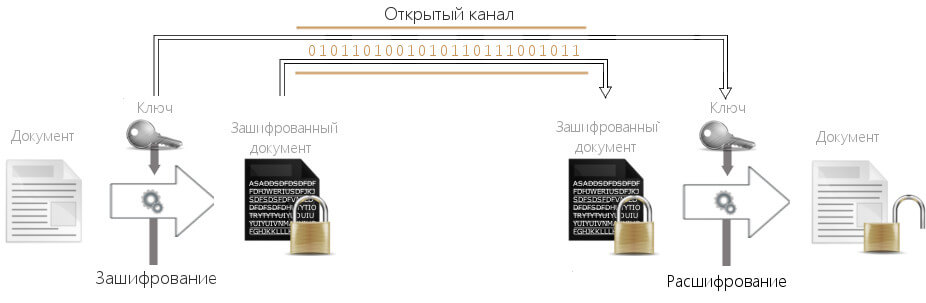
In fact, the best protection is not some magical gadget, but the banal mathematics that we studied in school. The inability to factor the product of large prime numbers. The uniqueness of the coordinates of the intersection of a straight line and an elliptic curve. That is, modern cryptography and encryption.
They say that everything best in the world is free. Love, friendship, honesty, etc. The introduction of financial calculations most often spoils sincere relationships. The same rule applies to cryptographic tools. Reliable tools are often distributed as open source, although there are exceptions here too. Here are some programs for encrypting files and disks under Linux and Windows:
ccrypt , command line utility
We take secret files – keys, passwords, wallets – encrypt them and close them with a strong password with maximum entropy.
Then we hide them under the guise of ordinary photos/videos so that no one will guess about the presence of secrets. This is steganography – an optional step for additional protection.
Steganography and obfuscation – hiding encrypted files in an array of other information. For example, video files or photos.
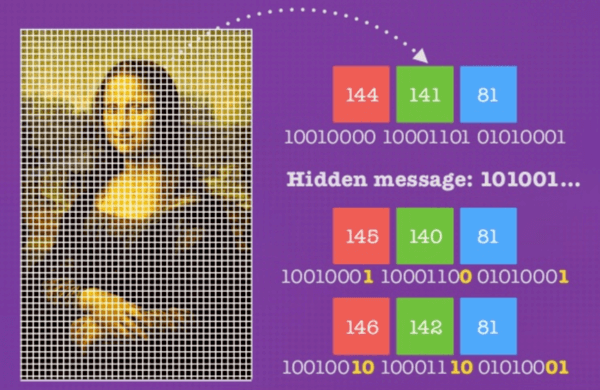
Ideally, no one would be able to prove the existence of hidden information until they recognize the mechanism of steganography. It’s like Morse code in a person’s blink on a TV screen. It’s impossible to prove that there is a useful signal there until we learn about the encoding scheme that the person on the screen has agreed on in advance with an accomplice.
Suppose that the bytes of your secret files are recorded in different pixels of video frames of a home video, masquerading as the surrounding colors. For example, each byte of the secret file can be encoded by adding/subtracting small R, G, B values from neighboring pixels. In the first frame, it can be one pixel, in the second frame – another, and so on. You can introduce slight distortions of the brightness channel, an audio track, and other media data. In a regular MKV container, there are many places where it is easy to record your information completely unnoticed.
Without knowing the algorithm for distributing data in the information container, the attacker will not be able to assume the hiding of additional data. Moreover, even having such an idea will not help the attacker, because there are many options for obfuscation. It is practically impossible to guess a specific scheme and randomly selected coefficients. Even if secret data is obtained, it will not be possible to decrypt it without a password, so this is double protection.
For optimal protection, it is better to come up with your own version of steganography/obfuscation and implement it in your own unique way. Probably, each person has many ideas in which files it is better to hide secret bits so that no one finds them. They may not necessarily be static files. Open Internet traffic can be used as a carrier. For example, add a few bits of useful information in every fifth packet from a webcam, approximately as the authors of the advanced SolarWinds Trojan did.
Some steganography tools:
Steghide (JPEG, BMP, WAV, AU).
Exiftool (writing metadata in file headers, supported 196 форматів файлів ).
WavSteg (WAV).
OpenStego (PNG).
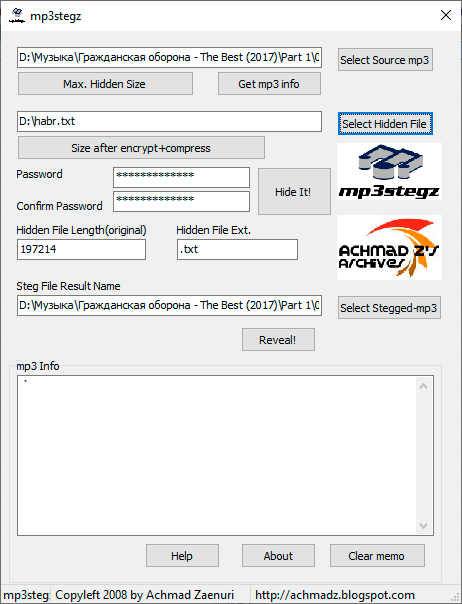
mp3stegz (MP3).
After encryption and obfuscation, the next stage comes – backup.
If the files are securely encrypted and password-protected, they can be stored relatively safely even in public clouds such as Google Drive, Yandex.Cloud, Apple iCloud or Telegram’s unlimited cloud storage (files up to 2 GB).
Of course, with additional security measures, including steganography. Secret information is stored in the form of video files or photos, dissolving among the bits of media content.
As we wrote last time, when duplicating information, conventional backup techniques are used, when each backup element reduces the probability of node failure according to the formula:
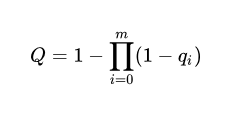
where m – Number of redundant elements (multiplicity of redundancy);
q_{i} – probability of failure of element i;
Q – probability of failure of a node with n elements (probability of failure of all elements).
Everyone chooses a level of reliability depending on their paranoia: from 99% to 99.(9)%.
Several duplication strategies, some of which can be combined with each other:
Different clouds: in case one or more cloud hostings fail, go bankrupt, become unavailable in your country, delete files for some reason (often the hosting has full right to delete user files, according to ToS).
Different media: SSD, flash drives, CD, DVD and others, with periodic media updates, for example, every 5-10 years.
Different locations: caches and bookmarks in different cities, countries and continents. Who knows where fate will throw you or your heirs in a century.
The final level of file protection is the Shamir secret partitioning scheme. It involves dividing the key into a certain number of fragments.
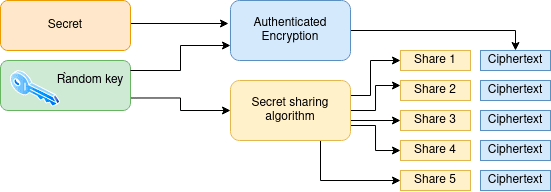
When constructing a secret, we can split it into an arbitrary number of fragments (n) and set the minimum number of fragments that will assemble the functional key (k). For example, n=4, k=3.
The secret partitioning scheme satisfies a number of conditions, including:
Losing a few fragments does not affect the preservation of information.
An attacker does not gain any information from possessing a single key fragment or any number of fragments less than the required (k-1).
An improved option is verifiable secret sharing schemes, such as the Feldman scheme and the Benalo scheme. They are additionally protected against secret fragment forgery attacks. That is, the algorithm is able to verify the authenticity of any fragment, which is useful.
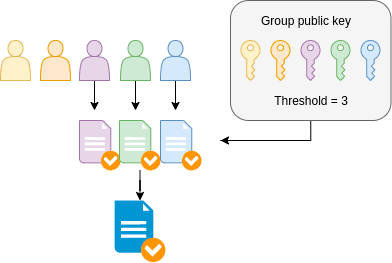
In practice, blockchains can use multi-signatures, or multi-sig addresses. These are addresses where multiple keys are required to make a transaction. For example, 2 out of 3 or 3 out of 5.
Since no one person is the sole owner of the secret, multi-signature increases the level of security by protecting the members of the team from capture or death of one of them.
One practical option for secret sharing is Dark Crystal. It is a set of protocols, libraries, and techniques for securely managing secret files such as keys, wallets, and private signatures.
Dark Crystal is designed to be embedded in third-party applications and supports any transport protocol. Reference implementations have been developed in Java, Javascript, and Rust. The reference implementations are based on conventions from the libsodium cryptographic library and the Shamir secret sharing library by Daan Sprenkl. Each implementation has a list of modules that can be freely used.
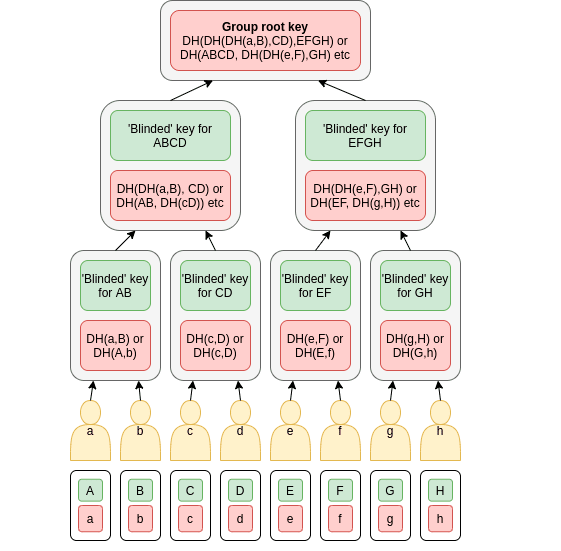
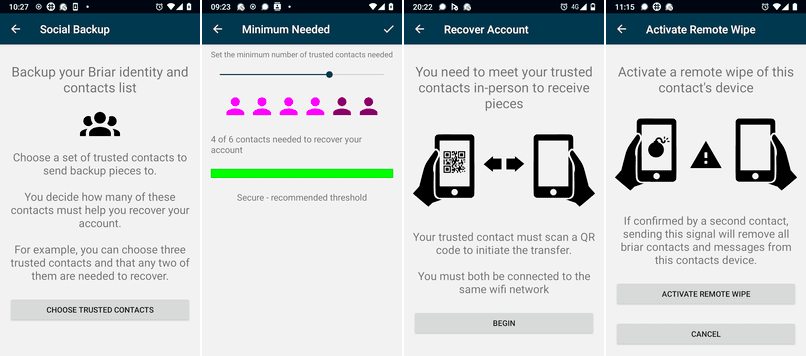
One of the Dark Crystal modules is the peer-to-peer messenger Briar, which works without the Internet (Bluetooth, WiFi) and supports multi-signature with secret sharing. Actually, these functions are implemented in it thanks to the integration of Dark Crystal modules.
The Dark Crystal Key Backup protocol has been independently audited by Include Security, see the final report on the audit results.
The photo above shows the procedure for restoring an account and generating a new key. For initiation, it is necessary to gather in one place users who received fragments of the secret during the social backup. These can be family members, friends or like-minded people, for example, four out of six people (photo from the Dark Crystal – Briar Project Case Report).
Sharing a key between relatives allows you to save valuable files, in particular after the death of the owner. In addition to implementing the will of the deceased, sharing keys has other applications. The scientific article describing Dark Crystal provides the following:
Social backup.
Remote deletion of secrets (if a friend is arrested or kidnapped). Supported in Briar.
Collective governance (decision-making, voting, referendums).
Regeneration of individual key in case of loss due to collective voting.
The world is becoming increasingly unpredictable—man-made disruptions, political instability, digital attacks, and simple human carelessness can put your entire digital life at risk at any moment. Losing your personal archives is unpleasant. Losing access to your finances, keys, or passwords is fatal.
But by combining simple, proven, and open technologies—such as encryption, steganography, backup, secret sharing, and Dark Crystal—you can build a true fortress around your most valuable information. A fortress that is nearly impossible to breach without your permission.