
07.07.2023
24 min
3781



Virtual VLANs in Linux are an effective way to separate network traffic without using physical switches. In this article, we’ll look at how to use Linux tools — such as network namespaces, veth pairs, bridge connections, and the ethsend utility — to create a full-fledged VLAN infrastructure.
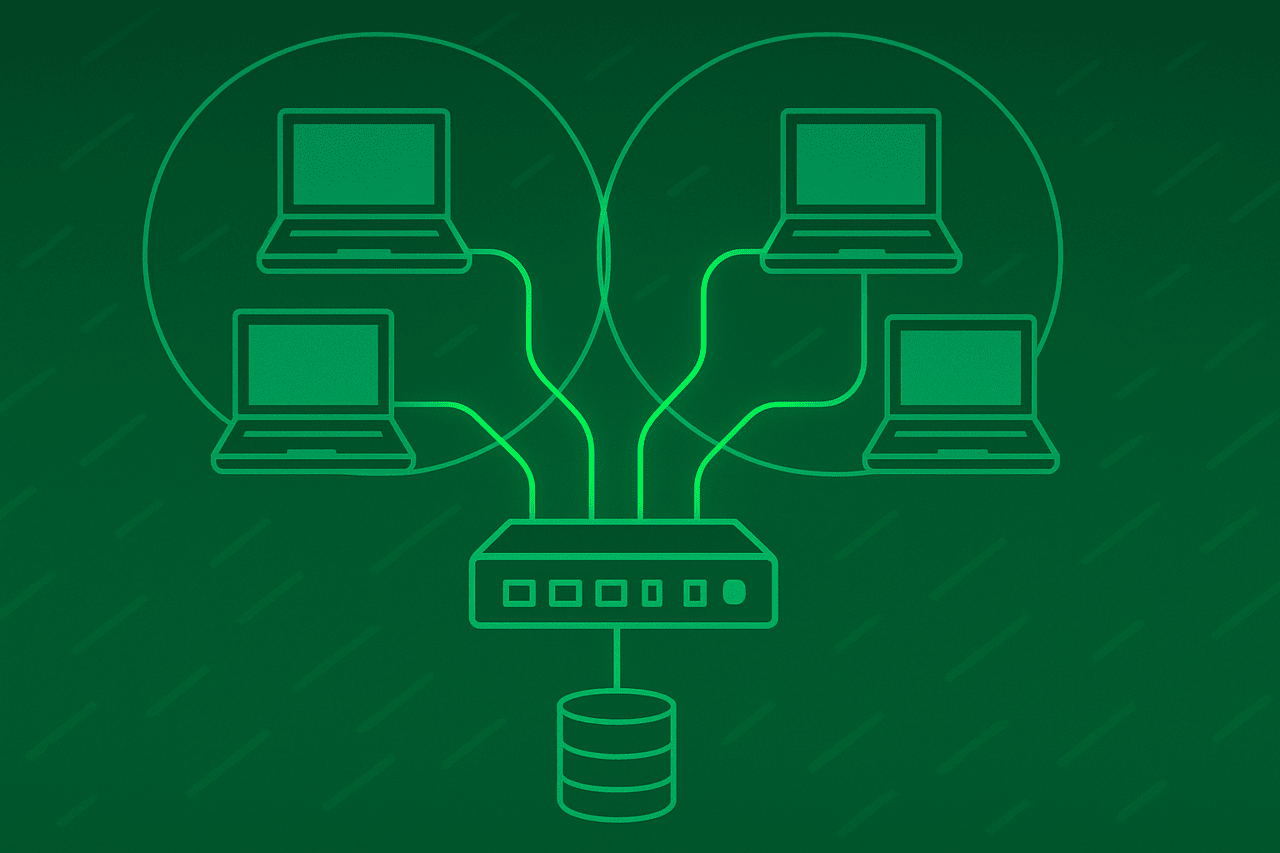
In this lab, we will see how to use the built-in VLAN capabilities of Linux bridges to split a single broadcast domain into multiple smaller domains, which can then be used to set up properly isolated IP subnets.
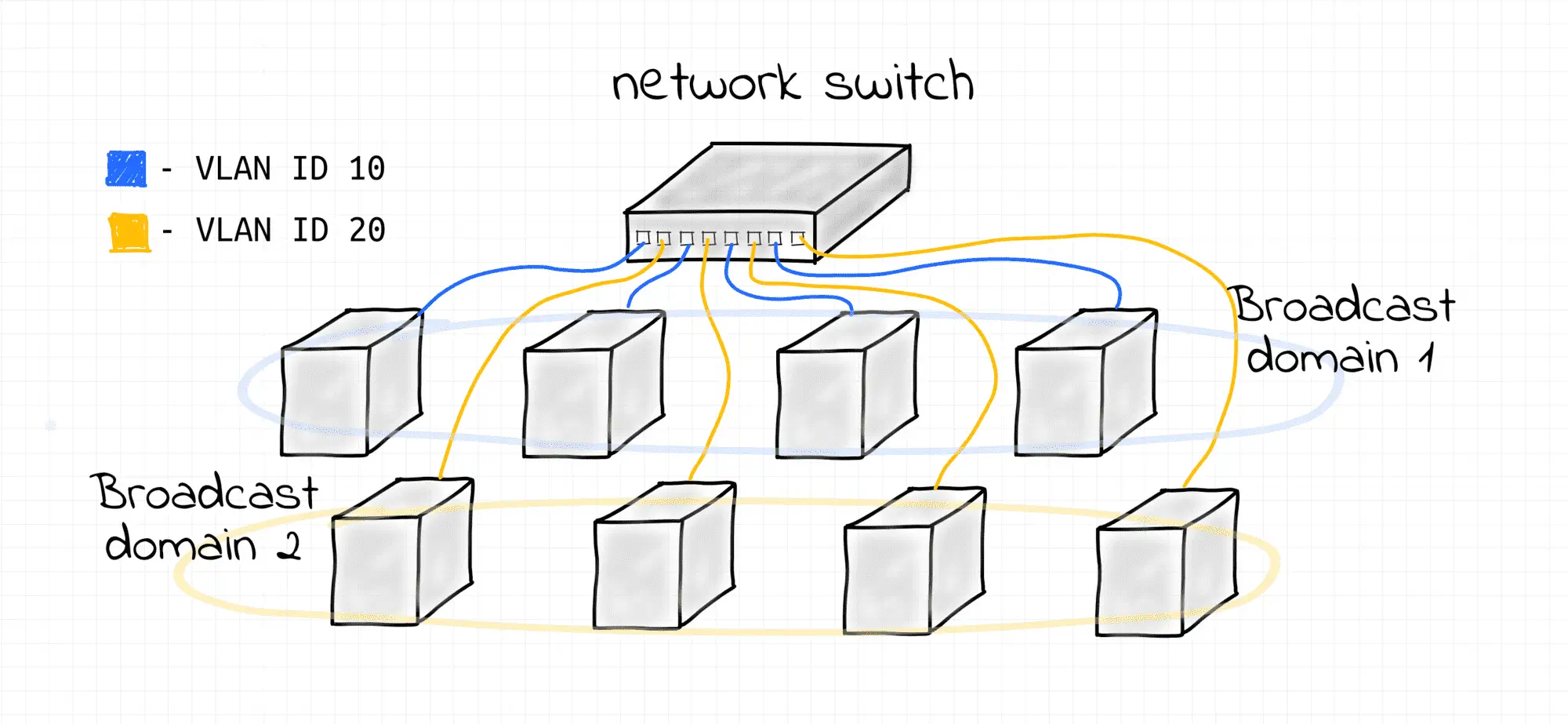
We will use Linux network virtualization tools to:
Emulate separate network nodes (via network namespaces)
Emulate network interfaces (via veth devices)
Emulate network switches (via bridge devices).
The playground conveniently provides a set of helper scripts to simplify the process of creating the endpoint hosts and switches. If you are using your own Linux machine to follow the course, simply copy the scripts from this page.
create_bridge – creates a new network namespace with a Linux bridge device; the bridge is configured to filter traffic by VLAN ID using the vlan_filtering 1 option:
create_bridge() {
  local nsname="$1"
  local ifname="$2"

  echo "Creating bridge ${nsname}/${ifname}"

  ip netns add ${nsname}
  ip netns exec ${nsname} ip link set lo up
  ip netns exec ${nsname} ip link add ${ifname} type bridge
  ip netns exec ${nsname} ip link set ${ifname} up

  # Enable VLAN filtering on bridge.
  ip netns exec ${nsname} ip link set ${ifname} type bridge vlan_filtering 1
}
create_end_host – creates a new network namespace with a veth device in it, which is in the specified VLAN (the other end of the veth pair is connected to the bridge):
create_end_host() {
  local host_nsname="$1"
  local peer1_ifname="$2"
  local peer2_ifname="$2b"
  local vlan_vid="$3"
  local bridge_nsname="$4"
  local bridge_ifname="$5"

  echo "Creating end host ${host_nsname} connected to ${bridge_nsname}/${bridge_ifname} bridge (VLAN ${vlan_vid})"

  # Create end host network namespace.
  ip netns add ${host_nsname}
  ip netns exec ${host_nsname} ip link set lo up

  # Create a veth pair connecting end host and bridge namespaces.
  ip link add ${peer1_ifname} netns ${host_nsname} type veth peer \
              ${peer2_ifname} netns ${bridge_nsname}
  ip netns exec ${host_nsname} ip link set ${peer1_ifname} up
  ip netns exec ${bridge_nsname} ip link set ${peer2_ifname} up

  # Attach peer2 interface to the bridge.
  ip netns exec ${bridge_nsname} ip link set ${peer2_ifname} master ${bridge_ifname}

  # Put host into right VLAN
  ip netns exec ${bridge_nsname} bridge vlan del dev ${peer2_ifname} vid 1
  ip netns exec ${bridge_nsname} bridge vlan add dev ${peer2_ifname} vid ${vlan_vid} pvid ${vlan_vid}
}
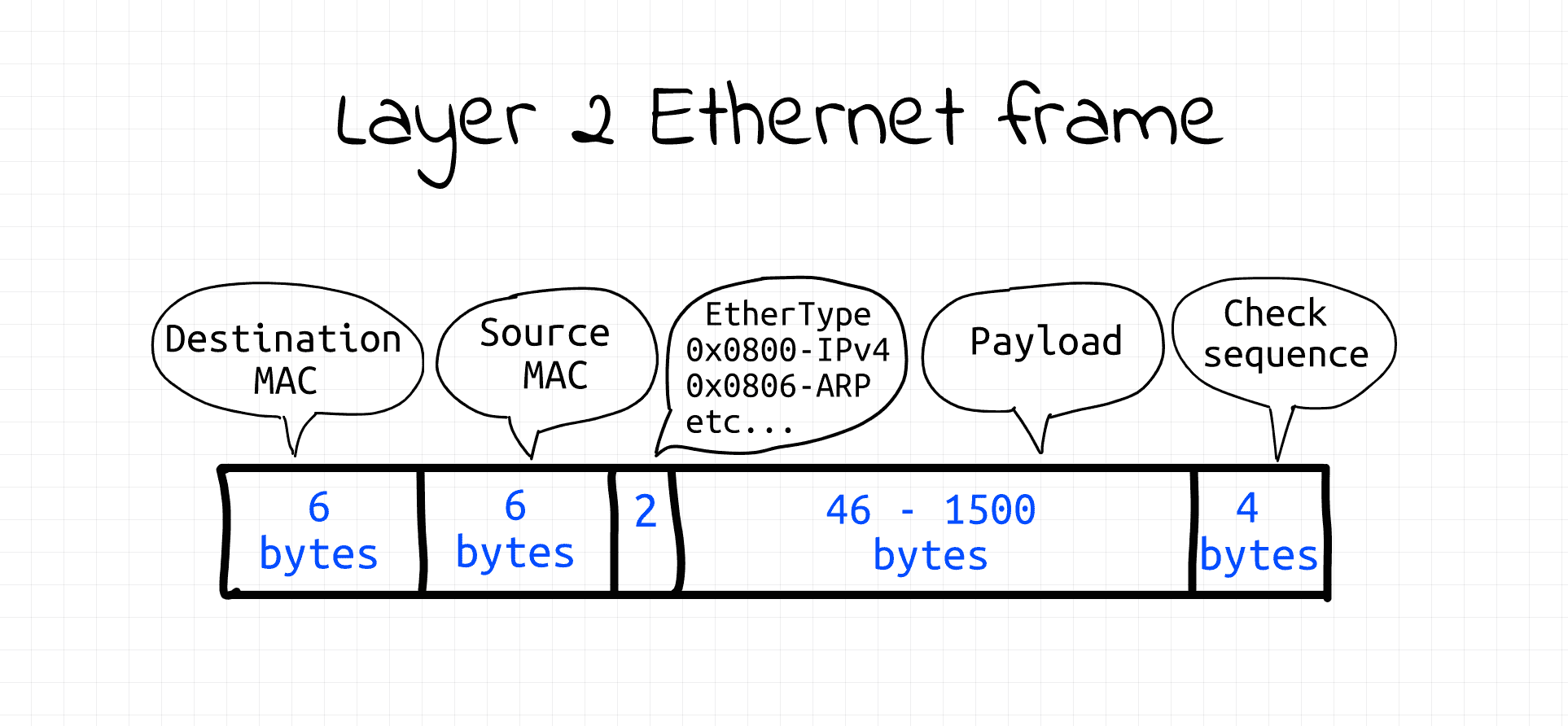
The playground also provides the ethsend tool for manually transmitting arbitrary data at the link level. The tool uses packet sockets (AF_PACKET) running in raw mode (SOCK_RAW) to programmatically send Ethernet frames. Fortunately, Ethernet frames have a fairly simple structure, so they are fairly easy to create in code and then write to a raw packet socket.
#!/usr/bin/env python3

# Usage: ethsend eth0 ff:ff:ff:ff:ff:ff 'Hello everybody!'
#        ethsend eth0 06:e5:f0:20:af:7a 'Hello 06:e5:f0:20:af:7a!'
#
# Note: CAP_NET_RAW capability is required to use SOCK_RAW

import fcntl
import socket
import struct
import sys

def send_frame(ifname, dstmac, eth_type, payload):
  # Open raw socket and bind it to network interface.
  s = socket.socket(socket.AF_PACKET, socket.SOCK_RAW)
  s.bind((ifname, 0))

  # Get source interface's MAC address.
  info = fcntl.ioctl(s.fileno(),
                     0x8927,
                     struct.pack('256s', bytes(ifname, 'utf-8')[:15]))
  srcmac = ':'.join('%02x' % b for b in info[18:24])

  # Build Ethernet frame
  payload_bytes = payload.encode('utf-8')
  assert len(payload_bytes) <= 1500  # Ethernet MTU

  frame = human_mac_to_bytes(dstmac) + \
          human_mac_to_bytes(srcmac) + \
          eth_type + \
          payload_bytes

  # Send Ethernet frame
  return s.send(frame)

def human_mac_to_bytes(addr):
  return bytes.fromhex(addr.replace(':', ''))

def main():
  ifname = sys.argv[1]
  dstmac = sys.argv[2]
  payload = sys.argv[3]
  ethtype = b'\x7A\x05'  # arbitrary, non-reserved
  send_frame(ifname, dstmac, ethtype, payload)

if __name__ == "__main__":
  main()
⚠️ CAP_NET_RAW functionality is required to run the above code (or simply use sudo).
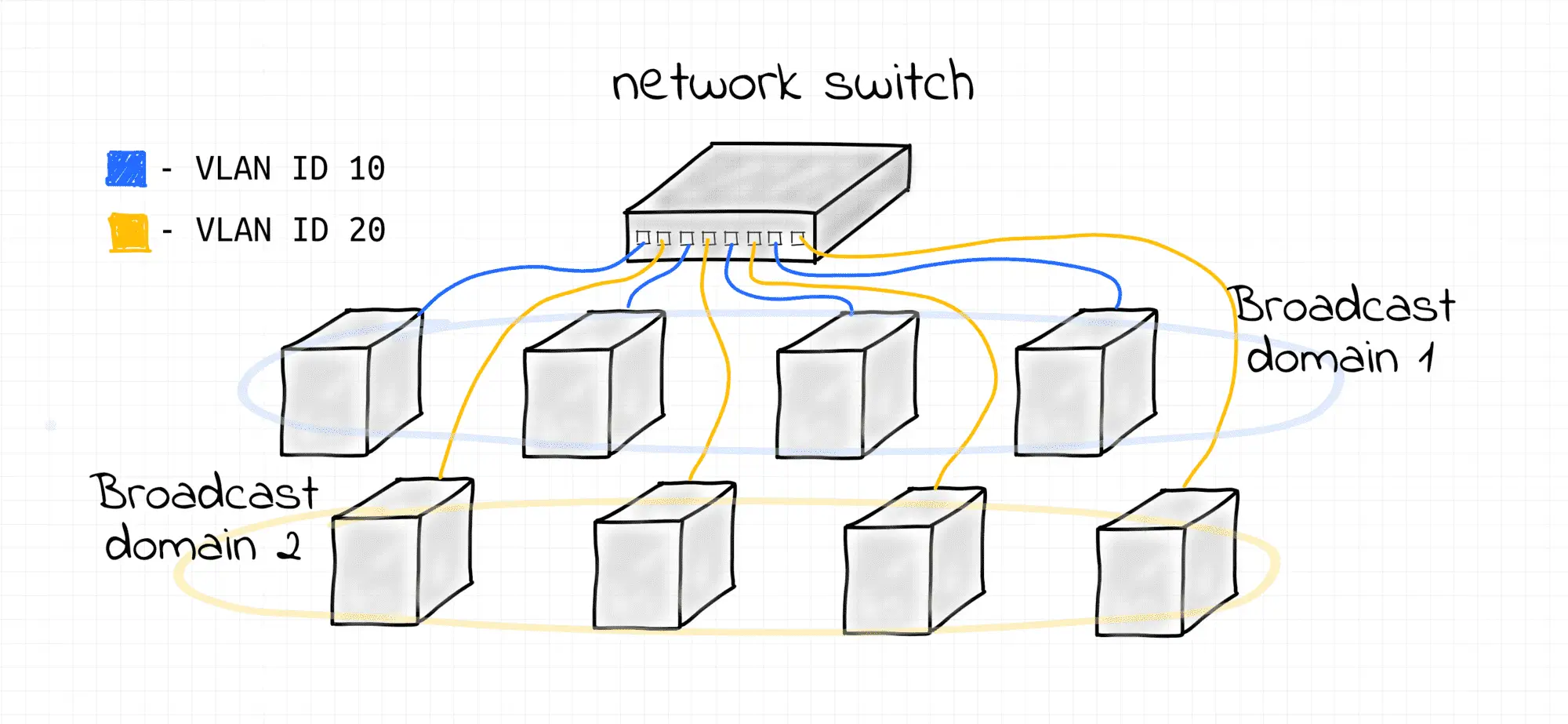
To divide a single L2 network segment into multiple disjoint subsegments without any reassembly, a technique called frame tagging is used. The Ethernet frame format is changed and an additional 4-byte field is added. Among other things, it contains the VLAN ID. Frames with different VLAN IDs logically belong to different L2 broadcast domains.
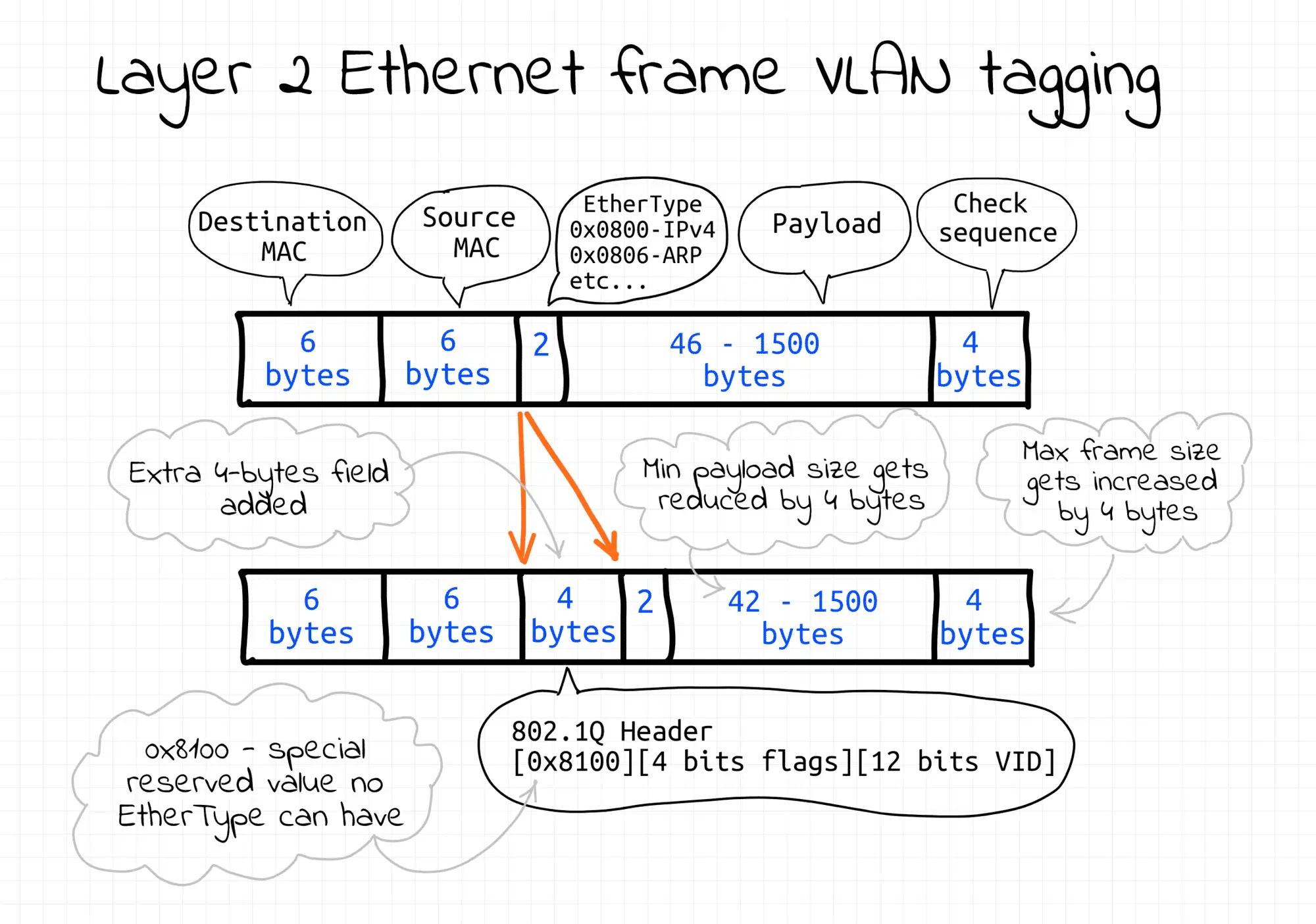
There is more than one way to tag frames. In this lab, the tagging is transparent to the end nodes and is implemented entirely by the bridge.
This example shows how to configure multiple L2 broadcast domains using a single Linux bridge with multiple VLANs. Follow the steps below to reproduce it.
First, create a new network namespace ( bridge1 ) with a bridge device ( br1 ) in it:
create_bridge bridge1 br1

Then create multiple end hosts connected to the bridge and assign them the same VLAN ID 10:
create_end_host host10 eth10 10 bridge1 br1
create_end_host host11 eth11 10 bridge1 br1
create_end_host host12 eth12 10 bridge1 br1
Then create another set of end hosts connected to the same bridge but assigned a different VLAN ID of 20:
create_end_host host20 eth20 20 bridge1 br1
create_end_host host21 eth21 20 bridge1 br1
create_end_host host22 eth22 20 bridge1 br1
To demonstrate that the above hosts form two isolated broadcast domains, start monitoring their traffic.
First VLAN (using a pair of new terminal tabs):
# from host11
nsenter --net=/var/run/netns/host11 \
  tcpdump -i eth11 ether proto 0x7a05
# from host12
nsenter --net=/var/run/netns/host12 \
  tcpdump -i eth12 ether proto 0x7a05
Second VLAN (using another pair of terminal tabs):
# from host21
nsenter --net=/var/run/netns/host21 \
  tcpdump -i eth21 ether proto 0x7a05
# from host22
nsenter --net=/var/run/netns/host22 \
  tcpdump -i eth22 ether proto 0x7a05
Now send two broadcast frames from the first hosts of each VLAN (using another terminal tab):
# from host10
nsenter --net=/var/run/netns/host10 \
  ethsend eth10 ff:ff:ff:ff:ff:ff 'Hello VLAN 10!'

# from host20
nsenter --net=/var/run/netns/host20 \
  ethsend eth20 ff:ff:ff:ff:ff:ff 'Hello VLAN 20!'

Carefully inspect the tcpdump output to ensure that broadcast frames are received only by the appropriate end hosts.
Note that neither the end host interfaces nor the Ethernet sending script need to know anything about VLAN tagging. The VLAN configuration in this demonstration is completely transparent to the end participants. The bridge assigns the appropriate VLAN tags based on the incoming port of the frame. But this is not the only possible way to create a VLAN. For example, VLAN tagging could be done on the end hosts.
The key takeaway from this lab is that VLANs are a L2 construct that can be configured to span any number of connected L2 segments, dividing a large broadcast domain into smaller ones and providing sufficient isolation for L3 subnets.
To clean up, simply remove the network namespaces you created:
ip netns delete bridge1

ip netns delete host10
ip netns delete host11
ip netns delete host12

ip netns delete host20
ip netns delete host21
ip netns delete host22
This lab demonstrates the power of Linux’s built-in network virtualization capabilities. Without any physical hardware, we created a full-scale network model with isolated VLANs operating at the L2 layer, providing separation of broadcast traffic. The Linux bridge’s VLAN filtering mechanism allows for highly flexible segmented networks, while the use of veth pairs, network namespaces, and raw sockets (ethsend) provides an accurate simulation of real-world traffic.
The key lesson is that proper isolation doesn’t require complex solutions; it’s enough to know how to use existing Linux kernel tools wisely. This approach is useful not only for training, but also for deploying test environments, verifying configurations, or developing network services in a controlled environment.