The output should indicate “Match found!” This is because c[a-z]t matches any three-letter string starting with ‘c’ and ending with ‘t’, where the middle character is a lowercase letter.




In this article, you’ll learn how to use regular expressions in Bash, a simple and powerful way to validate, find, and manipulate text in scripts. The material explains how the [[ string =~ regex ]] command works, what character classes, anchor characters, and quantifiers are, and shows practical examples of searching and selecting data in strings. You’ll learn how to use BASH_REMATCH to save matches, work with sed to replace text, and avoid common mistakes when working with strings.

Let’s start with the fundamental concepts of regular expressions. A regular expression is a sequence of characters that defines a search pattern. Think of it as a very powerful way to search for text.
Here are the basic building blocks:
Literal characters: Most characters simply match themselves. For example, the regular expression abc will match the string “abc” exactly.
Metacharacters: These are special characters that have a specific meaning in regular expressions.
Let’s look at a few key ones:
.(period): Matches any single character (except the newline character). So, a.c will match “abc”, “axc”, “a1c”, etc.
*(asterisk): Matches the previous character zero or more times. ab*c will match “ac”, “abc”, “abbc”, “abbbc”, etc.
^(cartridge): Matches the beginning of a string. ^hello will match a string that starts with “hello”.
$(dollar sign): Matches the end of a string. world$ will match a string that ends with “world”.
[](square brackets): Defines a character class. It matches any one of the characters in the brackets. [abc] will match “a”, “b” or “c”. [0-9] will match any single digit.
Now let’s create a Bash script to test our understanding. Create a file called regex_test.sh using the touch command:
cd ~/project
touch regex_test.sh
Next, open regex_test.sh using a text editor (such as nano or vim) and add the following code:
#!/bin/bash

string="Hello World"
if [[ "$string" =~ ^Hello ]]; then
  echo "The string starts with Hello"
else
  echo "The string does not start with Hello"
fi
Save the file and make it executable:
chmod +x regex_test.sh
Finally, run the script:
./regex_test.sh
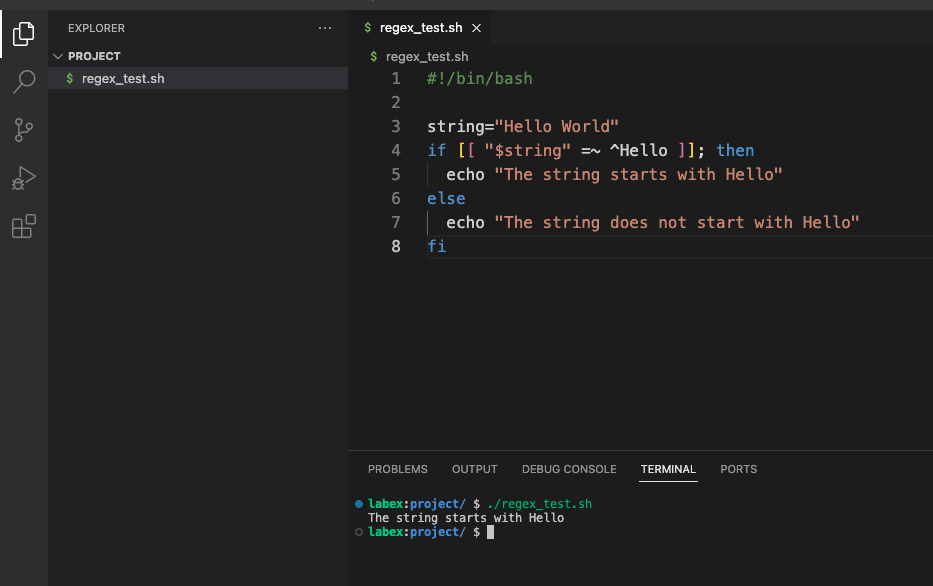
The output should show that the string starts with “Hello”.
Character sets, defined using square brackets [], allow you to match a single character from a specific group. This is very useful for creating more flexible patterns.
Character ranges: Inside [], you can use a hyphen (-) to specify a range. [a-z] matches any lowercase letter, [A-Z] matches any uppercase letter, and [0-9] matches any digit. You can combine them: [a-zA-Z0-9] matches any alphanumeric character.
Negation: If you put a ^ as the first character inside [], it will negate the class. [^0-9] matches any character that is not a digit.
Let’s modify our regex_test.sh script to use character sets. Open regex_test.sh with a text editor and replace its contents with the following:
#!/bin/bash

string="cat"
if [[ "$string" =~ c[a-z]t ]]; then
  echo "Match found!"
else
  echo "No match."
fi
Save the file and run it:
./regex_test.sh
The output should indicate “Match found!” This is because c[a-z]t matches any three-letter string starting with ‘c’ and ending with ‘t’, where the middle character is a lowercase letter.
Quantifiers control how many times a character or group should be repeated. This adds a lot of power to your regular expression patterns.
+(plus): Matches the previous character one or more times. ab+cMatches “abc”, “abbc”, “abbbc”, etc., but not “ac”.
?(question mark): Matches the previous character zero or one times (i.e. makes the previous character optional). ab?cMatches “ac” and “abc”, but not “abbc”.
*(asterisk): Matches the previous character zero or more times. We’ve seen this before.
{n}Matches the previous character exactly n times. a{3}Matches “aaa”.
{n,}Matches the previous character n or more times. a{2,}Matches “aa”, “aaa”, “aaaa”, etc.
{n,m}Matches the previous character n to m times (inclusive). a{1,3}Matches “a”, “aa”, or “aaa”.
Let’s modify our regex_test.sh script to use quantifiers. Open regex_test.sh with a text editor and replace its contents with the following:
#!/bin/bash

string="abbbc"
if [[ "$string" =~ ab+c ]]; then
  echo "Match found!"
else
  echo "No match."
fi
Save the file and run it:
./regex_test.sh
The output should say “Match found!” This is because ab+c matches a string that starts with ‘a’, followed by one or more ‘b’s, and ends with ‘c’.
Parentheses () are used to group parts of a regular expression. This is useful for applying quantifiers to multiple characters and for capturing text matches.
When you use parentheses, Bash stores the text that matches that part of the regular expression in a special array called BASH_REMATCH. BASH_REMATCH[0] contains the entire string, BASH_REMATCH[1] matches the first group, BASH_REMATCH[2] the second group, and so on.
Let’s modify our regex_test.sh script to extract data using capture groups. Open regex_test.sh with a text editor and replace its contents with the following code:
#!/bin/bash

string="apple123"
if [[ "$string" =~ ^([a-z]+)([0-9]+)$ ]]; then
  fruit="${BASH_REMATCH[1]}"
  number="${BASH_REMATCH[2]}"
  echo "Fruit: $fruit"
else
  echo "No match."
fi
Save the file and run it:
./regex_test.sh
The output should be “Fruit: apple”. This script extracts the name of the fruit from a string using capture groups.
Let’s create a new script called sed_test.sh to practice using sed.
cd ~/project
touch sed_test.sh
chmod +x sed_test.sh
Open sed_test.sh with a text editor and add the following:
#!/bin/bash

string="apple123"
echo "$string" | sed 's/[0-9]/X/g'
Save the file and run it:
./sed_test.sh
The output should be: appleXXX. This sed script replaces all digits in a string with the letter “X”.
Regular expressions in Bash are a convenient and powerful way to work with text right at the command line. They allow you to not only check strings, but also extract the necessary parts, change them, and automate repetitive actions in scripts. Thanks to simple constructs – from characters and quantifiers to capture groups – you can quickly create patterns that work with any data. And the combination with sed opens up even more possibilities for text processing without complex tools.