
01.10.2025
Updated 11.05.2026
Updated 11.05.2026
7 min
486



Executable PNGs are an experimental technology that combines steganography and Linux capabilities, allowing you to turn a regular image into a program. Using special tools, you can embed binary code into a PNG file and run it without creating a separate executable file. This approach is based on the use of the memfd_create system calls, file descriptors, and the binfmt_misc mechanism. Despite its limitations and cumbersomeness, this method shows how hiding information in images can go to a new level — from simple “secret” messages to actual program execution. The material will be of interest to programmers, security specialists, and anyone who wants to understand more deeply how the OS works with files and processes.
A few years ago, there was a publication about PICO-8 — a fictional game console with strict limitations. Of particular interest is the innovative way of distributing games for it — encoding in PNG format. This image contains everything: game code, resources and additional data. The image can be anything — a screenshot from the game, original art or even text. To download a game, just pass this PNG file to the input of the PICO-8 program, and it will start immediately.
This idea makes you think: what if a similar approach were applied to programs on Linux? At first glance, the idea seems absurd, but it was precisely this that became the basis of one of the strangest experiments of the year.
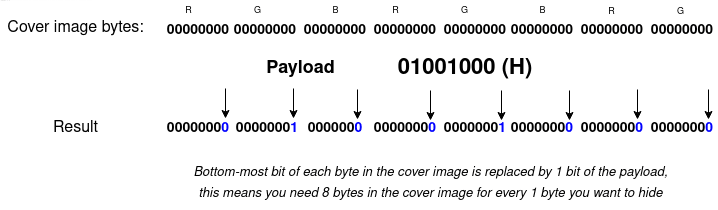
PICO-8 supposedly uses steganography techniques that allow hiding data in the “raw” bytes of an image. The essence of the approach is quite simple: any image consists of pixels, and each pixel is defined by three color values — red, green and blue (RGB), which are stored as three bytes. To add hidden data to the image (the so-called “payload”), the bytes of this payload are “mixed” with the image bytes.
If you write the data directly, replacing the original bytes, the image will immediately appear distorted areas — the colors will not match the original ones. The task is different: to make the changes as imperceptible as possible. To do this, the payload bytes are distributed among the bytes of the cover image, while the changes are made to the lower bits. This approach allows you to change the color values so slightly that the human eye is unable to detect the differences.
For example, if you want to embed the character H, which is represented in binary as 01001000 (72), its bits are decomposed into the least significant bits of the black pixels that form the background of the image.
In the output we will get a few pixels that will be slightly less black than before, but can you notice the difference?
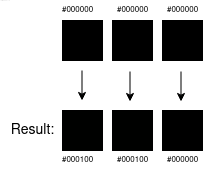
Only a very experienced colorist’s eye can distinguish such changes – in practice, minor shifts are noticeable only during machine analysis. To restore the hidden character H, it is enough to read one low-order bit from eight consecutive bytes of the image and assemble a single byte from them. Although hiding just one letter is pointless, the scale of the transmission can be increased almost indefinitely: the image can contain a short message, a complete novel, a link to an audio file, or even a compiled application. The only real limitation is the number of available bytes in the image: for reliable hiding, at least eight times more bytes-array in the image are required than bytes of data that are planned to be entered.
Returning to the idea of Linux executables in an image, it can be noted that any file consists of bytes, and therefore it can be hidden inside a PNG in a similar way to how it is implemented in PICO-8.
For this purpose, a custom steganography library and a special tool were created that can encode and decode data in PNG format. Although there are many ready-made solutions for steganography, the goal was to gain a deeper understanding of the principles of the method by developing our own implementation.
$ stegtool encode \

--cover-image htop-logo.png \

--input-data /usr/bin/htop \

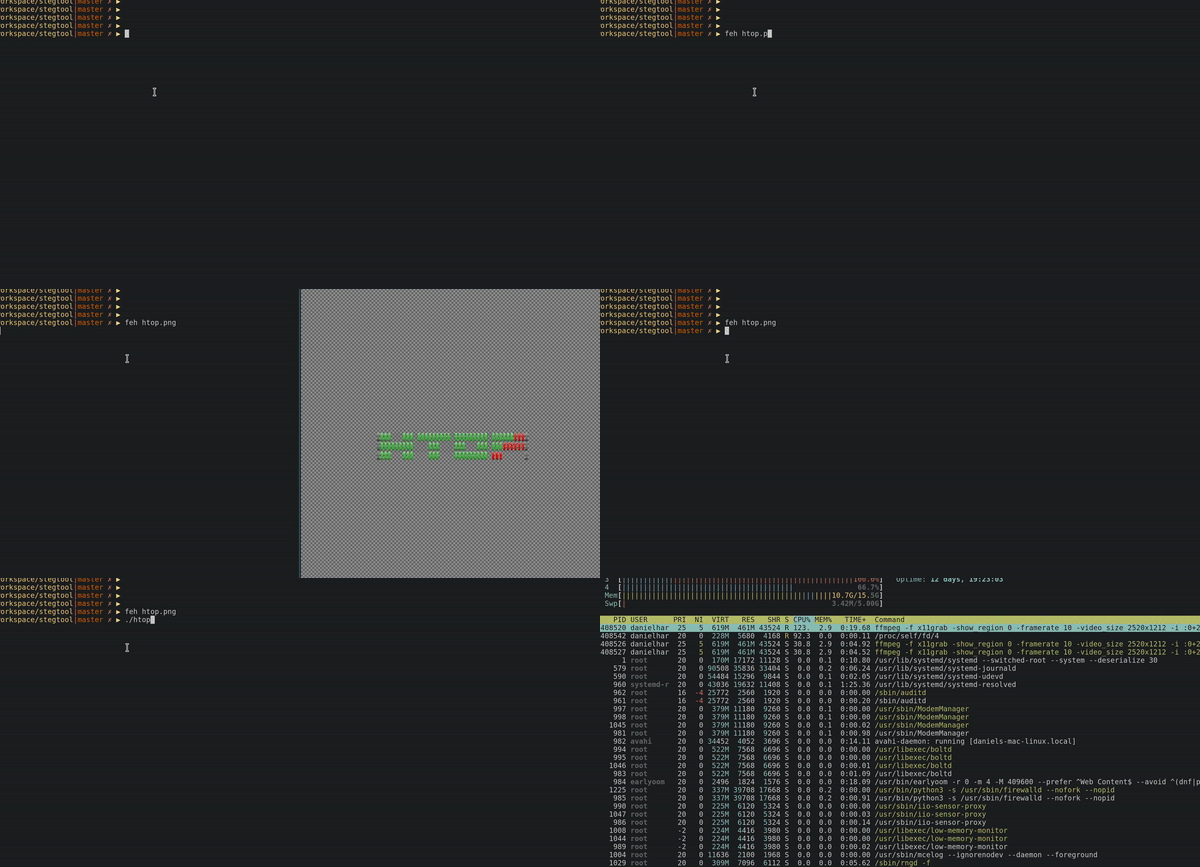
--output-image htop.png

$

$ echo "Super secret hidden message" | stegtool encode \

--cover-image image.png \

--output-image image-with-hidden-message.png

$ stegtool decode --image image-with-hidden-message.png

Super secret hidden message
Since everything is written in Rust, it was not difficult to compile it to WASM, so you can experiment on your own. So now we can embed data by adding executables to the image. But how do we run them?
The simplest approach would be to use a tool to decode the data into a new file, change the permissions with chmod +x, and then run it. This method works perfectly, but it is too straightforward. A more interesting task was to create a PICO-8-style mechanism: pass a PNG image as input and let the system do everything automatically.
However, loading an arbitrary set of bytes into memory and immediately handing control to Linux is not possible – at least not directly. However, there are simple tricks that allow you to implement a similar idea in a roundabout way.
After reading the material, it became clear: it is possible to create an executable file that is in memory. The idea is to allocate a block of memory, write binary data to it, and run it without having to patch the kernel, rewrite execve(2) in userland, or inject libraries into other processes.
The implementation uses the memfd_create(2) system call, which creates an anonymous file in the /proc/self/fd namespace of the current process; the necessary data is written to this file using write. When implementing in Rust, difficulties arise with bindings to libc and the data types in these bindings, since the official documentation on them is often not informative enough.
However, it was possible to get a working implementation of this approach:
unsafe {
    let write_mode = 119; // w
    // create executable in-memory file
    let fd = syscall(libc::SYS_memfd_create, &write_mode, 1);
    if fd == -1 {
        return Err(String::from("memfd_create failed"));
    }

    let file = libc::fdopen(fd, &write_mode);

    // write contents of our binary
    libc::fwrite(
        data.as_ptr() as *mut libc::c_void,
        8 as usize,
        data.len() as usize,
        file,
    );
}
Calling /proc/self/fd/<fd> as a child process from the parent that created it is enough to run your binary:
let output = Command::new(format!("/proc/self/fd/{}", fd))
    .args(args)
    .stdin(std::process::Stdio::inherit())
    .stdout(std::process::Stdio::inherit())
    .stderr(std::process::Stdio::inherit())
    .spawn();
Based on these basic mechanisms, the pngrun program was created to run images. Its work boils down to the following:
Takes from the steganographic image tool, which embeds our binary file, and arguments
Decodes it (i.e. extracts and reassembles the bytes)
Creates a file in memory using memfd_create
Places the bytes of the binary file into a file in memory
Calls the file /proc/self/fd/<fd> as a child process, passing all the arguments of the parent.
That is, you can run it like this:
$ pngrun htop.png

<htop output>

$ pngrun go.png run main.go

Hello world!
After pngrun completes, the file in memory is destroyed.

It’s inconvenient to type the pngrun command all the time, so the last step in this experiment was to use the binfmt_misc mechanism. This system allows you to execute files based on their type. The primary purpose is to support interpreters and virtual machines like Java: instead of running java -jar my-jar.jar, you can simply run ./my-jar.jar, and the system will automatically call the java process to run the JAR file. An important condition is that the execution flag is set on the file itself.
Similarly, you can add an entry for pngrun to binfmt_misc, which will allow you to run any PNG files with the x flag set directly:
$ cat /etc/binfmt.d/pngrun.conf

:ExecutablePNG:E::png::/home/me/bin/pngrun:

$ sudo systemctl restart binfmt.d

$ chmod +x htop.png

$ ./htop.png

<output>
From a practical point of view, this approach does not make much sense. The idea of creating PNG images that can run programs looks attractive and original, but in practice it turns out to be more of an experiment. There is a certain nostalgic appeal in the very fact of distributing programs in the form of pictures – like boxed versions of software with colorful design, which were once sold for personal computers. But in modern conditions, such a format is hardly worth using.
The project has many shortcomings that make it impractical. The main one among them is the need to use a separate pngrun program, without which the whole scheme does not work. In addition, strange effects are observed with some applications. For example, after encoding clang into the LLVM logo, the program itself starts correctly, but during compilation a crash occurs.
$ ./clang.png --version

clang version 11.0.0 (Fedora 11.0.0-2.fc33)

Target: x86_64-unknown-linux-gnu

Thread model: posix

InstalledDir: /proc/self/fd

$ ./clang.png main.c

error: unable to execute command: Executable "" doesn't exist!
The main problem is the large size of the binary files. Since they have to be written entirely in PNG, the resulting images become disproportionately large, which looks comical. Additionally, most software consists of more than one executable file, so the idea of distributing complex applications or games as PNG files loses all practicality.
This experiment can be considered one of the most absurd, but it turned out to be useful in terms of education. In the process, we managed to better understand the principles of steganography, the memfd_create system call and the binfmt_misc mechanism, as well as practice using Rust. Despite all the shortcomings, the project remained an interesting experience and a kind of exercise in understanding the internal capabilities of Linux.