
17.09.2026
31 min
318



Researchers at Graz University of Technology have shown how built-in mechanisms in Windows, Linux, Android, and macOS can be used to monitor user activity without reading the contents of their files. A system may block access to a document while still notifying a third-party application when that file is created, modified, or deleted. In some cases, those traces are enough to identify a visited website, detect file sharing through WhatsApp, or capture a user’s typing rhythm.

In the paper File Notification Attacks, the authors examined these leaks across several platforms and demonstrated multiple abuse scenarios. The most concerning part is that monitoring does not always require administrator privileges. However, this is not an attack that can be launched “from anywhere on the internet”: malicious code must already be running on the relevant device or server. Once that happens, an ordinary system feature can become a source of information about another user’s activity.
Operating systems constantly notify applications about what is happening to files. This is why a file manager can immediately show a newly downloaded photo, an editor can detect that a document was changed externally, and a synchronization app knows that it needs to upload a new version to the cloud. Without such notifications, applications would have to continuously poll folders for changes. The mechanism is useful, fast, and so routine that users rarely notice it.
On Linux, this functionality is provided in part by inotify; on Android, FileObserver uses similar capabilities; on Windows, the researchers worked with ReadDirectoryChangesW; and on macOS, with FSEvents. The names differ, but the principle is similar: an application subscribes to events and receives a signal whenever something happens to a file or directory. Depending on the platform, the notification may include the type of operation, the file name, or its path. The problem appears at the boundary between useful automation and access control.
Imagine a locked office. You cannot see the documents on the desk, but you receive a notification every time someone brings in a folder, opens a cabinet, or carries out an envelope. If the envelope also says where it came from, the observer does not necessarily need to know what is inside. This is how a side channel works: hidden activity is inferred from its external traces. In some Windows scenarios, the situation is even more direct because the name of a website can effectively appear in a visible file path.
The team first mapped ordinary user actions to file events by launching applications, opening websites, changing settings, and connecting devices. This produced behavioral patterns that could later be used to recognize activity. At the same time, a single notification is not always unambiguous: different actions can leave identical traces. As a result, the study includes both cases of near-direct information disclosure and statistical recognition that can make mistakes. Treating all of these techniques as a single “100% reliable spying technology” would therefore be inaccurate.
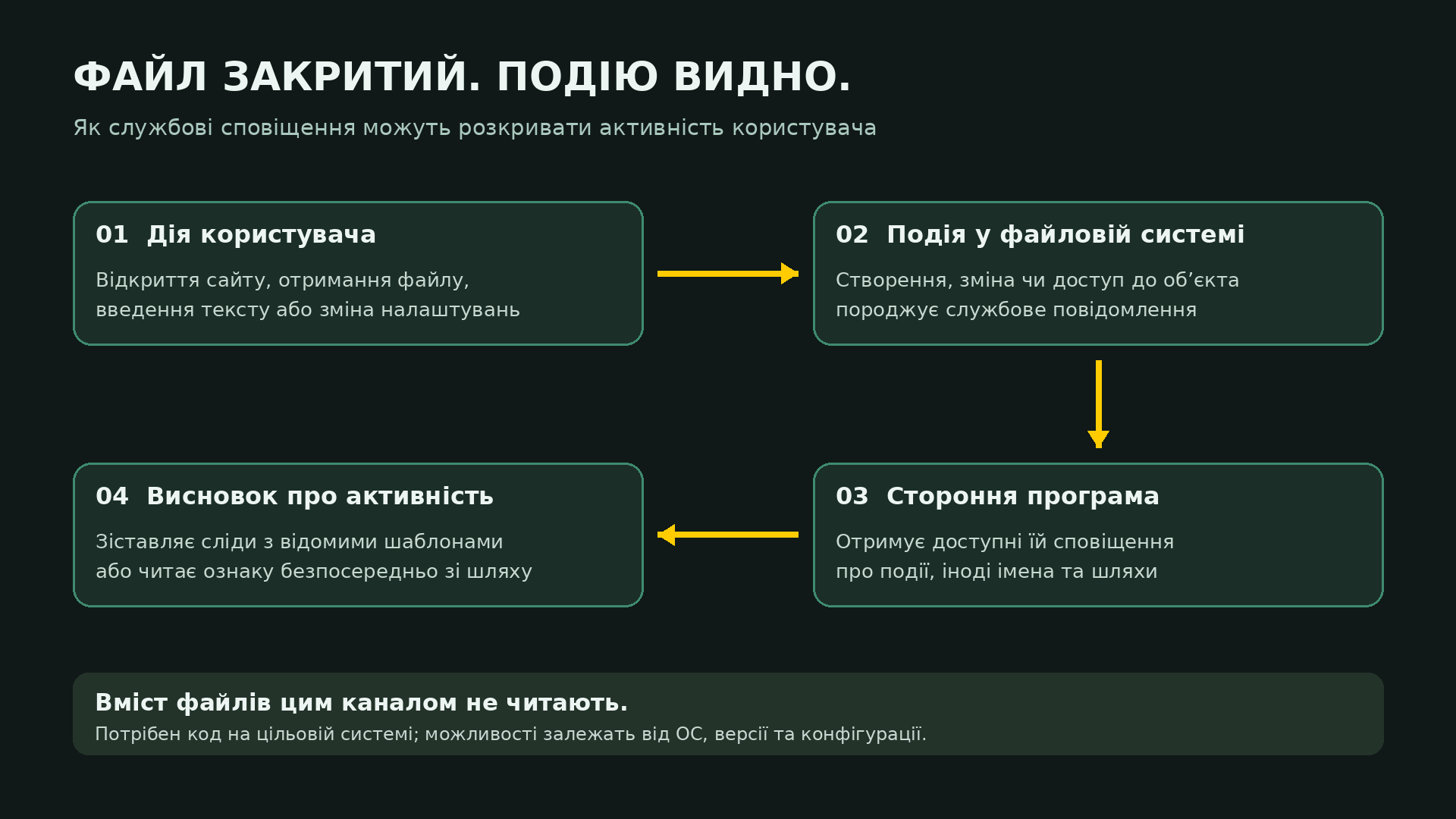
The basic desktop scenario involves an unprivileged process running under a different user account on the same machine. This could be an application launched from a separate account or a compromised service. On Android, the researchers considered an installed malicious app that did not request any additional permissions. The absence of a request for access to photos does not necessarily mean the app is unable to learn anything about newly created media files.
It is also important to distinguish between “code is already running” and “the attacker already has full control.” An application with limited privileges should not automatically be able to see another user’s private data. That is what user accounts, permissions, and isolation mechanisms are meant to prevent. The study shows how some information can still leak across those boundaries: reading the file itself is blocked, but notifications about related activity may still reach the observer. In other words, these techniques give additional capabilities to code that is already present on the system rather than providing a standalone method for delivering that code.
On the project website, the authors say they are not aware of these specific attacks being exploited in the wild. The paper demonstrates research scenarios rather than documenting a known large-scale campaign. The results also depend on specific operating system versions, configurations, and applications. Simply using Windows or Android does not mean every experiment described in the paper will work unchanged on every device.
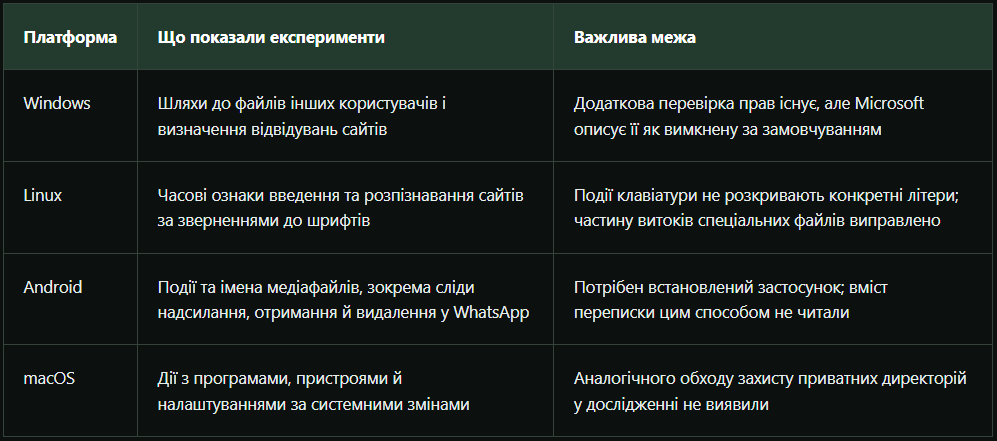
On Windows, the researchers found particularly revealing behavior. If an unprivileged user subscribed to file changes at the root of the C:\ drive, they could receive full file paths from other users’ profiles, even without permission to read those files or normally access the corresponding directories. The experiments were conducted on Windows 11 24H2 using a separate unprivileged account to observe another user’s activity.
Web browsers proved to be a convenient source of these traces. When a website uses local storage, IndexedDB, or cache files, the browser creates or modifies corresponding files on disk. In Firefox, the site name can become part of the path to those data directories. This means an observer does not need to open the browser history itself: seeing a file event containing a characteristic path may already reveal which website was visited. The folder remains private, but its path can still expose more information than intended.
To test this, the researchers used a list of 1,000 popular websites. Twenty-five did not respond, leaving 975 accessible sites in the evaluation. Firefox achieved an F1 score of 97.8%, while Edge reached 48.5%. The difference was tied to how storage behaved in the tested browsers: in that particular setup, Edge produced the relevant traces for fewer websites. This does not make Edge a universal defense against file-notification leaks, but it does show how strongly the attack depends on the behavior of the specific application.
F1 is a metric that combines precision and recall. It should not be interpreted as “the attacker can see 97.8% of everything you do.” In this experiment, it measured how accurately visits could be identified within a predefined set of websites. The researchers reported no false positives in the Windows test, although some visits were still missed. This is a specific experimental result, not a guarantee that the same accuracy will apply to every browser, website, or configuration.
The issue also extends beyond web browsing. The paper describes characteristic file changes triggered by launching Steam, using Zoom, changing system settings, and printing. The researchers also noted that a full Windows Defender scan could generate events that revealed file paths, although caching of scan results limited the effect. This is not an argument against antivirus software. It is an example of how a third-party process can sometimes learn too much about what other components of the operating system are doing.

On Linux, the researchers found an inconsistency in permission checks: attempting to subscribe directly to an inaccessible file was denied, but monitoring an accessible parent directory could still expose events related to files inside it. One particularly interesting case involved the /dev/input directory, where the system represents input devices. On vulnerable configurations, file events made it possible to detect key presses and releases without reading the keyboard events themselves.
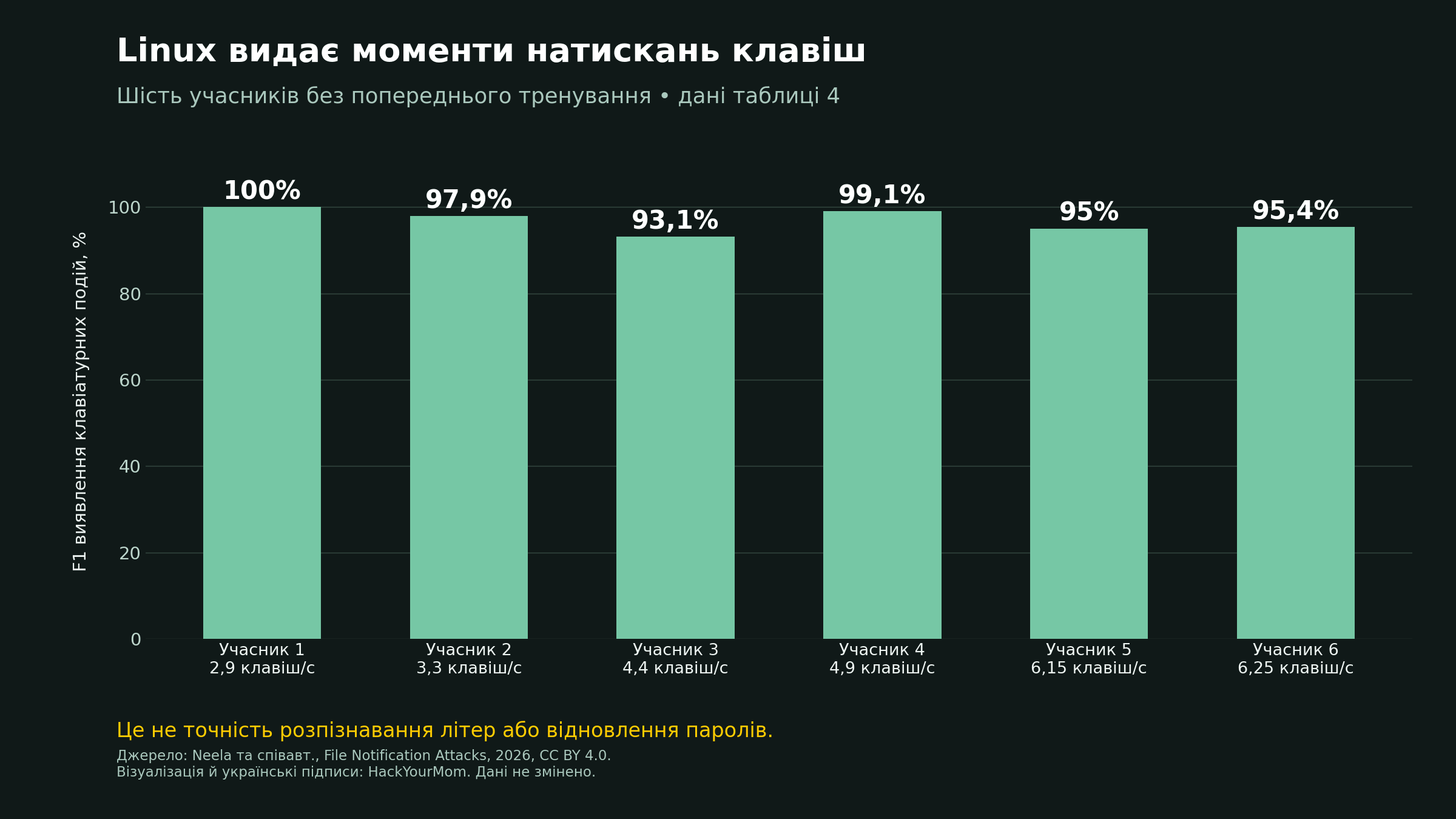
This is where it is easy to overstate the finding. The researchers did not show that the mechanism immediately reveals which exact character a user typed. Instead, it exposes the timing of key presses and the intervals between them. In tests involving seven participants, the F1 score for detecting keyboard events ranged from 93.1% to 100%. For one participant who had practiced typing the text beforehand, the score reached 100%. Detecting keyboard events and reconstructing the actual text are two different tasks.
That said, typing rhythm should not be dismissed either. People take different amounts of time to move between nearby and distant keys, repeat characters, make corrections, and type familiar combinations. In side-channel research, these timing patterns can be used as additional signals when analyzing input. This study demonstrates a way to obtain that signal, but the authors do not claim that the experiment can fully reconstruct an arbitrary password or conversation. The risk is real, but its capabilities need to be described accurately.
A similar effect was tested over SSH. The monitoring process ran on a remote server and observed events associated with another user’s pseudo-terminal. In an experiment involving 402 keystrokes, the researchers achieved an F1 score of 100%. This was not interception of encrypted traffic somewhere in the middle of the network: the attacker already needed the ability to execute code on the server. The technique also required text updates in the terminal. Entering a sudo password, where characters are not displayed, did not generate these notifications in the tested scenario.
Another Linux experiment focused on websites. Firefox accesses system fonts, and different webpages produce different sequences of font accesses. The researchers monitored 1,448 font files, trained a classifier on traces from visits to 100 websites, and added another 750 websites outside the target set. In that evaluation, the F1 score reached 87.9%. Unlike the Windows case, where a site name could appear directly in a file path, the website here was identified indirectly from its pattern of activity.
On Android, the researchers tested the issue on a Google Pixel 9a and a Samsung Galaxy A54 running Android 16. The problem appeared at the boundary between FileObserver and the platform’s storage access controls. Android gives applications a restricted view of the file system, so a third-party app should not normally be able to enumerate everything that belongs to another app. However, in the researchers’ experiments, file notifications exposed the names and paths of objects that the observing app could not see through ordinary directory access.
WhatsApp provided one of the clearest examples. The researchers focused on media files stored in the app’s directories on shared, including emulated, storage rather than on unrestricted access to WhatsApp’s internal databases. When the messenger downloaded a received image or document, a file event was generated. A third-party app could learn that an object had appeared, see its name, and record the time of the event, even though it could not access the actual photo or document. For monitoring user activity, that information alone can already be useful.
The demonstration on the researchers’ website highlights another detail: sent media is stored in separate Sent subdirectories. By looking at where a file appeared, an observer could distinguish between sending and receiving, while the file name or extension could reveal the type of media involved. Deletions also generated events. Together, these traces can form a timeline of file-sharing activity even when the underlying content remains inaccessible. At the same time, this does not mean every event reveals who the user was communicating with or what the message itself contained.
This does not mean WhatsApp’s encryption has been “broken.” The monitoring happens on the device, where the app is already processing the received data. From a privacy perspective, the distinction between content and metadata matters, but metadata can still be sensitive. When a person is active, whether they are exchanging documents, and when they delete received files all reveal information about behavior. A permission setting that blocks access to photos should therefore not become merely cosmetic if another system mechanism still exposes traces of those files.

On macOS, the researchers observed fewer information leaks. They did not find a comparable bypass that would allow FSEvents to monitor inaccessible private directories. Instead, the available information came from publicly accessible system files and directories. The tests were conducted on an Apple M2 system running macOS Sonoma 14.2.1, so the results from that configuration should not be treated as a complete description of all current macOS versions without further verification.
Despite those limitations, changes to system files still made it possible to detect software installation and removal, the connection of external storage devices, printer activity, network-related changes, and power settings. Some applications also produced recognizable traces when they were launched or closed. For example, operations involving Bluetooth devices modified corresponding configuration files. At the same time, not every individual signal was unique: the authors explicitly note that some changes could have several possible causes.
So placing macOS on the same level as Windows in terms of exposing private file paths would be an exaggeration. Still, the broader issue is visible here as well: system-wide events can reveal more about user behavior than might be expected. For monitoring purposes, the sensitive signal is not always the contents of a secret document. Simply learning that a particular application was launched or that a device was connected can also reveal useful information. What matters is exactly what information the system exposes and who is able to receive it.

A separate experiment shows why an attacker may care about the exact timing of a system event. In KDE Plasma 6.3.6 running on Wayland, the researchers used a file notification to detect when the system triggered a privilege-escalation prompt. A malicious application could then display a fake window on top of the legitimate one. The user expects a system password request and enters their credentials into a convincing dialog, but the password is actually captured by the malicious program. In this scenario, the file-notification channel acts as a timing signal that helps the attacker launch the deception at the right moment.
The threat model is different here. The malicious process is running as the user inside their own graphical session. This is not an extension of the earlier scenario in which a separate user account somehow gains the ability to draw windows on another user’s screen. Nor does the experiment demonstrate a universal break of Wayland. The attack combines the ability to detect a relevant event at the right moment with the ability to cover the corresponding system window in the tested environment.
According to the authors, the KDE team responded that the focus-stealing prevention mechanism was designed to reduce unwanted pop-up behavior rather than serve as a strict security boundary. On the project website, the researchers suggest a local rule that forces the password dialog to remain above other windows. This should be treated as a mitigation for the specific demonstrated scenario, not as a general guarantee against all fake system prompts.
The researchers reported their findings to vendors in 2025. According to their account, Microsoft initially treated the disclosure of file names and paths as intended behavior and distinguished it from disclosure of file contents. However, the researchers later added an important clarification to the project website: Windows includes a mechanism that strengthens access checks and mitigates the behavior described in the paper. So the claim that “Microsoft did nothing and there is no protection” no longer reflects the available information.
Microsoft’s KB5058189 documentation states that the fix is included in updates released on April 8, 2025 and later. It adds permission checks before directory-change notifications are delivered and filters events when the required access is missing. However, the protection is disabled by default because of potential compatibility issues. It can be enabled by setting EnforceDirectoryChangeNotificationPermissionCheck to 1; Microsoft’s instructions describe methods using both the Windows Registry and PowerShell. For administrators, that means it is worth checking not only whether the relevant updates are installed, but also whether the setting is enabled and whether business-critical applications remain compatible.
On Linux, part of the issue was addressed through CVE-2025-68788. The fix restricts the delivery of access and modification events for special files to processes monitoring a parent directory. The research website lists patched kernel branches including 5.10.248, 5.15.198, 6.1.160, 6.6.120, 6.12.65, and 6.18.3. This is important for the most serious device-file scenarios, but it does not eliminate every possible information leak. For a specific distribution, users should check its package updates and backported patches rather than relying only on the upstream kernel version. The status can also be tracked through resources such as the Debian Security Tracker.
As of the source review on September 29, 2026, the researchers’ website did not list separate fixes for the Android and macOS scenarios described in the paper. That wording reflects the status published by the authors and does not prove that every current build remains vulnerable in the same way. The Linux special-file fix also should not be treated as a solution for the Android WhatsApp storage issue, because the underlying leakage mechanisms are different. Those cases require separate testing and platform-specific changes.
The practical takeaway starts with the software you allow to run on your device. The absence of administrator privileges or a request for a dangerous permission does not automatically make an application harmless. Keeping unnecessary software to a minimum, installing programs only from trusted sources, and applying updates promptly all reduce the chances of ending up in one of the scenarios described in the research. This is not a special “anti-side-channel” switch, but it does reduce the number of processes that could take advantage of unnecessary visibility into system activity.
Administrators of shared computers and servers should check whether relevant Linux kernel fixes are installed and whether enhanced file-notification permission checks are available and enabled on Windows. Separate user accounts remain important, but they do not guarantee that all metadata is hidden. Workload isolation also needs to be evaluated based on the actual configuration: simply calling something a “container” does not mean every system trace is isolated. For especially sensitive workloads, what matters is having a well-defined and properly tested boundary between trusted and untrusted code.
There is also no reason to rely on a VPN as a fix for this issue. The signals examined in the study originate in the file system of the device or server, not merely along the network path. Likewise, clearing browser history after a session does not undo notifications that an observer has already received. This follows from how the attack works rather than from a separate test of every VPN or private-browsing mode. Effective protection needs to limit the source of the leak and restrict what the observing application is allowed to see.
The broader lesson challenges the convenient assumption that privacy ends once access to a file’s contents is denied. A system also needs to protect what can be inferred from a file’s name, location, and timing. If another application can tell when you open a website, receive a document, or type text, saying that “it never read the file itself” offers limited reassurance. Locking the door matters, but there is little point in doing so if outsiders are still notified about every movement on the other side.