05.05.2023
6 min
5059



Find out if you should use WPA2-Enterprise for your home Wi-Fi network. The article examines the security of home wireless networks in the context of using the WPA2-Enterprise standard, which is traditionally used in business environments to provide a higher level of protection.
Protecting home wireless networks has never been more important. The rise of remote work requires people to handle sensitive business data at home. In addition, our lives as a whole are becoming increasingly digital through services such as online banking and shopping.
We expect professional organizations we trust to protect our data, but it’s just as important to protect it on our own Wi-Fi network. This means diving into your network settings, including the security standards your router uses.
Wi-Fi Protected Access (WPA) is a wireless network security standard with several variations. WPA2-Personal is commonly used at home, but WPA2-Enterprise, which is widely used in businesses, is even more secure. In this article, we’ll discuss what it takes to implement WPA2-Enterprise on your home network and what the benefits are.
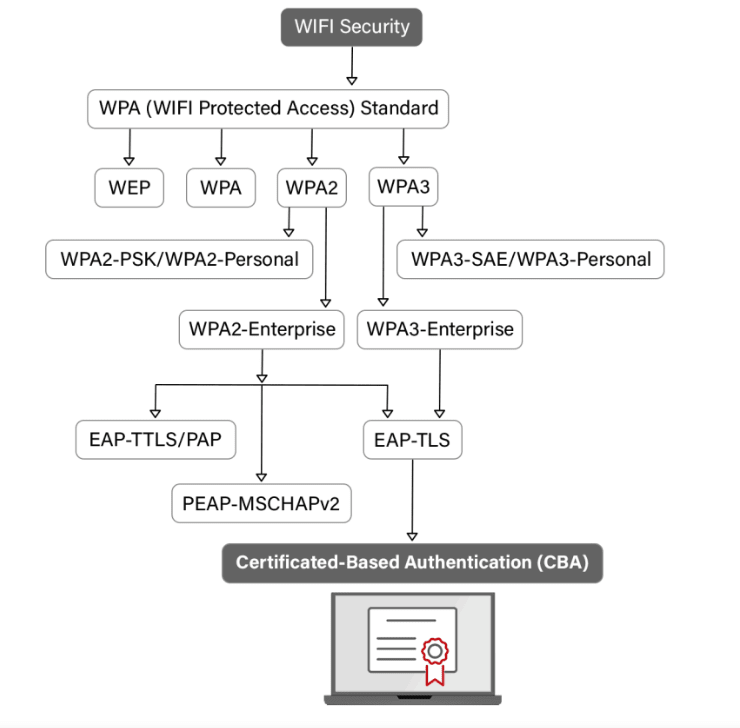
The WPA protocol has several variations that are widely used today. Some of these WPA modes include the following:
WPA
WPA2-Personal
WPA2-Enterprise
Wi-Fi Protected Access was originally introduced in 2003 as a more secure alternative to its predecessor, Wired Equivalent Privacy (WEP). Although they were similar, WPA’s biggest improvement was the use of Temporal Key Integrity Protocol (TKIP), which ensures that the same encryption key is not used every time by all devices on the network.
WPA2 was created soon after. Its first variant, WPA2-Personal, is common in homes and cafes. It is secured by a shared key (PSK) that all devices use to access the network. If you’ve ever had to ask someone for their Wi-Fi password or use the same password to connect multiple devices to Wi-Fi, then you’ve used WPA2-Personal.
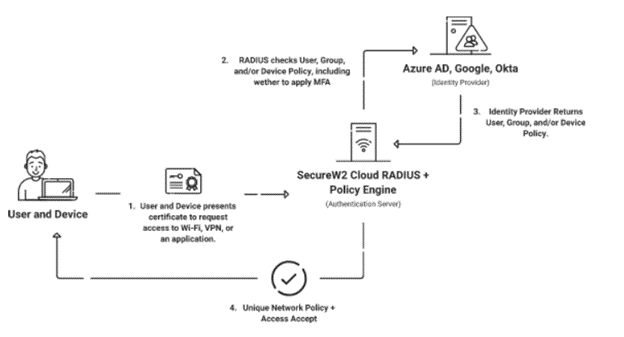
A common alternative to WPA2-Personal is WPA2-Enterprise. In a WPA2-Enterprise network, all devices have their own unique set of credentials to access the network instead of sharing a single password. Because routers cannot store all these sets of login information, an authentication server called a RADIUS server is required. The RADIUS server verifies the validity of each user’s credentials against a separate directory of user and device information.
Without proper home Wi-Fi security standards, there are a number of attacks that can target your online activities. When you consider everything the average person does online, like remote work, online banking, or scheduling important medical appointments, it’s easy to see why this is important.
If there is a single password to protect your home wireless network, your data can be easily compromised. For example, man-in-the-middle (MITM) attacks can intercept the data you transmit in various ways. Often these attacks are launched through other vectors, such as spoofing attacks that impersonate other devices or routers on your network.
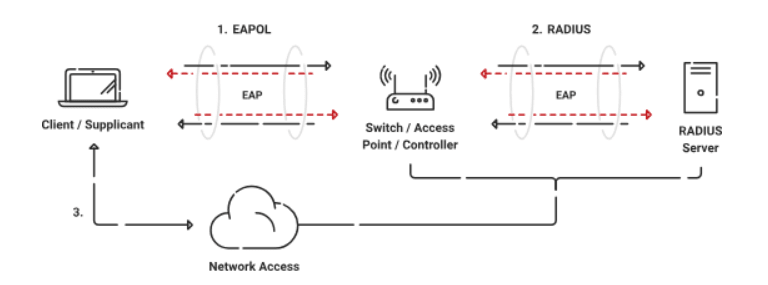
The main difference between WPA2-Enterprise and the regular WPA2-Personal you see at home is the number of credentials used. With WPA2-Personal, all devices can access your network using a single password. On the other hand, WPA2-Enterprise assigns individual passwords to each individual device on the network.
This means that additional equipment is required. Routers typically do not have the ability to store and authenticate many different sets of credentials. This is why a RADIUS (Remote Authentication Dial-In User Service) server is used. Instead of the router validating each account, the RADIUS server performs the authentication.
One of the primary purposes of a RADIUS server is this authentication process. However, it does not store the directory of user credentials locally. Instead, it refers to an external directory, such as an identity provider (IDP), to verify credentials.
WPA2-Enterprise security is often combined with the 802.1X authentication protocol standard. There’s more to 802.1X than just a RADIUS server—X.509 digital certificates are issued to users and devices over a public key infrastructure (PKI) to provide more context around each connection.
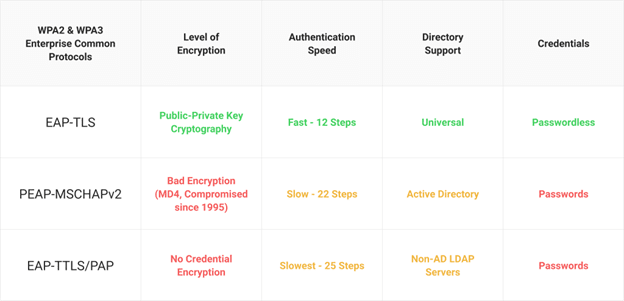
One of the reasons why WPA2-Enterprise is so popular in enterprise-grade network security is that it allows the use of different authentication protocols. Each offers different levels of encryption, uses different authentication vectors, and may require its own infrastructure.
There are three common authentication protocols in use today: EAP-TLS, PEAP-MSCHAPv2, and EAP-TTLS/PAP. PEAP-MSCHAPv2 and EAP-TTLS/PAP rely on passwords for authentication, making them vulnerable to compromise.
However, EAP-TLS can use digital certificates for authentication as opposed to passwords. This significantly reduces the risk of credential theft and increases the speed of the authentication process. However, in order to issue certificates, you need a public key infrastructure (PKI), which can be difficult to set up and maintain if you don’t already have experience with it. Managed PKI providers like SecureW2 can provide you with an off-the-shelf PKI that plugs into your existing infrastructure without having to build and maintain it yourself.
The short answer is yes. The longer and more accurate answer is yes, but it will require more expertise, software, hardware and maintenance than what you would need to implement a simple WPA2-Personal network.
Before proceeding further, it is worth considering a few points:
Your level of network usage
The sensitivity of data transmitted over your network
Your technical knowledge and willingness to perform maintenance
If you use the network purely for recreation, upgrading your security to WPA2-Enterprise may not be a pressing issue. However, if you run a business from home, regularly access sensitive information (such as banking, medical or legal) or any other sensitive information, increased network security may be critical.
You should also be aware of the technical skills that will be required to properly configure and maintain WPA2-Enterprise. You will need to configure a RADIUS server, which will require creating network access control policies and applying regular updates.
The main advantage of a WPA2-Enterprise home network is the increased security you get. If you only use one password to access Wi-Fi and other people know that password, you can never be sure that your password hasn’t been shared by strangers.
In addition, you rely on a single point of failure in the PSK network. If this password is cracked, anyone can gain access to your Wi-Fi network and spread their influence to other devices.
With separate credentials for all connected users, you can limit the spread of hacking. If a person’s password is compromised, it’s much easier to deal with than an entire network.
Because user access is tied to individual credentials, you have more control over the specific access each set of credentials has. For example, you can have guest networks with unique settings for different users. You can create guest networks for visitors to your home or segment different devices into different networks depending on your needs and expertise. The moment you no longer want a particular user or device to have access to the network, you can update it in your directory or database.
Adding a RADIUS server allows you to implement a number of network access control policies.
Most homes use the WPA2-Personal network because it is accessible to the average person. After all, the router and password can be set up in just a few minutes, and there are plenty of resources on how to do it.
WPA2-Enterprise requires more time and knowledge. Properly configuring a RADIUS server requires technical knowledge beyond that of most consumers and is undoubtedly one of the biggest obstacles to this type of network security.
For a WPA2-Personal network, you really only need a few things: Internet service, a modem, and a router. These things are relatively easy to get, and once set up, connecting to Wi-Fi is as easy as entering a password every time you add a new device.
A WPA2-Enterprise network requires you to have a RADIUS server and a RADIUS-compatible router. Many consumer-grade routers are not compatible with RADIUS-based authentication, so you’ll likely need to look for an enterprise-grade access point.
A RADIUS server requires special software configured to perform its functions. Of course, you’ll also need computer space to set up the authentication server, or a separate machine for it.
WPA2-Enterprise and 802.1X together are considered the gold standard for network security. These are standards used by large organizations around the world to protect highly sensitive data.
The average person may not demand the same exacting standards. Anyone who is away from home for long periods of time, or those who use their own Wi-Fi sparingly, may not need to worry about such robust protection. For those with technical abilities and those who handle sensitive or business data at home, this is much more important.
You will need additional resources beyond what is required for a WPA2-Personal network. Here are the extra things you’ll need:
User Directory / Identity Server
RADIUS server
Enterprise level access point
The user directory and the RADIUS server are completely separate servers. First, you need to configure your user directory to host the credentials that users and devices will use to access your network. Historically, organizations used on-premises identity servers such as Microsoft Active Directory. Smaller businesses or homes can look for free options like MySQL.
If you have free space on your computer, or even a whole extra computer, you can use it to install a RADIUS server with the appropriate software, such as Windows Server. Alternatively, you can check out free options such as FreeRADIUS.
Finally, you will need an access point that can communicate with your RADIUS server. This usually means an enterprise access point. There are many options, but a typical example is Ubiquiti hotspots. Some access points may even have built-in RADIUS.
Implementing WPA2-Enterprise security in your enterprise is challenging, even if you have a whole team of IT professionals to help. It’s even harder at home when you rely on yourself. If you feel that WPA2-Enterprise is unnecessary for your Wi-Fi usage, or that you simply aren’t ready to make the change, there are some smaller security measures you can take to make your network more secure.
Let’s start with password management. Set a strong password for your home wireless network that contains uppercase and lowercase letters, special characters, and numbers. Change this password periodically, even if you’re uncomfortable reconnecting devices.
You can also monitor devices connected to your network. Chances are, your router has an app or web portal that you can log into. With this portal, you can view the list of connected devices and confirm that they are indeed yours. If you see anything suspicious, change your Wi-Fi password immediately.
Just like computers or smartphones, other devices connected to your Wi-Fi often have software patches and updates, including your router. Be sure to log into your router’s portal regularly to check for updates and install them if necessary. These updates can protect it against new threats and pre-existing vulnerabilities.
Finally, make sure that the password for your router’s administrator account is different from the passwords you use elsewhere. However, it is generally a good policy to avoid reusing passwords.
In the end, WPA2-Enterprise is definitely more secure than its WPA2-PSK alternative, especially if you add certificate-based authentication. The problem with this security system is that it requires a lot of additional infrastructure that the average person may not be able to build and maintain.
However, with SecureW2, you don’t have to create it yourself. SecureW2 provides businesses with everything they need to upgrade to WPA2-Enterprise Wi-Fi with our managed Cloud RADIUS service, managed PKI for certificate-based security, and our adaptation technology for both managed and unmanaged devices.
Because all of our services are cloud-based, they can work from anywhere. There is no lengthy setup process, no expensive management costs, or the need to provide physical space and security for servers. We may not provide RADIUS and PKI for home use, but we have worked with organizations of all sizes and have extensive experience.