
04.08.2026
4 min
308



Passkeys are gradually replacing traditional passwords because they offer stronger protection against phishing attacks. Unlike passwords, they cannot simply be stolen, intercepted, or accidentally exposed during sign-in. However, if a device is infected with malware, attackers may be able to use passkeys without requiring a PIN, biometric authentication, or other verification methods, effectively bypassing multi-factor authentication.
Researchers at Unit 42, the threat intelligence team at Palo Alto Networks, have uncovered new attack techniques that could put Google Passkeys users at risk. According to the researchers, attackers can exploit passkeys to compromise every credential synchronized through Google’s ecosystem without triggering a genuine second-factor verification, such as biometric authentication or a PIN.
As part of their research, the team developed three separate account takeover techniques. The most severe attack resulted in the complete compromise of all of a victim’s synchronized passkeys.
There is one important prerequisite: the victim’s device must already be infected with malware. The researchers note that this is often achieved through large-scale automated phishing campaigns, including ClickFix attacks.
“An attacker can compromise an account protected by a Google-synchronized passkey using malware running on the victim’s device, without requiring elevated privileges, device unlocking, or any user interaction,” Unit 42 warned in its report.
At first glance, this may seem no different from malware stealing passwords stored on a user’s computer. However, stolen passwords typically still require a second authentication step, such as approving a login on a smartphone, preventing attackers from immediately taking full control of an account.
Passkeys work differently. Many online services trust passkeys without verifying whether the user actually completed a second-factor authentication check.
The researchers focused on Google’s widely used synchronized passkey implementation. If malware is already running on a victim’s device, it can inspect how passkeys are being used within the account.
“Chrome stores synchronized passkey data locally as part of the synchronization process,” the Unit 42 researchers explained.

Accessing these records does not require elevated privileges. As a result, an attacker can identify which services the victim uses with passkeys, along with associated usernames, credential IDs, and encrypted private keys.
Google generates and stores the actual passkeys inside an isolated cloud environment, where they never exist in plaintext. To access them, devices rely on two hardware-protected keys stored in a TPM or Secure Enclave.
When a user signs in, biometric authentication or a PIN unlocks the first key, known as User Verification (UV). The second key, Identifier (ID), proves that the request originates from a trusted device.
Both keys are then sent to Google’s cloud authenticator, which validates them and uses the appropriate passkey to complete the sign-in process.
The only thing preventing malware from directly stealing these two critical keys is that they never leave the TPM in a usable form. Instead, malware can only ask the TPM to sign data on its behalf.
According to the researchers, obtaining the Identifier (ID) key is relatively straightforward. Malware can generate the required signature simply by impersonating Chrome.
“Chrome creates conditions that allow it to request signatures on behalf of the user without elevated privileges and without triggering the device unlock protections,” the researchers wrote.
In the first attack scenario, dubbed Pass-ta-key, the researchers did not use the UV key at all.
Instead, they initiated a login to a web service, extracted the Identifier (ID) key, and submitted it to Google Cloud Authenticator. They found that the TPM signature alone was sufficient to compromise the victim’s account.
“From the cloud authenticator’s perspective, the request appears to come from a trusted device making a legitimate authentication request. It therefore generates a valid assertion, which is forwarded to the relying party, completing the authentication process and giving the attacker full control of the victim’s account,” the report explains.
The researchers also found that many online services, including eBay, failed to verify whether the user had actually completed user verification. Instead, they simply trusted the User Verified (UV) flag when it was set to true, even though malware could forge that value. eBay has since fixed the issue.
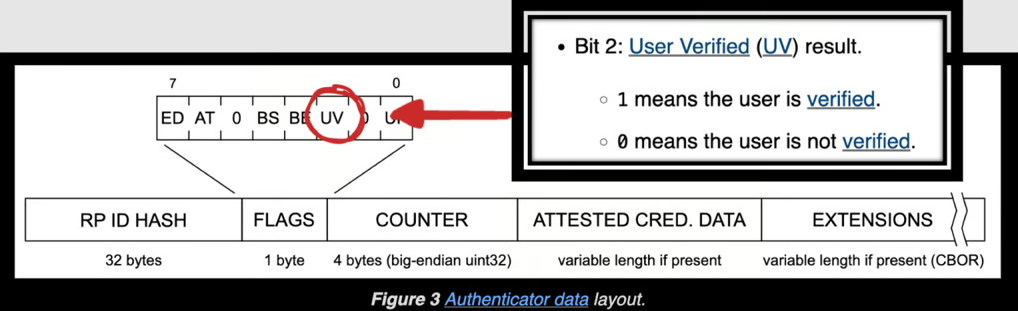
“We identified relying parties that accepted authentication requests because they failed to properly validate the User Verified (UV) flag. As a result, the attack succeeded even though no actual user verification had taken place.”
The researchers went even further, demonstrating that the User Verification (UV) key itself can also be compromised. This makes it possible to fully take over accounts even on services that enforce stricter authentication requirements.
The second attack works by tricking Google Cloud Authenticator into believing that the user has successfully unlocked their device.
Instead of obtaining a legitimate UV signature, the malware forces the device to re-register with Google using the device/forget command, which invalidates the existing UV key.
The malware then generates a new UV key, which Google Cloud Authenticator accepts and associates with the device without verifying whether it was signed by a genuine hardware security module.
According to the researchers, this attack could compromise even highly sensitive accounts, including online banking services and government systems.

The third attack scenario proved to be even more severe. It allows attackers to steal and decrypt every passkey synchronized through Google.
To protect these passkeys, Google relies on a master secret known as the Security Domain Secret (SDS). It is not directly accessible. Only an encrypted version is stored on the device, while only Google’s cloud infrastructure can decrypt it.
“If an attacker obtains the SDS, they can decrypt every synchronized passkey associated with that account. This would allow them to authenticate as a fully verified user and gain access to every service where the victim relies on passkeys,” the researchers said.
Perhaps the most surprising finding was how the researchers obtained the SDS. They discovered that the secret had been recorded in Chrome’s log files.
In other words, the system’s most sensitive secret was written to the logs in plaintext during the device enrollment process.

Following the Unit 42 report, Google removed the secret from Chrome’s log files. However, the researchers note that the Security Domain Secret (SDS) is still sent to the client and temporarily stored in the memory of the Chrome process during the recovery procedure. As a result, they believe the vulnerability could still be exploited to steal synchronized passkeys.
“If an attacker forces the victim to re-register with the cloud authenticator and knows what pattern to look for, they can extract the SDS directly from memory,” the researchers said.
In their report, the researchers recommend that online services stop relying solely on the User Verified (UV) flag and instead implement proper verification that user authentication actually took place. They also argue that Google should validate the authenticity of newly registered devices and UV keys before accepting them. In addition, they recommend strengthening passkey registration and recovery mechanisms and outline several other security improvements.
Although Passkeys make traditional account theft attacks significantly more difficult, they do not eliminate the risk entirely. The researchers believe attackers will increasingly shift toward techniques specifically targeting passkey implementations.
“The key takeaway is that endpoint compromise remains a critical part of the threat model,” the researchers concluded.