

01.09.2026
3 min
263



Developers can connect an Android smartphone to a computer via USB or Wi-Fi to gain advanced debugging access. Now, dangerous malware has learned how to establish the same kind of access directly from the smartphone itself. And the process is controlled by artificial intelligence.

It asks for only one permission: access to the Accessibility Service. The malware can take on many forms, for example by disguising itself as Chrome or a popular streaming app and changing its icons and names on the fly. Even if the user taps “Uninstall,” the removal process is canceled. A sample of the malware from China obtained by Zimperium researchers has almost no direct access to the device or its data, yet it uses an unconventional technique to gain near-complete control over the phone. It steals banking credentials, PIN codes, and passwords, intercepts data, monitors the screen, logs keystrokes, and can perform almost any other action.
How? It connects to the device from within the device itself using Android Debug Bridge, or ADB. Developers use ADB when they need deeper administrative access. They connect to the phone via USB or Wi-Fi, launch a command-line tool, and can execute commands, install apps, transfer files, debug code, and more. The malware, called RatHat, establishes the same kind of connection from inside the phone and connects to an external server where an AI agent operates and remotely issues new commands.
At least 162 malicious apps using the new payload were found publicly available. The attackers deployed more than a dozen command-and-control servers to manage infected devices.
“Threat actors are constantly refining their malware to gain undetected, unauthorized access to sensitive financial information,” Zimperium researchers said in their report.
The operators buy ads and send targeted SMS messages that lead users to fraudulent phishing websites. There, users are offered downloads disguised as legitimate apps. These sites encourage victims to manually download and install malicious APK files, bypassing Play Protect’s strict security controls. Researchers say the deployment method has been refined to evade Android’s real-time detection through sophisticated anti-analysis mechanisms.
Installation alone is not enough. The malicious app can dynamically change its appearance, posing as a browser, a streaming service, or another app. It uses sophisticated social engineering to obtain one critical permission: access to the Accessibility Service.
In some countries, users are told that the permission is required “because of network restrictions” and are also offered a financial incentive, Zimperium researchers said.
Once the user grants this permission, the situation becomes much more serious. The Accessibility Service allows the malware to simulate gestures and taps. It opens “Settings,” enables Developer Options by tapping “Build number” seven times, then starts Wireless Debugging pairing, captures the pairing PIN, authenticates, and gains shell access. The ADB connection is then used for spying, extracting data, and deploying additional payloads.
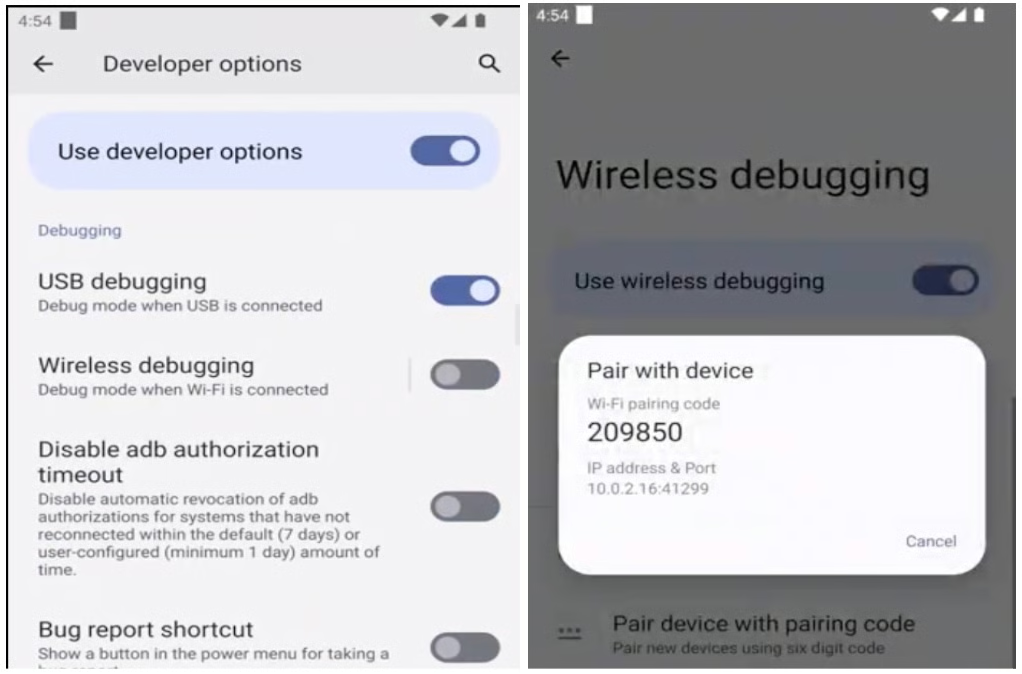
The malware gives attackers direct control by establishing a persistent real-time command-and-control channel. During real-world attacks, it also downloaded two additional components:
A Go agent that turns ADB access into persistent control. This component runs commands that bypass the restrictions imposed on regular user apps, makes the malware harder to stop, prevents it from going to sleep, disables other apps, and can even remove security-related applications.
The frpc reverse proxy client. Its only purpose is to maintain a secure, persistent tunnel to the command-and-control server.
The main app already includes a wide range of spyware capabilities. It can steal credentials, capture the screen and user input, intercept data such as SMS messages and 2FA/OTP codes, and even wipe the device completely.
“The app can request Device Administrator privileges, giving it the ability to wipe data from the device if an uninstall attempt is made,” the researchers said.
However, the malware intercepts uninstall confirmation dialogs and displays a fake error message, canceling the user’s action. Even if the user manages to remove the app, the attacker still retains shell access, and the malicious service automatically reinstalls it.
One particularly unusual feature is that the malware continuously interacts with an AI agent. The report refers to “one of the world’s most popular generative AI assistants.”
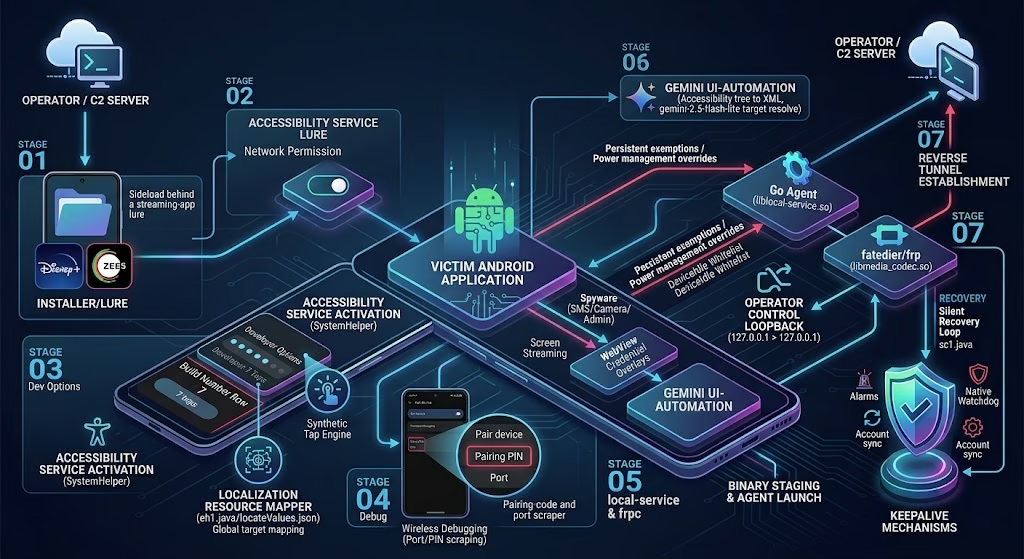
RatHat uses artificial intelligence for relatively simple tasks, such as understanding what is happening on the screen and determining where it needs to interact with the interface. The operators are primarily focused on banking and payment data.
“RatHat is capable of stealing credentials from certain banking and cryptocurrency apps: the malware monitors which app is running in the foreground and, when it detects a targeted package, launches the corresponding HTML injection mechanism,” the report explains.
Fake login screens designed to steal credentials can also be displayed for other payment apps, including WeChat and Alipay.


Як захищатися від подібних загроз? Є якість покрокові інструкції з урахуванням розвитку атак
Тут головне не ставити APK невідомо звідки й уважно дивитися, які дозволи просить застосунок.