
16.08.2026
35 min
184



DNS works quietly in the background every time we open a website using its domain name. We explain how google.com is translated into an IP address, what DNS servers do, why DNS caching, DNS records, and encrypted DNS queries are needed, and what happens when the system stops working.

We open a browser, type google.com, press Enter, and a moment later the Google homepage appears. It is such a routine action that hardly anyone stops to think about how the computer actually knew where to find the website. After all, Google’s servers are running somewhere in the world, and the name google.com by itself does not tell the network where to send the data.
This is where DNS, or the Domain Name System, comes into play. It works quietly in the background during almost everything we do online. DNS helps translate human-friendly names into addresses that network devices can work with. Without DNS, the internet would not physically disappear: servers would keep running, and data packets could still travel between devices. But using the internet would become so inconvenient that the modern web as we know it would effectively cease to exist.
To understand just how important this system is, we only need to follow what happens after entering an ordinary website address into a browser.
People are good at remembering names. It is much easier to remember google.com, wikipedia.org, or youtube.com than a string of numbers. Computer networks, however, need different information. To send data to a specific device on a network, they need to know its IP address.
With IPv4, an address might look like 192.0.2.10, for example. IPv6 uses much longer addresses, such as 2001:db8::10. These are simplified examples, but they illustrate the problem well: even a handful of addresses like these are harder to remember than website names. If someone regularly used a hundred different online services, they would need to maintain their own list of addresses.
Domain names solve this problem for people. DNS, in turn, helps the network determine which address is associated with a particular name. This is why DNS is often described as the phone book of the internet. The analogy works fairly well: we know someone’s name, and a directory helps us find their phone number. With DNS, we know the domain name, and the system helps us find the information needed to establish a connection.
Modern DNS, however, is far more sophisticated than an ordinary directory. A single domain can be associated with multiple IP addresses, responses can vary depending on a user’s location and network infrastructure, and some information is cached at different levels. DNS is also used for much more than simply finding website addresses. It helps identify mail servers, verify domain configurations, and supports many other mechanisms that keep internet services running.
So when we type google.com, that simple domain name hides an entire system that has to answer one crucial question as quickly as possible: where exactly should the connection go?
The need to match human-readable computer names with numerical addresses existed long before the modern web. When ARPANET and the networks that followed it were still relatively small, the problem could be solved in a fairly straightforward way: there was a file containing a list of known hosts and their addresses.
That file was called HOSTS.TXT. It was centrally maintained by the Network Information Center, and computers on the network could obtain an up-to-date copy. In practice, it served as a kind of phone book, with each machine’s name listed alongside its address.
As long as the network consisted of a relatively small number of computers, this model was manageable. But the internet began to grow rapidly. New machines appeared, addresses changed, new entries had to be added, and updated versions of the file had to be distributed. The centralized list kept getting larger, while keeping it up to date became increasingly difficult.
The problem was not just the size of the file. The entire approach scaled poorly. Imagine if today’s internet relied on a single enormous directory containing the names of countless servers. Every change would have to be submitted to one central source, and users would need to regularly obtain a new version of that directory.
By the early 1980s, it had become clear that the internet needed a system capable of growing along with the network. Instead of relying on one flat list, responsibility had to be distributed across different parts of the internet, creating a hierarchy in which no single participant needed to know absolutely everything. DNS was born out of that problem.

In the early 1980s, the technical community began discussing a move away from the old flat naming system toward a hierarchical one. One of the people who played a key role in creating this new mechanism was American engineer Paul Mockapetris.
In November 1983, RFC 882 and RFC 883, both written by Mockapetris, were published. These documents described the concept and implementation of the Domain Name System and laid the foundation for DNS. They were later replaced by RFC 1034 and RFC 1035, published in 1987. These remain foundational DNS documents to this day, even though the system has received countless additions and changes over the decades.
The main advantage of the new approach was decentralization. Instead of maintaining a single list of every computer in the world, DNS introduced a hierarchical system. Different organizations could be responsible for their own parts of the domain name space, and no DNS server needed to store a complete map of the entire internet.
The solution proved remarkably resilient. When DNS was created, there was no Google, no YouTube, no social media, no smartphones, and no cloud platforms in the modern sense. Tim Berners-Lee would not propose the World Wide Web until later in the decade. Yet the architecture of DNS managed to survive all of these changes.
Much of that longevity comes from its hierarchical structure. Responsibility for this enormous system is distributed among a vast number of participants. The owner of example.com does not need to coordinate with some single “master server of the internet” every time they create blog.example.com. Each level can delegate responsibility to the next.
The best way to understand this principle is to follow an ordinary DNS query from beginning to end.
Imagine the simplest possible situation. You open a browser, type google.com, and press Enter. At first glance, it seems like the browser simply needs to open the website. But before it can do that, it has to figure out where to connect. To do so, the system needs to obtain the address associated with google.com.
Not every visit to a website triggers a complete DNS lookup from scratch. Your computer and browser make extensive use of caching. If the necessary information was retrieved recently and is still valid, the system can use that cached answer instead. This is much faster.
If no cached answer is available, the request is sent to a DNS resolver. On a home network, the device often receives the resolver’s address automatically along with its other network settings. This may be a DNS service operated by the internet provider or another resolver configured by the user, operating system, browser, or network administrator.
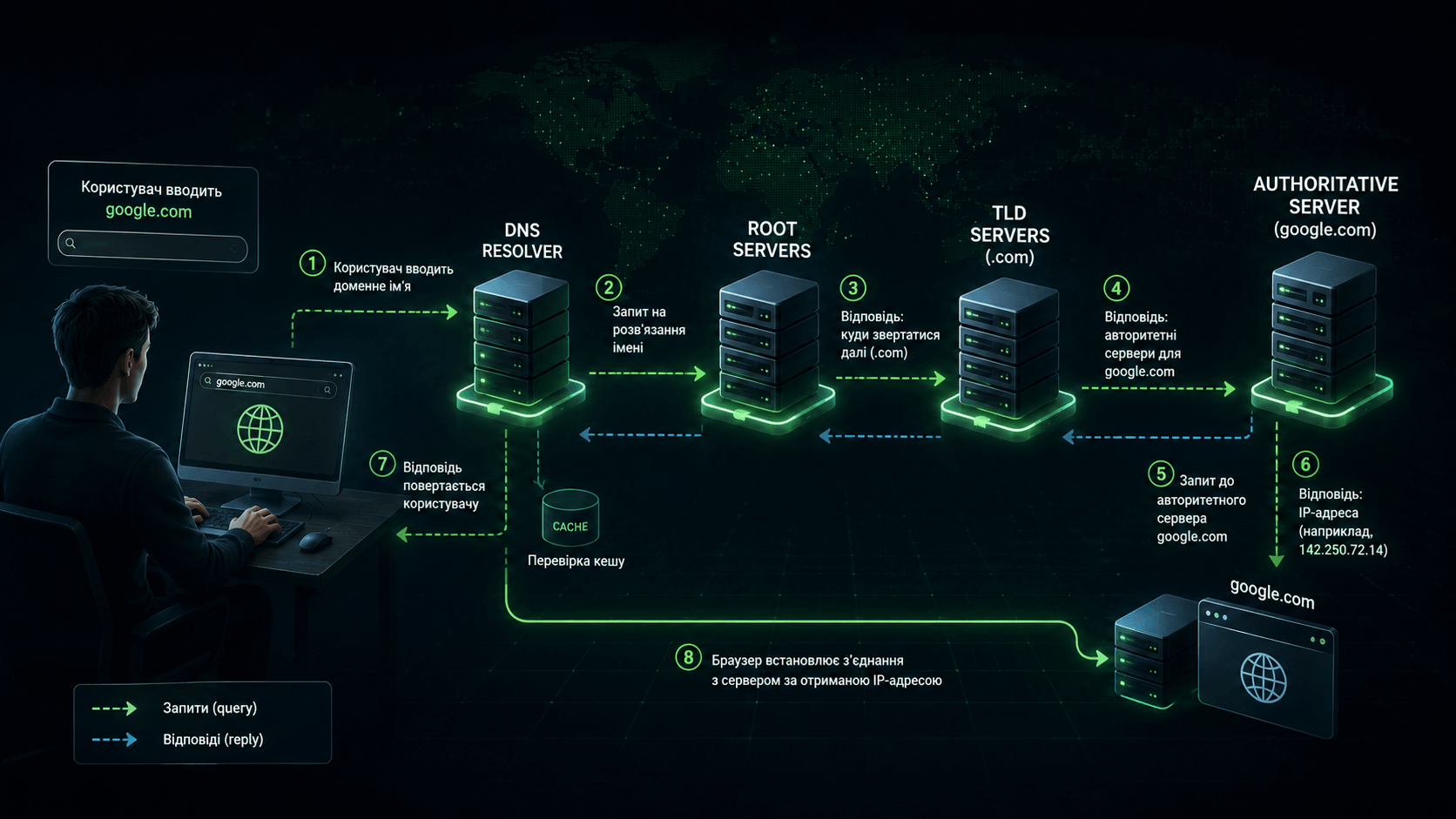
If we break down the entire process from entering the domain name to the point where the website can begin loading, it looks roughly like this:
The user enters the domain name. The browser receives
google.comand determines that it needs to find the address of this resource before it can establish a connection.
Available cached information is checked. If the system already has a valid answer, a full DNS lookup may not be necessary at all.
The query reaches a DNS resolver. If the resolver does not already have the required answer in its cache, it begins searching through the DNS hierarchy.
The resolver contacts the root DNS infrastructure. The root system helps determine where to look for information about the relevant top-level domain, which in this case is
.com.
The query moves to the
.comservers. They help identify which DNS servers are responsible forgoogle.com.
The resolver contacts an authoritative DNS server. This is where it obtains the required DNS answer, such as an IP address.
The answer is returned to the user. The browser can then move on to establishing the necessary network connection.
In practice, caching means this entire chain does not have to be repeated every time. Still, it clearly illustrates the fundamental logic of DNS: the system gradually moves from the general to the specific until it reaches the source that has the information it needs.
It is important to understand that DNS does not load the Google webpage itself. Its job is to help find the information needed for the next stage.
Once the address has been obtained, the browser can establish a network connection with the appropriate infrastructure. With HTTPS, several additional processes then take place, including establishing a secure connection, verifying the certificate, sending the HTTP request, and retrieving the resources needed to load the page.
In other words, there is an important dividing line between typing google.com and seeing the page appear. First, the system has to answer the question “where?” Only then can it move on to “connect and retrieve the page.” DNS is primarily responsible for the first part.
To prevent the system from turning into another HOSTS.TXT, DNS is built as a hierarchy. At the top is the DNS root zone. Below it are top-level domains such as .com, .org, .net, and .ua, followed by individual domains beneath them.
A domain name is essentially read hierarchically from right to left. Take news.example.com as an example. At the top is the DNS root, followed by .com, then example.com, and finally news.example.com within that domain.
If we simplify the system, four main participants are involved in a typical DNS lookup:
DNS resolver receives the user’s query, checks its cache, and, if it does not already have the answer, goes looking for it.
Root DNS infrastructure sits at the top of the hierarchy and helps the resolver find the servers responsible for the relevant top-level domain.
TLD servers are responsible for top-level zones such as
.com,.org, or.netand help identify the authoritative servers for a specific domain.
Authoritative DNS servers are the source of DNS information for a particular zone and return the data the resolver ultimately needs.
Root servers do not store the IP address of every website on the internet. Their role is much more fundamental: they help direct queries toward the appropriate top-level domain. If a resolver is looking for example.com, the root system can point it toward the servers responsible for .com.
There is a well-known myth surrounding root DNS servers that “the entire internet depends on 13 servers.” In reality, there are 13 named root server identities, traditionally labeled from A through M. Thanks to anycast technology, however, these identities are backed by a large number of physical server instances distributed around the world. So we are certainly not talking about 13 individual machines whose shutdown could instantly destroy DNS.
The next level, such as .com, does not need to know everything about a website either. It only needs to know which DNS servers are authoritative for a particular domain.
Finally, we arrive at the authoritative name server, or authoritative DNS server. This is the source of DNS information for its zone. NS records specify which servers are authoritative for a domain.
In this system, you can think of a DNS resolver as an assistant running around an enormous library on your behalf. You tell it, “Find the address for example.com.” It checks whether it already knows the answer. If not, it starts at the top level of the directory, gradually figures out whom to ask next, and eventually reaches the source that has the information it needs.
Thanks to this structure, no single part of the system has to store information about every domain in the world.
When people talk about DNS, they usually think of translating a domain name into an IP address. But DNS contains different types of records, each designed for a specific purpose.
Some of the most common include:
A links a domain name to an IPv4 address. This is one of the classic cases where DNS effectively answers the question: “Which IPv4 address should I connect to?”
AAAA performs a similar function for IPv6 addresses.
CNAME allows one domain name to act as an alias for another. Instead of pointing directly to an IP address, it points to another domain name.
MX specifies the mail servers that should receive email for a particular domain.
NS identifies the DNS servers that are authoritative for a particular zone and plays an important role in DNS delegation.
TXT allows text-based information to be stored in DNS and is widely used for various domain verification and configuration purposes.
A single domain can have more than one address. A website and email service using the same domain can also be handled by completely different infrastructure.
TXT records are particularly interesting. Today, they are used by many mechanisms related to email and domain ownership verification. DNS, for example, plays a role in SPF, DKIM, and DMARC, which help protect email infrastructure against message spoofing.
And this is far from a complete list. DNS has long since evolved into a versatile distributed database containing information about domains and the services associated with them.
That is why a DNS error can affect much more than just a website. A misconfigured record can disrupt email delivery, break a particular subdomain, or interfere with another service that depends on DNS.

If a resolver had to start with the root servers and work its way through the entire DNS hierarchy every single time someone opened a website, it would generate an enormous number of unnecessary queries. That is why caching is one of the most important parts of DNS.
Suppose a resolver has just found the address of a particular domain. Instead of repeating the same lookup a second later for another user, it can temporarily store the answer. The next query can then be handled much faster, without going through the entire DNS hierarchy again.
The lifecycle of a cached DNS response can be thought of as a simple cycle:
The DNS resolver receives an up-to-date answer from the appropriate source.
The information is stored in the cache and can be reused for subsequent queries.
As long as the TTL has not expired, the resolver can answer from its cache instead of repeating the entire lookup process.
Once the TTL expires, the old cached record should no longer be treated as current under normal circumstances.
The next time the record is requested, the resolver retrieves fresh information, and the cycle begins again.
How long this information can be stored is determined by a parameter called TTL, or Time To Live. TTL tells resolvers how long a response may be considered valid before it needs to be refreshed.
This creates an interesting trade-off. A longer TTL reduces the number of DNS queries and allows cached information to be reused for longer. But if the domain owner changes a record, the old data may remain in caches for some time. A shorter TTL allows systems to switch to new values more quickly, but it also increases the frequency of DNS lookups.
This is where a situation familiar to many website administrators comes from: a DNS record has already been changed, but one user is reaching the new server while another is still being directed to the old one.
This is often referred to as “DNS propagation,” as if the new record physically had to spread across the entire internet like a wave. In reality, the situation is more complicated. A major factor is the expiration of previously cached responses. One resolver may already need to request fresh data, while another may still be allowed to use its older cached answer.
So the familiar advice to “just wait a little after changing DNS” has a perfectly technical explanation. Somewhere on the network, the old information may still be sitting in a cache.
After reading about root servers, TLD servers, authoritative servers, and caches, it might seem as though opening any website should take forever. In reality, users barely notice DNS working most of the time. One of the main reasons is caching: if the required answer is already stored nearby, there is no need to go through the entire DNS lookup chain. DNS infrastructure itself is also designed to respond as quickly as possible, while major operators distribute servers across many geographic locations.
At the same time, it is not useful to tie DNS performance to a single number such as “a query always takes 20 milliseconds.” The actual time depends on the network, the distance to the server, whether the answer is already cached, the particular resolver being used, the state of the infrastructure, and other factors. What matters more to the user is that DNS sits on the critical path to accessing a resource: if the required address is not already known, the browser has to wait for it to be resolved before it can establish the necessary connection. As a result, slow DNS can add noticeable latency even when the web server itself responds extremely quickly.
This also explains why caching plays such an important role. It does more than simply reduce the number of queries and the load on DNS servers. It also helps make an enormous distributed system practically invisible to the user. Under normal conditions, we rarely stop to think that before opening an ordinary webpage, our computer first had to determine where on the network the requested resource could actually be found.
The best way to appreciate the importance of DNS is to see what happens without it. Imagine that a website’s server is working normally. It is connected to the network, accepting requests, and its connection is functioning properly. But for some reason, the DNS query for the domain fails to return the required answer.
For an ordinary user, the result is simple: the website does not open. This creates a somewhat paradoxical situation. The website itself may still be “alive.” The user’s internet connection may also be working. Other IP addresses may remain reachable. But the browser does not know where to connect when given that particular domain name.
It is a bit like trying to drive to a restaurant when you know its name but not its address. The restaurant has not disappeared, the roads are open, and your car works perfectly well. The problem is simply that you do not know where to go.
There are many possible causes of this kind of problem:
An unavailable DNS resolver that the user’s device is trying to contact.
Misconfigured DNS records that cause the domain to return incorrect information or fail to return the required information at all.
Problems with authoritative DNS servers that are supposed to provide information about the domain.
Incorrect domain delegation, where a higher level of the DNS hierarchy directs queries to the wrong place.
Network or software problems that prevent DNS queries from reaching the server or stop responses from making their way back to the user.
Sometimes switching to a different DNS resolver can help, but it is not a universal solution. If the problem lies with the domain’s own authoritative DNS infrastructure, another public resolver may also be unable to obtain the correct answer.
It is also worth remembering that entering an IP address directly will not always solve the problem. The modern web relies on HTTPS, virtual hosting, CDNs, and other mechanisms where the hostname itself can be essential. That is why the popular advice “if DNS is down, just enter the website’s IP address” is far less universally useful today than it might seem.

One of the most interesting things about DNS is that a problem with one component can easily look like something completely different has broken.
If a major online service loses access to its authoritative DNS infrastructure, users may assume that “the servers are down.” In reality, the application servers may still be running perfectly well. A large number of users simply can no longer find their way to them through the domain name.
The impact can be even greater when problems affect companies that provide DNS services for large numbers of customers. If thousands of domains depend on the same provider, a serious outage can potentially affect users across many otherwise unrelated websites.
That is why DNS is considered critical infrastructure and is designed with resilience in mind. Domains typically use multiple authoritative servers, while major DNS platforms distribute their infrastructure across different geographic locations.
Caching provides another layer of resilience. If an authoritative server becomes temporarily unavailable, some users may still be able to access previously cached information for a while. But caches do not last forever. Once the TTL expires, the resolver needs a fresh answer.
This is why large-scale DNS incidents can look so strange: services that appear to have nothing in common may suddenly become inaccessible at the same time. The common denominator turns out to be a piece of infrastructure that most users did not even know existed.
DNS is a bit like electricity in a house. As long as the power is on, we think of the television, refrigerator, and computer as separate devices. When the power goes out, it suddenly becomes obvious that all of them depend on the same underlying layer of infrastructure.
In theory, transmitting data over IP networks does not require every resource to have a convenient domain name. If you know the IP address of the machine you need and the service allows direct access, a connection may still be possible.
This raises an obvious question: why do we need DNS at all? Why not simply save IP addresses in our bookmarks?
For the modern web, that would quickly turn into a nightmare. There are several reasons:
IP addresses can change. A domain allows a service owner to rebuild or move their infrastructure without forcing millions of users to learn a new address.
A single IP address can host many websites. The server needs to know not only which address the connection reached, but also the specific domain name the user wants to open.
HTTPS is closely tied to domain names. Certificates verify that a server is authorized to represent a particular name or set of names, while modern TLS allows many secure websites to share the same infrastructure.
A single domain can sit in front of a massive CDN or cloud platform. Users do not need to know which particular server will handle their request today or which one will do so tomorrow.
All of this shows just how effectively a domain name separates the user from the inner workings of an internet service. A person only needs to know a stable name, while the service owner remains free to change servers, networks, and infrastructure behind the scenes.
So an internet without DNS would not necessarily mean that no data packets could travel anywhere. A more accurate way to put it is this: without a naming system, the modern internet would lose one of its fundamental layers of abstraction.
Instead of knowing “what we want to open,” we would need to know “where it is physically or logically located right now.” For a global network with constantly changing infrastructure, that is an enormous difference.
The phrase “DNS translates a domain into an IP address” is useful when first learning about DNS, but it can create a somewhat misleading picture, as if every website had one permanent address listed next to its name. The modern internet often works very differently.
A large service may use many servers across different data centers. If every user in the world connected to a single machine, it would quickly become a bottleneck. There is also little reason for a user in Europe to connect to a distant server every time if the necessary infrastructure can be placed much closer to them.
That is why modern services use CDNs, load balancing, geographically distributed data centers, and other technologies. DNS can be part of the mechanism that helps direct users to the appropriate infrastructure.
A single domain can have multiple A or AAAA records. DNS responses also do not have to remain the same forever. Infrastructure can change, servers can be added or taken out of service, and content delivery systems can optimize how users are routed.
Proxy services add another layer to this. When web traffic passes through a proxy network, DNS may return the address of that network rather than the website’s actual origin server. The proxy receives the user’s request and then communicates with the server behind it.
This is where the phone book analogy starts to break down. In a traditional phone book, we expect to find one particular person’s number. DNS is closer to an incredibly fast global directory that can tell you, “Here is the current way to reach the service you are looking for.”
It is precisely this flexibility that allows website owners to rebuild and change their infrastructure with little or no disruption to users.

The convenience of DNS has another side to it. If your device asks, “What address corresponds to this domain?”, someone has to receive that query and respond to it.
With traditional DNS, queries could travel across the network without encryption. This created a privacy concern: an observer on the network could potentially see information about the domain names a device was requesting.
It is important not to overstate what DNS can reveal. A DNS query does not mean that an outside observer automatically sees the full contents of the page you are reading. If you visit example.com, DNS typically deals with the domain name rather than the full HTTPS URL, such as https://example.com/private/article.html.
Even so, a list of domains can reveal a great deal about a person’s online activity. That is why DNS privacy has become an increasingly important issue over time.
Today, two widely used approaches for protecting DNS traffic include:
DNS over HTTPS (DoH) sends DNS queries through an encrypted HTTPS connection, making it much more difficult for an outside observer on the network to read the DNS query itself.
DNS over TLS (DoT) also encrypts communication between the client and the DNS resolver, but uses a dedicated TLS connection for DNS traffic.
Both mechanisms address a similar problem: preventing third parties on the network from simply reading DNS queries while they are in transit.
Encryption, however, does not magically make DNS anonymous. The resolver that receives the user’s query still has to process it. With standard DoH, for example, the resolver may be able to see both the client’s IP address and the domain being requested. Additional privacy technologies exist that attempt to separate this information between different parties, but that represents another stage in the evolution of DNS privacy.
Choosing a DNS resolver is therefore also a matter of trust. In practice, you are choosing the service that will help your device find domains.
DNS was created in a very different era of the internet, but today it has to deal with a challenge that early networks approached very differently: how to remain a fundamental internet service without turning every domain lookup into the digital equivalent of an open postcard.
Privacy is only one side of DNS security. There is another equally important question: how do we know that the answer we received is actually correct?
Imagine that a user wants to open bank.example, but an attacker manages to make their device receive the wrong IP address. The user enters the correct domain name, yet the system directs them somewhere other than where they expected to go.
Historically, DNS was created in an environment where today’s scale of cyber threats simply did not exist. Over time, attacks targeting name resolution mechanisms became a security problem of their own. One well-known class of attack is DNS cache poisoning, in which an attacker attempts to introduce false information into a DNS cache.
If a poisoned response makes it into the cache and is accepted as legitimate, the problem can affect more than a single query. Until that cached information expires, the incorrect data may potentially be reused.
Today, several different mechanisms are used to strengthen DNS security, and it is important not to confuse their roles:
DNSSEC helps cryptographically verify the authenticity and integrity of DNS data. Its purpose is not to hide the query, but to make it possible to verify the information that was received.
DoH encrypts DNS traffic between the client and the resolver using HTTPS. Its primary purpose is to protect the communication channel and the privacy of the query along that part of its journey.
DoT serves a similar purpose, but carries DNS over a secure TLS connection specifically designed for this type of traffic.
In other words, DNSSEC is not “another way to encrypt DNS.” And DoH and DoT do not, by themselves, perform the same DNS data authentication function that DNSSEC was designed to provide.
DNS is also only one layer of security in the modern web. HTTPS and TLS have their own roles to play. Even after a user receives an IP address, the browser still needs to verify the server’s certificate when establishing a secure connection. This layered approach makes the modern security model much stronger than relying on any single mechanism alone.
DNS should not simply tell us, “go there.” On today’s internet, it is increasingly important to be able to verify that the answer itself can be trusted.

Perhaps the most remarkable thing about DNS is not how much complexity lies behind the simple act of entering an address into a browser, but how much change the system has survived. The first DNS specifications appeared in 1983, when the internet was nothing like the network we know today in either scale or the way it was used. There was no modern web, no search engines, no streaming platforms, no social media, no cloud services, and no billions of smartphones. Yet the fundamental idea of a hierarchical, distributed naming system proved so effective that it continues to work decades later.
DNS did not remain frozen in the 1980s. Protocols evolved, new record types appeared, security mechanisms were introduced, IPv6 support was added, DNS queries gained encryption, and enormous anycast infrastructures were built. But the core logic remained the same: the global namespace is divided into levels, and responsibility can be delegated. This allows the system to scale without requiring a single worldwide database that has to know absolutely everything.
And now we can return to the same google.com we started with. The user types a few familiar characters, and the system checks its cache. If necessary, a DNS resolver looks for the answer, the root infrastructure helps locate the appropriate top-level domain, and the authoritative servers are then identified. Eventually, the necessary information is returned, allowing the connection process to continue. Other network protocols then take over, a secure connection is established, a request is sent, and the page begins to load.
For the user, this entire complex sequence remains almost completely invisible: they simply type google.com and see Google a moment later. That is one of the clearest signs of well-designed infrastructure: as long as everything works properly, most of the time we do not even think about its existence.
DNS is not the internet itself, nor does it deliver all web content on the internet’s behalf. Its role is both simpler and more fundamental: it allows people and software to find the resources they need using stable, human-readable names, without constantly having to think about which IP addresses or data centers those resources are running on.
Without DNS, servers would not disappear, routers would not stop forwarding packets, and the IP protocol would continue to exist. But the modern internet, where we access websites through recognizable names, move services between servers, and rely on cloud platforms, CDNs, email, and vast distributed infrastructures, would become incomparably more difficult to use.
That is why DNS is almost invisible when everything works and immediately noticeable when something breaks. Every time we enter a website address and see the page appear a moment later, a system whose fundamental principles were established more than forty years ago is quietly doing its job in the background.