
21.08.2025
10 min
895



Auto Archiver is an open source tool that helps journalists, researchers, and human rights activists preserve online evidence before it disappears from the web. Over 150,000 pieces of content have been preserved, from social media posts to videos and web pages. The system automates archiving, captures metadata, creates a chain of custody, and ensures the authenticity of digital evidence. The tool is team-friendly: you can integrate sources from Google Sheets, Telegram, or video services, and store results in the cloud or locally. Thanks to its modular architecture, Auto Archiver supports proxies to bypass bot protections and makes it easy to add new components. This solution is ideal for investigative journalists, OSINT communities, NGOs, and anyone who works with large amounts of sensitive information.
The Automatic Archiver is a tool designed to preserve digital online content before it can be altered, deleted, or removed. Launched publicly in 2022, it has preserved over 150,000 web pages and social media posts to date. The Automatic Archiver has been used by journalists to preserve information about dozens of fast-moving events, such as the January 6 riots — when we first used the tool internally — as well as to collect digital evidence for our Justice and Accountability project and to monitor the harm done to civilians in Ukraine.
The Automatic Archiver has also been adopted by both large newsrooms and non-governmental organizations. It has also been used by individual researchers, journalists, activists, archivists, academics, and developers. Given the high interest in the tool, we have worked hard to add to and improve it over time. But we’ve used the last few months to take a step back and build a new and more robust ecosystem that will further help individual organizations and researchers use and benefit from it.
Our goal was to make it more robust and even easier to use for more people. Today, we’re excited to announce an updated version of Auto Archiver, which includes many new features, such as:
Detailed documentation for all features and configurations
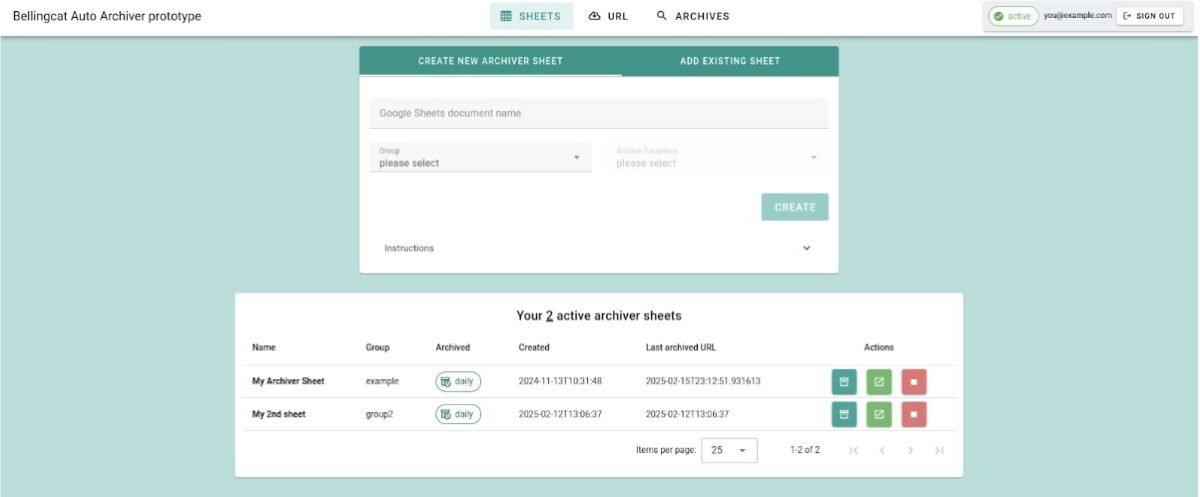
A user-friendly interface designed for teams using a shared instance
A new modular structure that improves the startup speed and reliability of the tool
New features such as storage chaining, perceptual hashing for deduplication, and methods for evading anti-bot measures and captchas on websites
A convenient tool for configuring the automatic archiver without having to edit text configuration files
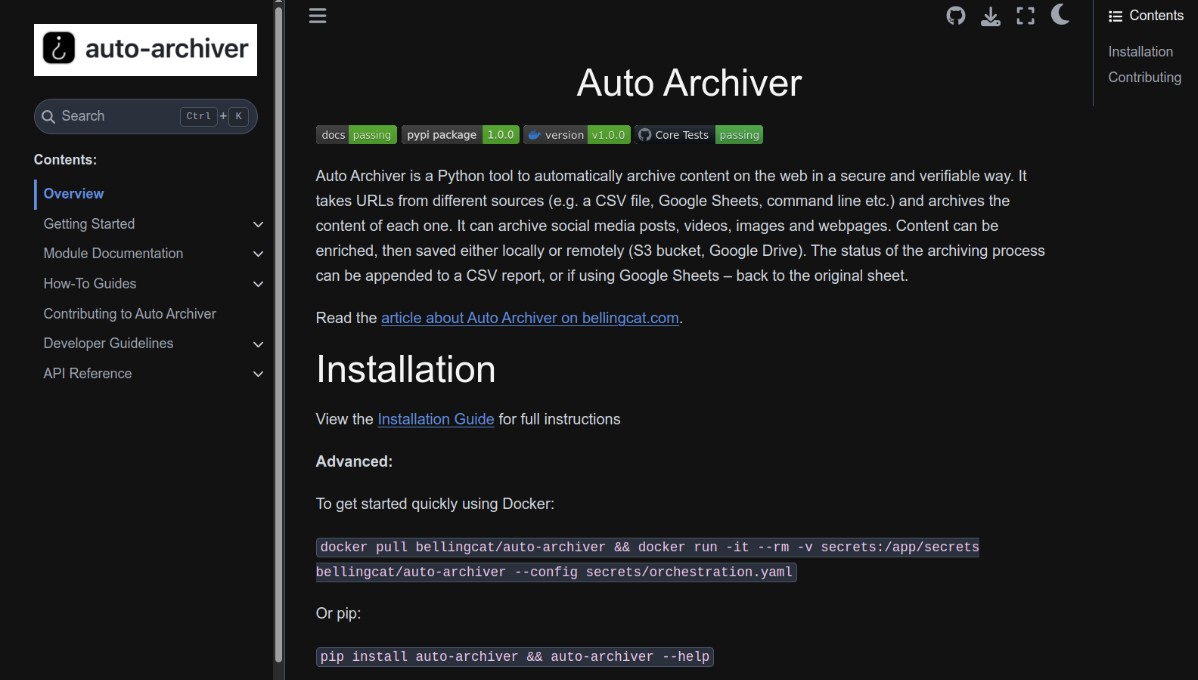
For a detailed look at the changes made to this stable version of Auto Archiver, see the “What’s changed, what’s stayed” section later in this article.
The latest version of Auto Archiver has an easy-to-use web interface and a streamlined installation process, making setup even easier than before. However, this initial process still requires some technical skills, and there are other tools available that can handle many of your archiving needs.
If you only need to archive a few unauthenticated URLs, we recommend using the Wayback Machine or Archive.today. Alternatively, the ArchiveWebPage browser extension from WebRecorder can create an archive of the website you visit for playback—even for content that is outside of the login system. For batch processing, the Wayback Machine has a bulk download service that accepts Google Sheets. If you specifically need to record all your browser interactions and save the content as you go, there are paid options like Hunchly. Finally, if you’re only interested in videos and are confident using the command line, yt-dlp will probably be enough to download them, even in bulk.
But if you’re hoping to automate archiving or archive a large number of URLs in a collaborative environment, that’s where Auto Archiver really shines. Its modular structure allows you or your team to customize archiving to your needs, and it provides a way to generate metadata that ensures others can be sure your archived content hasn’t been tampered with.
Learn more about which sites Auto Archiver can archive here.
Archiving web pages is a complex undertaking, especially when using logins, captchas, and other bot prevention systems. We will do our best to continue improving our automatic archiver, but we note that it should be just one of many tools in your research kit.
However, if you would like to support us on this journey of archiving important information, you can:
Download and use this tool
Test, provide feedback, and develop new features on our GitHub
Now that we’ve given a general overview of the tool and its changes, let’s take a deeper look at how its different parts work and interact. This will probably be more useful for more technically savvy users, and we reiterate that successful users of the tool will likely need some technical knowledge to set it up for the first time.
But help is available with our real-time Auto Archiver documentation . Here you’ll always find the latest information on how to install, configure, or debug the tool. Even if some aspects mentioned in this article change in the coming years, the documentation will be your go-to place for up-to-date instructions.
If you have any questions or problems, please open an issue on GitHub. This is where others will also turn for help, and it creates our shared knowledge space.
Many open source researchers prefer to use Auto Archiver with Google Sheets integration, which allows users to work together by adding links to a spreadsheet and letting Auto Archiver run in the background. However, we have now made it easier to integrate Auto Archiver into other systems. One such example is ATLOS, a collaborative investigation platform that integrates Auto Archiver and has been used by Bellingcat and the Center for Information Resilience.
The integration is possible thanks to Auto Archiver’s new modular architecture, which can be seen in two new projects we recently published under open source licenses: the Auto Archiver API and the Auto Archiver Web Interface.
Modules are the building blocks of the archiving pipeline and tell the tool how to work. They detail where to find URLs, what archiving methods to use, what additional processing to perform on the archived content, and where and how to store it. Each module belongs to a specific class:
Feeder modules tell you where to read URLs from. For example, one is for Google Sheets.
Extractor modules download media and other metadata from a URL: our most versatile is the Generic Extractor, which uses yt-dlp to download videos. However, extractors can be customized for specific platforms, such as the Telethon Extractor, which requires a Telegram account to download all media and metadata from messages in public or private chats that the account has joined.
Enrichment modules add value to archived content by adding additional information or validations, such as hashing or adding timestamps to the content for future consistency or chain of custody verification.
Formatting modules collect and display the result of the process in a single formatted output. We use the HTML Formatter, as shown in this example post by Bluesky.
Storage modules tell the tool where to place downloaded or generated files. The easiest way to store them locally is to store them locally. But for better storage, it is best practice to use cloud storage such as S3 or Google Drive.
Database modules simply tell the tool where to store the record of that archive, such as whether the archive was successful and what methods were used. For example, you can use a CSV file and Google Sheets.
The module documentation can be found here and will help you understand how each module works and is configured. Configuring modules for use is done using a YAML file. If you are not comfortable with this, we offer you a new interface called the configuration editor, where you can visually create or edit module configurations. In fact, the first time you run Auto Archiver, a minimal working YAML configuration file is generated, which you can use right away to read URLs from the command line and store archived content locally.
Some platforms limit access rates or block IP addresses entirely based on inauthentic behavior. One strategy we use to get around this is to send traffic through a proxy server, which can be configured in special modules such as Generic Extractor. We have been successfully using Oxylab’s residential proxies as part of their Project 4beta for over a year now, but we know that there are several good providers.
If you are a developer, you can create new modules as needed using Python code, and we would be happy if you would like to add them to our code. Imagine a Feeder that continuously collects URLs from a Bluesky account, or an Enricher that uses an AI model to detect and blur graphic content. All of this is possible and easy to create in this new architecture.
We hope you enjoy the updated tool.