

15.05.2024
15 min
1308



This article examines the fundamental Docker security model: how container isolation works, the role of namespaces, cgroups, and system restrictions, and why access to the Docker daemon effectively equals complete control over the host. It also highlights common configuration errors that even experienced teams make, and explains why they pose a real threat.
The Docker engine uses the Linux kernel’s namespaces and C groups to isolate containers, offering a basic level of security. Additional protection is provided through Capabilities dropping, Seccomp, and SELinux/AppArmor, which improve container isolation. The authentication plugin can further restrict user actions.
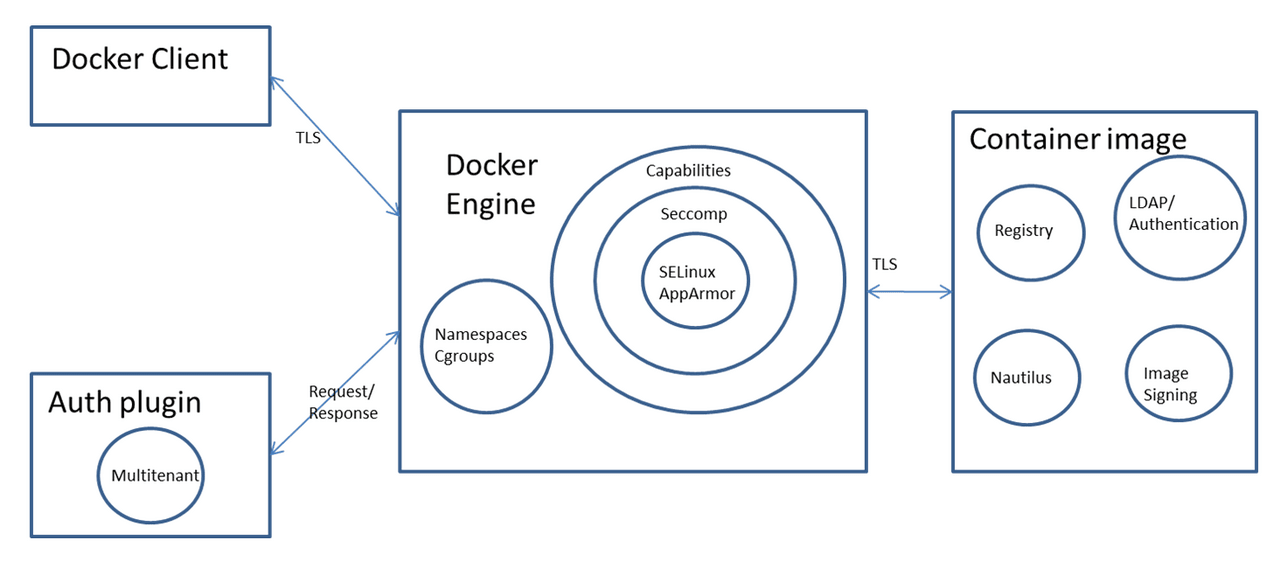
The Docker engine can be accessed locally via a Unix socket or remotely via HTTP. For remote access, it is important to use HTTPS and TLS to ensure confidentiality, integrity, and authentication.
By default, the Docker engine listens on a Unix socket at unix:///var/run/docker.sock. On Ubuntu systems, the Docker startup options are defined in /etc/default/docker. To enable remote access to the Docker API and client, open the Docker daemon via an HTTP socket by adding the following settings:
DOCKER_OPTS="-D -H unix:///var/run/docker.sock -H tcp://192.168.56.101:2376"
sudo service docker restart
However, for security reasons, it is not recommended to expose the Docker daemon over HTTP. It is preferable to secure the connection using HTTPS. There are two main approaches to securing the connection:
The client verifies the identity of the server.
Both the client and the server mutually authenticate each other’s identities.
Сертифікати використовуються для підтвердження ідентичності сервера. Докладні приклади обох методів див. у цьому посібнику .
Container images can be stored in either private or public repositories. Docker offers several options for storing container images:
Docker Hub : Public registry from Docker.
Docker Registry : an open source project that allows users to host their own registry.
Docker Trusted Registry : Docker’s commercial offering for the registry, which includes role-based user authentication and integration with LDAP directory services.
Containers can have security vulnerabilities either through the base image or through software installed on top of the base image. Docker is working on a project called Nautilus that performs security scans of containers and lists vulnerabilities. Nautilus works by comparing each layer of a container image against a vulnerability repository to identify security holes.
Для отримання додаткової інформації прочитайте це.
docker scanThis docker scan command allows you to scan existing Docker images by image name or ID. For example, run the following command to scan the hello-world image:
docker scan hello-world

Testing hello-world...

Organization:      docker-desktop-test
Package manager:   linux
Project name:      docker-image|hello-world
Docker image:      hello-world
Licenses:          enabled

✓ Tested 0 dependencies for known issues, no vulnerable paths found.

Note that we do not currently have vulnerability data for your image.
trivy -q -f json <container_name>:<tag>
snyk container test <image> --json-file-output=<output file> --severity-threshold=high
clair-scanner -w example-alpine.yaml --ip YOUR_LOCAL_IP alpine:3.5
Docker image signing ensures the security and integrity of images used in containers. Here’s a brief description:
Docker Content Trust uses the Notary project, based on The Update Framework (TUF), to manage image signing. For more information, see Notary and TUF.
To enable Docker content trust, set export DOCKER_CONTENT_TRUST=1. This feature is disabled by default in Docker versions 1.10 and later.
If this feature is enabled, only signed images can be uploaded. Initial image upload requires passphrases for the root and tagging keys, and Docker also supports Yubikey for added security. For more information, see here.
Attempting to fetch an unsigned image with content trust enabled results in the error “No trust data for the latest version.”
For uploads after the first, Docker prompts for the repository key password to sign the image.
To create a backup of your private keys, use the command:
tar -zcvf private_keys_backup.tar.gz ~/.docker/trust/private
When changing Docker hosts, you need to move the root key and repository key to maintain operation.
Container Safety Features Overview
Key Process Isolation Characteristics
In containerized environments, isolation of projects and their processes is paramount for security and resource management. Here is a simplified explanation of the key concepts:
Namespaces
Purpose: To provide isolation of resources such as processes, networks, and file systems. Specifically, in Docker, namespaces separate container processes from the host and other containers.
Usage: The unshare command (or underlying system call) is used to create new namespaces, providing an additional layer of isolation. However, while Kubernetes does not block this per se, Docker does.
Limitations: Creating new namespaces prevents a process from reverting to the default host namespaces. To enter host namespaces, you typically need access to the host’s /proc directory using nsenter to log in.
Control Groups (CGroups)
Function: Mainly used to allocate resources between processes.
Security aspect: CGroups themselves do not offer isolation security, except for the release_agent function, which, if not configured properly, can potentially be used for unauthorized access.
Falling opportunities
Importance: This is a critical security feature for process isolation.
Functionality: Restricts the actions that a root process can perform by denying certain capabilities. Even if a process is running with root privileges, the lack of the necessary capabilities prevents it from performing privileged actions because system calls will fail due to insufficient permissions.
Here are the remaining possibilities after the process discards the others:
Current: cap_chown,cap_dac_override,cap_fowner,cap_fsetid,cap_kill,cap_setgid,cap_setuid,cap_setpcap,cap_net_bind_service,cap_net_raw,cap_sys_chroot,cap_mknod,cap_audit_write,cap_setfcap=ep
Seccomp
This is enabled by default in Docker. This helps to further limit the system calls that a process can make. The default Docker Seccomp profile can be found at https://github.com/moby/moby/blob/master/profiles/seccomp/default.json
AppArmor
Docker has a template that can be activated: https://github.com/moby/moby/tree/master/profiles/apparmor
This will reduce capabilities, system calls, and access to files and folders.
Namespaces are a feature of the Linux kernel that divides kernel resources in such a way that one set of processes sees one set of resources and another set of processes sees another. This feature works by using the same namespace for a set of resources and processes, but these namespaces refer to different resources. Resources can exist in multiple namespaces.
Docker uses the following Linux kernel namespaces to achieve container isolation:
pid namespace
mount namespace
network namespace
ipc namespace
UTS namespace
For more information about namespaces, see the following page.
The Linux kernel feature cgroups provides the ability to limit resources such as CPU, memory, I/O, and network bandwidth among a set of processes. Docker allows containers to be created using the cgroup feature, which allows resources to be controlled for a specific container.
Below is a container created with user memory limited to 500 MB, kernel memory limited to 50 MB, CPU sharing to 512 MB, and blkioweight to 400. CPU share is a factor that controls the CPU usage of the container. It has a default value of 1024 and a range of 0 to 1024. If three containers have the same CPU share of 1024, each container can use up to 33% of the CPU in case of contention for CPU resources. blkio-weight is a factor that controls the I/O of the container. It has a default value of 500 and a range of 10 to 1000.
docker run -it -m 500M --kernel-memory 50M --cpu-shares 512 --blkio-weight 400 --name ubuntu1 ubuntu bash
To get the container control group, you can do the following:
docker run -dt --rm denial sleep 1234 #Run a large sleep inside a Debian container
ps -ef | grep 1234 #Get info about the sleep process
ls -l /proc/<PID>/ns #Get the Group and the namespaces (some may be uniq to the hosts and some may be shred with it)
For more information, check: CGroups
Capabilities allow for more fine-grained control over the capabilities that can be granted to the root user. Docker uses the Linux kernel’s capabilities feature to restrict the operations that can be performed inside a container regardless of the user type.
When a Docker container is started, the process loses any sensitive capabilities that it could use to break out of isolation. This is done to prevent the process from performing sensitive actions and breaking out of isolation.
Це функція безпеки, which allows Docker to limit the system calls that can be used inside a container.
AppArmor — This is a kernel enhancement that allows containers to be restricted to a limited set of resources with profiles for each application.
Labeling system: SELinux assigns a unique label to each process and file system object.
Policy enforcement: Enforces security policies that determine what actions a process label can take on other labels in the system.
Container process labels: When container engines initiate container processes, they are typically assigned a restricted SELinux label, typically container_t.
Container file labeling: Files in a container are typically labeled container_file_t.
Policy rules: SELinux policies primarily ensure that processes with a container_t label can only interact (read, write, execute) with files labeled container_file_t.
This mechanism ensures that even if a process in a container is compromised, it is limited to interacting only with objects that have the appropriate tags, significantly limiting the potential damage from such breaches.
У Docker плагін авторизації відіграє вирішальну роль у безпеці, deciding whether to allow or block requests to the Docker daemon. This decision is made by examining two key contexts:
Authentication Context: This includes comprehensive information about the user, such as who they are and how they authenticated.
Command Context: This contains all relevant data related to the request made.
These contexts help ensure that only legitimate requests from authenticated users are processed, which increases the security of Docker operations.
If you don’t properly limit the resources a container can use, a compromised container can cause a DoS crash on the host it’s running on.
# stress-ng
sudo apt-get install -y stress-ng && stress-ng --vm 1 --vm-bytes 1G --verify -t 5m

# While loop
docker run -d --name malicious-container -c 512 busybox sh -c 'while true; do :; done'
nc -lvp 4444 >/dev/null & while true; do cat /dev/urandom | nc <target IP> 4444; done
–privileged flag: On the next page you can find out, що
--privilegedозначає цей прапор.
–security-opt: no-new-privileges
If you run a container that an attacker accesses as a low-privilege user, and you have a misconfigured suid binary, the attacker can abuse it and escalate privileges inside the container. This could allow them to escape from the container.
Running the container with the no-new-privileges option enabled will prevent this escalation of privileges.
docker run -it --security-opt=no-new-privileges:true nonewpriv
#You can manually add/drop capabilities with
--cap-add
--cap-drop

# You can manually disable seccomp in docker with
--security-opt seccomp=unconfined

# You can manually disable seccomp in docker with
--security-opt apparmor=unconfined

# You can manually disable selinux in docker with
--security-opt label:disable
To see more –security-opt options, see: https://docs.docker.com/engine/reference/run/#security-configuration
It is extremely important to avoid embedding secrets directly into Docker images or using environment variables, as these methods expose your sensitive information to anyone with access to the container through commands such as docker inspect or exec.
Docker volumes are a safer alternative, recommended for accessing sensitive information. They can be used as a temporary in-memory file system, which reduces the risks associated with docker inspect logging. However, root users and those with exec access to the container can still access the secret data.
Docker secrets offer an even more secure method of handling sensitive information. For instances that require secrets during image build, BuildKit offers an efficient solution with build-time secrets support, which improves build speed and provides additional features.
To use BuildKit, you can activate it in three ways:
Via environment variable:export DOCKER_BUILDKIT=1
By adding prefixes to commands:DOCKER_BUILDKIT=1 docker build .
By enabling it by default in Docker configuration: { “features”: { “buildkit”: true } }, then restart Docker.
BuildKit allows you to use secrets during build with the –secret option, which ensures that these secrets are not included in the image build cache or the final image, using a command like:
docker build --secret my_key=my_value ,src=path/to/my_secret_file .
For secrets required in a running container, Docker Compose and Kubernetes offer robust solutions. Docker Compose uses the secrets key in the service definition to specify secret files, as shown in the docker-compose.yml example:
version: "3.7"
services:
  my_service:
    image: centos:7
    entrypoint: "cat /run/secrets/my_secret"
    secrets:
      - my_secret
secrets:
  my_secret:
    file: ./my_secret_file.txt
This configuration allows you to use secrets when starting services using Docker Compose.
In Kubernetes environments, secrets are supported natively and can be further managed using tools such as Helm-Secrets. Role-Based Access Control (RBAC) in Kubernetes enhances the security of secret management, similar to Docker Enterprise.
gVisor is an application kernel written in Go that implements a significant portion of the Linux system interface. It includes a runtime environment Open Container Initiative (OCI)runsc called , which provides an isolation boundary between the application and the host kernel. The runsc runtime integrates with Docker and Kubernetes, making it easy to run isolated containers.
GitHub – google/gvisor: Ядро застосунку для контейнерів
Kata Containers is an open source community working to create a secure container runtime with lightweight virtual machines that feel and perform like containers, but provide stronger workload isolation by using hardware virtualization technology as a second layer of protection.
Do not use the –privileged flag or mount a Docker socket inside a container. Docker sockets allow you to create containers, so it is an easy way to gain full control over the host, for example by starting another container with the –privileged flag.
Do not run as root inside a container. Use a different user and username namespaces. Root access in a container is the same as on the host unless reassigned by username namespaces. It is only slightly restricted, mainly by Linux namespaces, capabilities, and control groups.
Drop all capabilities ( –cap-drop=all ) and enable only those that are needed ( –cap-add=… ). Many workloads do not require any capabilities, and adding them increases the scope of a potential attack.
Use the no-new-privileges security option to prevent processes from gaining additional privileges, such as through suid binaries.
Limit the resources available to the container. Resource limits can protect the machine from denial-of-service attacks.
Configure seccomp, AppArmor (or SELinux) profiles to limit the actions and system calls available to the container to the minimum necessary.
Use official Docker images and require signatures or create your own based on them. Do not inherit or use backdoored images. Also, store your root keys and password in a secure location. Docker plans to manage keys using UCP.
Rebuild your images regularly to apply security patches to the host and images.
Manage your secrets wisely to make it difficult for an attacker to gain access to them.
If you are providing access to the Docker daemon, use HTTPS with client and server authentication.
In your Dockerfile, prefer COPY over ADD. ADD automatically extracts zip files and can copy files from URLs. COPY does not have these capabilities. Avoid using ADD if possible to avoid being vulnerable to attacks via remote URLs and zip files.
Have separate containers for each microservice
Do not put ssh inside a container, you can use “docker exec” to connect to the container via ssh.
Have smaller container images
If you are inside a Docker container or have access to a user in the Docker group, you can try to prevent the changes and elevate privileges:
Docker Breakout / Ескалація привілеїв
If you have access to a Docker socket or a user in the Docker group, but your actions are restricted by the Docker Auth plugin, see if you can bypass it:
AuthZ та AuthN – плагін авторизації доступу до Docker
Tool docker-bench-security – is a script that tests dozens of common recommendations for deploying Docker containers in production. All tests are automated and based on CIS Docker Benchmark версії 1.3.1 .
You need to run the tool from a host running docker or from a container with sufficient privileges. Learn how to run it in the README file: https://github.com/docker/docker-bench-security .
Виглядає що стаття була частково згенерована з AI
– деякі посилання введуть в нікуди
– docker scan вже не актуальний