Flipper Zero is a powerful multi-tool for security researchers, hackers, and tech enthusiasts. In the third part of our complete guide, we will focus on working with RFID technologies at a frequency of 125 kHz. This functionality allows you to read, store, emulate, and clone RFID cards with the most common protocols, such as EM4100, HID26, Indala, and others. We will show you step by step how to properly read cards, store them in the device’s memory, start emulation mode, and also how to write data to rewritable RFID tags of the T5577 type. We will separately consider manually adding cards, using different types of modulation (ASK, PSK), and the ability to read animal microchips.
Disclaimer: The information provided in this article is for educational and informational purposes only. The author is not responsible for any misuse or incorrect use of the Flipper Zero device.
Flipper Zero is equipped with a module for working with low-frequency (LF) radio-frequency identification (RFID) at a frequency of 125 kHz. This technology is widely used in access control systems, animal microchips, as well as in logistics – for tracking objects in supply chains.
Unlike NFC cards, LF RFID cards usually have a lower level of security, which makes them more vulnerable to cloning. At the same time, they are popular due to their ease of use and a large number of available form factors – these can be plastic cards, key fobs, tags, bracelets or microchips implanted in animals.
The RFID module in Flipper Zero allows you to perform all key operations with such cards: reading, saving, emulating and writing to rewritable tags. This makes the device a universal tool for both everyday use and research or test tasks.
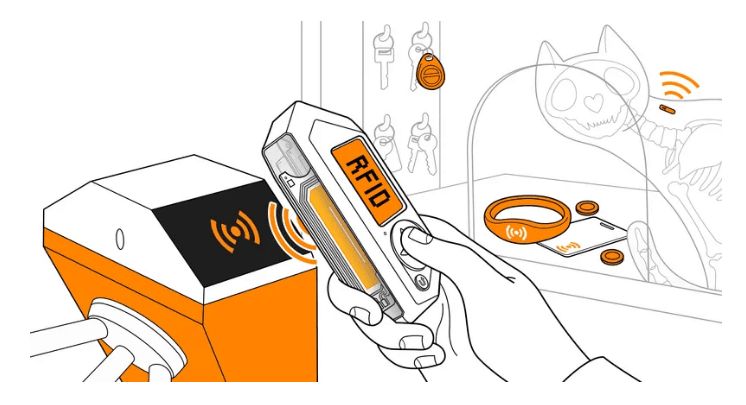
Insert microSD card to use 125kHz RFID app
Before using the 125 kHz RFID application, be sure to update the Flipper Zero firmware by inserting a microSD card, as the Flipper Zero stores databases on the microSD card.
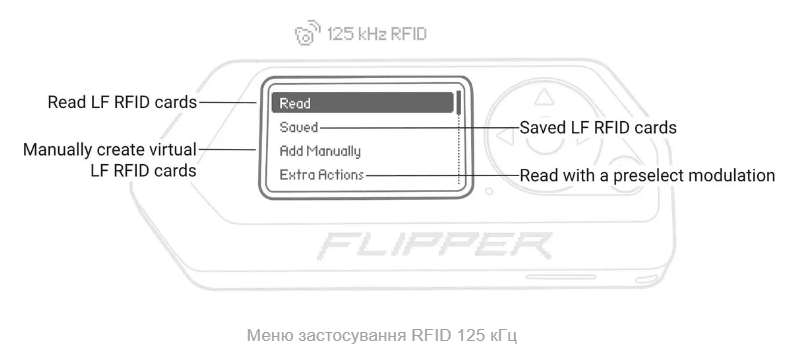
Read RFID cards LF (Read) — reads low-frequency RFID cards (125 kHz) and saves them in the device’s memory.
Saved cards (Saved) — opens a list of previously read cards that can be emulated or written to rewritable tags (for example, T5577).
Add Manually (Add Manually) — allows you to manually create a virtual RFID card by entering its identifier (ID) without the need for physical reading.
Extra Actions (Extra Actions) — provides the ability to read RFID cards using a pre-selected modulation type: ASK (Amplitude Shift Keying) — amplitude manipulation, PSK (Phase Shift Keying) — phase manipulation.
This list allows you to fully navigate the RFID 125 kHz Flipper Zero section, both for basic operations (reading) and for professional setup.
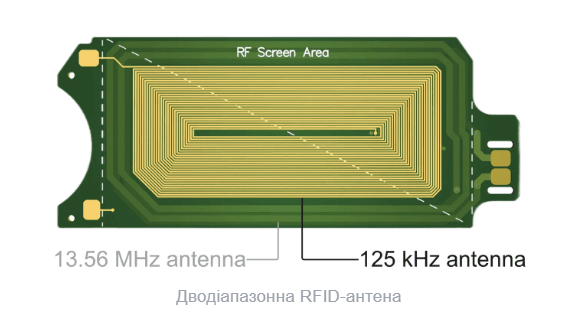
The Flipper Zero has built-in RFID support with a low-frequency antenna located on the back of the Flipper Zero. The STM32WB55 microcontroller is used for the 125 kHz RFID functionality.
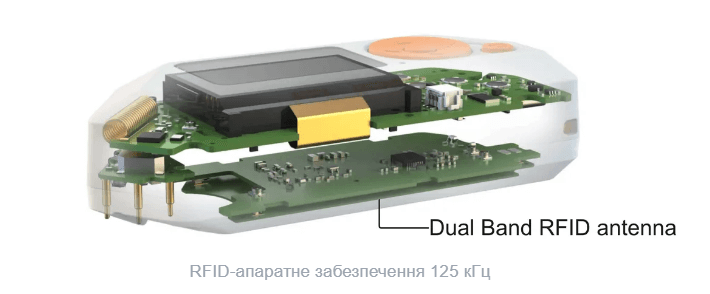
A 125 kHz low-frequency antenna is placed on a dual-band RFID antenna next to a 13.56 MHz high-frequency antenna.
Flipper Zero is not just a portable gadget for researchers, but a full-fledged tool for working with low-frequency RFID 125 kHz. Thanks to the capabilities of reading, saving, emulating and writing LF cards, the device opens up wide possibilities for testing access systems, investigating vulnerabilities and even working with microchips for animals.
The RFID menu is intuitive and allows you to effectively interact with different types of cards – from reading to manually creating new ones and cloning. No less important is the correct preparation of the device: updated firmware and a microSD card are mandatory for full operation.
As a result, Flipper Zero shows itself as a versatile and powerful tool for those who want to delve deeper into the world of RFID, from basic experiments to advanced analysis and automation of contactless systems.